


Commander des types de postes
Sort posts and custom post type objects using a drag-and-drop, sortable JavaScript AJAX interface, or through the default WordPress dashboard

Choix
Yes — Post Types Order is a safe, well-maintained plugin to use in 2026. It runs on 600K+ sites, is rated 4.5/5 and was last updated 4 weeks ago, and scores 86/100 on our health check.
- Prouvé à grande échelle sur plus de 600 000 000 sites actifs
- Loved by users — 4.5/5 from 296 reviews
- Développé activement — Dernière mise à jour il y a 4 semaines
- Testé avec le dernier WordPress (7.1)
Comment s'accumule-t-il ?
Côte à côte sur les installations, les mises à jour, les évaluations et le support



Téléchargements quotidiens
Les pics de téléchargement suivent généralement une nouvelle version - chaque site qui met à jour automatiquement compte comme un téléchargement.
Classements
Where Post Types Order stands todayWordPress.org Classements de recherche
Position en direct dans la recherche de plugins, Top 100| Mot-clé | Position |
|---|---|
| post order | #2 |
| post sort | #1 |
| post types order | #1 |
| posts order | #2 |
| posts sort | #1 |
Adoption de version
Part de sites actifs par version.
Répartition des notes
★★★★★★★★★★ 4.5 from 296 reviews
About Post Types Order
From the official readme · v2.5.9Description
Over 12 MILLIONS DOWNLOADS and near PERFECT rating out of 200 REVIEWS.
Easily Sort Posts and Custom Post Types with Drag-and-Drop
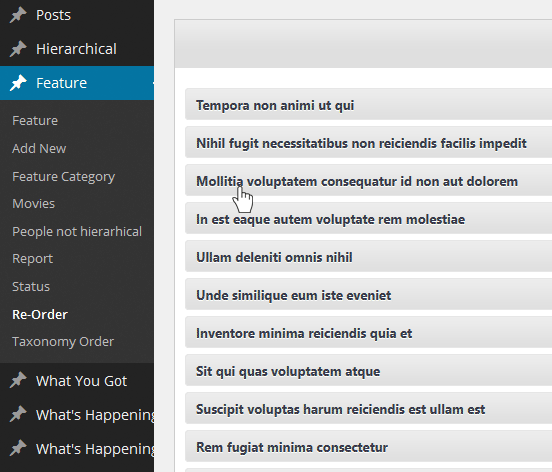
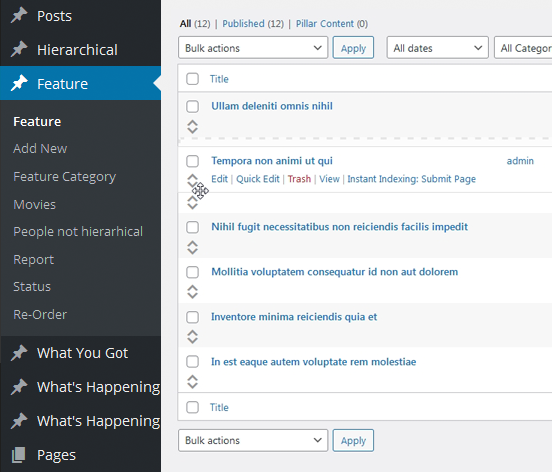
Take full control of your post order with a powerful plugin that lets you effortlessly reorder posts and custom post types using a simple drag-and-drop interface.
Customize the order directly from the default WordPress post archive list or use the dedicated Re-Order interface, which displays all available items for easy management. Whether you’re working with default posts or custom post types, organizing your content has never been easier.
Usage
This plugin was designed to be user-friendly, ensuring that anyone can easily use its sorting feature, regardless of their WordPress experience:
- Install the plugin via the “Install Plugins” interface or by uploading the post-types-order folder to the /wp-content/plugins/ directory.
- Activate the Post Types Order plugin.
- A new settings page will be added under Settings > Post Types Order. Visit this page and save the options for the first time.
- With the AutoSort option enabled, no code changes are needed, the plugin will automatically apply the customized post order.
- Use the Re-Order interface, available for every non-hierarchical custom post type, to change the post order as needed.
- For sorting posts via code, include ‘orderby’ => ‘menu_order’ within the custom query arguments. For more details, visit this guide Sample Usage
Example of Usage
As you can see, reordering posts is as simple as dragging and dropping, with the changes instantly reflected on the front end.
If the post order doesn’t update on your site, it could be due to one of two reasons: either there was a mistake during setup, or your theme/plugin is using a custom query that doesn’t follow WordPress Codex standards. But don’t worry—we’re here to help! You can report the issue in the forum, where many users are happy to assist, or you can contact us directly.
If you encounter any problems with the plugin, feel free to reach out via the forum or contact us directly through our support page, and we’ll take a look.
Need advanced features ?
For advanced features and functionality, check out the extended version of this plugin at Advanced Post Types Order
* Hierarchically post types order
* Manual Drag & Drop / Automatic Sorting
* Specify exact area where to apply through conditionals
* Advanced query interface filtering and complex sorts including multiple post types and taxonomies
* Posts Order by Custom Taxonomies
* Enhanced Interface, List / Grid View
* Allow Interface Filters (Categories, Dates, Search etc)
* Post Types Thumbnails
* Advanced query usage
* MultiSite Network Support, WPML, Polylang, WooCommerce, WP E-Commerce, Platform Pro, Genesis etc
* WPML 100% compatibility with sort synchronization across languages
* Mobile Touch Drag & Drop Ready
* Sort interfaces through admin and front end
* Pagination for sort lists
* Free Updates
* Free Support
This plugin is developed by Nsp-Code
Localization
Would you like to contribute a translation in your language? Please check at https://translate.wordpress.org/projects/wp-plugins/post-types-order
There isn’t any Editors for your native language on plugin Contributors? You can help to moderate! https://translate.wordpress.org/projects/wp-plugins/post-types-order/contributors
Installation
- Upload
post-types-orderfolder to your/wp-content/plugins/directory. - Activate the plugin from Admin > Plugins menu.
- Once activated you should check with Settings > Post Types Order
- Use Re-Order link which appear into each post type section or use default WordPress interface to make your sorting.
Journal de modifications
Make sure you get the latest version.
2.5.9
- Compatibility with Blocksy: sync the ct_content_block to ct-dashboard show/hide option.
- Fix: Sort within the default WordPress interface; pagination issue fix. Update for WPML and Polylang.
2.5.7
- When using WPML, Polylang, Bogo, the park items left out of an order-save runs only for current language objects.
- WordPress 7.1.3 compatibility check and tag update
2.5.6
- Import the old options structure to the new format.
- Fix: Text typo.
- WordPress 7.1.2 compatibility check and tag update.
2.5.5
- Relocate the pto/interface/query/limit filter so it can adjust the items_limit class property before it is used in the code.
- Fix: Correctly reconstruct the $object_ids list for the queried objects.
2.5.3
- Fix: Use the object date (default sorting method) for the Next/Previous navigation links when menu_order is set to the default value (0).
2.5.2
- New option “Revert Previous/Next Links” which reverts the navigational links
- Removed the current_user_can( ‘edit_post’, $id ) to allow users like contributors or custom roles to still be able to save the sorting.
Captures d'écran
Pour les développeurs
Est-ce votre plugin ? Montrez les chiffres.
Ajoutez un badge en direct à votre site, docs ou github readme. Il se met à jour par lui-même - aucun compte n'est nécessaire.
Best Post Types Order alternatives
All post order plugins →




FAQ
Post Types Order: quick answers
Réponses directes, extraites des données en direct WordPress.org.
Source : WordPress.org
Is Post Types Order free?
Yes. Post Types Order is free to download and use from the official WordPress.org plugin directory.
Is Post Types Order safe to use in 2026?
Yes — Post Types Order is a safe, well-maintained plugin to use in 2026. It runs on 600K+ sites, is rated 4.5/5 and was last updated 4 weeks ago, and scores 86/100 on our health check.
How many websites use Post Types Order?
Post Types Order is active on 600K+ WordPress websites and has been downloaded 19,146,397 times since it launched in September 2010. It was downloaded 376,684 times in the last 30 days.
Does Post Types Order work with WordPress 7.1?
Yes. The developer has tested Post Types Order up to WordPress 7.1.5, the latest release. It requires WordPress 2.8 or newer.
What PHP version does Post Types Order need?
Post Types Order requires PHP 5.6 or higher. Most hosts run PHP 8.x today, so it works on any modern WordPress hosting.
When was Post Types Order last updated?
The latest version, 2.5.9, was released on October 21, 2026 (4 weeks ago).
Who makes Post Types Order?
Post Types Order is developed and maintained by nsp-code.
What are the best alternatives to Post Types Order?
The most popular alternatives to Post Types Order are Intuitive Custom Post Order (400K+ installs), Simple Custom Post Order (300K+ installs) and WP Sort Order (6K+ installs).
Propulsé par PageForge
Un modèle et une feuille de calcul. Une vraie page pour chaque recherche.
PageForge transforme chaque ligne d'un CSV en une page WordPress avec son propre titre, URL, SEO et schéma, construit sur la mise en page que vous Déjà conçu. Gratuit sur WordPress.org.
- CSV et XLSX, plus Google Sheets sur les professionnels et les entreprises
- Son propre titre, URL, SEO champs et schéma pour chaque page
- Fonctionne avec l'éditeur de blocs, Elementor, Divi et Avada
- Gratuit sur WordPress.org, pas de carte de crédit