


PolyTranslate AI for Polylang
AI automatic translation for Polylang. Translate posts, pages, WooCommerce, ACF, SEO meta & custom fields using OpenAI, DeepL, Google or OpenRouter.

Choix solide
PolyTranslate AI for Polylang is a solid plugin choice in 2026, with a few things worth checking first. It runs on 300+ sites, is rated 4.3/5 and was last updated 2 weeks ago, and scores 78/100 on our health check.
- Développé activement — Dernière mise à jour il y a 2 semaines
- Testé avec le dernier WordPress (7.1)
- Petite base d'utilisateurs (plus de 300 installations actives)
Comment s'accumule-t-il ?
Côte à côte sur les installations, les mises à jour, les évaluations et le support


Téléchargements quotidiens
Les pics de téléchargement suivent généralement une nouvelle version - chaque site qui met à jour automatiquement compte comme un téléchargement.
Classements
Where PolyTranslate AI for Polyla… stands todayWordPress.org Classements de recherche
Position en direct dans la recherche de plugins, Top 100| Mot-clé | Position |
|---|---|
| ai translation | #22 |
| automatic translation | #32 |
| polylang | #10 |
| translate | #94 |
| translation | #72 |
Adoption de version
Part de sites actifs par version.
Répartition des notes
★★★★★★★★★★ 4.3 from 6 reviews
About PolyTranslate AI for Polylang
From the official readme · v6.0.0Description
Watch PolyTranslate AI in action
With one click, you can automatically translate:
- Posts and Pages
- Custom Post Types
- WooCommerce Products, Categories, Tags, Attributes & Brands
- Categories and Tags
- Custom Taxonomies
- AI Custom Fields Translation (ACF, Meta Box, etc.) — Pro
- SEO meta data (Yoast, Rank Math, SEOPress, AIOSEO) — Pro
- Elementor pages — Pro
- Gutenberg block content
- Polylang Strings (bulk AI translation) — Pro
This plugin enhances Polylang by adding professional AI translation capabilities directly inside the WordPress admin.
This is NOT a standalone translation plugin – it works exclusively with Polylang to add automatic translation capabilities.
Comment cela fonctionne
- Install and configure Polylang.
- Install PolyTranslate AI.
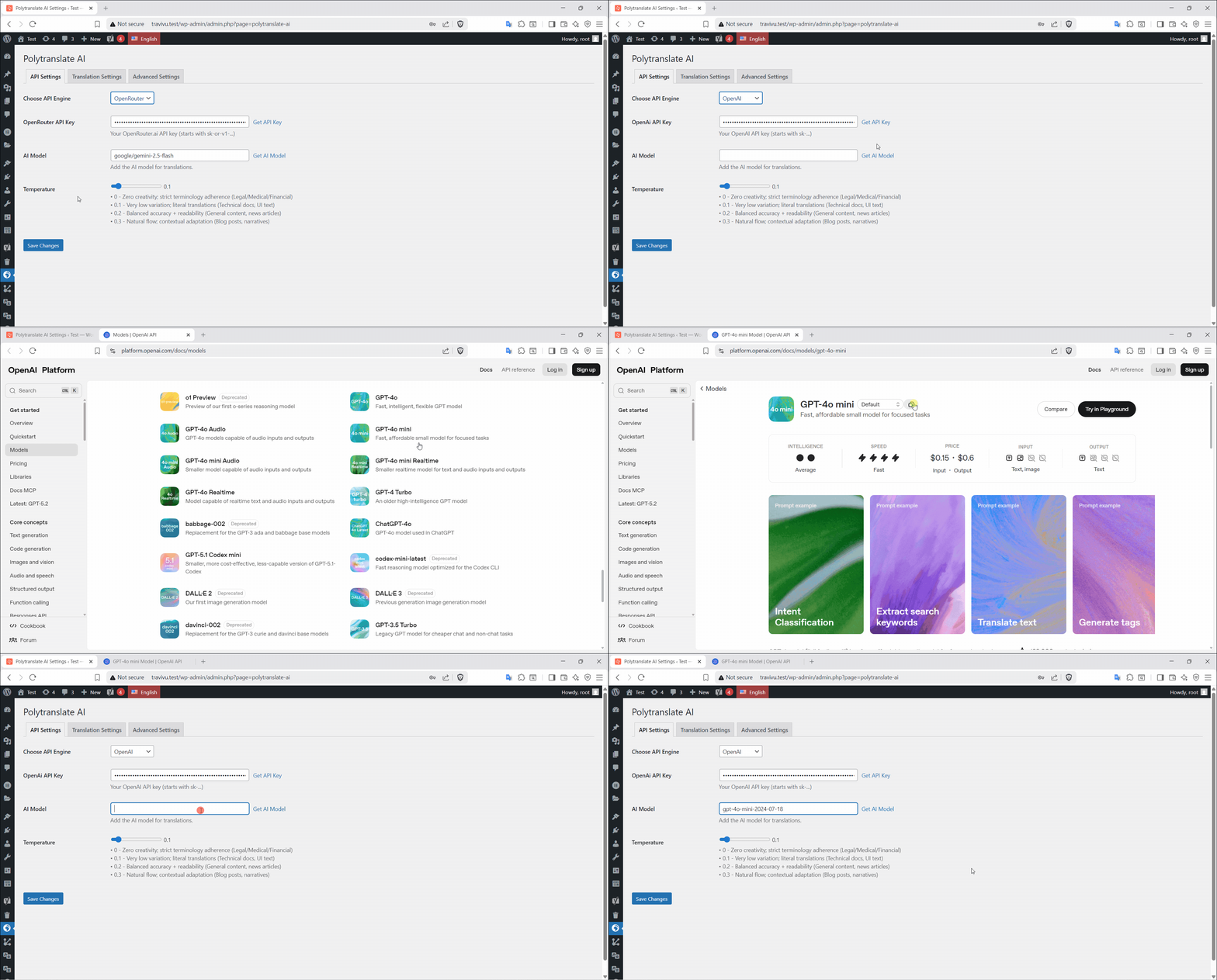
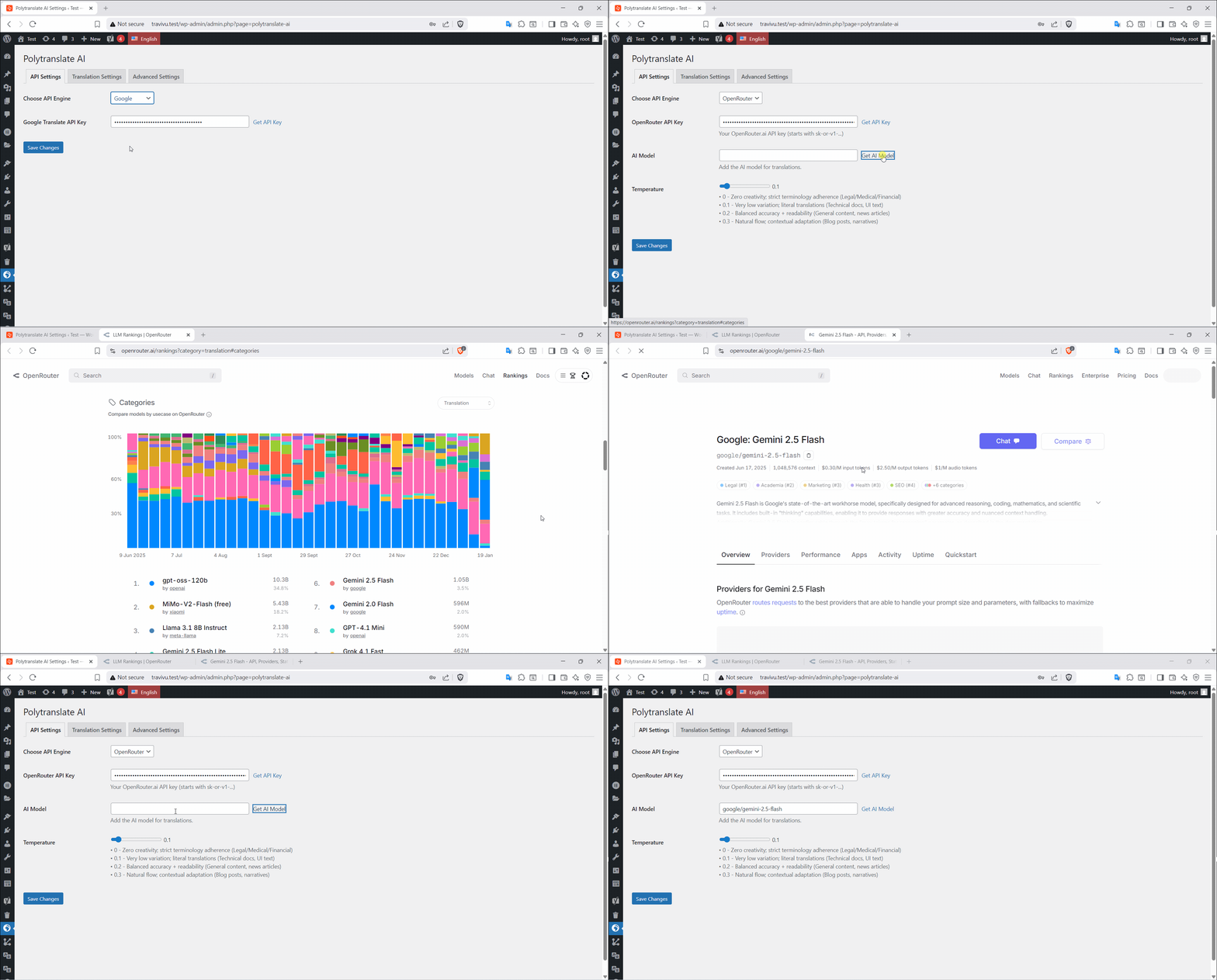
- Add your preferred AI provider API key in PolyTranslate AI → Settings.
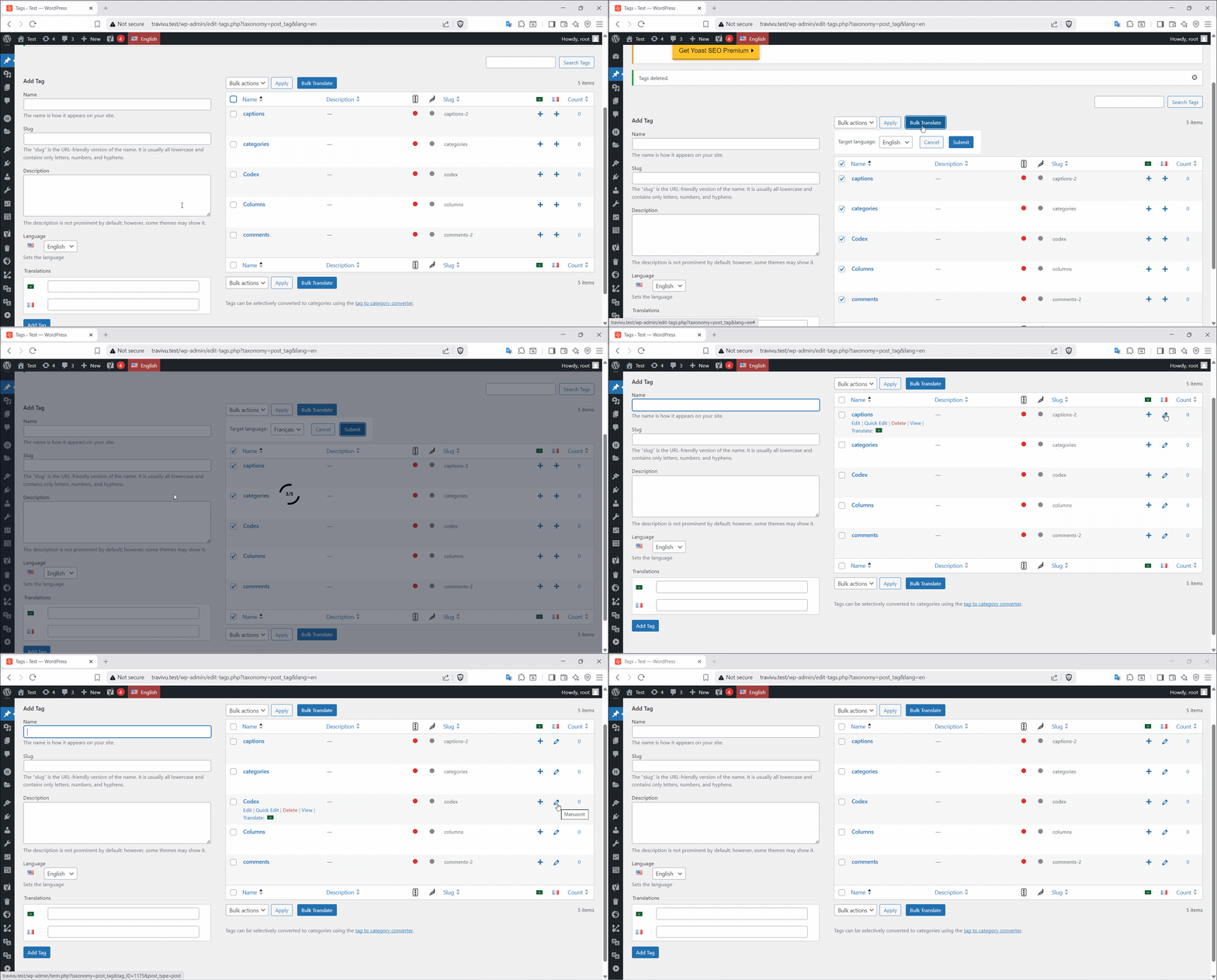
- Open the list of the content you want to translate (Pages, Posts, Products, or a taxonomy).
-
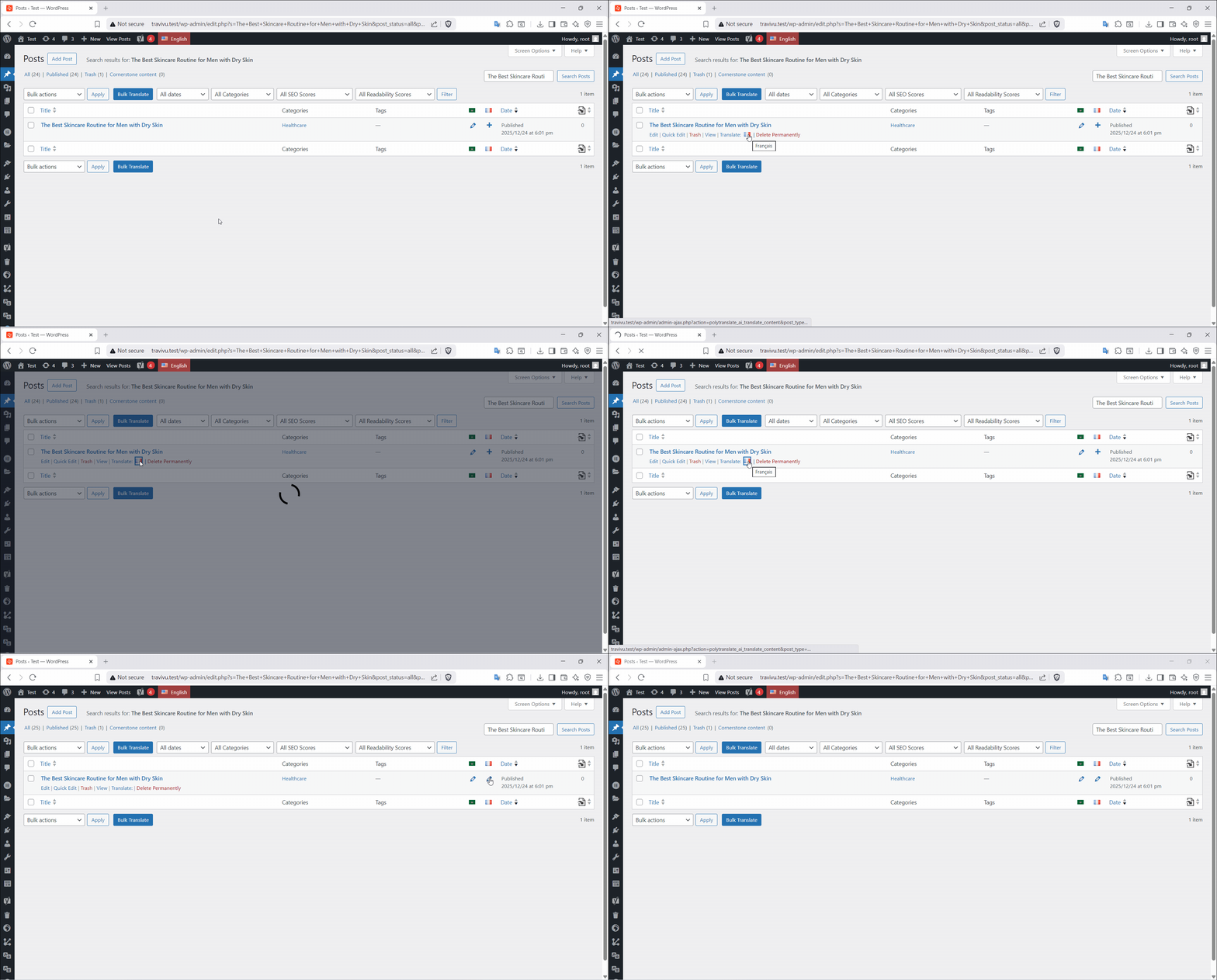
On the row of the original item, find the column of the language you want to translate into and click the PolyTranslate AI flag icon (the small language flag next to Polylang’s “+” icon).
The flag only appears when that translation does not exist yet. There is no Translate button inside the editor.
-
PolyTranslate AI translates the title, content and excerpt, creates the translation, links it to the original, and saves it with the status chosen in Settings → Translation Settings.
Your translated content is saved as a normal Polylang translation.
Principales caractéristiques
- Per-field Polylang Custom Fields Sync – Choose which custom fields Polylang syncs.
- Multiple AI Services – OpenAI, DeepL, Google Translate, OpenRouter
- Smart Language Detection – Automatically detects source language
- Update Internal Links in Translations – Automatically update post links to point to translated versions.
- Menu Sync – Translated menus follow your default language menu automatically (items, order, links and settings).
- Preserve Original Publish Date – Keep the original post date on translations
- Preserve Original Author – Keep the original post author on translations
- AI Custom Fields Translation (Pro) – All field types including repeaters
- Meta Box Fields (Pro) – Complete Meta Box plugin support
- Any Custom Fields (Pro) – Universal custom field translation
- Elementor Page Translation (Pro) – Full page builder support
- AI Bulk Translation (Pro) – Translate hundreds of posts at once
- Bulk AI Translation of Polylang Strings (Pro) – Translate all registered strings in bulk
- AI SEO Meta Translation (Pro) – (Yoast, Rank Math, SEOPress, All in One SEO Pack)
FREE vs Premium
The Free version includes:
✅ Posts & Pages Translation
✅ Custom Post Types Translation
✅ WooCommerce Products Translation
✅ WooCommerce Categories, Tags, Attributes & Brands
✅ Categories, Tags & Custom Taxonomies Translation
✅ Gutenberg Block Content Translation
✅ Update Internal Links in Translations
✅ Per-field Polylang Custom Fields Sync
✅ Menu Sync
✅ Preserve Original Publish Date
✅ Preserve Original Author
✅ Register Polylang Strings
✅ Unlimited Translations
✅ Multiple AI Services (OpenAI, DeepL, Google, OpenRouter)
✅ Language Auto-Detection
The Premium version includes:
✨ Everything in Free, plus:
✨ AI Bulk Translation
✨ Bulk AI Translation of Polylang Strings
✨ AI Custom Fields Translation (ACF, Meta Box, etc.)
✨ AI SEO Meta Translation
✨ Elementor Page Translation
✨ Priority Support
✨ Automatic Retranslation Detection
Translate ACF & Custom Meta Fields in WordPress
Services externes
PolyTranslate AI connects to third-party translation APIs when you trigger translations. You control your data and costs by providing your own API keys:
-
OpenAI
-
DeepL API (Free and Pro)
-
Google Translate API
-
OpenRouter.ai
This is a third-party addon for Polylang – not affiliated with or endorsed by Polylang.
Installation
⚠️ PREREQUISITES: You MUST have Polylang installed first!
Quick Start (5 minutes):
-
Install & Configure Polylang
- Install Polylang if you haven’t already
- Go to Languages → Settings in your WordPress admin
- Add your site’s languages
- Configure URL structure and language switcher
-
Install PolyTranslate AI Addon
- Aller à Plugins → Ajouter un nouveau
- Search for “PolyTranslate AI”
- Click Install & Activate
- (Or upload manually to
/wp-content/plugins/polytranslate-ai/)
-
Configure Translation API
- Go to PolyTranslate AI → Settings
- Choose your preferred translation service
- Add your API key (OpenAI, DeepL, Google, or OpenRouter)
- Save settings
-
Start Translating
- Go to Pages, Posts, Products, or the taxonomy list
- Make sure the language columns are visible in Screen Options
- On the original item’s row, click the PolyTranslate AI flag in the target language column
- Wait for the translation to finish, then open the new translation to review it
Journal de modifications
6.0.0
- NEW: Per-field custom field behavior. Every custom field now has its own choice of Default, Sync, Copy once, Don’t copy, or Translate (Pro), set from Advanced Settings for each post type and taxonomy. Translate copies the field once, then translates it with AI.
- NEW: Bulk apply a behavior to every field in a table at once, with optional multi-select exceptions.
- NEW: Per-field Polylang custom field synchronization for posts and terms, available in both Free and Pro.
- IMPROVED: Custom field handling for existing installs is migrated automatically. Fields previously marked as translatable become Translate.
- IMPROVED: ACF protected
_field_namerows are hidden from Advanced Settings; the public field row remains the one you edit. - IMPROVED: Clearer settings screens, with a Polylang status badge, language count, and a consistent “AI …” naming for Pro features.
- IMPROVED: The behavior controls in Advanced Settings have clearer labels for screen readers.
- IMPROVED: Advanced Settings tables sort and group by the chosen behavior and stay readable while filtering.
- IMPROVED: Advanced Settings table groups can be collapsed and expanded by clicking a group header.
- IMPROVED: Saving Advanced Settings stores only the fields currently shown, so hidden fields and fields outside the scan limit no longer keep old choices.
- IMPROVED: Advanced Settings hides internal WordPress, SEO, builder, and multilingual fields while keeping content fields such as SEO focus keywords and image alt text available.
- IMPROVED: Updated bundled translations and fixed plural forms in Arabic, German, Spanish, French, Portuguese, and Russian.
- FIXED: Real ACF field keys (including subfields) are never sent to the AI translator, even when the field is set to Translate. Values that only look like
field_…are still translated. - FIXED: AI-translated custom field values keep their backslashes.
- FIXED:
_wpb_custom fields are visible in Advanced Settings. - FIXED: Rank Math score fields are excluded from the custom field lists.
- FIXED: oEmbed cache fields (
_oembed_*) are no longer copied to translations; WordPress regenerates the cache when needed. - FIXED:
_wp_old_dateand Yoast SEO_yoast_wpseo_linkdex/_yoast_wpseo_wordproof_timestampare no longer copied to translations.
5.5.0
- NEW: Translation status filters for taxonomy term lists, with an “Untranslated in …” option per language
- IMPROVED: A new translation gets its language and translation group as soon as it is created, so SEO plugins build indexables with the correct language and permalink
- FIXED: Custom fields are copied once and no longer duplicated on the source post, and internal fields (outdated/sync flags, edit locks, SEO primary-term and score data) are no longer copied to translations
- FIXED: Elementor data and serialized custom fields keep their backslashes when copied
- FIXED: Creating a translation no longer unlinks the other languages already in its translation group
- FIXED: The new translation is deleted instead of left orphaned when Polylang cannot link it to its source
- FIXED: Translation status filters in post lists now work with Polylang’s untranslated filter and add a “Needs update” option
- FIXED: Long meta keys are no longer cut off in the meta settings table
5.4.0
- NEW: Translation status filters in post lists to find untranslated posts and posts that need an update
- IMPROVED: Redesigned translation progress loader with a clear message, a timer and a progress counter
- IMPROVED: Bulk Translate scrolls to the target language selector when clicked
- IMPROVED: Updated default AI models (OpenRouter Gemini 3.5 Flash Lite, OpenAI GPT-4.1 mini)
- IMPROVED: Updated translations
- FIXED: Translation Settings no longer enable every option by themselves on the first save
- FIXED: Register Strings no longer turns the first saved word into an array, and its cache is cleared on the first save
- FIXED: aria_label attribute values are now translated
5.3.3
- FIXED: Translation is now aborted with an error message instead of creating a translation with untranslated content when the AI response is invalid
- FIXED: Custom AI Prompt instructions now take priority and no longer prevent translation of image alt/title attribute values
- IMPROVED: Premium features (Bulk Translation, SEO Meta, Bulk Polylang Strings, Automatic Retranslation) are now enabled by default
- IMPROVED: Updated translations
5.3.2
- FIXED: “Fill with AI” not detecting the fields on the Polylang Strings translations page in newer WordPress versions.
5.3.1
- FIXED: Fatal error when activating the premium version while the free version is active.
Captures d'écran
Pour les développeurs
Est-ce votre plugin ? Montrez les chiffres.
Ajoutez un badge en direct à votre site, docs ou github readme. Il se met à jour par lui-même - aucun compte n'est nécessaire.
Best PolyTranslate AI for Polylang alternatives
All ai translation plugins →





FAQ
PolyTranslate AI for Polylang: quick answers
Réponses directes, extraites des données en direct WordPress.org.
Source : WordPress.org
Is PolyTranslate AI for Polylang free?
Yes. PolyTranslate AI for Polylang is free to download and use from the official WordPress.org plugin directory.
Is PolyTranslate AI for Polylang safe to use in 2026?
PolyTranslate AI for Polylang is a solid plugin choice in 2026, with a few things worth checking first. It runs on 300+ sites, is rated 4.3/5 and was last updated 2 weeks ago, and scores 78/100 on our health check.
How many websites use PolyTranslate AI for Polylang?
PolyTranslate AI for Polylang is active on 300+ WordPress websites and has been downloaded 11,352 times since it launched in July 2025. It was downloaded 1,395 times in the last 30 days.
Does PolyTranslate AI for Polylang work with WordPress 7.1?
Yes. The developer has tested PolyTranslate AI for Polylang up to WordPress 7.1.5, the latest release. It requires WordPress 6.5 or newer.
What PHP version does PolyTranslate AI for Polylang need?
PolyTranslate AI for Polylang requires PHP 7.4 or higher. Most hosts run PHP 8.x today, so it works on any modern WordPress hosting.
When was PolyTranslate AI for Polylang last updated?
The latest version, 6.0.0, was released on November 8, 2026 (2 weeks ago).
Who makes PolyTranslate AI for Polylang?
PolyTranslate AI for Polylang is developed and maintained by Almhdy.
What are the best alternatives to PolyTranslate AI for Polylang?
The most popular alternatives to PolyTranslate AI for Polylang are TranslatePress (400K+ installs), LocoAI (70K+ installs) and Translate WordPress with We… (50K+ installs).
Propulsé par PageForge
Un modèle et une feuille de calcul. Une vraie page pour chaque recherche.
PageForge transforme chaque ligne d'un CSV en une page WordPress avec son propre titre, URL, SEO et schéma, construit sur la mise en page que vous Déjà conçu. Gratuit sur WordPress.org.
- CSV et XLSX, plus Google Sheets sur les professionnels et les entreprises
- Son propre titre, URL, SEO champs et schéma pour chaque page
- Fonctionne avec l'éditeur de blocs, Elementor, Divi et Avada
- Gratuit sur WordPress.org, pas de carte de crédit