


Plugin Load Filter
Dynamically activate the selected plugins for each page. Response will be faster by filtering plugins.

Choix solide
Plugin Load Filter is a solid plugin choice in 2026, with a few things worth checking first. It runs on 7K+ sites, is rated 4.8/5 and was last updated 7 months ago, and scores 67/100 on our health check.
- Loved by users — 4.8/5 from 52 reviews
- Nécessite PHP 8.1 ou plus récent
Comment s'accumule-t-il ?
Côte à côte sur les installations, les mises à jour, les évaluations et le support


Téléchargements quotidiens
Les pics de téléchargement suivent généralement une nouvelle version - chaque site qui met à jour automatiquement compte comme un téléchargement.
Classements
Where Plugin Load Filter stands todayWordPress.org Classements de recherche
Position en direct dans la recherche de plugins, Top 100| Mot-clé | Position |
|---|---|
| Disable Plugins | #48 |
| dynamic deactivate plugins | #2 |
| Locale switching | #1 |
| performance | >100 |
Adoption de version
Part de sites actifs par version.
Répartition des notes
★★★★★★★★★★ 4.8 from 52 reviews
About Plugin Load Filter
From the official readme · v4.4.1Description
Although you may have installed a lot of plugins, you may not want (or need) them activated for all of your posts and pages. With this plugin, you will be able to deactivate unnecessary plugins for each individual post and page.
By filtering the activation of plugins, you can significantly speed up your website.
Traits
- Support Post Format type
- Support Custom Post type
- Support Jetpack Modules filtering
- Support WP Embed Content card (is_embed template)
- Support Simple Post Language Locale switcher
In addition to blog posts and pages, for example providing services as a Web application, you can also distinguish the plugins for blog and Web applications.
To further performance up plugin
YASAKANI Cache is a simple and easy to use super high speed page cache.
For more detailed information, there is an introduction page.
Installation
- Téléchargez le dossier
plugin-load-filterdans le répertoire/wp-content/plugins/. - Activate the plugin through the
Pluginsmenu in WordPress - Set up from
Plugin Load Filterto be added to the Plugins menu of Admin mode.
Remarque:
- This plugin to automatically activated as must-use plugin installed plf-filter.php file to MU-plugins folder. Depending on the permissions of the folders and files there is a possibility that it is not possible to install the plf-filter.php file.
- There is also plugins that can not be filtering, such as cache plugins or must-use plugins.
Usage
-
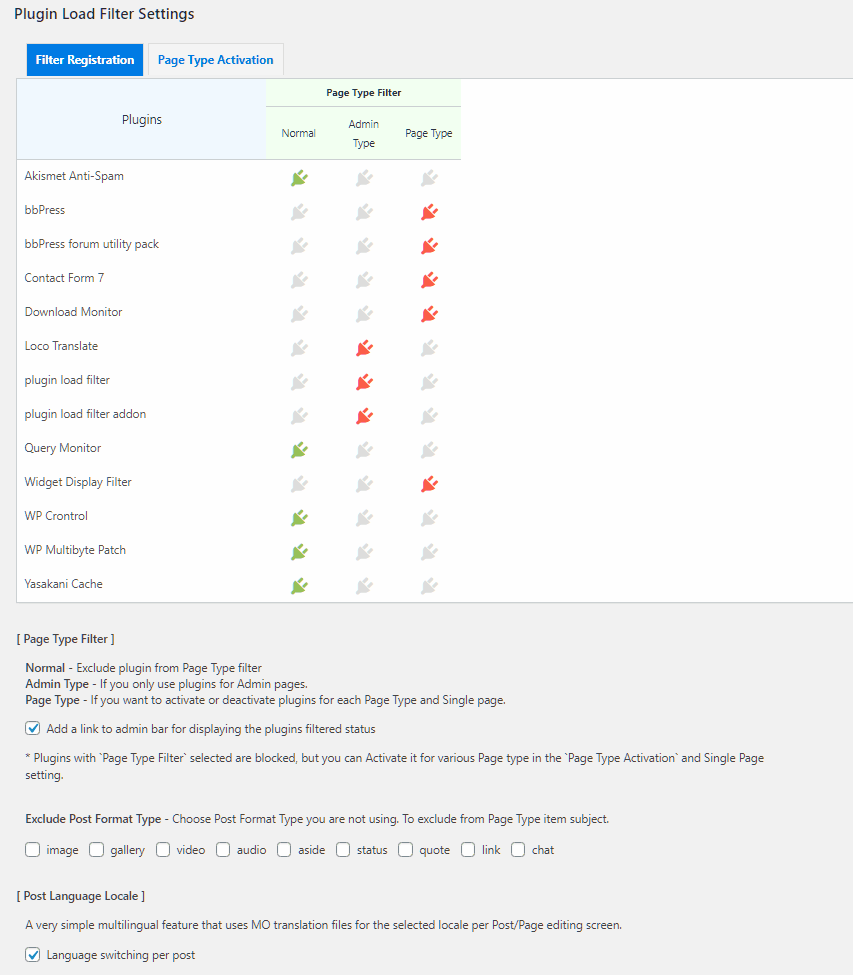
In the Page Type Filter, you can choose from two types of filters as needed (Filter Registration)
- Admin Type : Register the plugins to be used only in admin page.
- Page Type : Register the plugins for selecting whether to activate each Page type or Post. Page Type registration plugins are once blocked, but is activated by
Page Type filter Activationsetting.
-
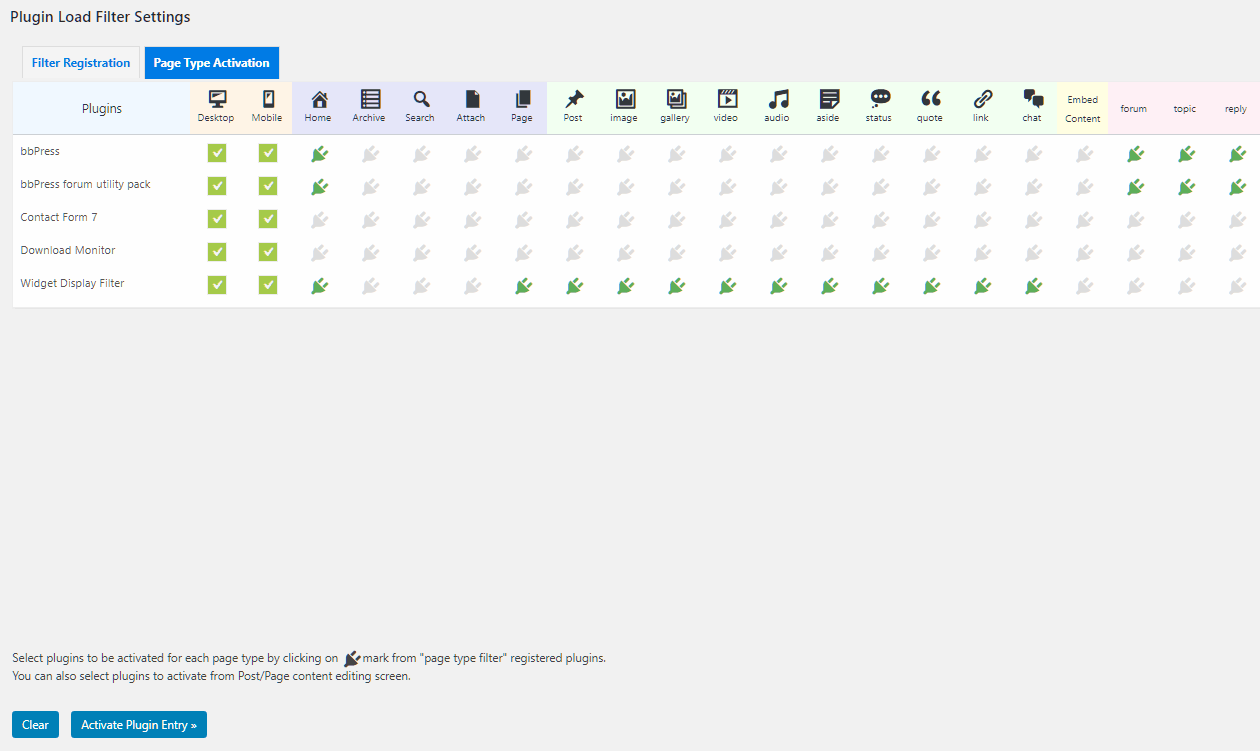
Select the plugins from
Page Type Filterregistration to activate (Page Type filter Activation)- Desktop/Mobile Filter : plugins to be used only in desktop/moble device. (wp_is_mobile function use)
- Select the plugins that you want to activate for each Page type or Post Format type or Custom Post type.
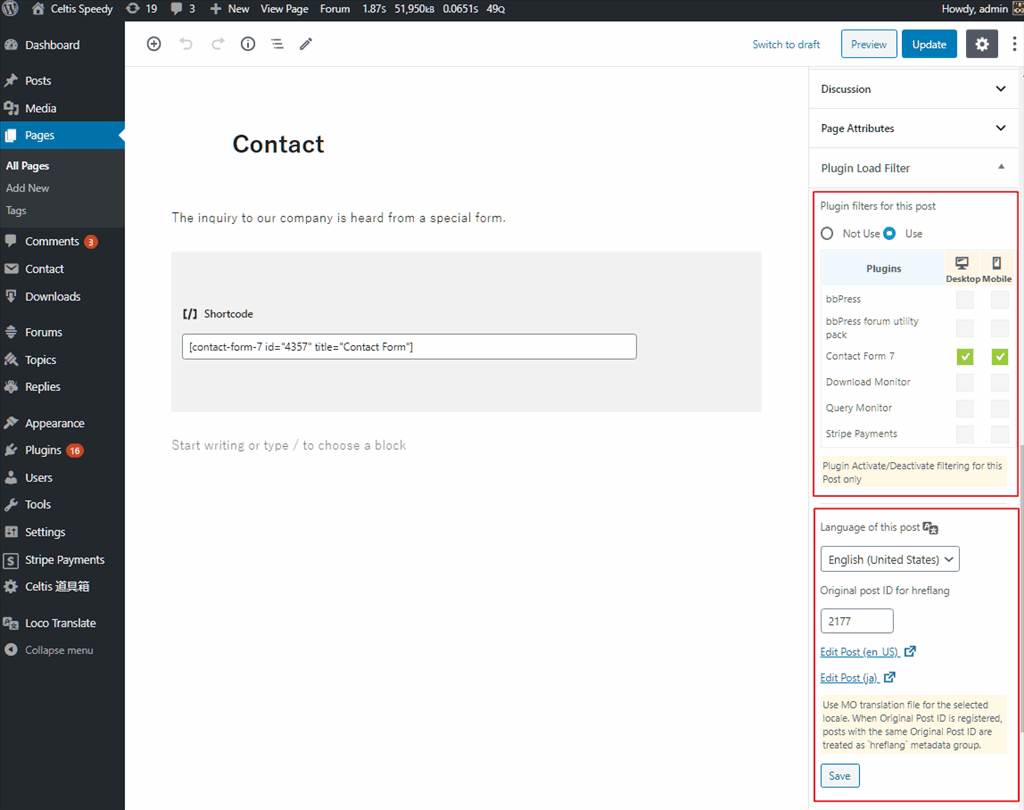
- Can be selected plugins to activate from Post content editing screen
-
Vérifier
- Please perform sufficient test whether the setting is working as expected.
- Please also check the operation if you add or remove a plugin.
- Filter priority : Each Single Post Filter > Admin Type > Page Type Filter
Journal de modifications
URL filter is changed incompatible with the old version, so if you used it you need to reset it.
4.4.1
- 2026-4-20
- Fixed PHP warning
4.4.0
- 2026-3-30
- WP7.0 support
- Added option Custom Post Types for Applying Single Post Plugin Filters
- changed Ajax acceleration filter – Limited to development (WP_DEVELOPMENT_MODE)
- Removed the explicit call to load_plugin_textdomain
- Security measures
- Changed Requires WP6.3
4.3.1
- 2026-2-19
- WP6.9 support
- Fixed issue with URL home page detection
4.3.0
- 2025-4-21
- WP6.8 support
- Added IFRAME_REQUEST check to prevent JS errors from occurring when retrieving user information in iframe of Customizer.
- Changed plf_option, plf_queryvars options autoload ‘no’
- Changed Requires WP6.0, php8.1
4.2.0
- 2024-11-12
- tested WP6.7
- Adjusted timing $current_user setting when calling wp_get_current_user is after setup_theme action.
- Added filter hook plf_singler_custom_url_to_postid for when post ID cannot be detected from the singler URL due to using a permalink change plugin etc.
- plf_singler_custom_url_to_postid filter hook has been used to get Post ID from custom URL of Permalink Manger or Custom Permalinks plugins.
- Fixed the call to load_plugin_textdomain to init hook.
4.1.1
- 2024-4-8
- Fixed PHP warning
Captures d'écran
Pour les développeurs
Est-ce votre plugin ? Montrez les chiffres.
Ajoutez un badge en direct à votre site, docs ou github readme. Il se met à jour par lui-même - aucun compte n'est nécessaire.
Best Plugin Load Filter alternatives
All Disable Plugins plugins →
FAQ
Plugin Load Filter: quick answers
Réponses directes, extraites des données en direct WordPress.org.
Source : WordPress.org
Is Plugin Load Filter free?
Yes. Plugin Load Filter is free to download and use from the official WordPress.org plugin directory.
Is Plugin Load Filter safe to use in 2026?
Plugin Load Filter is a solid plugin choice in 2026, with a few things worth checking first. It runs on 7K+ sites, is rated 4.8/5 and was last updated 7 months ago, and scores 67/100 on our health check.
How many websites use Plugin Load Filter?
Plugin Load Filter is active on 7K+ WordPress websites and has been downloaded 194,205 times since it launched in April 2015. It was downloaded 1,187 times in the last 30 days.
Does Plugin Load Filter work with WordPress 7.1?
Plugin Load Filter is officially tested up to WordPress 7.0.9, while the latest release is 7.1.5. It may still work, but try it on a staging site first.
What PHP version does Plugin Load Filter need?
Plugin Load Filter requires PHP 8.1 or higher. Most hosts run PHP 8.x today, so it works on any modern WordPress hosting.
When was Plugin Load Filter last updated?
The latest version, 4.4.1, was released on April 20, 2026 (7 months ago).
Who makes Plugin Load Filter?
Plugin Load Filter is developed and maintained by enomoto celtislab.
What are the best alternatives to Plugin Load Filter?
The most popular alternatives to Plugin Load Filter are WP Plugin Manager (3K+ installs), Unloadly (10+ installs) and CrashGuard Lite (<10 installs).
Propulsé par PageForge
Un modèle et une feuille de calcul. Une vraie page pour chaque recherche.
PageForge transforme chaque ligne d'un CSV en une page WordPress avec son propre titre, URL, SEO et schéma, construit sur la mise en page que vous Déjà conçu. Gratuit sur WordPress.org.
- CSV et XLSX, plus Google Sheets sur les professionnels et les entreprises
- Son propre titre, URL, SEO champs et schéma pour chaque page
- Fonctionne avec l'éditeur de blocs, Elementor, Divi et Avada
- Gratuit sur WordPress.org, pas de carte de crédit