


Player Leaderboard
Manage sports competitions, players and results, then publish standings, rankings and duel matrices with a shortcode.

Utiliser avec prudence
Player Leaderboard works, but test it on a staging site before relying on it in 2026. It runs on 30+ sites and was last updated 4 months ago, and scores 52/100 on our health check.
- Petite base d'utilisateurs (30+ installations actives)
- Très peu de critiques jusqu'à présent
Comment s'accumule-t-il ?
Côte à côte sur les installations, les mises à jour, les évaluations et le support



Téléchargements quotidiens
Les pics de téléchargement suivent généralement une nouvelle version - chaque site qui met à jour automatiquement compte comme un téléchargement.
Classements
Where Player Leaderboard stands todayWordPress.org Classements de recherche
Position en direct dans la recherche de plugins, Top 100| Mot-clé | Position |
|---|---|
| competition | #73 |
| leaderboard | #9 |
| ranking | >100 |
| results | >100 |
| sports | >100 |
Adoption de version
Part de sites actifs par version.
About Player Leaderboard
À partir du Lisez-moi officiel · v1.1Description
Player Leaderboard provides a complete, free workflow for managing sports rankings in WordPress. Administrators create competitions, add players or teams, enter results and publish the calculated tables on any page or post.
The plugin supports singles, doubles and team competitions. Standings use configurable points for victories, defeats and draws. Individual and doubles rankings can take opponent strength, bonuses and rating history into account.
There is one free edition of Player Leaderboard. No premium edition or paid feature gate is required.
Traits
- Create singles, doubles and team competitions.
- Manage players or teams and their contact information.
- Record one result or up to ten results at once.
- Configure points, sets, ratings, bonuses and ranking behaviour.
- Display standings, rankings and duel matrices on the front end.
- Optionally show result-detail dialogs.
- Import and export competitions, players and results as CSV.
- Configure table and matrix colours per competition.
- Use responsive, horizontally scrollable tables without clipped columns.
- Read expanded context-sensitive help and workflow guides while editing a competition.
- View complete shortcode documentation in the competition overview and directly below the editor help.
Basic workflow
- Open Player Leaderboard in the WordPress administration area.
- Create a competition and select its type and scoring rules.
- Add the participating players or teams.
- Enter the match results.
- Copy the shortcode shown in the competition list to a page or post.
Shortcode
The competition ID is required:
[player_leaderboard id="1"]
Available attributes:
id– Numeric competition ID. Required.mode– Output type:standing(default),rankingormatrix.showheader– Set totrueto show the competition title and view heading. Default:false.details– Set totrueto make standing or matrix values open result-detail dialogs. Default:false.view– Ranking calculation shown for doubles:points(default),quotient,rating,ratingsoraverage.type– Matrix value:games(default),sets,pointsorrating.matrix_font_size– Matrix font size in pixels from8to32. If omitted, the responsive default size is used.fontweight– Legacy responsive matrix font-size factor from1to500. Default:100.width– Minimum matrix width with a supported CSS unit, for example100%,720pxor50rem. If less space is available, the matrix becomes horizontally scrollable. Default:100%.
Exemples :
[player_leaderboard id="1" mode="standing" showheader="true" details="true"]

[player_leaderboard id="1" mode="ranking" view="average"]

[player_leaderboard id="1" mode="matrix" type="sets" details="true" matrix_font_size="12" width="100%"]
CSV import and export
Use the CSV export generated by Player Leaderboard as the template for imports. A complete competition export can contain competition, player and result rows. During import you can choose whether existing rating values are reset and whether result rows are imported.
For security, CSV uploads are limited to .csv files up to 5 MB and are available only to administrators.
Installation
- In WordPress, go to Plugins > Add New Plugin > Upload Plugin.
- Select the plugin ZIP file and choose Install Now.
- Activate Player Leaderboard.
- Open Player Leaderboard in the administration menu and create the first competition.
When the plugin is updated, its database schema is upgraded automatically. Deactivation keeps all data. Deleting the plugin through the WordPress plugin screen removes its competition, player and result tables.
Journal de modifications
Recommended update for current WordPress and PHP versions. It includes security hardening and fixes several PHP 8 runtime errors. Back up your database before updating a production site.
1.1
- Updated plugin metadata and compatibility information for WordPress 7.0.2 and PHP 7.4 or newer.
- Added complete installation, usage, shortcode, CSV and FAQ documentation.
- Removed outdated premium-version references; the plugin has one free edition.
- Added capability and nonce checks to all write operations, imports, recalculation and bulk deletion.
- Hardened database queries, sorting, uploads, dynamic styles and output escaping.
- Fixed a PHP 8 fatal error in front-end asset hooks.
- Fixed the matrix rating calculation and possible division-by-zero errors.
- Fixed the points-only path when entering multiple results.
- Fixed player and competition deletion so dependent data is removed consistently.
- Improved database indexes, redirects, date handling and PHP 8.4 CSV compatibility.
- Added responsive overflow containers so wide frontend and administration tables remain fully accessible.
- Added expanded context-sensitive help and workflow guides to the competition editor.
- Added complete shortcode documentation to the competition overview and directly below the editor help.
- Redesigned the encounter matrix with semantic table markup, compact 90-degree column labels, reliable horizontal scrolling, a clearer colour scale and improved keyboard accessibility.
- Added the
matrix_font_sizeshortcode parameter for an explicit matrix font size. - Fixed the competition editor page title so it shows the competition name while editing.
1.0.3
- Fixed CVE-2025-12824.
- Tested with WordPress 6.9.
1.0.2
- Corrected button style usage.
1.0.1
- Redesigned the administration screens.
1.0.0
- Initial release with competition, player, result, standing, ranking and matrix features.
- Corrected the plugin title and icon.
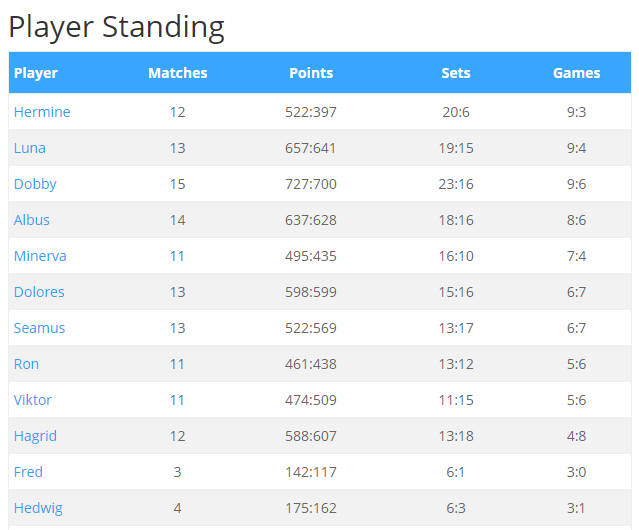
Captures d'écran


Pour les développeurs
Est-ce votre plugin ? Montrez les chiffres.
Ajoutez un badge en direct à votre site, docs ou github readme. Il se met à jour par lui-même - aucun compte n'est nécessaire.
Best Player Leaderboard alternatives
All competition plugins →




FAQ
Player Leaderboard: quick answers
Réponses directes, extraites des données en direct WordPress.org.
Source : WordPress.org
Is Player Leaderboard free?
Yes. Player Leaderboard is free to download and use from the official WordPress.org plugin directory.
Is Player Leaderboard safe to use in 2026?
Player Leaderboard works, but test it on a staging site before relying on it in 2026. It runs on 30+ sites and was last updated 4 months ago, and scores 52/100 on our health check.
How many websites use Player Leaderboard?
Player Leaderboard is active on 30+ WordPress websites and has been downloaded 6,044 times since it launched in February 2021. It was downloaded 142 times in the last 30 days.
Does Player Leaderboard work with WordPress 7.1?
Player Leaderboard is officially tested up to WordPress 7.0.9, while the latest release is 7.1.5. It may still work, but try it on a staging site first.
What PHP version does Player Leaderboard need?
Player Leaderboard requires PHP 7.4 or higher. Most hosts run PHP 8.x today, so it works on any modern WordPress hosting.
When was Player Leaderboard last updated?
The latest version, 1.1, was released on July 21, 2026 (4 months ago).
Who makes Player Leaderboard?
Player Leaderboard is developed and maintained by tharkun69.
What are the best alternatives to Player Leaderboard?
The most popular alternatives to Player Leaderboard are Giveaways and Contests by R… (20K+ installs), Simple Giveaways (400+ installs) and Leaderboarded (100+ installs).
Propulsé par PageForge
Un modèle et une feuille de calcul. Une vraie page pour chaque recherche.
PageForge transforme chaque ligne d'un CSV en une page WordPress avec son propre titre, URL, SEO et schéma, construit sur la mise en page que vous Déjà conçu. Gratuit sur WordPress.org.
- CSV et XLSX, plus Google Sheets sur les professionnels et les entreprises
- Son propre titre, URL, SEO champs et schéma pour chaque page
- Fonctionne avec l'éditeur de blocs, Elementor, Divi et Avada
- Gratuit sur WordPress.org, pas de carte de crédit