


PinSpot – Interactive Image Hotspots & Image Map
Interactive image hotspots and image maps — clickable pins and areas with accessible tooltips, for floor plans and shoppable images.

Choix solide
PinSpot is a solid plugin choice in 2026, with a few things worth checking first. It runs on 40+ sites and was last updated 2 weeks ago, and scores 67/100 on our health check.
- Développé activement — Dernière mise à jour il y a 2 semaines
- Testé avec le dernier WordPress (7.1)
- Petite base d'utilisateurs (40+ installations actives)
- Très peu de critiques jusqu'à présent
Comment s'accumule-t-il ?
Côte à côte sur les installations, les mises à jour, les évaluations et le support



Téléchargements quotidiens
Les pics de téléchargement suivent généralement une nouvelle version - chaque site qui met à jour automatiquement compte comme un téléchargement.
Classements
Where PinSpot stands todayWordPress.org Classements de recherche
Position en direct dans la recherche de plugins, Top 100| Mot-clé | Position |
|---|---|
| floor plan | #40 |
| image hotspot | #47 |
| Image Map | >100 |
| interactive images | >100 |
| shoppable images | #28 |
Adoption de version
Part de sites actifs par version.
About PinSpot
From the official readme · v1.3.0Description
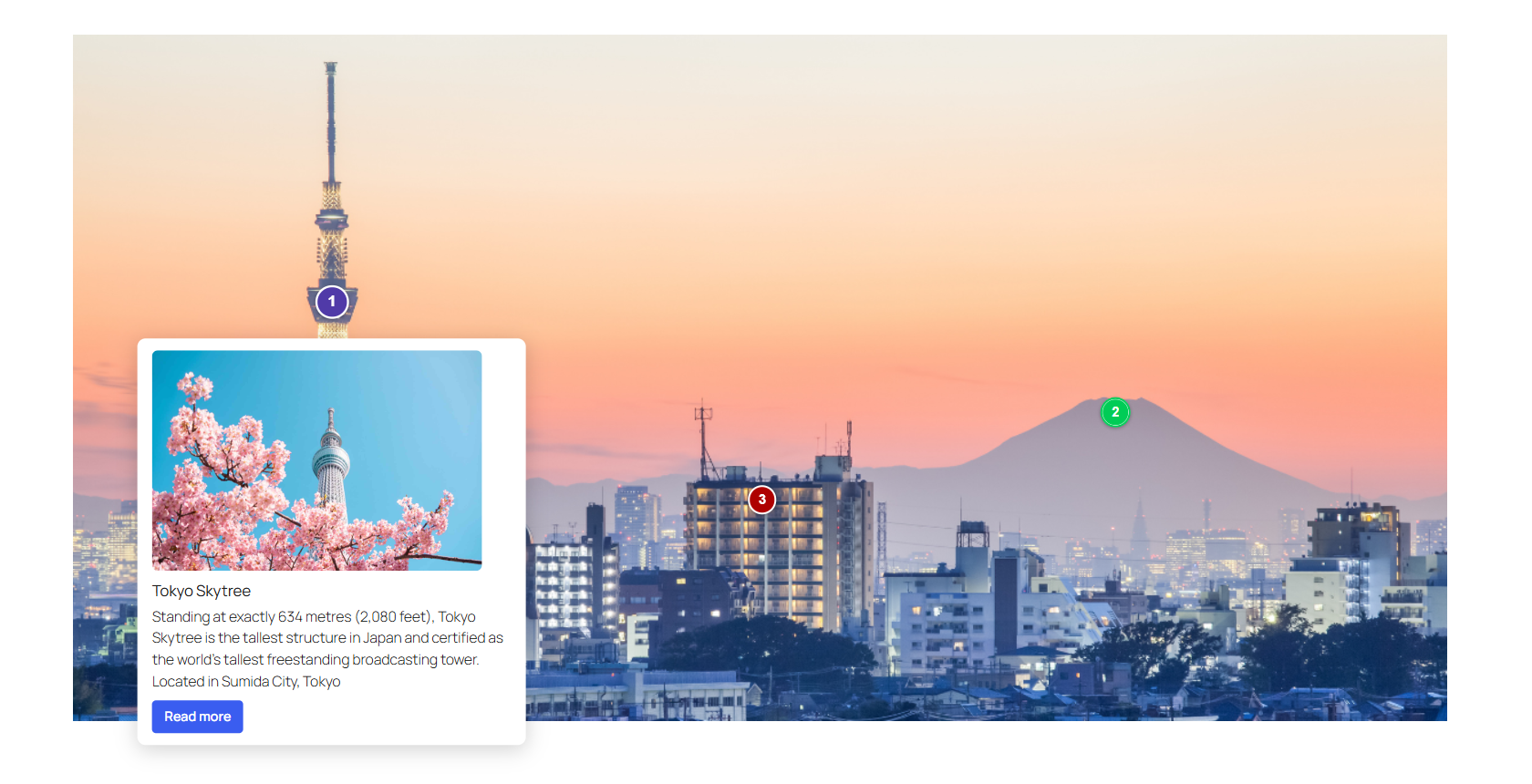
📌 PinSpot turns a flat image into an interactive image map people can explore. Drop hotspot pins anywhere on a photo, floor plan, diagram, map, or product shot — each pin opens a polished, accessible tooltip with a title, description, image or video, and a call-to-action button.
It is a single native block built the modern WordPress way — on the Interactivity API, the same technology that powers WordPress core blocks. No jQuery, no shortcodes, no page builder required. The frontend script is about 6 KB — roughly 2.4 KB gzipped over the wire — and only loads on pages that actually use a hotspot, so it never slows the rest of your site down.
✨ Highlights
- 📌 Unlimited hotspots on any image, with percentage-based positions that stay responsive at every screen size
- 🗂️ Stack several images in one block — floor-plan floors, before and after, or a wide shot and a close-up. Visitors switch between them, and each image keeps its own hotspots
- 💬 Rich tooltips — title, description, an image, a self-hosted video, or a YouTube / Vimeo embed, plus a call-to-action button
- 📐 Draw clickable areas — polygon, rectangle, or circle regions, not just point pins — ideal for floor plans, maps, and infographics
- 🎨 Marker styles — numbered, dot, plus, info, question, any emoji, or your own custom image, in any size and color
- 🖌️ Custom tooltip colors — set a background and text color, on top of the light/dark presets
- 🧭 Guided tour — Previous / Next controls with optional autoplay to walk visitors through every pin in order
- 🏷️ Group filters — let visitors show or hide pins by category, perfect for maps and floor plans
- 🔍 Zoom & pan plus an image lightbox for large, detailed graphics
- ✏️ Edit on the image — write a pin’s title and description right where it sits, then copy-and-paste a pin’s style onto others
- ♿ Accessible — full keyboard support, screen-reader labels, reduced-motion, RTL, and an optional text list
- 🔒 Privacy-first — no external requests until a visitor plays a video; your data stays in your post content
- 🧩 Six starter patterns — including a multi-floor plan, shop-the-look, and before/after — plus one-click import / export
🎯 What you can build
- 🏡 Real-estate floor plans & property tours — annotate rooms, floors, and features on a plan or photo so buyers can explore.
- 🛍️ Shoppable & WooCommerce product images — call out features with numbered pins and “Buy now” buttons.
- 🗺️ Interactive maps, campus & venue guides — a zoomable, pannable image map with pins visitors can explore.
- 🎪 Trade-show & event floor maps — show booths, stages, and exhibitors on an interactive map.
- 📊 Infographics & diagrams — explain each part in place, without cluttering the graphic.
- 👥 Team & about pages — reveal names and roles on hover.
💬 Rich, flexible tooltips
Every pin can carry a title, a description (with line breaks and basic bold, italic, and links), and one piece of media: an image from your library, a self-hosted video, or a YouTube / Vimeo embed. Add an optional call-to-action button that links anywhere. Choose light or dark tooltips, decide where they open (top, bottom, left, right, or automatic), and pick a marker style — numbered, dot, plus, info, question, any emoji, or your own custom image — in any size and color, with an optional pulse or bounce animation.
🧭 Guided tour
Turn on tour mode to add Previous and Next controls that walk visitors through every hotspot in order — perfect for a step-by-step story, a product walkthrough, or a self-running kiosk display. Optionally let the tour advance on its own at an interval you choose; visitors always get a pause button, and autoplay stays off automatically for anyone who prefers reduced motion. Each stop is announced to screen readers as it opens. Style the bar to match your design: place it below the image or overlaid on it, show or hide the position counter, and set the button color, size, and shape.
🏷️ Group filters
Assign each hotspot to a named group — “Exits”, “Restrooms”, “Food”, whatever fits — and PinSpot adds a row of filter chips above the image. Visitors tap a chip to show or hide that group, so a busy map or floor plan stays readable and people can focus on just what they need. An “All” chip brings everything back. The chips are real toggle buttons with proper pressed states for keyboard and screen-reader users, each item in the optional list is tagged with its group, and you can set the chip color to match your brand.
♿ Accessibility built in
PinSpot is designed to work for everyone, not just mouse users. Accessibility is built into how it works:
- ⌨️ Fully keyboard operable — every marker is a real button. Tab moves between pins, Enter or Space opens a tooltip, and Escape closes it and returns focus to the exact marker you opened it from, so you never lose your place.
- 🔊 Screen-reader ready — each marker exposes proper
aria-expandedandaria-controlsstate plus a descriptive label, so assistive technology understands what every pin does and whether its tooltip is currently open. - 📝 A full text alternative for the image — turn on the optional hotspot list and every pin’s title, description, and link is also printed as a clean, ordered list beneath the image. Screen-reader users get all the information without having to interact with the graphic at all — and search engines can read it too, which is good for SEO.
- 🌀 Respects reduced motion — if a visitor has “reduce motion” enabled in their operating system, every marker animation and tooltip transition is automatically switched off.
- 🎚️ Accessible controls throughout — the zoom buttons, the lightbox close button, and the video play button all carry proper labels.
- 🌍 Right-to-left ready — full RTL language support is included.
🧩 Start fast with block patterns
New to hotspots? PinSpot ships three ready-made layouts you can insert and edit in seconds. In the editor, open the block inserter (the + button in the top-left), switch to the Patterns tab, and choose the PinSpot category. You will find:
- 🛍️ Product showcase — three numbered pins with call-to-action buttons, arranged over a product image. Great for shoppable images and feature callouts.
- 👥 Team introduction — hover-activated dot pins with dark tooltips, spaced for a group photo. Perfect for an about or team page.
- 🗺️ Zoomable map tour — a zoom-and-pan image with pulsing question-mark pins, built for maps, floor plans, campus guides, and infographics.
Each pattern drops in with a demo illustration and sample pins already in place. Just replace the demo image with your own and edit the text — it is the fastest way to see everything PinSpot can do and to learn how the pieces fit together.
🎛️ Everything lives on the block — there is no settings page to hunt for
PinSpot deliberately has no separate admin dashboard. You configure everything right where you see it, using the standard WordPress block controls:
- 🧰 Block toolbar — swap the image, or click Add hotspot and then click the image to drop a pin exactly where you want it.
- 📍 Placing & moving pins — drag any marker to reposition it, or select it and nudge with the arrow keys (hold Shift for larger steps) for precise placement.
- ✏️ Edit right on the image — select a pin and its tooltip opens on the image so you can type the title and description in place, with bold, italic, and links in the description. The sidebar keeps the same fields if you prefer.
- 🎛️ Per-hotspot panels — with a pin selected, the block sidebar (Settings tab) shows panels for its Content, Media, Call to action, Marker style, and Behavior.
- 📋 All hotspots — one panel lists every pin on the image so you can reorder, duplicate, or delete them at a glance.
- 🎨 Copy & paste pin style — copy one pin’s look and behavior (marker, size, color, animation, trigger, placement, theme) and paste it onto another pin, or apply it to every pin at once, without touching their text.
- ⚙️ Display settings — set the trigger (click or hover), light or dark theme, tooltip width, the optional accessible list, group filters, the guided tour (with optional autoplay), and whether zoom & pan is enabled.
- 💾 Import / Export — save the whole layout as a JSON file and load it into another post, page, or site.
If you have ever placed a WordPress block, you already know how to use PinSpot.
🔒 Privacy-first by design
PinSpot makes no external requests on its own. YouTube and Vimeo tooltips show a lightweight preview image and only load the real player after the visitor clicks play — nothing is sent to Google or Vimeo until then. Your hotspot data is stored inside the block in your post content: no custom database tables, no tracking, no phoning home, and a completely clean uninstall.
Services externes
PinSpot embeds no external service by default. Only when you choose YouTube or Vimeo as a tooltip’s media type, the following apply on the public page:
YouTube (Google LLC) — video embeds and thumbnails
Purpose: show the video preview thumbnail and, after the visitor clicks play, the embedded player.
Data sent: the visitor’s IP address and standard browser headers are sent to i.ytimg.com when the tooltip preview image loads, and to www.youtube-nocookie.com (the privacy-enhanced embed domain) only after the visitor clicks play.
Sent when: only on pages where you added a YouTube tooltip; the player itself loads only on click.
Service: https://www.youtube.com
Terms of Service: https://www.youtube.com/t/terms
Privacy Policy: https://policies.google.com/privacy
Vimeo (Vimeo.com, Inc.) — video embeds
Purpose: show the embedded Vimeo player after the visitor clicks play.
Data sent: the visitor’s IP address and standard browser headers are sent to player.vimeo.com only after the visitor clicks play.
Sent when: only on pages where you added a Vimeo tooltip, and only on click.
Service: https://vimeo.com
Terms of Service: https://vimeo.com/terms
Privacy Policy: https://vimeo.com/privacy
Installation
From your dashboard
- Go to Plugins → Add New and search for PinSpot.
- Cliquez sur Installer maintenant, puis sur activer.
Manual upload
- Download the plugin ZIP file.
- Go to Plugins → Add New → Upload Plugin, choose the ZIP, and click Install Now.
- Activez le plugin.
Add your first hotspot image
- Edit any post or page.
- Add the PinSpot – Image Hotspots block (search for “PinSpot” in the inserter), or insert a PinSpot pattern to start from a ready-made layout.
- Select or upload the image you want to annotate.
- Click Add hotspot in the block toolbar, then click the spot on the image where the pin should go.
- With the pin selected, fill in its title, description, media, and link — right on the image or in the sidebar.
- Repeat for each pin, then Publish. There is no extra setup and no options page to configure.
Journal de modifications
Stack several images in one block with a switcher — floor-plan floors, before and after — each with its own hotspots. Add-on developers: read hotspots via Pinspot_Layers.
1.3.0
- New: 🗂️ Stack several images in one block — the floors of a floor plan, a before and an after, or a wide shot and a close-up. Visitors switch between them with a built-in control, and each image keeps its own hotspots.
- New: the guided tour can run across every image, switching as it goes — so a tour can walk a whole building, not just one floor.
- New: three starter patterns — Multi-floor plan, Shop the look, and Before and after.
- Improve: images on the layers you are not looking at are fetched up front at low priority, so switching is instant. (Marking them lazy would have been lighter, but a hidden image is never in the viewport, so the browser would not fetch it until the moment someone switched — and they would watch an empty frame while it downloaded.)
- Improve: group filter chips are now gathered across every image, so a chip never appears or disappears when visitors switch.
- Improve: the accessible hotspot list covers every image, so nothing is reachable only by using the switcher.
- Improve: import and export now work on the image you are editing, so each image in a block can be managed separately.
- Fix: corrected the stated size of the frontend script in this readme — it is about 6 KB (roughly 2.4 KB gzipped), not under 4 KB.
- Developers: new
Pinspot_Layershelper. If your add-on reads$attributes['hotspots']directly, switch toPinspot_Layers::all_hotspots( $attributes )— see HOOKS.md. Single-image blocks keep their existing storage shape, so published content is unchanged.
1.2.1
- Improve: redesigned Settings screen — grouped sections, a live preview of your defaults, a default tooltip width, and a one-click reset.
- Improve: the Blocks screen now reflects the blocks available in the editor, including companion blocks when PinSpot Pro is active.
- New: an Upgrade tab introduces PinSpot Pro (shoppable WooCommerce images, Live Map, Video Hotspots, and 360°/Panorama) — a link-only upsell that hides itself automatically when Pro is active.
1.2.0
- New: 📐 Draw clickable areas — draw polygon, rectangle, or circle regions directly on the image, with drag handles to move and reshape them. Great for floor plans, maps, and infographics.
- New: 🖌️ Custom tooltip colors — pick a background and text color for tooltips, alongside the light/dark presets.
- New: 🩸 Area fill opacity — control how strong each drawn region’s highlight appears.
- New: 🛠️ PinSpot admin screen — a Welcome/overview and global default settings (trigger, theme, marker color) in one place.
- New (developers): a documented extension API — PHP filters/actions and a JS/Interactivity contract (see HOOKS.md) so add-ons can extend PinSpot without editing it.
- Improve: tooltips now open with a subtle, snappy animation (and stay instant for anyone who prefers reduced motion).
- Improve: an empty tooltip (no title, description, media, or call-to-action) no longer shows as a small empty box; such markers and areas are non-interactive.
1.1.0
- New: 🧭 Guided tour — Previous / Next controls that step visitors through the hotspots in order, with optional autoplay and a pause button. Autoplay stays off automatically for anyone who prefers reduced motion, and each stop is announced to screen readers. Style the bar to taste: below the image or overlaid on it, show/hide the position counter, and set the button color, size, and shape.
- New: 🏷️ Group filters — assign hotspots to named groups and let visitors show or hide them with accessible filter chips, ideal for maps and floor plans. Includes an “All” reset and a chip color option.
- New: 🎨 Emoji and custom-image markers — use any emoji or your own image as a marker, alongside the existing numbered, dot, plus, info, and question styles.
- New: ✏️ Edit right on the image — a selected pin’s tooltip opens on the canvas so you can type its title and description in place, with bold, italic, and links.
- New: 📋 Copy & paste pin style — copy one pin’s look and behavior and paste it onto another pin, or apply it to every pin at once, without touching their text.
- Improve: the block sidebar is reorganized into focused, collapsible panels (Tooltips, Hotspot list & filters, Guided tour, Zoom & pan).
- Fix: tall tooltips no longer show stray horizontal or vertical scrollbars; only genuinely long content scrolls, inside the tooltip.
- Housekeeping: excluded a stray dot-file from the distributed package so it passes Plugin Check cleanly.
1.0.0
- Initial release: interactive image hotspots block with rich tooltips, media, light/dark themes, click or hover triggers, smart placement, zoom & pan, lightbox, click-to-load video facades, deep links, import/export, three starter patterns, an optional accessible hotspot list, and full keyboard, screen-reader, reduced-motion, and RTL support.
Captures d'écran


Pour les développeurs
Est-ce votre plugin ? Montrez les chiffres.
Ajoutez un badge en direct à votre site, docs ou github readme. Il se met à jour par lui-même - aucun compte n'est nécessaire.
Best PinSpot alternatives
All floor plan plugins →





FAQ
PinSpot: quick answers
Réponses directes, extraites des données en direct WordPress.org.
Source : WordPress.org
Is PinSpot free?
Yes. PinSpot is free to download and use from the official WordPress.org plugin directory.
Is PinSpot safe to use in 2026?
PinSpot is a solid plugin choice in 2026, with a few things worth checking first. It runs on 40+ sites and was last updated 2 weeks ago, and scores 67/100 on our health check.
How many websites use PinSpot?
PinSpot is active on 40+ WordPress websites and has been downloaded 859 times since it launched in August 2026. It was downloaded 352 times in the last 30 days.
Does PinSpot work with WordPress 7.1?
Yes. The developer has tested PinSpot up to WordPress 7.1.5, the latest release. It requires WordPress 6.6 or newer.
What PHP version does PinSpot need?
PinSpot requires PHP 7.4 or higher. Most hosts run PHP 8.x today, so it works on any modern WordPress hosting.
When was PinSpot last updated?
The latest version, 1.3.0, was released on November 17, 2026 (2 weeks ago).
Who makes PinSpot?
PinSpot is developed and maintained by Rayhan Uddin.
What are the best alternatives to PinSpot?
The most popular alternatives to PinSpot are Interactive Image Map Plugin (20K+ installs), Vision (2K+ installs) and Image Map Connect (100+ installs).
Propulsé par PageForge
Un modèle et une feuille de calcul. Une vraie page pour chaque recherche.
PageForge transforme chaque ligne d'un CSV en une page WordPress avec son propre titre, URL, SEO et schéma, construit sur la mise en page que vous Déjà conçu. Gratuit sur WordPress.org.
- CSV et XLSX, plus Google Sheets sur les professionnels et les entreprises
- Son propre titre, URL, SEO champs et schéma pour chaque page
- Fonctionne avec l'éditeur de blocs, Elementor, Divi et Avada
- Gratuit sur WordPress.org, pas de carte de crédit