


Picture Gallery – Frontend Uploads & Image Editor
Create searchable photo galleries with frontend uploads, built-in image editing, four layouts and full-screen browsing.

Choix solide
Picture Gallery is a solid plugin choice in 2026, with a few things worth checking first. It runs on 400+ sites, is rated 3.7/5 and was last updated 16 hours ago, and scores 77/100 on our health check.
- Actively developed — last update 16 hours ago
- Testé avec le dernier WordPress (7.1)
- Momentum — downloads up 169.1% vs the previous 30 days
- Petite base d'utilisateurs (400+ installations actives)
- Très peu de critiques jusqu'à présent
- Nécessite PHP 8.2 ou plus récent
Comment s'accumule-t-il ?
Côte à côte sur les installations, les mises à jour, les évaluations et le support



Téléchargements quotidiens
Les pics de téléchargement suivent généralement une nouvelle version - chaque site qui met à jour automatiquement compte comme un téléchargement.
Classements
Where Picture Gallery stands todayWordPress.org Classements de recherche
Position en direct dans la recherche de plugins, Top 100| Mot-clé | Position |
|---|---|
| frontend upload | #4 |
| Image editor | #30 |
| galerie d'images | #76 |
| lightbox | >100 |
| galerie de photos | #65 |
Adoption de version
Part de sites actifs par version.
Répartition des notes
★★★★★★★★★★ 3.7 from 3 reviews
About Picture Gallery
From the official readme · v1.11.4Description
Turn a collection of pictures into a place people want to explore. Picture Gallery combines attractive image layouts, frontend contributions and built-in editing on your WordPress site. Build a portfolio, collect event photos or create a shared gallery for your community.
Visitors can search, browse and open pictures in a full-screen viewer. Contributors can upload and manage their own images. You choose the presentation, who can contribute and which submissions or edits need review.
Key features and benefits
- Choose the right presentation: Styled Tiles, Responsive grid, Picture cards and Justified rows cover compact photo walls, contextual cards and mixed portrait/landscape collections.
- Let pictures breathe: PhotoSwipe adds zoom, swipe and nearby-picture browsing, with optional thumbnails and a clear link to the picture post.
- Collect photos from your community: frontend batch uploads, drag and drop and an optional moderated guest form keep contributions close to the gallery.
- Give contributors their own workspace: My Pictures brings titles, captions, descriptions, alternative text and image tools together on the frontend.
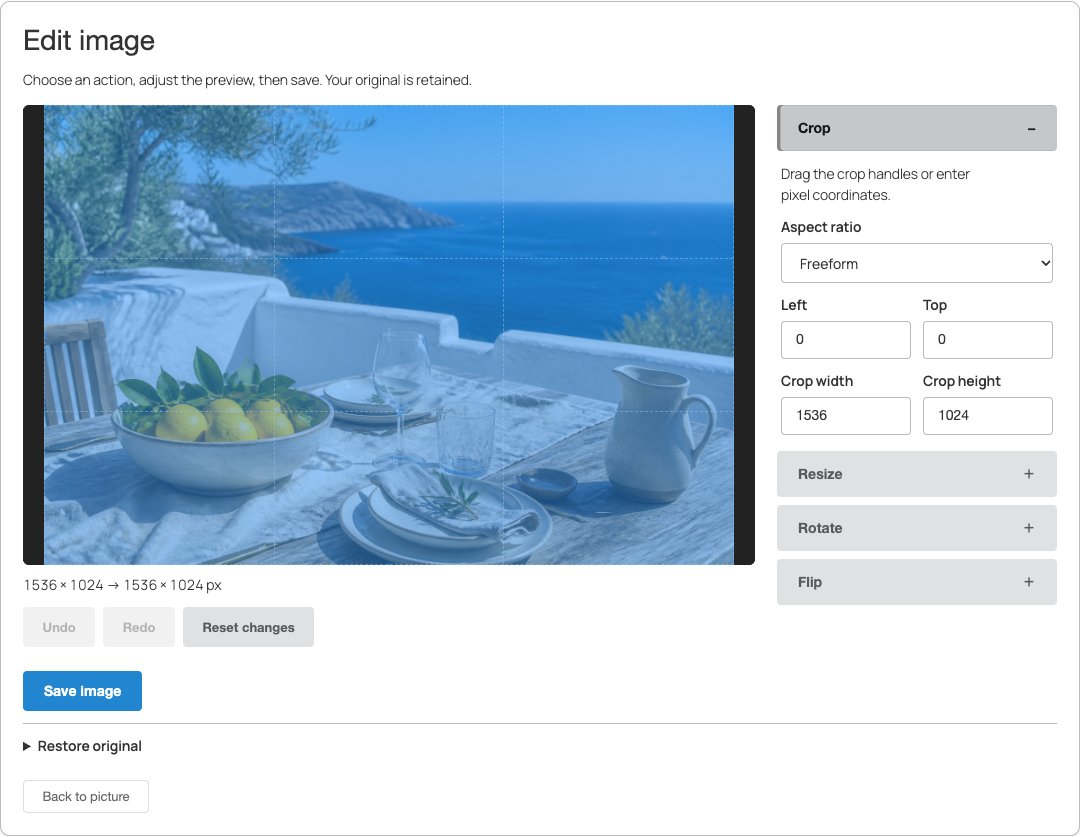
- Edit without leaving your site: crop, resize, rotate and flip supported JPEG/PNG images; preview changes, undo/redo and save with retained originals.
- Build in the WordPress editor: the native gallery block lets you select Pictures or import Media Library images and reorder them without writing a shortcode.
- Make large collections easier to explore: category/tag/name filters, sorting and pagination help visitors find the pictures they want. Optional layout buttons let them compare views.
- Review before changing public work: configure upload/publish roles and moderation. Image edits can await approval while the current public picture remains available.
The gallery, local PhotoSwipe viewer and image tools are included in the plugin. Image processing uses your WordPress host’s available image editor. Optional integrations are listed below.
Try the interactive gallery demo | Documentation and examples | WordPress.org support
Popular ways to use Picture Gallery
- Creator portfolios: present artwork, travel pictures, craft collections or photography with layouts that suit the images.
- Event and club galleries: let members contribute their pictures and review submissions before publication.
- Community photo collections: combine searchable galleries with personal My Pictures workspaces.
- A visual content library: connect optional video, rating and membership plugins when pictures form part of a broader creator site.
Create your first gallery
- Open Picture Gallery > Options > Quick setup and choose a presentation or contribution preset. Preview the concrete changes before saving.
- Select existing Pictures, import Media Library images or upload a small test collection. Original attachments are retained, and later Picture edits are not overwritten by repeating an import.
- Add the native gallery block or a listing shortcode to a page. Choose the layout, filters and viewer.
- Test browsing and, if enabled, upload and review with a separate contributor account.
Quick setup retains existing roles, access settings, storage and pages. Advanced options and standalone upload/import tools remain available.
Contribution, editing and review
Member uploads accept configured JPG, PNG and GIF files; compatible mobile browsers can choose camera or photo-library images. The optional guest form includes moderation, rate limits, notification email and configurable Google reCAPTCHA v3. Upload Journals help administrators inspect an interrupted request and its review state.
My Pictures provides picture-local text and image editing. Choose one tool, expand its controls and preview the result. Edits can remain pending while the existing public image stays available. Restore original composition creates a fresh generation while retaining the original and normalized master. Image Edit Journals support inspected recovery and explicit cleanup of proven unused edit files after a retention period.
Optional Media Capture integration adds webcam photos, screen snapshots and a shared upload entry. New captures normally become reviewed Gallery drafts; direct publication requires the administrator’s explicit choice and the creator’s native publishing permission. Original attachments and native Gallery editing remain separate from the capture app.
Practical control for site owners
- Configure defaults or per-listing layouts and filters, with an optional frontend selector.
- Enable stars, likes or both through Rate Star Review. Visitor eligibility and any paid voting remain the rating provider’s responsibility.
- Use FansPaysite light/dark mode and palette changes without reloading, or another compatible WordPress theme.
- Keep real picture links and page navigation when JavaScript enhancement is unavailable.
- Use WordPress Media Library relationships, picture taxonomies, EXIF orientation correction and bounded thumbnail processing.
- Retain existing posts, authors, URLs and media. Deactivation/uninstall preserve data; cleanup remains an explicit reviewed action.
- Optionally expose read-only picture/text inspection through WordPress Abilities for authenticated tools. It is disabled by default and cannot edit, publish or delete pictures.
- Use eleven included interface languages: Romanian, Spanish, German, French, Brazilian Portuguese, Japanese, Italian, Dutch, Polish, Turkish and Arabic. See the translation-status notice in the FAQ.
Optional integrations
- Media Capture: webcam photos, screenshots and shared creator intake.
- Rate Star Review: independent stars and likes across all four layouts.
- MicroPayments: supported creator subscriptions, individual purchases and site memberships. New member pictures can optionally show calendar or paid-start release information; native image visibility and approval still apply.
- Video Share VOD, Broadcast Live Video and Paid Videochat: related media and community workflows.
The gallery, uploader and editor work independently. Restricting a gallery does not turn an already public image URL into a private download. Choose an appropriate storage and delivery setup for restricted media.
Read the installation steps or ask a question in the support forum.
Optional VideoWhisper support connection
Open Picture Gallery → Connect for setup. With the separately installed VideoWhisper CRM Connection companion, an administrator can opt in to connect this site. The connection can prefill the website and product in support requests and provide shortcuts to previous conversations after CRM sign-in. The gallery, sharing and moderation features remain available without this connection.
The companion sends the site URL, product identifier, submitted contact name and email, and the emailed verification code to VideoWhisper CRM after you consent. Later requests use a limited site credential to refresh status, verify the site, accept an offer you approve, or disconnect. VideoWhisper may request a signed response from the site to verify ownership. The connection does not send site media or content. Disconnect from the Connect tab to stop future status requests. The CRM retains service records under its Privacy Policy and Terms of Use.
VideoWhisper may offer eligible sites time-limited access to separate services or add-ons. The offer shows its availability, duration and what happens at expiry before you accept. The service offer creates no paid subscription and does not install any add-on. The features included in this directory product continue after the offer ends.
Actifs d'interface utilisateur tiers
Le code de l'interface utilisateur Fomantic groupée est sous licence MIT. Source en amont lisible par l'homme, instructions de distribution/construction reproductibles, les avis de correctifs et de polices locaux exacts sont en scripts/semantic/README.txt et scripts/semantic/asset-provenance.txt. Les polices conservent leurs licences indiquées séparément. Les outils de construction ne sont pas requis sur l'hébergement WordPress.
Installation
- Install and activate Picture Gallery from WordPress Plugins.
- Open Picture Gallery > Options > Quick setup, choose or adjust a preset, click Preview setup changes, then Save reviewed setup. Use the advanced links for upload/publishing permissions, storage and access. Follow the standalone guide for community uploads or a Media Library portfolio. With automatic page setup enabled, save settings to create Pictures, My Pictures, Upload Pictures and Guest Picture pages.
- Choose a layout and menu/dropdown filters under Display. New installations use Responsive grid with PhotoSwipe and thumbnail navigation enabled. Saved preferences on existing sites are preserved.
- Review upload and publishing permissions before inviting contributors. Configure guest uploads and optional CAPTCHA if required.
In the WordPress block editor, add Picture Gallery. Show the latest pictures matching filters, or choose Selected pictures in manual order. Search existing Pictures, or choose Media Library images and click Import selected images. The confirmation explains the target media-library gallery and review policy. Imports create separate Picture posts, retain native originals, and can be retried safely after a failed response. You can copy the native title, caption and alternative text at first import; retries preserve later Picture edits and never change shared attachment text. JPEG, PNG and GIF are supported; offloaded images need a readable local file. Removing a selection or block does not delete pictures. Imported pictures awaiting approval are visible to their owner and authorized editors, then appear to visitors after publication.
Automatic page setup can be disabled. Add these shortcodes to your own pages instead:
[videowhisper_pictures]— browse authorized pictures.[videowhisper_pictures author_id="current"]— the current user’s pictures; requires login.[videowhisper_picture_upload]— member uploader.[videowhisper_picture_upload_guest]— guest uploader, declared in normal stored page/post content.[videowhisper_pictures layout="legacy" menu="1" viewer="photoswipe"]— Styled Tiles with a filter menu.[videowhisper_pictures layout="grid" menu="0" viewer="photoswipe"]— compact grid with dropdowns.-
[videowhisper_pictures layout="cards" menu="1"]— picture cards with a filter menu.[videowhisper_pictures source=”selected” picture_ids=”123,456″ layout=”grid”] uses the same ordered selection as the block. An empty selected list displays no pictures. Both forms enforce the same fresh image authorization; filters can further narrow the selection.
The stored shortcode value legacy means Styled Tiles and remains compatible with existing pages. Additional presentation overrides include columns, gap, show_title, show_caption and viewer_thumbs.
Journal de modifications
Optional calendar release presentation preserves native access and retained originals. Review new-content scheduling before use.
1.11.4
- Security: Limit server-folder imports and archive deletion to site administrators. Exclude symlink targets and preserve referenced images. Creator uploads remain available.
1.11.3
- Add optional Connect settings and delayed support reminders. The separately installed VideoWhisper CRM Connection companion provides consented support and trial offers.
1.11.2
- Added bundled local Fomantic icons to modern gallery filters and layout controls, with translated hover help.
- Included tooltip styling in component-based themes while retaining standalone gallery, editing, viewing and access behavior.
- Refreshed the workflow banner and curated layout/workflow screenshots.
1.11.1
- Correct member viewing of pictures that also offer an individual purchase. Native plan, gallery and independent purchase permissions remain authoritative.
- Show optional MicroPayments calendar release hints on picture cards without changing gallery permissions, purchases or originals.
1.11.0
- Add an optional MicroPayments one-time site-plan paid-gate adapter inside native picture authorization; retain gallery/watch rules and extension vetoes.
- Guard retained plan bodies, excerpts and REST projections when the provider is unavailable, with no global roles or original-file migration.
- Keep native picture purchases/creator tiers, standalone unselected galleries, editing and retained originals unchanged.
1.10.0
- Add the optional creator-media image provider for webcam photos, screenshots and workflow image uploads, without requiring Recorder for standalone Gallery features.
- Create a draft before copying or processing, retain native originals, record provider-owned image relationships and resolve repeated handoffs to their existing picture.
- Default new captures to review; add an explicit administrator direct-publication choice that still requires native capabilities and configured publishing permission.
- Add Quick setup presets with exact preview/save, preserve unrelated settings and link optional integrations without installing, activating or registering accounts.
- Refresh all eleven bundled locales for the new workflow and setup controls.
Captures d'écran


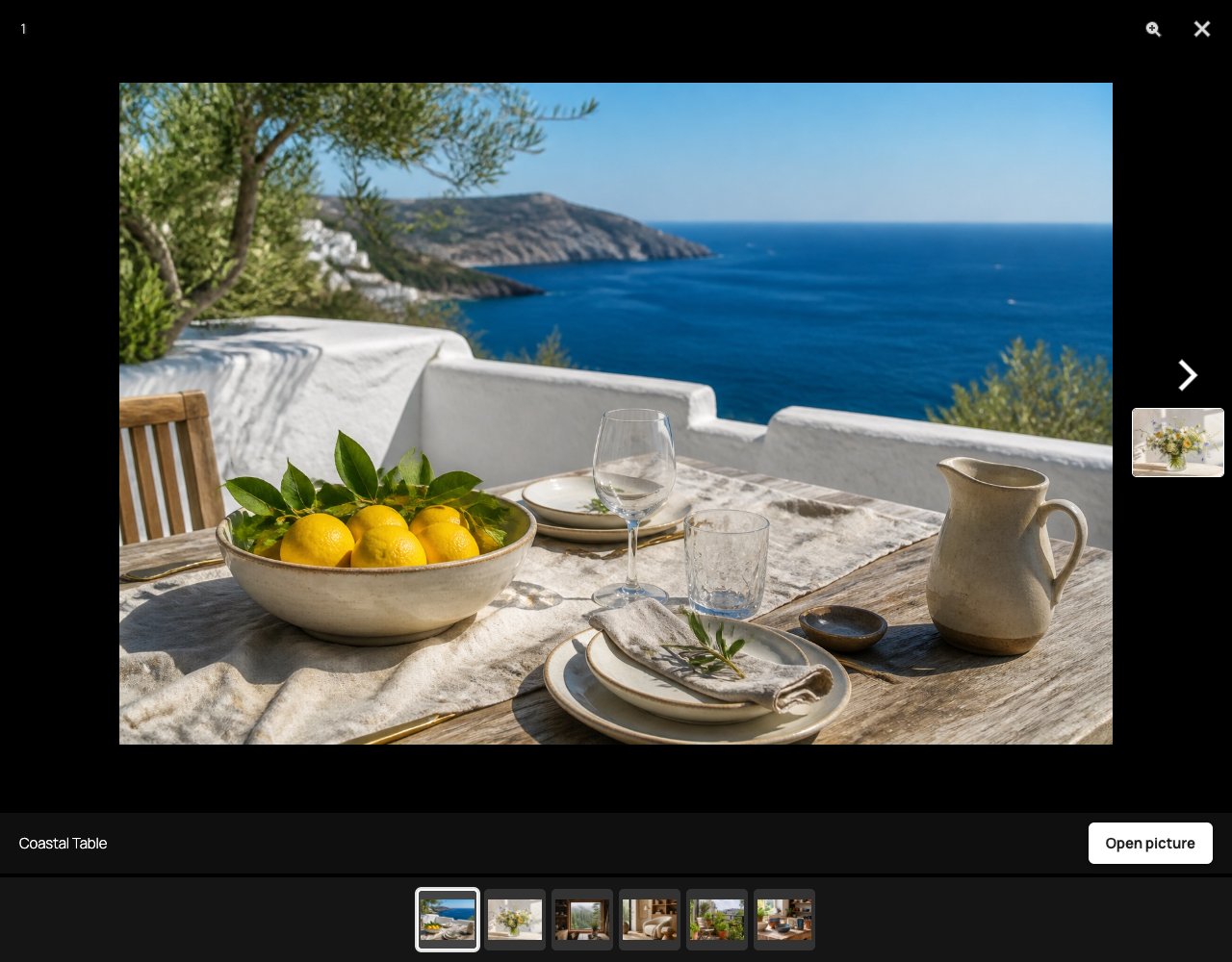


Pour les développeurs
Est-ce votre plugin ? Montrez les chiffres.
Ajoutez un badge en direct à votre site, docs ou github readme. Il se met à jour par lui-même - aucun compte n'est nécessaire.
Best Picture Gallery alternatives
All frontend upload plugins →FAQ
Picture Gallery: quick answers
Réponses directes, extraites des données en direct WordPress.org.
Source : WordPress.org
Is Picture Gallery free?
Yes. Picture Gallery is free to download and use from the official WordPress.org plugin directory.
Is Picture Gallery safe to use in 2026?
Picture Gallery is a solid plugin choice in 2026, with a few things worth checking first. It runs on 400+ sites, is rated 3.7/5 and was last updated 16 hours ago, and scores 77/100 on our health check.
How many websites use Picture Gallery?
Picture Gallery is active on 400+ WordPress websites and has been downloaded 34,783 times since it launched in September 2016. It was downloaded 3,458 times in the last 30 days.
Does Picture Gallery work with WordPress 7.1?
Yes. The developer has tested Picture Gallery up to WordPress 7.1.5, the latest release. It requires WordPress 6.9 or newer.
What PHP version does Picture Gallery need?
Picture Gallery requires PHP 8.2 or higher. Most hosts run PHP 8.x today, so it works on any modern WordPress hosting.
When was Picture Gallery last updated?
The latest version, 1.11.4, was released on November 22, 2026 (16 hours ago).
Who makes Picture Gallery?
Picture Gallery is developed and maintained by videowhisper.
What are the best alternatives to Picture Gallery?
The most popular alternatives to Picture Gallery are ImagePress (200+ installs), ChargeWP (30+ installs) and OptiImage – Upload Optimizer (<10 installs).
Propulsé par PageForge
Un modèle et une feuille de calcul. Une vraie page pour chaque recherche.
PageForge transforme chaque ligne d'un CSV en une page WordPress avec son propre titre, URL, SEO et schéma, construit sur la mise en page que vous Déjà conçu. Gratuit sur WordPress.org.
- CSV et XLSX, plus Google Sheets sur les professionnels et les entreprises
- Son propre titre, URL, SEO champs et schéma pour chaque page
- Fonctionne avec l'éditeur de blocs, Elementor, Divi et Avada
- Gratuit sur WordPress.org, pas de carte de crédit