


PaintClarity
Run your painting business from WordPress: quotes to invoices, crews, scheduling, customers, photos, profit reports, optional AI and card payments.

Choix solide
PaintClarity is a solid plugin choice in 2026, with a few things worth checking first. Was last updated 1 day ago, and scores 64/100 on our health check.
- Développé activement — Dernière mise à jour il y a 1 jour
- Testé avec le dernier WordPress (7.1)
- Petite base d'utilisateurs (<10 installations actives)
- Très peu de critiques jusqu'à présent
Comment s'accumule-t-il ?
Côte à côte sur les installations, les mises à jour, les évaluations et le support



Téléchargements quotidiens
Les pics de téléchargement suivent généralement une nouvelle version - chaque site qui met à jour automatiquement compte comme un téléchargement.
Classements
Where PaintClarity stands todayWordPress.org Classements de recherche
Position en direct dans la recherche de plugins, Top 100| Mot-clé | Position |
|---|---|
| contractor | #71 |
| estimates | >100 |
| invoicing | >100 |
| painting | #16 |
| horaire | >100 |
About PaintClarity
From the official readme · v1.2.095Description
PaintClarity turns your WordPress site into the back office for your painting business. (PaintClarity was formerly known as PaintOps. Same plugin, same team, same data.) Create Quotes, Estimates and Bids your customers can open and sign online. Schedule crews and follow each job from the first request to the final payment. Pro adds online deposits through Stripe and profit reports by job, crew and worker.
It was built by a painter, for painters. The quote builder understands painting scope: interior/exterior components, standard inclusions and exclusions, and the disclaimer language that keeps you out of disputes. Your data lives in your own WordPress database, not locked inside someone else’s SaaS, and the free plugin is a complete system on its own.
Quote to invoice, start to finish
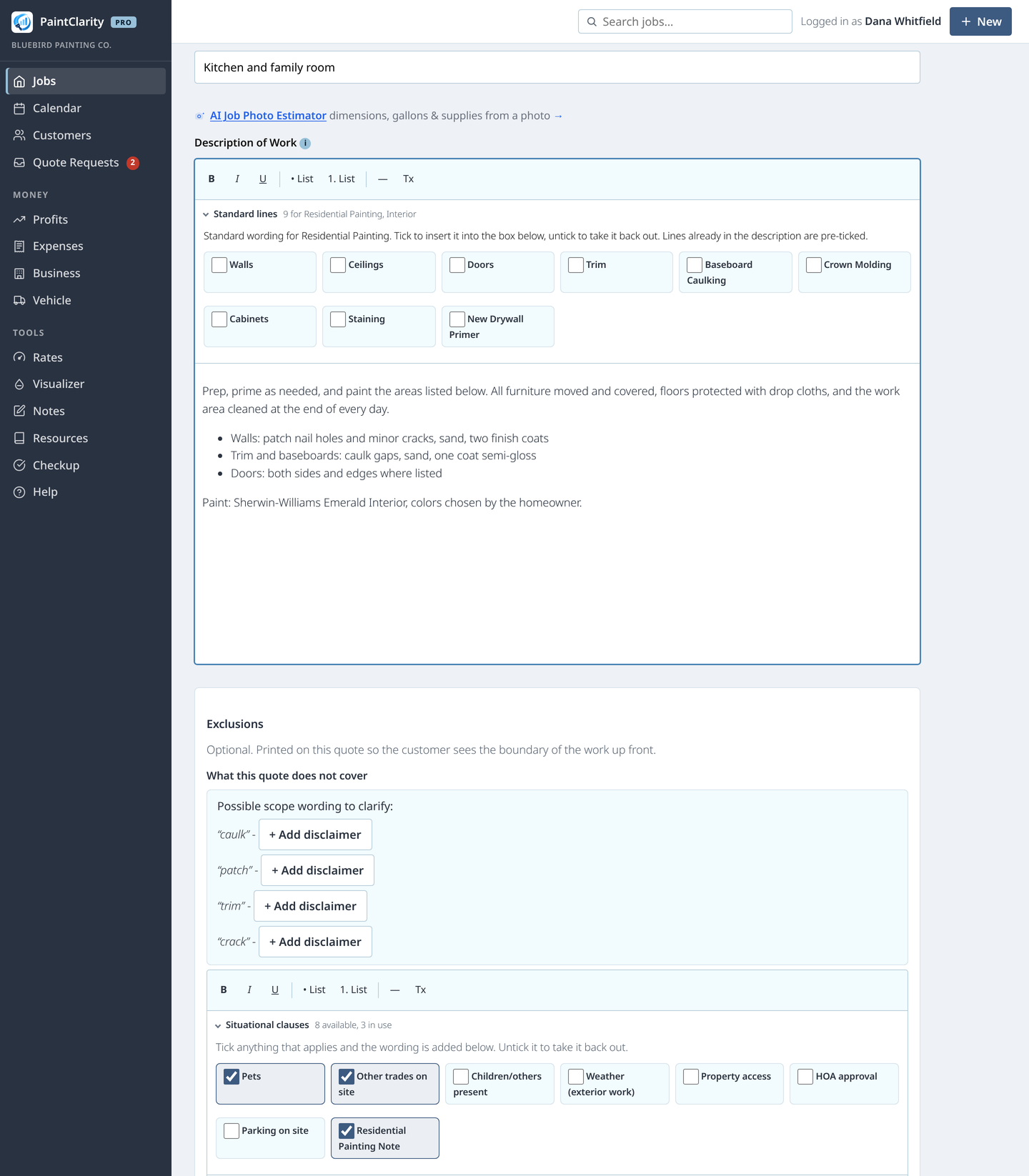
- Quotes, estimates & bids: a scope-aware builder with reusable inclusions/exclusions, itemized or lump-sum pricing, trade calculators that add their numbers straight to the quote, printable output, and email delivery. Preview Online Quote shows you exactly what the customer will see before you send it.
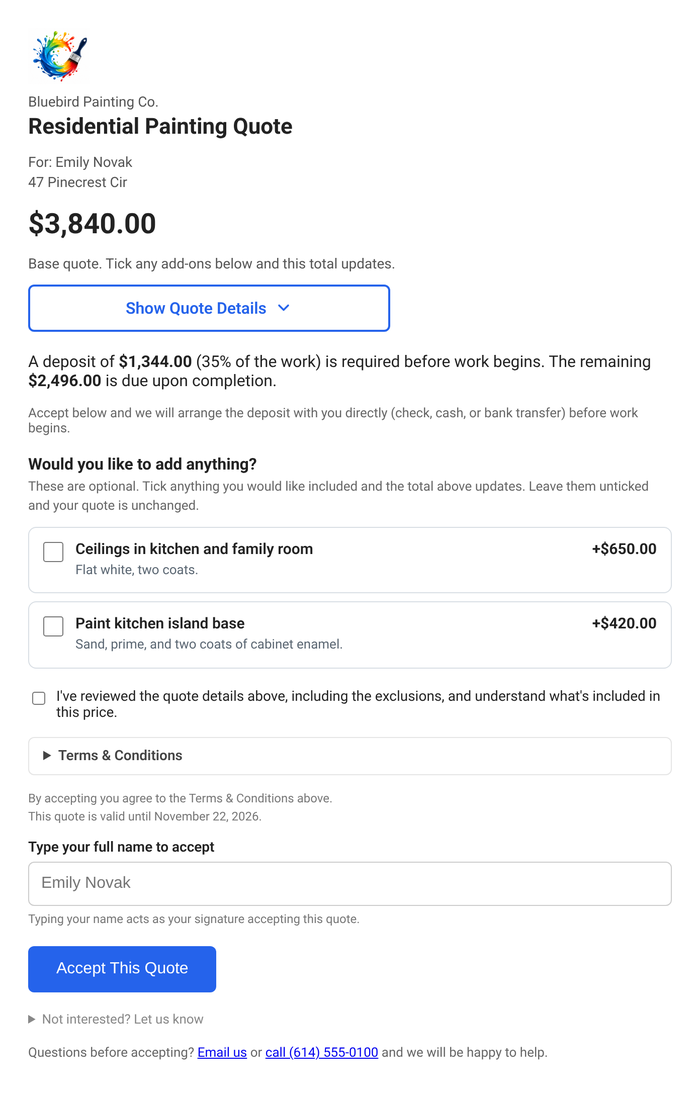
- A professional customer page: your customer opens a clean, branded page (your logo, your terms & conditions) and accepts by typing their name. PaintClarity records the name and time. They can also decline with a reason, or ask a question, and the plugin attempts to email your office either way. You see when the quote was viewed.
- Saving an online acceptance changes the request to a Job. The document keeps its Quote, Estimate or Bid label. For work agreed by phone or in person, choose “Mark as Won, convert to Job” on the request page.
- Payments: every job has a Payments page. Record cash, check, or in-person card payments and refunds, and see Billed, Paid, and Still Owed at a glance. A payment flips the matching invoice to paid, so balances always agree.
- Hours and job receipts: log who worked a job, which day and how many hours (or let the crew’s Time Clock do it), and file receipts against a job from a phone with Add Expense.
- Sales tax, one or two: a default rate plus any number of additional rates, each stamped on the job when it is created so a later rate change never rewrites old paperwork. Provinces that charge GST and PST (or GST and QST) on the same work can enter both, and quotes and invoices print each tax on its own line.
- Communication History: every email the plugin sent, every call or text link tapped, and every conversation you logged by hand, in one place per job, each marked by how much it can be trusted: sent by PaintClarity, link opened, or recorded by hand.
- Receivables at a glance: unpaid invoices surface on your dashboard with amounts and age, and a quote that has gone quiet shows up under Needs Your Attention with a one-tap follow-up email or text.
- Request Performance: how often your quotes turn into jobs, counted per job rather than per revision, so three rounds of edits before a yes count as one win, not two losses.
Running the work
- Jobs, two ways: a row view with Requests, Upcoming, Active, and Completed sections (unpaid balances right on the Completed section), and a board / pipeline view, Quote → Active → Completed, plus a lost-leads drawer with the customer’s decline reason so you can revive the ones worth re-working.
- Follow-up visits without re-entering the job: schedule a callback, a punch list, or approved add-on work (with its own price and balance) against the original job in a short form. It lands on the calendar, the board, and the crew’s phones like any other job.
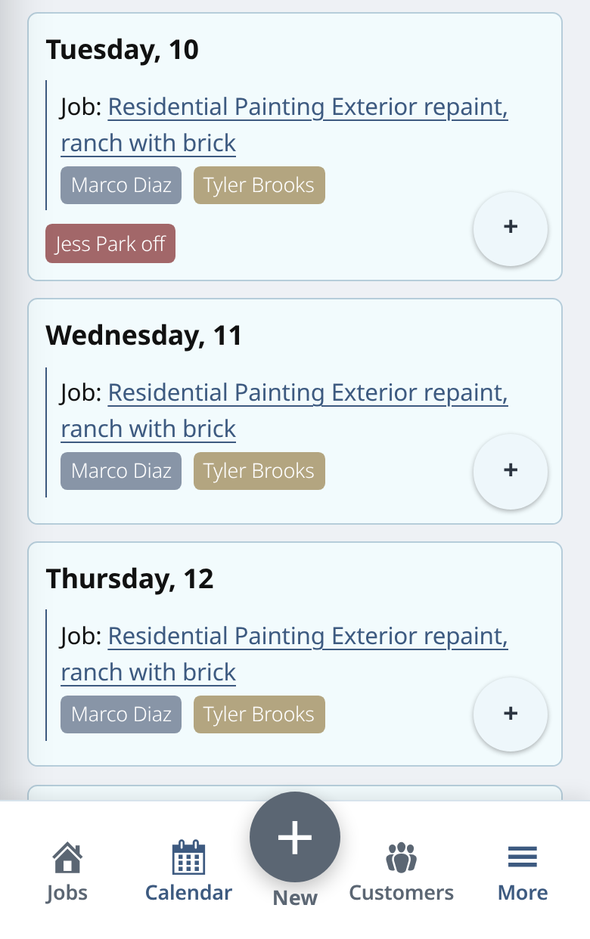
- Scheduling calendar with crew filtering, worker badges, time-off, and a subscribe link for Google/Apple/Outlook. Add your own recurring holiday labels.
- Crews: group your painters into named, colored crews; staff a job with one tap and filter the calendar and reports by crew.
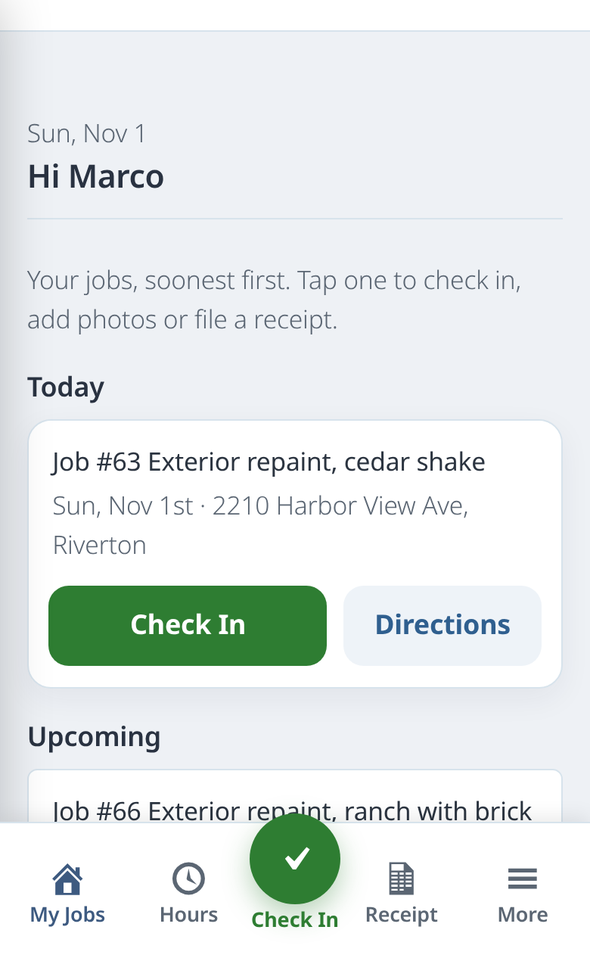
- A real app for your painters: install-to-home-screen (PWA), a “My Jobs” home, one-tap directions (Google/Apple/Waze), per-job check-in/out that works offline and syncs, photo/receipt/note logging, a “My Hours” view of their own time and pay, and a “Mark Job Complete” button that attempts to email the office and tells the worker if the website could not send it. Email delivery is not guaranteed. Workers see only what their permissions allow, never your numbers.
- Production Rates: the one number every quote leans on and most shops only half-remember. PaintClarity already holds the hours and the paintable area of every completed job, so this screen divides one by the other over your recent jobs and shows the work, per job and as a median, measured from your own crews. It measures; it never changes a quote behind your back, and a quiet Use measured rate button copies a figure into your settings only when you press it.
- Business Checkup: nine read-only scans of the whole business on one page: completed jobs with a balance due, jobs past their end date not marked complete, won jobs never scheduled, started jobs with no hours or no expenses logged, requests waiting more than two weeks, requests with no quote document, expenses missing a receipt image, and open records with no phone or email. Every line links to the record so it can be fixed in two clicks. It also tells you when the site is not on HTTPS and which features that holds back.
- Customers: a directory with contact details, lifetime value, job history, and multiple service addresses per customer, built for landlords, realtors, property managers, and GCs whose one account means a dozen properties.
- Bring your existing records: import customers, and jobs and quotes, from a CSV under Settings. The importer recognizes exports from Joist, Housecall Pro, and Jobber as well as a plain spreadsheet, and shows you the column match and exactly what will happen before anything is written.
- Business Notes: a simple notebook for vendor account numbers, insurance renewal dates, and reminders, plus “Add a Note to a Job” to drop a note onto any open job’s log without leaving the page.
- Before/After photos with camera alignment overlay and a compare slider.
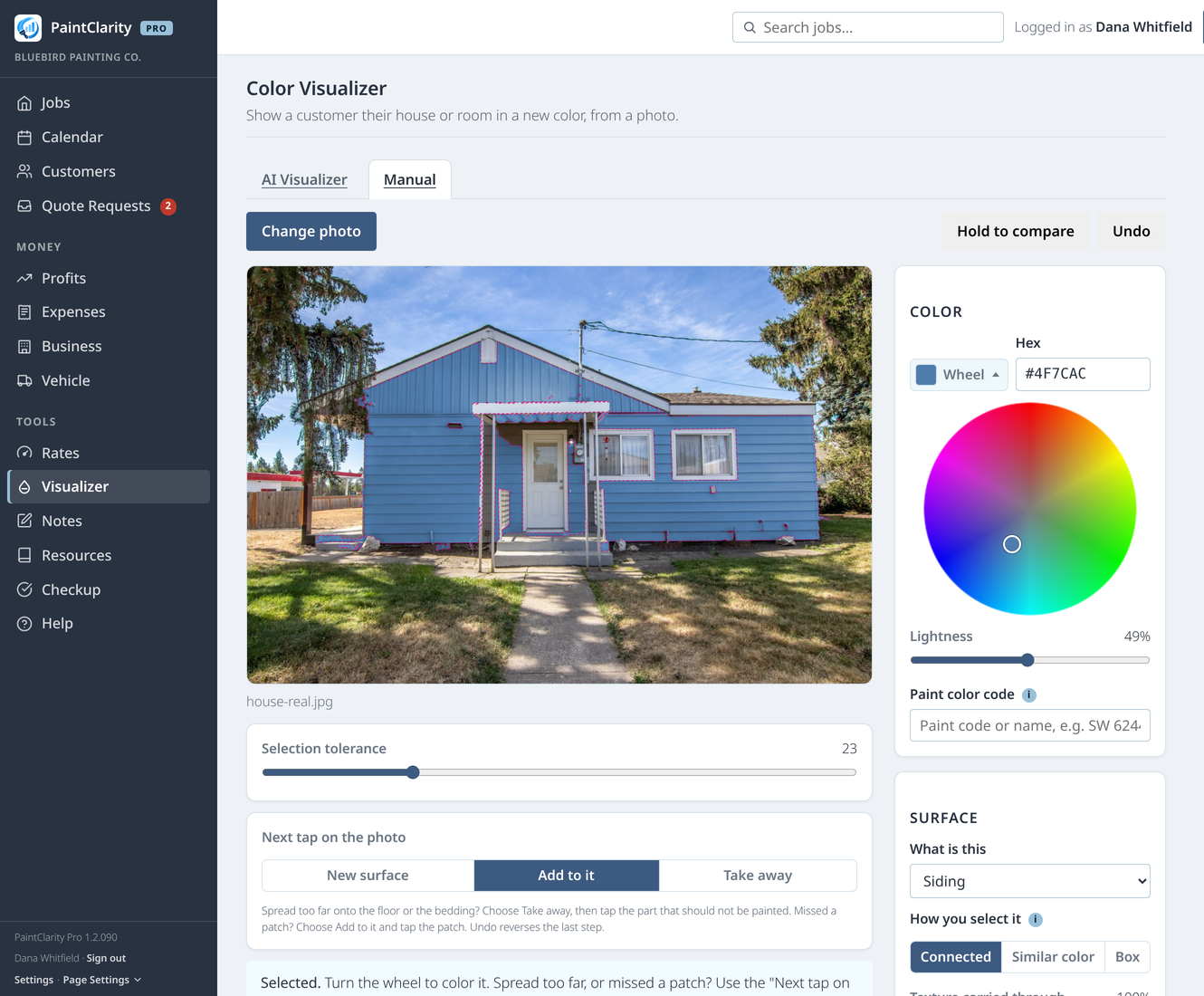
- Color Visualizer: load a photo of the house or the room, select the surface, and turn a color wheel until it is the color you are proposing. The wall changes color and keeps its own shading, grain and texture. Select by fill, by matching color, or by dragging a box over a big flat wall. Handles stucco, siding, brick, concrete block and interior drywall, takes the Sherwin-Williams or Benjamin Moore number alongside it, and prints or saves the render for the customer. The Manual tab runs entirely in your browser: no photo is uploaded anywhere.
- AI Visualizer (Pro): the other tab. Upload or take a photo, pick colors by brand and name from the Sherwin-Williams and Benjamin Moore books, add a note like “paint the stone wall too, in Alabaster”, and get back a realistic repainted photo to show the customer. This tab sends the photo to OpenAI under your own API key (Settings > AI), billed to your OpenAI account at a few cents per render. Renders can be saved to the job’s photos. Colors on screen are approximate; brand and color names are trademarks of their owners and PaintClarity is not affiliated with any paint manufacturer.
- Trade calculators, paint-color tracking, and resource links.
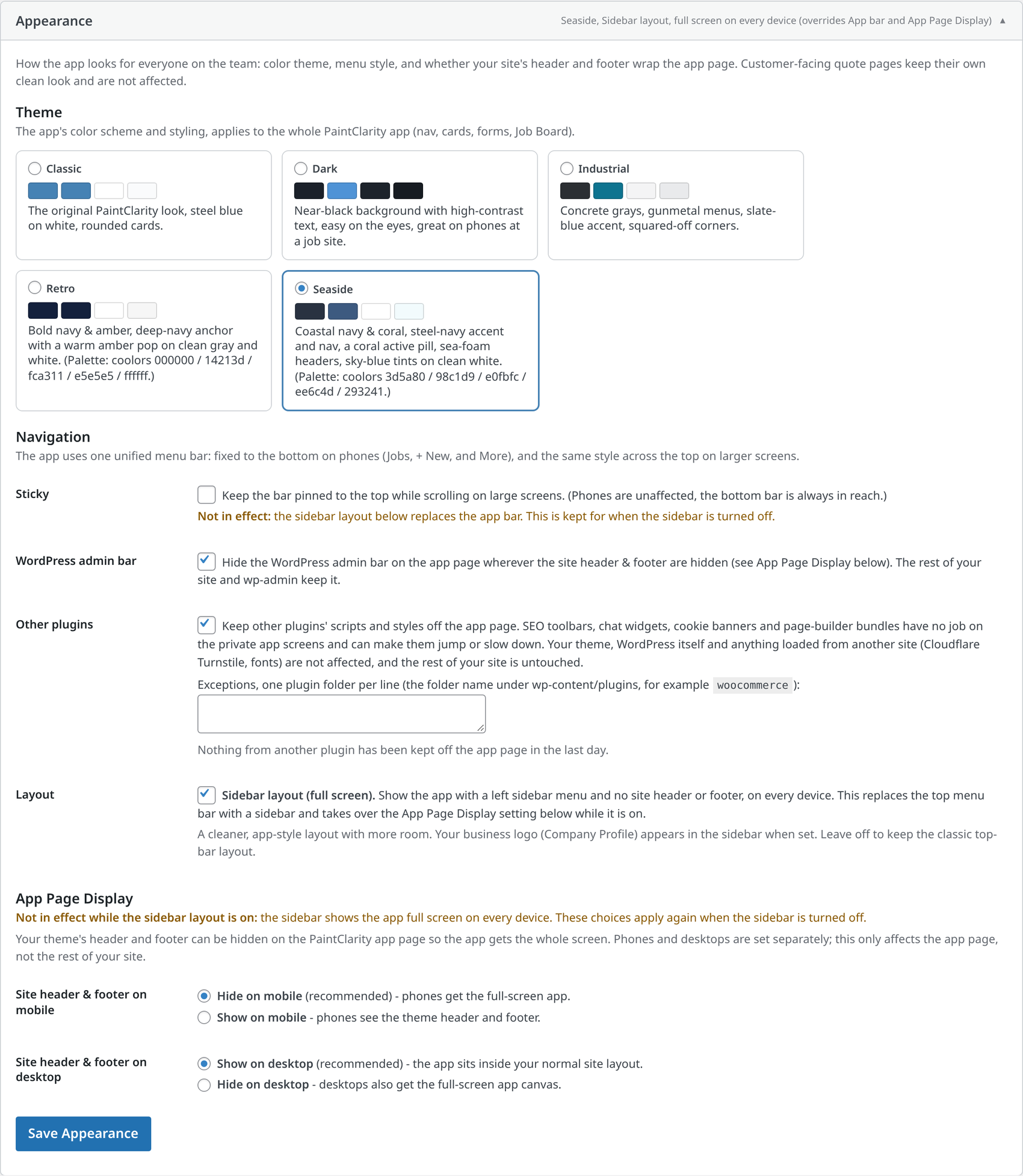
- A choice of visual themes (light, dark, industrial, and more) with a modern app-style navigation bar on desktop and phone, or a full-screen sidebar layout that hides the site’s header and footer.
- Works with your browser’s translation. The app’s own text is English. Chrome, Safari and Edge page translation, and front-end translation plugins, are supported: customer names, addresses, amounts, dates, job numbers and paint color codes are marked so they stay exactly as entered.
- Help built in: a five-minute walkthrough video with chapter links, a setup checklist, and a Setup Health panel that says what is still missing before the first quote goes out.
Ce que Pro ajoute
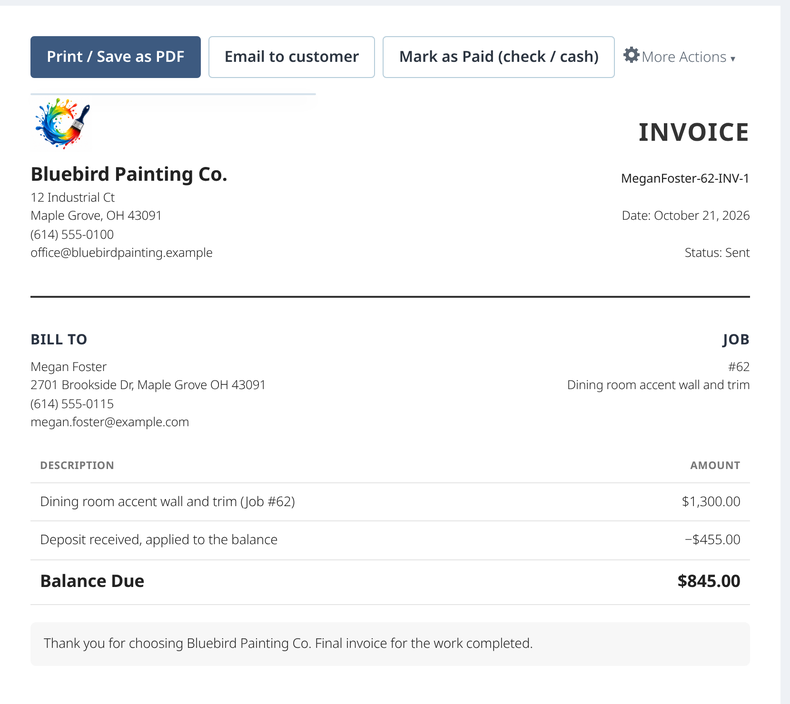
- Invoices: numbered invoices for the balance (full or partial), emailed or shared by link, payable online through Stripe or marked paid for check/cash. Invoicing more than the job is billing asks first, so a number never slips past you. On the free plugin, invoices already sent stay viewable and can still be marked paid.
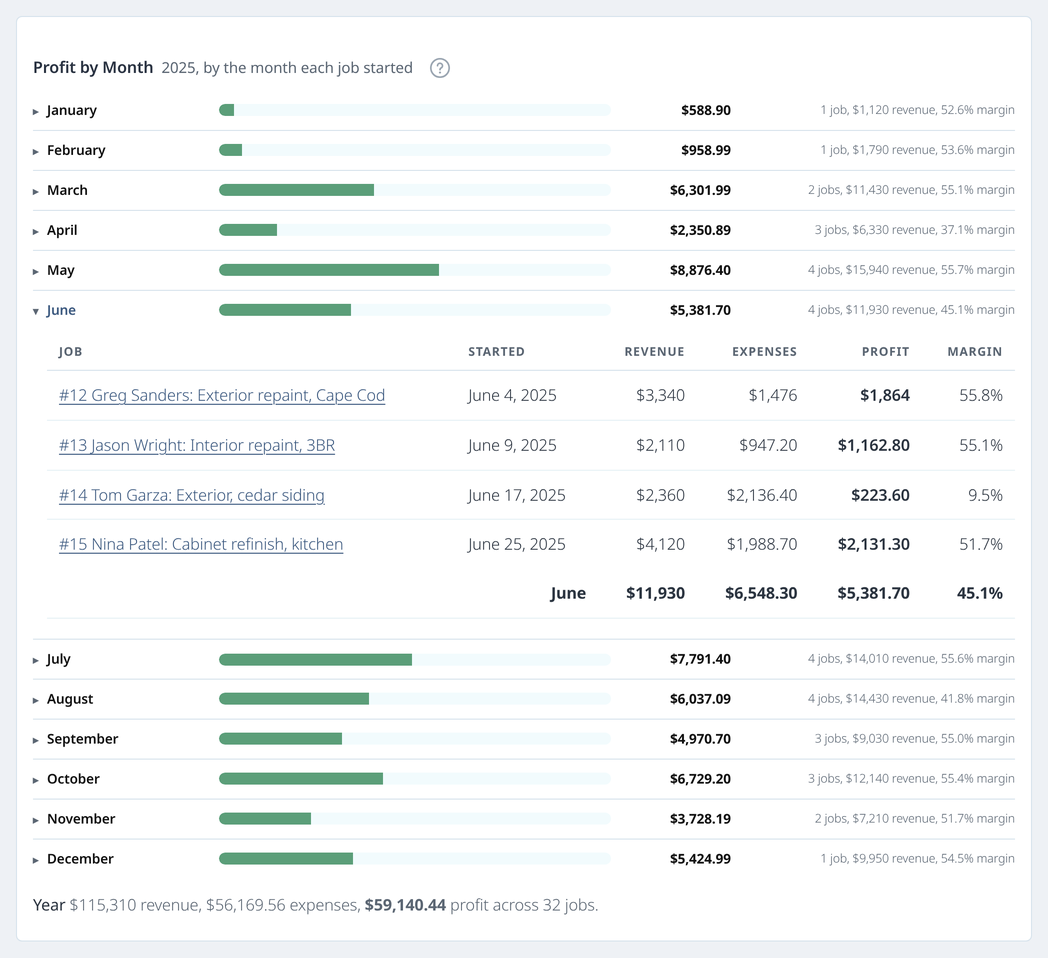
- Job financials & profitability: one Financials page per job for costs, materials, expenses, hours and pay; gross, profit, and margin per job; a Profits dashboard with profit-by-classification, profit-per-hour rankings, and profit by crew and by worker (allocated by logged hours).
- Job Pulse: one page that answers “how is this job doing?” in whatever terms apply right now: a quote waiting on the customer, a job about to start, a job that is running (hours against the quote’s labor, payroll against the price), or a finished job’s after-action review.
- Expense reporting: the Expenses page (a year of spending by category and month), business overhead and vehicle expense tracking, spend by vendor, and a duplicate-receipt finder. Filing job receipts and logging hours are free.
- Business Financial Report for your accountant: income and expenses for the year, with sales tax to remit by filing period, one table per tax name and rate, by quarter or by month, on a cash basis following the payment date.
- A quote request form for your website: add
[paintops_quote_form]to a page so customers can ask for a price. Saved website inquiries appear in Leads, unless they need a check first. Those wait on the Unverified tab in Quote Requests. Spam checks help you sort them. Optional Cloudflare Turnstile adds another spam check. Requests that cannot be checked or do not pass can be saved in Unverified requests for you to review. These are set to be deleted 30 days after they arrive. Some requests cannot be saved, including ones over the form limits. Convert to Request opens a new request form. Choose Quote, Estimate, Bid or Job, then save to create the record. You are asked to check any possible match with an existing customer.
The form allows 5 requests per internet address (IP address) per hour, 100 across your website per hour and 500 across your website per day. With Turnstile on, requests that pass the spam check do not count toward the website limits. Limits also apply to how much can be entered in one request. Office alerts about Unverified requests follow your email settings, or come once a week if you choose, and are never sent more than once an hour. A passed spam check does not guarantee a genuine customer.
* Online payments: deposits on quote acceptance and invoice balances through Stripe Checkout, recorded automatically.
* AI tools (bring your own OpenAI key): every AI feature is Pro. Estimate dimensions, gallons, and a Description of Work from a photo; scan receipts to auto-fill expenses and suggest a category; get feedback on, a rewrite of, or a materials list for your quote wording; AI Visualizer renders; plain-language Job Pulse, variance and profit summaries; draft a payment reminder for an unpaid invoice; suggest resource links.
Pro is a paid upgrade handled through Freemius. The free plugin is fully functional on its own; Pro is optional.
Bundled artwork
The four ready-made logos offered under Business > Logo URL (assets/img/logos/) are AI-generated original artwork created for this plugin. They carry no third-party rights and are distributed under the same GPLv2-or-later license as the rest of the plugin. They are optional, off by default, and carry no PaintClarity branding or link.
Services externes
This plugin can connect to the following third-party services. Some are optional and only run when you enable and configure the corresponding feature.
OpenAI (Pro AI features, optional). Uses your own OpenAI API key. Nothing is sent until you press an AI button, and then only what that tool needs goes to https://api.openai.com: Photo Estimate sends the photos you pick; Receipt Scan (job, business and vehicle receipts) sends the receipt image or PDF; Quote Feedback, Rewrite and Materials List send the quote’s Description of Work; the AI Visualizer sends the house or room photo and your color note; Job Pulse, Variance and Profit Summary send that job’s calculated figures; Invoice Reminder sends your business name, the customer’s first name, the amount, invoice number and pay link; Expense Category sends the vendor name and note; Resource Suggestions sends your job categories and recent job titles. The AI Visualizer also reads your account’s model list (https://api.openai.com/v1/models) to pick an image model. See OpenAI’s Terms (https://openai.com/policies/terms-of-use) and Privacy Policy (https://openai.com/policies/privacy-policy).
Cloudflare Turnstile (Pro quote request form, optional). If you add Turnstile keys, the quote request form loads Cloudflare’s check from https://challenges.cloudflare.com, and on submit your site sends a short check result (called a token), your private Cloudflare key and the visitor’s internet address (IP address) to Cloudflare to check the result. A successful check does not guarantee that a request is genuine. See Cloudflare’s Terms (https://www.cloudflare.com/terms/) and Turnstile Privacy Addendum (https://www.cloudflare.com/turnstile-privacy-policy/).
Stripe (Pro online payments, optional). If you enable card payments and a customer pays online, the plugin creates a Stripe Checkout session and verifies Stripe’s webhook using your own Stripe keys. Order/amount details are exchanged with Stripe to process the payment. Requests go to https://api.stripe.com. See Stripe’s Services Agreement (https://stripe.com/legal/ssa) and Privacy Policy (https://stripe.com/privacy).
Google Maps Platform (optional). If you add a Google Maps API key, address fields use Google Places/Geocoding for autocomplete and validation, and job locations may be shown on an embedded map. The address text you type is sent to Google to return suggestions. Requests go to https://maps.googleapis.com and related Google Maps endpoints. See Google’s Terms (https://cloud.google.com/maps-platform/terms) and Privacy Policy (https://policies.google.com/privacy). (One-tap turn-by-turn Directions for your crew use keyless map links and need no API key.)
YouTube and Vimeo (Resources page video embeds, optional). The Resources page (staff-facing, inside your admin area) lets you save links to training videos, and seeds a starter list of publicly available painting tutorials on YouTube. When a staff member clicks a saved YouTube or Vimeo link’s play button, the video is embedded on the page via the provider’s standard embed player (www.youtube.com / player.vimeo.com), which loads content from that provider and is subject to its terms; no data is sent until the play button is clicked, and you can delete any or all saved links. See YouTube’s Terms (https://www.youtube.com/t/terms) and Google’s Privacy Policy (https://policies.google.com/privacy), and Vimeo’s Terms (https://vimeo.com/terms) and Privacy Policy (https://vimeo.com/privacy).
Freemius (licensing & updates). PaintClarity uses the Freemius SDK to manage Pro licenses, deliver Pro updates, and (optionally) collect anonymous usage diagnostics you can opt out of. Site and license information is exchanged with Freemius. See Freemius’s Terms (https://freemius.com/terms/) and Privacy Policy (https://freemius.com/privacy/).
Some services need a private setup key before they can be used. Others, such as license checks, updates, videos you play and links you open, can contact …
Installation
- Install PaintClarity from the Plugins screen (Plugins → Add New → search “PaintClarity”), or upload the plugin ZIP under Plugins → Add New → Upload Plugin. Activate it.
- Create a WordPress Page and add the shortcode
[paintops_app]. This one page is your whole PaintClarity app; it routes internally. - Go to PaintClarity → Settings and set your Company Profile (business name, logo, country, currency), and review the Setup Health panel.
- (Optional) Add team members under PaintClarity → Painters/Helpers, set their permissions, and group them into Crews.
- (Optional) Add your Quote Terms & Conditions under Business Settings so customers see and sign against them.
- (Optional, Pro) Under Settings → AI Settings connect OpenAI, and under Stripe Payments add your Stripe secret key AND webhook signing secret (both are required before online payment buttons appear). (Optional, any plan) Add a Google Maps API key for address autocomplete.
Journal de modifications
A $0 quote cannot be emailed, and saving one as $0 asks you to confirm. New customers need a name plus a phone or an email. After you send a quote, the page says it was sent. On a new request, Create Quote is the big button. Customer said no waits until a document exists. On a phone, the job list comes first.
1.2.095
- Fixed: a quote, estimate or bid at $0 cannot be emailed. Saving one as $0 asks you to confirm first.
- Fixed: a new customer needs a name plus a phone number or an email. The same rule applies when you save an edit. Existing incomplete customers are not changed until you save them.
- Fixed: the email subject is no longer a bare “Quote For ” when the job has no title. It uses the customer name, the address, or your business name instead.
- Fixed: standard notes that start ticked (pets, other trades, color approval) are named at the top of Exclusions, so you can untick any you do not want. Existing sites keep their saved defaults.
- Fixed: if your business name is missing, you are warned before sending, and the customer’s page uses the site title so it is not blank.
- Added: after you email a quote, estimate or bid, the page says it was sent, with a way back to the job or to send it to someone else. The document and the job also show when it was sent.
- Changed: on a new request, the big button is Create Quote (or Estimate or Bid). After a document exists, it is Email until sent, then Customer said yes. Customer said no waits until then too. Yes and no ask you to confirm. Those next-step buttons are a little smaller.
- Changed: on a phone, the job list comes first, with one setup card under it, even on a brand-new site. Requests open when there are no jobs yet.
- Changed: on a phone, job actions open upward so they are not hidden by the bottom bar, the Save bar is slimmer, and Check Out uses a stop square instead of a pause icon.
- Changed: date and arrival time on a new request are optional and start as “Not scheduled yet.”
- Fixed: updates from much older versions are safer if several pages load at once or the update stops partway.
1.2.094
- Added: a note on the Jobs page when old records may say Quote by mistake. Only administrators see it. Hide this puts it away.
- Added: Leave as Quote on the Old Records Saved as Quote list. It hides a record you checked and changes nothing on it. Bring it back from Hidden, or with Undo.
- Changed: the Old Records Saved as Quote screen explains the old mistake in plainer words.
- Changed (Pro): security update for the viewer that prints PDF receipts in expense and vehicle reports (pdf.js 5.7). In a very old browser, each PDF still opens from its link.
- Changed (Pro): Unverified requests moved into Quote Requests in the app, as the Unverified tab with a count. They also count in the number next to Quote Requests in the menu, and on the More button on a phone. Add to Leads, Delete and the weekly email choice (now “Once a week, on Mondays”) are all there now. The Unverified requests item in the WordPress menu is gone. Old links and alert emails open the new tab.
- Fixed: initials in the app menu and in the crew circles keep an accented first letter whole. “Émile Ñuñez” now shows ÉÑ.
1.2.093
- Added: Old Records Saved as Quote, under Settings. Before 1.2.091, saving a record as a Job could switch an Estimate or Bid back to Quote. The list shows those records. Change back the surest ones one at a time, with Undo.
- Added (Pro): a choice to get Unverified requests by email once a week, as a summary on Monday. Emails about new requests in Leads do not change.
- Changed: Estimates and Bids say Estimate or Bid everywhere, including the customer page, buttons, page titles, follow-up emails, the board and Job Pulse. Website quote requests still say quote.
- Changed: links to install a plugin in Setup Health open WordPress’s own install screen, also on multisite.
- Changed: PaintClarity recognizes more email (SMTP) plugins and names the one in use, so it stops warning when your email is set up.
- Changed (Pro): the spam check warning clears when you save new Turnstile keys, and old misses stop counting after 7 days.
- Changed (Pro): with Turnstile on, requests that pass the spam check do not count toward the website-wide form limits.
- Changed: on Free, a new request starts on “No deposit required”. Pro with Stripe still starts on a card deposit online.
- Changed: saving the Company Profile no longer puts the starter Terms on your quotes. Edit them, or tick “Use these terms on my quotes as they are”, then save.
- Changed: the Add to Home Screen bar sits in the Jobs page instead of floating over it, and shows only on https sites once Start here is done.
- Changed: the Google Maps note on the customer form is a calm hint, not a red error. The https note is calmer outside Setup Health.
- Fixed: if a check-in or check-out does not save, the phone keeps it and keeps trying. It is never saved twice.
- Fixed: Mark Job Complete works with no signal. It is sent when the signal is back, unless the office changed the job first.
- Fixed: on phones, a field you tap is no longer hidden under the bottom menu or the Save bar. Save Customer no longer covers City, State and Zip.
- Fixed: on WordPress 7, the Change back confirm page no longer shows the list behind it.
- Fixed: opening the app, importing requests and voiding an invoice no longer stop with an error on web hosts without the PHP mbstring extension.
- Fixed: security hardening for the quote form, crew time taps, paint color links, Pricing Rules and page titles.
- Fixed (Pro): turning PaintClarity off deletes Unverified requests that are already past their 30 days.
The full history is in changelog.txt in the plugin folder.
Captures d'écran
Pour les développeurs
Est-ce votre plugin ? Montrez les chiffres.
Ajoutez un badge en direct à votre site, docs ou github readme. Il se met à jour par lui-même - aucun compte n'est nécessaire.
Best PaintClarity alternatives
All contractor plugins →




FAQ
PaintClarity: quick answers
Réponses directes, extraites des données en direct WordPress.org.
Source : WordPress.org
Is PaintClarity free?
Yes. PaintClarity is free to download and use from the official WordPress.org plugin directory.
Is PaintClarity safe to use in 2026?
PaintClarity is a solid plugin choice in 2026, with a few things worth checking first. Was last updated 1 day ago, and scores 64/100 on our health check.
How many websites use PaintClarity?
PaintClarity is active on <10 WordPress websites and has been downloaded 2,498 times since it launched in July 2026. It was downloaded 639 times in the last 30 days.
Does PaintClarity work with WordPress 7.1?
Yes. The developer has tested PaintClarity up to WordPress 7.1.5, the latest release. It requires WordPress 6.2 or newer.
What PHP version does PaintClarity need?
PaintClarity requires PHP 7.4 or higher. Most hosts run PHP 8.x today, so it works on any modern WordPress hosting.
When was PaintClarity last updated?
The latest version, 1.2.095, was released on November 28, 2026 (1 day ago).
Who makes PaintClarity?
PaintClarity is developed and maintained by paintops.
What are the best alternatives to PaintClarity?
The most popular alternatives to PaintClarity are Contractor Commerce Integra… (20+ installs), Primiko (<10 installs) and Smart Home Remodeling Cost… (<10 installs).
Propulsé par PageForge
Un modèle et une feuille de calcul. Une vraie page pour chaque recherche.
PageForge transforme chaque ligne d'un CSV en une page WordPress avec son propre titre, URL, SEO et schéma, construit sur la mise en page que vous Déjà conçu. Gratuit sur WordPress.org.
- CSV et XLSX, plus Google Sheets sur les professionnels et les entreprises
- Son propre titre, URL, SEO champs et schéma pour chaque page
- Fonctionne avec l'éditeur de blocs, Elementor, Divi et Avada
- Gratuit sur WordPress.org, pas de carte de crédit