


Page and Post Restriction
Restrict content access for WordPress (WP) | Restrict pages/posts in WP based on user roles and login status to protect content

Choix solide
Page and Post Restriction is a solid plugin choice in 2026, with a few things worth checking first. It runs on 1K+ sites, is rated 4.3/5 and was last updated 2 days ago, and scores 79/100 on our health check.
- Développé activement — Dernière mise à jour il y a 2 jours
- Testé avec le dernier WordPress (7.1)
- Momentum — downloads up 16.5% vs the previous 30 days
Comment s'accumule-t-il ?
Côte à côte sur les installations, les mises à jour, les évaluations et le support



Téléchargements quotidiens
Les pics de téléchargement suivent généralement une nouvelle version - chaque site qui met à jour automatiquement compte comme un téléchargement.
Classements
Where Page and Post Restriction stands todayWordPress.org Classements de recherche
Position en direct dans la recherche de plugins, Top 100| Mot-clé | Position |
|---|---|
| content restriction | #11 |
| page restriction | #3 |
| Post Restriction | #2 |
| Restrict access | #54 |
| restrict content | #55 |
Adoption de version
Part de sites actifs par version.
Répartition des notes
★★★★★★★★★★ 4.3 from 16 reviews
About Page and Post Restriction
À partir du Lisezmoi officiel · v1.7.0Description
CONTENT RESTRICTION / PAGE POST RESTRICTION | PROTECT CONTENT FOR WORDPRESS
Content Restriction lets you control who can view the pages and posts of your WordPress site as they browse it. This includes Page Restriction and Post Restriction i.e. Content restriction according to User Roles. You can Protect content by setting consent for single-entity users on WordPress sites based on their roles. Here a user role has permission to access a page; the authorization enables access to that user. By default, all roles will have access to the content of the page.
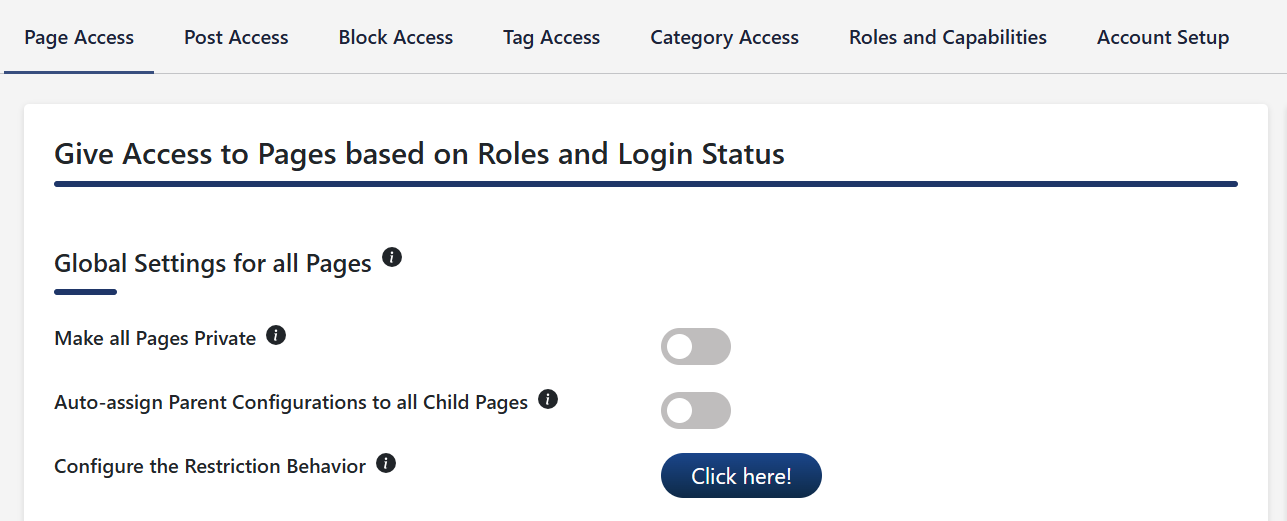
Page Restriction provides page protection by allowing content access to only Logged In Users to specific or all pages. Restrict access of your pages to logged-out users by showing them an error message letting them know they do not have permission to look into the content on the particular page.
Besides Page Restrictions, we also provide Post Restrictions (Content restriction) feature which helps to Protect content by Restricting access for posts on logged-in/out status to users or specific user roles. Users who do not have permission to view a restricted page or post are shown an error message instead of its content. The premium version extends this to categories and custom post types, and lets you display a custom message or redirect users to a specified URL.
Content Restriction also includes role-based capabilities which help in creating new custom roles and provide capabilities. You can create roles and customize them by assigning various WordPress capabilities to them according to requirements. You can also restrict content of your WordPress according to these custom roles with the help of our roles and capabilities feature.
We provide integration with SAML Single Sign-On (SAML SSO) and OAuth Single Sign-On (OAuth SSO) which helps in content restriction and allows content access to only those users who are authenticated by the configured Identity Provider or the Identity Server.
CONTENT RESTRICTION – FREE VERSION FEATURES
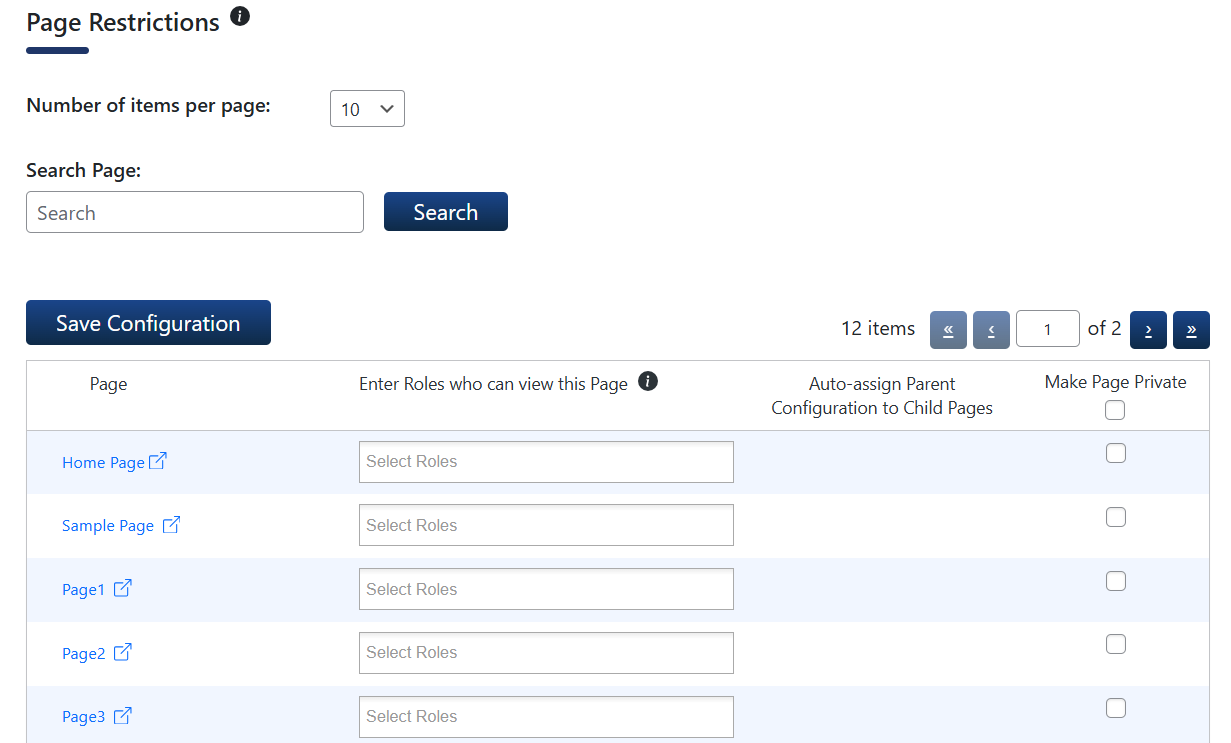
- Page restriction: Restrict pages / Protect Content / Restrict user access by applying Page restriction on all or specific pages of your site. You can apply Page restriction to all the pages or restrict particular pages from the users that are not logged-in. Restricted users will be shown a static / default error message
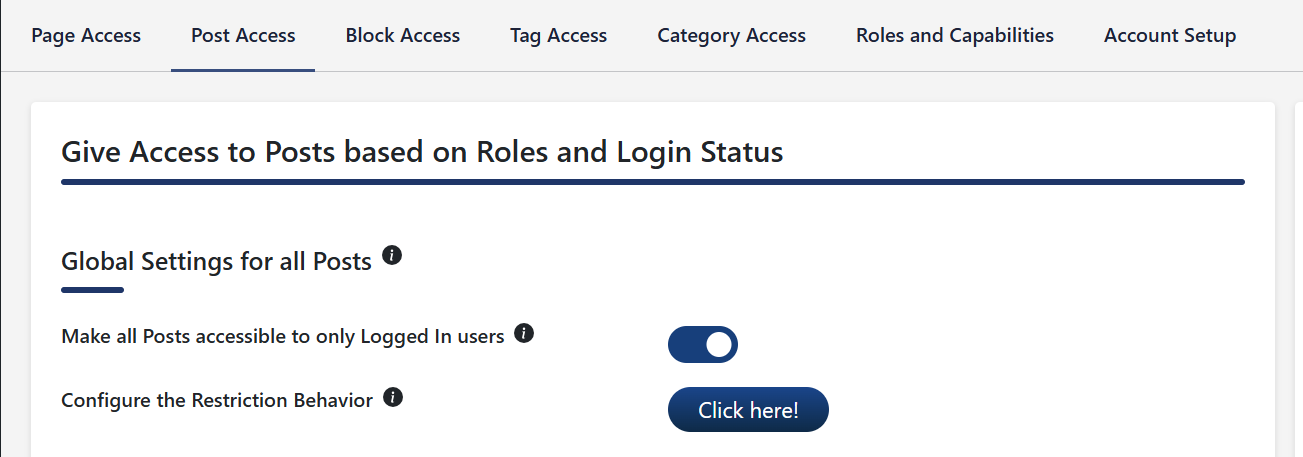
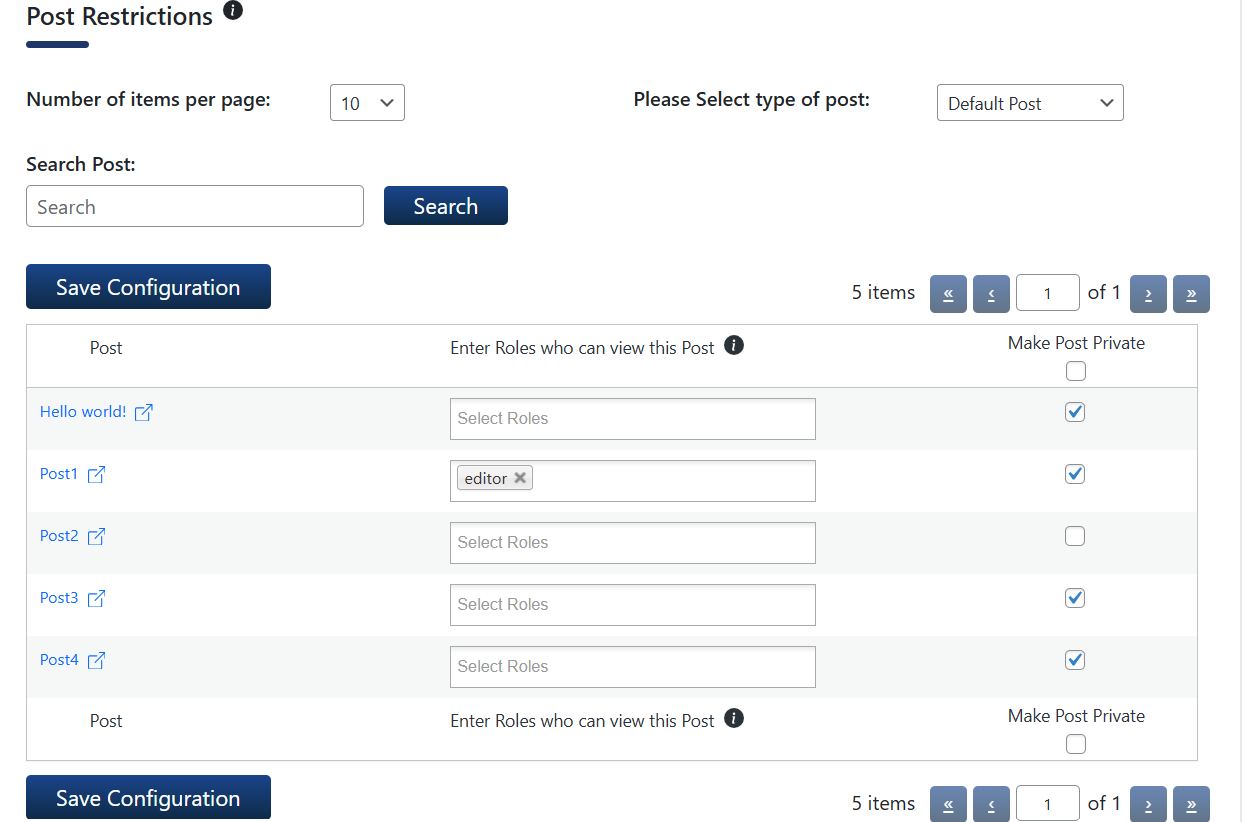
- Post restriction: Restrict access for individual posts. Restrict user access by applying Post restriction on all or specific posts. Restrict posts by showing a static / default error message to the users who do not have permission to access the content
- Site restriction: You can enable site restriction and restrict access of your site to logged-in users and restrict/protect content of your site from those who are not logged- in. Site restriction applies to all the pages and posts of your site, so users who are not logged in won’t have access to their content. Restricted users will be shown a static / default error message.
- Content Restriction based on user login status: Restrict content (Page restriction | Post restriction | site restriction) and allow only logged-in users the content access. Protect content from those who are not logged-in users of the site. Those who are not logged-in won’t have the content access and will be shown a static / default error restriction message
- Restrict content based on one or more WordPress Roles: This option allows content restriction according to the roles. Assign roles to the users and then give the content access according to the roles assigned to the users. Protect content confidential to a specific user role by restricting other user roles.
- Restrict Pages/Posts while Creating (Meta Box): Page restriction / Post restriction option while creating a particular page or post. This provides page restriction and Post restriction options to users while creating and editing posts/pages. This shows all the site’s user roles based on which Page restriction and Post restriction can be made. The meta box also asks if login is required to access the page/post.
- Restrict all of your WordPress pages or posts: this option allows you to restrict all the pages or posts available on your WordPress site. This option gives an effortless experience if you want to restrict pages, restrict posts or restrict content as you don’t have to list down individual pages or posts to restrict them from unauthorized users. A convenient way to protect all of your content in one step.
- Unlimited WordPress Content restriction: Restrict pages | Restrict posts | Restrict content to an unlimited extent. Any number of Page restrictions | Post restriction | Content restriction is allowed. The Page Restriction Plugin can work with large number of pages, posts and other WordPress content without overloading your servers. You can restrict as many pages / posts as you have in your WordPress and control which users can view them.
- Static Error Message: Protect content by restricting users who do not have permission to view the content by redirecting to a static / default error message.
- Apply Parent Page Post Restriction to all Child Pages: Configure restrictions for the parent page and apply to all its child pages. Choose which parent page’s restrictions should be applied to its child pages.
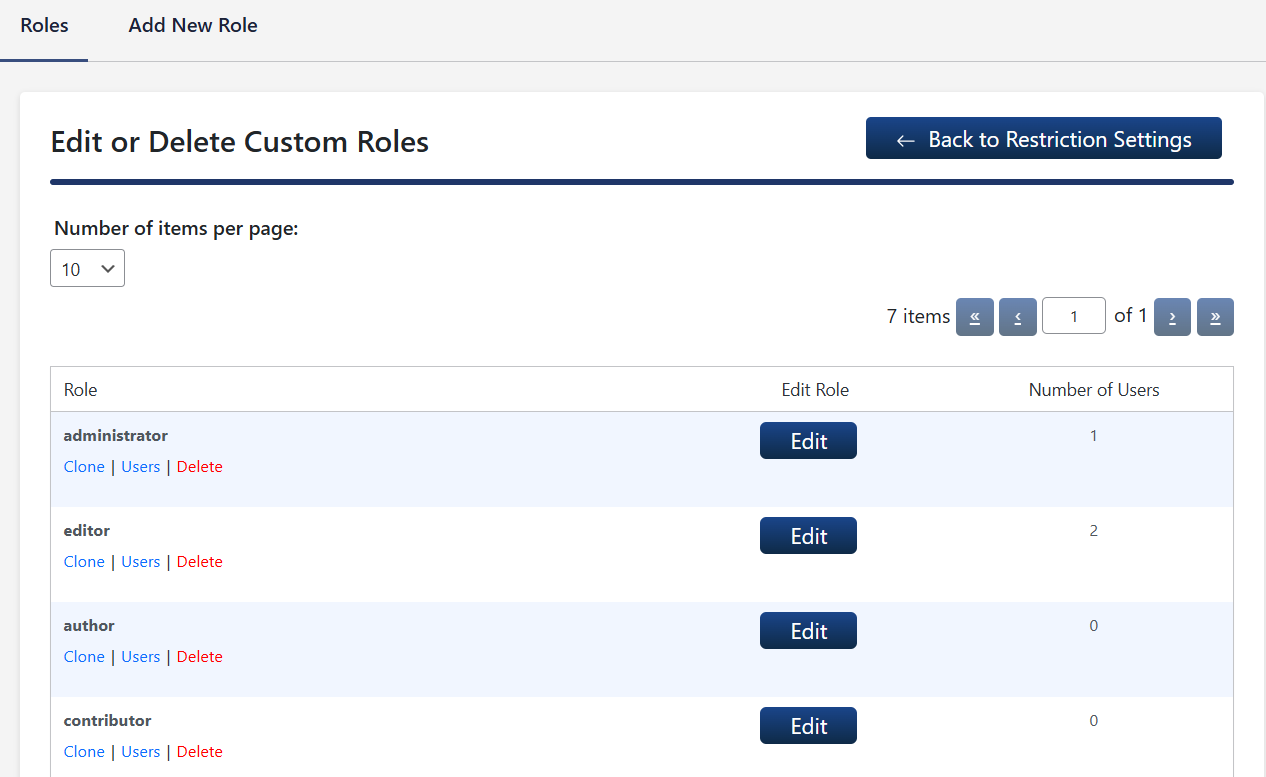
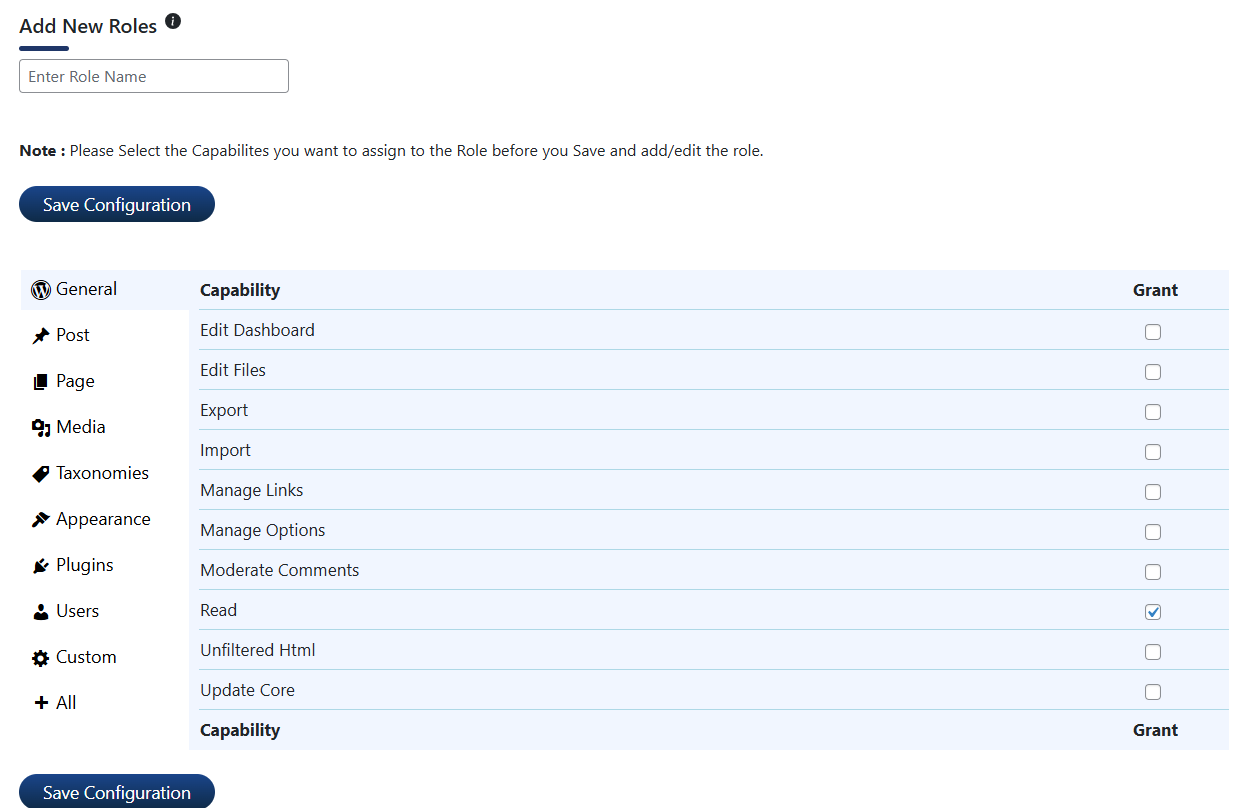
- Create New Roles: The Page restriction and post restriction plugin allows you to create new WordPress Roles and assign capabilities as per the requirements. Create unlimited custom roles in your WordPress and protect content according to the user roles created
- Modify Role Capabilities: Apply different WordPress capabilities to the roles created. Users will be able to update the capabilities of the new roles created as well as modify the capabilities of the custom roles. You can assign / delete / update new capabilities to the default WordPress roles
- Update existing Roles: Default existing roles can be updated according to the requirements of the users. With the Page restriction plugin, users will be able to edit role names, delete or update roles, create a copy of an existing role etc.
- Restrict using Quick Edit: Page Restriction / Post Restriction Plugin gives an option of quick edit on the restriction interface to make it convenient for you to edit the content restriction settings without going to the very restricted content.
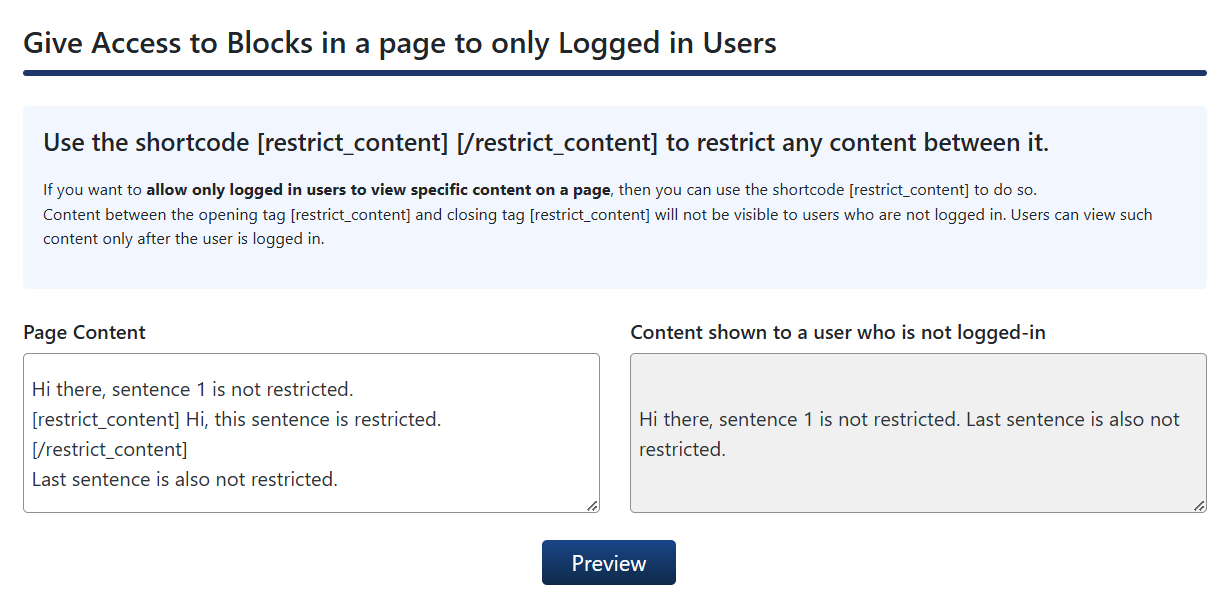
- Restrict specific blocks/excerpts in a Page/Post: Restrict specific blocks in the content of pages or posts. Use opening and closing tags of the shortcode anywhere in the page/post to restrict the access to the content present in the between the tags of the shortcode.
Note: Restrictions in the free version apply to pages and posts as visitors view them on your site. Files in the Media Library, and content accessed by other means such as apps or third-party integrations, are not restricted. Contact us if you need broader content protection.
PAGE RESTRICTION – PREMIUM VERSION FEATURES
- All features of the free version
- Restrict Tags: Restrict users from accessing specific tags. Apply tag restriction on all or specific tags to restrict access of all or specific users from accessing the posts with the tag and the main page of the tag.
- Restrict Nav Menu Items: Control the access to navigation menu of your site. Protect the content of the navigation menu and restrict specific user roles or logged out users from accessing the navigation menu items.
- Restrict Widgets: Get better access control of the WordPress widgets. Restrict widgets by hiding them from the users. You can apply widget restriction to all widgets or have an option to restrict particular widgets from the users.
- Restrict Custom Post Types: Allows extending restrictions of posts to custom post types. Protect posts of custom post types by assigning user roles to a page who can access content of that post.
- Role based Block Restriction: Restrict blocks to one or more user roles and enable displaying content dynamically on your pages or posts. Allow only specific user roles to view some content on your page or post.
- Post Category restrictions: Page restriction WordPress plugin controls the visibility of content for post categories without the hassle of editing every post on your site and defining the restrictions individually to logged in/out users or specific user roles
- Restrict access to Meta Box: Restrict Access to the custom Meta Box based on user roles. This allows you to have control over who can restrict access to a page or post while creating/editing content.
- Custom Error Message: Restrict content from users who do not have permission to view the protected content by displaying a custom error message.
- Redirect Restricted user to WP Login Page: Redirects users who do not have permission to view the restricted content to WordPress default login page (redirects to page/post after login).
- Restrict Category based on User’s Login Status: Restrict content based on user’s logged in/out status and after successful authentication, redirect back to the restricted page.
- Redirect Restricted User to a URL: Users trying to access a restricted page (content restrict) will be redirected to a specific page URL. This post restriction / page restriction option lets you modify the behaviour of restricted pages and posts.
- Page Post restriction Plugin Integration with SAML/OAuth SSO: This page restriction and post restriction feature allows Protected content access to only the users who have been authenticated by the configured IdP. Allows redirecting not logged in users to your Identity Provider /Oauth Server login page.
WHY DO YOU NEED PAGE RESTRICTION WORDPRESS – PROTECT WP PAGES/POST PLUGIN?
Managing a website is easier than ever nowadays. Do you have content you only want certain WordPress users to access? Now you can manage content for specific users as well as control or restrict content access for certain groups.
Page restrictions and Post restrictions permit you to control / protect who can see as well as alter restrictions on individual pages in a space. Content Restriction allows you to restrict what visitors can view on your WordPress site (site restriction, plus tag, widget and taxonomy restriction in the premium version) according to the user login status or their WordPress roles.We energetically suggest investigating your site needs and provide you the miniOrange Page Restriction WordPress plugin specially designed for integrating with WordPress Sites to keep your website safe with a user-friendly experience at an affordable price.
BENEFITS OF USING CONTENT RESTRICTION WORDPRESS PLUGIN
- Restrict access to complete site: Our Page restriction WordPress plugin helps you make the pages and posts of your WordPress site viewable only by logged-in users, with the flexibility to keep selected pages open. This is very useful for intranet sites.
- Unlimited content restriction: Content Restriction WordPress provides granular access to your content by applying restrictions on unlimited pages and posts on your site.
- Supports Custom Post Types: With the premium version you can also restrict access to custom post types
- Multiple User Roles: Page Restriction | Post restriction plugin can provide one, two, or even more roles to any pages. Multiple roles could be assigned to pages/posts simultaneously.
- Inherited Restrictions: Page Restriction | Post restriction plugin helps you to make content restriction as easy as possible by reflecting the changes down to child pages/posts when a restriction is applied to the parent one.
- Customize redirect: With the premium version you can customize restricted messages and choose login authentication for Single Sign-On (SSO) redirecting to the IDP login page and redirecting to the WP login page.
- Easy to use: Ease to set up and designed with user-friendly interfaces or Ease of use with protected content integrates User management and role-based content access
- Multi-level content access: The option to hide content from different user roles and even nested pages
- Restrict Anonymous/Other users: Our Page and Post restriction plugin limits anonymous/other user roles to your site who are logged in from accessing site content.
HOW WE ARE DIFFERENT
miniOrange has various types of deployments that give the customer a safe and protective choice. miniOrange offers a plugin, Cloud, and On-premise server module. We provide a reliable plugin with extended functionality in a cost-beneficial manner to Protect content on your WordPress sites. Our Page restriction WordPress, Post restriction plugin for WordPress sites, carries a lot of features within it like protecting posts and pages, plus custom post types in the premium version. If you are looking for a greater amount of administrative control over your WordPress website in a cost-efficient manner miniOrange is best with the powerful content restriction feature.
CONTRIBUTED BY MINIORANGE
Page restriction WordPress – Protect WP Pages/Posts is built by miniOrange. We create high-quality WordPress plugins that help you grow your WordPress sites.
Check out our website for other plugins https://plugins.miniorange.com/ or click here to see all our listed WordPress plugins.
DOCUMENTATION
Our Page restriction WordPress – Protect WP Pages/Posts plugin for WordPress comes with detailed setup guidelines with ensured content, expectations to make sure you don’t get lost along the way.
https://plugins.miniorange.com/wordpress-page-restriction#pagerestriction
CONTACT SUPPORT
If you are still nervous about your website security or how the plugin would work for you specifically, customized solutions and Active support are available. You can always Contact Us, or Email us at samlsupport@xecurify.com and we would be happy to help you out.
Installation
À partir de votre tableau de bord WordPress
- Visit
Plugins > Add New. - Search for
Page Restriction WordPress. Find and InstallPage Restriction WordPress. - Activate the plugin from your Plugins page.
De WordPress.org
- Download Page Restriction WordPress plugin.
- Unzip and upload the
page-and-post-restrictiondirectory to your/wp-content/plugins/directory. - Activate Page and Post Restriction from your Plugins page.
Journal de modifications
Fixed a Broken Access Control that allowed restricted pages/posts to be viewed by changing the URL query parameters Fixed an issue with case-insensitive role-name matching for role-restricted pages/posts
1.7.0
- Fixed a Broken Access Control that allowed restricted pages/posts to be viewed by changing the URL query parameters
- Fixed an issue with case-insensitive role-name matching for role-restricted pages/posts
1.6.2
- Fixed an issue where restricted posts were listed with their title and content on the blog home page and on category, tag, author and date archives
- Fixed an issue where restricted posts were shown in the Latest Posts block, Recent Posts widget and previous/next post links
1.6.1
- Fixed a Broken Access Control that allowed restricted pages/posts and their comments to be accessed via the REST API
- Fixed an issue where comments on restricted pages/posts were visible in comment feeds and front-end comment lists
1.6.0
- Fixed an issue where restricted page/post content was visible to unauthenticated users through RSS/Atom feeds
- Fixed an issue where comments on restricted pages/posts were visible via the REST API and comment feeds
- Fixed an issue with role-name matching on role-restricted pages/posts
1.5.0
- Compatibility with 7.1
- Fixed a Cross-Site Scripting (XSS) in the [restrict_content] shortcode output
- Fixed a Broken Access Control that allowed non-administrator roles to modify Page/Post Restriction settings via Quick Edit
- Feature: Added a General Settings tab to configure roles allowed to manage restriction settings
1.4.2
- Enhanced Rest API Security for Pages and Posts
Captures d'écran
Pour les développeurs
Est-ce votre plugin ? Montrez les chiffres.
Ajoutez un badge en direct à votre site, docs ou github readme. Il se met à jour par lui-même - aucun compte n'est nécessaire.
Best Page and Post Restriction alternatives
All content restriction plugins →




FAQ
Page and Post Restriction: quick answers
Réponses directes, extraites des données en direct WordPress.org.
Source : WordPress.org
Is Page and Post Restriction free?
Yes. Page and Post Restriction is free to download and use from the official WordPress.org plugin directory.
Is Page and Post Restriction safe to use in 2026?
Page and Post Restriction is a solid plugin choice in 2026, with a few things worth checking first. It runs on 1K+ sites, is rated 4.3/5 and was last updated 2 days ago, and scores 79/100 on our health check.
How many websites use Page and Post Restriction?
Page and Post Restriction is active on 1K+ WordPress websites and has been downloaded 49,027 times since it launched in August 2020. It was downloaded 3,745 times in the last 30 days.
Does Page and Post Restriction work with WordPress 7.1?
Yes. The developer has tested Page and Post Restriction up to WordPress 7.1.5, the latest release. It requires WordPress 3.7 or newer.
What PHP version does Page and Post Restriction need?
Page and Post Restriction requires PHP 5.6 or higher. Most hosts run PHP 8.x today, so it works on any modern WordPress hosting.
When was Page and Post Restriction last updated?
The latest version, 1.7.0, was released on November 25, 2026 (2 days ago).
Who makes Page and Post Restriction?
Page and Post Restriction is developed and maintained by miniOrange.
What are the best alternatives to Page and Post Restriction?
The most popular alternatives to Page and Post Restriction are User Registration & Members… (50K+ installs), Content Control (40K+ installs) and Paid Membership Subscriptio… (10K+ installs).
Propulsé par PageForge
Un modèle et une feuille de calcul. Une vraie page pour chaque recherche.
PageForge transforme chaque ligne d'un CSV en une page WordPress avec son propre titre, URL, SEO et schéma, construit sur la mise en page que vous Déjà conçu. Gratuit sur WordPress.org.
- CSV et XLSX, plus Google Sheets sur les professionnels et les entreprises
- Son propre titre, URL, SEO champs et schéma pour chaque page
- Fonctionne avec l'éditeur de blocs, Elementor, Divi et Avada
- Gratuit sur WordPress.org, pas de carte de crédit