


Widget de carte OSM pour Elementor
Free Elementor map widget powered by OpenStreetMap: markers, shapes, routes along roads, markers from posts and 27 map styles.

Choix
Yes — OSM Map Widget for Elementor is a safe, well-maintained plugin to use in 2026. It runs on 8K+ sites, is rated 4.5/5 and was last updated 2 days ago, and scores 86/100 on our health check.
- Développé activement — Dernière mise à jour il y a 2 jours
- Testé avec le dernier WordPress (7.1)
- Momentum — downloads up 1167.7% vs the previous 30 days
Comment s'accumule-t-il ?
Côte à côte sur les installations, les mises à jour, les évaluations et le support



Téléchargements quotidiens
Les pics de téléchargement suivent généralement une nouvelle version - chaque site qui met à jour automatiquement compte comme un téléchargement.
Classements
Where OSM Map Widget for Elementor stands todayWordPress.org Classements de recherche
Position en direct dans la recherche de plugins, Top 100| Mot-clé | Position |
|---|---|
| addons | >100 |
| élémentorateur | #38 |
| Widget Elementor | #21 |
| map widget | #1 |
| open street map | #2 |
Adoption de version
Part de sites actifs par version.
Répartition des notes
★★★★★★★★★★ 4.5 from 8 reviews
About OSM Map Widget for Elementor
From the official readme · v1.6.0Description
A free Elementor map widget built on OpenStreetMap. Add markers, shapes and routes, pull locations from your posts, and pick from 27 map styles. Requires the Elementor plugin, version 3.30 or newer.
Traits
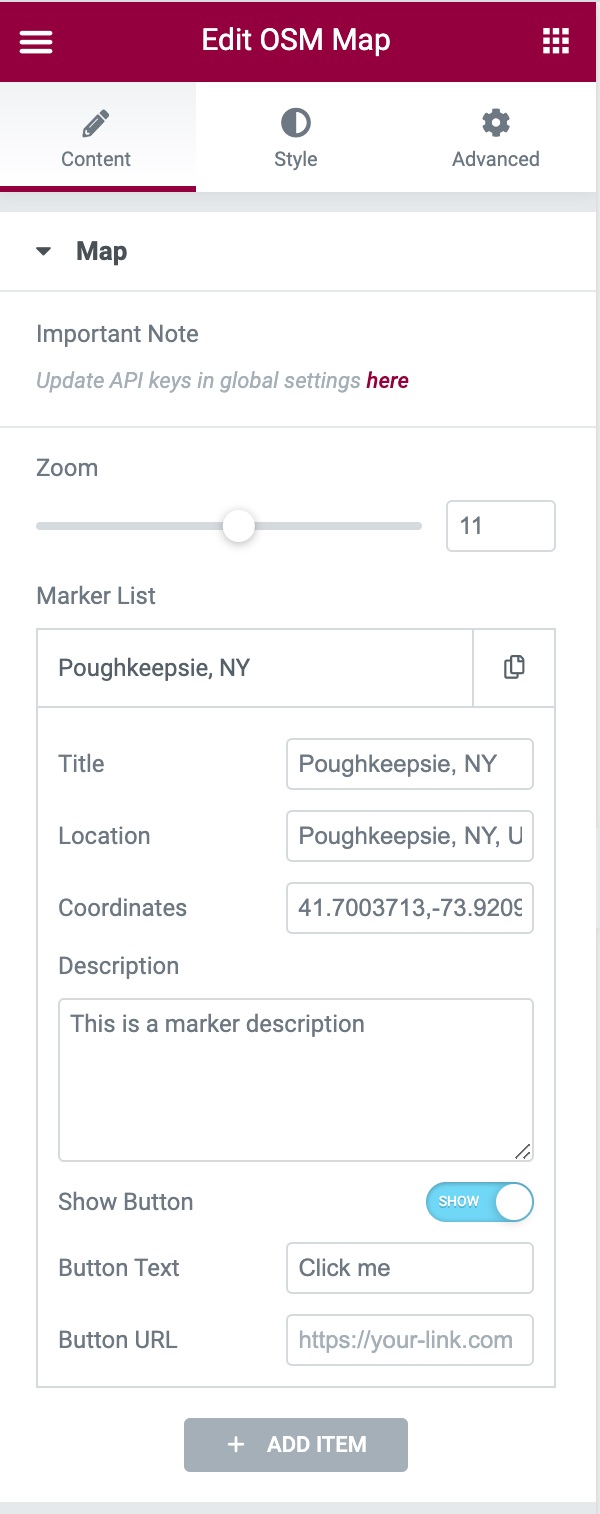
- Markers with a title, description (HTML allowed), button and popup or tooltip. Use the default pin, a Font Awesome icon or your own image, at any size.
- Shapes: draw rectangles, circles, polygons and lines, or paste GeoJSON. Each shape has its own border and fill colors and the same popups as markers.
- Routes along roads: enter a start, an end and optional stops to draw the driving, walking or cycling route, with distance and time in the popup. Needs a free Geoapify API key.
- Markers from posts: show a marker for each published post of a chosen type, with coordinates from custom fields such as ACF fields.
- Map Center: center on the markers, zoom to fit all of them, or set your own coordinates.
- Map styles: 27 tile styles from OpenStreetMap, Stadia Maps and Geoapify, or your own tile server.
- Lightweight: the map’s scripts and styles load only on pages that use the widget.
This plugin is open source. To contribute:
1. Open an issue here
2. Submit a pull request with well-written code that implements the feature.
Usage
- Make sure the Elementor plugin is installed.
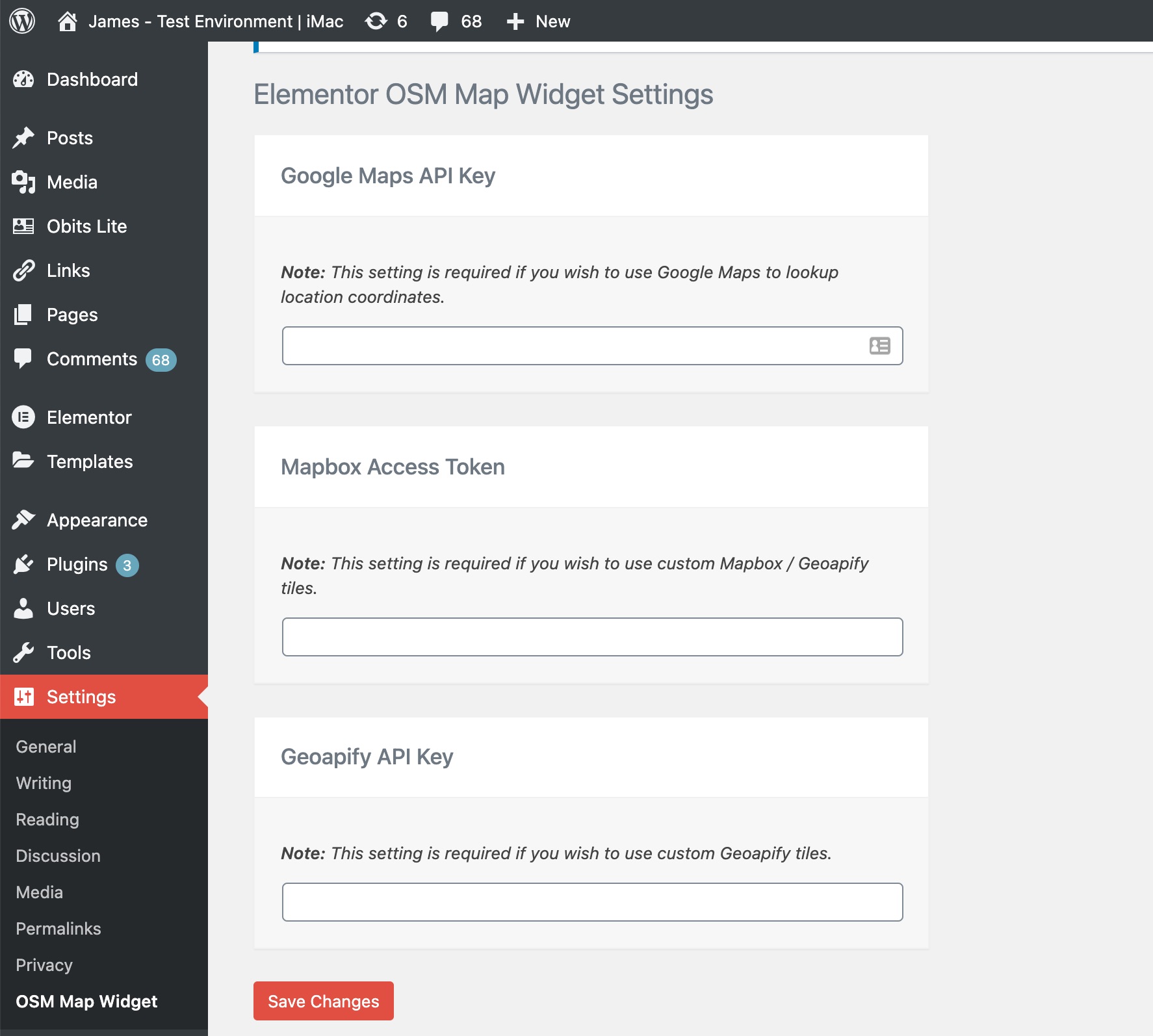
- Optionally, add API keys on the plugin’s settings page:
- Google Maps API Key (autocompletes marker coordinates in the editor. How to get one)
- Mapbox Access Token (used with the Geoapify key for the Geoapify map styles, which are drawn with Mapbox GL. How to get one)
- Geoapify API Key (for Geoapify tile styles and for routes along roads. How to get one)
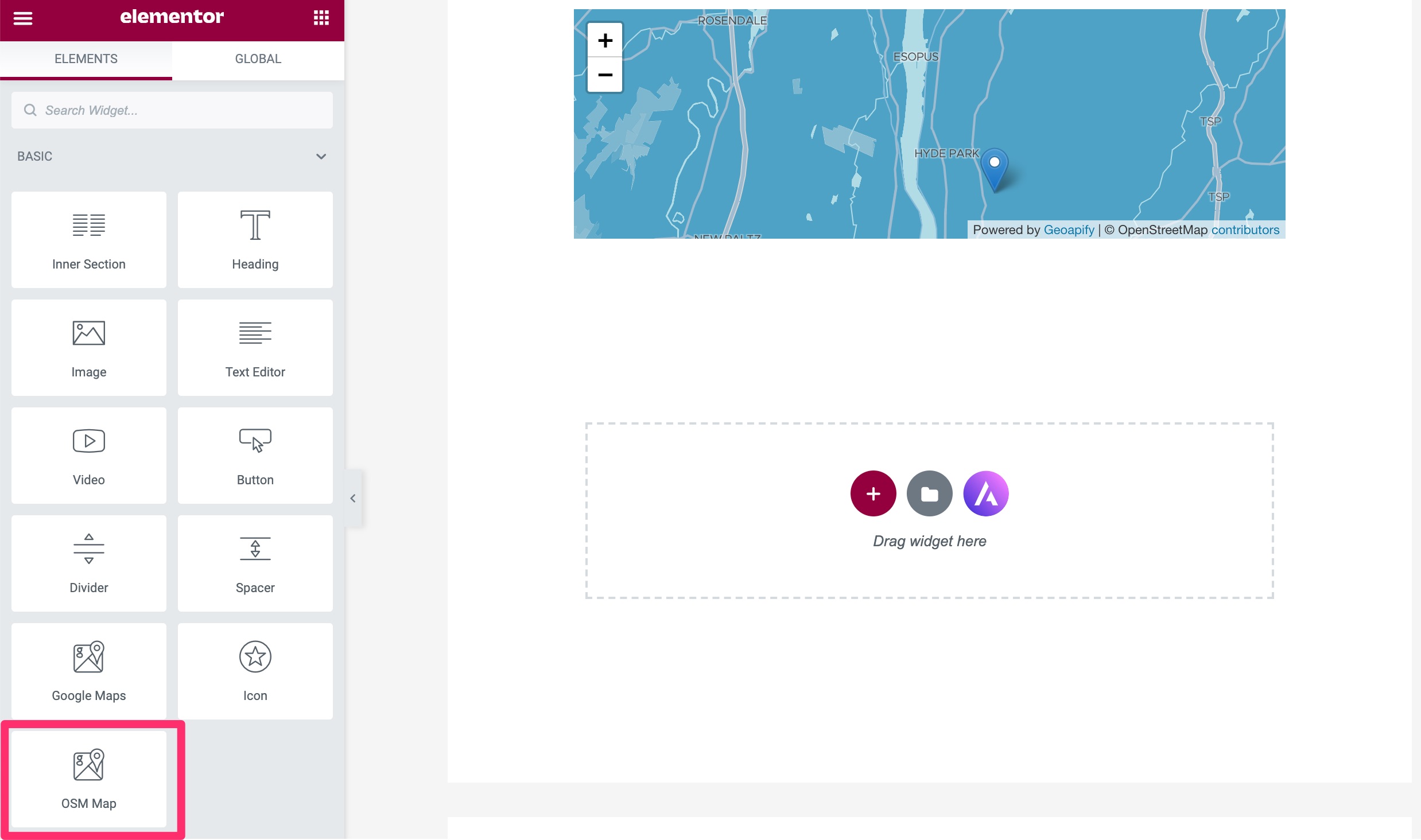
- Add the OSM Map widget to an Elementor page:
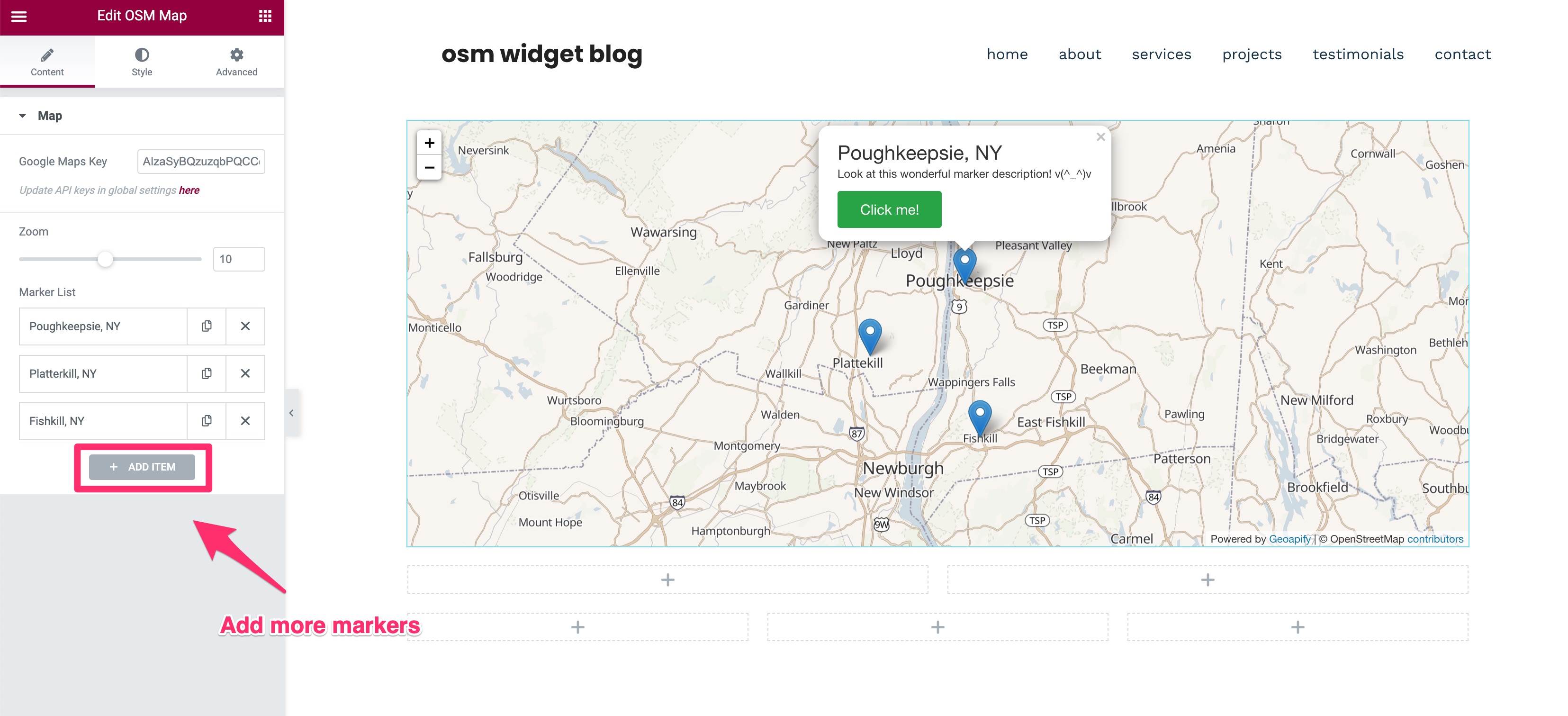
- Markers: add items to the marker list. Each item’s Type is Point, Rectangle, Circle, Polygon, Line, GeoJSON or Route. A Point needs only its Coordinates; the other types ask for their own corners, points or stops.
- Marker Source: set it to Posts to build the markers from your posts instead.
- Map Center: choose Midpoint of markers, Fit all markers or Custom coordinates, and set the zoom level per device.
- Style: change the tiles and the marker, shape, popup and button styles from the Style tab.
Services externes
This plugin loads map tiles and map libraries from third-party services in the visitor’s browser, and, for routes, contacts Geoapify from your server. No data is sent to the plugin authors.
OpenStreetMap tile servers (tile.openstreetmap.org)
Used by default to display the map. Every map view requests tiles from this service, which receives the visitor’s IP address and the tiles requested. Tile usage policy and privacy policy.
Stadia Maps (tiles.stadiamaps.com)
Used only when a Stadia tile is selected in the widget’s Style tab. The visitor’s IP address and the tiles requested are sent to Stadia Maps. Terms of service and privacy policy.
Geoapify (maps.geoapify.com)
Used only when a Geoapify tile is selected. The Geoapify API key saved in the plugin settings and the visitor’s tile requests (including IP address) are sent to Geoapify. Terms and conditions and privacy policy.
Geoapify Routing API (api.geoapify.com)
Used only when a map contains a Route item and a Geoapify API key is saved in the plugin settings. Your WordPress server, not the visitor’s browser, sends the route’s start, stop and end coordinates, the travel mode and the API key to Geoapify when the route is first shown or changed, again when the cached route expires (after 7 days), and in the editor preview. A failed request is retried after 10 minutes, or after a day when the error cannot fix itself, such as a rejected key. Visitors’ IP addresses are not sent. Terms and conditions and privacy policy.
Mapbox GL JS
Geoapify vector styles are rendered with the bundled mapbox-gl library, which is given the Mapbox access token saved in the plugin settings. The library may contact Mapbox services when an access token is supplied. Terms of service and privacy policy.
Google Maps JavaScript API (maps.googleapis.com)
Used only in the Elementor editor, and only when a Google Maps API key is saved in the plugin settings, to autocomplete marker coordinates. The key and the location text typed by the editor are sent to Google. Visitors of the published site are not affected. Google no longer enables the legacy Places Autocomplete on projects created recently, so coordinates may need to be typed by hand. Terms of service and privacy policy.
Custom tile server
When a custom map tile URL is configured in the plugin settings, the visitor’s browser requests tiles from that server, and its terms and privacy policy apply.
Journal de modifications
Adds Map Center (fit all markers or custom coordinates), shapes (rectangles, circles, polygons, lines, GeoJSON), routes along roads (needs a Geoapify key) and markers from posts, and loads the map's scripts only on pages that use it.
1.6.0
- NEW: Map Center setting. Keep “Midpoint of markers”, choose “Fit all markers” to zoom and center the map so every visible marker fits (Zoom Level becomes the closest it zooms in), or enter custom center coordinates. Existing maps keep their current center. Thanks to @skonebeke, @herondino and @giamox.
- NEW: Shapes as markers. Set a marker’s Type to Rectangle (two opposite corners), Circle (center and radius in meters), Polygon or Line (one “lat, long” point per line), or paste GeoJSON; shapes have their own border and fill colors and the same popups, tooltips and buttons as markers. Thanks to @ms-lepol.
- NEW: Routes. Set a marker’s Type to Route and enter a start, an end and optional stops to draw the driving, walking or cycling route along roads and paths, with optional start and end markers and distance and time in the popup. Routes need a Geoapify API key in the plugin settings; your server fetches each route once and caches it. Without a key the route is drawn as a dashed straight line. Maps with road routes credit Geoapify. Thanks to @Phoenix-Ignited-Tech.
- NEW: Markers from posts. Set Marker Source to Posts to show a marker for each published post of a chosen type, using coordinates from custom fields such as ACF fields. Thanks to @samben28 and @scatata.
- IMPROVEMENT: The map’s scripts and styles (Leaflet, Mapbox GL, Font Awesome) load only on pages with an OSM Map widget, and the plugin no longer adds jQuery to every page. Sites that need the assets everywhere can return true from the
osm_map_elementor_load_assets_on_every_pagefilter. Thanks to @ausdemnichts. - IMPROVEMENT: Font Awesome markers have an accessible name for screen readers and keyboard users, taken from the marker title. Thanks to @letiziam2024.
1.5.1
- FIX: HTML in a marker’s Description shows as formatting again instead of as text. Descriptions allow the same HTML as post content, so scripts, event handlers and javascript: links are removed. Text inside angle brackets, such as an email address in
<>, is treated as markup and removed, so write<for a literal<. Thanks to @fastnormal and @tdebaillon. - SECURITY: The map’s script now receives only the zoom levels and breakpoints it uses, instead of every widget setting, so a marker’s unfiltered Description no longer appears in the page source.
- FIX: Maps that start hidden, such as in Elementor tabs, accordions or popups, now load their tiles and center correctly when they appear instead of staying grey. Thanks to @blackspiral and @designstuuv.
- FIX: The map fills the available width in a row (flexbox) container instead of collapsing to zero width. A width set in the widget’s Advanced settings still takes priority. Thanks to @ag13.
- IMPROVEMENT: OSM Carto tiles load from tile.openstreetmap.org, as OpenStreetMap recommends, instead of the old a/b/c subdomains.
1.5.0
- NEW: Marker Size setting for the Default and Font Awesome marker icons. It scales the whole marker from 25% to 200%, and popups and tooltips follow the new size. Existing maps keep their current marker size. The Font Awesome Icon Size setting now scales together with the pin. Thanks to @xanhcloud24.
1.4.1
- IMPROVEMENT: Links that open in a new tab, such as map attributions and settings page links, now use rel=”noopener noreferrer”. The marker button uses rel=”noopener” when it opens a new tab. Thanks to @frapsd.
1.4.0
- COMPAT: Tested with WordPress 7.1 and Elementor 4.4.
- REQUIREMENTS: WordPress 6.8+, PHP 7.4+ and Elementor 3.30+.
- FIX: Fatal error on PHP 8 when a marker has invalid coordinates. Such markers are now skipped.
- FIX: Tablet and mobile zoom levels now apply.
- FIX: Saving the settings page redirects correctly and shows the confirmation notice.
- SECURITY: Marker button links only allow http, https, mailto and tel URLs, and the link target is restricted to the same or a new tab.
- SECURITY: Marker titles in the Elementor panel are escaped, and tile and API key settings are encoded for the script context.
- IMPROVEMENT: Updated Font Awesome to 6.7.2 and mapbox-gl to 1.13.3, and removed unused library files to reduce the plugin size.
- IMPROVEMENT: Map scripts are added with WordPress script APIs.
- IMPROVEMENT: The text domain is now osm-map-elementor, so existing translations of the plugin can be loaded. Several notices were reworded and need re-translating.
1.3.1
- SECURITY: Fixed stored XSS vulnerability in Button URL field.
- SECURITY: Added proper input sanitization and output escaping for all user inputs.
- SECURITY: Fixed Open Redirect vulnerability in admin settings.
- SECURITY: Added CSRF protection with nonce verification.
- SECURITY: Fixed unescaped output in JavaScript contexts.
- SECURITY: Added comprehensive array key validation to prevent PHP warnings.
- IMPROVEMENT: Added proper version parameters to all enqueued scripts and styles.
- IMPROVEMENT: Set scripts to load in footer for better performance.
- IMPROVEMENT: Enhanced error handling and defensive programming practices.
- IMPROVEMENT: Updated tested WordPress version to 6.6.
- BUGFIX: Fixed undefined array key warnings for zoom and height settings.
- BUGFIX: Fixed null value access warnings in marker processing.
- BUGFIX: Improved form action URL handling with proper fallbacks.
For older versions, see the full changelog.
Captures d'écran


Pour les développeurs
Est-ce votre plugin ? Montrez les chiffres.
Ajoutez un badge en direct à votre site, docs ou github readme. Il se met à jour par lui-même - aucun compte n'est nécessaire.
Best OSM Map Widget for Elementor alternatives
Tous les plugins Addons →





FAQ
OSM Map Widget for Elementor: quick answers
Réponses directes, extraites des données en direct WordPress.org.
Source : WordPress.org
Is OSM Map Widget for Elementor free?
Yes. OSM Map Widget for Elementor is free to download and use from the official WordPress.org plugin directory.
Is OSM Map Widget for Elementor safe to use in 2026?
Yes — OSM Map Widget for Elementor is a safe, well-maintained plugin to use in 2026. It runs on 8K+ sites, is rated 4.5/5 and was last updated 2 days ago, and scores 86/100 on our health check.
How many websites use OSM Map Widget for Elementor?
OSM Map Widget for Elementor is active on 8K+ WordPress websites and has been downloaded 81,922 times since it launched in September 2020. It was downloaded 8,671 times in the last 30 days.
Does OSM Map Widget for Elementor work with WordPress 7.1?
Yes. The developer has tested OSM Map Widget for Elementor up to WordPress 7.1.5, the latest release. It requires WordPress 6.8 or newer.
What PHP version does OSM Map Widget for Elementor need?
OSM Map Widget for Elementor requires PHP 7.4 or higher. Most hosts run PHP 8.x today, so it works on any modern WordPress hosting.
When was OSM Map Widget for Elementor last updated?
The latest version, 1.6.0, was released on November 19, 2026 (2 days ago).
Who makes OSM Map Widget for Elementor?
OSM Map Widget for Elementor is developed and maintained by garbowza.
What are the best alternatives to OSM Map Widget for Elementor?
The most popular alternatives to OSM Map Widget for Elementor are Jeg Kit for Elementor (300K+ installs), Qi Addons For Elementor (200K+ installs) and Addon Elements for Elemento… (80K+ installs).
Propulsé par PageForge
Un modèle et une feuille de calcul. Une vraie page pour chaque recherche.
PageForge transforme chaque ligne d'un CSV en une page WordPress avec son propre titre, URL, SEO et schéma, construit sur la mise en page que vous Déjà conçu. Gratuit sur WordPress.org.
- CSV et XLSX, plus Google Sheets sur les professionnels et les entreprises
- Son propre titre, URL, SEO champs et schéma pour chaque page
- Fonctionne avec l'éditeur de blocs, Elementor, Divi et Avada
- Gratuit sur WordPress.org, pas de carte de crédit