


Options for Twenty Seventeen
Adds powerful customizer options to modify all aspects of the default WordPress theme Twenty Seventeen.

Choix
Yes — Options for Twenty Seventeen is a safe, well-maintained plugin to use in 2026. It runs on 8K+ sites, is rated 4.8/5 and was last updated 3 months ago, and scores 82/100 on our health check.
- Loved by users — 4.8/5 from 57 reviews
- Testé avec le dernier WordPress (7.1)
Comment s'accumule-t-il ?
Côte à côte sur les installations, les mises à jour, les évaluations et le support


Téléchargements quotidiens
Les pics de téléchargement suivent généralement une nouvelle version - chaque site qui met à jour automatiquement compte comme un téléchargement.
Classements
Where Options for Twenty Seventeen stands todayWordPress.org Classements de recherche
Position en direct dans la recherche de plugins, Top 100| Mot-clé | Position |
|---|---|
| change | #60 |
| adapter à | #55 |
| modify | #10 |
| twenty-seventeen | #1 |
| twentyseventeen | #1 |
Adoption de version
Part de sites actifs par version.
Répartition des notes
★★★★★★★★★★ 4.8 from 57 reviews
About Options for Twenty Seventeen
From the official readme · v2.5.7Description
Options for Twenty Seventeen
This plugin is for Twenty Seventeen theme, please see our other plugins for Twenty Nineteen, Twenty Twenty, Twenty Twenty-One and Block Themes like Twenty Twenty-Two and Twenty Twenty-Three.
This plugin adds the following modification options to the default WordPress theme Twenty Seventeen …
General Options
- Fixes bug that pixelates the home page featured images on iPads.
- Fixes bug preventing cropping of logos larger than 250px x 250px.
- Fixes jumpy parallax effect in IE11.
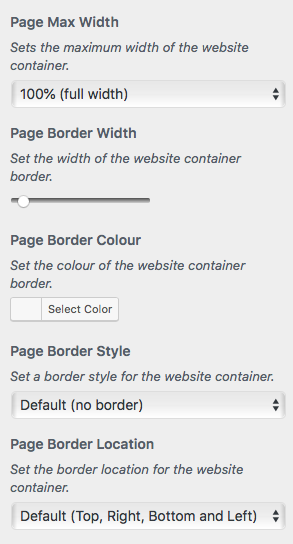
- Change the max width of the whole page.
- Change the background colour of the site.
- Add a border to the whole page.
- Remove link underlines or add underlines to widget unordered lists.
- Show images in search results.
Header Options
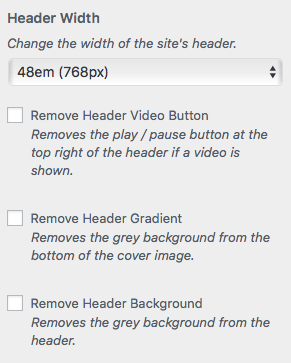
- Change the width of the site’s header.
- Remove the header video play / pause button.
- Set colour of site logo, title and description background.
- Remove header link hover opacity.
- Align the site branding to the center or right.
- Align and style the site title and description.
- Automatically fix the YouTube full width, responsive and play / pause button bugs.
- Remove the grey gradient background from the bottom of the cover image.
- Change the height, color and opacity of the grey gradient background from the bottom of the cover image.
- Remove the grey header background.
- Force the cover image to retain its aspect ratio or to take on the same style as pages.
Navigation Options
- Prevent the main menu from moving after the page has loaded.
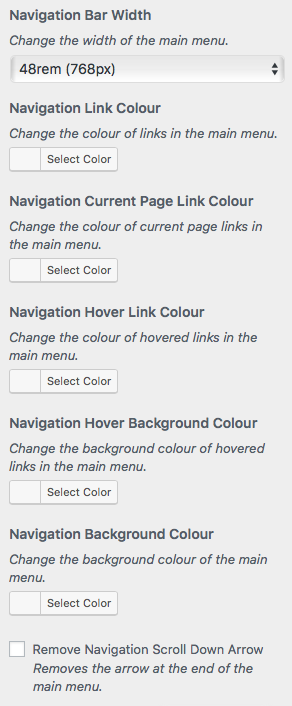
- Change the width of the main menu.
- Change the width of the main menu when sticky.
- Remove the “Menu” text from the mobile hamburger menu button.
- Choose a background image for the main menu.
- Style the background image on the main menu.
- Remove the main menu padding.
- Increase the main menu link padding.
- Align and style the main menu.
- Change the colours in the main menu.
- Rotate the arrow in main menu items with sub menus.
Content Options
- Remove the main menu scroll down arrow.
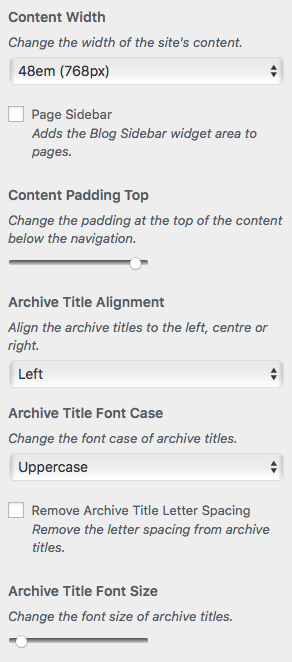
- Change the width of the site’s content.
- Change the background color of the site content.
- Add the Blog Sidebar to pages.
- Reduce the space at the top of the content below the navigation.
- Change the width of the border at the bottom of featured images.
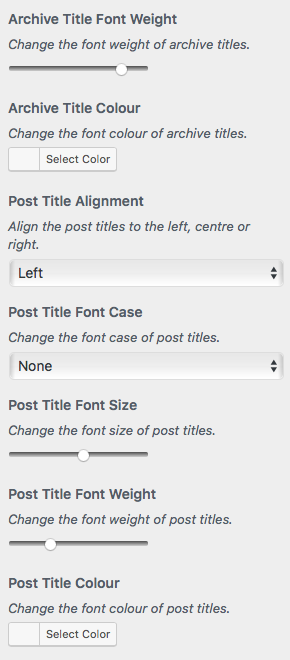
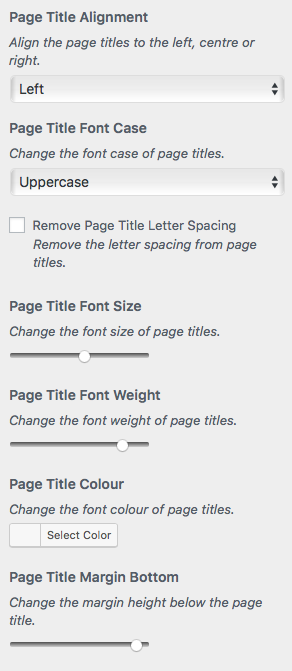
- Align and style the Page, Post and Archive titles.
- Align and style the Post Meta.
- Reduce the space below page titles.
- Choose a colour for links and hover links in the content.
- Hide links to tags and categories in single posts.
- Hide the post navigation.
Footer Options
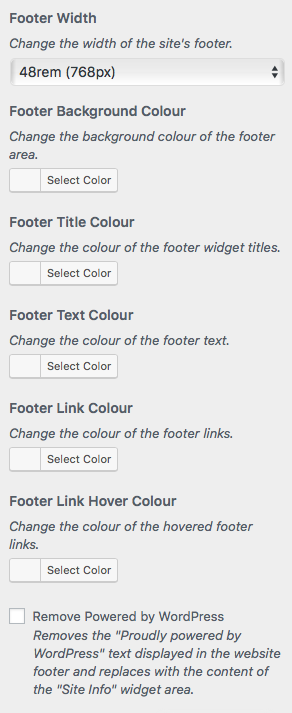
- Change the width of the site’s footer.
- Change the width of the border at the top of the footer.
- Change the colour of the footer (background, titles, text, links).
- Remove the “Proudly powered by WordPress” text displayed in the website footer and replace with content of widget sidebar.
- Shortcode [social-links] to show the social network menu in your content.
Options de couleur
- Option to set a paragraph color
- Option to set a heading color
Don’t see what you want?
Request a feature in the Support Forum!
Premium Options
The following options area available for users who have upgraded to the premium plugin …
- Add a widget area below page titles.
- Enable featured images on front page section blog.
- Add “Back to top” links.
- Fix the “Back to top” link to the bottom right of the browser window.
- Add “True Parallax” effect or remove “Parallax” effect on front page section featured images.
- Force blog and search pages to display as one column.
- Add more sections to your static front page.
- Set the height of the frontpage section parallax images.
- Add anchor links to static front page sections into your menus.
- Prevent loading of Google font Libre Franklin to increase page speed.
- Choose and style a page backgroumd image.
- Auto excerpts of posts on home page and archive pages.
- Set the maximum number of words for the excerpt.
- Reset Tag Cloud widget styles to defaults.
- Set the height of the home page header image.
- Use featured image as header image and show full size header image.
- Hide header image on all but the home page.
- Hide site branding (title and description) on all but the home page.
- Add a widget sidebar to the header area.
- Hide YouTube video until loaded.
- Pause YouTube video on user scroll.
- Disable looping of mp4 header video.
- Add “True Parallax” effect to the cover image on the front page.
- Use Nivo Slider, SlidersPack or MetaSlider instead of the cover image on the front page.
- Add Nivo Slider captions overlay with links.
- Move or copy the site logo to the main menu.
- Animate the site logo in the main menu on just the home page or on all pages.
- Move the main menu to the top of the custom header.
- Fix the mobile menu to the top of the screen.
- Increase or decrease the mobile menu responsive breakpoint.
- Align the navigation menu hamburger to the left or right.
- Align the navigation menu items to the center, right or justified.
- Align the navigation logo to the left, center or right.
- Animate / bounce the scroll down arrow at the end of the main menu.
- Hide the Blog Sidebar widget area for small screens.
- Match the height of the Blog Sidebar and main content.
- Change the width of the Primary Content area.
- Change the width of the gap between the Primary Content area and the Blog Sidebar.
- Swap around the Primary Content area and the Blog Sidebar for desktop or mobile.
- Implement Yoast SEO Breadcrumbs on single posts and pages.
- Show the caption of a featured image on top of the image.
- Change the font size and weight of the featured image captions.
- Move post featured image into content area.
- Hide post featured images on archive pages.
- Hide post dates.
- Remove post author from posts.
- Remove “Category:” and “Tag:” from Archive titles.
- Show page content on posts page.
- Add a third or fourth footer widget sidebar.
- Change the opacity of the footer background color.
- Additional social icons for Amazon, BookBub and goodreads.
- Fix social links to the left or right on larger screens.
- Make the social menu links square.
- Colour the social menu links with their brand colours.
- Hide featured images on single posts and pages.
- Hide sidebar on single posts and pages.
- Show child pages as panels like the home page.
- Hide titles on single posts and pages
Installation
Easily use this plugin to modify WordPress default Twenty Seventeen theme …
1) Install “Options for Twenty Seventeen” automatically or by uploading the ZIP file.
2) Activate the plugin through the “Plugins” menu in WordPress.
3) Find the additional features by clicking “Customize” in the “Appearance” admin menu.
Journal de modifications
Fix a minor issue highlighted by "Plugin Check" code review and preparing for WordPress v7.0
2.5.7
- Fix a minor issue highlighted by “Plugin Check” code review and preparing for WordPress v7.0
2.5.6
- Fixed a bug with CSS output
2.5.5
- General housekeeping preparing for “Plugin Check” code review
2.5.4
- Remove Customizer CSS due to incompatible change introduced in WordPress v6.7
2.5.3
- Added option to remove the “Menu” text from the mobile hamburger
2.5.2
- Minor security updates to translation strings
Captures d'écran
Pour les développeurs
Est-ce votre plugin ? Montrez les chiffres.
Ajoutez un badge en direct à votre site, docs ou github readme. Il se met à jour par lui-même - aucun compte n'est nécessaire.
Best Options for Twenty Seventeen alternatives
All change plugins →




FAQ
Options for Twenty Seventeen: quick answers
Réponses directes, extraites des données en direct WordPress.org.
Source : WordPress.org
Is Options for Twenty Seventeen free?
Yes. Options for Twenty Seventeen is free to download and use from the official WordPress.org plugin directory.
Is Options for Twenty Seventeen safe to use in 2026?
Yes — Options for Twenty Seventeen is a safe, well-maintained plugin to use in 2026. It runs on 8K+ sites, is rated 4.8/5 and was last updated 3 months ago, and scores 82/100 on our health check.
How many websites use Options for Twenty Seventeen?
Options for Twenty Seventeen is active on 8K+ WordPress websites and has been downloaded 369,040 times since it launched in May 2018. It was downloaded 1,075 times in the last 30 days.
Does Options for Twenty Seventeen work with WordPress 7.1?
Yes. The developer has tested Options for Twenty Seventeen up to WordPress 7.1.5, the latest release. It requires WordPress 4.7 or newer.
What PHP version does Options for Twenty Seventeen need?
Options for Twenty Seventeen requires PHP 7.0 or higher. Most hosts run PHP 8.x today, so it works on any modern WordPress hosting.
When was Options for Twenty Seventeen last updated?
The latest version, 2.5.7, was released on August 14, 2026 (3 months ago).
Who makes Options for Twenty Seventeen?
Options for Twenty Seventeen is developed and maintained by Olly Campion.
What are the best alternatives to Options for Twenty Seventeen?
The most popular alternatives to Options for Twenty Seventeen are Remove Footer Credit (60K+ installs), Say What? (40K+ installs) and Add to Cart Button Custom T… (9K+ installs).
Propulsé par PageForge
Un modèle et une feuille de calcul. Une vraie page pour chaque recherche.
PageForge transforme chaque ligne d'un CSV en une page WordPress avec son propre titre, URL, SEO et schéma, construit sur la mise en page que vous Déjà conçu. Gratuit sur WordPress.org.
- CSV et XLSX, plus Google Sheets sur les professionnels et les entreprises
- Son propre titre, URL, SEO champs et schéma pour chaque page
- Fonctionne avec l'éditeur de blocs, Elementor, Divi et Avada
- Gratuit sur WordPress.org, pas de carte de crédit