


Optimole – Optimize Images | Convert WebP & AVIF | CDN & Lazy Load | Image Optimization
Automatically optimize images with bulk compression, lazy loading, WebP/AVIF conversion & CloudFront image CDN. Boost Core Web Vitals & conversions.

Choix
Yes — Optimole is a safe, well-maintained plugin to use in 2026. It runs on 200K+ sites, is rated 4.7/5 and was last updated 1 week ago, and scores 95/100 on our health check.
- Prouvé à grande échelle sur plus de 200 000 sites actifs
- Loved by users — 4.7/5 from 641 reviews
- Développé activement — Dernière mise à jour il y a 1 semaine
- Testé avec le dernier WordPress (7.1)
Comment s'accumule-t-il ?
Côte à côte sur les installations, les mises à jour, les évaluations et le support


Téléchargements quotidiens
Les pics de téléchargement suivent généralement une nouvelle version - chaque site qui met à jour automatiquement compte comme un téléchargement.
Classements
Where Optimole stands todayWordPress.org Classements de recherche
Position en direct dans la recherche de plugins, Top 100| Mot-clé | Position |
|---|---|
| AVIF | #10 |
| compress images | #13 |
| image optimization | #8 |
| optimize images | #7 |
| webp | #17 |
Adoption de version
Part de sites actifs par version.
Répartition des notes
★★★★★★★★★★ 4.7 from 641 reviews
About Optimole
From the official readme · v4.2.20Description
Optimole is the complete image optimization powerhouse that helps you compress images automatically, resize them, and deliver your images via lightning-fast CDN from 450+ locations. From product images to portfolio photos, Optimole handles it all. With WebP and AVIF conversion, intelligent lazy loading, and ML-powered optimization, Optimole dramatically improves page speed, Core Web Vitals, and SEO rankings—all with zero configuration required. Say goodbye to slow-loading images and hello to a faster website that visitors and search engines will love.
⚡ Quick Links
- Test Your Site – See how much faster we can make your site
- Documentation – Learn how to use all features
- Support Forum – Get help from our team
- How to Speed Up WordPress – Essential optimization tips
- Go Pro – Upgrade for more monthly visits
🚀 Summary of What Optimole Does
- Compress images without quality loss – ML-powered technology preserves details
- Global AWS CloudFront CDN – 450+ locations for instant loading
- WebP & AVIF conversion – Up to 80% smaller file sizes
- [PRO] Complete image offloading – Store images in the cloud and free up server space with one-click restoration
- jQuery-free lazy loading – Improves Core Web Vitals
- Adaptive image sizing – Perfect fit for every device
- Cloud media library – Manage assets across multiple sites
- Support for all file types – Images, video, audio, documents
- Automatic watermarking – Protect your visual content
- Zero configuration needed – Install and forget
- Free plan with all features – For sites with up to 2000 visits/month
Why Choose Optimole Over Other Image Optimization Plugins?
- Truly Automated Optimization – Install once and let our cloud-based system handle everything
- Compress images in bulk – Process your entire media library with one click
- Smaller Images, Same Visual Quality – Advanced ML-powered compression preserves image details
- Perfect Size for Every Device – Images dynamically resized for each visitor’s exact screen dimensions
- Lightning-Fast Global CDN – Free delivery from 450+ locations worldwide for instant loading
- Automatic Next-Gen Formats – WebP and AVIF conversion reduces file size by up to 80%
- Zero Server Resource Usage – All processing happens in our cloud, keeping your hosting resources free
- WooCommerce Performance Boost – Optimized product galleries load faster, increasing conversions
- Eliminate Content Shifting – Perfect placeholder dimensions prevent Cumulative Layout Shift (CLS)
- Significant Core Web Vitals Improvement – Lower Largest Contentful Paint (LCP) scores
- Complete Media Management – Cloud library with Digital Asset Management features
What’s the Magic Behind Optimole’s Image Optimization?
Optimole handles image optimization seamlessly in the cloud—tailored to each visitor in real time. Once installed, it automatically replaces your image URLs with cloud-based ones, without altering the original files on your server.
When someone visits your site, Optimole instantly detects their device type, screen size, browser, and connection speed. Based on this data, it delivers the ideal version of each image—perfectly resized, compressed, and converted into the most efficient format their browser supports.
How Many Images Can Be Optimized? (Unlimited)
We offer an unlimited number of image optimizations in both Free and Pro plans, you will be able to optimize an unlimited number of images for up to 2000 monthly visits. All are delivered from more than 450+ locations around the globe.
Features That Make Optimole The Ultimate Image Solution:
🔄 Seamless Bulk Optimization
Optimize your entire media library with a single click. Optimole processes your images in the background, so you don’t need to keep your browser open during optimization. Perfect for existing websites with large image collections.
🚀 One-Click Image Offloading [PRO]
Free up valuable server space by offloading your entire media library to Optimole’s secure cloud storage. All your images are safely stored and delivered from our optimized CDN, reducing your hosting costs and server load. Need your images back on your server? Our seamless one-click restoration process makes it easy to transfer everything back whenever you want, giving you complete flexibility and control over your media assets.
🌎 CDN
Optimole provides free access to an AWS CloudFront CDN with edge locations in more than 450+ cities around the globe.
🖼️ ML-Powered Smart Compression
Our machine learning algorithms analyze each image to determine the optimal compression level that balances quality and file size. Unlike basic compression tools, Optimole’s smart compression adapts to image content, preserving important details while aggressively compressing areas where quality loss won’t be noticeable. Making it easy to compress images without sacrificing quality.
🔄 Intelligent Format-Based Optimization
Our advanced cloud-based transformation process optimizes images based on format and serves them in next-gen formats automatically. If your visitor’s browser supports WebP or AVIF, Optimole instantly converts and delivers these formats, reducing file size by up to 80% compared to traditional JPEG and PNG, while maintaining visual quality.
💾 Advanced Digital Asset Management (DAM)
Take complete control of your media with our built-in DAM system. Store images in the Optimole Cloud to save server space and easily share assets between multiple websites. Our seamless integration with Elementor Builder and WordPress core editor means you can access your optimized cloud images directly from your familiar editing interfaces.
📏 Exact Responsive Sizing
Optimole delivers just one image perfectly sized for each visitor’s exact device dimensions – no more generating multiple image sizes or guessing at breakpoints. This means mobile users don’t download desktop-sized images, and desktop users get appropriately high-resolution versions.
📱 Retina & High-DPR Display Support
Automatically detect high-resolution displays like Retina screens and deliver images with the perfect Device Pixel Ratio (DPR). Your images will look crisp and sharp on the latest devices without unnecessarily large file sizes on standard displays.
⚡ No Content Shifting with Advanced Lazy Loading
Our lightweight lazy loading defers offscreen images for faster initial page loads without any content shifting. Optimole’s implementation doesn’t rely on heavy jQuery dependencies, making it faster than other lazy loading solutions while being more compatible with modern themes.
🔍 AI-Powered Smart Cropping
Maintain focus on the important elements in your images with our intelligent cropping system. Whether it’s faces in portraits, products in e-commerce shots, or key elements in landscapes, smart cropping ensures proper sizing without losing the subject’s focus. This is especially valuable for responsive designs where image dimensions change dramatically.
💧 Customizable Watermarking
Protect your images with automatic watermarking. Configure your watermark once, select positioning and opacity, and Optimole will apply it to all future uploads automatically. Perfect for photographers, artists, and content creators who need to protect their work.
🖼️ Multiple File Type Support
Optimole goes beyond just images. Our cloud dashboard supports uploading and managing a wide variety of file types, including videos, audio files, PDFs, documents, and more. This makes Optimole a comprehensive media management solution, not just an image optimizer. Store all your media assets in one place, organize them efficiently, and access them across all your websites with our cloud library system.
🌈 Enhanced User Experience Features
- Custom Lazy Load Placeholders – Add brand-matching colors to your lazy-loading placeholders
- Adaptive Quality – Automatically adjust image quality for visitors on slower connections
- Background Optimization – Process images without keeping browser tabs open
- Zero Content Shifting – Prevent layout shifts with perfectly sized placeholders
Real-World Use Cases Where Optimole Shines
🛍️ E-commerce Success Story
Challenge
An online store owner with thousands of product photos was experiencing slow loading times—especially on mobile—leading to high bounce rates and abandoned carts.
Solution
After installing Optimole, product photos were automatically compressed and served in WebP format from the global CDN. Mobile shoppers now see perfectly sized images for their devices.
Results
– Significantly reduced page load times
– Improved mobile conversions
– Better Google Core Web Vitals scores
– Faster checkout completion and fewer abandoned carts
📸 Photography Portfolio Transformation
Challenge
A professional photographer needed to showcase a high-resolution portfolio online without sacrificing photos quality or website performance.
Solution
Optimole’s lossless compression preserved the fine details in their work while substantially reducing file sizes. The built-in watermarking protected the images, and adaptive sizing ensured visitors on all devices could appreciate the work.
Results
– Noticeably faster portfolio page loading
– Maintained premium photo quality
– Prevented unauthorized use with watermarking
– Freed up server space via cloud storage
🌍 Travel Blog Acceleration
Challenge
A travel blog featured beautiful destination photography, but large images were causing slow loading and high bounce rates—especially for readers in remote locations.
🛠Solution
Optimole’s smart compression, WebP conversion, and global CDN drastically reduced image loading times. The AI-powered smart cropping kept the focus on key elements, regardless of screen size.
Results
– Faster loading for readers, even in low-bandwidth areas
– Increased reader engagement
– More pages viewed per session
– Boost in advertising revenue through longer time-on-site
📰 Multi-Author News Site Optimization
Challenge
A news website with dozens of authors struggled with inconsistent image sizes and formats, causing layout shifts and performance issues.
Solution
Optimole automatically standardized all uploaded images—fixing dimensions, optimizing compression, and ensuring consistent quality sitewide, regardless of who uploaded the content.
Results
– Layout shifts from images were virtually eliminated
– Bandwidth usage significantly reduced
– Core Web Vitals scores improved
– Editors saved time with no need to manually resize or compress images
Comprehensive Compatibility & Security
Optimole works seamlessly with:
- Supports all major page builders: Elementor, Divi, Beaver Builder, WPBakery, Otter Blocks, Gutenberg, and more
- Compatible with popular WordPress themes: Neve, Hestia, Astra, GeneratePress, Kadence, and others
- Built for e-commerce: Seamless integration with WooCommerce to optimize product photos and galleries
- Works flawlessly with caching plugins: Super Page Cache, WP Rocket, W3 Total Cache, LiteSpeed Cache, and more
Your security is our top priority – we don’t store stripped EXIF data on our service. Optimole works behind the scenes and won’t interact with your site’s visitors or collect their data. Our privacy-first approach means we only process what’s needed for optimization. Terms of Service
Clean Installation & Complete Reversibility
Optimole installs in seconds with a user-friendly onboarding flow and one-click preset configurations tailored for optimal results. Once set up, it quietly runs in the background—continuously optimizing your images without any extra work from your side.
Changed your mind? No problem. Optimole offers a clean uninstall process that restores your site to its original state—no leftover code, no clutter in your database.
Ready to Scale? Go Pro
Premium plans start from support for 40,000 monthly visits and scale up to 3 million visits. Need even more? We’re happy to help with custom plans tailored to your needs.
All images are delivered via AWS CloudFront, using a global network of 450+ edge locations for lightning-fast load times, anywhere in the world.
Pro is ideal for photographers, agencies, and businesses managing large volumes of photos online. As a Pro user, you’ll get priority support and the option to use a custom CNAME—so your image URLs reflect your brand while being served at top speed. Get Optimole Pro.
What Our Users Say About Optimole
Made a 50% speed difference
This is a brilliant plugin that I used to replace Nitro, which unaccountably lowered my loading speed massively after a site restore. It does the job and plays nicely with other plugins so far as I can tell.
🧑💻 JS Wilkins, Website Owner
Better Than Any Other Image Plugin
Increased my site speed as any other image plugin did not in the past! Performance for mobile reached 94 in (Lighthouse) without tuning anything else in my site.
🧑💻 Domingosanna, Website Owner
Great Performance, Support & Savings
Beautiful product. Works great. Nice design. Excellent customer support. Saving a ton on hosting costs by going this route. happy happy joy joy.
🧑💻 Alex Williams, Business Owner
Soutien
Nous sommes là pour vous aider. N'hésitez pas à ouvrir un nouveau fil sur le forum support.
Documentation
Discover how to make the most of Optimole with our detailed and user-friendly documentation.
Installation
The following are the steps to install the Optimole plugin
- In your WordPress Dashboard, click on Add New option under Plugins from the menu.
Click on upload at the top. - Browse the location, select the Optimole plugin and click “Install now”.
- Go to Media -> Optimole and follow in the instructions on how to enable the service.
Journal de modifications
Version 4.2.20 (2026-11-12)
- Fixed unreadable selected compression mode on WordPress 7.1.
- Fixed media rename, video block, and dashboard widget on older WordPress versions.
- Sécurité renforcée
- Dépendances mises à jour
Captures d'écran
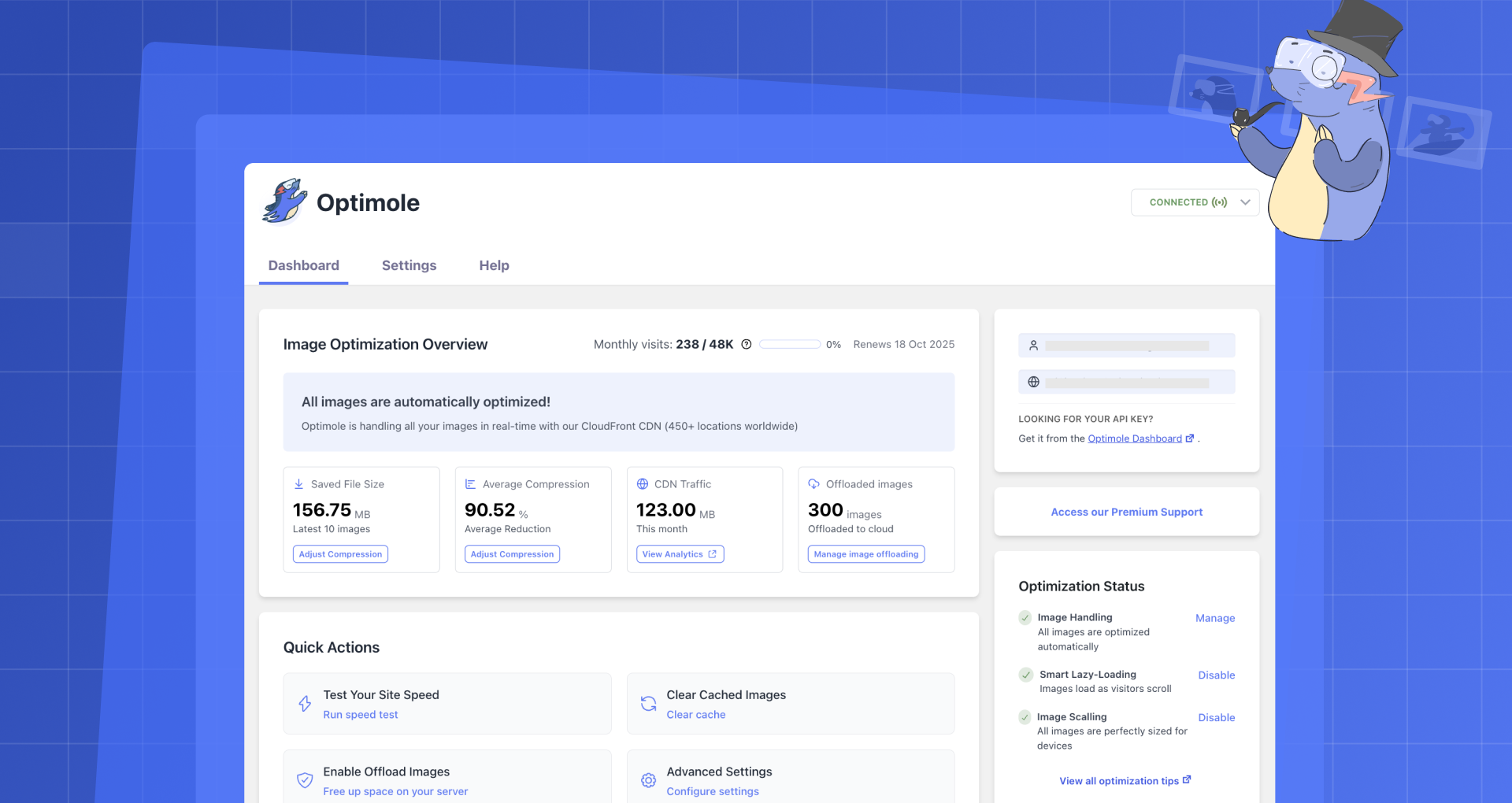

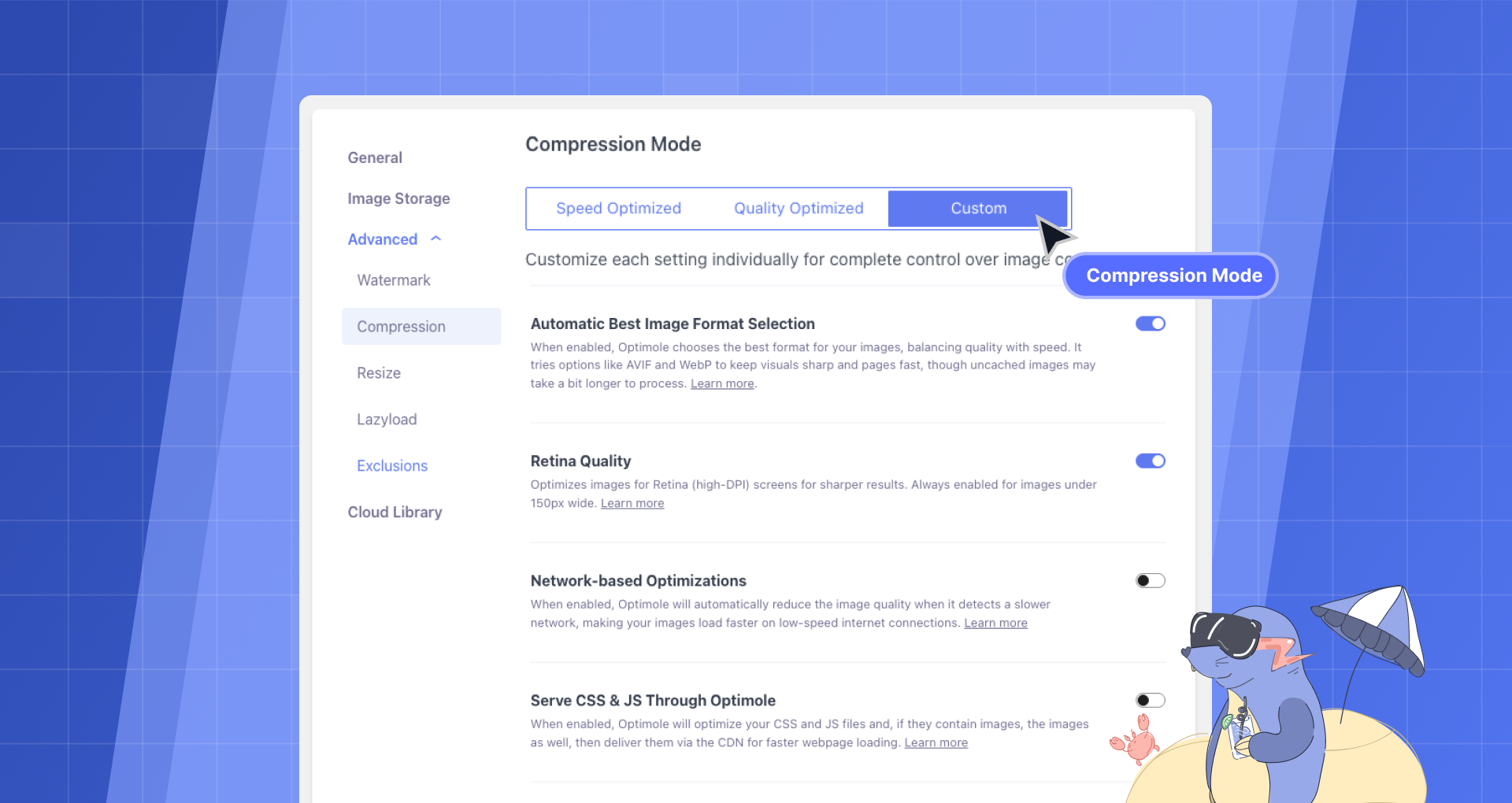
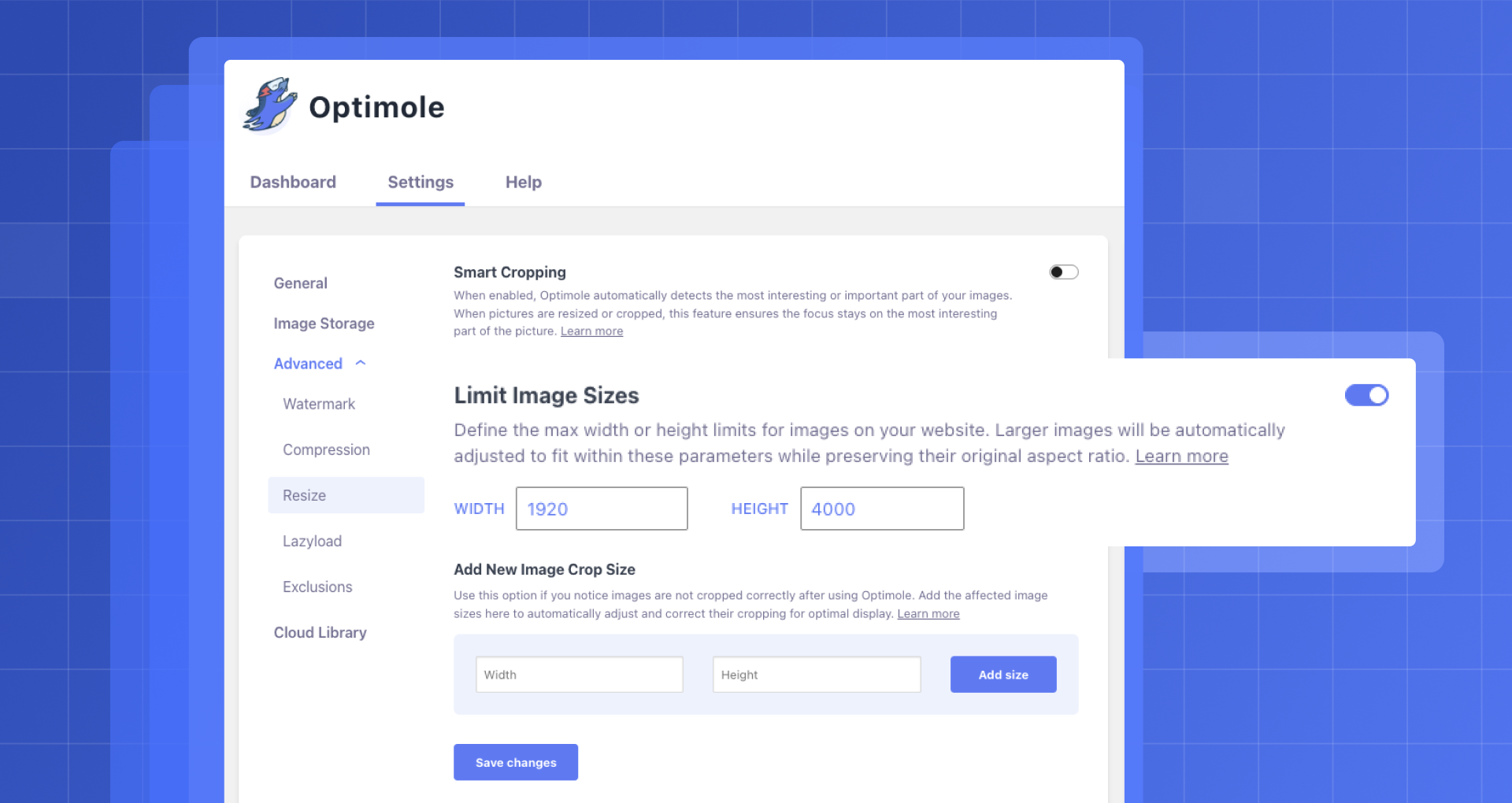


Pour les développeurs
Est-ce votre plugin ? Montrez les chiffres.
Ajoutez un badge en direct à votre site, docs ou github readme. Il se met à jour par lui-même - aucun compte n'est nécessaire.
Best Optimole alternatives
All AVIF plugins →





FAQ
Optimole: quick answers
Réponses directes, extraites des données en direct WordPress.org.
Source : WordPress.org
Is Optimole free?
Yes. Optimole is free to download and use from the official WordPress.org plugin directory.
Is Optimole safe to use in 2026?
Yes — Optimole is a safe, well-maintained plugin to use in 2026. It runs on 200K+ sites, is rated 4.7/5 and was last updated 1 week ago, and scores 95/100 on our health check.
How many websites use Optimole?
Optimole is active on 200K+ WordPress websites and has been downloaded 9,576,773 times since it launched in September 2018. It was downloaded 330,646 times in the last 30 days.
Does Optimole work with WordPress 7.1?
Yes. The developer has tested Optimole up to WordPress 7.1.5, the latest release. It requires WordPress 5.5 or newer.
What PHP version does Optimole need?
Optimole requires PHP 7.4 or higher. Most hosts run PHP 8.x today, so it works on any modern WordPress hosting.
When was Optimole last updated?
The latest version, 4.2.20, was released on November 12, 2026 (1 week ago).
Who makes Optimole?
Optimole is developed and maintained by Optimole.
What are the best alternatives to Optimole?
The most popular alternatives to Optimole are Modern Image Formats (100K+ installs), Robin Image Optimizer (100K+ installs) and Perfect Images: Regenerate… (60K+ installs).
Propulsé par PageForge
Un modèle et une feuille de calcul. Une vraie page pour chaque recherche.
PageForge transforme chaque ligne d'un CSV en une page WordPress avec son propre titre, URL, SEO et schéma, construit sur la mise en page que vous Déjà conçu. Gratuit sur WordPress.org.
- CSV et XLSX, plus Google Sheets sur les professionnels et les entreprises
- Son propre titre, URL, SEO champs et schéma pour chaque page
- Fonctionne avec l'éditeur de blocs, Elementor, Divi et Avada
- Gratuit sur WordPress.org, pas de carte de crédit