


One Click SSL
Enable SSL/TLS (https://) to redirect all pages to SSL/TLS and load all resources over SSL/TLS.

Choix solide
One Click SSL is a solid plugin choice in 2026, with a few things worth checking first. It runs on 10K+ sites, is rated 4.9/5 and was last updated 5 months ago, and scores 75/100 on our health check.
- Prouvé à grande échelle sur plus de 10 000 sites actifs
- Loved by users — 4.9/5 from 139 reviews
Comment s'accumule-t-il ?
Côte à côte sur les installations, les mises à jour, les évaluations et le support



Téléchargements quotidiens
Les pics de téléchargement suivent généralement une nouvelle version - chaque site qui met à jour automatiquement compte comme un téléchargement.
Classements
Where One Click SSL stands todayWordPress.org Classements de recherche
Position en direct dans la recherche de plugins, Top 100| Mot-clé | Position |
|---|---|
| https | #26 |
| mixed content | #5 |
| réorienter | >100 |
| resources | #22 |
| SSL | #7 |
Adoption de version
Part de sites actifs par version.
Répartition des notes
★★★★★★★★★★ 4.9 from 139 reviews
About One Click SSL
From the official readme · v1.7.8Description
A simple and easy to use WordPress SSL plugin which will redirect all non-SSL pages to SSL/TLS and ensure that all resources on your SSL pages are loaded over SSL as well.
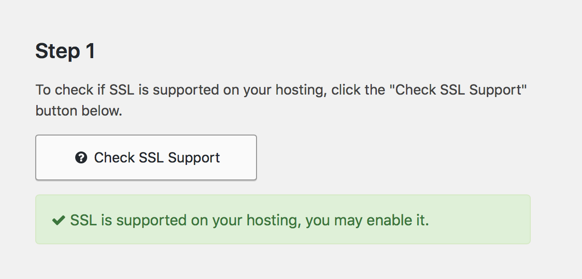
It includes a user-friendly setup wizard upon activation to check if SSL is supported on the hosting/server before it allows the SSL to be enabled and that ensures that the website doesn’t become inaccessible if SSL is not supported.
Fonctionnalités du plugin
- Check if SSL/TLS is supported on hosting/server
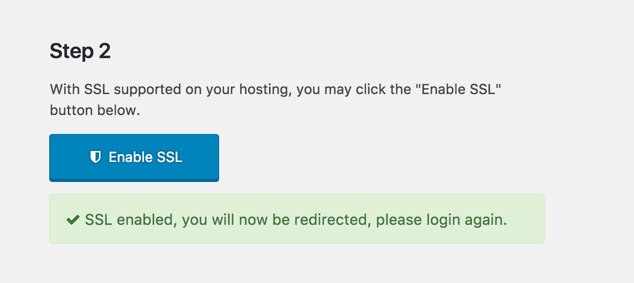
- Enable SSL with a single click
- Redirects all non-SSL URLs to https://
- Converts all non-SSL resources (images, scripts, stylesheets, etc.) to https:// on pages
- Redirect to non-SSL if SSL is not enabled
- Multisite network compatibility (enable SSL for all sites from one location)
See our online documentation for more details and detailed instructions.
Installation
Follow these steps to install the plugin:
- Upload the plugin files to the
/wp-content/plugins/one-click-ssldirectory, or install the plugin through the WordPress plugins page directly. - Activate the plugin through the ‘Plugins’ page in WordPress.
- Use the setup screen after activation to enable SSL or go to the One Click SSL admin menu item to enable.
Journal de modifications
See all releases and full changelogs in our docs.
1.7.8
- IMPROVE: Route plugin diagnostics through WordPress debug logging with structured, redacted context.
- IMPROVE: PHP 8.5 checkup.
- IMPROVE: WordPress 7.0 compatibility.
- FIX: Show the correct WordPress debug logging status and log path in the settings tooltip.
1.7.7
- FIX: Critical error when debug mode is active and SSL is not available.
1.7.6
- ADD: “Turn on debuging” toggle in plugin settings page.
- FIX: Prevent fatal error by ensuring $ocssl instance is initialized before load_plugin_data() is called.
1.7.5
- IMPROVE: Updated “Tested up to” tag for compatibility with WordPress v6.8.3.
1.7.4
- FIX: Added proper nonce verification for rating notice dismissal.
1.7.3
- ADD: Automatic Basic Authentication detection, allowing you to bypass htpasswd basic auth to check for SSL support.
- ADD: Added support for the insecure resources scanner in WordPress multisite network admin, allowing network administrators to scan sites for HTTP resources.
- IMPROVE: Detecting the protocol in tags.
- IMPROVE: All General Settings and the Insecure Resources Scanner now display in Multisites as well.
- IMPROVE: Code updates.
- FIX: Incompatibility with Ultimate Addons for Beaver Builder.
- FIX: Wrong redirection after saving configuration in multisite.
- FIX: PHP 8.3/8.4 error.
- FIX: Insecure Resources Scanner detecting the SVG xmlns attributes as insecure content.
- FIX: Insecure Resources Scanner now works well with different URLs, especially in multisites.
- FIX: Insecure Resources Scanner now displays the full URLs of insecure resources (e.g.: http://example.com/image.jpg).
- FIX: Move the admin menu option was not working in multisites. So, in multisites, it will now move it under the Settings menu.
- FIX: A few bugs found in multisite networks.
Captures d'écran


Pour les développeurs
Est-ce votre plugin ? Montrez les chiffres.
Ajoutez un badge en direct à votre site, docs ou github readme. Il se met à jour par lui-même - aucun compte n'est nécessaire.
Best One Click SSL alternatives
All https plugins →





FAQ
One Click SSL: quick answers
Réponses directes, extraites des données en direct WordPress.org.
Source : WordPress.org
Is One Click SSL free?
Yes. One Click SSL is free to download and use from the official WordPress.org plugin directory.
Is One Click SSL safe to use in 2026?
One Click SSL is a solid plugin choice in 2026, with a few things worth checking first. It runs on 10K+ sites, is rated 4.9/5 and was last updated 5 months ago, and scores 75/100 on our health check.
How many websites use One Click SSL?
One Click SSL is active on 10K+ WordPress websites and has been downloaded 325,049 times since it launched in March 2017. It was downloaded 1,898 times in the last 30 days.
Does One Click SSL work with WordPress 7.1?
One Click SSL is officially tested up to WordPress 7.0.9, while the latest release is 7.1.5. It may still work, but try it on a staging site first.
When was One Click SSL last updated?
The latest version, 1.7.8, was released on June 19, 2026 (5 months ago).
Who makes One Click SSL?
One Click SSL is developed and maintained by Tribulant Software.
What are the best alternatives to One Click SSL?
The most popular alternatives to One Click SSL are Really Simple Security (3M+ installs), Hostinger Tools (3M+ installs) and SSL Insecure Content Fixer (100K+ installs).
Propulsé par PageForge
Un modèle et une feuille de calcul. Une vraie page pour chaque recherche.
PageForge transforme chaque ligne d'un CSV en une page WordPress avec son propre titre, URL, SEO et schéma, construit sur la mise en page que vous Déjà conçu. Gratuit sur WordPress.org.
- CSV et XLSX, plus Google Sheets sur les professionnels et les entreprises
- Son propre titre, URL, SEO champs et schéma pour chaque page
- Fonctionne avec l'éditeur de blocs, Elementor, Divi et Avada
- Gratuit sur WordPress.org, pas de carte de crédit