


Offair – Branded Error Pages
Branded pages for the screens WordPress shows when it breaks: database connection errors, fatal PHP errors and the update notice.

Choix solide
Offair – Branded Error Pages is a solid plugin choice in 2026, with a few things worth checking first. It runs on 10+ sites and was last updated 1 month ago, and scores 66/100 on our health check.
- Développé activement — Dernière mise à jour il y a 1 mois
- Testé avec le dernier WordPress (7.1)
- Petite base d'utilisateurs (plus de 10 installations actives)
- Très peu de critiques jusqu'à présent
Comment s'accumule-t-il ?
Côte à côte sur les installations, les mises à jour, les évaluations et le support



Téléchargements quotidiens
Les pics de téléchargement suivent généralement une nouvelle version - chaque site qui met à jour automatiquement compte comme un téléchargement.
Classements
Where Offair – Branded Error Pages stands todayWordPress.org Classements de recherche
Position en direct dans la recherche de plugins, Top 100| Mot-clé | Position |
|---|---|
| 503 | #48 |
| base de données | >100 |
| downtime | #78 |
| error page | >100 |
| fatal error | >100 |
Adoption de version
Part de sites actifs par version.
About Offair – Branded Error Pages
À partir du Lisez-moi officiel · v1.6.2Description
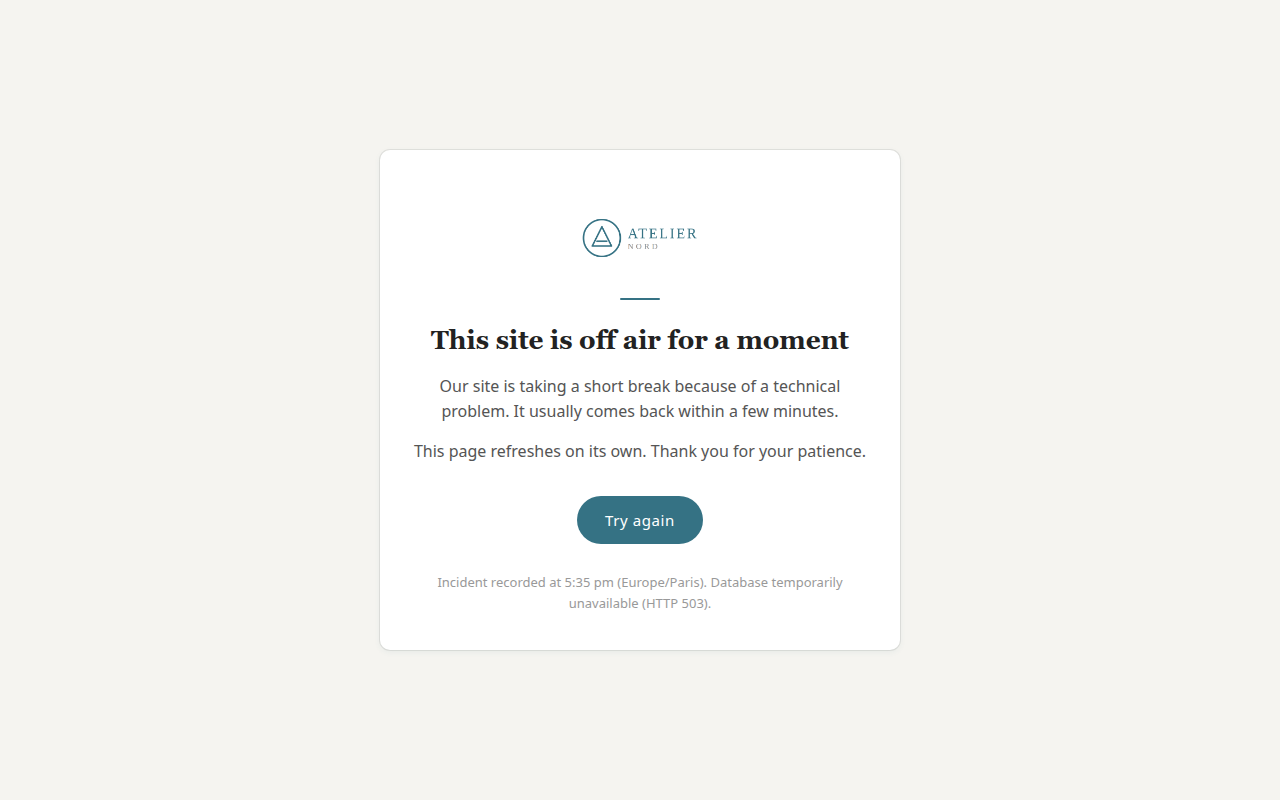
When WordPress breaks, it shows screens of its own that no theme and no plugin can style, because they appear before any of them is loaded:
- Error establishing a database connection, when the database is unreachable.
- Briefly unavailable for scheduled maintenance, while WordPress installs updates.
- There has been a critical error on this website, after a fatal PHP error.
Offair replaces these three screens with a calm page in your colors, with your logo and your words, and makes them answer with the right HTTP status so that search engines and caches treat the outage as temporary.
It also keeps a history of the outages your visitors ran into, and can email you when the database goes down, then again once the site is back.
This is not a maintenance mode or coming soon plugin. It does not take your site offline and it does not add a page you switch on. It only covers the moments when WordPress itself cannot serve your site.
Comment cela fonctionne
WordPress looks for three special files in wp-content, called drop-ins: db-error.php, maintenance.php and php-error.php. It loads them itself, before any plugin, which is the only way to show something when the database is down.
The plugin copies one static file shipped in its own folder (dropins/drop-in.php) under these three names. No code is generated. The content of the pages (texts, colors, logo) is saved as a JSON file in wp-content/uploads/offair/, and the drop-in reads it when a page has to be shown. What visitors must not see, such as the alert recipient and the history, is kept next to it in a private folder whose name cannot be guessed, with an .htaccess file that refuses web access on Apache and LiteSpeed. On Nginx, see the FAQ.
Ce que vous obtenez
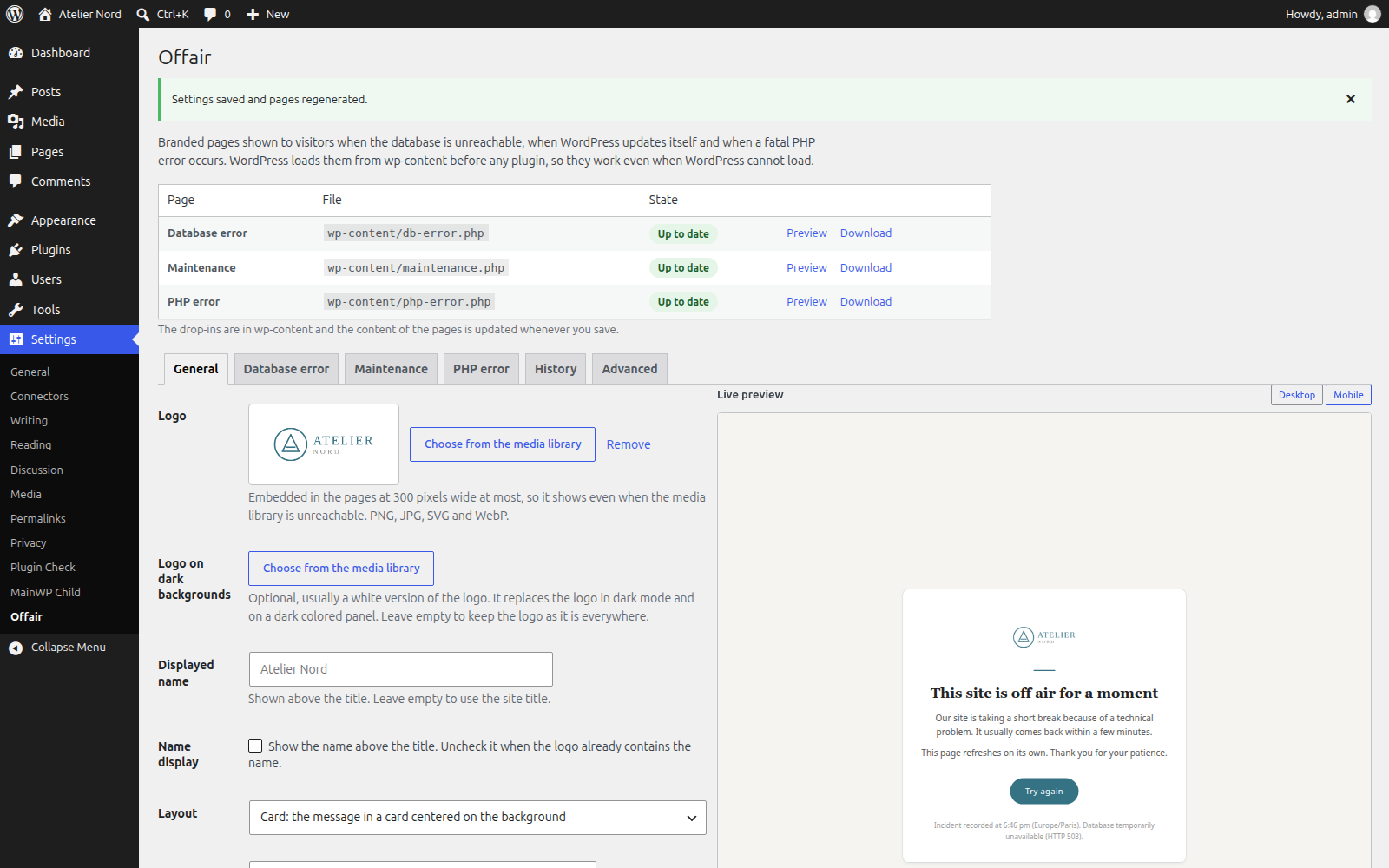
- Four layouts for the three screens: card, minimal, two columns or banner. Each shows the logo, the site name, the title, the message, a retry button and an incident line with the local time.
- Automatic dark mode: the pages follow the light or dark setting of the device of the visitor, with an optional logo for dark backgrounds. They can also stay always light or always dark.
- Your logo and colors, detected from the theme, the site icon and Elementor global colors when available, editable at any time.
- Texts in the language of the site until you customize them. Translations included: French, German, Spanish, Italian, Portuguese (Brazil), Dutch, Polish, Russian and Japanese.
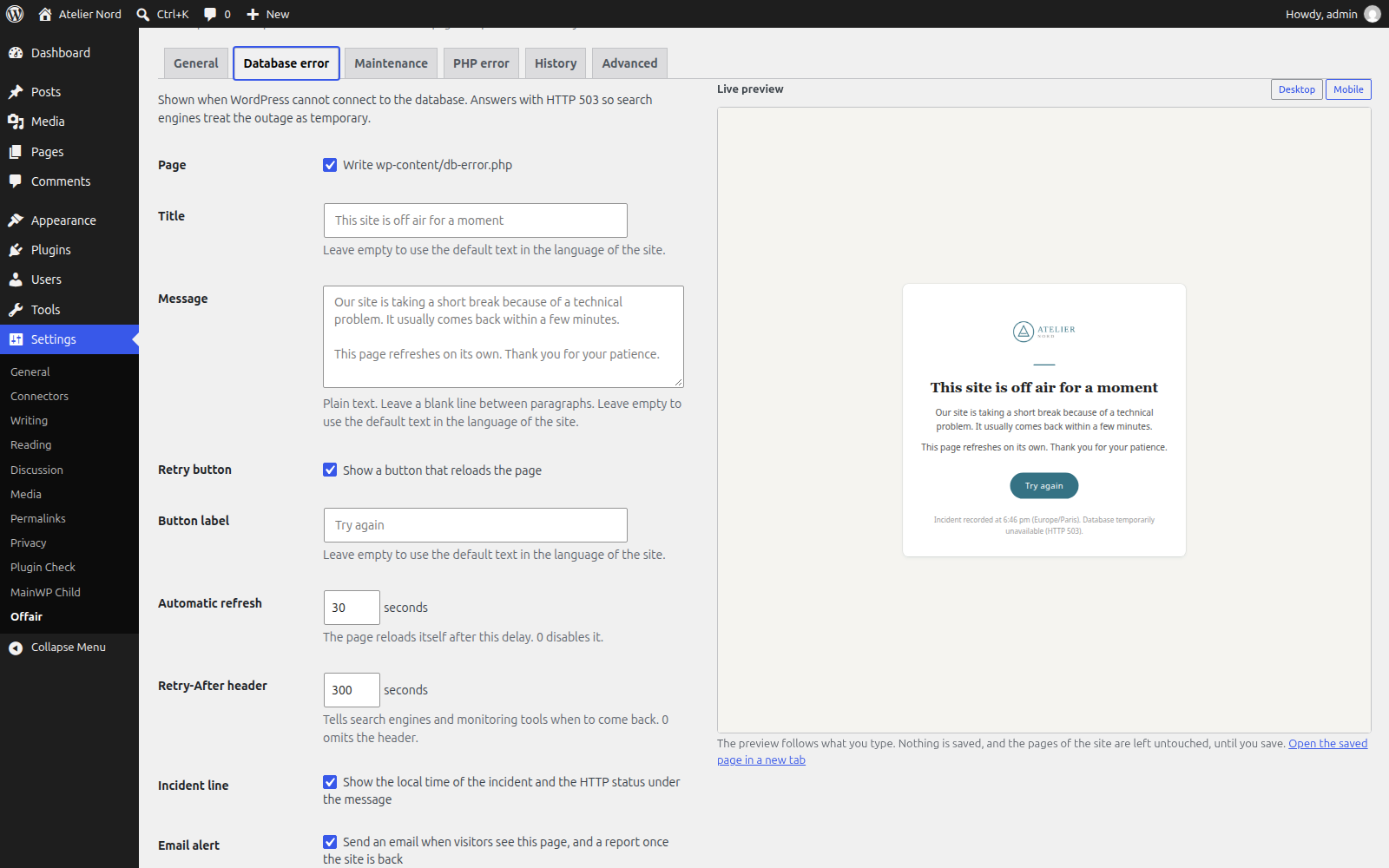
- Correct HTTP answers: 503 with a Retry-After header for the database and update pages, 503 or 500 for PHP errors (your choice), plus no-cache headers so no cache ever keeps an error page.
- No external dependency: system fonts, logo embedded in the content file, nothing loaded from the network.
- A live preview beside the settings, rendered by the drop-in itself, exactly as visitors will see it. It follows what you type, and nothing is saved or written to your site until you save.
- An email alert when the database goes down, off by default. The page itself sends it while WordPress cannot run, and WordPress sends a report once the site is back, with the duration of the outage. A test button shows whether your host delivers it.
- A history of the outages, under Tools, Outage history: the date, the page and the HTTP status, recorded once a minute at most. For a PHP error, the error itself too: its message, file and line, which usually name the plugin or theme in cause. Nothing about your visitors is recorded.
- A dashboard widget with the outages of the last 30 days, off by default, shown only to the roles you choose. Without it, a notice on the dashboard tells administrators about a database outage they missed.
- Theme templates: a theme can design any of the three pages itself, with the texts, colors and logo from the settings.
- A status box, a Site Health test and WP-CLI commands.
- Clean removal: the drop-ins are removed when the plugin is deactivated, and everything is removed when it is uninstalled.
The plugin never replaces a db-error.php, maintenance.php or php-error.php it did not add itself. If one already exists, it tells you and waits for your decision.
Works with MainWP
If you manage your sites with MainWP, the free Offair for MainWP extension shows in your MainWP Dashboard the outages your visitors ran into on all your sites, in one place. An uptime monitor checks your sites from the outside every few minutes. Offair sees the short database outages and the fatal errors on a single page that such checks miss.
Nothing else is needed on the sites: when MainWP Child is active, Offair adds its outages to the regular MainWP synchronization, and only when the dashboard asks for it. The state of the pages already reaches MainWP through the Site Health test.
Développeurs
offair_settingsfilters the settings before the page content is built.offair_datafilters the page content before it is saved for the drop-in.offair_incident_resolvedfires once a database outage is over, with the times of the first and last pages shown.- Theme templates:
offair/db-error.php,offair/maintenance.phpandoffair/php-error.phpin the active theme or its parent. The variable they receive is described in the FAQ, under Can my theme design the pages? - WP-CLI:
wp offair status,generate [--force],remove [--force],preview <db|maintenance|php>,history.
Environ
Offair is developed and maintained by Nolidev, a WordPress studio in Vannes, France, which uses it on the sites it looks after.
Installation
- Install and activate the plugin from Plugins, Add New.
- Open Settings, Offair. The logo and primary color of your site are pre-filled when they can be detected.
- Adjust the texts and colors, save. The preview shows the result.
On activation the plugin copies its drop-in to wp-content under the three names WordPress expects, and saves the page content in wp-content/uploads/offair/. If wp-content is not writable, download the drop-ins from the settings page and upload them yourself, once.
Journal de modifications
Documentation and link changes only.
1.6.2
- Docs: the theme template reference now lives in the FAQ, and the plugin links to its page on nolidev.fr.
1.6.1
- Security: the alert sent during a database outage now takes only its sender from the private folder. A changed file can no longer add recipients or headers.
- Security: control characters are removed from the recorded PHP errors, so that a message cannot alter the terminal that shows
wp offair history. - Fix: the PHP errors kept in the history now take 2 MB at most. A larger file left by an earlier version is trimmed, so the history and the daily check no longer need much memory.
- New: Site Health warns when the private folder can be read from the web, as on Nginx, which ignores .htaccess files. The FAQ gives the rule to add.
1.6.0
- New look for the pages: a plain background instead of a gradient, and a card with a thin border, a short shadow and smaller corners.
- The default title of the database error page is now “This site is off air for a moment”. A title you typed yourself is kept.
- Nouvelle icône de plugin et bannière.
1.5.2
- Fix: a WP-CLI command that crashed was recorded as an outage seen by visitors, and printed the HTML page in the terminal.
- Fix: after a fatal error during a REST API or admin-ajax.php request, the block editor and other scripts received the HTML page. They now get JSON or plain text, as WordPress sends them.
- Fix: on a network, the list of the sites and the page of each site were readable by anyone in the uploads folder. They now sit in the private folder.
- Fix: on a network, the sites did not use the templates of their own theme, and the alert could carry the name of another site than the main one.
- Fix: on a network, changing the email address or the language of the network now updates the pages.
- Fix: the history files were only trimmed after a database outage. They are now trimmed every day.
- Fix: an outage that came back shortly after its report could be reported twice. The report now leaves once the error page has not been shown for about ten minutes.
- Uninstalling now also removes the scheduled tasks of a large network and the messages kept after saving.
- With Offair for MainWP 0.2.2: the link to the settings works on a network, and the updates no longer push the real outages out of the list sent to MainWP.
1.5.1
- The dashboard widget now appears at the top of the second column, where it is seen without scrolling. A position you chose yourself is kept.
- French translation reviewed: spelling and typography.
1.5.0
- New: the history has a page of its own, under Tools, Outage history. The History tab of the settings and the plugins screen lead there.
- New: optional dashboard widget with the outages of the last 30 days, off by default. Choose on the history page which roles see it.
Captures d'écran
Pour les développeurs
Est-ce votre plugin ? Montrez les chiffres.
Ajoutez un badge en direct à votre site, docs ou github readme. Il se met à jour par lui-même - aucun compte n'est nécessaire.
Best Offair – Branded Error Pages alternatives
All 503 plugins →




FAQ
Offair – Branded Error Pages: quick answers
Réponses directes, extraites des données en direct WordPress.org.
Source : WordPress.org
Is Offair – Branded Error Pages free?
Yes. Offair – Branded Error Pages is free to download and use from the official WordPress.org plugin directory.
Is Offair – Branded Error Pages safe to use in 2026?
Offair – Branded Error Pages is a solid plugin choice in 2026, with a few things worth checking first. It runs on 10+ sites and was last updated 1 month ago, and scores 66/100 on our health check.
How many websites use Offair – Branded Error Pages?
Offair – Branded Error Pages is active on 10+ WordPress websites and has been downloaded 1,092 times since it launched in September 2026. It was downloaded 189 times in the last 30 days.
Does Offair – Branded Error Pages work with WordPress 7.1?
Yes. The developer has tested Offair – Branded Error Pages up to WordPress 7.1.5, the latest release. It requires WordPress 6.0 or newer.
What PHP version does Offair – Branded Error Pages need?
Offair – Branded Error Pages requires PHP 7.4 or higher. Most hosts run PHP 8.x today, so it works on any modern WordPress hosting.
When was Offair – Branded Error Pages last updated?
The latest version, 1.6.2, was released on October 30, 2026 (1 month ago).
Who makes Offair – Branded Error Pages?
Offair – Branded Error Pages is developed and maintained by nolidev.
What are the best alternatives to Offair – Branded Error Pages?
The most popular alternatives to Offair – Branded Error Pages are Labinator Minimal Maintenan… (100+ installs), BEAPI – Maintenance Mode (100+ installs) and ACW Maintenance Mode by Page (50+ installs).
Propulsé par PageForge
Un modèle et une feuille de calcul. Une vraie page pour chaque recherche.
PageForge transforme chaque ligne d'un CSV en une page WordPress avec son propre titre, URL, SEO et schéma, construit sur la mise en page que vous Déjà conçu. Gratuit sur WordPress.org.
- CSV et XLSX, plus Google Sheets sur les professionnels et les entreprises
- Son propre titre, URL, SEO champs et schéma pour chaque page
- Fonctionne avec l'éditeur de blocs, Elementor, Divi et Avada
- Gratuit sur WordPress.org, pas de carte de crédit