

NarraFirma
Participatory Narrative Inquiry in a box. Gather stories and make sense of challenges and opportunities in your community or organization.

Utiliser avec prudence
NarraFirma works, but test it on a staging site before relying on it in 2026. It runs on 40+ sites and was last updated 5 months ago, and scores 52/100 on our health check.
- Petite base d'utilisateurs (40+ installations actives)
- Très peu de critiques jusqu'à présent
Comment s'accumule-t-il ?
Côte à côte sur les installations, les mises à jour, les évaluations et le support



Téléchargements quotidiens
Les pics de téléchargement suivent généralement une nouvelle version - chaque site qui met à jour automatiquement compte comme un téléchargement.
Classements
Where NarraFirma stands todayWordPress.org Classements de recherche
Position en direct dans la recherche de plugins, Top 100| Mot-clé | Position |
|---|---|
| communauté | >100 |
| narrative | #13 |
| participation | #24 |
| research | >100 |
| histoires | >100 |
Adoption de version
Part de sites actifs par version.
About NarraFirma
From the official readme · v1.6.14Description
NarraFirma is companion software to the textbook Working with Stories in Your Community Or Organization: Participatory Narrative Inquiry.
Participatory Narrative Inquiry is a form of Participatory Action Research in which groups of people share and work with their stories of personal experiences to understand each other and to make collective sense of complex issues and situations. You can use it to help the people in your community or organization discover insights, catch emerging trends, make decisions, generate ideas, resolve conflicts, and connect people.
What is NarraFirma?
-
It’s a checklist. NarraFirma provides practical guidance as you work, with questions for you to answer, recommendations based on the conditions you describe, activities that help you make decisions, and just-in-time advice.
-
It’s a journal. NarraFirma helps you keep careful records about what happened in your project, and it gives you places to reflect on what happened. This reminds you to keep learning as you work, and it helps you to document your project for future reference.
-
It’s a kiosk. NarraFirma helps you collect stories, on-line and/or off-line, based on question forms you design (with sample questions you can copy). Because story collection is integrated, there is no need to export or import data.
-
It’s a workstation. NarraFirma helps you explore and interpret patterns in your data (stories and answers to questions about stories), creating annotated visualizations you can use to make sense of the stories you collected.
Why choose NarraFirma?
-
It’s portable. You can install NarraFirma anywhere, as a WordPress plugin or a Node.js web application. Web hosting is inexpensive, popular, and well supported. You can also install NarraFirma on your local computer and use it off-line. (Whichever installation method you choose, we strongly suggest that you set up SSL security on your web site before collecting or entering confidential or important information. Many hosting providers can help you with this task.)
-
It’s a team player. With NarraFirma your team can work on projects together in real time without having to hand files back and forth. You can plan your project, collect stories, discover patterns, and reflect on what you’ve learned – together.
-
It’s an open book. NarraFirma is open source software. So if you have a question about how something works, you can just look at the source code to find out. If you need the software to do something it can’t do, you can add new functionality yourself or ask someone else to add it.
-
It works in the real world. One NarraFirma installation supports multiple projects, forms, data sets, and reports. Why? Because real-life story projects are rarely simple or predictable. So go ahead and make a mess. NarraFirma is ready for it.
Dons
We have spent a lot of time developing NarraFirma. We appreciate donations, and will use them to keep working on it. You can donate at PayPal.
Need some help?
I offer training in the use of NarraFirma and consulting for PNI projects. If you are interested, check out my web site at cfkurtz.com, or send me a note at cfkurtz at cfkurtz dot com.
Installation
To install NarraFirma:
- Download the NarraFirma plugin (in zip format) from WordPress.org or the NarraFirma web site.
- In your WordPress dashboard, click on “Plugins,” then click “Add New.”
- In the “Add Plugins” page, click “Upload Plugin.”
- Click “Browse,” then choose the zip file you downloaded.
- Click “Install Now.”
- Click “Activate.”
- You should see a new “NarraFirma” menu item in your dashboard menu. Click it.
- In the screen that appears, create a new project and add some users who can access it.
Or you can install NarraFirma from the WordPress plugins directory:
- In your WordPress installation, click “Plugins.”
- Click “Add New.”
- In the search box, type “narrafirma”.
- When NarraFirma appears, click “Install.”
- Click “Activate.”
- You should see a new “NarraFirma” menu item in your dashboard menu. Click it.
- In the screen that appears, create a new project and add some users who can access it.
Journal de modifications
This minor upgrade adds an empty journal printout (with journaling questions) for offline use.
1.6.14
- Added: Option to print empty NarraFirma journal (on Project admin – Print page) to use off-line
- Changed: Increased line height throughout application (for better readability)
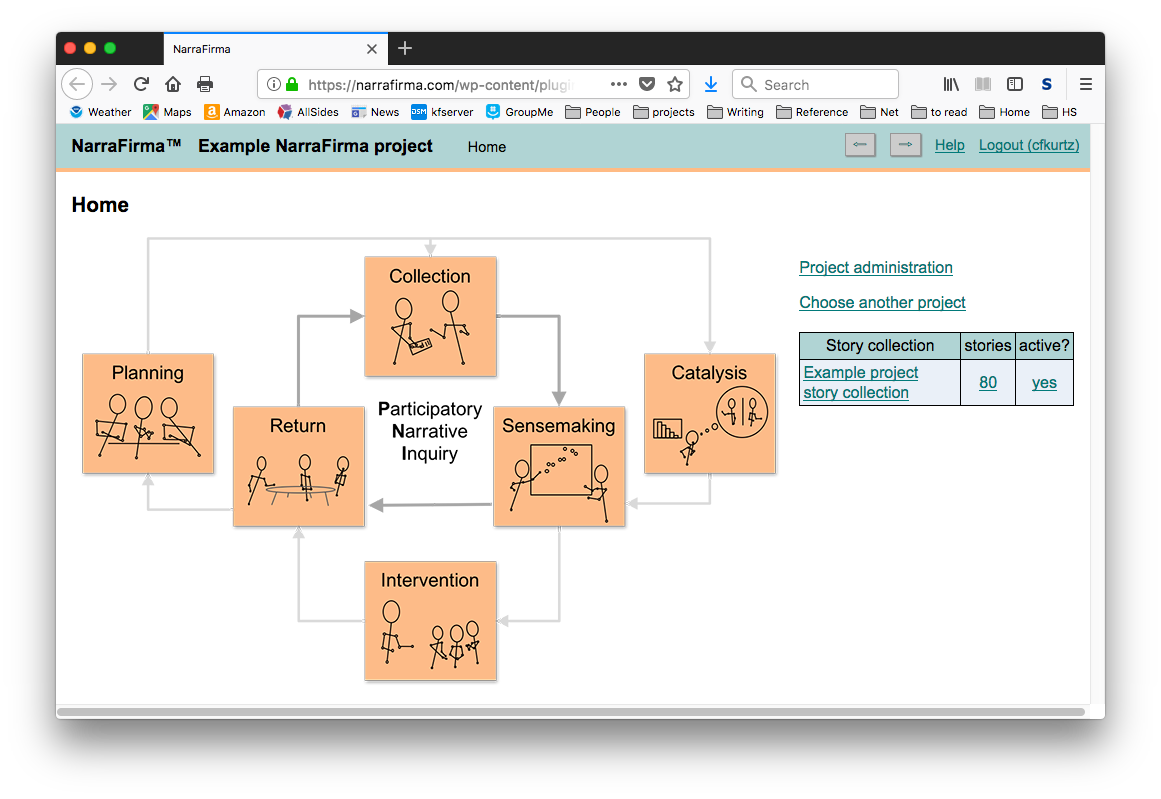
- Changed: Decreased scale of home-page navigation image a bit
1.6.13
- Changed: Fixed versioning mistake (in 1.6.12, forgot to update “tested up to” WordPress version).
- Changed: Updated GitHub readme description.
1.6.12
- Changed: Increased batch size of startup message loading from 100 to 1000. Should reduce errors due to rate limiting on WordPress servers.
- Changed: Updated home-page diagram to match new PNI-phases diagram in fourth edition of Working with Stories.
- Changed: Updated labels on “PNI planning questions” to match revised headings in fourth edition of WWS.
- Changed: To improve clarity, tweaked various elements of home page and section/phase pages (headers, icons, page names, etc).
- Changed: Removed unnecessary and distracting title-attribute popup tooltips on some buttons, icons, and links.
- Changed: Replaced excerpts from the third edition of WWS with comparable excerpts from the fourth edition.
1.6.11
Added: On “Configure catalysis report” page, added options to hide story-count labels on bar graphs and histograms as well as on contingency tables
Added: On “Review graphs” page, story-count labels are now hidden by default (but there is a new checkbox to show them)
Changed: Stopped capitalizing graph titles (if you like them, check the blog for how to get them back)
Changed: Bolded axis name labels
Changed: Changed “Count” on bar graphs to “Number of stories”
Changed: In histogram and scatterplot sets, moved set answer names (e.g., Feel: happy) to above graphs
Changed: Added fine gray lines around sub-graphs
Changed: Increased sizes of all fonts on all graphs
Changed: On “Configure catalysis report” page, changed “tables” label to “contingency tables”
Changed: Increased default graph width to 900 pixels (because most laptops have better screen resolutions than they did 10 years ago)
Fixed: Bug with shrunken fonts in exported PNG graphs
Fixed: Bug where some graphs erroneously showed useless (and wrong) “n: 0” statistics message
1.6.10
Added: On “Describe participant groups” page, questions to build a win-win proposal for each participant group.
Added: Debug page (in Project administration) that shows all project data (for easier problem solving).
Added: On “Translate story forms” page, additional operations (in “Do it” list) to rename or remove a language, systematically replacing or removing all related translations.
Changed: On “Translate story forms” page, improved counts of translated texts to include “hidden” translations (for languages that no longer appear in the “Additional languages” box).
Changed: On “Start story collection” page, improved descriptions of data conflicts (seen after clicking “Check for Data Conflicts”).
Changed: Improved error message shown in console when question included in story form does not exist in project.
Changed: On “Build story forms” page, added “NOT FOUND in project” to question-choice listbox to alert user when included question does not exist in project (because it has been renamed or removed).
Changed: Updated text on Node.js site administration page.
Fixed: Bug (in WordPress version) in which choice questions with numerical answers caused mismatches between PHP and Javascript data formats (sorting algorithms have now been improved).
Fixed: Stopped trying to save to clipboard without checking that the context is secure (clipboard access is not allowed when page context is insecure).
Fixed: In WordPress version, added some missing PHP return statements in certain error conditions, which could have (theoretically) caused problems.
Fixed: Confusing error message when granting anonymous survey access without first having created an anonymous user id.
Fixed: Improved handling of situation in which question is null or missing during survey display and story collection.
1.6.9
Changed: Updated WordPress readme file to comply with WordPress requirements.
Captures d'écran


Pour les développeurs
Est-ce votre plugin ? Montrez les chiffres.
Ajoutez un badge en direct à votre site, docs ou github readme. Il se met à jour par lui-même - aucun compte n'est nécessaire.
Best NarraFirma alternatives
Tous les plugins de communauté →





FAQ
NarraFirma: quick answers
Réponses directes, extraites des données en direct WordPress.org.
Source : WordPress.org
Is NarraFirma free?
Yes. NarraFirma is free to download and use from the official WordPress.org plugin directory.
Is NarraFirma safe to use in 2026?
NarraFirma works, but test it on a staging site before relying on it in 2026. It runs on 40+ sites and was last updated 5 months ago, and scores 52/100 on our health check.
How many websites use NarraFirma?
NarraFirma is active on 40+ WordPress websites and has been downloaded 7,732 times since it launched in October 2015. It was downloaded 340 times in the last 30 days.
Does NarraFirma work with WordPress 7.1?
NarraFirma is officially tested up to WordPress 7.0.9, while the latest release is 7.1.5. It may still work, but try it on a staging site first.
When was NarraFirma last updated?
The latest version, 1.6.14, was released on June 22, 2026 (5 months ago).
Who makes NarraFirma?
NarraFirma is developed and maintained by cfkurtz.
What are the best alternatives to NarraFirma?
The most popular alternatives to NarraFirma are Ultimate Member (200K+ installs), BuddyPress (90K+ installs) and Ultimate Member – reCAPTCHA (20K+ installs).
Propulsé par PageForge
Un modèle et une feuille de calcul. Une vraie page pour chaque recherche.
PageForge transforme chaque ligne d'un CSV en une page WordPress avec son propre titre, URL, SEO et schéma, construit sur la mise en page que vous Déjà conçu. Gratuit sur WordPress.org.
- CSV et XLSX, plus Google Sheets sur les professionnels et les entreprises
- Son propre titre, URL, SEO champs et schéma pour chaque page
- Fonctionne avec l'éditeur de blocs, Elementor, Divi et Avada
- Gratuit sur WordPress.org, pas de carte de crédit