


Multilingual Text
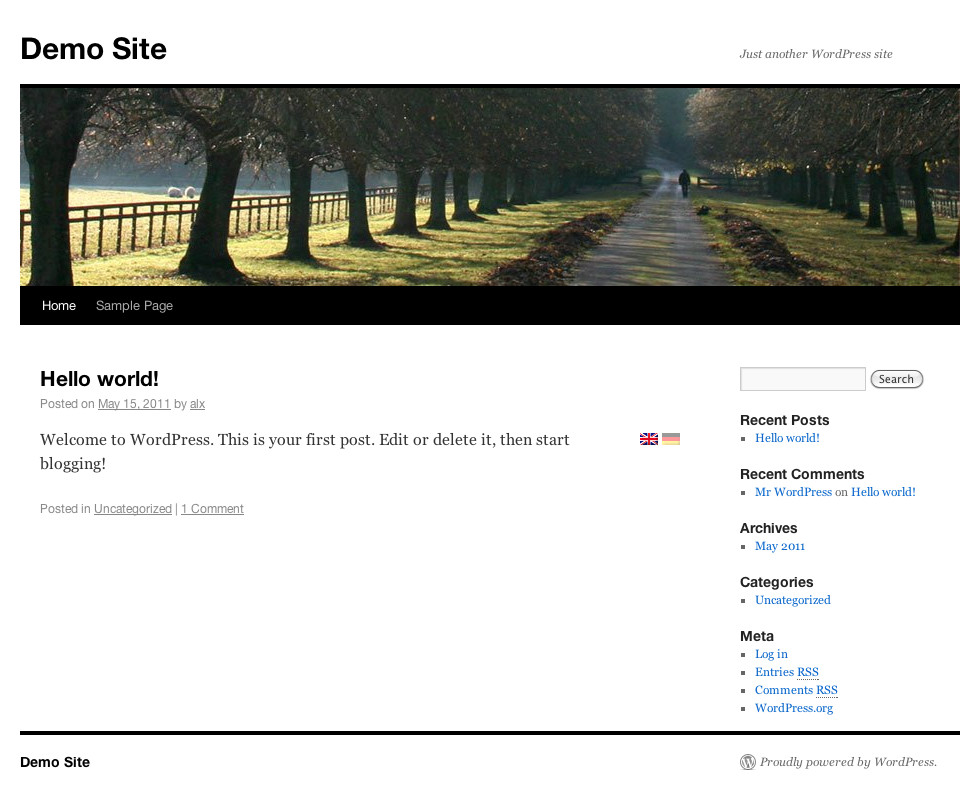
Just tag parts of your text to be in different languages, and a flag will appear next to the text and allows users to switch between them.

Envisager une alternative
Multilingual Text shows warning signs in 2026 — compare the alternatives below before installing. It runs on 30+ sites and was last updated 15 years ago, and scores 24/100 on our health check.
- Petite base d'utilisateurs (30+ installations actives)
- Très peu de critiques jusqu'à présent
- Pas de mise à jour dans 15 ans
- Only tested up to WordPress 3.2 (latest is 7.1)
Comment s'accumule-t-il ?
Côte à côte sur les installations, les mises à jour, les évaluations et le support



Téléchargements quotidiens
Les pics de téléchargement suivent généralement une nouvelle version - chaque site qui met à jour automatiquement compte comme un téléchargement.
Classements
Where Multilingual Text stands todayWordPress.org Classements de recherche
Position en direct dans la recherche de plugins, Top 100| Mot-clé | Position |
|---|---|
| bilingual | >100 |
| language | >100 |
| multilanguage | >100 |
| multilingual | >100 |
Adoption de version
Part de sites actifs par version.
About Multilingual Text
À partir du Lisezmoi officiel · v1.4Description
Just tag parts of your text to be in different languages, and a flag will appear next to the text and allows users to switch between them.
No other elements of the blog will be translated.
Use [:gb] to specify that the following text part is english, or use any other two char language code.
To use one text block in multiple languages use e.g. [:gb,de], which is handy for parts like images.
Write [:*] to use the block in all (within the text already known) languages.
You can without any problem mix many of those tags. e.g. [:gb]english-intro[:de]german-intro[:*]common image[...].
Optionally also the title of a text can be multilingual, but requires theme modification.
The flags can be placed:
- next to the text. This is the default and do work out of the box.
- next to the title. This requires a template change.
- an other place. If you would like to place e.g. the flags in a widget (which is included).
Remerciements
Thanks to:
- zorun for the flags
- Tamas, Anton for beta testing
Contributing
You may overwork the readme and also the other texts… that would be great.
If you have ideas/bugs please contact me.
Code
The package also contains an version for PHP5.3+. The file is functional identical to the other one (which only requires PHP 5.2) but makes usage of a nice new feature and is easier to read/write.
When WordPress requires PHP5.3+ (sometime in the future) that file will be used.
Flags
The flags are from http://www.free-country-flags.com/ and under CC-BY-SA License (http://creativecommons.org/licenses/by-sa/3.0/).
Installation
Exigences :
- WordPress 2.7+
- PHP 5.2+
Installation:
- Use the ‘Plugins/Add New’, or extract the archive into the
/wp-content/plugins/directory - Activez le plugin via le menu « Plugins » dans WordPress
- See the configuration in the ‘Settings/General’ menu
Flags (optional):
- Use the flags in ‘/wp-content/plugins/multilingual-text/flags/’ or create a new directory, place your flags there, and specify it in the config (it’s not recommended to place your flags in the plugin’s directory because those will be overwritten on update)
Theme Modifications (optional):
- Flags on title: place a
<?php Multilingual_Text::Flags(); ?>in front of the title, or where you like to have the flags - Multilingual title: replace the
<?php the_title(); ?>with<?php Multilingual_Text::Title(); ?>, this can’t be done automatically because some titles (like the<title>or other<meta>elements) do not support switching
Widget (optional):
- You can place a widget to switch between the languages, in this case you can disable the flags on text/title. You have to enter the name of all languages which will be showed.
Custom usage:
- I you want to use the Multilingual-Text Engine for your own text, you can do so.
Multilingual_Text::Parse(string $text [, bool $with_flags = true [, bool $with_text = true ]] )will parse the text (ml-style) and returns the generated code.- With the two options
$with_flagsand$with_textyou can control wether flags and/or text will be returned. - The generated code will only be returned, so you have to
echoit – or process it anyway.
Journal de modifications
1.4
- Added custom usage
- Small fixes
1.3
- Fixed an bug where the language selection was dropped
- Added “[:*]” to write for all languages
1.2
- Added a “Settings” Link to the plugin page
- Added many flags
1.1
- Added support for PHP 5.2
- Fixed a few flaws
1.0
- Version initiale.
Captures d'écran

Pour les développeurs
Est-ce votre plugin ? Montrez les chiffres.
Ajoutez un badge en direct à votre site, docs ou github readme. Il se met à jour par lui-même - aucun compte n'est nécessaire.
Best Multilingual Text alternatives
All bilingual plugins →




FAQ
Multilingual Text: quick answers
Réponses directes, extraites des données en direct WordPress.org.
Source : WordPress.org
Is Multilingual Text free?
Yes. Multilingual Text is free to download and use from the official WordPress.org plugin directory.
Is Multilingual Text safe to use in 2026?
Multilingual Text shows warning signs in 2026 — compare the alternatives below before installing. It runs on 30+ sites and was last updated 15 years ago, and scores 24/100 on our health check.
How many websites use Multilingual Text?
Multilingual Text is active on 30+ WordPress websites and has been downloaded 10,075 times since it launched in May 2011. It was downloaded 92 times in the last 30 days.
Does Multilingual Text work with WordPress 7.1?
Multilingual Text is officially tested up to WordPress 3.2.1, while the latest release is 7.1.5. It may still work, but try it on a staging site first.
When was Multilingual Text last updated?
The latest version, 1.4, was released on September 21, 2011 (15 years ago).
Who makes Multilingual Text?
Multilingual Text is developed and maintained by Sibin Grasic.
What are the best alternatives to Multilingual Text?
The most popular alternatives to Multilingual Text are Ray Enterprise Translation (7K+ installs), WPBakery Visual Composer &… (7K+ installs) and WPML to Polylang (5K+ installs).
Propulsé par PageForge
Un modèle et une feuille de calcul. Une vraie page pour chaque recherche.
PageForge transforme chaque ligne d'un CSV en une page WordPress avec son propre titre, URL, SEO et schéma, construit sur la mise en page que vous Déjà conçu. Gratuit sur WordPress.org.
- CSV et XLSX, plus Google Sheets sur les professionnels et les entreprises
- Son propre titre, URL, SEO champs et schéma pour chaque page
- Fonctionne avec l'éditeur de blocs, Elementor, Divi et Avada
- Gratuit sur WordPress.org, pas de carte de crédit