


Migrate Guru – Site Migration & Cloning
Effortlessly migrate, clone, or transfer your WordPress site to over 5,000 web hosts with Migrate Guru, trusted by Cloudways, Pantheon, and Dreamhost.

Safe pick
Yes — Migrate Guru is a safe, well-maintained plugin to use in 2026. It runs on 200K+ sites, is rated 4.9/5 and was last updated 3 months ago, and scores 92/100 on our health check.
- Proven at scale on 200K+ active sites
- Loved by users — 4.9/5 from 1,646 reviews
- Tested with the latest WordPress (7.1)
- Responsive support — 100% of recent threads resolved
How does it stack up?
Side-by-side on installs, updates, ratings & support



Daily downloads
Download spikes usually follow a new release — each site that auto-updates counts as a download.
Rankings
Where Migrate Guru stands todayWordPress.org search rankings
Live position in the plugin search, top 100| Keyword | Position |
|---|---|
| clone | #14 |
| copy | #19 |
| migrate | #1 |
| migration | #8 |
| Wordpress migrate | #1 |
Version adoption
Share of active sites per release.
Rating breakdown
★★★★★★★★★★ 4.9 from 1,646 reviews
About Migrate Guru – Site Migration & Cloning
From the official readme · v6.72Description
Migrate Guru is a powerful WordPress migration plugin designed to seamlessly transfer your WordPress site to a new host or domain. Whether you need to clone, move, or migrate your WordPress website, Migrate Guru ensures a hassle-free process with its one-click migration feature. This plugin supports all-in-one WP migrations, handling large sites up to 200 GB without overloading your server. Compatible with every major web host and equipped with automatic URL rewriting and serialized data handling, it’s the go-to tool for moving WordPress sites to new domains or hosts. Move, clone, or migrate your WordPress site with Migrate Guru—the smart, swift, and secure WordPress migrator and backup plugin.
CHECKOUT Migrate Guru in Action
TOP FEATURES
One-Click Migration
Effortlessly move WordPress sites 80% faster with a single click, migrating 1 GB in under 30 minutes.
No Site Overload
Migrate Guru uses its own servers, preventing site crashes.
Optimized for Large Sites
Easily migrate WordPress sites up to 200 GB, overcoming live-site server limits.
No Add-Ons Required
Seamlessly handle multi-sites and serialized data without extra plugins.
No Storage Needed
Temporary copies are removed post-migration.
Universal Compatibility
Compatible with all web hosts, making transfers simple.
Automated Search & Replace
Accurate search and replace for serialized data.
Real-Time Alerts
Receive real-time and email alerts on migration status.
DISCLAIMER
Currently we don’t support:
- Local host migrations
- Migration of multi-site network sub-sites to a different domain or migration of a site to multi-site network subdivision.
HOW TO PERFORM A MIGRATION
- Install Migrate Guru on the site you want to clone.
- Install WordPress on the destination.
- Choose the destination web host that you want to clone your website to, enter details.
- Click ‘Migrate’.
PROUD MIGRATION PARTNERS of Cloudways, Pantheon and DreamHost
SUPPORTS ALL 5,000+ WEB HOSTS AROUND THE WORLD
Pantheon, LiquidWeb, Cloudways, Savvii, DigitalOcean, Hostgator, Godaddy, Bluehost, SiteGround, Kinsta, AWS, Pressable, Webhostingtalk, Inmotion Hosting, Softlayer, Reverbnation, Homestead, Site5, Linode, Fatcow, DreamHost, Rackspace, etc.
WordPress Support forum
For dedicated support and guidance on Migrate Guru, visit the WordPress.org support page. Here you can find community discussions, ask questions, and access resources to ensure smooth and efficient WordPress migrations.
Installation
Automatic installation
- Log in to your WordPress dashboard, navigate to the Plugins menu. Click Add New.
- Type Migrate Guru, click Install Now, and activate it.
Manual installation
- In the search field type Migrate Guru and click Search Plugins.
- Click Download.
- Upload the .zip file to your web server via an FTP application. Instructions here
Changelog
6.72
- Tweak: Added validation checks for input params.
6.65
- Improvement: Enhanced secret generation using the secure random_int function.
- Improvement: Improved connection key generation mechanism.
- Improvement: Optimized migration of large database tables.
- Tweak: Improved file upload.
- Tweak: Improved validation for streamed callbacks.
6.28
- Tweak: Improved migration workflow for smoother operation
- Tweak: Updated UI for a simpler and more user-friendly experience
5.92
- Tweak: Improvements in fetching File Stats
- Tweak: Code Restructuring
5.88
- Tweak: Code Restructuring
- Tweak: Added support for PHP 8.4
5.65
- Tweak: 24 hrs Validity for Migration Key
Screenshots
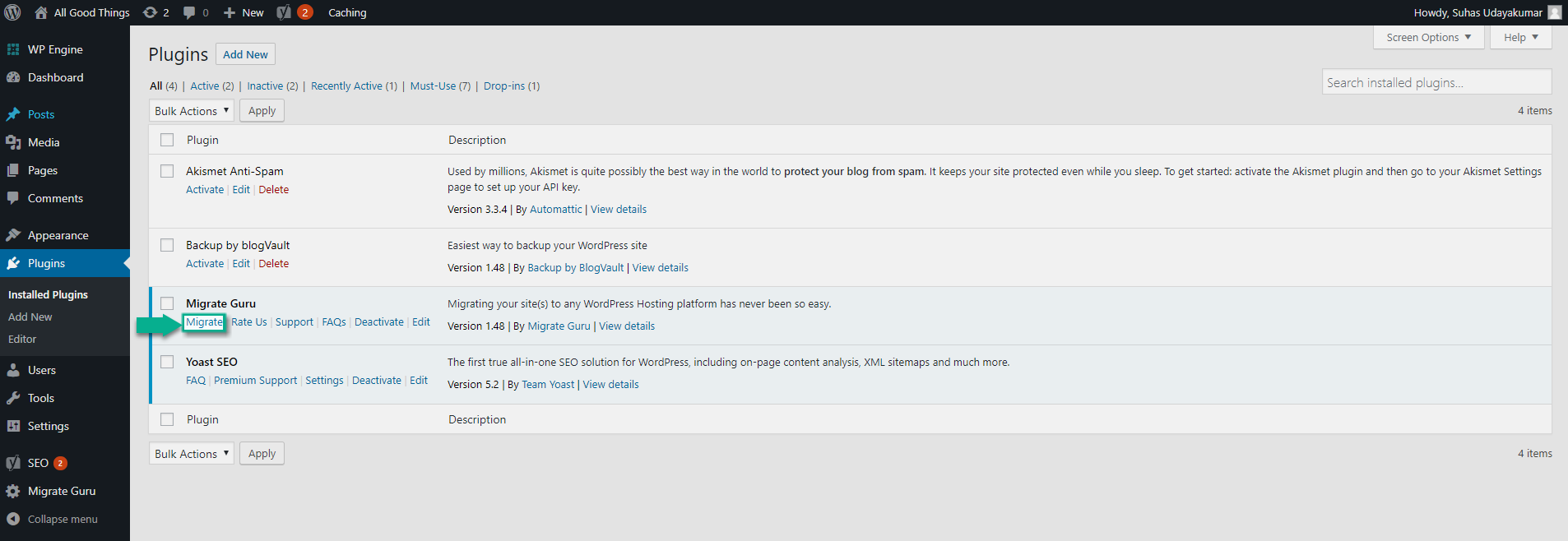
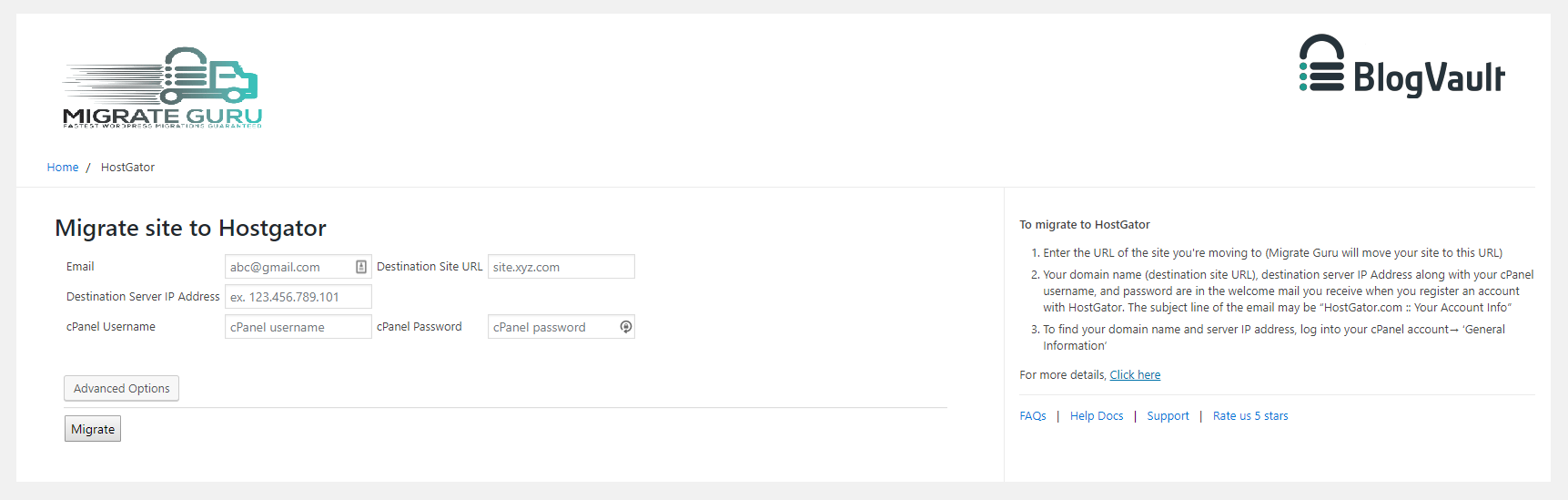


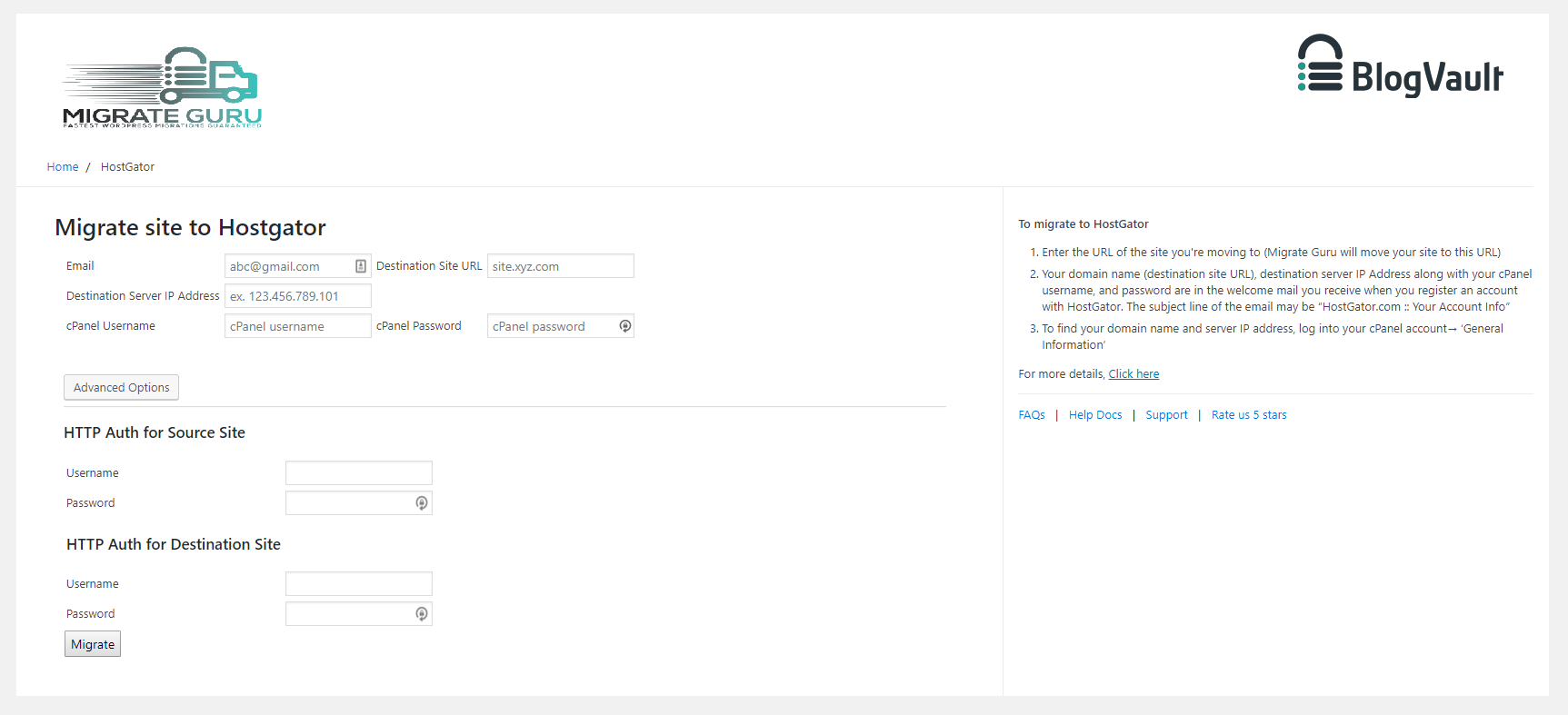
For developers
Is this your plugin? Show off the numbers.
Add a live badge to your site, docs or GitHub README. It updates on its own — no account needed.
Best Migrate Guru alternatives
All clone plugins →





FAQ
Migrate Guru: quick answers
Straight answers, pulled from live WordPress.org data.
Source: WordPress.org
Is Migrate Guru free?
Yes. Migrate Guru is free to download and use from the official WordPress.org plugin directory.
Is Migrate Guru safe to use in 2026?
Yes — Migrate Guru is a safe, well-maintained plugin to use in 2026. It runs on 200K+ sites, is rated 4.9/5 and was last updated 3 months ago, and scores 92/100 on our health check.
How many websites use Migrate Guru?
Migrate Guru is active on 200K+ WordPress websites and has been downloaded 2,850,453 times since it launched in August 2017. It was downloaded 41,905 times in the last 30 days.
Does Migrate Guru work with WordPress 7.1?
Yes. The developer has tested Migrate Guru up to WordPress 7.1.4, the latest release. It requires WordPress 4.0 or newer.
What PHP version does Migrate Guru need?
Migrate Guru requires PHP 7.0 or higher. Most hosts run PHP 8.x today, so it works on any modern WordPress hosting.
When was Migrate Guru last updated?
The latest version, 6.72, was released on August 28, 2026 (3 months ago).
Who makes Migrate Guru?
Migrate Guru is developed and maintained by migrateguru.
What are the best alternatives to Migrate Guru?
The most popular alternatives to Migrate Guru are All-in-One WP Migration and… (5M+ installs), Yoast Duplicate Post (3M+ installs) and WPvivid (900K+ installs).
Powered by PageForge
One template and a spreadsheet. A real page for every search.
PageForge turns each row of a CSV into a WordPress page with its own title, URL, SEO fields and schema, built on the layout you already designed. Free on WordPress.org.
- CSV and XLSX, plus Google Sheets on Professional and Enterprise
- Its own title, URL, SEO fields and schema for every page
- Works with the block editor, Elementor, Divi and Avada
- Free on WordPress.org, no credit card