


MaxButtons – Create buttons
Maxbuttons is the best and easiest button plugin for WordPress. Within minutes you can create beautiful buttons, share buttons and social icons.

Choix
Yes — MaxButtons – Create buttons is a safe, well-maintained plugin to use in 2026. It runs on 70K+ sites, is rated 4.9/5 and was last updated 2 months ago, and scores 91/100 on our health check.
- Prouvé à grande échelle sur plus de 70 000 sites actifs
- Loved by users — 4.9/5 from 1,093 reviews
- Testé avec le dernier WordPress (7.1)
Téléchargements quotidiens
Les pics de téléchargement suivent généralement une nouvelle version - chaque site qui met à jour automatiquement compte comme un téléchargement.
Classements
Where MaxButtons – Create buttons stands todayWordPress.org Classements de recherche
Position en direct dans la recherche de plugins, Top 100| Mot-clé | Position |
|---|---|
| butotn creator | #1 |
| css wordpress button | #6 |
| css3 button generator | #1 |
| responsive buttons | #4 |
| share button | #15 |
Adoption de version
Part de sites actifs par version.
Répartition des notes
★★★★★★★★★★ 4.9 from 1,093 reviews
About MaxButtons – Create buttons
From the official readme · v9.8.6Description
MaxButtons is a powerful WordPress button, share button and social icon plugin. Create great looking CSS3 WordPress buttons in a minute. Easy to understand. Our button editor with live preview makes it a snap to generate awesome responsive buttons in very little time. The social share buttons and social icon features allow you to add social options to your website in minutes.
MaxButtons WordPress button plugin has been going strong for over 15 years and was the first button plugin for WordPress. MaxButtons has earned over 1000 5-star reviews and over 3.5 million downloads. Here are couple of our favorites:
“The best plugin of its kind”
“This plugin makes creating buttons sooooo easy.”
Why aren’t all plugins like this?!?
MaxButtons easily solved my problem with lots of options when creating the button and a live view of what it was going to look like. It would have done the job for me there and then but being able to adjust the text AND link with shortcodes on my page made modifications a breeze. – by discgosforth“Easy, clear, and robust. I’m a programmer and can write CSS till the cows come home, but why? Just get it, install it and use it. Then, when you’re impressed, buy the pro version”
Max Foundry also makes the WordPress Gallery plugin MaxGalleria and WordPress Media Folders plugin for real WordPress Media Library folders.
Obligations
- WordPress installed
- PHP 7
WordPress Buttons
- Create WordPress Buttons
- Getting Social Icons on your WordPress site.
- Share Buttons on your WordPress site.
- WordPress button library and button sets can make my designers and developers more productive.
MaxButtons
- No coding, the plugin takes care of everything
- Button shortcodes for ease of use, unlimited text and link combinations possible
- Create unlimited number of buttons
- Live preview window instantly updates as you customize your buttons
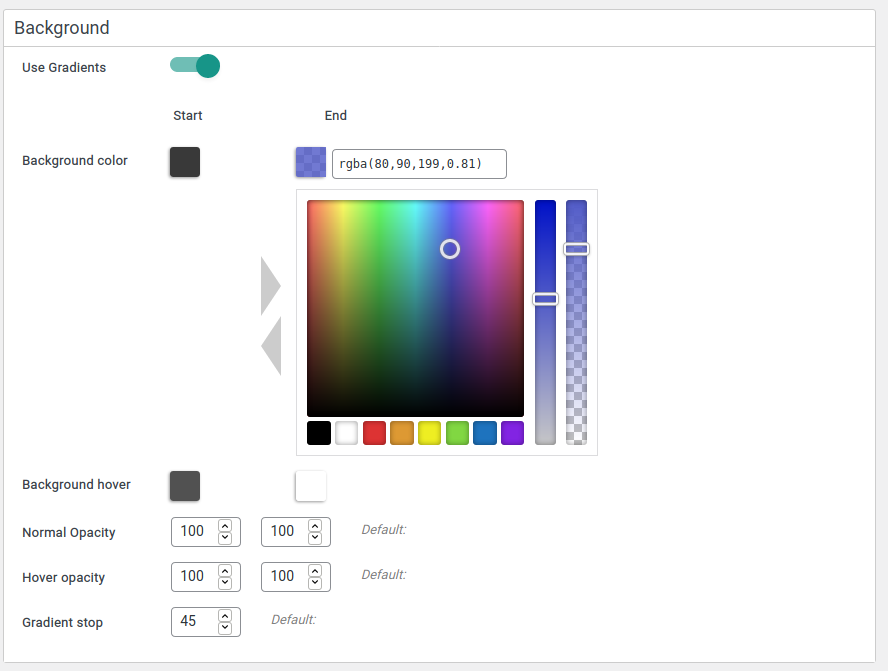
- Color picker for unlimited color combinations
- Works with all modern browsers, degrades gracefully for others
- Fully CSS3 compliant with text shadowing, box shadowing, gradients, etc.
- Copy an existing button to use as starting point for others
- See your buttons on different color backgrounds
- Predefined defaults make getting started super easy
- Works with your page builder: Beaver Builder, SiteOrigin, Elementor etc
- Great Gutenberg support, works out of the box.
- Integrates with Popup Builders to open Modals
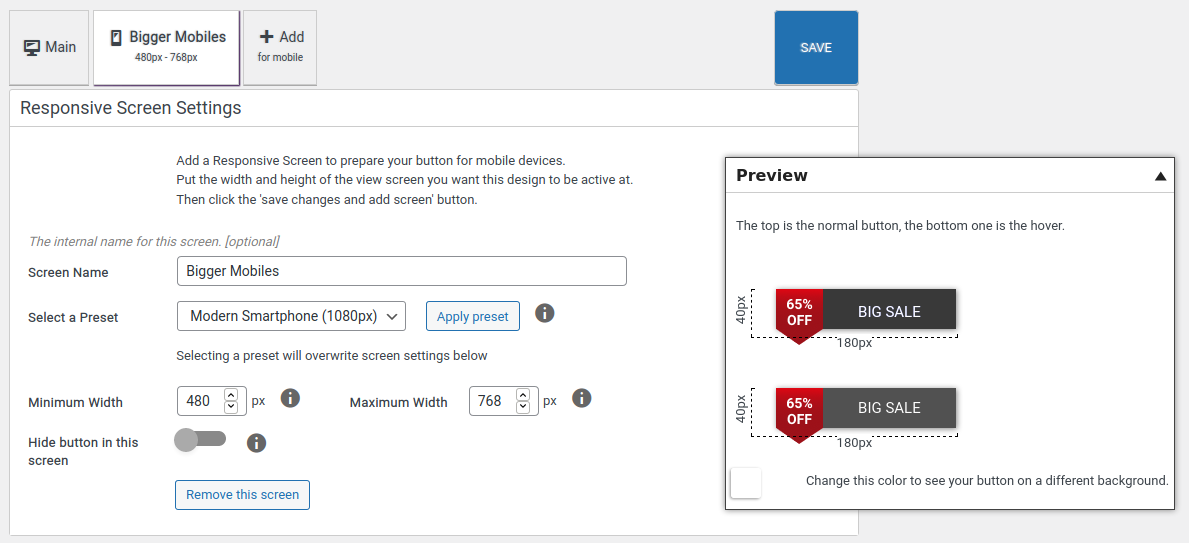
- Best responsive options. Customize for each mobile device and screen size
Share Buttons
MaxButtons has a share buttons addon that includes 7 beautifully designed share button sets for the following social networks:
- Le Facebook
- Gazouillement
- Google+
- StumbleUpon
- Buffer
Plus email and print icons.
Icônes sociales
In addition to promoting your content through MaxButtons share buttons you can also use share buttons to promote your social network profiles. Simply select a social icon or make a button, include the link to your profile and post the button shortcode on your page. Social icons are easy with MaxButtons!
MaxButtons Pro
Take your buttons to the next level with MaxButtons Pro!
Our premium WordPress plugin for buttons, share buttons and social icons brings you the best WordPress button plugin through continuous feature updating. Upgrading to the Pro version allows you to add icons and images to your custom WordPress buttons. The Pro features allow you to do so much more!
- Icons and Images – Add icons and images to your buttons and customize placement and size.
- Multi-line text – Add a second line of text and stylize with font, size and placement.
- Google Fonts – We have included the entire set to help your buttons stand out with beautiful typography.
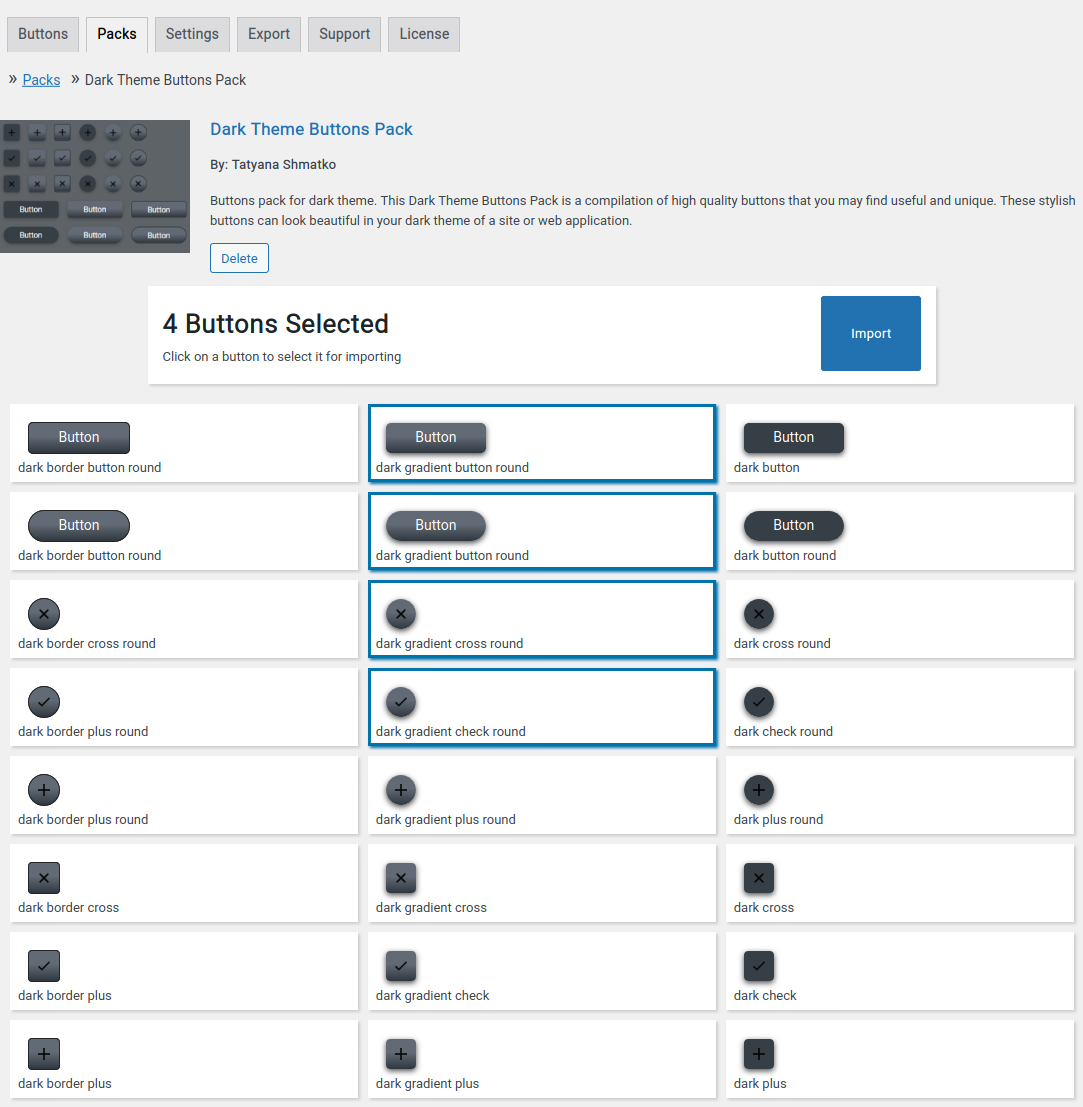
- Button Packs – Ready to use, value priced button sets that make any site good great.
- Google Analytics Event Tracking for WordPress Buttons. The best way to see you users’ interactions with buttons in Google Analytics. No coding needed.
- Import/Export – Useful for backing up and/or moving your buttons. Also, use any of the great free icons listed on our site.
- Dynamic Buttons – Use variables from WordPress or theme in your link and text
- Custom CSS – Built-in per button custom CSS
- Button Search – for easier management of large button sets.
- Font Awesome 5 – Largest icon collection, fastest served
- WPBakery Page Builder – Integrated with WPBakery Page Builder
- Contact Form 7 Integration
- Beaver Builder Integration
- Easy Digital Downloads Purchase and Checkout Button Integration
WordPress Button Sets
In addition to the Basic Buttons and free button packs included with MaxButtons Pro you can also purchase additional professionally designed, production ready button packs from the largest WordPress button library in existence. The library features more than 6,000 buttons. It is the largest WordPress button library in the known universe.
WordPress button sets make designers and developers much more productive.
Free Icons
You can use free icons when you create your buttons with MaxButtons Pro so we’ve built one of the largest libraries to inspire you and make your buttons really stand out.
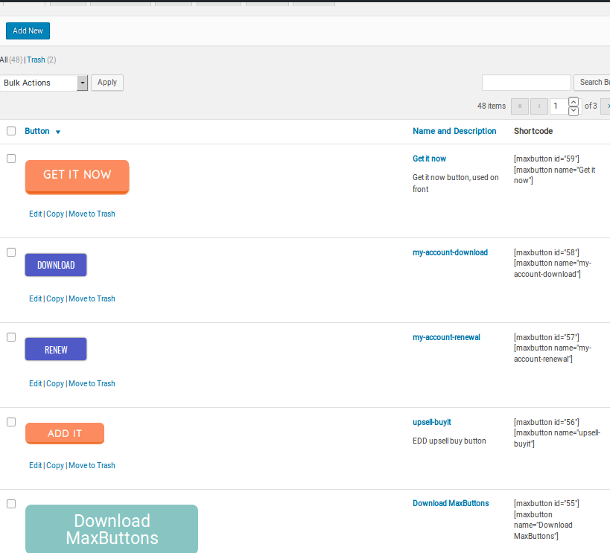
Button Shortcode
- Click the MaxButtons page from the admin menu.
- Cliquez sur le bouton Ajouter un nouveau.
- Create and customize your button using the button editor.
- Fill out and select the options needed to build your button.
- Once you’re ready, click Save.
- A button shortcode will be generated (ex: [maxbutton id=”17″] or [maxbutton name=”My Button Name”]).
- Use the shortcode anywhere in your content and the button will appear.
You can also pass the button text and URL as parameters in the button shortcode, giving you even greater flexibility. For example, if you want to create a set of buttons that look exactly the same, except for the text and URL, you could do something like this:
[maxbutton id=”17″ text=”Search Google” url=”http://google.com”]
[maxbutton name=”MaxButtons Button Name” text=”Search Yahoo” url=”http://yahoo.com”]
Another parameter you can give the shortcode is window, which tells the button whether or not to open the URL in a new window (by default the button opens the URL in the current window). To do so you always give the window parameter the value “new”, shown below. Anything else will open the button URL in the current window.
[maxbutton id=”17″ window=”new”]
You can also use the nofollow parameter, which will add a rel=”nofollow” attribute to the button when set to true, as shown below (the default is false):
[maxbutton id=”17″ nofollow=”true”]
NOTE: Passing parameters to the shortcode overrides those settings saved as part of the button.
Soutien
We work hard to give timely support during the week. And we give support when we’re on during the weekend.
MaxButtons. Bringing the #buttonlove!
Installation
Pour une installation automatique :
- Connectez-vous à votre site Web et accédez à la section Plugins de votre panneau d'administration.
- Cliquez sur le bouton Ajouter un nouveau.
- Sous Installer des plugins, cliquez sur le lien de téléchargement.
- Sélectionnez le fichier ZIP du plugin à partir de votre ordinateur, puis cliquez sur le bouton Installer maintenant.
- Vous devriez voir un message indiquant que le plugin a été installé avec succès.
- Cliquez sur le lien Activer le plugin.
Pour une installation manuelle :
- Vous devriez avoir accès au serveur sur lequel WordPress est installé. Si ce n'est pas le cas, consultez votre administrateur système.
- Copiez le fichier zip du plugin sur votre serveur et décompressez-le quelque part sur le système de fichiers.
- Copy the “maxbuttons” folder into the /wp-content/plugins directory of your WordPress installation.
- Connectez-vous à votre site Web et accédez à la section Plugins de votre panneau d'administration.
- Look for “MaxButtons” and click Activate.
Journal de modifications
Warning . This is a big upgrade. This update has major changes to responsive options. Before updating - Make backup of database table - Check your buttons after updating - Check your responsive buttons
9.8.6
- Communiqué de maintenance
- Fix – Missing escape on view parameter in maxbutton list
- Compatible and tested with latest WordPress (7.0) and PHP (8.3)
9.8.5
- Fix for page check in admin footer
- Readme updates
9.8.4
- Another fix preventing javascript in URL .
9.8.3
- Regular fix preventing javascript in URL, not also via esc_url .
9.8.2
- Removed possibility to add javascript in URL links on request of WP plugin team (security issue)
9.8.1.
- Minor security improvements
Captures d'écran




Pour les développeurs
Est-ce votre plugin ? Montrez les chiffres.
Ajoutez un badge en direct à votre site, docs ou github readme. Il se met à jour par lui-même - aucun compte n'est nécessaire.
FAQ
MaxButtons – Create buttons: quick answers
Réponses directes, extraites des données en direct WordPress.org.
Source : WordPress.org
Is MaxButtons – Create buttons free?
Yes. MaxButtons – Create buttons is free to download and use from the official WordPress.org plugin directory.
Is MaxButtons – Create buttons safe to use in 2026?
Yes — MaxButtons – Create buttons is a safe, well-maintained plugin to use in 2026. It runs on 70K+ sites, is rated 4.9/5 and was last updated 2 months ago, and scores 91/100 on our health check.
How many websites use MaxButtons – Create buttons?
MaxButtons – Create buttons is active on 70K+ WordPress websites and has been downloaded 5,234,275 times since it launched in August 2011. It was downloaded 5,657 times in the last 30 days.
Does MaxButtons – Create buttons work with WordPress 7.1?
Yes. The developer has tested MaxButtons – Create buttons up to WordPress 7.1.5, the latest release. It requires WordPress 5.0 or newer.
What PHP version does MaxButtons – Create buttons need?
MaxButtons – Create buttons requires PHP 7.0 or higher. Most hosts run PHP 8.x today, so it works on any modern WordPress hosting.
When was MaxButtons – Create buttons last updated?
The latest version, 9.8.6, was released on September 30, 2026 (2 months ago).
Who makes MaxButtons – Create buttons?
MaxButtons – Create buttons is developed and maintained by maxfoundry.
Propulsé par PageForge
Un modèle et une feuille de calcul. Une vraie page pour chaque recherche.
PageForge transforme chaque ligne d'un CSV en une page WordPress avec son propre titre, URL, SEO et schéma, construit sur la mise en page que vous Déjà conçu. Gratuit sur WordPress.org.
- CSV et XLSX, plus Google Sheets sur les professionnels et les entreprises
- Son propre titre, URL, SEO champs et schéma pour chaque page
- Fonctionne avec l'éditeur de blocs, Elementor, Divi et Avada
- Gratuit sur WordPress.org, pas de carte de crédit