


LMComments
Modern, moderated comments for WordPress: threaded replies, reactions and one moderation dashboard. Connect in two minutes, no keys to copy.

Utiliser avec prudence
LMComments works, but test it on a staging site before relying on it in 2026. Was last updated 2 months ago, and scores 60/100 on our health check.
- Testé avec le dernier WordPress (7.1)
- Petite base d'utilisateurs (<10 installations actives)
- Très peu de critiques jusqu'à présent
Comment s'accumule-t-il ?
Côte à côte sur les installations, les mises à jour, les évaluations et le support



Téléchargements quotidiens
Les pics de téléchargement suivent généralement une nouvelle version - chaque site qui met à jour automatiquement compte comme un téléchargement.
Classements
Where LMComments stands todayWordPress.org Classements de recherche
Position en direct dans la recherche de plugins, Top 100| Mot-clé | Position |
|---|---|
| comment system | >100 |
| les commentaires | >100 |
| communauté | >100 |
| discussion | >100 |
| moderation | >100 |
About LMComments
À partir du Lisez-moi officiel · v2.0.0Description
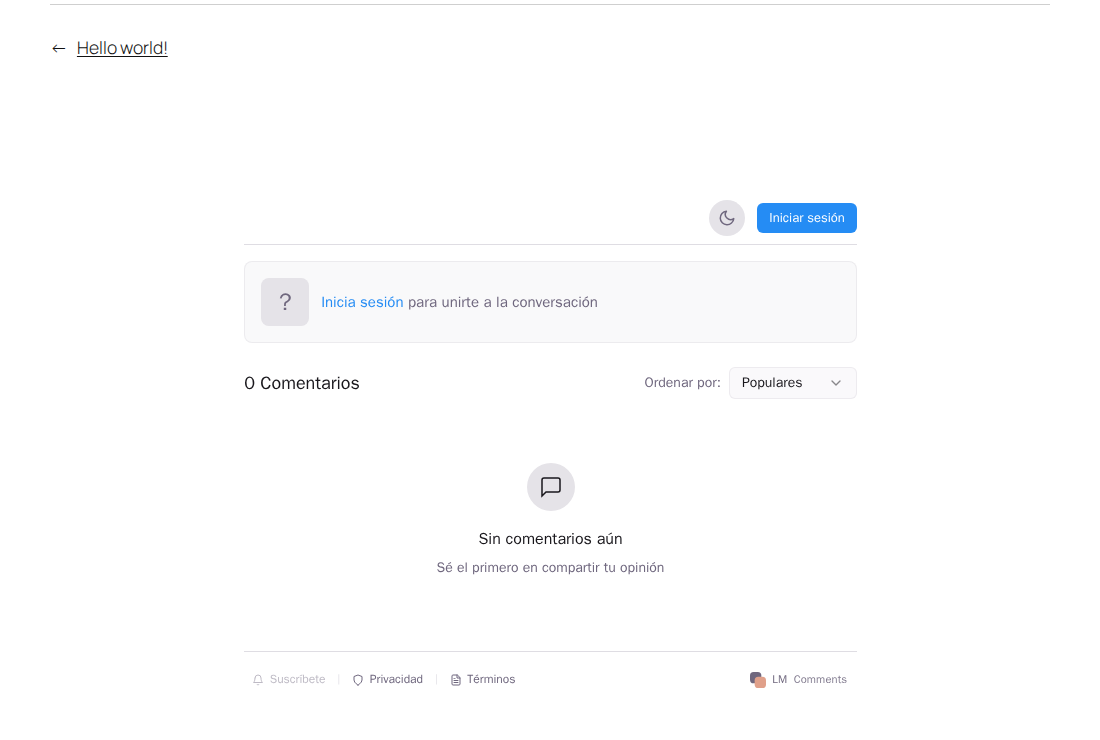
LMComments replaces the WordPress comments section with a modern conversation: threaded replies, reactions, sign-in with Google or Discord, and a moderation dashboard that works for every site you run.
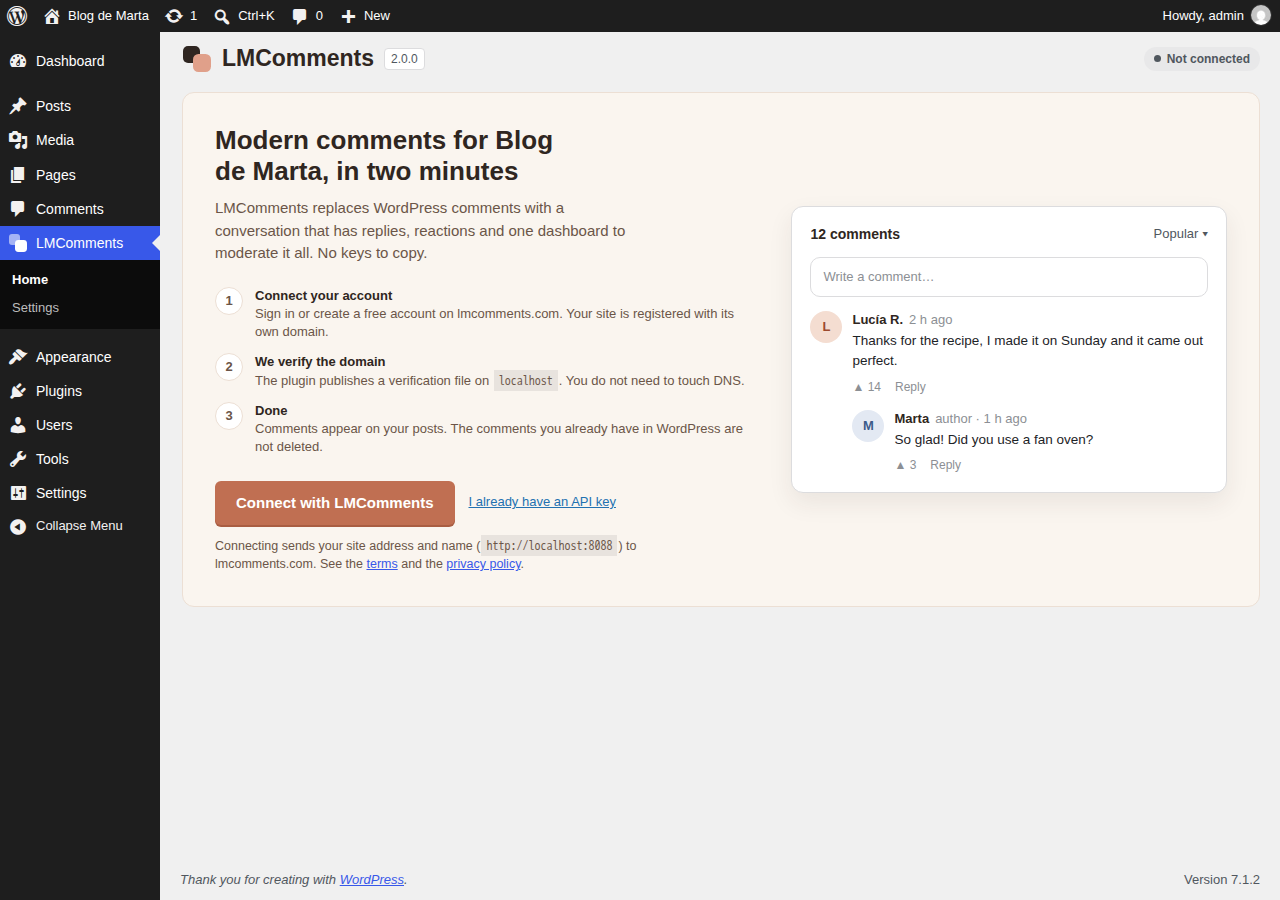
Set up in two minutes. Click Connect with LMComments, sign in or create a free account, and you are back in WordPress with everything configured. The plugin proves you own the domain by itself, so there is nothing to copy and no DNS to edit.
Ce que vous obtenez
- Threaded conversations with replies, mentions, reactions and voting.
- One place to moderate: approve, reject, ban and filter from the LMComments dashboard, with a history of who did what. Invite moderators on paid plans.
- Anti-spam built in, and native WordPress comment submissions are blocked where LMComments runs.
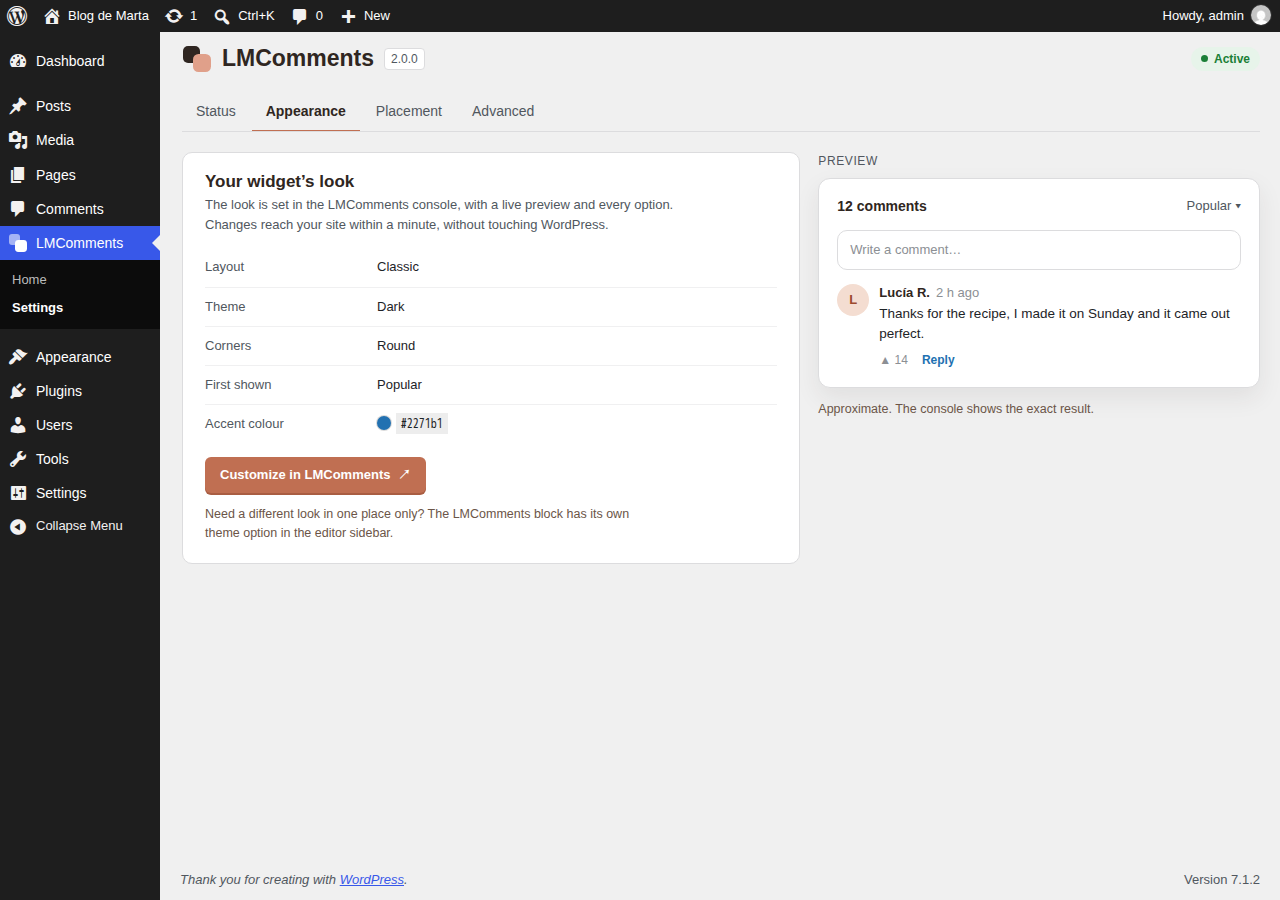
- Looks like your site. The widget blends into your theme’s background, light or dark. Fine-tune colours, corners and layout in the LMComments console with a live preview.
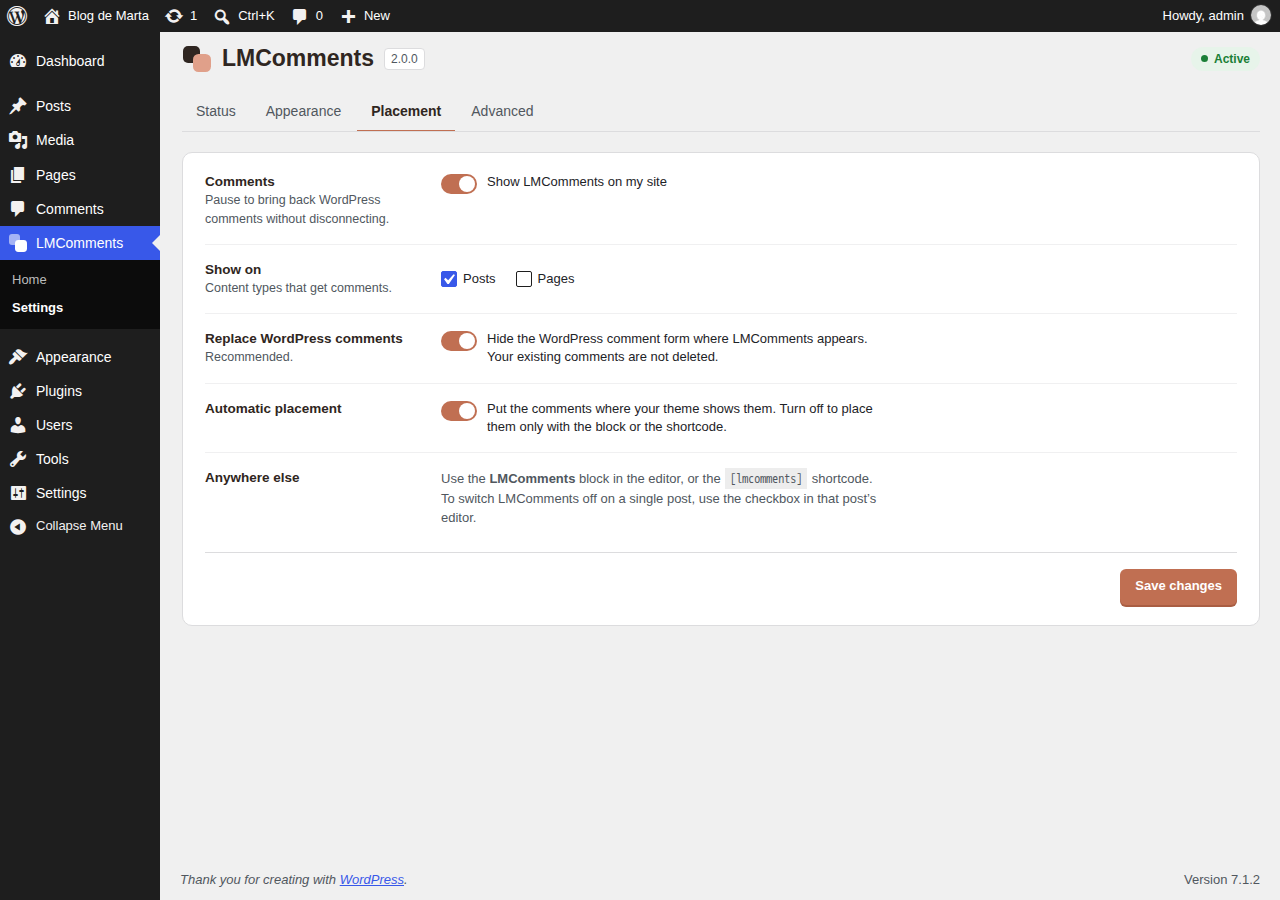
- Works with any theme: classic themes, block themes (it replaces the Comments block), and the Madara manga theme.
- Place it anywhere with the LMComments block or the
[lmcomments]shortcode, and switch it off for any single post. - Your comments follow your URLs. Change a post’s permalink and its conversation moves with it.
- Nothing is lost. Your existing WordPress comments stay in your database, untouched. Deactivate the plugin and they show again.
Free and paid plans
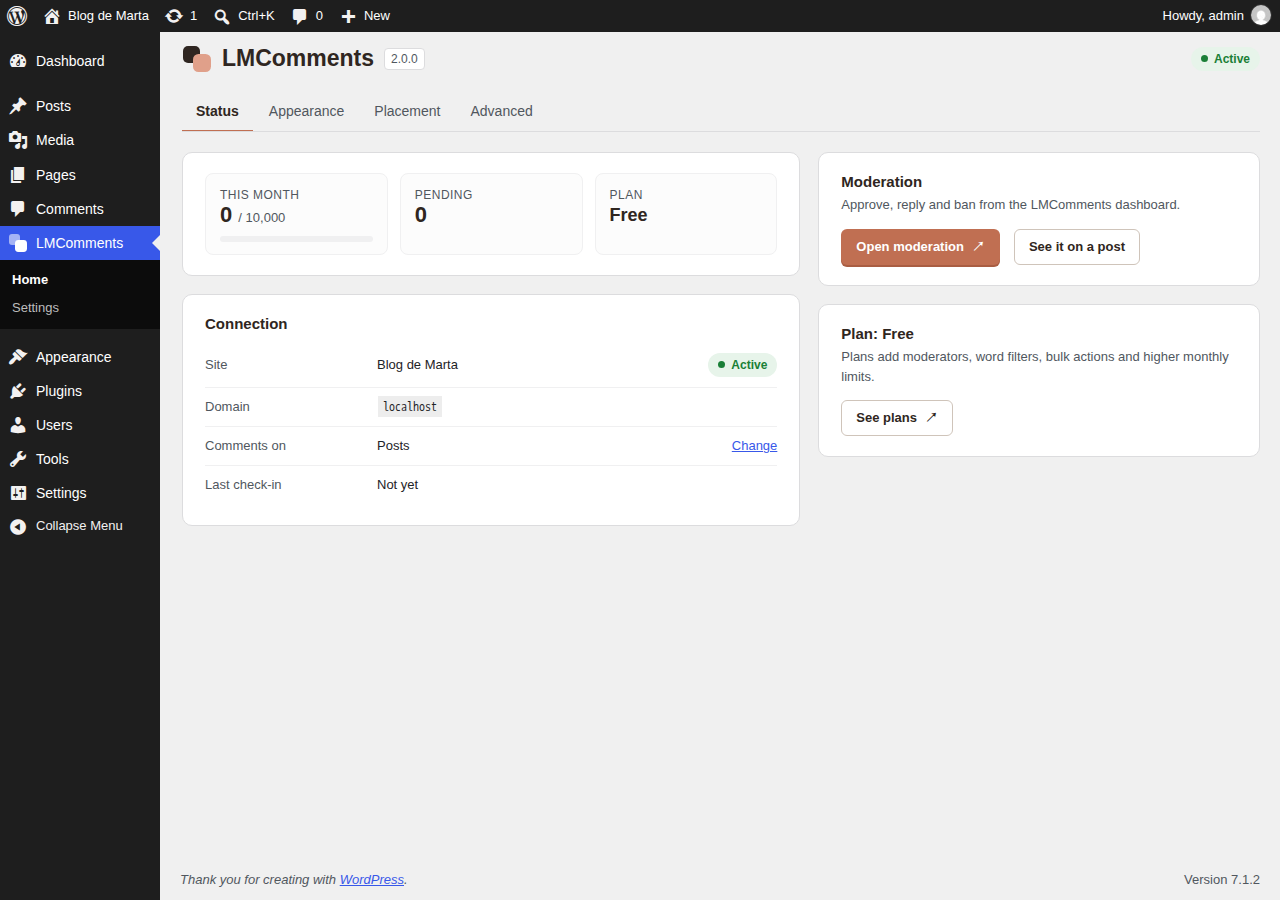
The free plan includes 10,000 comments a month. Paid plans add moderators, word filters, bulk moderation and higher limits. See plans and pricing.
Services externes
This plugin is the WordPress integration of LMComments, a hosted comment service run by LMComments at lmcomments.com. The comments themselves are stored and served by that service, so the plugin cannot work without it. It connects to it in these cases:
- Showing the comments (every page where comments appear, once the site is connected): your visitor’s browser loads the script
https://lmcomments.com/embed/loader.js, which displays the comments in an iframe fromlmcomments.com. The service receives the visitor’s IP address and browser details, your site’s API key and site name, and the address and an internal identifier of the page. When a visitor comments, reacts or signs in, the service stores what they submit and their account details. Older versions of the plugin could keep a copy of the visitor’s sign-in in your site’s local storage; the script still reads such a copy until it expires but no longer creates one. - Connecting (only when an administrator clicks Connect with LMComments): the administrator is sent to
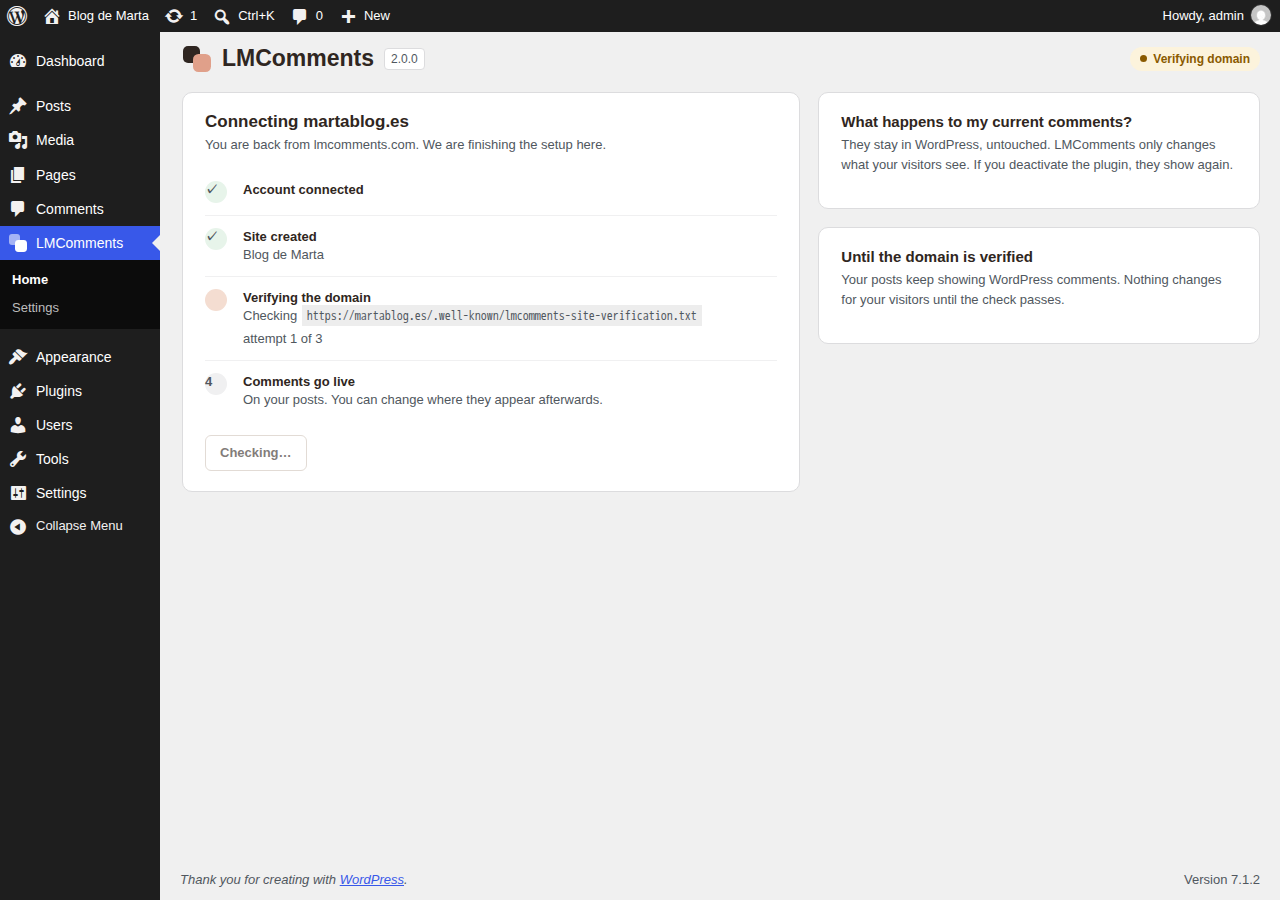
lmcomments.comwith your site’s address and name. Back in WordPress, your server exchanges a one-time code withhttps://lmcomments.com/api/connect/exchangeto receive the site’s credentials. - Verifying your domain (right after connecting, and when an administrator clicks Check again): your server asks
https://lmcomments.com/api/connect/verifyto check the file the plugin publishes at/.well-known/lmcomments-site-verification.txt. The service then requests that file from your site. - Status and appearance panels (when an administrator opens the plugin’s page): your server requests
https://lmcomments.com/api/connect/statusandhttps://lmcomments.com/api/sites/appearance, sending the site’s credentials and address. - Daily check-in (once a day while the site is connected and the plugin is switched on): your server sends the plugin version and your site’s address to
https://lmcomments.com/api/heartbeat. - Keeping comments attached to your URLs (when a published post’s permalink changes, or when an administrator runs Update all posts): your server sends the old and new slug, or the post ID and slug, to
https://lmcomments.com/api/migration/. - Moving settings once (the first time an administrator opens the plugin after updating from a version before 2.0): the appearance settings saved in older versions are sent to
https://lmcomments.com/api/connect/appearance-import.
Nothing is sent to LMComments before the site is connected, except that the setup notice links to it.
LMComments Terms of Service and Privacy Policy.
Installation
- In your WordPress admin go to Plugins → Add New, search for LMComments, then install and activate it.
- Open LMComments in the admin menu and click Connect with LMComments.
- Sign in or create a free account and authorize your site. You come back to WordPress; the plugin verifies your domain and comments go live.
Already have an API key from the LMComments dashboard? Choose I already have an API key on the same screen.
Your WordPress must be reachable at a public domain (for example myblog.com) for the connection to complete. Sites on localhost or an IP address cannot be connected.
Journal de modifications
New one-click connection, a status panel and an editor block. Appearance moves to the LMComments console; your current look is kept automatically. Your comments and settings are preserved.
2.0.0
- New: Connect with LMComments. Set up with one click instead of copying an API key, a site slug and a secret. The plugin verifies your domain by itself.
- New: an LMComments menu with a welcome screen, a status panel (monthly comments, pending moderation, plan) and settings in tabs.
- New: the LMComments block for the editor, with a per-placement light/dark option.
- New: works with block themes. It replaces the Comments block, where before the comments could be missing.
- Changed: the widget’s appearance now lives only in the LMComments console, where it has a live preview and every option. Settings you had in the plugin are moved there automatically, once, without changing how your widget looks.
- Fix: on themes that only show comments when they are open (such as Twenty Twenty-One) the widget could be missing.
- Fix: native WordPress comment submissions are refused where LMComments runs, so bots cannot post around the widget.
- Fix: moving a post to the trash, restoring it or publishing a draft no longer triggers a comment migration.
- Fix: failed URL migrations are now retried.
- Fix: the setup notice is shown only to administrators, only on the Dashboard and Plugins screens, and stays dismissed.
- Fix: uninstalling from WP-CLI now removes all the plugin’s data, including scheduled tasks.
- Privacy: the admin no longer loads a font from Google. Suggested text for your privacy policy is added under Settings → Privacy.
- The daily check-in only runs while the site is connected and switched on, and backs off when it fails.
1.3.1
- Maintenance release. Removed dead code left over from the self-hosted auto-updater that was retired in 1.2.0 (the plugin no longer parses or stores an “update available” flag from the heartbeat — updates come from WordPress.org).
- Added the “Full (pill)” border-radius option, matching the choices available in the dashboard.
- The Appearance notice now explains that newer options — the widget layout (Classic or Marea), font size, line height and link colour — are configured only in the LMComments dashboard.
- Internal cleanup: removed unused helper methods and aligned the activation defaults with the real settings schema. No behaviour change for existing installs.
1.3.0
- The widget now matches your site’s background instead of drawing its own box. It measures the colour actually painted behind the comments and blends into it, including when your theme has a dark mode switch.
- The Appearance tab in the LMComments dashboard now works on WordPress. The plugin used to send its own appearance values on every page load, which quietly overrode whatever you had saved in the dashboard. It now sends only the options you deliberately changed here.
- The plugin’s Appearance settings are deprecated. Configure appearance in the LMComments dashboard instead. The existing fields still work and will be removed in a future version.
- Internal: the plugin now loads the same embed script as every other LMComments site instead of maintaining its own copy. Fewer moving parts, and fixes reach WordPress at the same time as everywhere else.
1.2.3
- Fix: on sites using a JavaScript optimization or caching plugin (deferred or combined scripts), the comment widget could stay collapsed and appear empty, with page content overlapping it. The widget now initializes reliably and resizes to fit its content.
- Fix: dashboard links now point to the correct owner dashboard.
1.2.2
- Security: added a private Migration Secret so slug-change/reindex requests are authorized by a server-side secret instead of the public API key. Paste it from your LMComments dashboard (Site settings → Migration secret).
1.2.1
- Replaced inline scripts with wp_add_inline_script() for WordPress coding standards compliance
- Removed invalid repository URL
Captures d'écran
Pour les développeurs
Est-ce votre plugin ? Montrez les chiffres.
Ajoutez un badge en direct à votre site, docs ou github readme. Il se met à jour par lui-même - aucun compte n'est nécessaire.
Best LMComments alternatives
All comment system plugins →
FAQ
LMComments: quick answers
Réponses directes, extraites des données en direct WordPress.org.
Source : WordPress.org
Is LMComments free?
Yes. LMComments is free to download and use from the official WordPress.org plugin directory.
Is LMComments safe to use in 2026?
LMComments works, but test it on a staging site before relying on it in 2026. Was last updated 2 months ago, and scores 60/100 on our health check.
How many websites use LMComments?
LMComments is active on <10 WordPress websites and has been downloaded 586 times since it launched in April 2026. It was downloaded 93 times in the last 30 days.
Does LMComments work with WordPress 7.1?
Yes. The developer has tested LMComments up to WordPress 7.1.5, the latest release. It requires WordPress 6.0 or newer.
What PHP version does LMComments need?
LMComments requires PHP 7.4 or higher. Most hosts run PHP 8.x today, so it works on any modern WordPress hosting.
When was LMComments last updated?
The latest version, 2.0.0, was released on September 26, 2026 (2 months ago).
Who makes LMComments?
LMComments is developed and maintained by lmcomments.
What are the best alternatives to LMComments?
The most popular alternatives to LMComments are Comments – wpDiscuz (60K+ installs), Comments (400+ installs) and WP Star Reviews, Map, and T… (20+ installs).
Propulsé par PageForge
Un modèle et une feuille de calcul. Une vraie page pour chaque recherche.
PageForge transforme chaque ligne d'un CSV en une page WordPress avec son propre titre, URL, SEO et schéma, construit sur la mise en page que vous Déjà conçu. Gratuit sur WordPress.org.
- CSV et XLSX, plus Google Sheets sur les professionnels et les entreprises
- Son propre titre, URL, SEO champs et schéma pour chaque page
- Fonctionne avec l'éditeur de blocs, Elementor, Divi et Avada
- Gratuit sur WordPress.org, pas de carte de crédit