


Listings for Buildium
Gets your buildium property listings and display them in an interactive way instead of using iframe and gives you styling and SEO freedom.

Envisager une alternative
Listings for Buildium shows warning signs in 2026 — compare the alternatives below before installing. It runs on 100+ sites and was last updated 12 months ago, and scores 40/100 on our health check.
- Petite base d'utilisateurs (plus de 100 installations actives)
- Très peu de critiques jusqu'à présent
- Uniquement testé jusqu'à WordPress 6,9 (le dernier est de 7,1)
Téléchargements quotidiens
Les pics de téléchargement suivent généralement une nouvelle version - chaque site qui met à jour automatiquement compte comme un téléchargement.
Classements
Where Listings for Buildium stands todayWordPress.org Classements de recherche
Position en direct dans la recherche de plugins, Top 100| Mot-clé | Position |
|---|---|
| Buildium | #1 |
| listings | >100 |
| property listings | #64 |
| rentals | >100 |
Adoption de version
Part de sites actifs par version.
About Listings for Buildium
From the official readme · v0.1.6Description
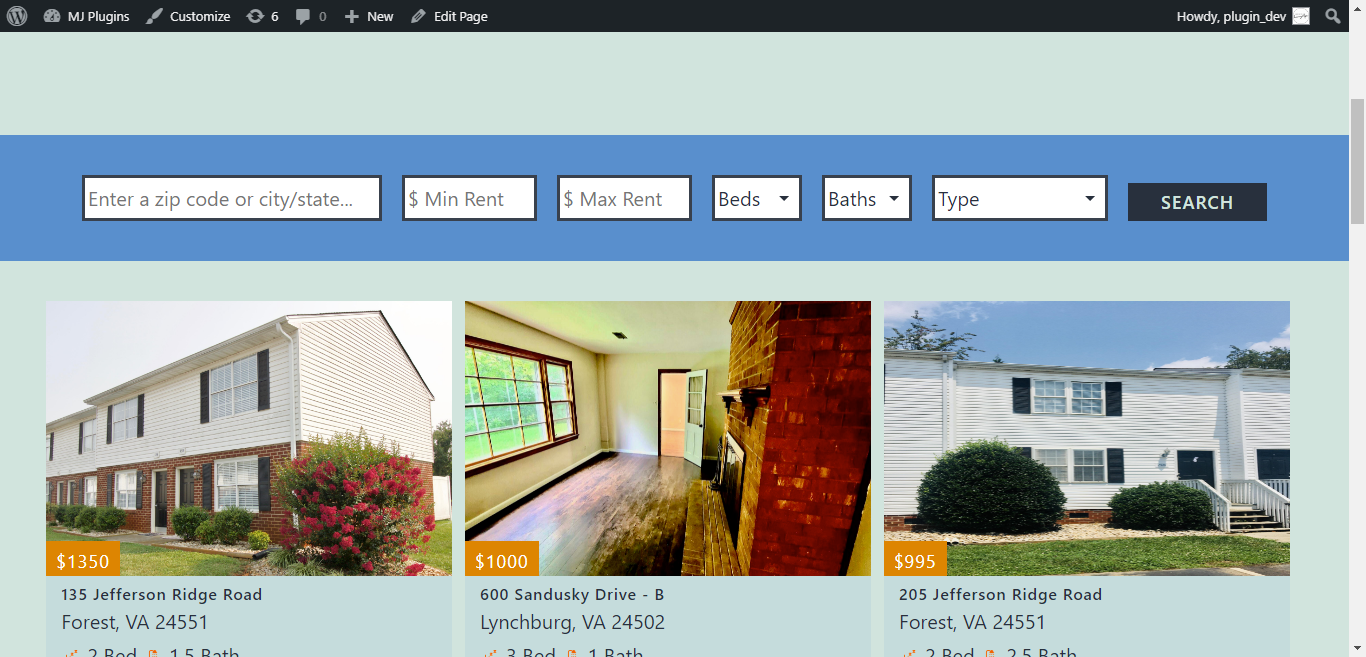
“Listings for Buildium” is a light-weight property listing plugin that allows you to list your rental properties on your WordPress site from your Buildium account using a shortcode.
The old iframe method of showing buildium rental listings does not allow site owners to customize the styling and improve SEO. This plugin will give you freedom to make any changes to the listings page.
All your buildium rental listings will be shown in an interactive way which you can customize using CSS easily. You will get all the filters from your buildium listings page working as they work there.
Shortcode: [bldm_listings]
where you want to show the rental listings. A full-width page is recommended for good styling.
Notice: This plugin depends on “allow_url_fopen” to get the content from buildium rental listings site. Please add “allow_url_fopen = 1” in your php.ini file or contact your hosting to enable it.
You will need to enter your buildium account page URL in the plugin settings that looks like this – https://example.managebuilding.com
(Please don’t include trailing slash at the end)
If you have any feedback or new feature request, please let us know by creating a support ticket and we will add/improve it as soon as possible.
Check our other plugin – Listings for Appfolio
Traits
-
Easy setup for the plugin.
-
iframe alternative method that allows you any customization on the layout and styling.
-
SEO improvement.
-
No need to manually add rental listings.
-
No need to manually sync the listings with your buildium account.
-
Gives you styling freedom.
-
Filters to search for rental listings.
-
Interactive 3 column design for listings page.
-
Single property listing opens in the same page.
-
Easy to use shortcode.
-
Full screen gallery to view the property images.
-
Customization options in WordPress backend.
-
Support for multiple Buildium accounts to load listings from.
-
Hide/Show filters, buttons, Price, Availability, Title, Address.
-
Replaceable icons for bedroom and bathroom labels.
-
1 column and 2 columns design options.
-
Options to toggle different search filters.
-
Option to use custom link for Apply buttons.
-
Option to add a Page heading.
Installation
You can install the Plugin in two ways.
WordPress interface installation
- Go to plugins in the WordPress admin and click on “Add new”.
- In the Search box enter “Listings for Buildium” and press Enter.
- Click on “Install” to install the plugin.
- Activez le plugin.
- Go to Settings > Listings for Buildium and Enter URL.
- Save the settings and use shortcode [bldm_listings].
Installation manuelle
- Download and upload the plugin files to the /wp-content/plugins/listings-for-buildium directory from the WordPress plugin repository.
- Activate the plugin through the “Plugins” screen in WordPress admin area.
- Go to Settings > Listings for Buildium and Enter URL.
- Save the settings and use shortcode [bldm_listings].
Journal de modifications
0.1.6
- 2025-12-08
- Updated backend settings page.
- Added backend customizer page.
0.1.5
- 2025-10-16
- Improved security.
0.1.4
- 2025-03-22
- Fixed the Request Information button link.
0.1.3
- 2025-01-17
- Fixed escaping and sanitization for url configuration.
0.1.2
- 2024-03-24
- Updated description and demo site.
- Updated plugin author with a dedicated website.
0.1.1
- 2021-10-06
- Fixed the trailing-slash bug for single listing page.
Captures d'écran


Pour les développeurs
Est-ce votre plugin ? Montrez les chiffres.
Ajoutez un badge en direct à votre site, docs ou github readme. Il se met à jour par lui-même - aucun compte n'est nécessaire.
FAQ
Listings for Buildium: quick answers
Réponses directes, extraites des données en direct WordPress.org.
Source : WordPress.org
Is Listings for Buildium free?
Yes. Listings for Buildium is free to download and use from the official WordPress.org plugin directory.
Is Listings for Buildium safe to use in 2026?
Listings for Buildium shows warning signs in 2026 — compare the alternatives below before installing. It runs on 100+ sites and was last updated 12 months ago, and scores 40/100 on our health check.
How many websites use Listings for Buildium?
Listings for Buildium is active on 100+ WordPress websites and has been downloaded 3,615 times since it launched in September 2021. It was downloaded 204 times in the last 30 days.
Does Listings for Buildium work with WordPress 7.1?
Listings for Buildium is officially tested up to WordPress 6.9.12, while the latest release is 7.1.5. It may still work, but try it on a staging site first.
What PHP version does Listings for Buildium need?
Listings for Buildium requires PHP 7.4 or higher. Most hosts run PHP 8.x today, so it works on any modern WordPress hosting.
When was Listings for Buildium last updated?
The latest version, 0.1.6, was released on December 8, 2025 (12 months ago).
Who makes Listings for Buildium?
Listings for Buildium is developed and maintained by Deepak Khokhar.
Propulsé par PageForge
Un modèle et une feuille de calcul. Une vraie page pour chaque recherche.
PageForge transforme chaque ligne d'un CSV en une page WordPress avec son propre titre, URL, SEO et schéma, construit sur la mise en page que vous Déjà conçu. Gratuit sur WordPress.org.
- CSV et XLSX, plus Google Sheets sur les professionnels et les entreprises
- Son propre titre, URL, SEO champs et schéma pour chaque page
- Fonctionne avec l'éditeur de blocs, Elementor, Divi et Avada
- Gratuit sur WordPress.org, pas de carte de crédit