


Custom Block Builder – Lazy Blocks
Easily create custom blocks and custom meta fields for Gutenberg without hard coding.

Choix
Yes — Custom Block Builder is a safe, well-maintained plugin to use in 2026. It runs on 20K+ sites, is rated 4.9/5 and was last updated 3 days ago, and scores 94/100 on our health check.
- Prouvé à grande échelle sur plus de 20 000 sites actifs
- Loved by users — 4.9/5 from 80 reviews
- Développé activement — Dernière mise à jour il y a 3 jours
- Testé avec le dernier WordPress (7.1)
- Momentum — downloads up 81.8% vs the previous 30 days
- Nécessite PHP 8.3 ou plus récent
Comment s'accumule-t-il ?
Côte à côte sur les installations, les mises à jour, les évaluations et le support



Téléchargements quotidiens
Les pics de téléchargement suivent généralement une nouvelle version - chaque site qui met à jour automatiquement compte comme un téléchargement.
Classements
Where Custom Block Builder stands todayWordPress.org Classements de recherche
Position en direct dans la recherche de plugins, Top 100| Mot-clé | Position |
|---|---|
| blocs | #9 |
| coutume | #49 |
| les domaines | #90 |
| Gutenberg | >100 |
| méta | #58 |
Adoption de version
Part de sites actifs par version.
Répartition des notes
★★★★★★★★★★ 4.9 from 80 reviews
About Custom Block Builder – Lazy Blocks
From the official readme · v4.5.2Description
Custom Blocks Plugin For WordPress
★★★★★
Developers magic wand for WordPress custom blocks. We created Lazy Blocks WordPress plugin, to help every developer get access to the powerful tools they need to quickly run websites based on WordPress block editor (called Gutenberg).
Official Site | Documentation | GitHub
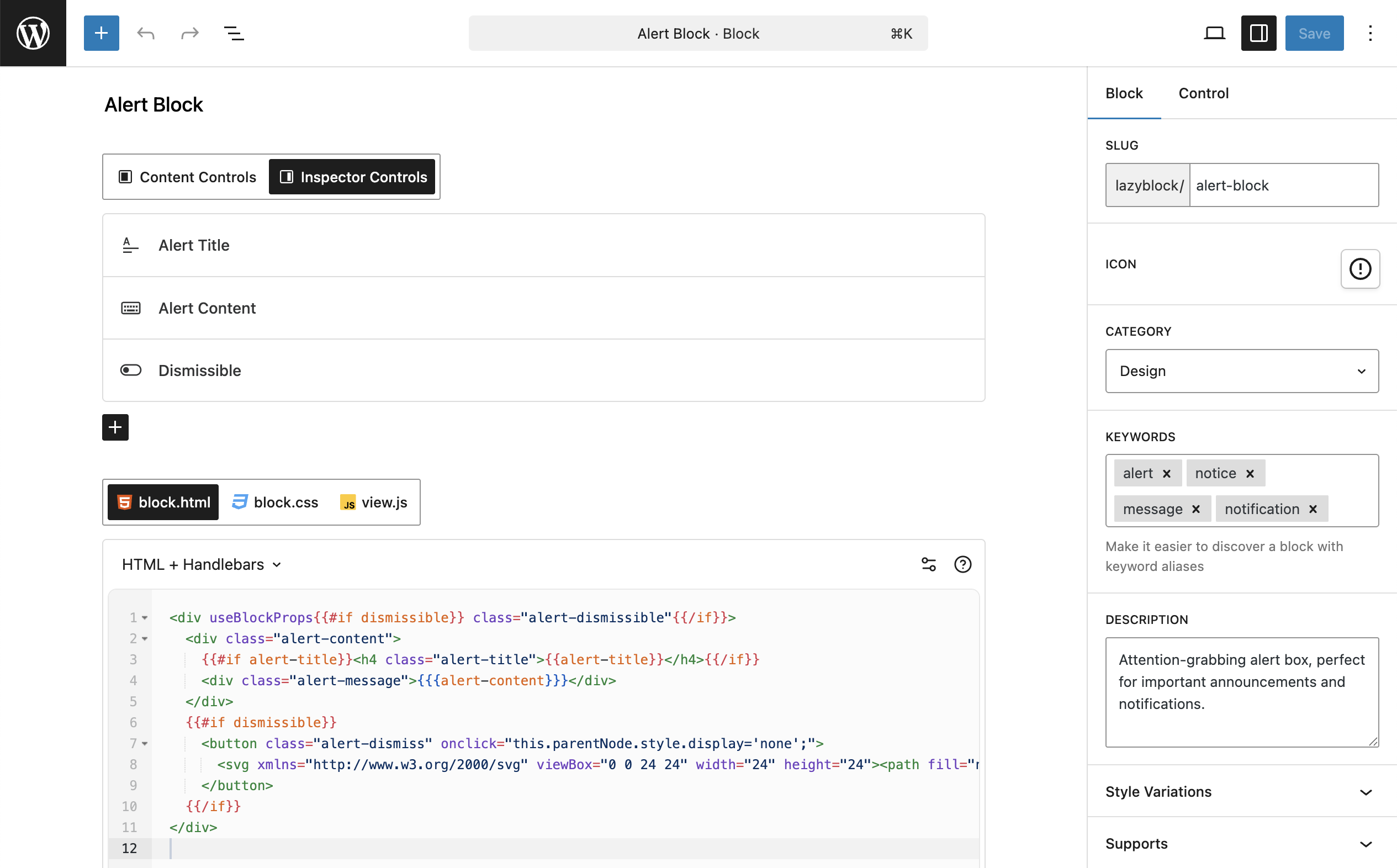
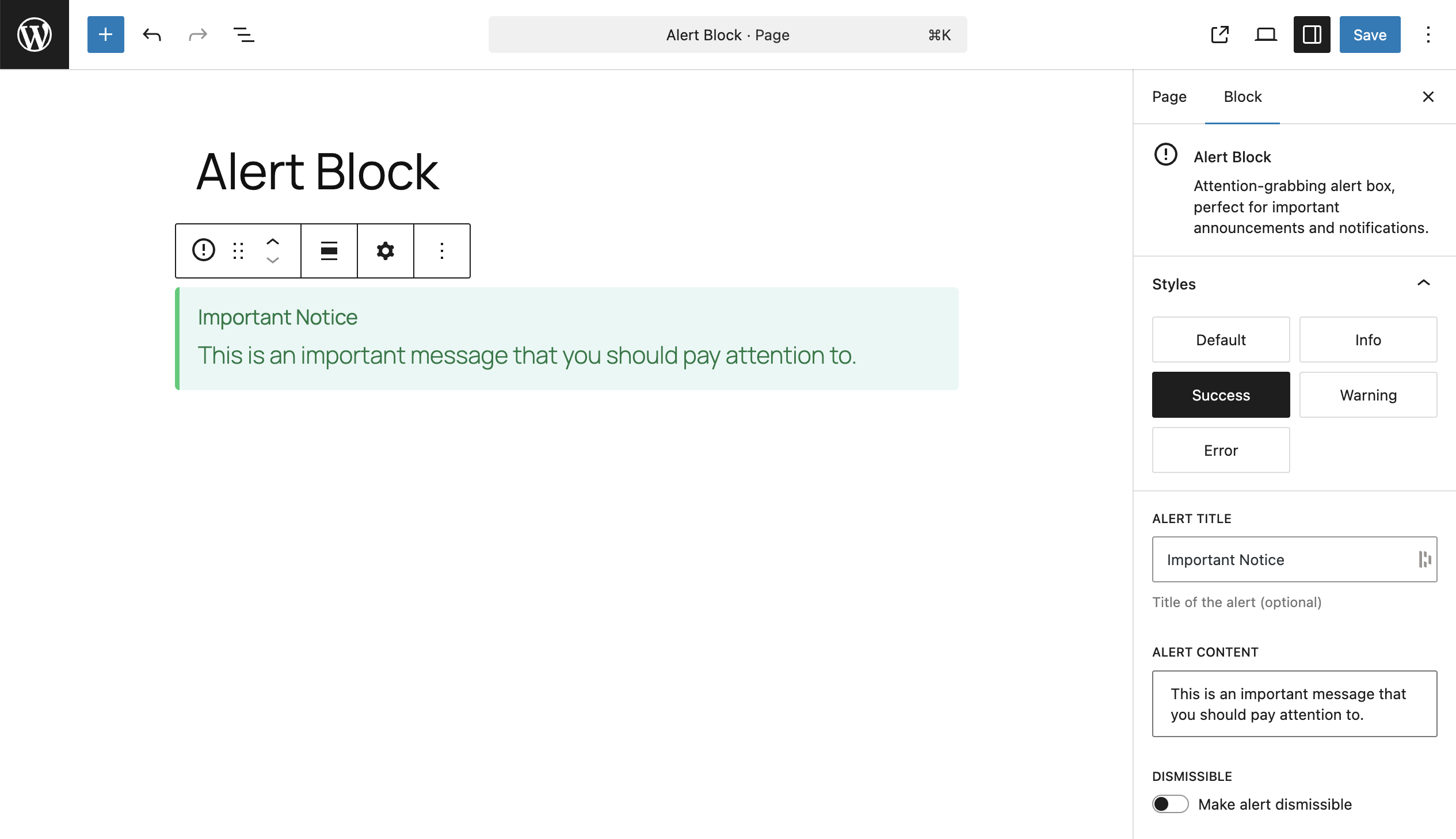
Create custom blocks visually, add controls to your blocks using drag & drop, write blocks output using HTML or PHP code. You can create custom blocks as well as custom meta fields for specific post types. Furthermore, you are able to create post templates with predefined blocks for any post type.
🚀 Easy To Start
This everything you need to deploy your custom block in WordPress editor:
1. Configure Custom Block
Give a name to your custom block, set icon, category, etc.
2. Add Controls
Add control fields like simple text and complex image selectors.
3. Write Output Code
Output code for your custom block with HTML and PHP support.
🌟 Features
- Custom blocks with output code
- Custom blocks for posts meta fields
- Large set of predefined controls
- Show controls in block content / inspector
- Multiple output methods allowed
- Custom PHP
- Custom HTML + Handlebars
- Template files in theme folder
- Export / Import blocks
🔥 Controls
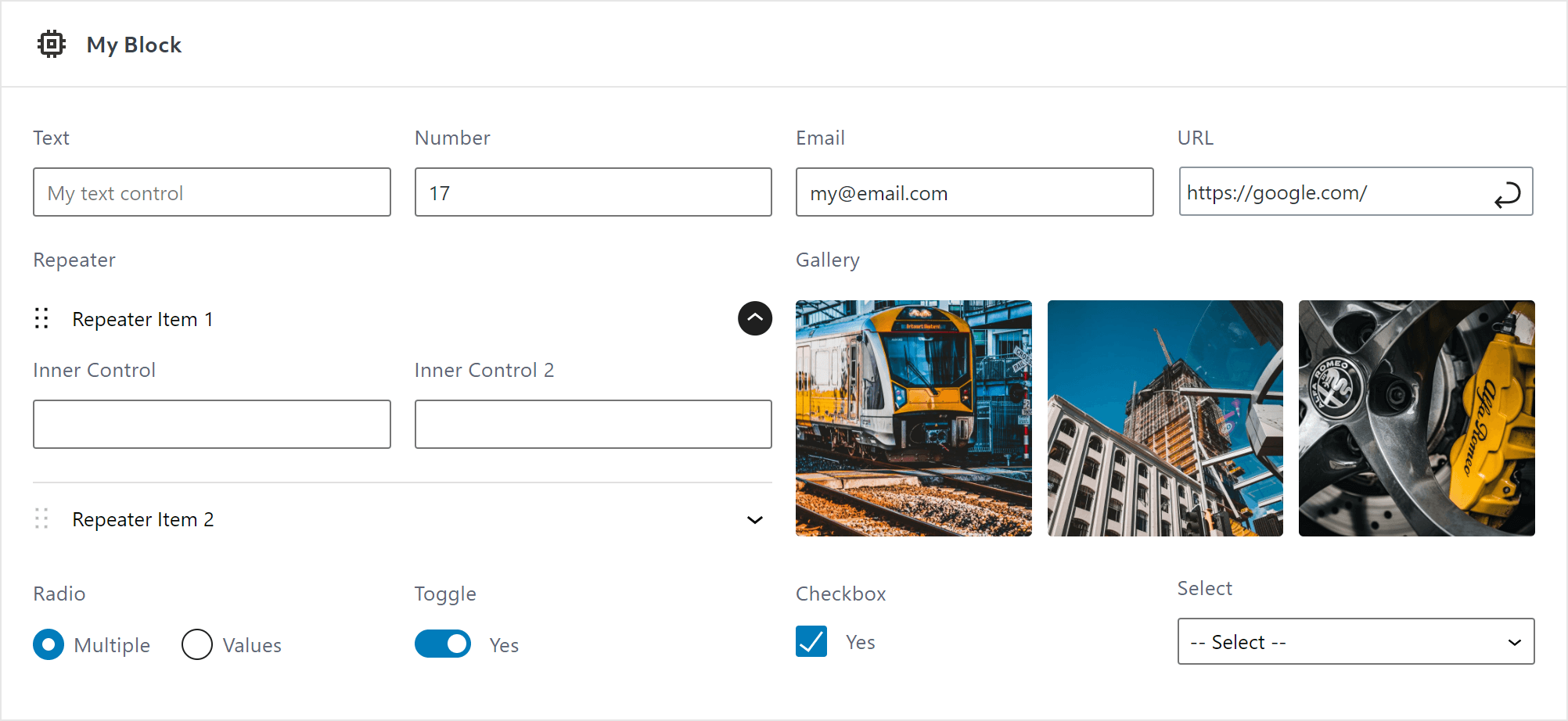
To manage custom blocks attributes you need to use Controls. Lazy Blocks have a large set of controls predefined for you:
- Basic
- Texte
- Textarea
- Numéro
- Gamme
- URL
- Mot de passe
- Content
- Image
- Galerie
- Fichier
- Rich Text
- Éditeur classique
- Code Editor
- Inner Blocks
- Choice
- Select
- Radio
- Checkbox
- Toggle
- Avancée
- Cueillette de couleurs
- Sélecteur de date
- La mise en page
- Répétiteur
- Custom Controls read our extensive documentation
🏳️ Multilingual
Lazy Blocks adds a new layer of compatibility for WPML. All text controls of custom blocks are compatible with WPML and ready for translation. https://www.lazyblocks.com/docs/multilingual/
🛠 Built For Developers
Lazy Blocks built by developers, for developers and gives you unlimited freedom to create custom blocks. Furthermore, there are PHP filters and actions to customize every part of your custom blocks from the backend. Possibility to use PHP and theme templates system.
Every UI part should be intuitive for simple custom blocks, but if you want to create something more complex, you may be required to read our extensive documentation.
🔥 Lazy Blocks Pro
The Lazy Blocks plugin is also available in a professional version which includes more controls and features! Learn more about Lazy Blocks Pro
In order to maintain the free version of the plugin on an ongoing basis, and to provide quick and effective support for free, we offer a Pro version of the plugin. The Pro version allows you to:
-
Additional Controls
- Posts – Search and select posts based on post type or taxonomy
- Taxonomy – Search and select categories, tags and any other custom taxonomies
- Users – Search and select users based on user roles
- Units – Advanced number input with possibility to select any CSS unit
- Message – Display a helpful message between controls
- Code Editor – Insert code parts using editor with syntax highlighting
-
Controls Conditions
Conditionally display/hide controls. In order not to overload your block with a huge list of controls, you can hide some of them depending on the values of other controls. -
Styles & Scripts
Add custom CSS and JavaScript to your blocks. Define styles for editor and frontend, and script for interactive frontend functionality. Assets are automatically loaded only when needed for optimal performance. -
Panels and Dividers
The Panels and Dividers provides a way to structure controls into groups. It assists in better organizing the block panel UI. -
Blocks Preloading
Display blocks preview immediately once the page editor loaded. -
SEO Enhancements
Additional support for content analysis in Rank Math and Yoast SEO plugins.
Find much more custom blocks features of Lazy Blocks Pro today!
Installation
Installation automatique
Automatic installation is the easiest option as WordPress handles the file transfers itself and you don’t need to leave your web browser. To do an automatic install of Lazy Blocks, log in to your WordPress dashboard, navigate to the Plugins menu and click Add New.
In the search field type “Lazy Blocks” and click Search Plugins. Once you’ve found our plugin you can view details about it such as the point release, rating and description. Most importantly of course, you can install it by simply clicking “Install Now”.
Installation manuelle
The manual installation method involves downloading our Lazy Blocks plugin and uploading it to your webserver via your favourite FTP application. The WordPress codex contains instructions on how to do this here.
Journal de modifications
4.5.2 – Nov 17, 2026
- added a Live Preview button on the WordPress.org plugin page, with a sample Hero block to try
- fixed a fatal error with WPML when a block has a Repeater inside another Repeater with translatable controls
- fixed inline styles with a colon or semicolon inside a value, such as a background image URL, being cut in the editor when the block output uses
useBlockProps - fixed the block builder marking a block as changed and offering Undo as soon as it opens
- fixed the block builder sidebar staying empty after creating a block on sites with
SCRIPT_DEBUGenabled - Pro:
- fixed Undo in the block builder making a block look saved while a collection change stayed unsaved
4.5.1 – Oct 26, 2026
- fixed style variations in the block builder ignoring typing in the Name and Label fields and staying in the list after removal
4.5.0 – Oct 24, 2026
- Ajout de WordPress 7.2 Compatibilité
- requires PHP version 8.3 or higher
- redesigned the block builder: a block card with the icon, title, description and an editable slug, a control picker laid out like the block inserter, and control settings grouped into Settings, Layout and Behavior
- improved the block builder controls list: one actions menu per control, double-click to rename, arrow keys to move the selection, and a button to copy the control name
- added border, background, duotone, sticky position, interactivity, text columns, text shadow (WordPress 7.2), width and height supports to the block builder, all off by default
- added a block builder notice when style supports are enabled but the frontend output has no
useBlockPropswrapper - added abilities for AI agents on WordPress 6.9+ to list, read, create and update blocks:
lazy-blocks/list-blocks,lazy-blocks/get-block,lazy-blocks/create-block,lazy-blocks/update-block - added block context to PHP output, so a block that uses context such as
postIdandpostTypereceives it in$context - added an editor notice when saving block data in the block builder fails
- improved post editor loading: the icon list loads only when an icon picker opens, and control scripts are a third smaller
- removed the
date_i18nscript that loaded on every admin screen; code that enqueued this handle needs to load its own copy - security fix: users who cannot edit Lazy Blocks could save block data, preview blocks in the block builder, and activate, deactivate or duplicate blocks
- fixed the
useBlockPropswrapper and InnerBlocks output losing unquoted classes, boolean attributes, Interactivity API directives, JSON values and custom element names - fixed block icons losing circle, line and polygon shapes and stroke attributes
- fixed InnerBlocks content not keeping
\1,$1and backslashes as written - fixed Repeater rows not opening with the Enter and Space keys
- fixed Image, File and Gallery controls picking up a file’s temporary preview while it is still uploading
- Pro:
- added editing of a custom slug namespace in the block card
- added a “Where is my license key?” link next to the license key field
- security fix: Collections, the Posts and Users controls and license activation did not check user permissions, and showed user emails and names to users who cannot list users
- security fix: custom CSS could close the tag it is printed in
- fixed a malformed saved collection breaking the editor for every user
4.4.2 – Oct 12, 2026
- improved page and editor loading speed on sites with many blocks
- fixed WPML offering block settings such as select values, colors and block IDs for translation when no control of the block is marked Translate
- Pro:
- improved page loading speed on sites with a few dozen blocks or more, which could take several seconds since Pro 4.1
- fixed a failed plugin update on the Plugins screen holding back the other updates queued after it until the page was reloaded
4.4.1 – Aug 31, 2026
- changed Lazy Blocks to stay active next to Lazy Blocks Pro instead of being deactivated
4.4.0 – Aug 26, 2026
- Ajout de la compatibilité WordPress 7.1
- added filters for extending how a block renders in the editor preview
- improved the Gallery control in the block builder, which now previews its images in a grid
- improved Gallery control loading speed on galleries with many images, fetching image data in one request instead of one per image
- fixed dragging values in a multi-select control inside the editor canvas
- fixed Image, File and Gallery values not being read when written as raw JSON in block markup
- fixed Repeater values not being read when written as a raw array in block markup
- Pro:
- added a Rich Text control that edits inline the way a core block does, and rebuilt the wizard presets on it
- fixed the update notice still offering a version already installed
Captures d'écran
Pour les développeurs
Est-ce votre plugin ? Montrez les chiffres.
Ajoutez un badge en direct à votre site, docs ou github readme. Il se met à jour par lui-même - aucun compte n'est nécessaire.
Best Custom Block Builder alternatives
Plugins Tous les blocs →





FAQ
Custom Block Builder – Lazy Blocks: quick answers
Réponses directes, extraites des données en direct WordPress.org.
Source : WordPress.org
Is Custom Block Builder free?
Yes. Custom Block Builder is free to download and use from the official WordPress.org plugin directory. The developer also sells premium add-ons or a Pro version with extra features.
Is Custom Block Builder safe to use in 2026?
Yes — Custom Block Builder is a safe, well-maintained plugin to use in 2026. It runs on 20K+ sites, is rated 4.9/5 and was last updated 3 days ago, and scores 94/100 on our health check.
How many websites use Custom Block Builder?
Custom Block Builder is active on 20K+ WordPress websites and has been downloaded 504,542 times since it launched in August 2018. It was downloaded 24,045 times in the last 30 days.
Does Custom Block Builder work with WordPress 7.1?
Yes. The developer has tested Custom Block Builder up to WordPress 7.2, the latest release. It requires WordPress 6.2 or newer.
What PHP version does Custom Block Builder need?
Custom Block Builder requires PHP 8.3 or higher. Most hosts run PHP 8.x today, so it works on any modern WordPress hosting.
When was Custom Block Builder last updated?
The latest version, 4.5.2, was released on November 17, 2026 (3 days ago).
Who makes Custom Block Builder?
Custom Block Builder is developed and maintained by nK.
What are the best alternatives to Custom Block Builder?
The most popular alternatives to Custom Block Builder are Spectra Legacy (1M+ installs), Kadence Blocks (600K+ installs) and Extendify (500K+ installs).
Propulsé par PageForge
Un modèle et une feuille de calcul. Une vraie page pour chaque recherche.
PageForge transforme chaque ligne d'un CSV en une page WordPress avec son propre titre, URL, SEO et schéma, construit sur la mise en page que vous Déjà conçu. Gratuit sur WordPress.org.
- CSV et XLSX, plus Google Sheets sur les professionnels et les entreprises
- Son propre titre, URL, SEO champs et schéma pour chaque page
- Fonctionne avec l'éditeur de blocs, Elementor, Divi et Avada
- Gratuit sur WordPress.org, pas de carte de crédit