


Liste d'archives JS
Un widget JS (peut être utilisé dans les publications) pour afficher une liste d'archives avec certains effets.

Utiliser avec prudence
JS Archive List works, but test it on a staging site before relying on it in 2026. It runs on 3K+ sites, is rated 4.8/5 and was last updated 8 months ago, and scores 59/100 on our health check.
- Aimé par les utilisateurs — 4,8/5 sur 45 avis
- Uniquement testé jusqu'à WordPress 6,9 (le dernier est de 7,1)
Comment s'accumule-t-il ?
Côte à côte sur les installations, les mises à jour, les évaluations et le support



Téléchargements quotidiens
Les pics de téléchargement suivent généralement une nouvelle version - chaque site qui met à jour automatiquement compte comme un téléchargement.
Classements
Where JS Archive List stands todayWordPress.org Classements de recherche
Position en direct dans la recherche de plugins, Top 100| Mot-clé | Position |
|---|---|
| archiver | #10 |
| bloc | >100 |
| Gutenberg | >100 |
| Javascript | #91 |
| list | #18 |
Adoption de version
Part de sites actifs par version.
Répartition des notes
★★★★★★★★★★ 4.8 from 45 reviews
About JS Archive List
From the official readme · v6.3.1Description
This plugin provides a widget and a filter to display a collapsible archive list in your sidebar or posts using the JS JS library.
Traits
- Support for Gutenberg blocks. Add it to any FSE theme or Gutenberg compatible theme.
- Display a collapsed list of your archives to reduce space.
- Uses vanilla JS to add effects and to be compatible with all browsers.
- Select your expand/collapse symbol and date format.
- Support for archive filters.
- Auto expands current/select year from posts.
- Select the categories to exclude
- Multiple instances support.
- Shortcode support [JsArchiveList]
- Generates valid HTML code.
- Supports multiple languages.
- Compatible with most JS cache and minify plugins.
- And more to come…
Configuration
- Title: title of the widget.
- Trigger Symbol: characters to be displayed as bullet.
- Effect: Effect to use.
- Month Format: month’s display format of the month.
- Expand: when to expand the content of the list.
- Hide years from before: older years will be hidden under a link. To save space in the page on old sites.
- Show days inside month list: group posts by day.
- Show number of posts: display how many post are published in the year or in the month.
- Show only posts from selected category: show only posts from the selected category when visiting a category page.
- Only expand/reduce by clicking the symbol: select if animations start when click the link or just the bullet.
- Open links in a new tab: opens archive and post links in a new browser tab/window.
- Only expand one at the same time: select if you want to have only one expanded at the same time.
- Show posts under months: show post’s title under months.
- Show post date next to post title: show post’s date next to post title.
- Sort posts by: select how to sort the posts under months.
- Include or Exclude categories: Select the categories to include or exclude.
Installation
- Make a directory js-archive-list-widget under /wp-content/plugins/
- Upload all downloaded files to /wp-content/plugins/js-archive-list-widget/
- Activate plugin at the plugins section.
- Go to Presentation -> Widgets and drag the JS Archive List to your sidebar and configure it, if you want to display it inside a post then write [JSArchiveList] at the location where it will be shown and save it.
Journal de modifications
6.3.1
- Added a new block setting to open archive and post links in a new tab/window.
- Updated the frontend link rendering so year, month, and post links include
target="_blank"when the option is enabled. - Added unit tests for the new “open links in a new tab” behavior.
- Updated translation template with the new block setting label.
6.3.0
- Added block-only support for archive lists of custom post types via a new post type selector in the block settings.
- Added taxonomy-aware term selection in the block editor and clear saved terms when the post type or taxonomy changes.
- Updated the dynamic block frontend, REST API, and datasource to render the same expandable archive UI for selected custom post types and hierarchical taxonomies.
- Improved automated test coverage for custom taxonomy filtering and refreshed the PHPUnit toolchain for current development environments.
6.2.1
- Fixed PHP 8.3 strict typing compatibility in
class-jq-archive-list-datasource.phpby normalizing values beforeexplode()calls.
6.2.0
- Fixed unsafe deserialization of shortcode category filters by safely parsing serialized category IDs and rejecting object payloads.
- Aligned text domain with the plugin slug across PHP, JS, and translation files.
- Updated plugin/readme headers (requires, license, and license URI).
- Added WordPress PHPUnit test suite setup docs and installer script.
- Updated “Tested up to” to the latest WordPress release.
6.1.7
- Updating development libraries to be up to date.
- Updating jest config to use the same rendered as the WP dependency code.
- Escaped post titles in legacy HTML output to prevent injection in classes/class-jq-archive-list-widget.php.
- Stopped duplicate id=”app” and mounted React for all block instances via .jalw-archive-list in classes/frontend/class-js-archive-list-frontend-widget.php and
src/view.js. - Removed post type settings from legacy and block widgets and ignore any saved block type attributes during render.
- Fixed boolean parsing for editor preview config in src/components/frontend/context/ConfigContext.js.
- Fixed category archive context to use the queried term in classes/frontend/class-js-archive-list-frontend-widget.php.
- Removed stray console logging in assets/js/jal.js.
- Avoided PHP notice for missing include-or-exclude and escaped widget title in form in classes/class-jq-archive-list-widget.php.
- Ensured include/exclude category selection supports multiple categories for legacy and block widgets.
6.1.6
- Improve plugin’s backend code to be more efficient, secure and faster.
- Solving the bug of loading the text domain at the wrong time.
Captures d'écran
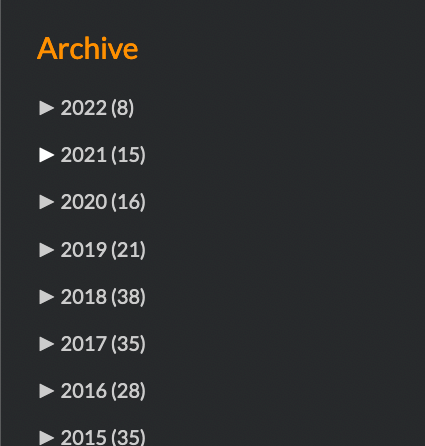
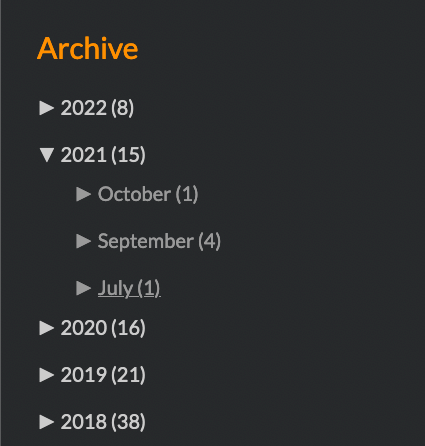
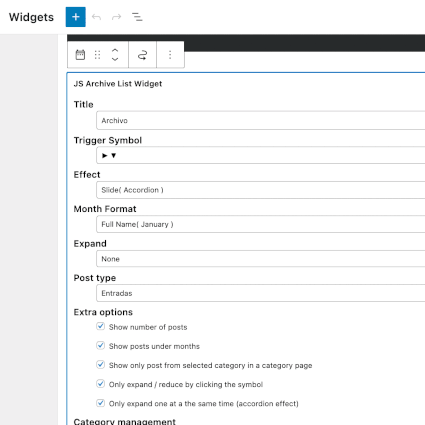
Pour les développeurs
Est-ce votre plugin ? Montrez les chiffres.
Ajoutez un badge en direct à votre site, docs ou github readme. Il se met à jour par lui-même - aucun compte n'est nécessaire.
Best JS Archive List alternatives
Tous les plugins d'archives →




FAQ
JS Archive List: quick answers
Réponses directes, extraites des données en direct WordPress.org.
Source : WordPress.org
Is JS Archive List free?
Yes. JS Archive List is free to download and use from the official WordPress.org plugin directory.
Is JS Archive List safe to use in 2026?
JS Archive List works, but test it on a staging site before relying on it in 2026. It runs on 3K+ sites, is rated 4.8/5 and was last updated 8 months ago, and scores 59/100 on our health check.
How many websites use JS Archive List?
JS Archive List is active on 3K+ WordPress websites and has been downloaded 126,829 times since it launched in December 2009. It was downloaded 834 times in the last 30 days.
Does JS Archive List work with WordPress 7.1?
JS Archive List is officially tested up to WordPress 6.9.12, while the latest release is 7.1.5. It may still work, but try it on a staging site first.
What PHP version does JS Archive List need?
JS Archive List requires PHP 7.4 or higher. Most hosts run PHP 8.x today, so it works on any modern WordPress hosting.
When was JS Archive List last updated?
The latest version, 6.3.1, was released on April 3, 2026 (8 months ago).
Who makes JS Archive List?
JS Archive List is developed and maintained by Miguel Useche.
What are the best alternatives to JS Archive List?
The most popular alternatives to JS Archive List are Jetpack VaultPress (9K+ installs), Zippy (7K+ installs) and Posts List (7K+ installs).
Propulsé par PageForge
Un modèle et une feuille de calcul. Une vraie page pour chaque recherche.
PageForge transforme chaque ligne d'un CSV en une page WordPress avec son propre titre, URL, SEO et schéma, construit sur la mise en page que vous Déjà conçu. Gratuit sur WordPress.org.
- CSV et XLSX, plus Google Sheets sur les professionnels et les entreprises
- Son propre titre, URL, SEO champs et schéma pour chaque page
- Fonctionne avec l'éditeur de blocs, Elementor, Divi et Avada
- Gratuit sur WordPress.org, pas de carte de crédit