


IP Geo Block
The more you install themes and plugins, the more likely your sites will be vulnerable, even if you securely harden your sites.

Use with caution
IP Geo Block works, but test it on a staging site before relying on it in 2026. It runs on 7K+ sites, is rated 4.2/5 and was last updated 8 years ago, and scores 42/100 on our health check.
- Momentum — downloads up 49.1% vs the previous 30 days
- No update in 7 years
- Only tested up to WordPress 5.0 (latest is 7.1)
How does it stack up?
Side-by-side on installs, updates, ratings & support


Daily downloads
Download spikes usually follow a new release — each site that auto-updates counts as a download.
Rankings
Where IP Geo Block stands todayWordPress.org search rankings
Live position in the plugin search, top 100| Keyword | Position |
|---|---|
| Brute Force | >100 |
| firewall | >100 |
| login | >100 |
| security | >100 |
| vulnerability | >100 |
Version adoption
Share of active sites per release.
Rating breakdown
★★★★★★★★★★ 4.2 from 95 reviews
About IP Geo Block
From the official readme · v3.0.17.4Description
The more you install themes and plugins, the more likely your sites will be vulnerable, even if you securely harden your sites.
While WordPress.org provides excellent resources, themes and plugins may often get vulnerable due to developers’ human factors such as lack of security awareness, misuse and disuse of the best practices in those resources.
This plugin focuses on insights into such developers’ human factors instead of detecting the specific attack vectors after they were disclosed. This brings a smart and powerful methods named as “WP Zero-day Exploit Prevention” and “WP Metadata Exploit Protection“.
Combined with those methods and IP address geolocation, you’ll be surprised to find a bunch of malicious or undesirable access blocked in the logs of this plugin after several days of installation.
Features
-
Privacy by design:
IP address is always encrypted on recording in logs/cache. Moreover, it can be anonymized and restricted on sending to the 3rd parties such as geolocation APIs or whois service. -
Immigration control:
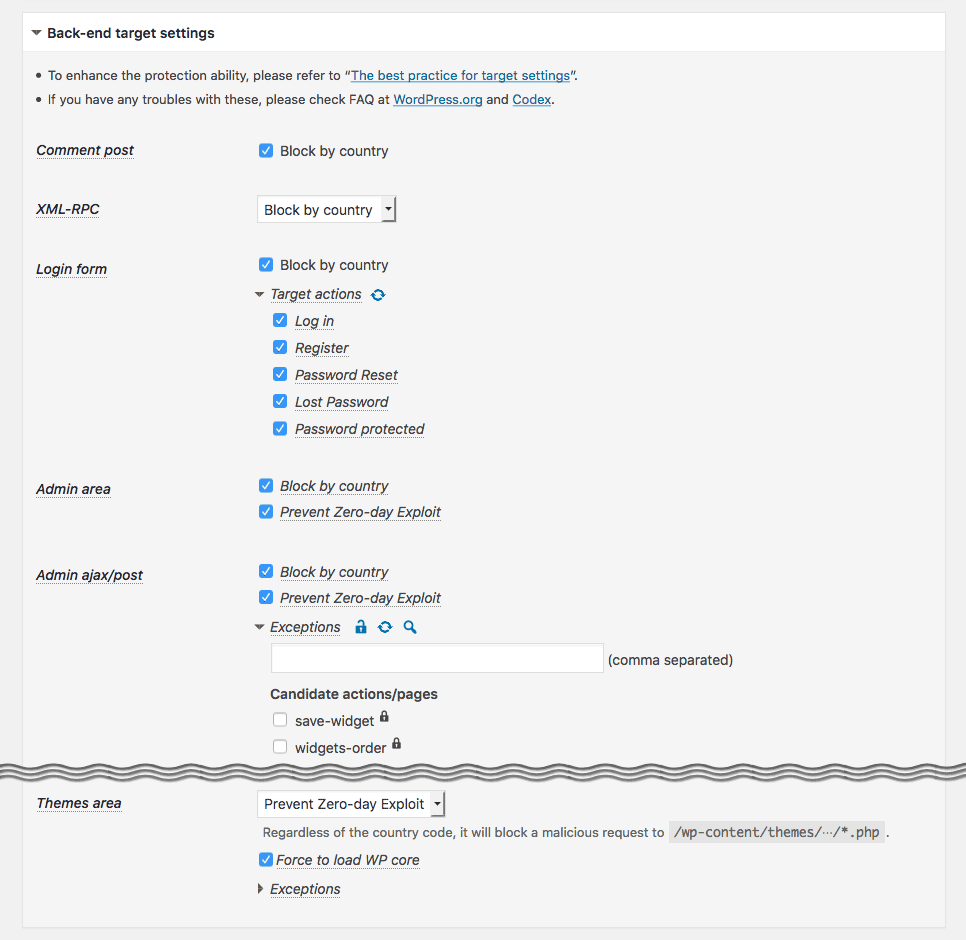
Access to the basic and important entrances into back-end such aswp-comments-post.php,xmlrpc.php,wp-login.php,wp-signup.php,wp-admin/admin.php,wp-admin/admin-ajax.php,wp-admin/admin-post.phpwill be validated by means of a country code based on IP address. It allows you to configure either whitelist or blacklist to specify the countires, CIDR notation for a range of IP addresses and AS number for a group of IP networks. -
Zero-day Exploit Prevention:
Unlike other security firewalls based on attack patterns (vectors), the original feature “WordPress Zero-day Exploit Prevention” (WP-ZEP) is focused on patterns of vulnerability. It is simple but still smart and strong enough to block any malicious accesses towp-admin/*.php,plugins/*.phpandthemes/*.phpeven from the permitted countries. It will protect your site against certain types of attack such as CSRF, LFI, SQLi, XSS and so on, even if you have some vulnerable plugins and themes in your site. -
Guard against login attempts:
In order to prevent hacking through the login form and XML-RPC by brute-force and the reverse-brute-force attacks, the number of login attempts will be limited per IP address even from the permitted countries. -
Minimize server load against brute-force attacks:
You can configure this plugin as a Must Use Plugins so that this plugin can be loaded prior to regular plugins. It can massively reduce the load on server. -
Prevent malicious down/uploading:
A malicious request such as exposingwp-config.phpor uploading malwares via vulnerable plugins/themes can be blocked. -
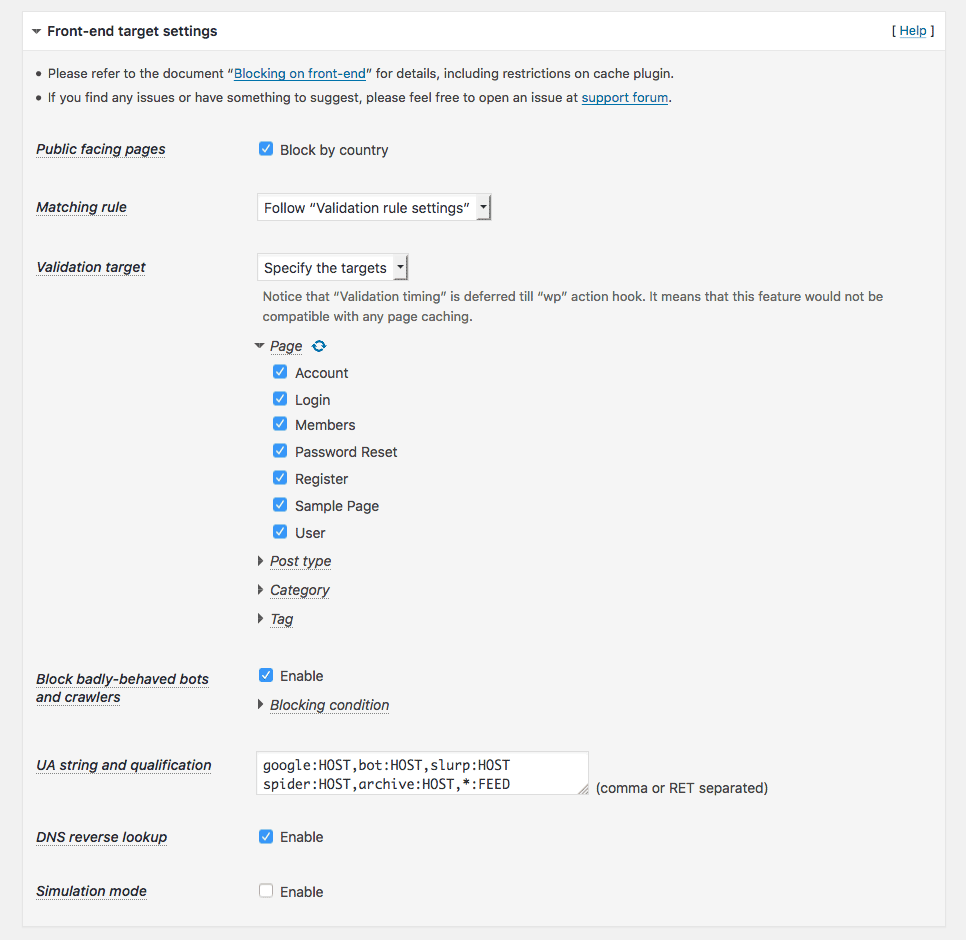
Block badly-behaved bots and crawlers:
A simple logic may help to reduce the number of rogue bots and crawlers scraping your site. -
Support of BuddyPress and bbPress:
You can configure this plugin so that a registered user can login as a membership from anywhere, while a request such as a new user registration, lost password, creating a new topic and subscribing comment can be blocked by country. It is suitable for BuddyPress and bbPress to help reducing spams. -
Referrer suppressor for external links:
When you click an external hyperlink on admin screens, http referrer will be eliminated to hide a footprint of your site. -
Multiple source of IP Geolocation databases:
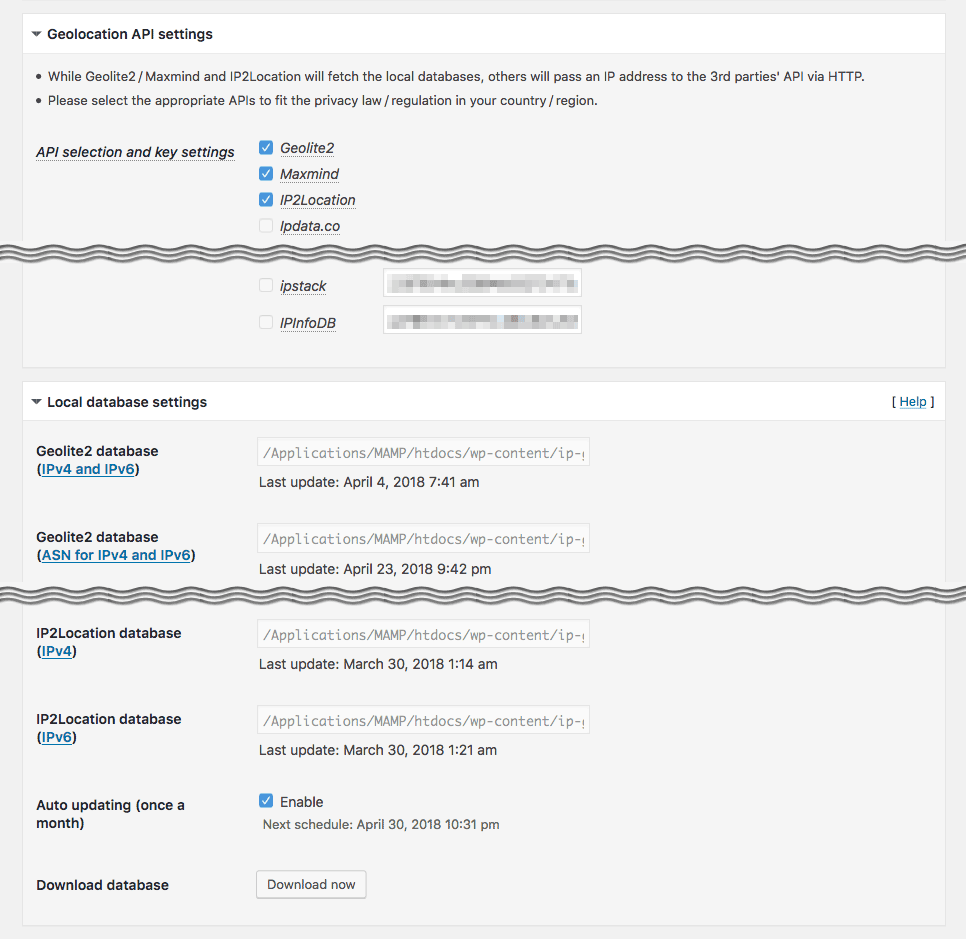
MaxMind GeoLite2 free databases (it requires PHP 5.4.0+) and IP2Location LITE databases can be installed in this plugin. Also free Geolocation REST APIs and whois information can be available for audit purposes.
Father more, dedicated API class libraries can be installed for CloudFlare and CloudFront as a reverse proxy service. -
Customizing response:
HTTP response code can be selectable as403 Forbiddento deny access pages,404 Not Foundto hide pages or even200 OKto redirect to the top page.
You can also have a human friendly page (like404.php) in your parent/child theme template directory to fit your site design. -
Validation logs:
Validation logs for useful information to audit attack patterns can be manageable. -
Cooperation with full spec security plugin:
This plugin is lite enough to be able to cooperate with other full spec security plugin such as Wordfence Security. See this report about page speed performance. -
Extendability:
You can customize the behavior of this plugin viaadd_filter()with pre-defined filter hook. See various use cases in samples.php bundled within this package.
You can also get the extension IP Geo Allow by Dragan. It makes admin screens strictly private with more flexible way than specifying IP addresses. -
Self blocking prevention and easy rescue:
Website owners do not prefer themselves to be blocked. This plugin prevents such a sad thing unless you force it. And futhermore, if such a situation occurs, you can rescue yourself easily. -
Clean uninstallation:
Nothing is left in your precious mySQL database after uninstallation. So you can feel free to install and activate to make a trial of this plugin’s functionality.
Attribution
This package includes GeoLite2 library distributed by MaxMind, available from MaxMind (it requires PHP 5.4.0+), and also includes IP2Location open source libraries available from IP2Location.
Also thanks for providing the following great services and REST APIs for free.
- http://ip-api.com/ (IPv4, IPv6 / free for non-commercial use)
- http://geoiplookup.net/ (IPv4, IPv6 / free)
- https://ipinfo.io/ (IPv4, IPv6 / free)
- [https://ipapi.com/](https://ipapi.com/ “ipapi – IP Address Lookup and Geolocation API) (IPv4, IPv6 / free, need API key)
- https://ipdata.co/ (IPv4, IPv6 / free, need API key)
- https://ipstack.com/ (IPv4, IPv6 / free for registered user, need API key)
- https://ipinfodb.com/ (IPv4, IPv6 / free for registered user, need API key)
Development
Development of this plugin is promoted at WordPress-IP-Geo-Block and class libraries to handle geo-location database are developed separately as “add-in”s at WordPress-IP-Geo-API.
All contributions will always be welcome. Or visit my development blog.
Known issues
- No image is shown after drag & drop a image in grid view at “Media Library”. For more details, please refer to this ticket at Github.
- From WordPress 4.5,
rel=nofollowhad no longer be attached to the links incomment_content. This change prevents to block “Server Side Request Forgeries” (not Cross Site but a malicious internal link in the comment field). - WordPress.com Mobile App can’t execute image uploading because of its own authentication system via XMLRPC.
Installation
Using The WordPress Dashboard
- Navigate to the ‘Add New’ in the plugins dashboard
- Search for ‘IP Geo Block’
- Click ‘Install Now’
- Activate the plugin on the Plugin dashboard
- Stay cool for a while and go to ‘Settings’ » ‘IP Geo Block’
- Try ‘Best for Back-end’ button for easy setup at the bottom of this plugin’s setting page.
Please refer to the document for your best setup.
Changelog
3.0.17.4
- Fix issue: Add an option “Metadata Exploit Protection” in “Validation rules and behavior” section and make it disabled by default because it potentially caused “Sorry, your request cannot be accepted”.
- Fix issue: Fix the issue that direct request to PHP files under plugins/themes directory was “404 Not found” when WP-ZEP enabled.
- Fix issue: Fix the incorrect link to the corresponding option page on error message in multisite environment.
- Improvement: Update the url to the google map api to prevent 301 redirection.
- Improvement: Use RIPE stat Data API to get whois information instead of using YQL (Yahoo! Query Language) which was retired on Jan. 3, 2019.
3.0.17.3
Sorry for the frequent update.
* Fix issue: Remove wp_user_roles from “Metadata Exploit Protection” which was equipped in 3.0.17 because some plugins/themes would add their own role and capability without admin authority.
3.0.17.2
- Fix issue: Fixed the fatal error under certain condition.
3.0.17.1
- Fix issue: Inadequate verification of IPv4 with some CIDR notation.
- Fix issue: Insufficient path parsing for document root and content directory when real path and symbolic link were mixtured on virtual host.
- Fix issue: Unexpected blocking on admin dashboard when home url is different from site url.
- Fix issue:
wp-signup.phpwas not blocked when only “Register” was enabled as “Target actions” at “Login form” in “Back-end target settings” section. - Improvement: Improve compatibility with Advanced Access Manager.
- Improvement: Use comment syntax
@codingStandardsIgnoreLinefor deprecated function on PHP7+ to avoid false positive by some scanning tool like PHP Compatibility Checker.
Hava a happy new year!
3.0.17
- Fix issue: Avoid the error of “Can not load Geolocation API libraries” caused by the race condition on upgrading this plugin.
- New feature: Enhance protecting against certain types of attacks by privilege escalation.
- New feature: Add a new option of “Network wide settings” in “Plugin settings” section to synchronize all the settings with the main blog on multisite.
- New feature: Add “Preset filters” using
ip-geo-block-logs[-preset]filter hook to make analyze logs easy on “Logs” tab. - Improvement: When
pwdis set at “$_POST key to record with value” in “Privacy and record settings” section, mask the password in logs unless the login attempt is blocked. - Improvement: Flush out the buffer of “Live update” on “Logs” tab when stop button is activated to avoid data remains.
- Improvement: Update the geolocation API service “geoip.nekudo.com” to “ipapi.com”.
- Improvement: Update the class for Maxmind GeoLite Legacy databases to prepare against the upcoming expiry of support.
- See 3.0.17 release note for some details.
3.0.16
- Fix issue: Fix the issue that some functions did not work properly when “Validation timing” was set as
"mu-plugins" (ip-geo-block-mu.php)under some conditions before WP 4.0. - New feature: Add “Sites list” page at Network admin page to look through the status of the sites if this plugin is network activated on multisite.
- Improvement: Support Swift Performance Lite cache plugin with “Disk Cashe with PHP” caching mode.
- Improvement: Apply simulation mode to not only the front-end but also to the back-end.
- Improvement: Optimize SQL issuing to reduce some queries.
- See 3.0.16 release note for some details.
Screenshots


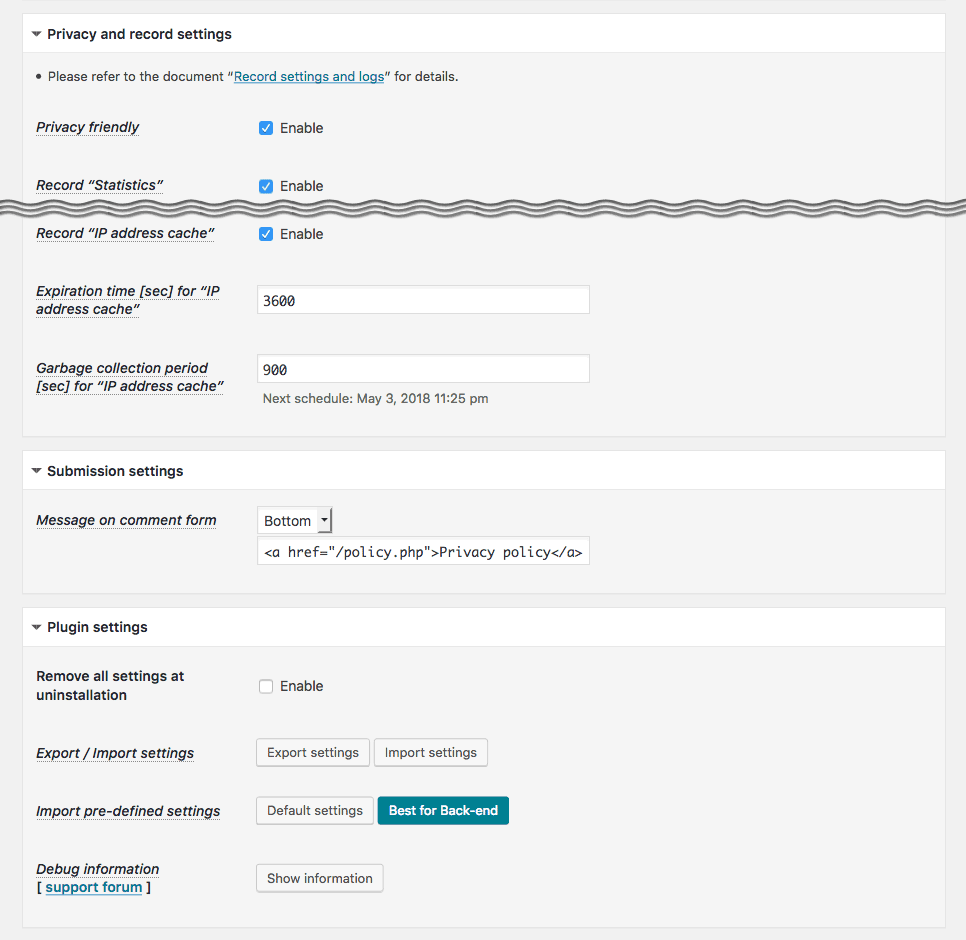

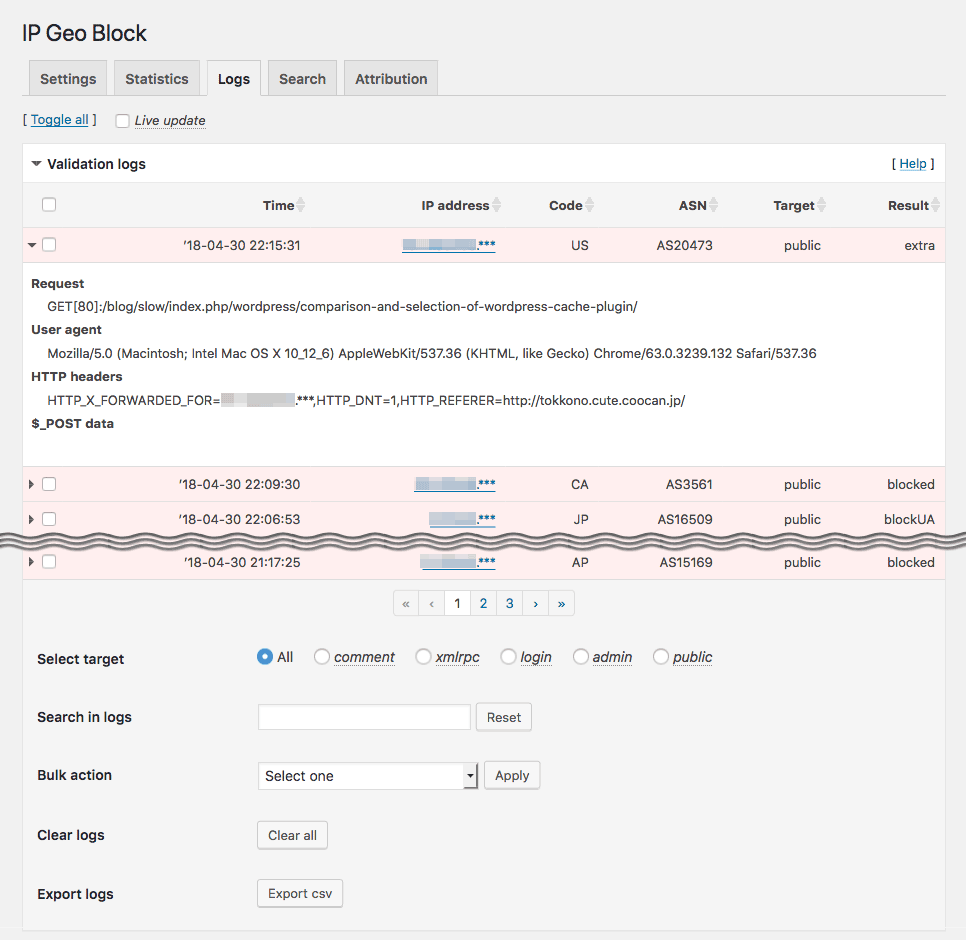
For developers
Is this your plugin? Show off the numbers.
Add a live badge to your site, docs or GitHub README. It updates on its own — no account needed.
Best IP Geo Block alternatives
All Brute Force plugins →





FAQ
IP Geo Block: quick answers
Straight answers, pulled from live WordPress.org data.
Source: WordPress.org
Is IP Geo Block free?
Yes. IP Geo Block is free to download and use from the official WordPress.org plugin directory.
Is IP Geo Block safe to use in 2026?
IP Geo Block works, but test it on a staging site before relying on it in 2026. It runs on 7K+ sites, is rated 4.2/5 and was last updated 8 years ago, and scores 42/100 on our health check.
How many websites use IP Geo Block?
IP Geo Block is active on 7K+ WordPress websites and has been downloaded 781,117 times since it launched in February 2014. It was downloaded 735 times in the last 30 days.
Does IP Geo Block work with WordPress 7.1?
IP Geo Block is officially tested up to WordPress 5.0.31, while the latest release is 7.1.4. It may still work, but try it on a staging site first.
When was IP Geo Block last updated?
The latest version, 3.0.17.4, was released on January 22, 2019 (8 years ago).
Who makes IP Geo Block?
IP Geo Block is developed and maintained by tokkonopapa.
What are the best alternatives to IP Geo Block?
The most popular alternatives to IP Geo Block are Limit Login Attempts Securi… (1M+ installs), CloudSecure WP Security (200K+ installs) and Anti-Malware Security and B… (100K+ installs).
Powered by PageForge
One template and a spreadsheet. A real page for every search.
PageForge turns each row of a CSV into a WordPress page with its own title, URL, SEO fields and schema, built on the layout you already designed. Free on WordPress.org.
- CSV and XLSX, plus Google Sheets on Professional and Enterprise
- Its own title, URL, SEO fields and schema for every page
- Works with the block editor, Elementor, Divi and Avada
- Free on WordPress.org, no credit card