


Instant Breaking News
This plugin will allow you to pin posts and feature them as "Breaking News" at the header of your website.

Envisager une alternative
Instant Breaking News shows warning signs in 2026 — compare the alternatives below before installing. It runs on 60+ sites, is rated 5/5 and was last updated 1 year ago, and scores 41/100 on our health check.
- Petite base d'utilisateurs (60+ installations actives)
- Très peu de critiques jusqu'à présent
- Pas de mise à jour depuis plus d'un an
- Uniquement testé jusqu'à WordPress 6,8 (le dernier est de 7,1)
Comment s'accumule-t-il ?
Côte à côte sur les installations, les mises à jour, les évaluations et le support



Téléchargements quotidiens
Les pics de téléchargement suivent généralement une nouvelle version - chaque site qui met à jour automatiquement compte comme un téléchargement.
Classements
Where Instant Breaking News stands todayWordPress.org Classements de recherche
Position en direct dans la recherche de plugins, Top 100| Mot-clé | Position |
|---|---|
| Breaking News | #6 |
| open source | >100 |
| universal | >100 |
Adoption de version
Part de sites actifs par version.
Répartition des notes
★★★★★ ★★★★★ 5 sur 1 avis
About Instant Breaking News
À partir du Lisez-moi officiel · v1.0.1Description
Instant Breaking News or IBN,
will allow you to pin posts and feature them as “Breaking News” at the header of your website.
For a longer documentation check the Plugin GitHub repository here.
How it works ?
Instant Breaking News plugin will appear in your WP Dashboard menu once it’s activated.
You’ll find the plugin Options Page under the name Breaking News.
From the options page you’ll be able to change the “Breaking News” banner title, background and text colors.
You’ll also be able to preview the current pinned post and go to it’s edit page directly from here.
However if you haven’t pinned anything yet, you’ll be able to go to your Posts archive too!
Pinning your first post:
Once you choose which will be your first Breaking News post in its Edit screen you’ll find a newly created metabox under the name of Breaking News Options somewhere at the bottom of the Edit screen.
There you’ll find the following three options:
1. Make this post breaking news: Once checked it’ll pin your post and overwrite previously pinned posts. Sadly at version 1.0 you can have only one pinned post at a time.
2. Custom breaking news title: This setting allows you to choose a specific title for your post, which will be presented only in the Breaking News banner.
3. Set an expiration Date & Time: This option allows you to choose when the pinned post to disappear from your website automatically.
There is something that you should remember about the Expiring Pins functionality.
Instant Breaking News plugin automatically takes your server time and converts it to your WordPress Timezone.
That is extremely important to remember when setting the expiration date & time of your post, because if you pick a time which has already passed at your WordPress Timezone that post will be automatically unpinned in order to protect you from pinning expired posts. However if that happens don’t worry! Once you set the new date and time you’ll be able to re-pin it again, just by checking the Make this post breaking news option again.
Note:
This plugin will work with almost every standart WordPress theme.
If your template has unique structure, the plugin will need a bit of tweeking in order to run properly.
The change that’ll be required is at the /assets/scripts/public.js file.
You’ll have to specify where on your website you would like to attach the Breaking News banner through those two lines:
let $firstHeader = jQuery( "header" ).first();
jQuery( container ).insertAfter( $firstHeader );
That’s it, let’s start pinning!
Log:
- 1.0.1 – Fix: CSRF and XSS in settings; nonce and capability checks; sanitization and escaping hardening.
- 1.1 – Update tested version of WP Core to 6.0.2
- 1.0 – Release
Installation
- Téléchargez les fichiers du plug-in dans le répertoire
/wp-content/plugins/plugin-nameou installez directement le plugin via l'écran des plugins WordPress. - Activez le plugin via l'écran "Plugins" dans WordPress
- Use the Settings->Plugin Name screen to configure the plugin
Alternative:
Download and activate the plugin from WordPress.org or
clone the repository from GitHub – https://github.com/Gero0Nikolov/IBN-WordPress-Plugin –
to your wp-content/wp-plugins/ folder and activate it from the WordPress Dashboard after that.
Pour les développeurs
Est-ce votre plugin ? Montrez les chiffres.
Ajoutez un badge en direct à votre site, docs ou github readme. Il se met à jour par lui-même - aucun compte n'est nécessaire.
Best Instant Breaking News alternatives
All Breaking News plugins →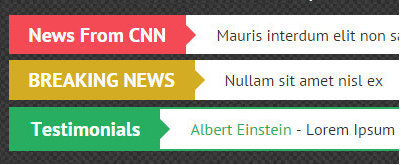





FAQ
Instant Breaking News: quick answers
Réponses directes, extraites des données en direct WordPress.org.
Source : WordPress.org
Is Instant Breaking News free?
Yes. Instant Breaking News is free to download and use from the official WordPress.org plugin directory.
Is Instant Breaking News safe to use in 2026?
Instant Breaking News shows warning signs in 2026 — compare the alternatives below before installing. It runs on 60+ sites, is rated 5/5 and was last updated 1 year ago, and scores 41/100 on our health check.
How many websites use Instant Breaking News?
Instant Breaking News is active on 60+ WordPress websites and has been downloaded 3,577 times since it launched in June 2020. It was downloaded 122 times in the last 30 days.
Does Instant Breaking News work with WordPress 7.1?
Instant Breaking News is officially tested up to WordPress 6.8.13, while the latest release is 7.1.5. It may still work, but try it on a staging site first.
When was Instant Breaking News last updated?
The latest version, 1.0.1, was released on August 23, 2025 (1 year ago).
Who makes Instant Breaking News?
Instant Breaking News is developed and maintained by Gero Nikolov.
What are the best alternatives to Instant Breaking News?
The most popular alternatives to Instant Breaking News are T4B News Ticker (6K+ installs), News Ticker (100+ installs) and OXP Breaking News Ticker (100+ installs).
Propulsé par PageForge
Un modèle et une feuille de calcul. Une vraie page pour chaque recherche.
PageForge transforme chaque ligne d'un CSV en une page WordPress avec son propre titre, URL, SEO et schéma, construit sur la mise en page que vous Déjà conçu. Gratuit sur WordPress.org.
- CSV et XLSX, plus Google Sheets sur les professionnels et les entreprises
- Son propre titre, URL, SEO champs et schéma pour chaque page
- Fonctionne avec l'éditeur de blocs, Elementor, Divi et Avada
- Gratuit sur WordPress.org, pas de carte de crédit