


Insérer le code des en-têtes et des pieds de page – Script HT
This plugin allows you to insert Google analytic code, Facebook pixel code, custom javascript, custom style in your website's header and footer.

Choix
Yes — Insert Headers and Footers Code is a safe, well-maintained plugin to use in 2026. It runs on 6K+ sites, is rated 5/5 and was last updated 3 months ago, and scores 80/100 on our health check.
- Testé avec le dernier WordPress (7.1)
Comment s'accumule-t-il ?
Côte à côte sur les installations, les mises à jour, les évaluations et le support



Téléchargements quotidiens
Les pics de téléchargement suivent généralement une nouvelle version - chaque site qui met à jour automatiquement compte comme un téléchargement.
Classements
Where Insert Headers and Footers… stands todayWordPress.org Classements de recherche
Position en direct dans la recherche de plugins, Top 100| Mot-clé | Position |
|---|---|
| Facebook pixel | #23 |
| google analytics | >100 |
| inject code | #2 |
| inject html | #1 |
| inject javascript | #1 |
Adoption de version
Part de sites actifs par version.
Répartition des notes
★★★★★ ★★★★★ 5 sur 8 avis
About Insert Headers and Footers Code
From the official readme · v1.1.10Description
Insert Headers and Footers Code allows you to insert Google Analytics, Facebook Pixel, custom CSS, custom HTML, JavaScript code to your website header and footer without modifying your theme code.
This plugin has the option to add any custom code to your theme in one place, no need to edit the theme code. It will save your time and remove the hassle for the theme update.
Pro version is also available : Check it out now!
Video Documentation:
Caractéristiques :
- Very easy to use
- Insert Unlimited Scripts
- Insert Code to header / footer
- Add custom CSS/js to any theme
- Add Google Analytics code
- Add Facebook Pixel code
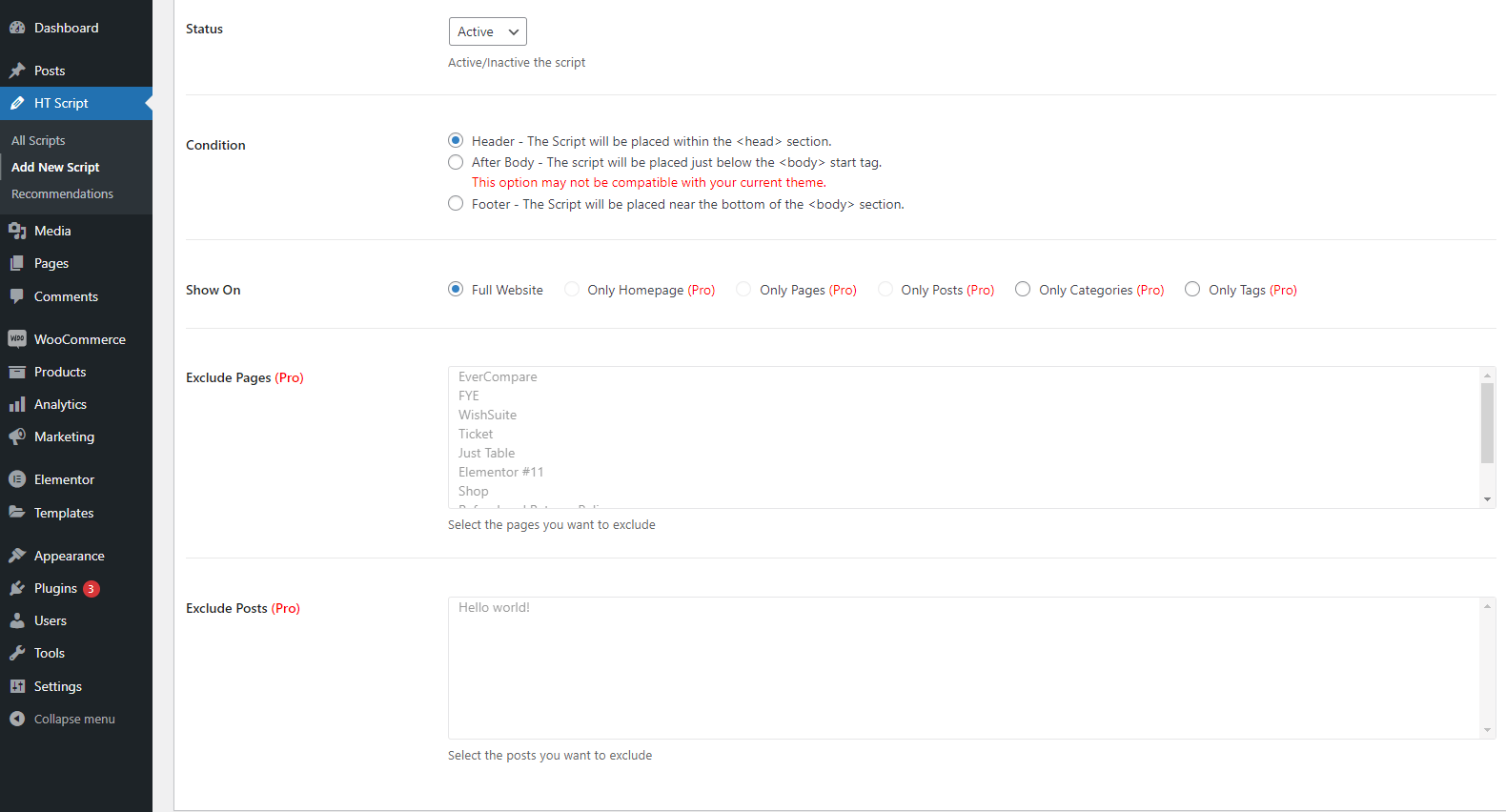
- Show On Full website
- Show on Only Homepage (Pro)
- Show on Selected Pages (Pro)
- Show on Selected Posts (Pro)
- Show on Selected Categories (Pro)
- Show on Selected Tags (Pro)
- Exclude Pages (Pro)
- Exclude Posts (Pro)
Other Projects
We have a lot of plugins and extensions that might interest you. Try out other projects by following this link:
Woolentor Addons
Woolentor is a WooCommerce page builder plugin that extends the functionality of the WooCommerce store. These Elementor Addons provide additional features and options for WooCommerce stores. Woolentor is the best alternative for ShopReady, Kadence, JetWidgets, ShopEngine, and CoDesigner. The Woolentor addons come with 50+ free Elementor widgets like Wishlist Extension Addon, Product compare, Product Filters, Product Variation Swatches, Shopify Style Checkout, Product Slider and 50+ pro Elementor Widgets like Checkout Fields Editor, Partial Payment, Email Customizer for WooCommerce with ready Email Templates, WooCommerce Email Automation, Multi Step Checkout, and many much more. Also it provide 90+ WooCommerce Elementor templates, 22+ WooCommerce Modules, and Gutenberg Blocks.
HT Mega For Elementor
HT Mega is an Elementor Addons that comes with custom page builder, header builder, footer builder, mega menus, and more for your Elementor based website. The HT Mega plugin also includes a comprehensive set of Elementor widgets, readymade Elementor templates and Elementor Blocks. HT Mega plugin works like ElementsKit, Essential Addons for Elementor, Royal Elementor Addons, Premium Addons, Happy Addons, PowerPack Addons, Unlimited Elements, Qi Addons, etc. The HT Mega plugin provides 84+ free Elementor widgets like Post Grid widget, Slider widget, Accordion widget, Elementor Forms widget, Contact Form Widget, Elementor tables, and other related items. It also provides 18+ pro widgets like Filterable Gallery Widget, Event Box Widget, Breadcrumbs Widget, Elementor Facebook Review Widget, Elementor Category List Widget, etc.
Hashbar Wp Notification Bar
HashBar is a WordPress Notification Bar Plugin that enables you to create unlimited notification bars on your WordPress website. You can create as many notification bars as you want and customize their content to meet your needs.
WP Plugin Manager – Deactivate plugins per page
WP Plugin Manager is the perfect solution for those who want to disable certain plugins on specific pages or posts. With this plugin, you can easily activate or deactivate plugins on a per-page or per-post basis. Whichever plugin you don’t need you can deactivate or disable that plugin with the help of WP plugin Manager.
Extensions For Cf7
Contact Form 7 is an excellent plugin for organizing your contact page. The CF7 extensions plugin includes Contact Form 7 Database, enabling Conditional Fields for Contact Form 7, etc. It allows fields to be set up as either visible or hidden depending upon the input from visitors. In addition, integrating seamlessly with Mailchimp brings leads generated every time someone fills out one form into an associated email list immediately.
Whols
Whols is an outstanding plugin for WooCommerce that allows store owners to set wholesale prices for the products of their online stores. With Whols, you can easily add custom fields to your registration form, set minimum product requirements, and control how wholesale prices are displayed on both the shop and product detail pages. Whols work like Wholesale Suite, B2Bking and B2B plugins.
Just Tables
JustTables is a WooCommerce product table plugin that helps you easily create and manage tables for your products. It includes 28 pre-built columns with options to enable/disable, and you can add custom columns with custom fields/taxonomies. Just Tables also allows you to order table columns using drag and drop and set the number of products per page.
Swatchly
Swatchly is a WooCommerce product variation swatches plugin that allows you to add color swatches to your product pages. With Swatchly, you can enable swatches for the shop, product list, and product details pages. There are three swatch types (label swatche, color swatche, image swatche), and the plugin supports multi-colored swatches.
HT Slider For Elementor
HT Slider For Elementor is a powerful and user-friendly slider addon for Elementor. You can customize the look and feel of your slider with HT Slider’s custom styling options. You also have the option to display your slides by id and category. Plus, HT Slider For Elementor comes with custom design options for slider navigation and pagination, so you can easily control the look and feel of your slider.
HT Contact form
HT Contact Form 7 Widget is an Elementor addon that allows you to easily drag and drop Contact Form 7 forms into your web pages. With the help of this plugin, you can choose your form from the drop-down list, Custom Styling Options, and add it to any page or place on your website. The HT Contact Form 7 Widget is an essential tool for anyone using Contact Form 7 on their website.
Need Help?
Is there any feature that you want to get in this plugin?
Needs assistance to use this plugin?
Feel free to Contact us
Installation
This section describes how to install the Insert Headers and Footers plugin and get it working.
1) Installer
Modern Way:
- Accédez à la section "Ajouter un nouveau plugin" de tableau de bord WordPress.
- Search For “Insert Headers and Footers Script”.
- Installez-le, puis activez-le.
Old Way:
- Unzip (if it is zipped) and Upload
insert-headers-and-footers-scriptfolder to the/wp-content/plugins/directory - Activez le plugin via le menu « Plugins » dans WordPress
2) Configurer
- After activating the plugin, a new menu will appear in, your dashboard named ‘Header and Footer scripts’
- Create new script and publish!
Journal de modifications
Version: 1.1.10 – Date: 25 August 2026
- Fixed: Recommended Plugins page showing a single stacked column instead of a grid on WordPress 7.1+.
- Fixed: A few minor issues.
- Tested: Compatibility with the latest version of WordPress.
Version: 1.1.9 – Date: 30 July 2026
- Fixed: CSRF vulnerability in the plugin activation AJAX handler by adding nonce verification.
Version: 1.1.8 – Date: 26 Feb 2026
- Improved: Admin notice display.
Version: 1.1.7 – Date: 30 Oct 2025
- Fixed: Restricted script access to users with proper capabilities.
- Fixed: Sanitization callback to validate user capabilities before saving scripts.
Version: 1.1.6 – Date: 22 July 2025
- Added: Status column in post list to show script status
- Improved: Metabox query performance.
Version: 1.1.5 – Date: 17 June 2025
- Fixed: Translation issues have been resolved in multiple areas.
- Fixed: Escaping issues have been resolved in multiple areas.
Captures d'écran


Pour les développeurs
Est-ce votre plugin ? Montrez les chiffres.
Ajoutez un badge en direct à votre site, docs ou github readme. Il se met à jour par lui-même - aucun compte n'est nécessaire.
Best Insert Headers and Footers Co… alternatives
All Facebook Pixel plugins →





FAQ
Insert Headers and Footers Code: quick answers
Réponses directes, extraites des données en direct WordPress.org.
Source : WordPress.org
Is Insert Headers and Footers Code free?
Yes. Insert Headers and Footers Code is free to download and use from the official WordPress.org plugin directory. The developer also sells premium add-ons or a Pro version with extra features.
Is Insert Headers and Footers Code safe to use in 2026?
Yes — Insert Headers and Footers Code is a safe, well-maintained plugin to use in 2026. It runs on 6K+ sites, is rated 5/5 and was last updated 3 months ago, and scores 80/100 on our health check.
How many websites use Insert Headers and Footers Code?
Insert Headers and Footers Code is active on 6K+ WordPress websites and has been downloaded 118,698 times since it launched in June 2019. It was downloaded 1,317 times in the last 30 days.
Does Insert Headers and Footers Code work with WordPress 7.1?
Yes. The developer has tested Insert Headers and Footers Code up to WordPress 7.1.5, the latest release. It requires WordPress 5.0 or newer.
When was Insert Headers and Footers Code last updated?
The latest version, 1.1.10, was released on August 25, 2026 (3 months ago).
Who makes Insert Headers and Footers Code?
Insert Headers and Footers Code is developed and maintained by HT Plugins.
What are the best alternatives to Insert Headers and Footers Code?
The most popular alternatives to Insert Headers and Footers Code are Insert Headers And Footers (200K+ installs), Pixel Manager for WooCommer… (40K+ installs) and Pixel Cat (30K+ installs).
Propulsé par PageForge
Un modèle et une feuille de calcul. Une vraie page pour chaque recherche.
PageForge transforme chaque ligne d'un CSV en une page WordPress avec son propre titre, URL, SEO et schéma, construit sur la mise en page que vous Déjà conçu. Gratuit sur WordPress.org.
- CSV et XLSX, plus Google Sheets sur les professionnels et les entreprises
- Son propre titre, URL, SEO champs et schéma pour chaque page
- Fonctionne avec l'éditeur de blocs, Elementor, Divi et Avada
- Gratuit sur WordPress.org, pas de carte de crédit