

IndieTech Popup Builder
A powerful popup plugin with Gutenberg editor support and advanced targeting options.

Choix solide
IndieTech Popup Builder is a solid plugin choice in 2026, with a few things worth checking first. It runs on 100+ sites and was last updated 1 week ago, and scores 68/100 on our health check.
- Développé activement — Dernière mise à jour il y a 1 semaine
- Testé avec le dernier WordPress (7.1)
- Petite base d'utilisateurs (plus de 100 installations actives)
- Très peu de critiques jusqu'à présent
Comment s'accumule-t-il ?
Côte à côte sur les installations, les mises à jour, les évaluations et le support



Téléchargements quotidiens
Les pics de téléchargement suivent généralement une nouvelle version - chaque site qui met à jour automatiquement compte comme un téléchargement.
Classements
Where IndieTech Popup Builder stands todayWordPress.org Classements de recherche
Position en direct dans la recherche de plugins, Top 100| Mot-clé | Position |
|---|---|
| exit-intent | >100 |
| Gutenberg | >100 |
| modal | >100 |
| popup | >100 |
| targeting | >100 |
Adoption de version
Part de sites actifs par version.
About IndieTech Popup Builder
À partir du Lisez-moi officiel · v1.2.2Description
Popup by IndieTech is a feature-rich WordPress popup plugin that makes it easy to create and display engaging popups on your website. Built with the Gutenberg editor, you can create rich, interactive popup content using familiar WordPress blocks.
Principales caractéristiques
- Gutenberg Editor Support: Create rich popup content using the WordPress block editor. All settings are in the document sidebar (Trigger, Behavior, Design, Location).
- Advanced Triggering Options:
- Immediate display on page load
- Time delay (show after X seconds, 0-30)
- Scroll percentage (show when user scrolls X% of the page)
- Exit intent (when cursor leaves the viewport from the top)
- Button / Link: open on click of any element with a specific CSS class (e.g. a Gutenberg button block)
- Smart Targeting (Location):
- Include rules (multi-select): All pages, Homepage, CPT single (by post type), Specific page/post IDs, URL prefixes (one per line)
- Exclude rules: Exclude by post/page IDs or URL prefixes
- Exclusions are applied first; popup shows if any include rule matches and no exclude rule matches
- Cookie Management: Control how often users see popups
- Cookie duration in days (0 = show every time, up to 365)
- Choose when cookie is set: On Close or On Seen
- Customizable Styling (Design):
- Position: 9-position matrix (top/center/bottom x left/center/right)
- Max width (200-1200px)
- Overlay opacity (0-1)
- Close button: Do not show, Show inside, or Show outside
- Behavior Options:
- Close when clicking outside (overlay)
- Disable page scroll when popup is open
- Private popups: Publish as Private to show only to logged-in users
- Close link in content: Use href=”#popup:close” in popup content to close the modal
- List view: Custom columns for Status and Trigger (Immediate, Delay, Scroll %, Exit Intent)
- Mobile Responsive: Fully responsive design that works on all devices
- GA4 / GTM Tracking: Optional event tracking for popup open, close, and CTA clicks. Works with direct GA4 (gtag.js) and Google Tag Manager (dataLayer).
- Gravity Forms Integration: Optionally set a permanent cookie and auto-close the popup after a successful form submission inside it.
- Accessible: Built with Micromodal for accessible modals (focus trap, ARIA, keyboard)
- Lightweight: Optimized code; assets only load when there are active popups; transient cache for performance
Comment cela fonctionne
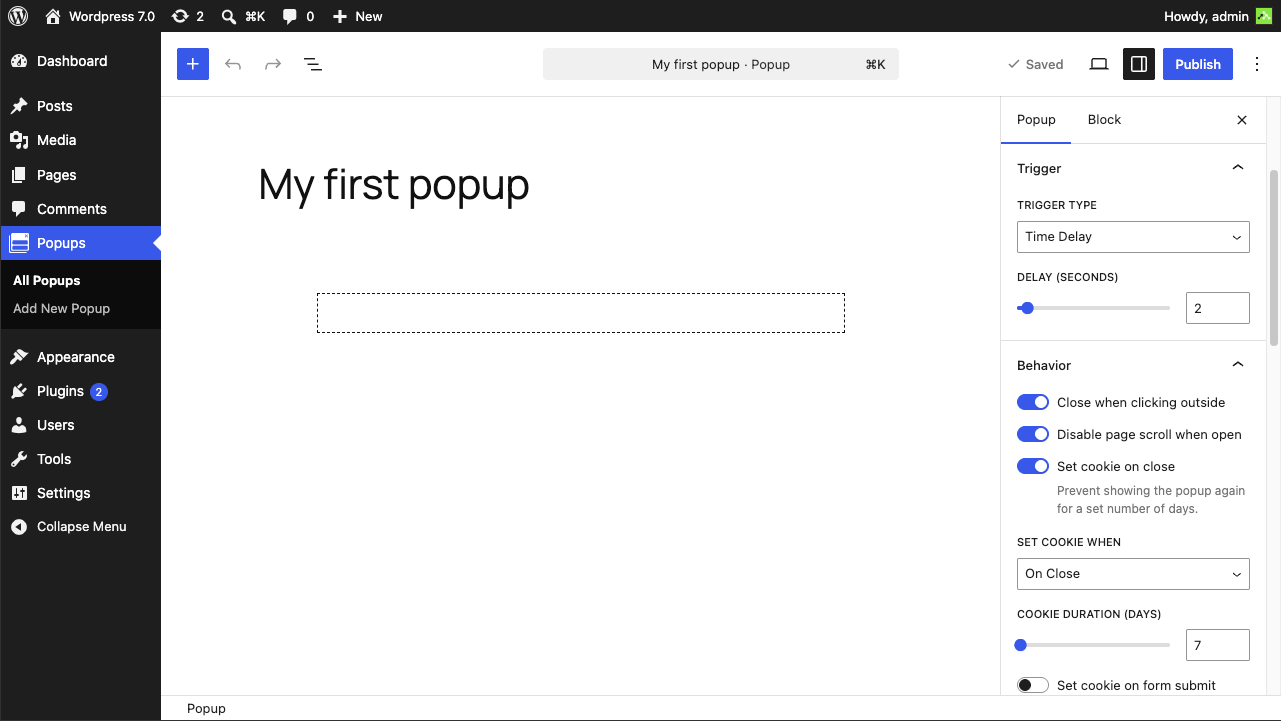
- Create a new popup by going to Popups > Add New
- Use the Gutenberg editor to add your content (text, images, forms, buttons, etc.)
- In the document sidebar, configure Trigger, Behavior, Design, and Location
- Publish (or set to Private for logged-in users only). Your popup will appear based on your targeting and trigger settings
Cas d'utilisation
- Lead generation forms
- Newsletter signups
- Promotional offers and announcements
- Important messages and alerts
- Exit intent offers
- Welcome messages
- Cookie consent notices
- Product launches and updates
Installation
- Upload the
indietech-popup-builderfolder to your/wp-content/plugins/directory - Activez le plugin via le menu « Plugins » dans WordPress
- Go to ‘Popups > Add New’ to create your first popup
- Configure your popup settings and publish
Journal de modifications
Fixes popup changes not appearing immediately on sites with object caching, adds settings validation, developer filters and uninstall cleanup.
1.2.2
- Fixed popup changes taking up to 5 minutes to appear on sites with a persistent object cache (Redis, Memcached). The popup cache is now invalidated with a version key that works with any cache backend.
- Popup cache now stores only post IDs and is shared per visibility level instead of one entry per logged-in user, reducing database usage on sites with many users.
- Trashing or deleting non-popup content no longer clears the popup cache.
- Popup settings are now validated on save (allowed values for trigger, position, close button and cookie options; numeric settings clamped to their allowed ranges).
- Fixed the editor live preview (max width and close button) on WordPress versions that render the editor in an iframe. The editor now shows popup content at its exact frontend width, ignoring the theme’s content-width limit.
- New popups now start with an empty paragraph inside the default Group, so typing starts inside the popup box instead of adding a paragraph outside it.
- Sidebar strings in the block editor can now be translated.
- New developer filters:
indietech_popup_should_displayandindietech_popup_settings. - Deleting the plugin now removes all popups, their settings and cached data.
- Removed unused code (classic-editor save fallback, unused frontend AJAX data).
- Tested up to WordPress 7.2.
1.2.1
- Fixed close button requiring two clicks when the SVG icon inside it is the click target. Added
pointer-events: noneto the SVG so clicks always land on the button element.
1.2.0
- New trigger type: Button / Link — open a popup by clicking any block (button, link, image, etc.) with a specific CSS class. The sidebar shows the exact class to use (e.g.
popup-open-123). No cookie is required; the popup can be reopened after closing.
1.1.2
- Fixed CPT single targeting not working on themes that call
query_posts()beforewp_head()(e.g. Inertia.js-based themes). Page context is now snapshotted on thewpaction before any template code runs. - Fixed JavaScript crash (“Cannot read properties of null: removeEventListener”) on sites where other plugins or themes use
data-micromodal-triggerattributes pointing to non-existent modals. - Compatibility and code quality fixes to satisfy WordPress Plugin Check.
- Improved sanitization of request URLs and popup meta box settings.
- Corrected text domain to
indietech-popup-builderand prepared the language directory for translations. - Updated build/package configuration to exclude development files from distribution.
1.1.0
- Gutenberg sidebar for all popup settings (Trigger, Behavior, Design, Location)
- Targeting: multi-select include rules (All, Homepage, CPT single, Specific IDs, URL prefixes) and exclude rules (IDs, URL prefixes)
- Position: 9-position matrix (top/center/bottom x left/center/right)
- Close button options: none, inside, or outside
- Private popups (visible only to logged-in users)
- Close link in content: href=”#popup:close”
- List columns: Status and Trigger
- Transient cache for active popups with cache invalidation on save/delete
- Editor live preview for max width and close button
1.0.0
- Communiqué initial
- Gutenberg editor support with full block compatibility
- Advanced triggering options (immediate, time delay, scroll percentage, exit intent)
- Smart targeting (all pages, homepage, specific pages by ID or URL prefix)
- Cookie-based frequency control
- Customizable styling (position, width, overlay opacity)
- Behavior options (close on outside click, close button, scroll lock)
- Mobile responsive design
- Accessibility support with Micromodal
- Lightweight and optimized code
Captures d'écran


Pour les développeurs
Est-ce votre plugin ? Montrez les chiffres.
Ajoutez un badge en direct à votre site, docs ou github readme. Il se met à jour par lui-même - aucun compte n'est nécessaire.
Best IndieTech Popup Builder alternatives
All exit-intent plugins →





FAQ
IndieTech Popup Builder: quick answers
Réponses directes, extraites des données en direct WordPress.org.
Source : WordPress.org
Is IndieTech Popup Builder free?
Yes. IndieTech Popup Builder is free to download and use from the official WordPress.org plugin directory.
Is IndieTech Popup Builder safe to use in 2026?
IndieTech Popup Builder is a solid plugin choice in 2026, with a few things worth checking first. It runs on 100+ sites and was last updated 1 week ago, and scores 68/100 on our health check.
How many websites use IndieTech Popup Builder?
IndieTech Popup Builder is active on 100+ WordPress websites and has been downloaded 2,085 times since it launched in April 2026. It was downloaded 323 times in the last 30 days.
Does IndieTech Popup Builder work with WordPress 7.1?
Yes. The developer has tested IndieTech Popup Builder up to WordPress 7.2, the latest release. It requires WordPress 6.7 or newer.
What PHP version does IndieTech Popup Builder need?
IndieTech Popup Builder requires PHP 7.4 or higher. Most hosts run PHP 8.x today, so it works on any modern WordPress hosting.
When was IndieTech Popup Builder last updated?
The latest version, 1.2.2, was released on November 10, 2026 (1 week ago).
Who makes IndieTech Popup Builder?
IndieTech Popup Builder is developed and maintained by IndieTech Solutions.
What are the best alternatives to IndieTech Popup Builder?
The most popular alternatives to IndieTech Popup Builder are Promolayer (1K+ installs), Optinly (700+ installs) and Nelio Popups (300+ installs).
Propulsé par PageForge
Un modèle et une feuille de calcul. Une vraie page pour chaque recherche.
PageForge transforme chaque ligne d'un CSV en une page WordPress avec son propre titre, URL, SEO et schéma, construit sur la mise en page que vous Déjà conçu. Gratuit sur WordPress.org.
- CSV et XLSX, plus Google Sheets sur les professionnels et les entreprises
- Son propre titre, URL, SEO champs et schéma pour chaque page
- Fonctionne avec l'éditeur de blocs, Elementor, Divi et Avada
- Gratuit sur WordPress.org, pas de carte de crédit