


Widget d'images
A simple image widget that uses the native WordPress media manager to add image widgets to your site.

Utiliser avec prudence
Image Widget works, but test it on a staging site before relying on it in 2026. It runs on 100K+ sites, is rated 4.9/5 and was last updated 7 months ago, and scores 58/100 on our health check.
- Prouvé à grande échelle sur plus de 100 000 sites actifs
- Loved by users — 4.9/5 from 287 reviews
- Momentum — Téléchargements en hausse de 38,1 % par rapport aux 30 jours précédents
- Uniquement testé jusqu'à WordPress 6,7 (le dernier est de 7,1)
Comment s'accumule-t-il ?
Côte à côte sur les installations, les mises à jour, les évaluations et le support


Téléchargements quotidiens
Les pics de téléchargement suivent généralement une nouvelle version - chaque site qui met à jour automatiquement compte comme un téléchargement.
Classements
Where Image Widget stands todayWordPress.org Classements de recherche
Position en direct dans la recherche de plugins, Top 100| Mot-clé | Position |
|---|---|
| ad | >100 |
| bannière | >100 |
| image | #36 |
| barre latérale | #66 |
| widget | #31 |
Adoption de version
Part de sites actifs par version.
Répartition des notes
★★★★★★★★★★ 4.9 from 287 reviews
About Image Widget
From the official readme · v4.4.12Description
Image Widget is a simple plugin that uses the native WordPress media manager to add image widgets to your site.
Image Widget Features
- Sensible
- MU Compatible
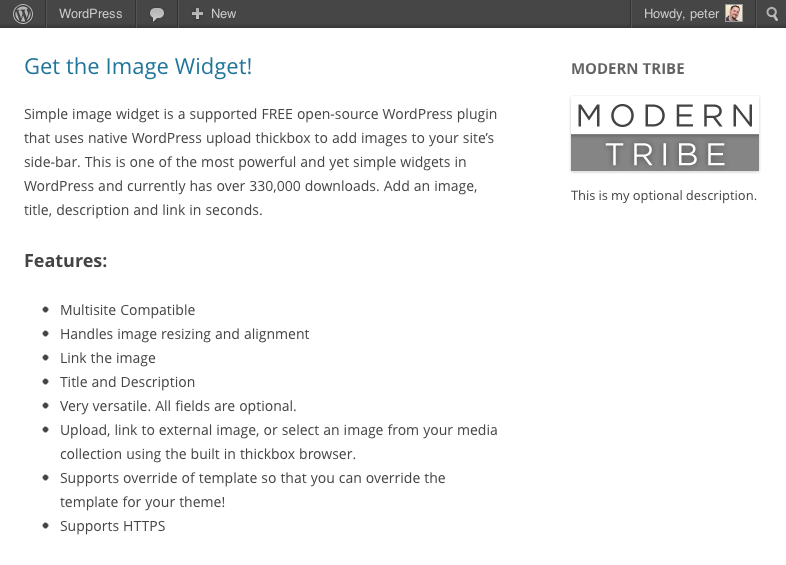
- Handles image resizing and alignment
- Link the image
- Add title and description
- Versatile – all fields are optional
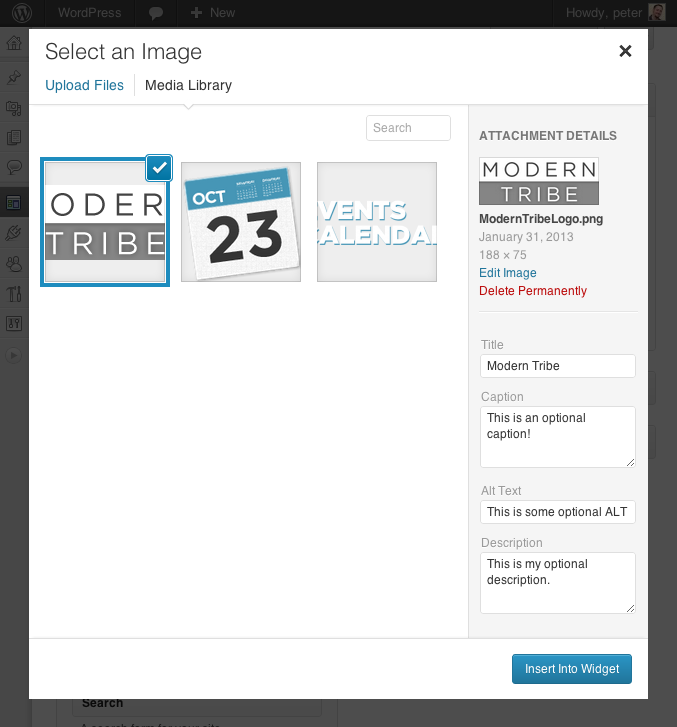
- Upload, link to external image, or select an image from your media collection
- Customize the look & feel with filter hooks or theme overrides
Quality You Can Trust
Image Widget is developed and maintained by The Events Calendar, the same folks behind The Events Calendar, Event Tickets, and a full suite of premium plugins.
This plugin is actively supported by our team and contributions from community members. If you see a question in the forum you can help with or have a great idea and want to code it up or submit a patch, that would be awesome! Not only will we shower you with praise and thanks, it’s also a good way to get to know us and lead into options for paid work if you freelance.
Pull Requests & Translations
Check us out on GitHub to pull request changes.
Translations can be submitted here on WordPress.org.
Documentation
The built in template can be overridden by files within your template.
Default vs. Custom Templates
The Image Widget comes with a default template for the widget output. If you would like to alter the widget display code, create a new folder called “image-widget” in your template directory and copy over the “views/widget.php” file.
Edit the new file to your hearts content. Please do not edit the one in the plugin folder as that will cause conflicts when you update the plugin to the latest release.
New in 3.2: You may now also use the “sp_template_image-widget_widget.php” filter to override the default template behavior for .php template files. Eg: if you wanted widget.php to reside in a folder called my-custom-templates/ and wanted it to be called my-custom-name.php:
add_filter('sp_template_image-widget_widget.php', 'my_template_filter');
function my_template_filter($template) {
    return get_template_directory() . '/my-custom-templates/my-custom-name.php';
}
Filtres
There are a number of filters in the code that will allow you to override data as you see fit. The best way to learn what filters are available is always by simply searching the code for ‘apply_filters’. But all the same, here are a few of the more essential filters:
widget_title
This is actually a pretty typical filter in widgets and is applied to the widget title.
widget_text
Another very typical widget filter that is applied to the description body text. This filter also takes 2 additional arguments for $args and $instance so that you can learn more about the specific widget instance in the process of filtering the content.
image_widget_image_attachment_id
Filters the attachment id of the image.
Accepts additional $args and $instance arguments.
image_widget_image_url
Filters the url of the image displayed in the widget.
Accepts additional $args and $instance arguments.
THIS IS DEPRECATED AND WILL EVENTUALLY BE DELETED
image_widget_image_width
Filters the display width of the image.
Accepts additional $args and $instance arguments.
image_widget_image_height
Filters the display height of the image.
Accepts additional $args and $instance arguments.
image_widget_image_maxwidth
Filters the inline max-width style of the image. Hint: override this to use this in responsive designs 🙂
Accepts additional $args and $instance arguments.
Return null to remove this css from the image output (defaults to ‘100%’).
image_widget_image_maxheight
Filters the inline max-height style of the image.
Accepts additional $args and $instance arguments.
Return null to remove this css from the image output (defaults to null)
image_widget_image_size
Filters the selected image ‘size’ corresponding to WordPress registered sizes.
If this is set to ‘tribe_image_widget_custom’ then the width and height are used instead.
Accepts additional $args and $instance arguments.
image_widget_image_align
Filters the display alignment of the image.
Accepts additional $args and $instance arguments.
image_widget_image_alt
Filters the alt text of the image.
Accepts additional $args and $instance arguments.
image_widget_image_link
Filters the url that the image links to.
Accepts additional $args and $instance arguments.
image_widget_image_link_target
Filters the link target of the image link.
Accepts additional $args and $instance arguments.
image_widget_image_attributes
Filters a list of image attributes used in the image output. Similar to ‘wp_get_attachment_image_attributes’
Accepts $instance arguments
image_widget_link_attributes
Filters a list of attributes used in the image link. Similar to ‘wp_get_attachment_image_attributes’
Accepts $instance arguments
Have You Supported the Image Widget?
If so, then THANK YOU! Also, feel free to add this line to your wp-config.php file to prevent the image widget from displaying a message after upgrades.
define( ‘I_HAVE_SUPPORTED_THE_IMAGE_WIDGET’, true );
For more info on the philosophy here, check out our blog post
Installation
Installer
Getting started with Image Widget is a breeze!
- Download and install the Image Widget plugin
- From your WordPress admin screen, select Plugins from the menu
- Activate the Image Widget plugin
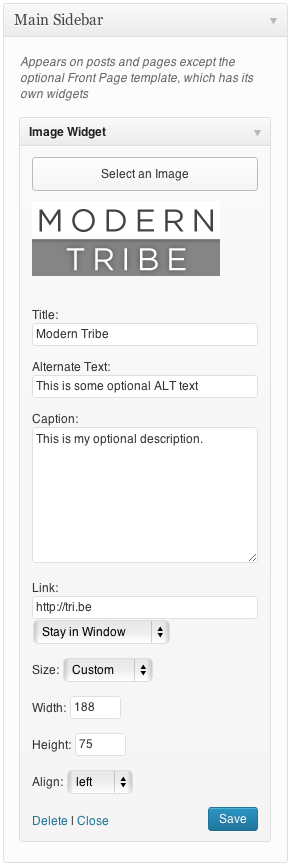
- Go to Appearance > Widget to place the widget in your sidebar in the Design
If you run into any questions or have suggestions, please visit the forum to post questions or comments.
Obligations
- PHP 5.2 or above
- WordPress 3.5 or above
Journal de modifications
Please be advised that this is a significant upgrade. You should definitely back up your database before updating in case your existing image widgets have any problems. Also, several languages will no longer be supported until new translations are submitted. Currently, we have support for Italian, Dutch, and Swedish. If you would like to contribute your own language files, please post links here: http://wordpress.org/support/topic/image-widget-40-translations-needed-2
[4.4.12] 2026-04-20
- Security – Add escaping to image attributes.
[4.4.11] 2024-11-20
- Security – Prevent old Image URL from being misused for XSS attacks.
[4.4.10] 2023-05-30
- Fix – Prevent weird bugs around
widget_titlenot having all the expected arguments. - Tweak – Add documentation for a few filters.
[4.4.9] 2022-06-05
- Tweak – Updating WordPress compatibility, tested up to 6.6.2.
- Tweak – Remove references to Image Widget Plus and Notices.
[4.4.8] 2022-05-06
- Tweak – Updating WordPress compatibility.
[4.4.7] 2017-11-02
- Feature – Added new Link Title field and filter to improve tooltip (previously used alt text) (thanks @marklcm) [89993]
- Tweak – Added new
image_widget_option_defaultshook to improve customizability (props @svandragt) [#91225]
Captures d'écran
Pour les développeurs
Est-ce votre plugin ? Montrez les chiffres.
Ajoutez un badge en direct à votre site, docs ou github readme. Il se met à jour par lui-même - aucun compte n'est nécessaire.
Best Image Widget alternatives
All ad plugins →





FAQ
Image Widget: quick answers
Réponses directes, extraites des données en direct WordPress.org.
Source : WordPress.org
Is Image Widget free?
Yes. Image Widget is free to download and use from the official WordPress.org plugin directory.
Is Image Widget safe to use in 2026?
Image Widget works, but test it on a staging site before relying on it in 2026. It runs on 100K+ sites, is rated 4.9/5 and was last updated 7 months ago, and scores 58/100 on our health check.
How many websites use Image Widget?
Image Widget is active on 100K+ WordPress websites and has been downloaded 4,742,909 times since it launched in July 2008. It was downloaded 10,522 times in the last 30 days.
Does Image Widget work with WordPress 7.1?
Image Widget is officially tested up to WordPress 6.7.12, while the latest release is 7.1.5. It may still work, but try it on a staging site first.
When was Image Widget last updated?
The latest version, 4.4.12, was released on April 20, 2026 (7 months ago).
Who makes Image Widget?
Image Widget is developed and maintained by Nexcess.
What are the best alternatives to Image Widget?
The most popular alternatives to Image Widget are Meks Easy Ads Widget (10K+ installs), Ad Widget for WordPress (2K+ installs) and Floating Ads Bottom (2K+ installs).
Propulsé par PageForge
Un modèle et une feuille de calcul. Une vraie page pour chaque recherche.
PageForge transforme chaque ligne d'un CSV en une page WordPress avec son propre titre, URL, SEO et schéma, construit sur la mise en page que vous Déjà conçu. Gratuit sur WordPress.org.
- CSV et XLSX, plus Google Sheets sur les professionnels et les entreprises
- Son propre titre, URL, SEO champs et schéma pour chaque page
- Fonctionne avec l'éditeur de blocs, Elementor, Divi et Avada
- Gratuit sur WordPress.org, pas de carte de crédit