


Idle User Logout
This plugin automatically logs out the user after a period of idle time. The time period can be configured from admin end.

Choix solide
Idle User Logout is a solid plugin choice in 2026, with a few things worth checking first. It runs on 1K+ sites, is rated 4.1/5 and was last updated 3 months ago, and scores 74/100 on our health check.
- Testé avec le dernier WordPress (7.1)
- Momentum — downloads up 56% vs the previous 30 days
Comment s'accumule-t-il ?
Côte à côte sur les installations, les mises à jour, les évaluations et le support


Téléchargements quotidiens
Les pics de téléchargement suivent généralement une nouvelle version - chaque site qui met à jour automatiquement compte comme un téléchargement.
Classements
Where Idle User Logout stands todayWordPress.org Classements de recherche
Position en direct dans la recherche de plugins, Top 100| Mot-clé | Position |
|---|---|
| auto logout | #5 |
| auto sign out | #9 |
| automatic | >100 |
| idle time | #1 |
| idle user | #1 |
Adoption de version
Part de sites actifs par version.
Répartition des notes
★★★★★★★★★★ 4.1 from 18 reviews
About Idle User Logout
From the official readme · v3.1.1Description
This plugin detects idle user and execute the action that is being specified in Admin End.
The plugin is very minimalistic. Nothing fancy. So, if you are looking for a plugin that adds up security without having to add additional load in your website, you can try this plugin.
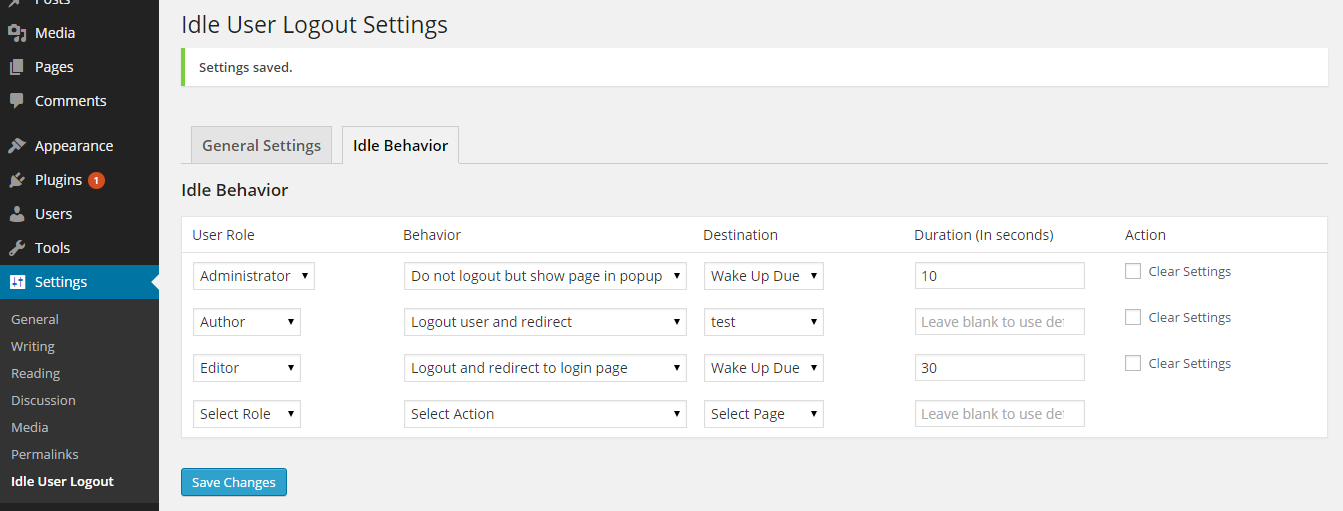
From version 2.0, you can now specify the action and time for each user role.
It tracks the users activity in both the front end and admin end.
You can setup Idle Time from WP Admin > Settings > Idle User Logout
Once you reach Idle User Logout Page, you can setup behavior of the plugin for each user\’s role.
If there is any problem, or need any help, we can give you a helping hand.
Installation
Installation is very simple:
-
Upload the plugin\’s folder to the
/wp-content/plugins/directory -
Activez le plugin via le menu \’plugins\’ dans WordPress
-
That\’s it! Go to Settings > Idle User Logout and configure the field \”Auto Logout Duration\” as you want.
Journal de modifications
Please take a backup of your project (specially database) before upgrading this plugin.
3.2
- Fix: Coding standards improvements — singleton pattern, nonce verification, input sanitization, and output escaping
- Ensured WordPress coding standards compliance
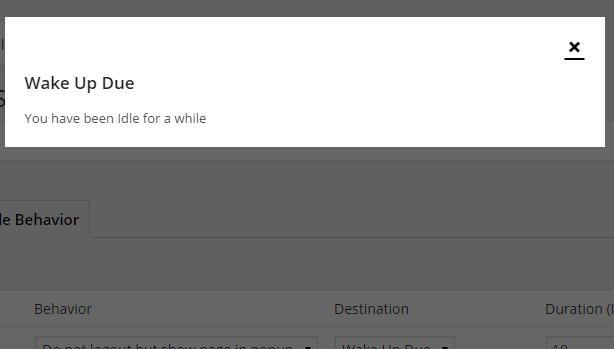
- Feature: Added 10-second countdown toast with “Stay logged in” option before logout
- Feature: Separated frontend and admin modal templates for theme override
- Fix: Coding standards improvements — singleton pattern, nonce verification, input sanitization, and output escaping
3.1
- No changes are made. Just updated the version
3.0
- Ensured WordPress 5.8.2 compatibility
- Ensured PHP 8.0 compatibility
- Updated timer library
2.3
- Dev: Server end timer added – User will get kicked out even if they close the browser
- Dev: Added session destory along with cookie
- Ensured WordPress 4.6 compatibility
2.2
- Fix: Minor JavaScript issues.
- Ensured WordPress 4.3 compatibility
2.1
- Fix: Minor issue while activating the plugin.
Captures d'écran
Pour les développeurs
Est-ce votre plugin ? Montrez les chiffres.
Ajoutez un badge en direct à votre site, docs ou github readme. Il se met à jour par lui-même - aucun compte n'est nécessaire.
Best Idle User Logout alternatives
All auto logout plugins →FAQ
Idle User Logout: quick answers
Réponses directes, extraites des données en direct WordPress.org.
Source : WordPress.org
Is Idle User Logout free?
Yes. Idle User Logout is free to download and use from the official WordPress.org plugin directory.
Is Idle User Logout safe to use in 2026?
Idle User Logout is a solid plugin choice in 2026, with a few things worth checking first. It runs on 1K+ sites, is rated 4.1/5 and was last updated 3 months ago, and scores 74/100 on our health check.
How many websites use Idle User Logout?
Idle User Logout is active on 1K+ WordPress websites and has been downloaded 31,874 times since it launched in May 2015. It was downloaded 825 times in the last 30 days.
Does Idle User Logout work with WordPress 7.1?
Yes. The developer has tested Idle User Logout up to WordPress 7.1.5, the latest release. It requires WordPress 3.0 or newer.
When was Idle User Logout last updated?
The latest version, 3.1.1, was released on August 30, 2026 (3 months ago).
Who makes Idle User Logout?
Idle User Logout is developed and maintained by Abiral Neupane.
What are the best alternatives to Idle User Logout?
The most popular alternatives to Idle User Logout are Loggedin (8K+ installs), Intranet & Private Site (3K+ installs) and Only one device login limit (200+ installs).
Propulsé par PageForge
Un modèle et une feuille de calcul. Une vraie page pour chaque recherche.
PageForge transforme chaque ligne d'un CSV en une page WordPress avec son propre titre, URL, SEO et schéma, construit sur la mise en page que vous Déjà conçu. Gratuit sur WordPress.org.
- CSV et XLSX, plus Google Sheets sur les professionnels et les entreprises
- Son propre titre, URL, SEO champs et schéma pour chaque page
- Fonctionne avec l'éditeur de blocs, Elementor, Divi et Avada
- Gratuit sur WordPress.org, pas de carte de crédit