

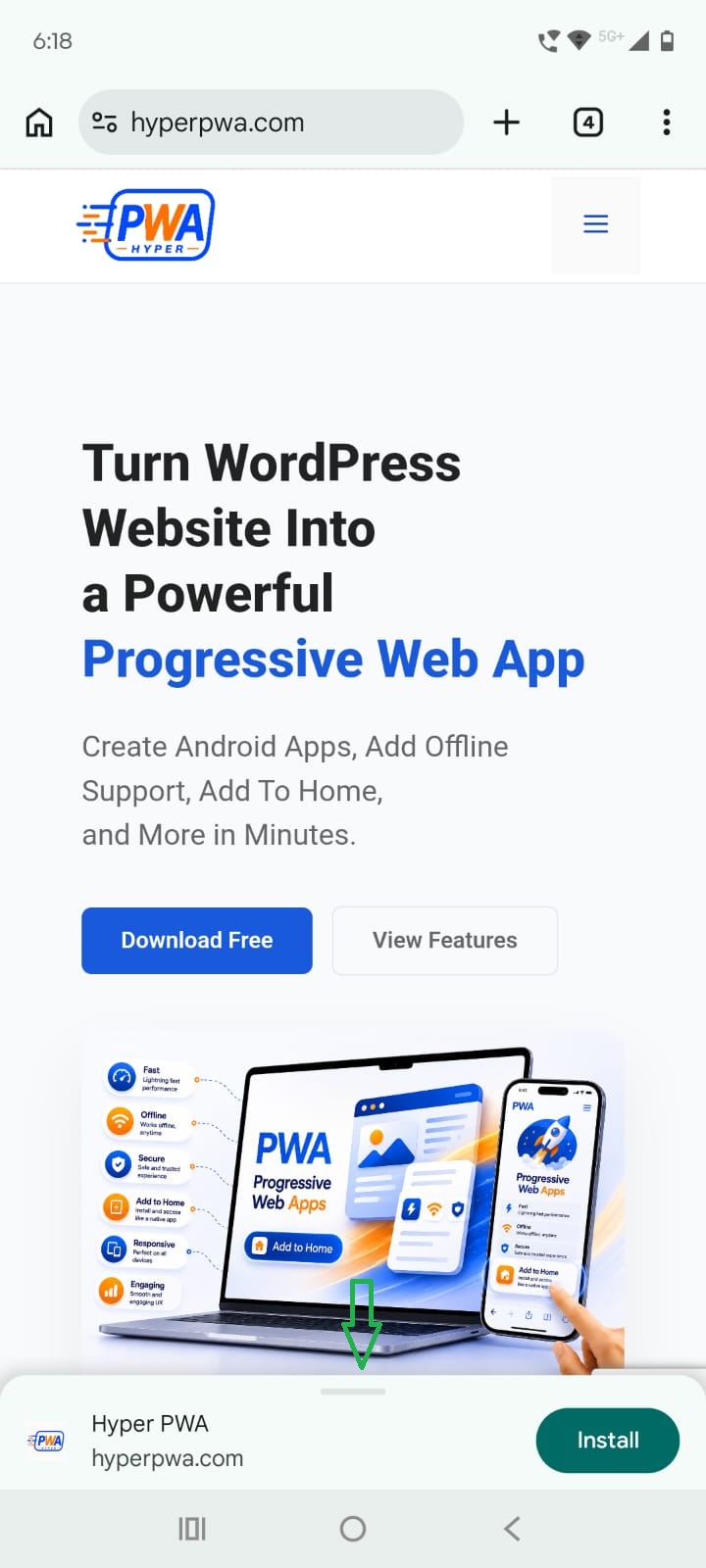
Hyper PWA – Bringing Modern Progressive Web App Experiences
Turn your WordPress site into a fast, installable Progressive Web App. Give users a seamless offline experience and native mobile app feel.

Choix
Yes — Hyper PWA is a safe, well-maintained plugin to use in 2026. It runs on 400+ sites, is rated 4.7/5 and was last updated 3 weeks ago, and scores 85/100 on our health check.
- Développé activement — Dernière mise à jour il y a 3 semaines
- Testé avec le dernier WordPress (7.1)
- Momentum : téléchargements en hausse de 36,3 % par rapport aux 30 jours précédents
- Petite base d'utilisateurs (400+ installations actives)
Comment s'accumule-t-il ?
Côte à côte sur les installations, les mises à jour, les évaluations et le supportTéléchargements quotidiens
Les pics de téléchargement suivent généralement une nouvelle version - chaque site qui met à jour automatiquement compte comme un téléchargement.
Classements
Where Hyper PWA stands todayWordPress.org Classements de recherche
Position en direct dans la recherche de plugins, Top 100| Mot-clé | Position |
|---|---|
| add to homescreen | #4 |
| manifest | #6 |
| offline | #27 |
| progressive web apps | #4 |
| pwa | #3 |
Adoption de version
Part de sites actifs par version.
Répartition des notes
★★★★★★★★★★ 4.7 from 12 reviews
About Hyper PWA
From the official readme · v5.11Description
Hyper PWA transforms your WordPress website into a fast, installable Progressive Web App (PWA). Give your visitors an app-like experience with offline support, Add to Home Screen prompts and many more powerful PWA features.
Home | Knowledge Base | Help & Support | Testimonials | Premium
Built to be lightweight, fast, and flexible, Hyper PWA is designed with performance and ease of use in mind. Most settings can be configured from a modern accordion-based dashboard, keeping everything organized in one place without unnecessary scrolling or popups. Whether you’re a beginner or an advanced user, Hyper PWA makes creating a Progressive Web App simple.
If you’d like to see a new feature or integration, please contact us. We’re constantly improving Hyper PWA based on community feedback.
Hyper PWA Core Features
- Convert Your Website into a Progressive Web App (PWA): Instantly transform your WordPress website into an installable app that works seamlessly on Android, iPhone, iPad, Windows, macOS, and ChromeOS. Learn More
- Push Notification Support: Send push alerts directly to your web app subscribers via hyperpushx.com integration. Learn More
- Apple iOS & Safari Support: Add-to-Home prompt, customizable splash screen generator, and meta tags for a complete iOS native-app feel. Learn More
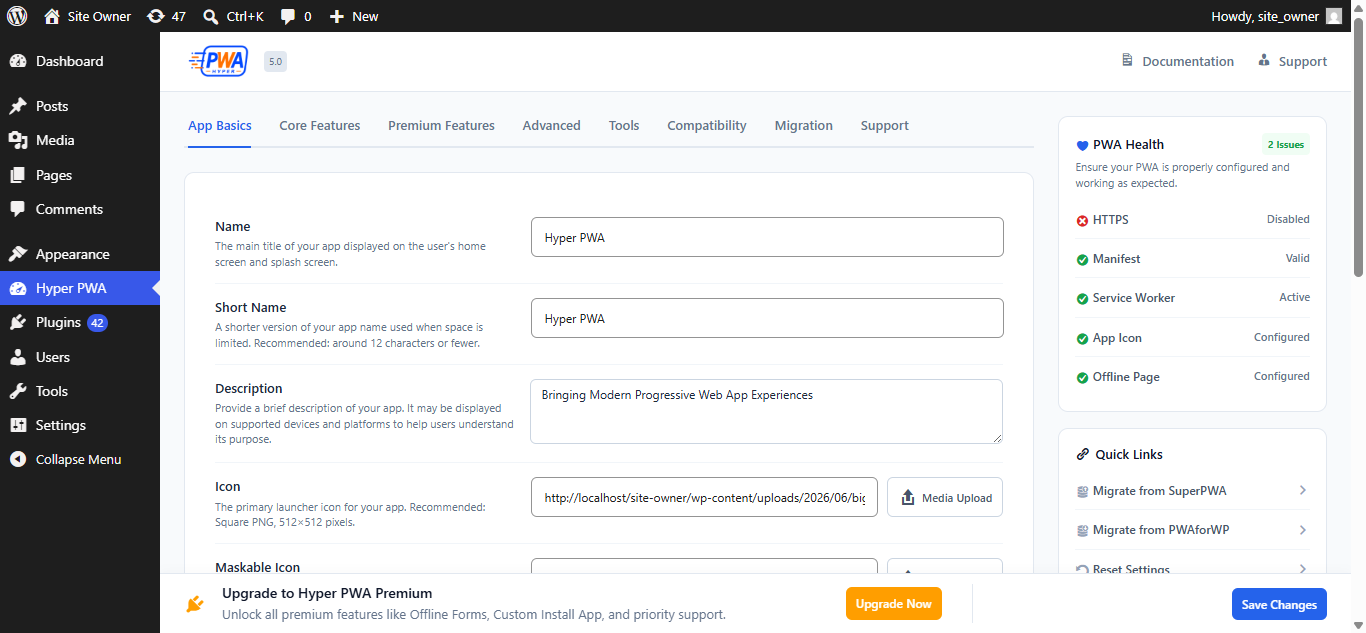
- App Manifest Generator: Automatically generate a valid Web App Manifest with complete customization. Learn More
- Offline Mode: Allow visitors to browse cached pages and assets even without an internet connection. Learn More
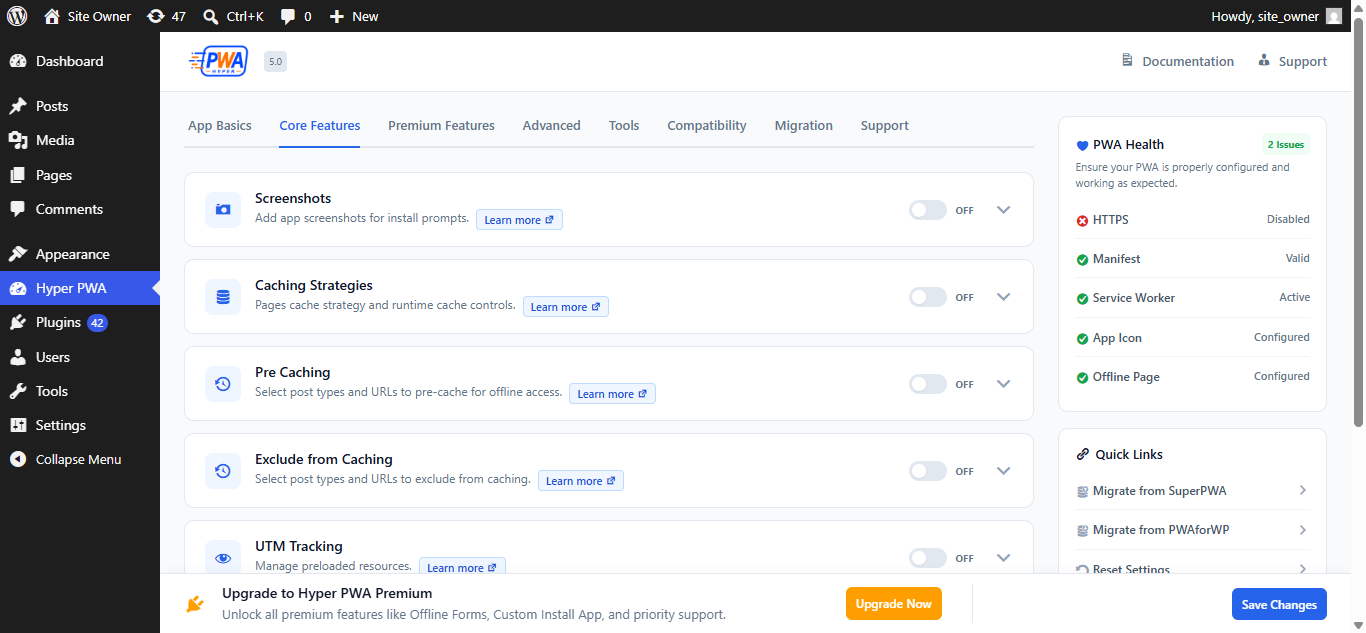
- Caching Strategies: Choose from multiple caching strategies to optimize performance, improve load times, and ensure the best offline experience for your Progressive Web App. Learn More
- Pre Caching: Cache essential pages and assets in advance so your Progressive Web App loads faster and remains available even when users are offline. Learn More
- UTM Tracking: Automatically preserve and track UTM parameters for PWA launches, helping you measure campaign performance and user acquisition in your analytics. Learn More
- Connectivity Notice: Display customizable browser pop-up notifications whenever users go offline or reconnect, keeping them informed about their internet connection status. Learn More
- Start Page: Choose the page that opens when users launch your Progressive Web App, creating a customized app experience from the very first screen.
- Custom 404 Page: Display a custom offline-friendly 404 page when requested content isn’t available, providing a better user experience instead of a generic error page.
- Custom Offline Page: Display a beautiful offline screen when users lose connectivity. Learn More
- Launch Modes: Choose between Standalone, Fullscreen, Minimal UI, or Browser mode.
- Screen Orientation: Lock your app to Portrait, Landscape, or Auto mode.
- Excluding from Caching: Exclude selected pages or file types from offline caching. Learn More
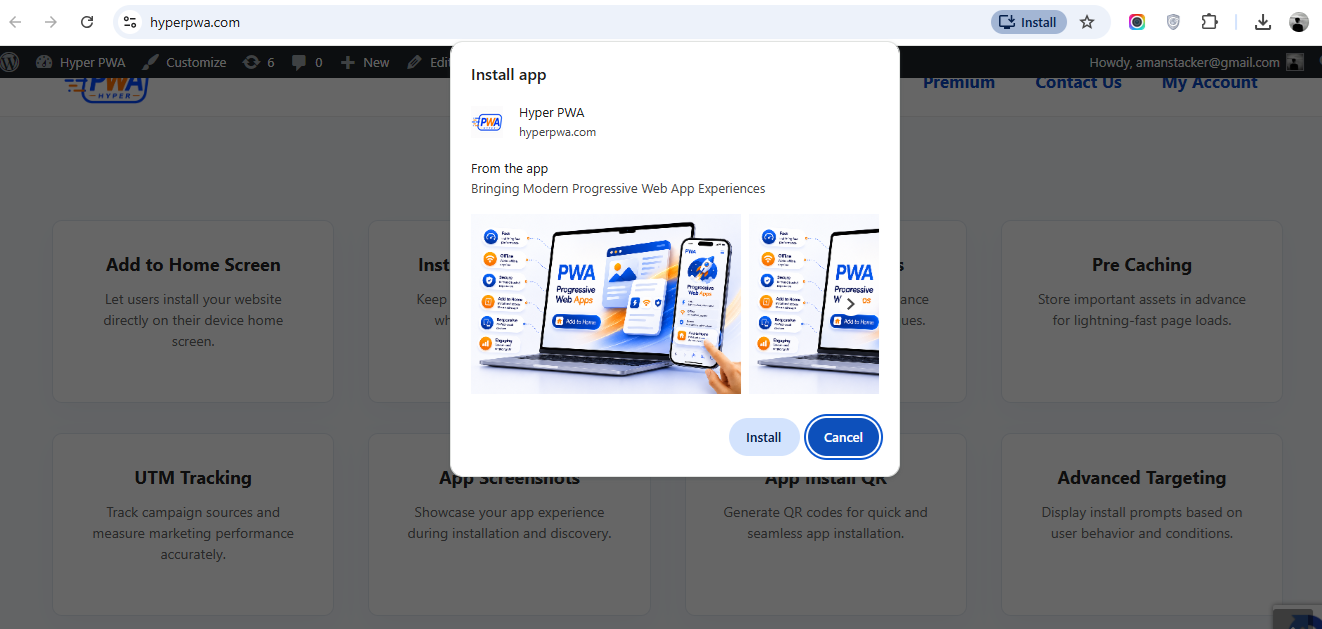
- Screenshots: Add screenshots to improve the installation experience on supported browsers. Learn More
- Legacy Icons: Generate and support legacy app icons to ensure compatibility with older browsers, devices, and operating systems. Learn More
- Force Update: Automatically replace outdated cached files with the latest version, ensuring users always experience the most up-to-date Progressive Web App. Learn More
- Preload App Manifest: Preload the web app manifest to help browsers discover your Progressive Web App faster, improving installation readiness and launch performance.
- Cache External Resources: Cache external assets such as fonts, images, and scripts to improve performance, reduce load times, and enhance offline support.
- File Serving Method: Server and hosting configurations vary. If your server doesn’t support WordPress rewrite rules or restricts writing files to the root directory, choose the alternative serving method. Learn More
- PWA Health Check: Monitor your Progressive Web App’s health directly from the Hyper PWA dashboard, with instant insights into configuration, compatibility, and potential issues.
- Multisite Support: Fully compatible with WordPress Multisite. Learn More
- Export & Import Settings: Export your Hyper PWA settings for backup, then restore them on the same website or import them into another WordPress site with just a few clicks. Learn More
- One-Click Migration: Easily migrate your existing Progressive Web App settings from SuperPWA or PWA for WP to Hyper PWA with a single click. Learn More
- Delete Data on Uninstall: Optionally remove all Hyper PWA plugin data when uninstalling the plugin, leaving no leftover settings or database entries.
- Third-Party Compatibility: Seamlessly integrates with third-party push notification services like OneSignal, Webpushr, and Gravitec. Learn More
- Install Button Shortcode: Easily output a customizable PWA install button anywhere on your site using a simple shortcode. Learn More
- Gutenberg Block Integration: Add PWA install buttons directly from the WordPress Gutenberg block editor. Learn More
- Elementor Widget Integration: Insert and customize PWA install buttons directly using the Elementor page builder. Learn More
- RTL Layout Support: Full Right-to-Left writing language stylesheet compatibility across all frontend PWA layouts and elements.
- Performance Optimized: Lightweight architecture focused on speed and low server overhead.
- Regular Updates: Continuous improvements, new features, and compatibility updates.
- Fast Help & Support: Our support team is always ready to help.
Hyper PWA Premium Features
Unlock the full potential of your Progressive Web App with Hyper PWA Premium and deliver a faster, smarter, and more app-like experience for your visitors.
- Custom Install App: Create fully customized install buttons, banners, or triggers to encourage more app installations. Learn More
- Initial Loader: Display a beautiful loading screen while your app starts for a polished user experience. Learn More
- App Install QR & Gutenberg Block: Generate a PWA install QR code. Includes a fully customizable “PWA QR Code Install” Gutenberg block to embed installation triggers on any page, post, or layout. Learn More
- Bottom Navigation: Add a native app-style bottom navigation bar for faster and more intuitive browsing with built-in push notification inbox integration and unread badge alerts. Learn More
- Offline Forms: Allow users to submit forms even without an internet connection and sync them automatically when back online. Learn More
- Smart Analytics: Track app installs, launches, user engagement, and other important PWA insights. Learn More
- App Shortcuts: Provide quick access to important pages directly from the app icon on supported devices. Learn More
- Android APK Builder: Convert your PWA into an Android APK for easy distribution and publishing on the Google Play Store. Learn More
- Fix Mixed Content: Automatically upgrades insecure HTTP resource requests to HTTPS and rewrites mixed content page assets to prevent PWA security warnings (requires SSL). Learn More
- Caching & Optimization Plugin Compatibility: Individual toggles for Airlift, WP Rocket, LiteSpeed Cache, Autoptimize, WP Fastest Cache, W3 Total Cache, and WP Super Cache. Automatically ensures they work in perfect harmony with your PWA by optimizing service worker and manifest delivery. Learn More
- [Exclusive] Link Hover Prefetching: Pre-cache pages in the service worker cache the moment a user hovers over a link, reducing page transition latency to 0ms (Instant Page Transitions). Learn More
- Premium Features on Demand: Request new premium features and enhancements tailored to your needs. We continuously add features based on user feedback and demand.
- 24/7 Priority Support: Get fast, dedicated support from our team whenever you need assistance.
Browser Capabilities
Hyper PWA is built using modern Progressive Web App (PWA) standards and supports all major browsers that implement Service Workers and the Web App Manifest.
Fully Supported
* Google Chrome (Desktop & Android)
* Microsoft Edge (Desktop & Android)
* Samsung Internet
* Brave
* Opera
* Safari (macOS)
* Safari (iPhone & iPad)
Partially Supported
* Mozilla Firefox (Offline caching and Service Workers are supported, but native PWA installation experience is limited on desktop.)
Notes
* PWA installation is best supported in Chromium-based browsers (Chrome, Edge, Brave, Opera).
* On iPhone and iPad, users can install the app using Share → Add to Home Screen.
* Push notifications are supported on Android browsers and on iOS/iPadOS 16.4+ after the app is installed to the Home Screen.
* Some advanced PWA features (such as install prompts, app shortcuts, background sync, and link capturing) vary depending on the browser and operating system.
* Progressive Web Apps require your website to be served over HTTPS (a secure origin).
Progressive Web App Troubleshooting
If your Progressive Web App (PWA) is not working as expected or you don’t see the Install App or Add to Home Screen prompt, try the following:
- Make sure your website is served over HTTPS. PWAs require a secure origin (SSL certificate) to enable installation, offline support, and other core features.
- Verify that you are using a supported browser and device. PWA installation is best supported in Chromium-based browsers (Chrome, Edge, Brave, Opera). Safari supports installation on iPhone and iPad using Share → Add to Home Screen.
- Ensure your App Icon is a valid PNG image. For best compatibility, provide at least 192×192 px and 512×512 px icons.
- Confirm that your Web App Manifest and Service Worker are loading correctly and are not blocked by your theme, security plugins, CDN, or server configuration.
- If you are using a CDN or caching plugin, purge all caches after updating your PWA settings.
- Some browsers delay or suppress the install prompt until the website meets all PWA installability requirements and the user has interacted with the site.
- If the issue persists, open a support ticket and include your website URL along with a description of the problem. We’ll be happy to help investigate.
Report Bug or Contribute fix
Encounter an issue with Hyper PWA? or wanted to contribute. Kindly visit Hyper PWA repository on GitHub. Please be aware that GitHub is not a support forum, but rather a streamlined platform for effectively addressing and solving problems.
Support & Documentation
For help, documentation, and tutorials, visit our official website:
Inside WordPress, you can also go to:
Hyper PWA → Support tab
Crédits
Thanks to rickey29 for creating and maintaining this plugin for many years. We’re proud to continue its development.
Hyper PWA uses the following third-party libraries:
- Select2 – A jQuery-based replacement for select boxes
- Link: https://github.com/select2/select2
- License: MIT
Services externes
This plugin integrates with HyperPush X (https://hyperpushx.com) to provide push notification delivery, web push registration, subscriber statistics sync, and push alert campaigns.
To use the push notification features, this plugin connects to the HyperPush X service via secure API calls. Use of this service is subject to the following terms and privacy policies:
* Service Description: HyperPush X provides a web push notification platform for websites.
* Terms of Use: https://hyperpushx.com/terms
* Privacy Policy: https://hyperpushx.com/privacy
Installation
-
Automatic Installation:
- Go to Plugins > Add New in your WordPress dashboard.
- Search for Hyper PWA.
- Click Install Now, then Activate the plugin.
-
Manual Installation via WordPress:
- Download the Hyper PWA ZIP file.
- Go to Plugins > Add New in your WordPress dashboard.
- Click Upload Plugin, select the ZIP file, and click Install Now.
- Activate the plugin after installation.
-
Manual Installation via FTP:
- Extract the Hyper PWA ZIP file.
- Upload the extracted
hyper-pwafolder to the/wp-content/plugins/directory using an FTP client. - Log in to your WordPress dashboard, navigate to Plugins > Installed Plugins, and activate Hyper PWA.
-
Go to Hyper PWA in your WordPress dashboard.
- Configure your Progressive Web App settings, including the app icon, splash screen, offline mode, install prompt, bottom navigation, shortcuts, and other features.
- Save your settings and visit your website to enjoy your new Progressive Web App.
Journal de modifications
Adds interactive iPhone Live Preview for iOS & Safari, new Auto Display Install Prompt toggle, persistent iOS prompt handling, and enhanced App Badging for push notifications.
5.11
- Added: Interactive realistic iPhone Live Preview for iOS & Safari settings with real-time prompt simulation.
- Added: “Auto Display Install Prompt” toggle for iOS to control automatic prompt appearance on page load.
- Improved: iOS Add-to-Home prompt persistence across page visits until explicitly dismissed or installed.
- Improved: iOS & Safari settings layout — moved general settings (Apple Touch Icon, Status Bar Style, Splash Screens) to full width to prevent input squishing.
- Improved: Media upload button label in admin settings compacted to upload icon and clean “Upload” text.
- Improved: Web Push service worker notifications with App Badging API (setAppBadge / clearAppBadge) and live foreground tab sync.
- Improved: Production minification and performance across admin and frontend scripts.
5.10
- Added: Interactive information tooltips and status badges to PWA Health Check items.
- Added: Admin AJAX endpoint for testing push notification connection status.
- Improved: Select2 multi-select UI styling and clear-selection behavior across admin settings.
- Improved: Push notification service worker payload handling (support for optional icon, image, and badge attributes).
- Improved: Push notification client SDK subscription sync and prompt flow.
- Improved: iOS Add-to-Home guide trigger logic and compatibility with PWA install buttons.
- Improved: Cache fetch strategy handling in service worker for offline stability.
- Updated: Translation strings and
.potcatalog file.
5.9
- Added: “Browser Console Logging” option in App Basics to toggle frontend console debug logs.
- Fixed: Settings reset issue across tabs when saving plugin configuration in admin dashboard.
- Fixed: Option sanitization logic to strictly sanitize only submitted form input fields.
- Improved: Code optimization and overall plugin stability.
5.8
- Added: Direct Support Email card on the Support tab for quick email contact.
- Fixed: Support ticket submission issues from the plugin admin settings page (nonce and permissions verification).
5.7
- Added: Gutenberg block for “PWA QR Code Install” allowing admins to display scannable app installation QR codes on posts, pages, and layouts.
- Added: Customizable PWA Install Button Elementor widget to easily place installation triggers in page builder designs.
- Added: Full out-of-the-box compatibility and cache bypass exclusions for dynamic WooCommerce endpoints (checkout, cart, wc-ajax queries).
- Added: Direct Knowledge Base learning links for Gutenberg Block settings, File Serving Methods, and mixed content troubleshooting options.
- Improved: Minified core CSS and JavaScript assets to optimize frontend loading speeds.
- Fixed: Sticky footer bar CSS layout alignment and overlap bugs in RTL dashboards (e.g. Persian/Farsi).
5.6
- Added: Customizable PWA Install Button Gutenberg block integration for block editor layouts.
- Added: Install Button shortcode support to display installation triggers anywhere on your site.
- Added: RTL layout stylesheet compatibility across all frontend PWA layouts and elements.
- Added: Dashicons-Wifi SVG inline fallback rendering for offline/online notice configurations when standard dashicons fail.
- Added: Top-right aligned Learn More documentation link in App Basics configuration form.
- Added: Sleek inline Upgrade badges next to the Premium badge in the label row of Premium compatibility settings and Advanced settings panels.
- Improved: Changed settings popover grid absolute positioning to open upward, preventing accordion clipping.
- Improved: Swapped compatibility tab display hierarchy to group all Free integrations (OneSignal, Webpushr, Gravitec) at the top.
- Fixed: Connectivity Notice typography scaling and anti-blur rendering optimizations on frontend page loads.
- Updated: Corrected Install Button Shortcode Learn More documentation URL target.
- Tested with WordPress 7.1 and confirmed to be fully compatible with it.
Captures d'écran
Pour les développeurs
Est-ce votre plugin ? Montrez les chiffres.
Ajoutez un badge en direct à votre site, docs ou github readme. Il se met à jour par lui-même - aucun compte n'est nécessaire.
Best Hyper PWA alternatives
All add to homescreen plugins →| Rang | Plugin | Installations actives |
|---|---|---|
| 1 |
 Super Progressive Web Apps
SuperPWA helps you convert your WordPress website into a Progressive Web App instantly. |
40K+ |
| 2 |
 PWA - un moyen simple d'accéder à une application Web progressive
Votre moyen facile d'accéder à une application Web progressive. |
1K+ |
FAQ
Hyper PWA: quick answers
Réponses directes, extraites des données en direct WordPress.org.
Source : WordPress.org
Is Hyper PWA free?
Yes. Hyper PWA is free to download and use from the official WordPress.org plugin directory.
Is Hyper PWA safe to use in 2026?
Yes — Hyper PWA is a safe, well-maintained plugin to use in 2026. It runs on 400+ sites, is rated 4.7/5 and was last updated 3 weeks ago, and scores 85/100 on our health check.
How many websites use Hyper PWA?
Hyper PWA is active on 400+ WordPress websites and has been downloaded 20,801 times since it launched in March 2021. It was downloaded 977 times in the last 30 days.
Does Hyper PWA work with WordPress 7.1?
Yes. The developer has tested Hyper PWA up to WordPress 7.1.5, the latest release. It requires WordPress 6.0 or newer.
What PHP version does Hyper PWA need?
Hyper PWA requires PHP 7.4 or higher. Most hosts run PHP 8.x today, so it works on any modern WordPress hosting.
When was Hyper PWA last updated?
The latest version, 5.11, was released on November 11, 2026 (3 weeks ago).
Who makes Hyper PWA?
Hyper PWA is developed and maintained by amanstacker.
What are the best alternatives to Hyper PWA?
The most popular alternatives to Hyper PWA are Super Progressive Web Apps (40K+ installs) and PWA (1K+ installs).
Propulsé par PageForge
Un modèle et une feuille de calcul. Une vraie page pour chaque recherche.
PageForge transforme chaque ligne d'un CSV en une page WordPress avec son propre titre, URL, SEO et schéma, construit sur la mise en page que vous Déjà conçu. Gratuit sur WordPress.org.
- CSV et XLSX, plus Google Sheets sur les professionnels et les entreprises
- Son propre titre, URL, SEO champs et schéma pour chaque page
- Fonctionne avec l'éditeur de blocs, Elementor, Divi et Avada
- Gratuit sur WordPress.org, pas de carte de crédit