


Highlight Source Pro
Powerful, flexible, XHTML-compliant, server-side code highlighting, credits for everything but ‘making it a plugin’ go to Jay Pipes and GeSHi.

Envisager une alternative
Highlight Source Pro shows warning signs in 2026 — compare the alternatives below before installing. It runs on 30+ sites and was last updated 19 years ago, and scores 24/100 on our health check.
- Petite base d'utilisateurs (30+ installations actives)
- Très peu de critiques jusqu'à présent
- No update in 18 years
- Only tested up to WordPress 2.5 (latest is 7.1)
Comment s'accumule-t-il ?
Côte à côte sur les installations, les mises à jour, les évaluations et le support



Téléchargements quotidiens
Les pics de téléchargement suivent généralement une nouvelle version - chaque site qui met à jour automatiquement compte comme un téléchargement.
Classements
Where Highlight Source Pro stands todayWordPress.org Classements de recherche
Position en direct dans la recherche de plugins, Top 100| Mot-clé | Position |
|---|---|
| code | >100 |
| Highlight | >100 |
| markup | >100 |
| source | >100 |
| syntax | >100 |
Adoption de version
Part de sites actifs par version.
About Highlight Source Pro
À partir du Lisezmoi officiel · v1.3Description
Powerful, flexible, XHTML-compliant, server-side code highlighting, credits for everything
but ‘making it a plugin’ go to Jay Pipes
and GeSHi.
Traits
- Highlight sources of any language
- automatically, server-side (no javascripts)
- XHTML-Compliant,
<div>,<ul>,<span>with class-attributes and a css-file are used for styling - optionally add a heading for every code-block
- optionally specify line-number offset (BREAKS XHTML COMPLIANCE)
- optionally don’t display line-numbers
- set per-codeblock if the code is html_entity_encoded or not
- only parses
<pre>-tags with thelang=-attribute, thus does not interfere with any regular preformatted contents you might have - degrades beautifully through
<pre>-tags (if you keep the sources clean, that is) - all settings through logical, valid arguments for the main container
- comes with generic cross-browser CSS (tested: IE5.5+, FF, Safari, Opera)
Version History
- 1.3: Thanks to a tipp now the link-path to the stylesheets is correct, sorry for the inconvenience
- 1.2: Leading whitespace isn’t stripped anymore (indents as well as newlines), when there’s no title the title-div is not being generated anymore
- 1.1: Solved the issue with single-quotes being changed to typographical quotes
Known Issues
While the plugin is basically XHTML 1.0 Strict compliant there’s just no way of getting the offset-based line-numbering to display without inadequate (ab)use of javascript and css hacks, so be warned that IF you use the line-number offset, your documents will NOT validate because of the forbidden start=-attribute for the <ol>!
Documentation
More on the Highlight Source Pro Page
Installation
Le plugin est simple à installer :
- Upload the
highlight_source_profolder to your/wp-content/pluginsdirectory - Enable via Admin-Interface
Comment utiliser
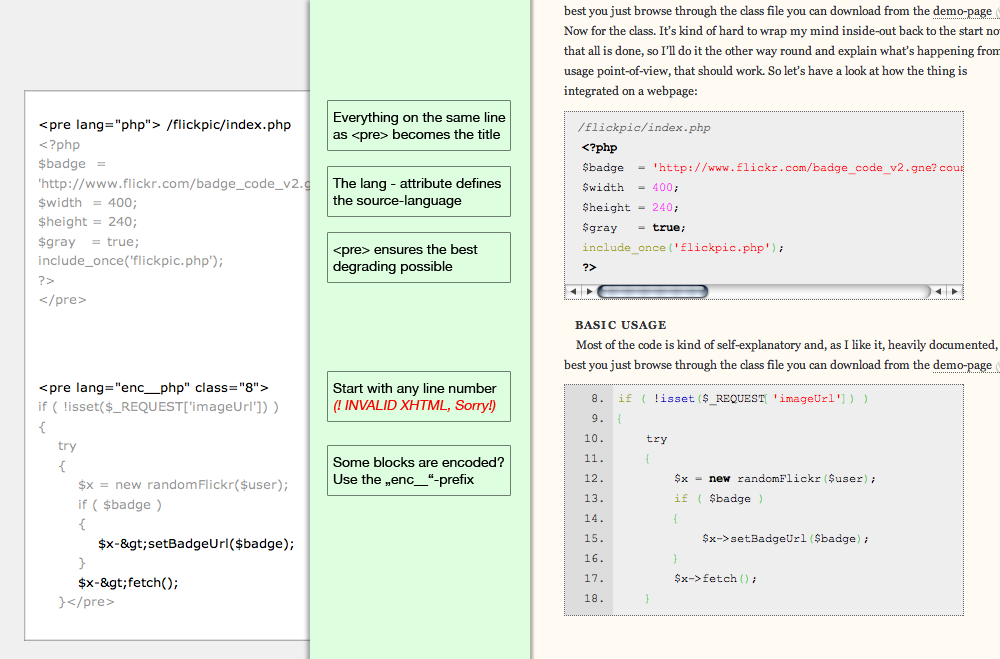
Set your code-blocks as <pre>-tags. If the language is supported by GeSHi (see file list in the /geshi-directory) use the filename (without extension) as language-attribute. If your code is encoded (html-entities; e.g. < is displayed as < – most likely the case if you write in the visual editor) add the enc__-prefix. For example for a php-codeblock you would start as follows:
<pre lang="php">
You can control various things:
* Start of Line-Offset, e.g. for #17: <pre class="17">
* define entity-encoded blocks, e.g. for php: <pre lang="enc__php">
* Define a title for your code-block that appears inside the block, but above the code lines. Everything in the same line as the opening <pre> tag will be considered the title, including HTML works fine:
<pre lang="php"><strong>This is</strong> an <em>example</em> with a <h3>headline</h3>
* disable line numbers by not specifying an offset
* combine all those things as long as you stick to the right order:
Captures d'écran
Pour les développeurs
Est-ce votre plugin ? Montrez les chiffres.
Ajoutez un badge en direct à votre site, docs ou github readme. Il se met à jour par lui-même - aucun compte n'est nécessaire.
Best Highlight Source Pro alternatives
Tous les plugins de code →




FAQ
Highlight Source Pro: quick answers
Réponses directes, extraites des données en direct WordPress.org.
Source : WordPress.org
Is Highlight Source Pro free?
Yes. Highlight Source Pro is free to download and use from the official WordPress.org plugin directory.
Is Highlight Source Pro safe to use in 2026?
Highlight Source Pro shows warning signs in 2026 — compare the alternatives below before installing. It runs on 30+ sites and was last updated 19 years ago, and scores 24/100 on our health check.
How many websites use Highlight Source Pro?
Highlight Source Pro is active on 30+ WordPress websites and has been downloaded 14,046 times since it launched in April 2008. It was downloaded 120 times in the last 30 days.
Does Highlight Source Pro work with WordPress 7.1?
Highlight Source Pro is officially tested up to WordPress 2.5, while the latest release is 7.1.5. It may still work, but try it on a staging site first.
When was Highlight Source Pro last updated?
The latest version, 1.3, was released on April 10, 2008 (19 years ago).
Who makes Highlight Source Pro?
Highlight Source Pro is developed and maintained by kno.
What are the best alternatives to Highlight Source Pro?
The most popular alternatives to Highlight Source Pro are WPCode (3M+ installs), Code Snippets (1M+ installs) and Head & Footer Code (100K+ installs).
Propulsé par PageForge
Un modèle et une feuille de calcul. Une vraie page pour chaque recherche.
PageForge transforme chaque ligne d'un CSV en une page WordPress avec son propre titre, URL, SEO et schéma, construit sur la mise en page que vous Déjà conçu. Gratuit sur WordPress.org.
- CSV et XLSX, plus Google Sheets sur les professionnels et les entreprises
- Son propre titre, URL, SEO champs et schéma pour chaque page
- Fonctionne avec l'éditeur de blocs, Elementor, Divi et Avada
- Gratuit sur WordPress.org, pas de carte de crédit