


Hide Admin Notices
Have you become tired of the clutter of Admin Notices that appear at the top of every page in your WordPress Dashboard?

Utiliser avec prudence
Hide Admin Notices works, but test it on a staging site before relying on it in 2026. It runs on 20K+ sites, is rated 4.6/5 and was last updated 3 years ago, and scores 45/100 on our health check.
- Prouvé à grande échelle sur plus de 20 000 sites actifs
- Aimé par les utilisateurs — 4,6/5 sur 20 avis
- Momentum — Téléchargements en hausse de 37,7 % par rapport aux 30 jours précédents
- Pas de mise à jour dans 2 ans
- Uniquement testé jusqu'à WordPress 6,4 (le dernier est de 7,1)
Comment s'accumule-t-il ?
Côte à côte sur les installations, les mises à jour, les évaluations et le support


Téléchargements quotidiens
Les pics de téléchargement suivent généralement une nouvelle version - chaque site qui met à jour automatiquement compte comme un téléchargement.
Classements
Where Hide Admin Notices stands todayWordPress.org Classements de recherche
Position en direct dans la recherche de plugins, Top 100| Mot-clé | Position |
|---|---|
| hide admin notices | #61 |
| hide admin notifications | >100 |
| hide dashboard notices | #71 |
| hide dashboard notifications | >100 |
| hide updates nags | #17 |
Adoption de version
Part de sites actifs par version.
Répartition des notes
★★★★★★★★★★ 4.6 from 20 reviews
About Hide Admin Notices
À partir du Lisez-moi officiel · v2.1Description
New & improved!
Have you become tired of the clutter of Admin Notices that appear at the top of every page in your WordPress Dashboard?
With each new plugin or theme that you install, there seem to be more and more notices that appear at the top of each page!
With this simple plugin, you can claim back all this wasted screen space so that you can focus on what is important – creating your content.
Hide Admin Notices hides away all Notices, Messages, and Update Nags, and makes it easy for you to see them again when you want.
HOW DOES IT WORK?
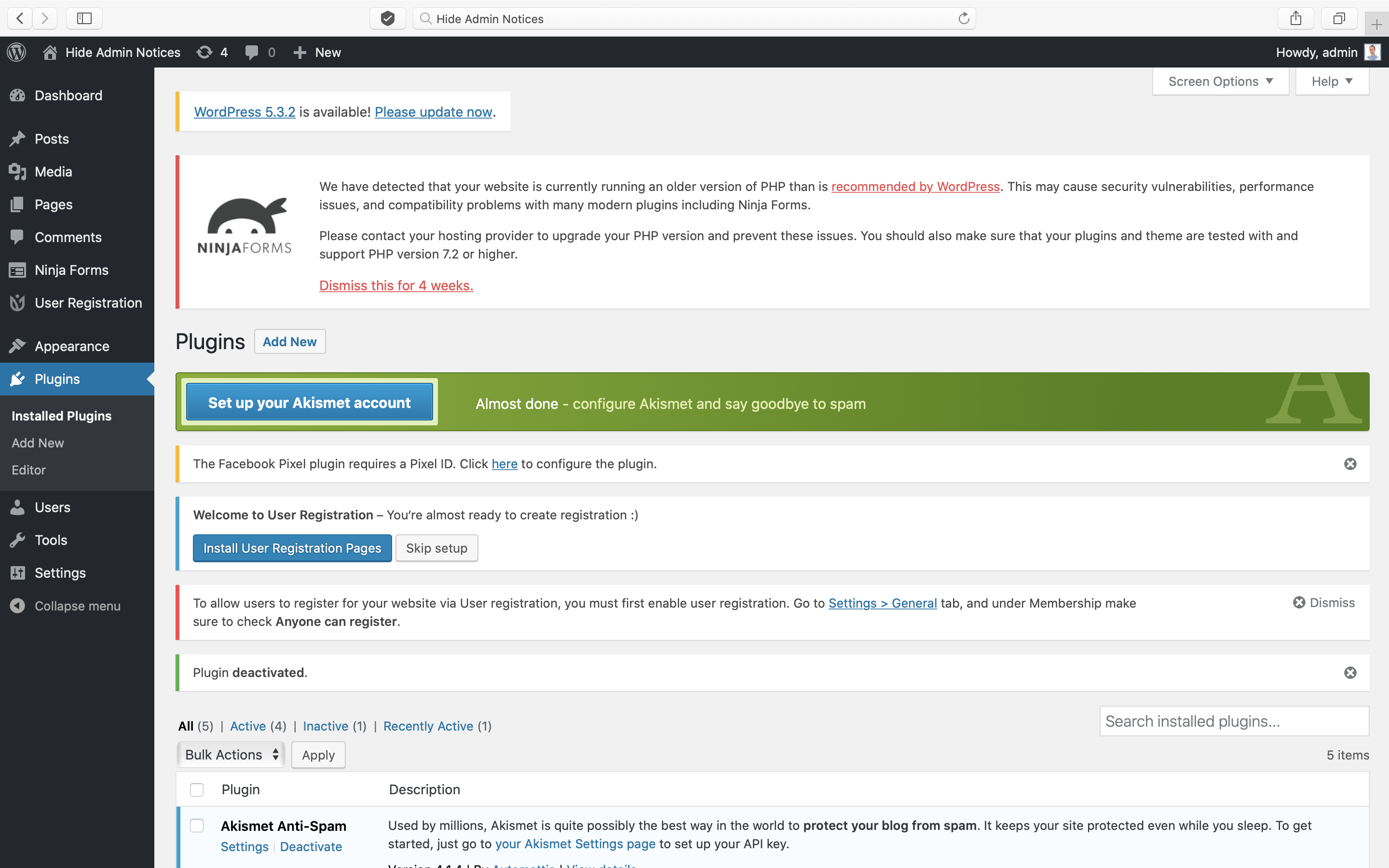
After activating the plugin, you will have a new Show Notices button at the top right-hand corner of your admin pages – just next to Screen Options.
Click the button to reveal all hidden notices, then simply click the button again to hide them.
Soutien
Like this plugin? Please Rate It or Donate a $1
Have a problem? Please write a message in the WordPress Support Forum
Traduction
- Anglais
- Russe
- Allemand
- Japonais
- Italien
- Espanol
Installation
- Press the Add New button on your WordPress Dashboard Plugins screen
- Search for “Hide Admin Notices”
- Press Install Now and then Activate
- The plugin will work straight away; there is nothing more to do!
Journal de modifications
No special instructions
2.1.0
- Report form update.
2.0.0
- Major rewrite!
- Prevent the flash of notices appearing on page load.
- Prevent notices that are “hidden” by default from being shown in the Hide Admin Notices panel.
- Hide the “Show Notices” tab when other Screen Options tabs are open.
- Stop hiding plugin update messages on the Plugins page.
- Stop hiding bulk action and plugin deactivated notices on Plugins page.
- Stop hiding notices such as “New user created”.
- Add a settings page to report issues with specific plugins.
- Add a background and border to the panel like Screen Options.
1.2.3
- WP 6.4 compatibility
1.2.2
- Excluding WP default update notices
1.2.1
- Donate link update
1.2.0
- New PontetLabs brand
- WP 5.9 compatibility
- Translations for Russian, German, Japanese, Spanish & Italian
- Mobile support
Captures d'écran

Pour les développeurs
Est-ce votre plugin ? Montrez les chiffres.
Ajoutez un badge en direct à votre site, docs ou github readme. Il se met à jour par lui-même - aucun compte n'est nécessaire.
Best Hide Admin Notices alternatives
All hide admin notices plugins →




FAQ
Hide Admin Notices: quick answers
Réponses directes, extraites des données en direct WordPress.org.
Source : WordPress.org
Is Hide Admin Notices free?
Yes. Hide Admin Notices is free to download and use from the official WordPress.org plugin directory.
Is Hide Admin Notices safe to use in 2026?
Hide Admin Notices works, but test it on a staging site before relying on it in 2026. It runs on 20K+ sites, is rated 4.6/5 and was last updated 3 years ago, and scores 45/100 on our health check.
How many websites use Hide Admin Notices?
Hide Admin Notices is active on 20K+ WordPress websites and has been downloaded 145,432 times since it launched in April 2020. It was downloaded 1,124 times in the last 30 days.
Does Hide Admin Notices work with WordPress 7.1?
Hide Admin Notices is officially tested up to WordPress 6.4.15, while the latest release is 7.1.5. It may still work, but try it on a staging site first.
What PHP version does Hide Admin Notices need?
Hide Admin Notices requires PHP 7.4 or higher. Most hosts run PHP 8.x today, so it works on any modern WordPress hosting.
When was Hide Admin Notices last updated?
The latest version, 2.1, was released on February 18, 2024 (3 years ago).
Who makes Hide Admin Notices?
Hide Admin Notices is developed and maintained by PontetLabs.
What are the best alternatives to Hide Admin Notices?
The most popular alternatives to Hide Admin Notices are Disable Admin Notices (100K+ installs), Hide Dashboard Notifications (20K+ installs) and Admin Notices Manager (10K+ installs).
Propulsé par PageForge
Un modèle et une feuille de calcul. Une vraie page pour chaque recherche.
PageForge transforme chaque ligne d'un CSV en une page WordPress avec son propre titre, URL, SEO et schéma, construit sur la mise en page que vous Déjà conçu. Gratuit sur WordPress.org.
- CSV et XLSX, plus Google Sheets sur les professionnels et les entreprises
- Son propre titre, URL, SEO champs et schéma pour chaque page
- Fonctionne avec l'éditeur de blocs, Elementor, Divi et Avada
- Gratuit sur WordPress.org, pas de carte de crédit