


GSheetConnector – WPForms Google Sheets Connector, Save WPForms Lite & PRO Entries to Database & Sheets
Connect WPForms to Google Sheets and automatically send form entries to a google sheet in real-time. No manual exports, no coding required.

Choix
Yes — GSheetConnector is a safe, well-maintained plugin to use in 2026. It runs on 7K+ sites, is rated 4.6/5 and was last updated 3 weeks ago, and scores 82/100 on our health check.
- Développé activement — Dernière mise à jour il y a 3 semaines
- Testé avec le dernier WordPress (7.1)
Téléchargements quotidiens
Les pics de téléchargement suivent généralement une nouvelle version - chaque site qui met à jour automatiquement compte comme un téléchargement.
Classements
Where GSheetConnector stands todayWordPress.org Classements de recherche
Position en direct dans la recherche de plugins, Top 100| Mot-clé | Position |
|---|---|
| Contact Form Google Sheets | #21 |
| google sheets integration | #6 |
| WPForms | #5 |
| wpforms google sheets | #3 |
| WPForms Google Sheets Integration | #3 |
Adoption de version
Part de sites actifs par version.
Répartition des notes
★★★★★★★★★★ 4.6 from 18 reviews
About GSheetConnector
From the official readme · v4.2.5Description
Automatically send WPForms entries to Google Sheets in real-time.
GSheetConnector for WPForms is a powerful and user-friendly add-on that connects your WordPress website running WPForms with Google Sheets and automatically saves every form submission into a connected spreadsheet.
When a visitor submits a form on your website, the data is instantly synced to Google Sheets — no manual export, no copy-paste, and no coding required. This makes it easy to manage, share, and analyze WPForms entries directly inside Google Sheets.
This plugin works with both WPForms Lite and WPForms Pro and allows you to build a complete WPForms to Google Sheets automation system without writing any code.
🚀 Key Features
🔄 Real-time sync of WPForms entries to Google Sheets
📄 Works with WPForms Lite and WPForms Pro (tested with the latest versions)
🧩 Feed-based form-to-sheet connections
📊 Supports multiple forms and multiple Google Sheets per form
🔑 Secure Google authentication (one-click OAuth)
🏷 Supports WPForms Smart Tags
📅 Sync submission date and time
🛠 Debug log and system status for troubleshooting
💡 Why Use GSheetConnector for WPForms?
Most businesses waste time exporting WPForms entries, downloading CSV files, and manually copying data into spreadsheets. GSheetConnector eliminates this by creating a real-time connection between WPForms and Google Sheets.
Every form submission is automatically synced, allowing you to:
• Follow up on leads instantly
• Share data with your team
• Build reports and dashboards
• Avoid data loss and human errors
• Manage everything inside Google Sheets
• Enable real-time collaboration
Documentation | Support | Demo | WPForms Google Sheet Connector Pro | Our Plugins
🤝 Powerful PRO Automation Features
Upgrade to WPForms Google Sheet Connector Pro to unlock full automation and advanced control:
➜ Custom Google API integration (OAuth & Service Account)
➜ Create new Google Sheets directly from WordPress
➜ Field-to-column mapping
➜ Re-order or rename Google Sheet headers
➜ Use any WPForms Smart Tags as column headers
➜ Sync existing WPForms entries to Google Sheets
➜ Freeze header row
➜ Row colors (odd/even + header styling)
➜ Multiple feeds per form
➜ Date-based and filtered syncing
👉 Upgrade to Pro: https://www.gsheetconnector.com/wpforms-google-sheet-connector-pro/
Trusted by 20,000+ active installations across FREE and PRO versions. Try WPForms Google Sheet Connector now and simplify your WPForms to Google Sheets workflow.
⚡️ Check Live Demo
🔗 WPForms Live Demo – Click Here
Google Sheet URL to Check submitted Data
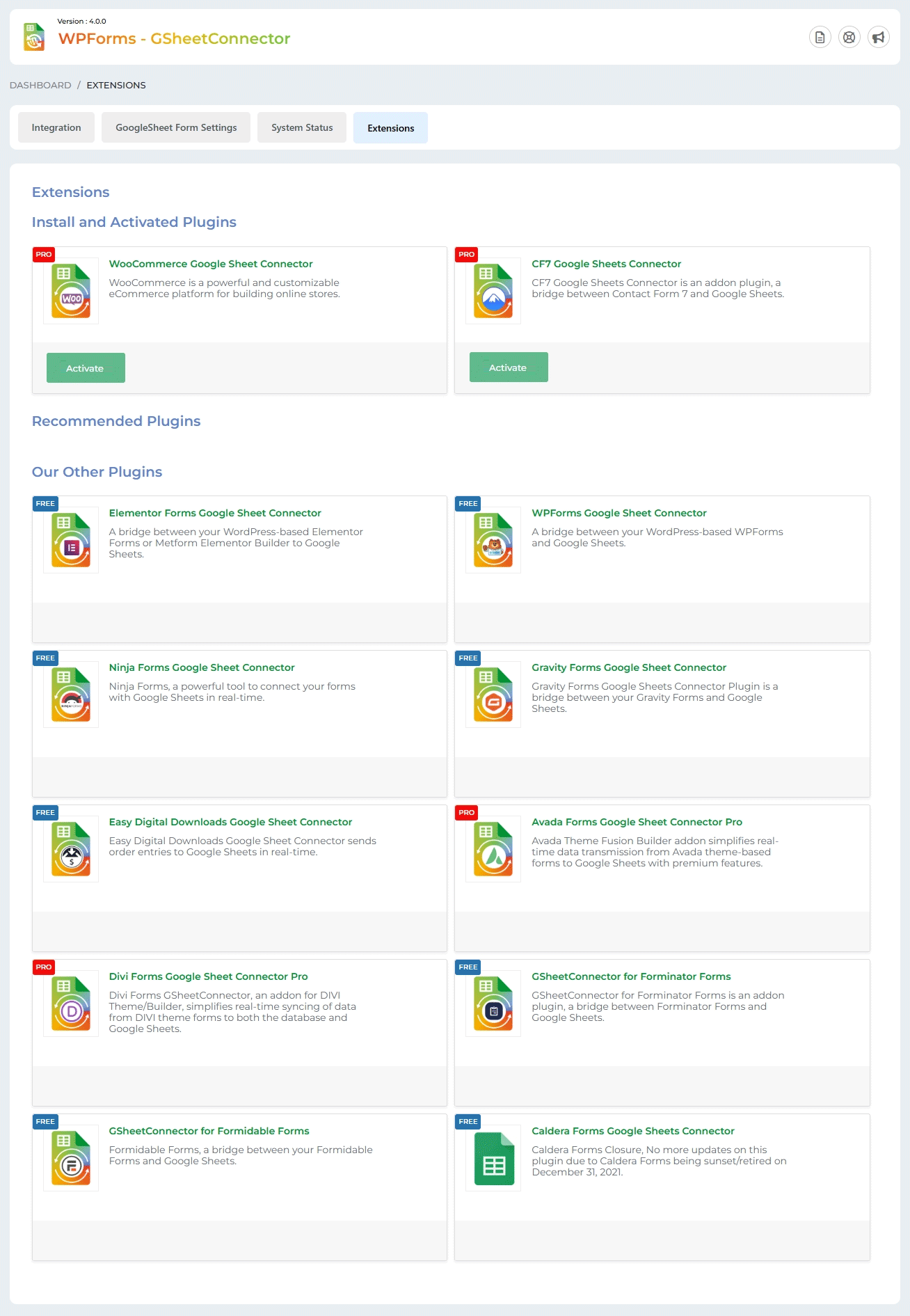
Related Google Sheets Connector Plugins
GSheetConnector also offers Google Sheets integrations for other popular WordPress plugins, helping you automate data syncing across your website without writing code.
• GSheetConnector for Contact Form 7 – Automatically send Contact Form 7 submissions to Google Sheets for easy lead management. (Free & Pro available)
• GSheetConnector for WPForms – Sync WPForms entries to Google Sheets in real-time with flexible feed-based settings. (Free & Pro available)
• GSheetConnector for Gravity Forms – Connect Gravity Forms submissions to Google Sheets and manage form data efficiently. (Free & Pro available)
• GSheetConnector for Ninja Forms – Automatically export Ninja Forms entries to Google Sheets with reliable syncing. (Free & Pro available)
• GSheetConnector for Formidable Forms – Connect Formidable Forms data to Google Sheets for structured data management. (Free & Pro available)
• GSheetConnector for Fluent Forms – Export Fluent Forms entries to Google Sheets automatically upon form submission. (Free & Pro available)
• GSheetConnector for Elementor Forms – Send Elementor form submissions directly to Google Sheets for reporting and collaboration. (Free & Pro available)
• GSheetConnector for WooCommerce – Sync WooCommerce orders, customers, and products with Google Sheets for real-time tracking. (Free & Pro available)
• GSheetConnector for Divi Forms – Integrate Divi form submissions with Google Sheets. (Pro version only)
• GSheetConnector for Avada Forms – Send Avada form entries to Google Sheets for centralized data handling. (Pro version only)
• GSheetConnector for WordPress Core – Import and export WordPress posts and pages using Google Sheets. (Pro version only)
Explore our Google Sheets connector plugins and access free versions where available.
✨ How to Use this Plugin
-
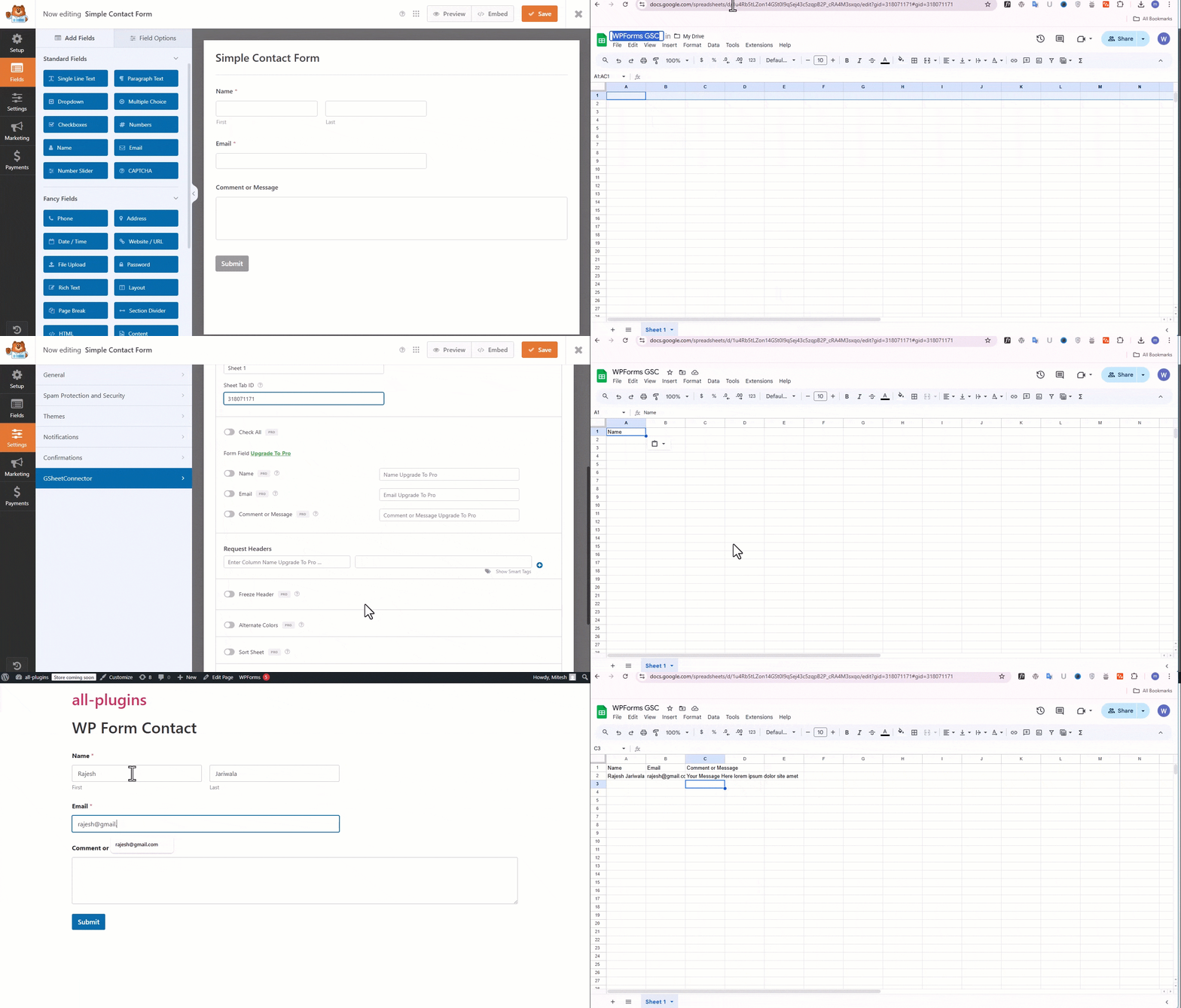
Step: 1 – In Google Sheets
➜ Log into your Google Account and visit Google Sheets.
➜ Create a new Sheet and name it.
➜ Rename or keep default name of the tab on which you want to capture the data.
➜ Copy Sheet Name, Sheet ID, Tab Name and Tab ID (Refer Screenshots) -
Step: 2 – In WordPress Admin
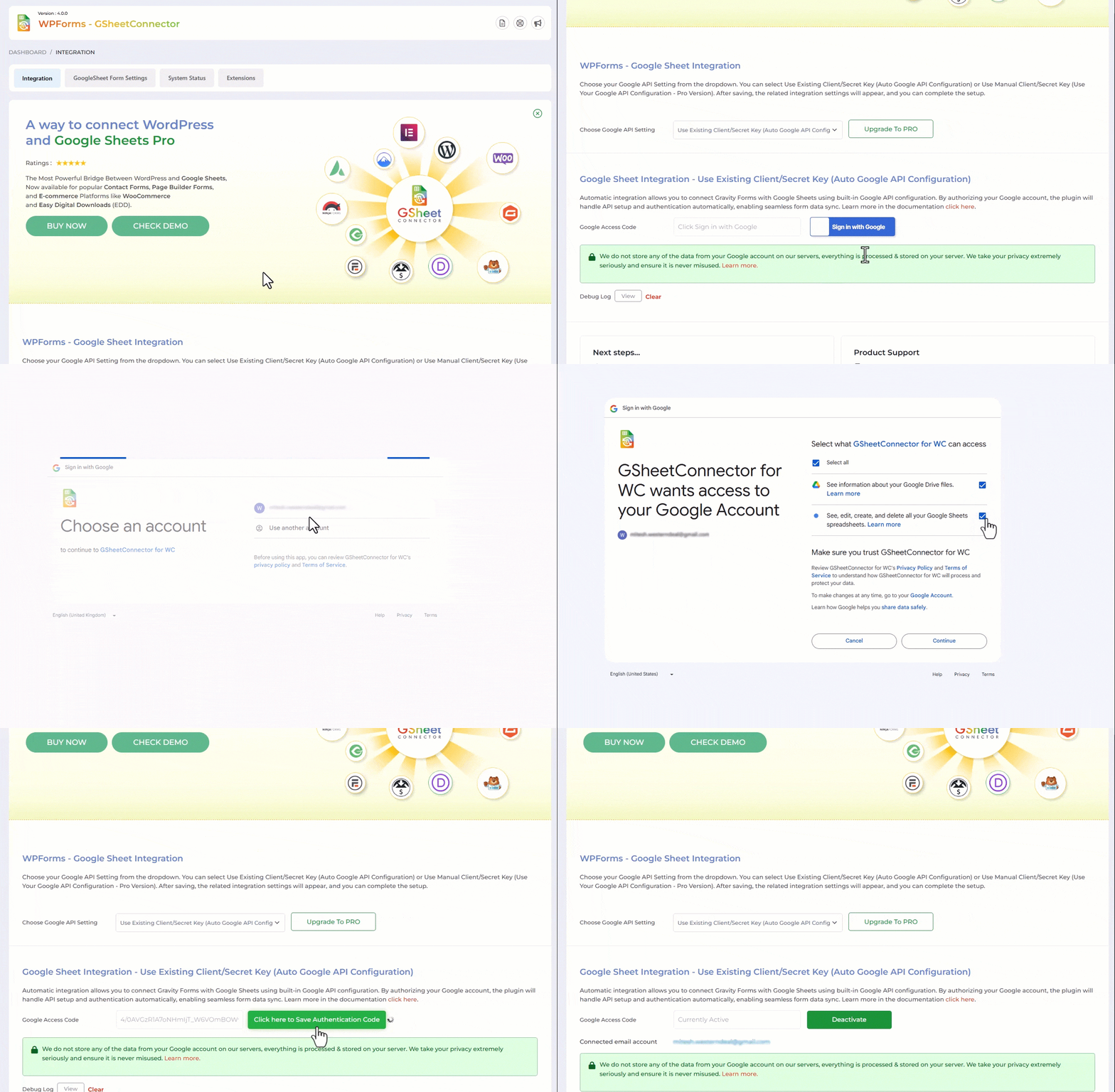
➜ Navigate to WPForms > Google Sheet > Integration Tab.
➜ Authenticate with Google using new “Google Access Code” while clicking on “Get Code”
➜ Make Sure to ALLOW Google Permissions for Google Drive and Google Sheets and then copy the code and paste in Google Access Code field, and Hit Save & Authenticate.
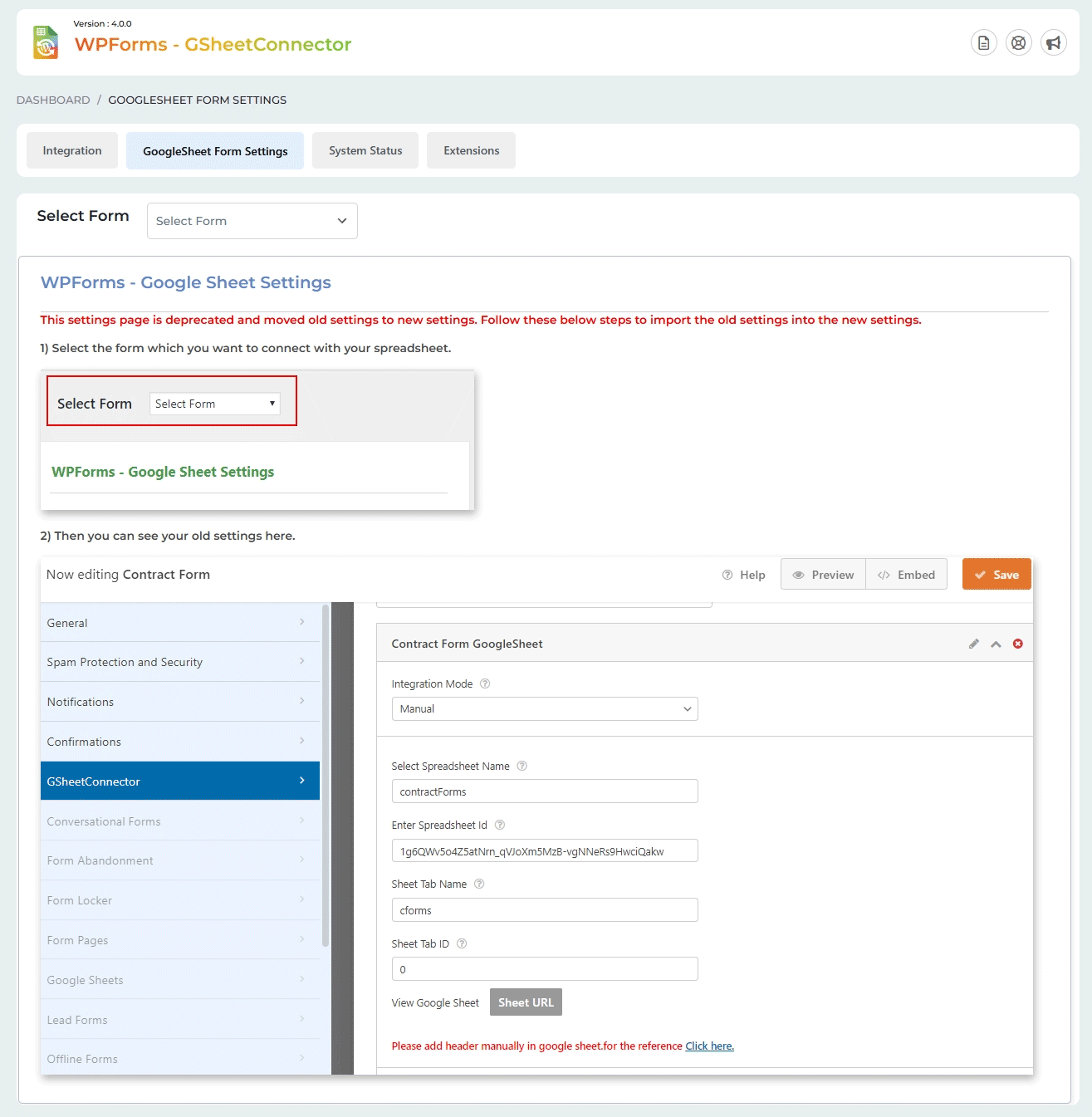
➜ Then, Navigate to GoogleSheet Form Settings Tab Selected respective WPForm from the dropdown with which you want to connect with Google Sheet.
➜ Now copy and paste the Google Sheets sheet name and tab name into respective input fields, and submit. -
Step: 3 – Arranging Columns in Sheet
➜ In the selected Google sheet, enter column names in first row (as a header) as per the Label, Copy and Paste the form field label from the WPForms to Google Sheet (e.g. “Name”, “Email”, “Comment or Message”, “date” etc).
➜ Lastly Test your WPForms and verify that the data shows up in your Google Sheet.
🔥 Videos to help you get started with WPForms Google Sheets Connector
🚀WPForms Forms Google Sheet Connector Introduction Video
🔐 Secure & Compliant
GSheetConnector connects directly to your Google account. Your form data stays inside:
• Your WordPress site
• Your Google Drive
No third-party servers, no external storage.
If you need advanced automation, bulk sync, or multiple feeds, the Pro version gives you full control over how your WPForms data flows into Google Sheets.
Notes importantes
➜ Make sure the column headers in your Google Sheet match the field labels used in WPForms. Keeping names consistent ensures that form entries are mapped and synced correctly.
Installation
- Upload
gsheetconnector-wpformsto the/wp-content/plugins/directory, ORSite Admin > Plugins > New > Search > GsheetConnector Wpforms > Install. - Activez le plugin via l'écran "Plugins" dans WordPress.
- Use the
Admin Panel > WPForms > Google Sheet > Integrationscreen to connect toGoogle Sheetsby entering the Access Code. You can get the Access Code by clicking the “Get Code” button.
Enjoy!
Journal de modifications
4.2.5 (12-11-2026)
- Fixed: Fatal error “Call to undefined method WPForms\WPForms::is_pro()” on form submission with WPForms older than 1.7.3.
4.2.4 (02-11-2026)
- Added: Google tokens and service account JSON are encrypted at rest.
- Improved: Google API request timeout raised to 20 seconds (filter
gscwpf_google_api_timeout). - Fixed: Extensions page now prioritizes the active state when both Free and Pro plugins are active.
- Fixed: Entries saved with WPForms Lite now get a real Entry ID instead of 0 (existing entries are updated automatically).
- Fixed: Entries are no longer saved twice in the database after switching between the Free and Pro plugins.
- Fixed: Sending a single entry to Google Sheets finds the “Entry ID” column by its header and updates the same row.
- Fixed: A failed Google sign-in no longer replaces a working connection with an invalid token.
- Fixed: Missing Existing-method API credentials are re-fetched automatically instead of requiring plugin reactivation.
- Fixed: Network-activated plugin is no longer deactivated on all sites when a subsite has no WPForms.
- Fixed: Failed sheet writes are reported as failures and logged.
- Fixed: Tab names like “Q1” or containing ‘ / ! no longer break sheet reads and writes.
- Fixed: Phone field values are saved exactly as entered (e.g. “+92 300 1234567”, “0300…”): no #ERROR!, no lost + or 0, no apostrophe.
- Fixed: When GSheetConnector for WPForms Pro is active, the Free plugin pauses and Pro handles syncing (before, nothing was sent to Google Sheets while both were active).
- Fixed: Fatal error on the front end with WordPress versions before 6.8.
4.2.3 (10-10-2026)
- Updated: Updated Freemius integration code and related files.
4.2.2 (29-09-2026)
- Fixed: Resolved an issue where Google Sheet details were not being saved correctly when using the Service Account authentication method.
4.2.1 (08-09-2026)
- Fixed: Improved the display of connected Google Sheet details in the WordPress dashboard.
- Fixed: Resolved a compatibility issue identified during PCP plugin compatibility testing.
4.1.0 (25-07-2026)
- Added: Introduced a refreshed and more intuitive user interface.
- Added: Added a new Dashboard tab for quick access to plugin information.
- Added: Introduced a notification bar to display important updates and alerts.
- Added: Added support for Service Account authentication.
- Added: Enhanced the Feed Settings interface for improved usability.
- Fixed: Resolved a compatibility issue related to PCP.
- Fixed: Removed the unused
libdirectory from the plugin package.
Captures d'écran

Pour les développeurs
Est-ce votre plugin ? Montrez les chiffres.
Ajoutez un badge en direct à votre site, docs ou github readme. Il se met à jour par lui-même - aucun compte n'est nécessaire.
FAQ
GSheetConnector: quick answers
Réponses directes, extraites des données en direct WordPress.org.
Source : WordPress.org
Is GSheetConnector free?
Yes. GSheetConnector is free to download and use from the official WordPress.org plugin directory.
Is GSheetConnector safe to use in 2026?
Yes — GSheetConnector is a safe, well-maintained plugin to use in 2026. It runs on 7K+ sites, is rated 4.6/5 and was last updated 3 weeks ago, and scores 82/100 on our health check.
How many websites use GSheetConnector?
GSheetConnector is active on 7K+ WordPress websites and has been downloaded 185,983 times since it launched in December 2018. It was downloaded 7,636 times in the last 30 days.
Does GSheetConnector work with WordPress 7.1?
Yes. The developer has tested GSheetConnector up to WordPress 7.1.5, the latest release. It requires WordPress 5.6 or newer.
What PHP version does GSheetConnector need?
GSheetConnector requires PHP 7.4 or higher. Most hosts run PHP 8.x today, so it works on any modern WordPress hosting.
When was GSheetConnector last updated?
The latest version, 4.2.5, was released on November 12, 2026 (3 weeks ago).
Who makes GSheetConnector?
GSheetConnector is developed and maintained by WesternDeal.
Propulsé par PageForge
Un modèle et une feuille de calcul. Une vraie page pour chaque recherche.
PageForge transforme chaque ligne d'un CSV en une page WordPress avec son propre titre, URL, SEO et schéma, construit sur la mise en page que vous Déjà conçu. Gratuit sur WordPress.org.
- CSV et XLSX, plus Google Sheets sur les professionnels et les entreprises
- Son propre titre, URL, SEO champs et schéma pour chaque page
- Fonctionne avec l'éditeur de blocs, Elementor, Divi et Avada
- Gratuit sur WordPress.org, pas de carte de crédit