


Gitium
Automatic git version control and deployment for your plugins and themes integrated into wp-admin.

Choix solide
Gitium is a solid plugin choice in 2026, with a few things worth checking first. It runs on 400+ sites, is rated 4.1/5 and was last updated 1 month ago, and scores 74/100 on our health check.
- Testé avec le dernier WordPress (7.1)
- Petite base d'utilisateurs (400+ installations actives)
Comment s'accumule-t-il ?
Côte à côte sur les installations, les mises à jour, les évaluations et le support


Téléchargements quotidiens
Les pics de téléchargement suivent généralement une nouvelle version - chaque site qui met à jour automatiquement compte comme un téléchargement.
Classements
Where Gitium stands todayWordPress.org Classements de recherche
Position en direct dans la recherche de plugins, Top 100| Mot-clé | Position |
|---|---|
| git | #4 |
| gitium | #1 |
| presslabs | #1 |
| revision | #66 |
| version control | #48 |
Adoption de version
Part de sites actifs par version.
Répartition des notes
★★★★★★★★★★ 4.1 from 10 reviews
About Gitium
À partir du Lisezmoi officiel · v1.2.6Description
Automatic git version control and deployment for your plugins and themes integrated into wp-admin.
About the makers
This plugin was developed by the crafty people at Presslabs—the Smart Managed WordPress Hosting Platform. Here we bring high-performance hosting and business intelligence for WordPress sites. In our spare time, we contribute to the global open-source community with our code.
We’ve built Gitium back in 2013 to provide our clients a more simple and error-free method to integrate a new git version control into their code management flow.
What is Gitium?
This plugin enables continuous deployment for WordPress, integrating with tools such as Github, Bitbucket or Travis-CI. Theme or plugin updates, installs and removals are all automatically versioned. Ninja code edits from the WordPress editor are also tracked by the version control system.
Why is Gitium?
Gitium is designed with responsible development environments in mind, allowing staging and production to follow different branches of the same repository. You can also deploy code by simply using git push.
Gitium requires git command line tool with a minimum version of 1.7 installed on the server and the proc_open PHP function enabled.
Gitium features:
-preserves the WordPress behavior
-accountability for code changes
-safe code storage—gets all code edits in Git
Développement
For more details about Gitium, head here: http://docs.presslabs.com/gitium/usage/
Receiving is nicer when giving
We’ve built this to make our lives easier and we’re happy to do that for other developers, too. We’d really appreciate it if you could contribute with code, tests, documentation or just share your experience with Gitium.
Development of Gitium happens at http://github.com/PressLabs/gitium
Issues are tracked at http://github.com/PressLabs/gitium/issues
This WordPress plugin can be found at https://wordpress.org/plugins/gitium/
Installation
Installation manuelle
- Go to your WordPress admin dashboard.
- Navigate to ‘Plugins’ → ‘Add New’.
- Search for “Gitium”.
- Install and activate the Gitium plugin.
Usage
-
Connect Your Repository
After activation, go to the Gitium settings in your WordPress admin area.
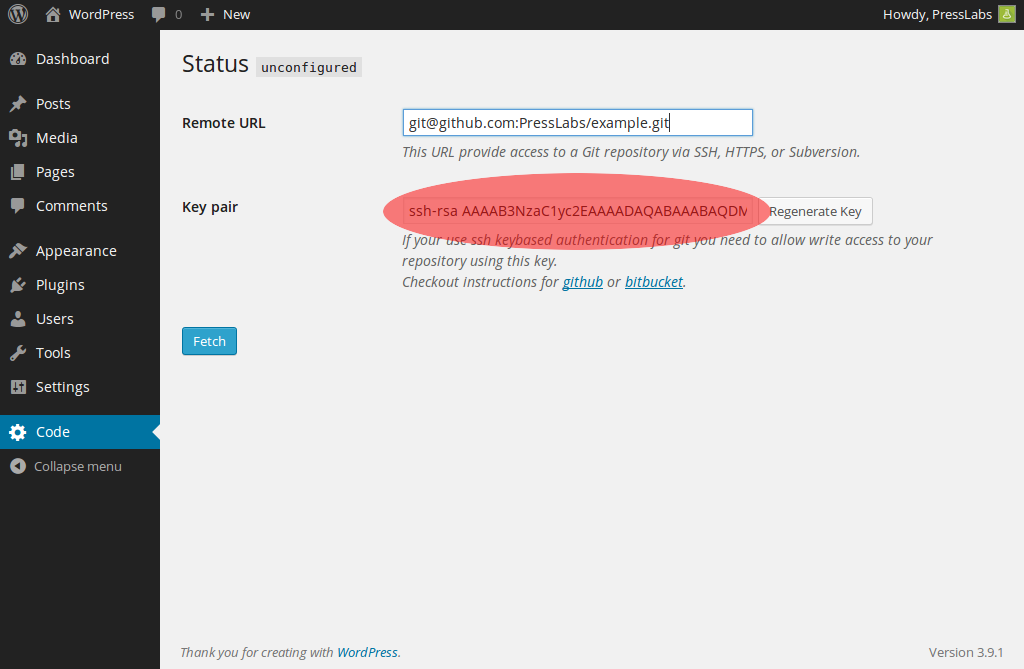
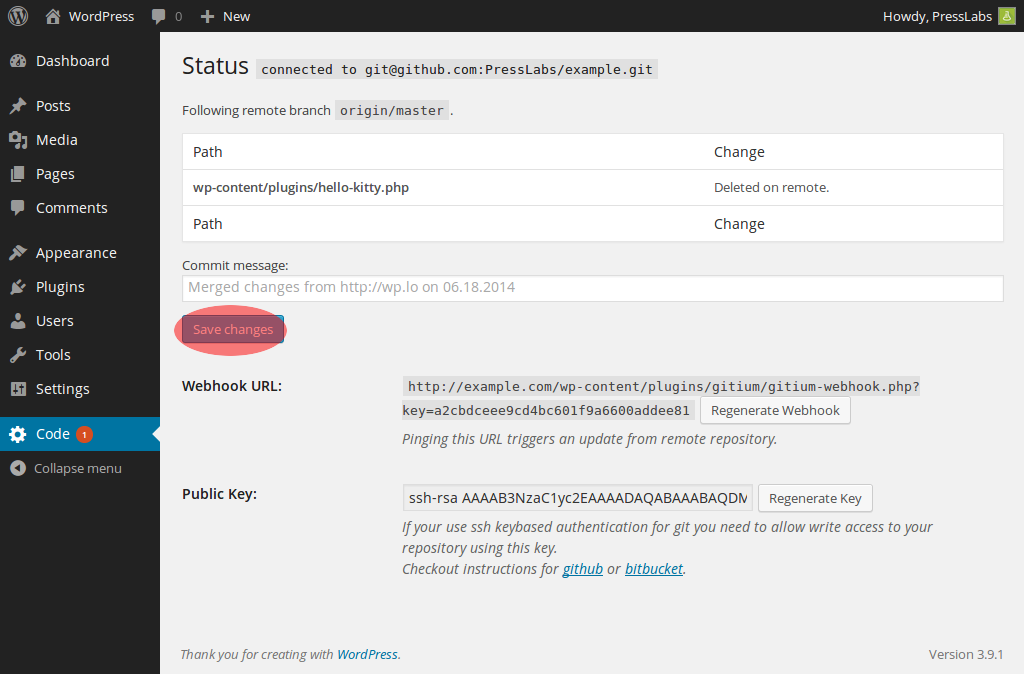
Copy the Public Key that Gitium has generated for you from the Key Pair field.
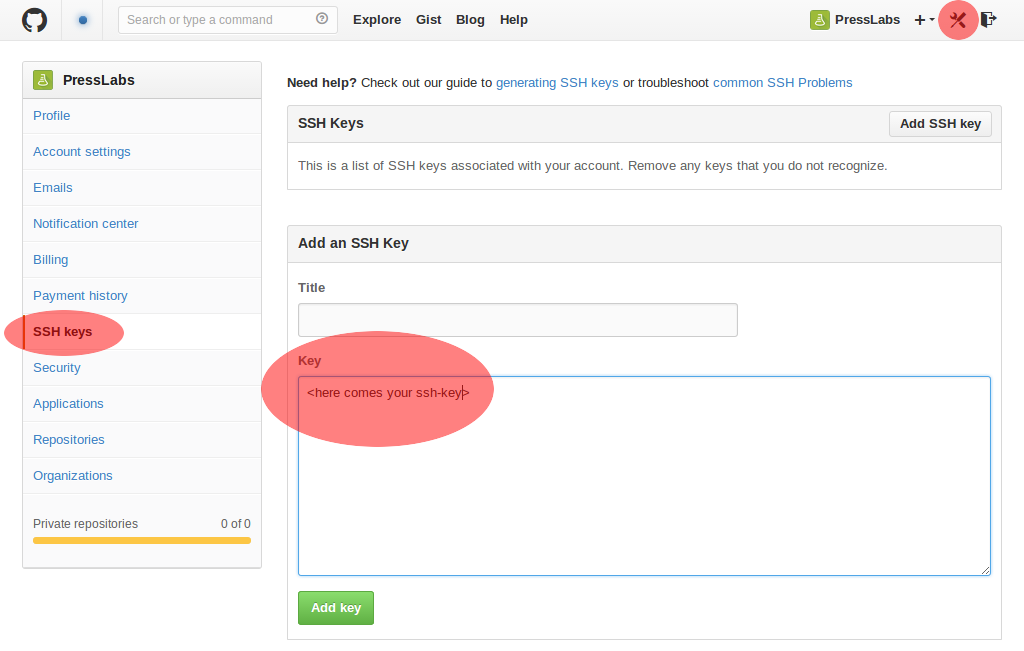
In your repository manager of choice (GitHub, GitLab, or Bitbucket), go to the settings page and find the “Deploy keys” (or similar) section. There you will need to add the Public Key you’ve copied from Gitium. This will grant Gitium access to your repository. Make sure to allow write access as well. Also make sure that you copy the entire key from gitium.
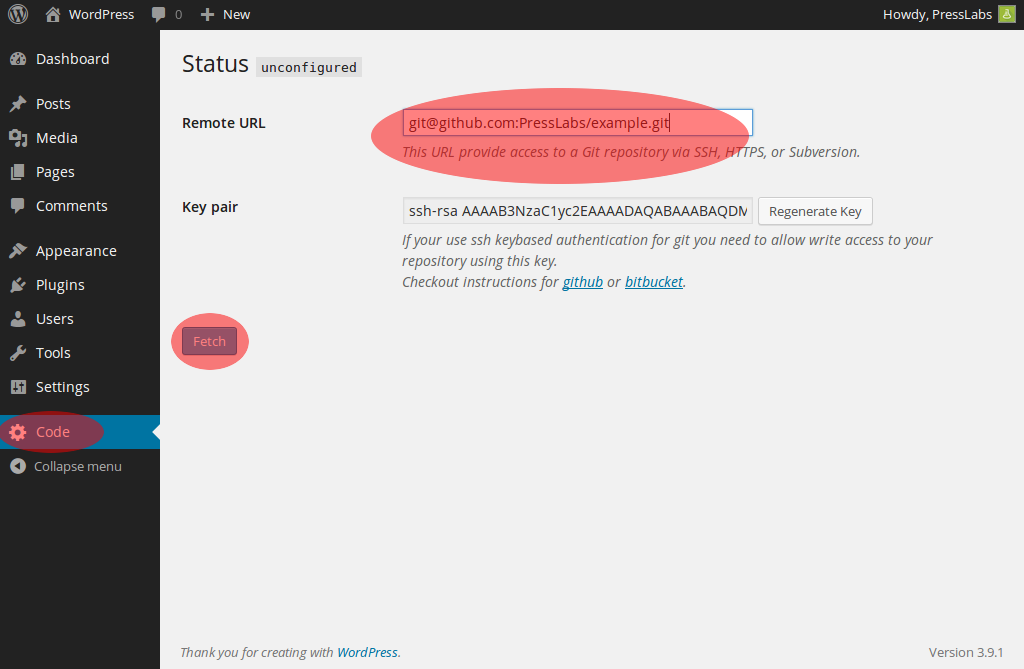
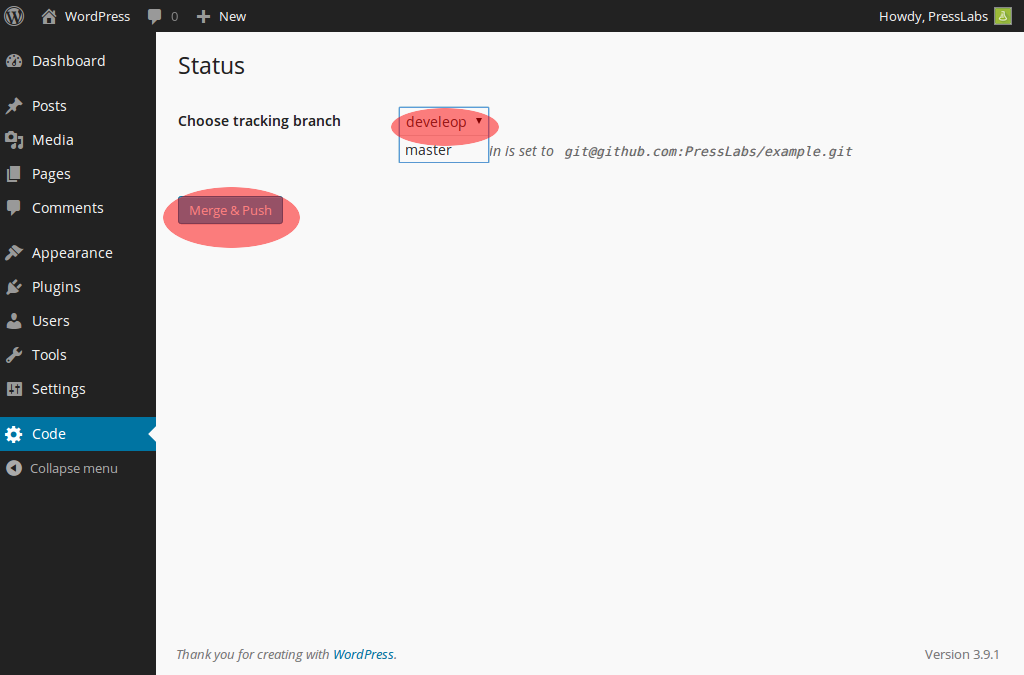
Now go back to your main repository page and copy the SSH URL to your repo. Paste this URL in Gitium and press the “Fetch” button.
A “Repository initialized successfully” message will show up. This means that your repository has been populated with the current code of your website and it is ready to start working with Gitium. -
Initial Commit
Once connected, Gitium will automatically commit your existing WordPress theme and plugins to the connected repository.
This initial commit serves as the baseline for your site’s code. -
Making Changes
Make changes to your WordPress site’s code (themes, plugins) as needed.
Gitium will automatically commit these changes to your Git repository.
Using the webhook provided by Gitium, it will also automatically deploy the changes from the repository to your WordPress site. -
Webook Configuration
Gitium uses the webhook to automatically deploy remote changes to your server. To configure it follow these steps:- Go to your WordPress website and go to your Gitium Settings page;
- Copy the full Webhook URL that Gitium provides;
- In your Git Manager settings, go to Webhook section, add a new webhook and paste the webhook URL you have copied from Gitium.
- Press Add, no settings changes needed. The webook simply needs a ping, nothing more. The security key is already embedded in the final URL Gitium has generated for you.
Now when you push to your repo, this webhook will automatically pull the changes to your remote server and deploy them.
You can see more details about the plugin also in our documentation here: https://www.presslabs.com/docs/code/gitium/install-gitium/
Journal de modifications
Fixed reverting a merge commit from wp-admin
1.2.6
- Fixed: Reverting a merge commit from the Gitium Commits page failed
- Fixed: Revert errors and success messages were not shown on the Commits page
1.2.5
- Added: Revert the last commit from the Gitium Commits page in wp-admin
1.2.4
- Tested the compatibility of the plugin with WP 7.1
1.2.3
- Tested the compatibility of the plugin with WP 7.0
- Added: Create a commit message when a plugin is deleted via WP CLI
1.2.2
- Tested the compatibility of the plugin with WP 6.9
1.2.1
- Tested the compatibility of the plugin with WP 6.8
Captures d'écran
Pour les développeurs
Est-ce votre plugin ? Montrez les chiffres.
Ajoutez un badge en direct à votre site, docs ou github readme. Il se met à jour par lui-même - aucun compte n'est nécessaire.
Best Gitium alternatives
All git plugins →



FAQ
Gitium: quick answers
Réponses directes, extraites des données en direct WordPress.org.
Source : WordPress.org
Is Gitium free?
Yes. Gitium is free to download and use from the official WordPress.org plugin directory.
Is Gitium safe to use in 2026?
Gitium is a solid plugin choice in 2026, with a few things worth checking first. It runs on 400+ sites, is rated 4.1/5 and was last updated 1 month ago, and scores 74/100 on our health check.
How many websites use Gitium?
Gitium is active on 400+ WordPress websites and has been downloaded 25,362 times since it launched in June 2014. It was downloaded 456 times in the last 30 days.
Does Gitium work with WordPress 7.1?
Yes. The developer has tested Gitium up to WordPress 7.1.5, the latest release. It requires WordPress 4.7 or newer.
What PHP version does Gitium need?
Gitium requires PHP 7.4 or higher. Most hosts run PHP 8.x today, so it works on any modern WordPress hosting.
When was Gitium last updated?
The latest version, 1.2.6, was released on October 14, 2026 (1 month ago).
Who makes Gitium?
Gitium is developed and maintained by Presslabs.
What are the best alternatives to Gitium?
The most popular alternatives to Gitium are Deployer for Git (600+ installs), Plugins Page Tweaker (60+ installs) and WP Pusher Slack Notificatio… (40+ installs).
Propulsé par PageForge
Un modèle et une feuille de calcul. Une vraie page pour chaque recherche.
PageForge transforme chaque ligne d'un CSV en une page WordPress avec son propre titre, URL, SEO et schéma, construit sur la mise en page que vous Déjà conçu. Gratuit sur WordPress.org.
- CSV et XLSX, plus Google Sheets sur les professionnels et les entreprises
- Son propre titre, URL, SEO champs et schéma pour chaque page
- Fonctionne avec l'éditeur de blocs, Elementor, Divi et Avada
- Gratuit sur WordPress.org, pas de carte de crédit