


GD Mail Queue
Intercept emails sent with wp_mail() into flexible mail queue for sending emails, convert plain text emails to HTML, email log, and more.

Utiliser avec prudence
GD Mail Queue works, but test it on a staging site before relying on it in 2026. It runs on 700+ sites, is rated 5/5 and was last updated 2 years ago, and scores 46/100 on our health check.
- Momentum — downloads up 43.3% vs the previous 30 days
- Petite base d'utilisateurs (plus de 700 installations actives)
- Pas de mise à jour depuis plus d'un an
- Uniquement testé jusqu'à WordPress 6,7 (le dernier est de 7,1)
Comment s'accumule-t-il ?
Côte à côte sur les installations, les mises à jour, les évaluations et le support



Téléchargements quotidiens
Les pics de téléchargement suivent généralement une nouvelle version - chaque site qui met à jour automatiquement compte comme un téléchargement.
Classements
Where GD Mail Queue stands todayWordPress.org Classements de recherche
Position en direct dans la recherche de plugins, Top 100| Mot-clé | Position |
|---|---|
| dev4press | #12 |
| email log | >100 |
| Courriel HTML | >100 |
| queue | #10 |
| SMTP | >100 |
Adoption de version
Part de sites actifs par version.
Répartition des notes
★★★★★ ★★★★★ 5 sur 11 avis
About GD Mail Queue
À partir du Lisez-moi officiel · v4.4Description
The plugin adds a mail queue system that can intercept all the emails sent through the wp_mail function, and depending on the predefined rules (number of recipients), sent the email into the queue, with each recipient getting their email. On top of that, the plugin can process all plain text emails and wrap them in the HTML, and send them as HTML, with options to customize the template and various other aspects.
How the plugin works
The central part of the plugin, called ‘Mailer,’ controls the process.
- Intercept every
wp_mailcall - If needed, wrap email in HTML
- Determine the number of recipients
- If eligible, add each recipient email into the queue
Process of turning plain text into HTML emails, support all emails sent through wp_mail, even if they don’t end in the queue. This can turn all WordPress system emails (registration, password reset…) into HTML emails and you can choose between predefined HTML templates, or register own templates via filter.
Queue works through the CRON, as a background job, and you can configure how many emails to send in a batch, with the timeout setting to prevent PHP timeout breaking the sending process.
Email Sending
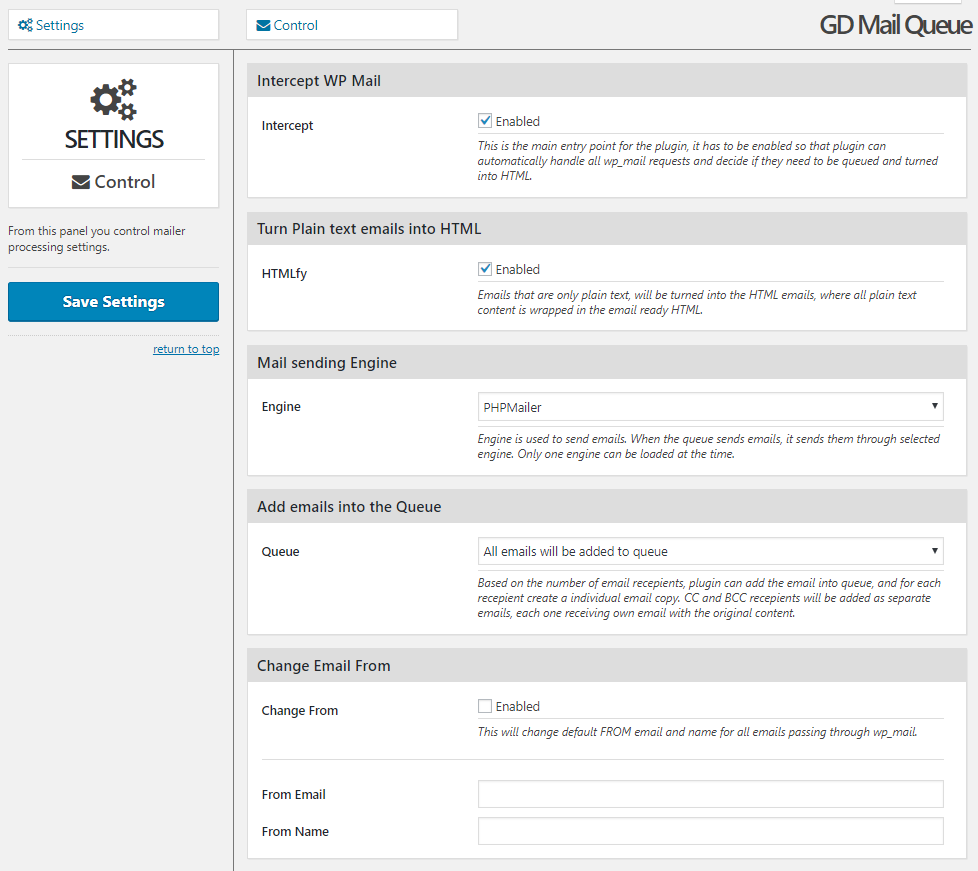
Emails are sent using PHPMailer built into WordPress. But, the plugin has additional options to control the queue sending process and the wp_mail sending process.
- Email sending engine based on PHPMailer class
- PHPMailer options to use SMTP for sending emails
- Customize email From for all emails passed through
wp_mail - Customize email From, Reply, and Sender for all emails sent through the queue
Email Logging
The plugin includes an advanced email log.
- Custom database tables to store logs, made for performance
- Store all relevant data for each email, including a list of attachments
- Email log panel with filters for logged emails
- Preview popup displaying all logged email details
- Preview popup shows the full HTML email part preview
- Retry sending any failed emails through the queue
Security related features
The plugin will attempt to strip malicious content from intercepted email, and sanitize the email plain text before generating HTML version, with the option to control the scope of the HTML tags to allow. HTML from subject will be striped. Emails stored in the log will be additionally sanitized, and on display, email content will be again escaped or run through KSES to avoid issues.
Other plugin features
- Options to pause wp_mail and queue operations
- Dashboard: an overview of the queue (including the last run) statistics
- Dashboard: an overview of the overall mailer statistics
- Dashboard: additional boxes with various other information
- Automatic cleanup of all successfully sent and/or failed emails
- Logging of the errors for each email send through the queue
- Developers friendly with various actions and filters for extra control
- Support for intercepting bbPress subscription notifications emails
- Support for the BuddyPress mail system
- Option to set BuddyPress to use WordPress wp_mail() function
- Track email types from emails sent by WordPress, bbPress and more
- Tools to test sending of emails and adding to the queue
Upgrade to GD Mail Queue Pro
Pro version contains many more great features:
- REST API based email sending engines
- REST API Engine: SendGrid
- REST API Engine: Amazon Web Services SES (through free addon)
- REST API Engine: Gmail (through free addon)
- REST API Engine: Mailgun (through free addon)
- REST API Engine: Mailjet (through free addon)
- REST API Engine: SendInBlue (through free addon)
- PHPMailer third-party SMTP services support
- PHPMailer SMTP Service: Amazon Web Services SES
- PHPMailer SMTP Service: Mailgun
- PHPMailer SMTP Service: Mailjet
- PHPMailer SMTP Service: Mandrill
- PHPMailer SMTP Service: PostMark
- PHPMailer SMTP Service: PepiPost
- PHPMailer SMTP Service: SendGrid
- PHPMailer SMTP Service: SendInBlue
- PHPMailer SMTP Service: SendPulse
- PHPMailer SMTP Service: SparkPost
- Panel to show everything currently in queue
- Email Notifications with daily and weekly statistics
- Email Notifications with daily and weekly errors logged
- Safe staging support with email redirection
- HTMLfy support for uploading logos
- Improved dashboard with various control buttons
- Improved log with the email role-based filtering
- Tool to preview HTML template
With more features on the roadmap exclusively for the Pro version.
- More information about GD Mail Queue Pro
- Compare Free vs. Pro Plugin
More Information and Support
- More information about GD Mail Queue
- Support and Knowledge Base for GD Mail Queue
Important
- The plugin only works with the default WordPress
wp_mailfunction that uses thePHPMailerobject. - The plugin doesn’t replace
wp_mailor PHPMailer and uses default function and class built into WordPress. - It is not advisable to use this plugin and some other plugin that manipulates WordPress
PHPMailerobject. - Plugin doesn’t support plugins replacing the
wp_mailfunction (Sendgrid, WP Offload SES, and similar).
Installation
General Requirements
- PHP: 7.4 or newer
- Plugin doesn’t work with PHP 7.3 or older versions.
WordPress Requirements
- WordPress: 5.8 or newer
- Plugin doesn’t work with WordPress 5.7 or older versions.
Basic Installation
- Plugin folder in the WordPress plugins folder must be
gd-mail-queue. - Téléchargez le dossier
gd-mail-queuedans le répertoire/wp-content/plugins/. - Activez le plugin via le menu "plugins" dans WordPress.
Journal de modifications
Various improvements, changes and security fix.
4.4 – 2024.12.03
- New: plugin tested with WordPress up to 6.7
- New: plugin tested with PHP up to 8.4
- Edit: proper sanitization of the HTML classes
- Edit: d4pLib 2.8.19
- Fix: cross site scripting problem with the admin error messages
4.3 – 2024.05.08
- New: plugin tested with WordPress up to 6.5
- New: plugin tested with PHP up to 8.3
- New: system requirements: plugin requires PHP 7.4
- New: system requirements: plugin requires WordPress 5.8
- New: changes related to WordPress and PHP code standards
- New: function
json_encodereplaced withwp_json_encode - Edit: d4pLib 2.8.17
- Fix: intercepted email subject encodes
&character - Fix: getting version number from PHPMailer for email test
- Fix: few minor issues related to an older shared library version
4.2.1 – 2023.08.09
- Edit: improved the function for detecting HTML tags in content
- Fix: duplicated merge of the KSES wide tags and attributes lists
- Fix: rare issue when the plain text processing deals with NULL value
- Fix: fixed regex for the conversion of text links
4.2 – 2023.07.16
- New: plugin icon for the dashboard, about and menu
- Edit: changed order of processing for the HTMLfy of plain content
- Edit: changed HTMLfy strip method to allow basic A and BR tags
- Edit: preprocess plain text only if it contains HTML
- Fix: stripped required tags when HTMLfy process is in strip mode
- Fix: url in plain text email ends up with encoded entities
4.1 – 2023.06.26
- New: system requirements: plugin requires WordPress 5.5
- New: system requirements: PHPMailer class 6.1 or newer
- New: expanded list of email types detection for WordPress core
- Edit: updates to the code to support only one PHPMailer class
- Remove: dropping support for older versions of PHPMailer class
- Fix: queue message logging error for long results messages
- Fix: queue sometimes fails to mark message as failed
4.0 – 2023.06.09
- New: plugin tested with WordPress up to 6.2
- New: system requirements: plugin requires PHP 7.3
- New: system requirements: plugin requires WordPress 5.2
- New: option to control HTMLfy pre-processing of plain text
- New: run KSES filter when adding email into queue
- New: run KSES filter when saving email into the log
- New: logged email preview with proper data escaping
- New: filters to control pre-processing of emails going to queue
- New: process logged email preview with KSES before displaying
- New: filter for HTMLfy pre-processing control for KSES
- Edit: many more additional content escaping for display
- Edit: various small updates to improve PHP code standards
- Edit: d4pLib 2.8.15
- Fix: unauthenticated stored cross-site scripting vulnerability
Captures d'écran


Pour les développeurs
Est-ce votre plugin ? Montrez les chiffres.
Ajoutez un badge en direct à votre site, docs ou github readme. Il se met à jour par lui-même - aucun compte n'est nécessaire.
Best GD Mail Queue alternatives
All dev4press plugins →





FAQ
GD Mail Queue: quick answers
Réponses directes, extraites des données en direct WordPress.org.
Source : WordPress.org
Is GD Mail Queue free?
Yes. GD Mail Queue is free to download and use from the official WordPress.org plugin directory. The developer also sells premium add-ons or a Pro version with extra features.
Is GD Mail Queue safe to use in 2026?
GD Mail Queue works, but test it on a staging site before relying on it in 2026. It runs on 700+ sites, is rated 5/5 and was last updated 2 years ago, and scores 46/100 on our health check.
How many websites use GD Mail Queue?
GD Mail Queue is active on 700+ WordPress websites and has been downloaded 16,657 times since it launched in May 2019. It was downloaded 602 times in the last 30 days.
Does GD Mail Queue work with WordPress 7.1?
GD Mail Queue is officially tested up to WordPress 6.7.12, while the latest release is 7.1.5. It may still work, but try it on a staging site first.
What PHP version does GD Mail Queue need?
GD Mail Queue requires PHP 7.4 or higher. Most hosts run PHP 8.x today, so it works on any modern WordPress hosting.
When was GD Mail Queue last updated?
The latest version, 4.4, was released on December 3, 2024 (2 years ago).
Who makes GD Mail Queue?
GD Mail Queue is developed and maintained by Milan Petrovic.
What are the best alternatives to GD Mail Queue?
The most popular alternatives to GD Mail Queue are forumAttachments for bbPress (6K+ installs), forumTools for bbPress (1K+ installs) and GD Security Headers (1K+ installs).
Propulsé par PageForge
Un modèle et une feuille de calcul. Une vraie page pour chaque recherche.
PageForge transforme chaque ligne d'un CSV en une page WordPress avec son propre titre, URL, SEO et schéma, construit sur la mise en page que vous Déjà conçu. Gratuit sur WordPress.org.
- CSV et XLSX, plus Google Sheets sur les professionnels et les entreprises
- Son propre titre, URL, SEO champs et schéma pour chaque page
- Fonctionne avec l'éditeur de blocs, Elementor, Divi et Avada
- Gratuit sur WordPress.org, pas de carte de crédit