


FluentBoards – Project Management, Task Management, Goal Tracking, Kanban Board, and, Team Collaboration
The Simplest Project & Task Management Plugin Specifically Crafted for Agencies, Freelancers & Founders.

Choix
Yes — FluentBoards is a safe, well-maintained plugin to use in 2026. It runs on 6K+ sites, is rated 5/5 and was last updated 3 weeks ago, and scores 89/100 on our health check.
- Aimé par les utilisateurs — 5/5 sur 25 avis
- Développé activement — Dernière mise à jour il y a 3 semaines
- Testé avec le dernier WordPress (7.1)
Comment s'accumule-t-il ?
Côte à côte sur les installations, les mises à jour, les évaluations et le support


Téléchargements quotidiens
Les pics de téléchargement suivent généralement une nouvelle version - chaque site qui met à jour automatiquement compte comme un téléchargement.
Classements
Where FluentBoards stands todayWordPress.org Classements de recherche
Position en direct dans la recherche de plugins, Top 100| Mot-clé | Position |
|---|---|
| kanban | #2 |
| project | #5 |
| project management | #3 |
| task management | #2 |
| task manager | #6 |
Adoption de version
Part de sites actifs par version.
Répartition des notes
★★★★★ ★★★★★ 5 sur 25 avis
About FluentBoards
From the official readme · v2.3.0Description
FluentBoards is a next-gen project management solution, designed to revolutionize your workflow with seamless organization, effortless communication, and unparalleled efficiency, ensuring you sweat less and achieve more!
Create projects, assign members, set priority, manage multi-stage workflows, receive work updates, and administrate projects – all at your fingertips without leaving the dashboard.
🧐WHAT MAKES FLUENTBOARDS SPECIAL?
🛡 Ensure the complete security of your data
💼 Organize tasks, track progress, and collaborate efficiently
📋 Create & customize workflows that align perfectly with your team’s goals
💬 Communicate seamlessly, stay on top of deadlines, and work together cohesively
🔔 Whether you’re in the office, at home, or on the go, manage your projects wherever you are
📊 Get real-time insights and make informed decisions to keep projects on track
Traits
✅ Create unlimited tasks/projects and assign them to your team
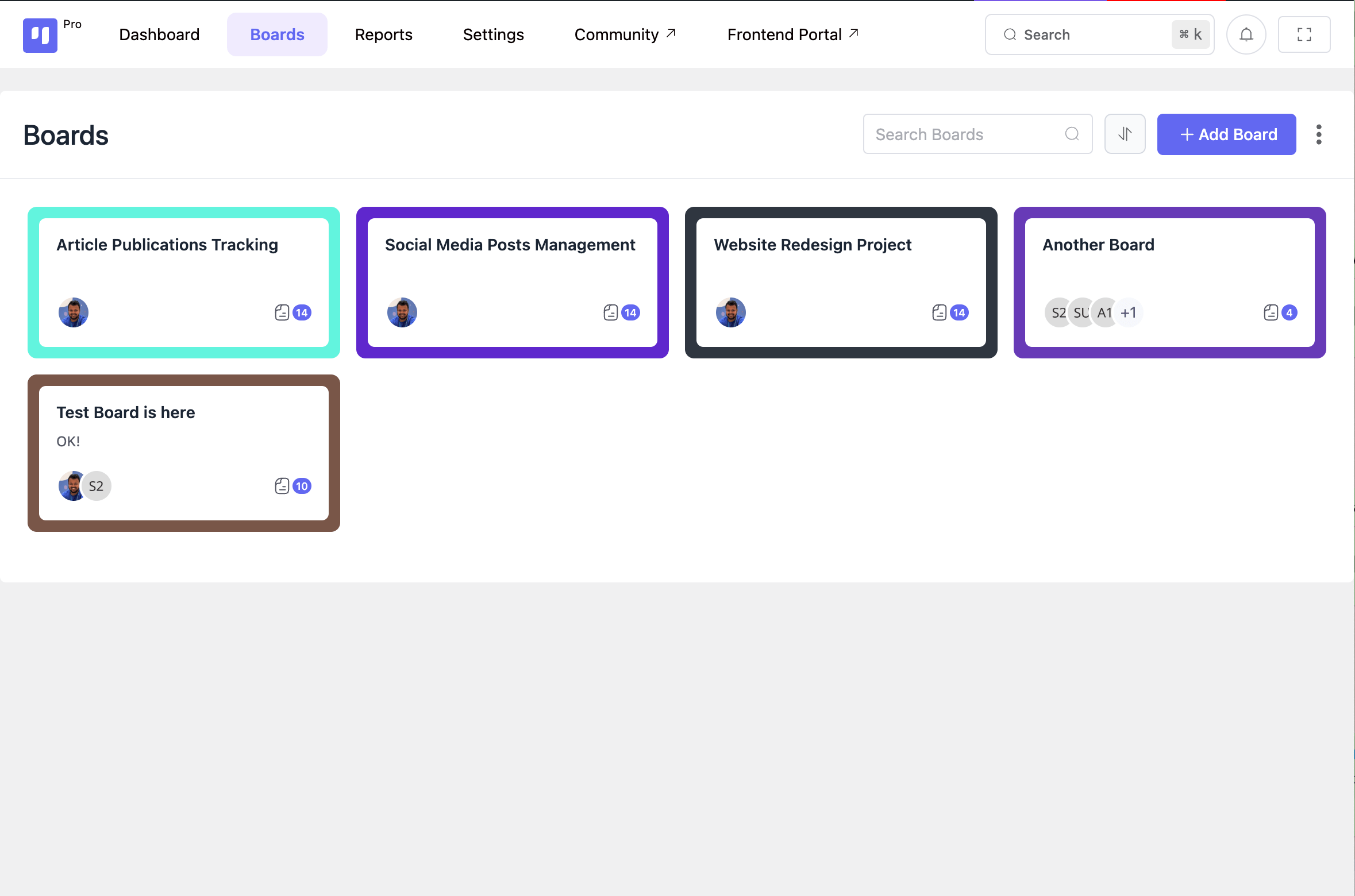
✅ Manage multiple projects together in a centralized hub
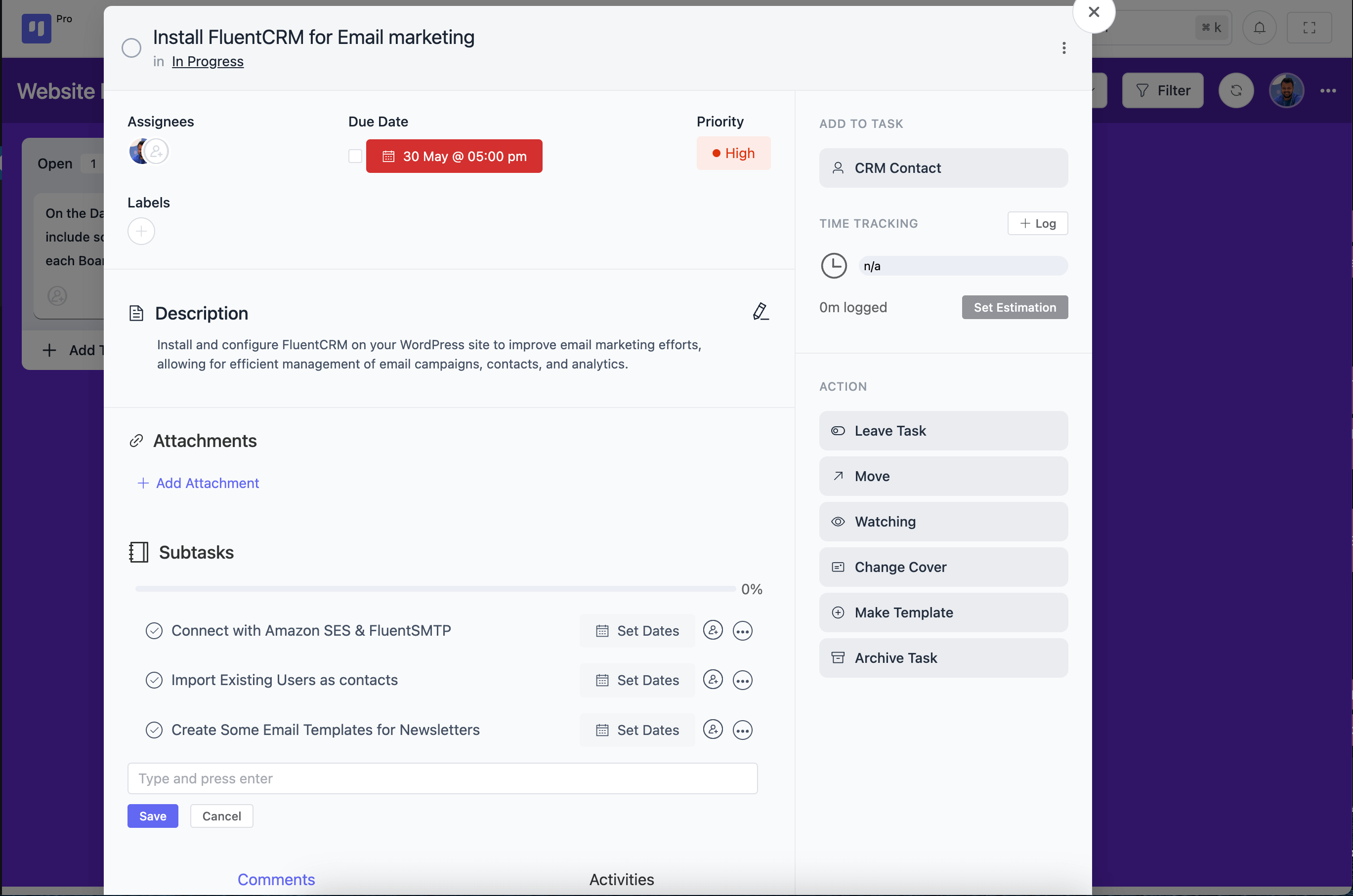
✅ Add due date, assign labels, set priority, and add CRM contact to your tasks
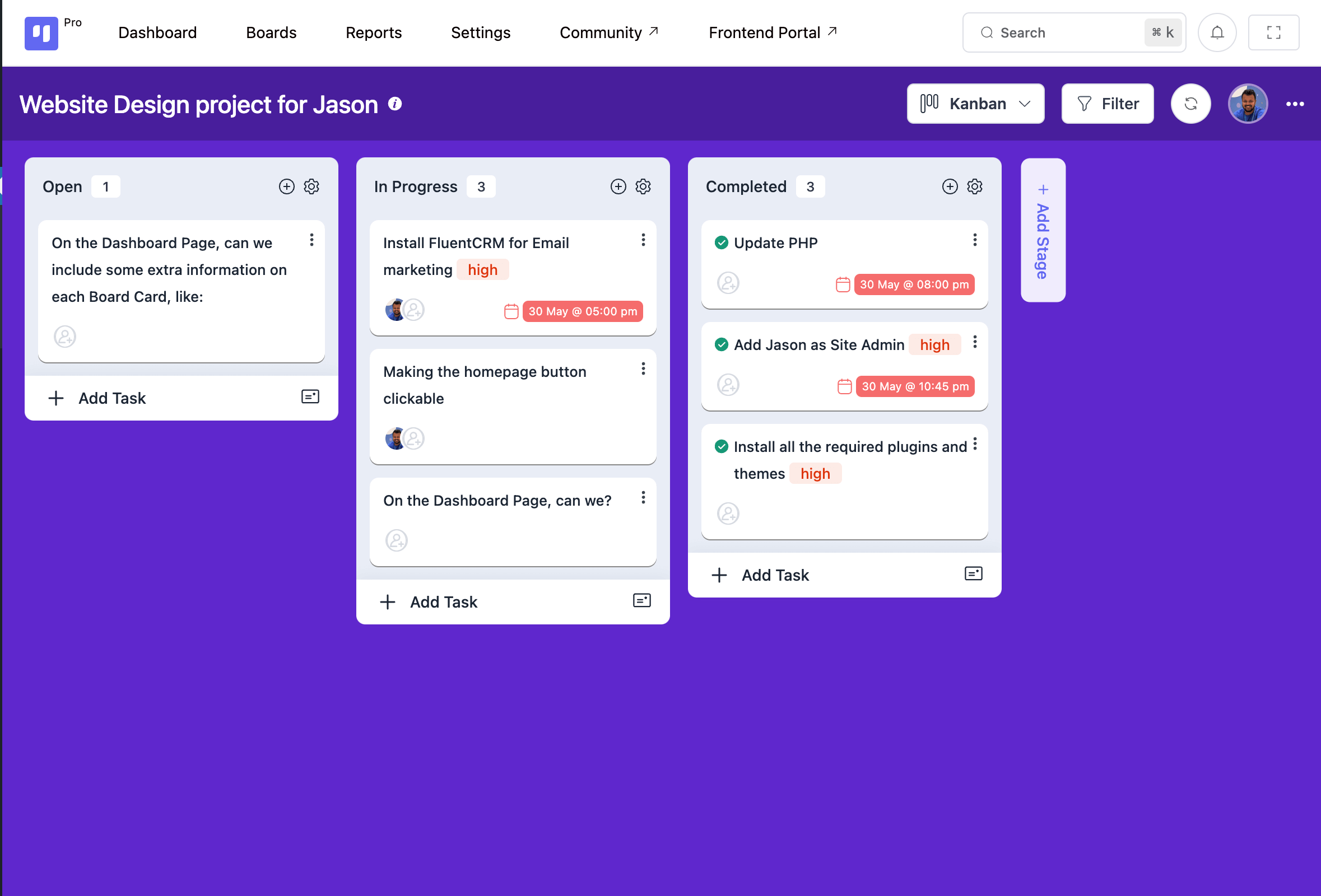
✅ Manage multi-stage workflows in the Kanban board
✅ Easily identify and resolve any bottlenecks for smooth task management
✅ Filter and check task progress by assignee, due date, priority, and labels
✅ Change or reorder task stages by simply dragging or moving
✅ Switch between Kanban and the table view to visualize tasks differently
✅ Communicate with the team, receive in-depth activity history, and improve coordination
✅ Drop and share links or important files in any task or comment
✅ Customize the board background and make your workspace unique
✅ Receive instant email notifications on work status and stay updated
✅ Make administrative tasks a breeze and manage your resources efficiently
🗂️PROJECT MANAGEMENT
Managing projects is a nightmare when you select the wrong tool. But with FluentBoards you’ll enjoy the simplest management of the toughest projects!
From creating projects to completing to-dos, the journey is enjoyable and stress-free, making your workflow smooth and helping you achieve goals in the smartest way possible!
Create and manage unlimited projects and delegate tasks among team members
Break down complex projects into biteable tasks and simplify managing
Handle multiple projects together and make the best use of resources
Add CRM contact to any task and give your team relevant client information
Track every task in-depth with activity history
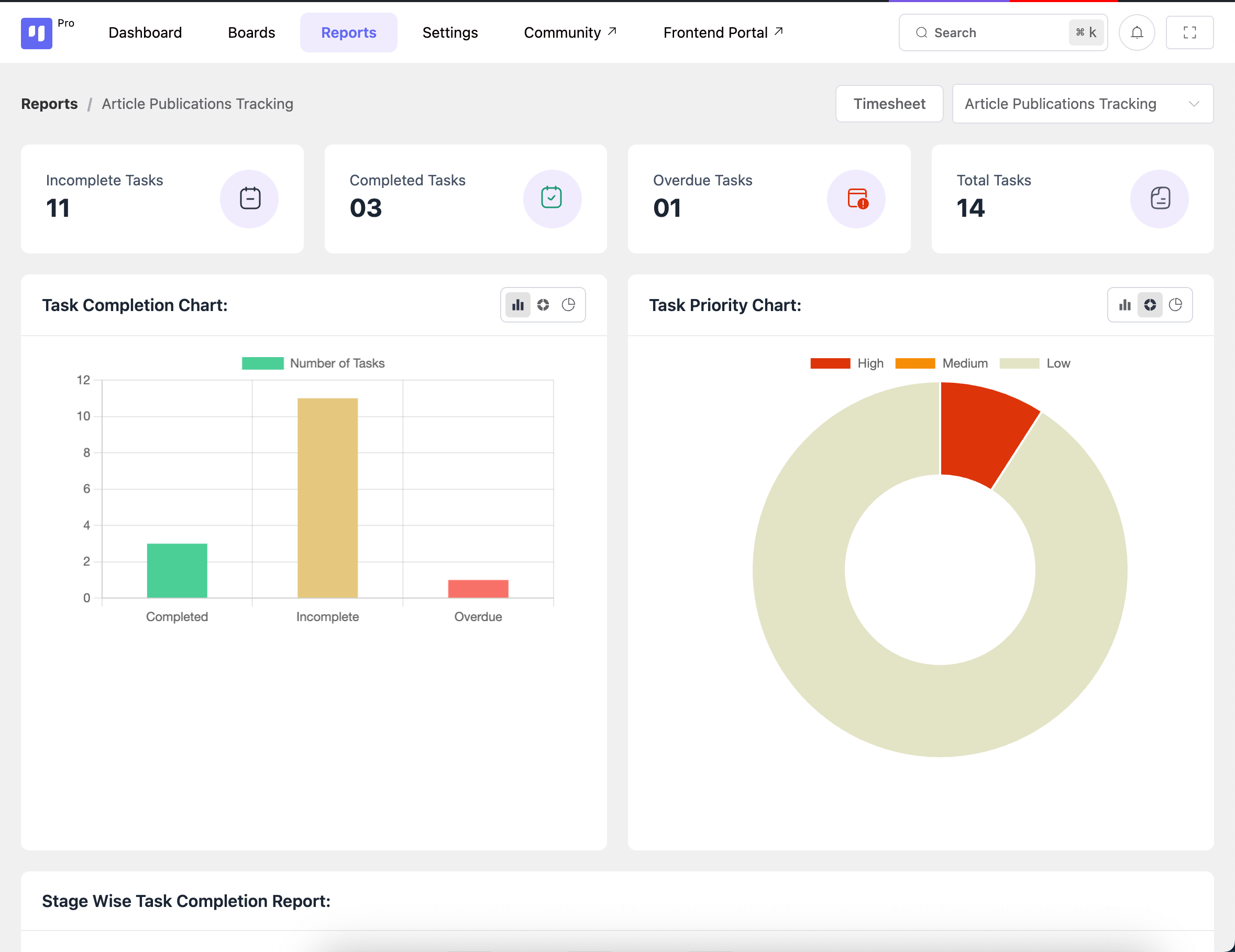
Stay laser-focused on your projects and task statuses from your dashboard
🎯GOAL TRACKING
Take control of challenging projects by setting a clear roadmap for achievement and hitting your goals effortlessly.
Add deadlines, set task priorities, track progress, and align tasks with overarching objectives to ensure everyone understands project priorities and unleashes their full potential.
Set task deadlines and keep your team on track for timely completion
Indicate task importance by setting priority as – Low, Medium, or High
Filter tasks by assignees, stages, and priorities and gain actionable insights
Receive real-time insights on task progress and optimize your workflows
⚙️WORKFLOW VISUALIZATION
Get a bird’s eye view of your workflow stages and learn how your team is doing. Find out bottlenecks easily and improve your workforce productivity.
Manage multi-stage workflows with dynamic Kanban board
Monitor project progress and assignee performance in real-time
Switch between Kanban board and table view for smooth project management
Organize and filter your tasks using colored labels
Customize your board background with a custom image
💬REAL-TIME COMMUNICATION
Stay focused, and be clear about your work and responsibilities. Take projects, solve problems, and achieve targets collaboratively with your team, and stay on track toward success.
Get timely email updates and stay in the loop with your work
Communicate with your team in real-time and improve team collaboration & coordination
Add links or upload files and give your team access to important documents
🛠️ADMIN & SECURITY
No more administrative hassles or information insecurity! Make your administrative tasks a breeze and regain control with robust security measures, ensuring your sensitive data remains safeguarded and your operations run smoothly.
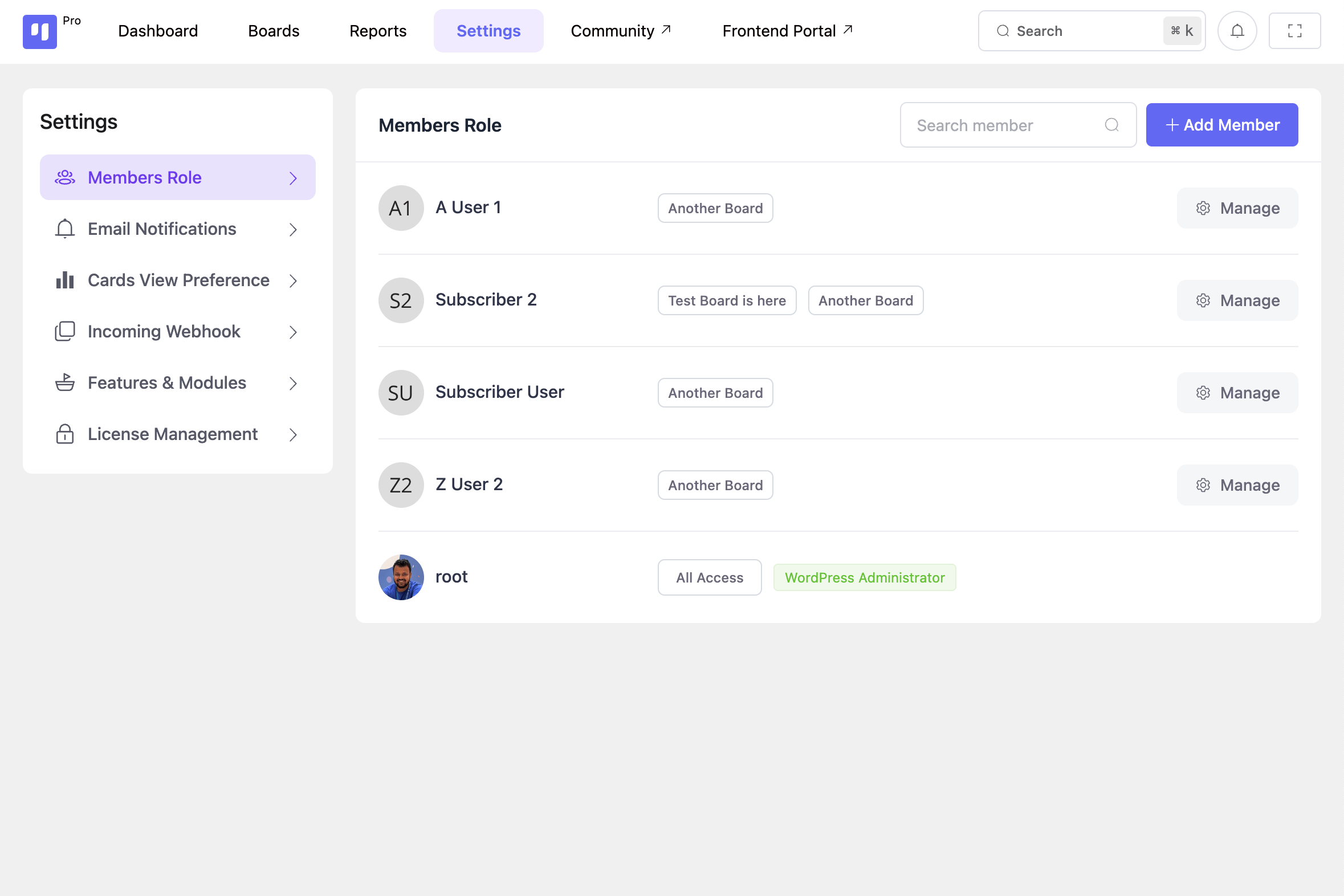
Add members, grant access, and assign roles for clarity and responsibility
Scan and monitor team members’ progress and performance on assigned projects
Swiftly add new admins and manage permissions for a smoother workflow
Ensure robust data security and keep your information safe
🖥️DASHBOARD
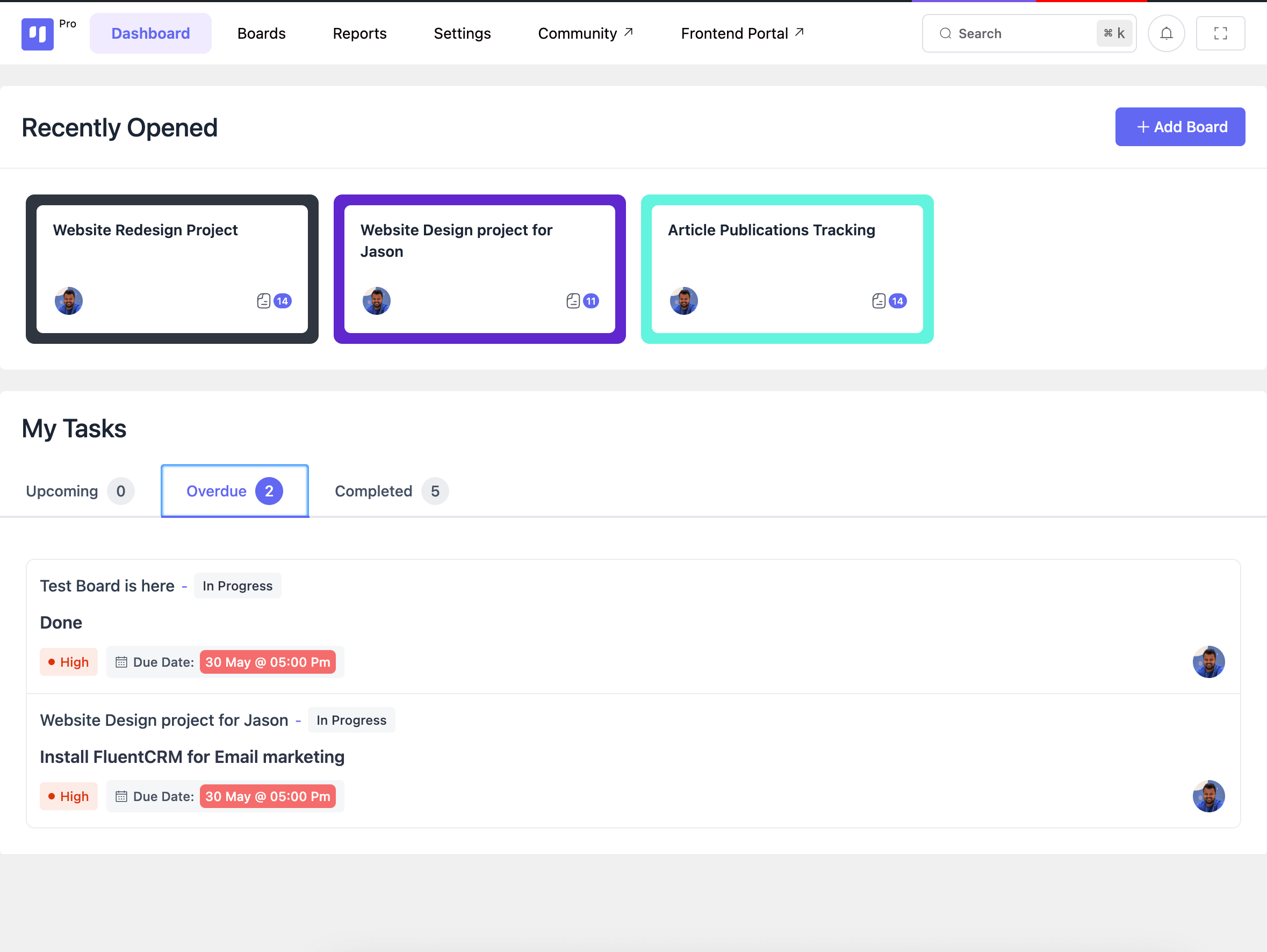
The elegant dashboard is designed to keep you informed about your current objectives and upcoming challenges. So that whenever you log into your site, you can quickly assess your progress and plan your next steps with clarity and efficiency.
- Search or go to any board easily
- Create a new board effortlessly
- Explore your most recent projects in a single click
- Easily filter your upcoming tasks, overdue tasks, and high-priority tasks
🥷Construit et fabriqué par des ninjas
Developed by experienced developers with over a decade of expertise in the field, this tool is created by the same creators behind Ninja Tables, FluentCRM, and Fluent Forms, renowned for their swiftness and contemporary approach.
INTEGRATION
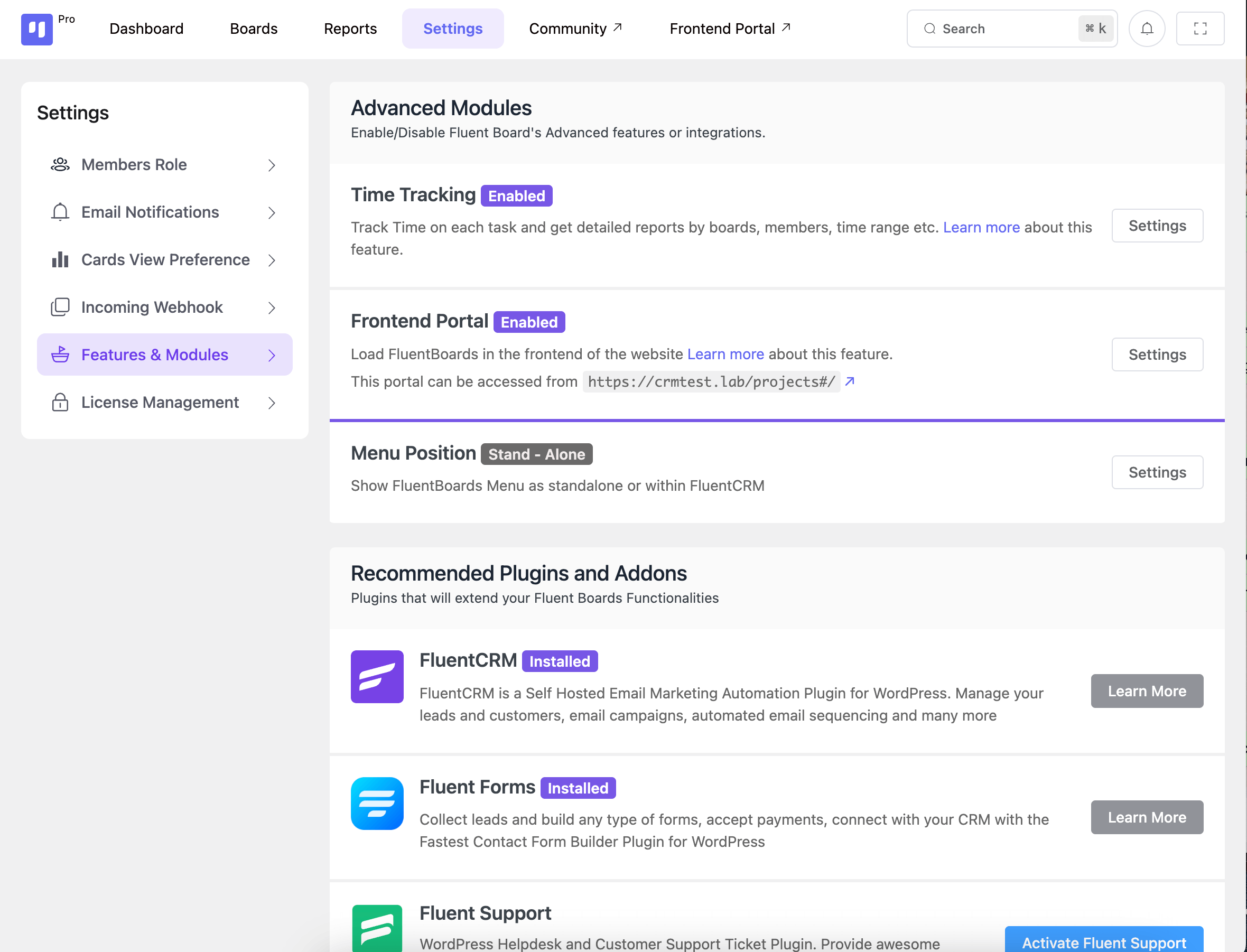
FluentBoards comes with the most advanced integrations to ensure you run your projects with the highest efficiency and achieve your goals effortlessly, streamlining your workflow and maximizing productivity.
FluentCRM
- Craft dynamic automation funnels with triggers for new boards, tasks, and task stage changes
- Receive real-time updates when new boards/tasks are created or when task stages change
FLUENT FORMS
- Simplify task creation through form submissions
- Easily create tasks for specific contacts
Autres plugins par l'équipe Wpmanageninja
- FluentCRM - Email Marketing Automation et CRM plugin pour WordPress
- Formulaires fluides – Plugin de création de formulaires WordPress le plus rapide
- WordPress Helpdesk and Customer Support Ticket Plugin
- Tables Ninja – Meilleur plugin WP DataTables pour WordPress
- Graphiques Ninja – Meilleur plugin WP Charts pour WordPress
- PayMattic – Plugin de dons de paiement simple et d'abonnement
Installation
- Install FluentBoards either via the WordPress.org plugin repository or by uploading the files to your server.
- Activate FluentBoards.
- Navigate to the Admin Menu and find FluentBoards and start managing your projects.
- Need more help? Get support with WPManageNinja Support.
Journal de modifications
The latest version is compatible with the previous version, So nothing to worry about.
v2.3.0 (Date: October 30, 2026)
- New: Read-only task share links, no login needed
- New: Share Board controls for layouts and visibility
- New: Emoji in comments and reactions
- New: Pause notifications globally or per board, with scheduled or manual resume
- New: Save and create another task
- New: Task dependencies in task details, with search and blocked indicators
- Improvement: Save boards and tasks as templates through MCP
- Improvement: Board filters persist, with an active count
- Improvement: Dates follow WordPress language and date settings
- Improvement: Trello import recovery and cover retries
- Improvement: Refreshed public boards with flexible layouts, search, task details, and theme styling
- Fixed: Security hardening for board access on task covers, watchers, dependencies, CRM contact links, and template status
- Fixed: Duplicate comment and mention emails
- Fixed: Missing unread counts on Kanban cards
- Fixed: List view not loading more tasks on scroll
- Fixed: Recurring tasks use the site timezone
- Fixed: Invitations keep the selected role and clear once accepted
- Fixed: Missing or duplicate tasks in JSON imports
- Fixed: Field spacing in Fluent Forms task descriptions
- Other improvements and bug fixes
v2.2.2 (Date: October 16, 2026)
- Fixed: Attachment previews disrupted by buffered output or PHP notices in Pro
- Other bug fixes and improvements
v2.2.1 (Date: October 13, 2026)
- Fix: Upload directory warning issue
- Fix: Cloud attachment downloads failing on some sites
- Fix: Search briefly showing empty results while typing
- Fix: CSV import upload error handling
- Fix: Recurring task and reminder scheduling fixes
- Fix: Minor stability and permission fixes
v2.2.0 (Date: October 12, 2026)
- New: Browse, preview, and create boards from built-in templates, or save them for reuse
- New: Ready-to-use board background images
- New: OpenRouter support for AI writing assistance
- New: Create MCP connection keys from your account, with admin-managed access
- New: Import Fluent Boards exports without Pro
- New: Filter recurring tasks and task templates
- New: Drag and drop boards into folders
- Improvement: Update your profile name and photo from your account
- Improvement: Redesigned notification emails with light and dark mode support
- Improvement: Easier member access management across multiple boards
- Improvement: Preserve more task data when duplicating boards, importing, and using templates
- Improvement: Richer comment formatting, slash commands, and easier description copying
- Improvement: Clearer recurring schedules, links to generated tasks, and custom-field activity history
- Improvement: Faster board lists, task activity feeds, and bulk stage moves
- Improvement: Simpler AI setup, updated model choices, and better translations
- Fixed: Assignment notifications, comment email links, and incorrect archive emails when restoring tasks
- Fixed: Bulk task moves now apply stage defaults and trigger notifications and webhooks
- Fixed: Task and board deletion now cleans up related data and local or cloud attachments
- Fixed: Search and filters now work together, and failed status updates preserve the previous status
- Fixed: Recurring tasks retain custom fields and correctly update task counts and creation webhooks
- Fixed: Time-log dates, custom date fields, timesheet access, and CSV exports
- Fixed: Webhook event selection, task completion events, and missing-data handling
- Fixed: FluentCRM task assignments, template data, and contact-board associations
- Fixed: Task navigation, upload protection, and board permission checks
v2.1.0 (Date: September 17, 2026)
- New: Rich text formatting for comments and replies
- New: Markdown attachment previews with Mermaid diagrams and full-screen mode
- New: Import Trello boards via API
- New: Label colors that adapt to light and dark modes
- Improvement: Identify labels faster with colored backgrounds
- Improvement: Task descriptions now auto-save, with dedicated Save and Cancel buttons for added control
- Improvement: Task headers now show the current stage
- Improvement: Spot high-priority tasks faster with color-coded priorities
- Improvement: Refined task details and dashboard badges
- Fixed: Table search persistence, Gantt scrolling, and date picker overlap
- Fixed: Timesheet reports, missing board descriptions, and task lookup errors
- Fixed: Tightened security for public boards and API responses
- Fixed: Other security issues
- Other improvements and bug fixes
v2.0.15 (Date: September 9, 2026)
- Improvement: Refined priority controls and task card UI
- Improvement: Smoother task description editing
- Improvement: Updated translations
- Improvement: Faster board exports
- Fixed: Task description formatting and links when creating and editing tasks
- Fixed: Duplicate subtask creation through the AI assistant
- Fixed: Subtask and time-tracking cleanup issues
- Fixed: Attachment popover placement, folder title overflow, and template preview contrast in dark mode
- Fixed: Board background cleanup and board-scoped image file resolution
- Fixed: Member authorization issue
- Fixed: Other security issues
Captures d'écran
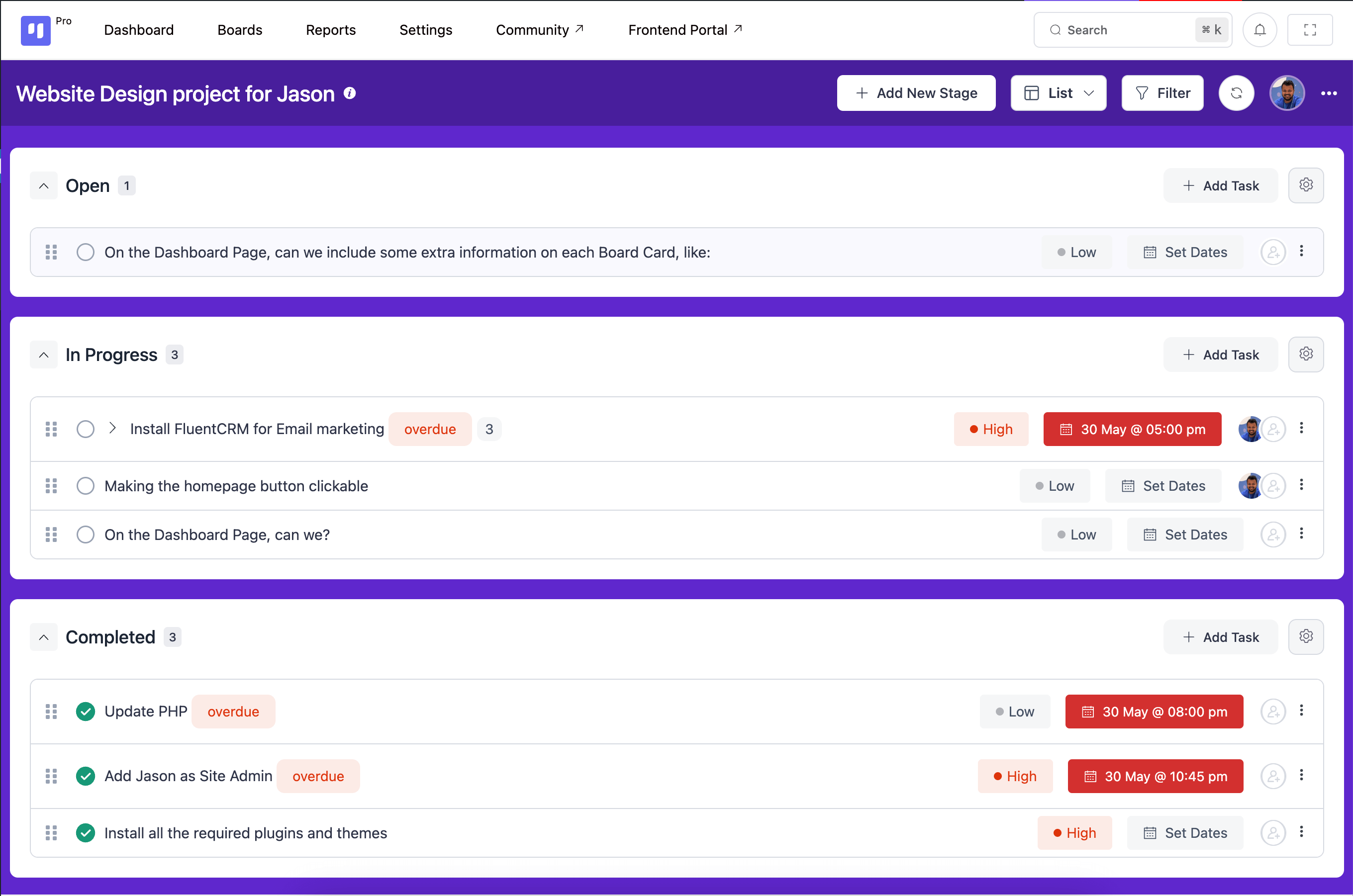
Pour les développeurs
Est-ce votre plugin ? Montrez les chiffres.
Ajoutez un badge en direct à votre site, docs ou github readme. Il se met à jour par lui-même - aucun compte n'est nécessaire.
Best FluentBoards alternatives
All kanban plugins →



FAQ
FluentBoards: quick answers
Réponses directes, extraites des données en direct WordPress.org.
Source : WordPress.org
Is FluentBoards free?
Yes. FluentBoards is free to download and use from the official WordPress.org plugin directory.
Is FluentBoards safe to use in 2026?
Yes — FluentBoards is a safe, well-maintained plugin to use in 2026. It runs on 6K+ sites, is rated 5/5 and was last updated 3 weeks ago, and scores 89/100 on our health check.
How many websites use FluentBoards?
FluentBoards is active on 6K+ WordPress websites and has been downloaded 149,007 times since it launched in May 2024. It was downloaded 7,325 times in the last 30 days.
Does FluentBoards work with WordPress 7.1?
Yes. The developer has tested FluentBoards up to WordPress 7.1.5, the latest release. It requires WordPress 5.0 or newer.
What PHP version does FluentBoards need?
FluentBoards requires PHP 7.4 or higher. Most hosts run PHP 8.x today, so it works on any modern WordPress hosting.
When was FluentBoards last updated?
The latest version, 2.3.0, was released on October 30, 2026 (3 weeks ago).
Who makes FluentBoards?
FluentBoards is developed and maintained by Mahmudul Hasan Arif.
What are the best alternatives to FluentBoards?
The most popular alternatives to FluentBoards are Project Manager (5K+ installs), Kanbanz (3K+ installs) and Taskbuilder (600+ installs).
Propulsé par PageForge
Un modèle et une feuille de calcul. Une vraie page pour chaque recherche.
PageForge transforme chaque ligne d'un CSV en une page WordPress avec son propre titre, URL, SEO et schéma, construit sur la mise en page que vous Déjà conçu. Gratuit sur WordPress.org.
- CSV et XLSX, plus Google Sheets sur les professionnels et les entreprises
- Son propre titre, URL, SEO champs et schéma pour chaque page
- Fonctionne avec l'éditeur de blocs, Elementor, Divi et Avada
- Gratuit sur WordPress.org, pas de carte de crédit