


FETCHUB – AI RSS Feed Aggregator & Translator
Fetch, translate, and publish RSS feeds automatically with AI.

Envisager une alternative
FETCHUB shows warning signs in 2026 — compare the alternatives below before installing. It runs on 10+ sites, is rated 5/5 and was last updated 1 year ago, and scores 39/100 on our health check.
- Petite base d'utilisateurs (plus de 10 installations actives)
- Très peu de critiques jusqu'à présent
- Pas de mise à jour depuis plus d'un an
- Uniquement testé jusqu'à WordPress 6,8 (le dernier est de 7,1)
Comment s'accumule-t-il ?
Côte à côte sur les installations, les mises à jour, les évaluations et le support



Téléchargements quotidiens
Les pics de téléchargement suivent généralement une nouvelle version - chaque site qui met à jour automatiquement compte comme un téléchargement.
Classements
Where FETCHUB stands todayWordPress.org Classements de recherche
Position en direct dans la recherche de plugins, Top 100| Mot-clé | Position |
|---|---|
| aggregator | #33 |
| IA | >100 |
| feed | >100 |
| rss | >100 |
| translator | >100 |
Adoption de version
Part de sites actifs par version.
Répartition des notes
★★★★★ ★★★★★ 5 sur 4 avis
About FETCHUB
From the official readme · v1.3.8Description
Fetchub keeps your WordPress site filled with fresh content from your favorite feeds — automatically and in your own language.
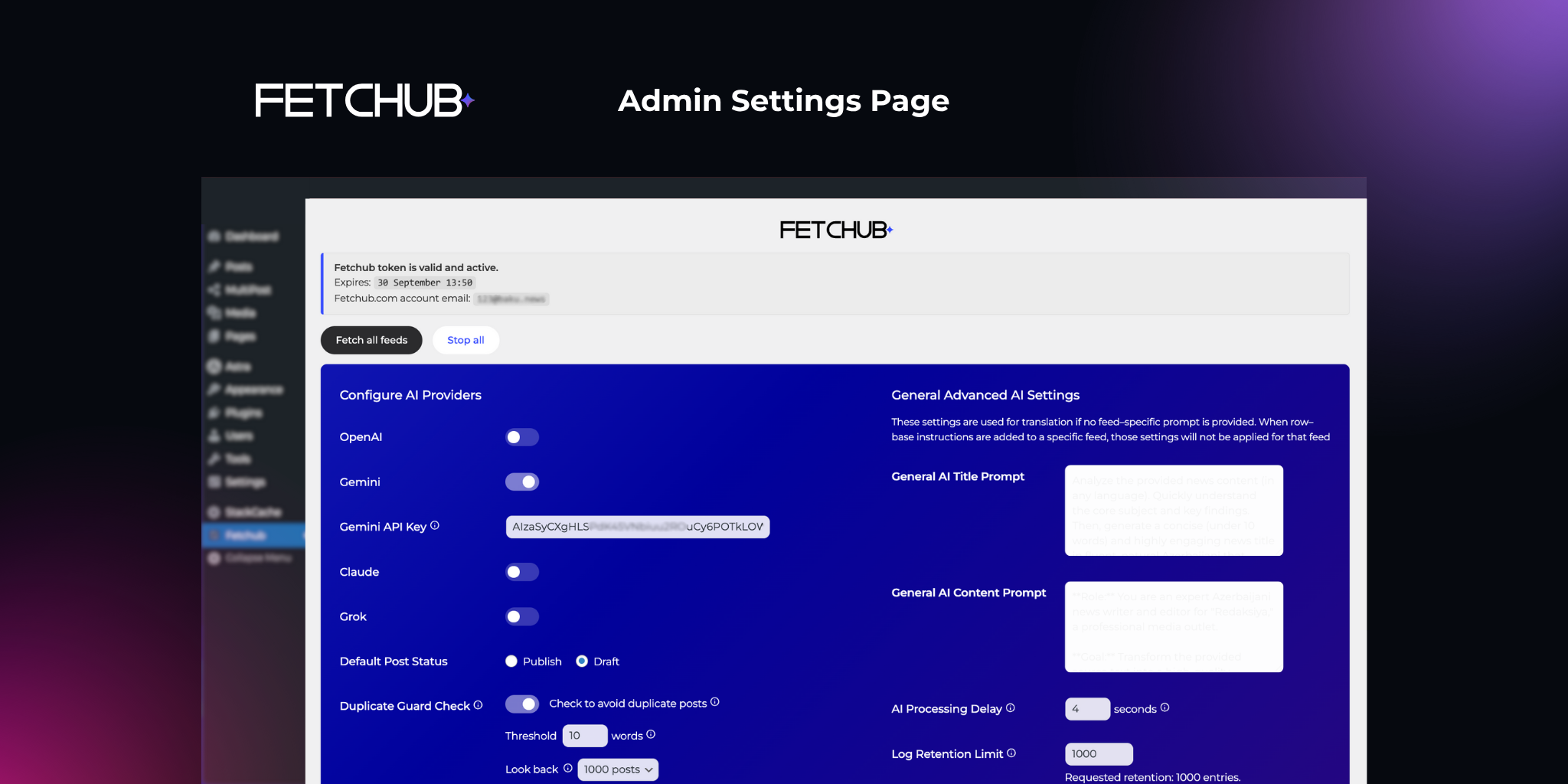
Add any RSS feed, choose a target language, and let Fetchub do the work. It fetches new items, translates them with leading AI providers (OpenAI, Gemini, Claude, Grok), generates natural titles and summaries, sets featured images, and publishes them as posts on your site.
Made for: publishers, editors, journalists, students, beginners, professionals, busy site owners — practically anyone who wants effortless, multilingual content.
Pricing: Only $1/month, with a free 3-day trial to get started. No contract. No hidden costs. Cancel anytime directly from your account page.
Traits
- AI Translation: Translate content with OpenAI, Google Gemini, Anthropic Claude, or xAI Grok (90+ languages supported).
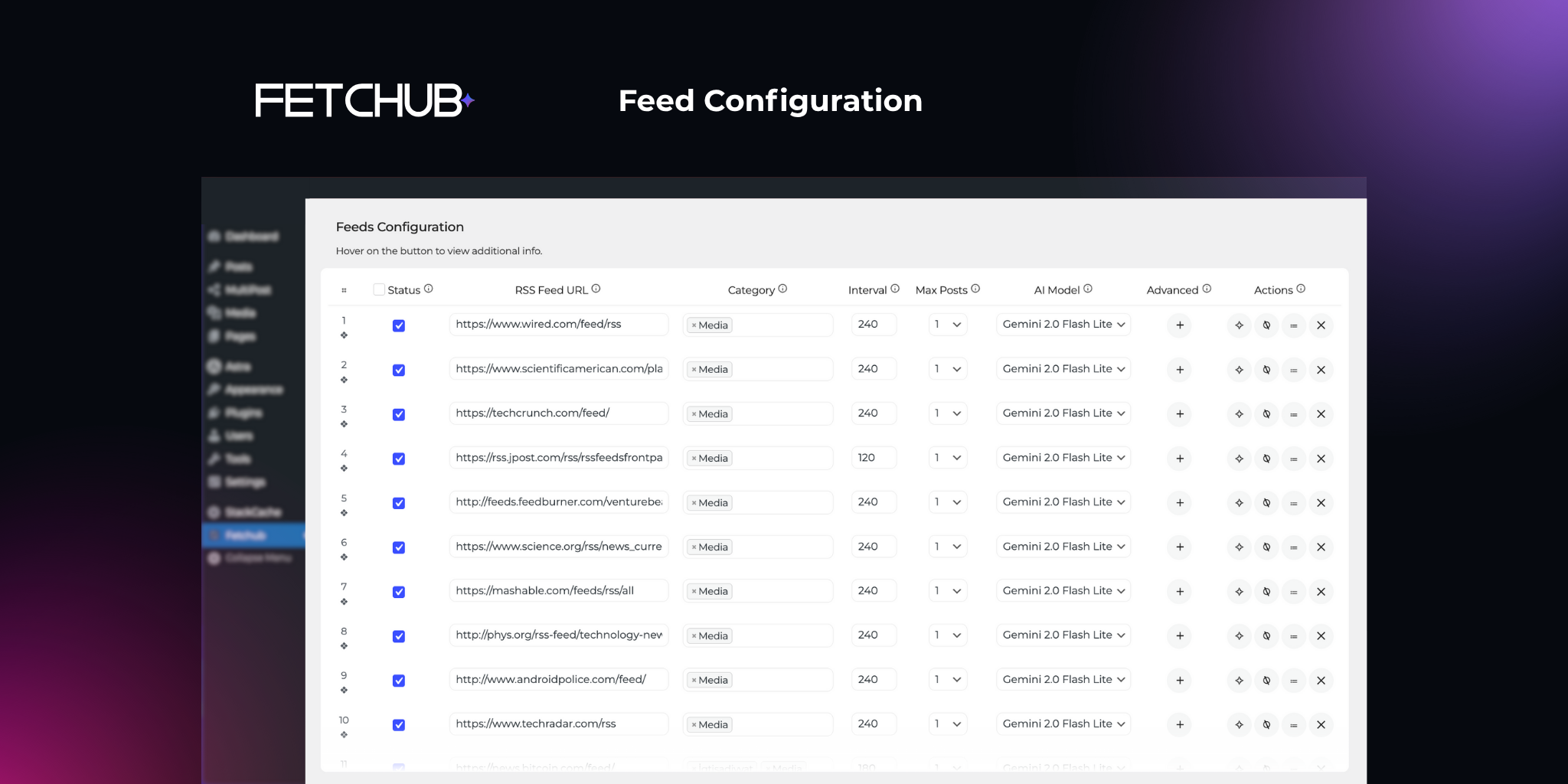
- Per-Feed Scheduling: Each feed has its own interval (every X minutes/hours). Run instantly, pause, or reschedule anytime.
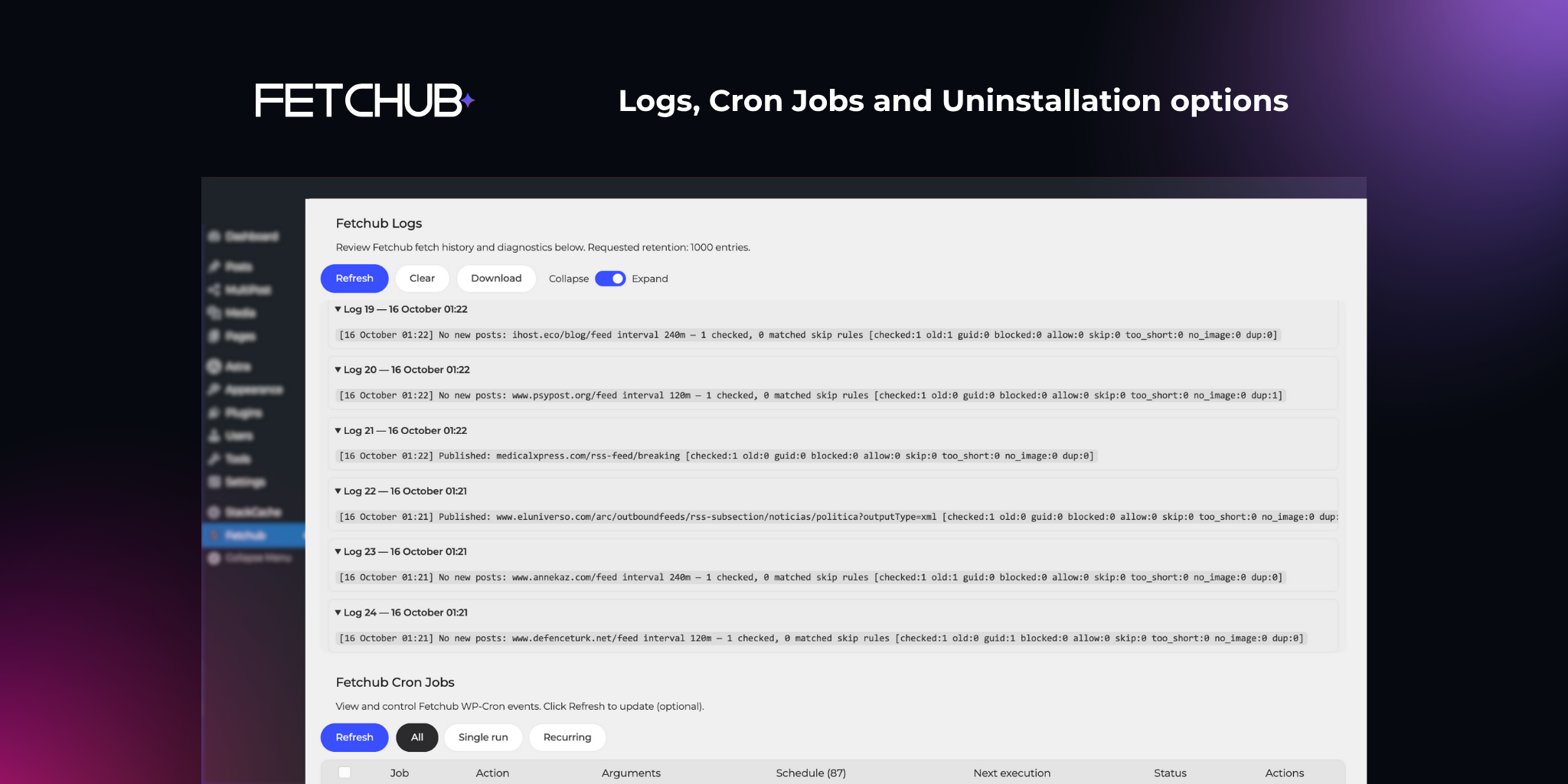
- Cron Jobs Panel: See all Fetchub cron events; run, delete, or reschedule feeds with one click.
- Duplicate Guard: Prevent reposts with adjustable thresholds and look-back.
- Smart Logic (AI rank): Prioritize high-value stories automatically.
- Couple Title: Generate a clear main headline plus an optional secondary title for more engaging posts.
- Allow / Block Words: Fine-tune your feeds by requiring or excluding specific keywords.
- Custom Prompts: Global and per-feed AI prompts for titles and content.
- Featured Images: Auto-fetch and set images from the source.
- Session-Based Authorization: Secure, token-free handshake with Fetchub accounts.
- Post Status Control: Choose to publish immediately or save as draft.
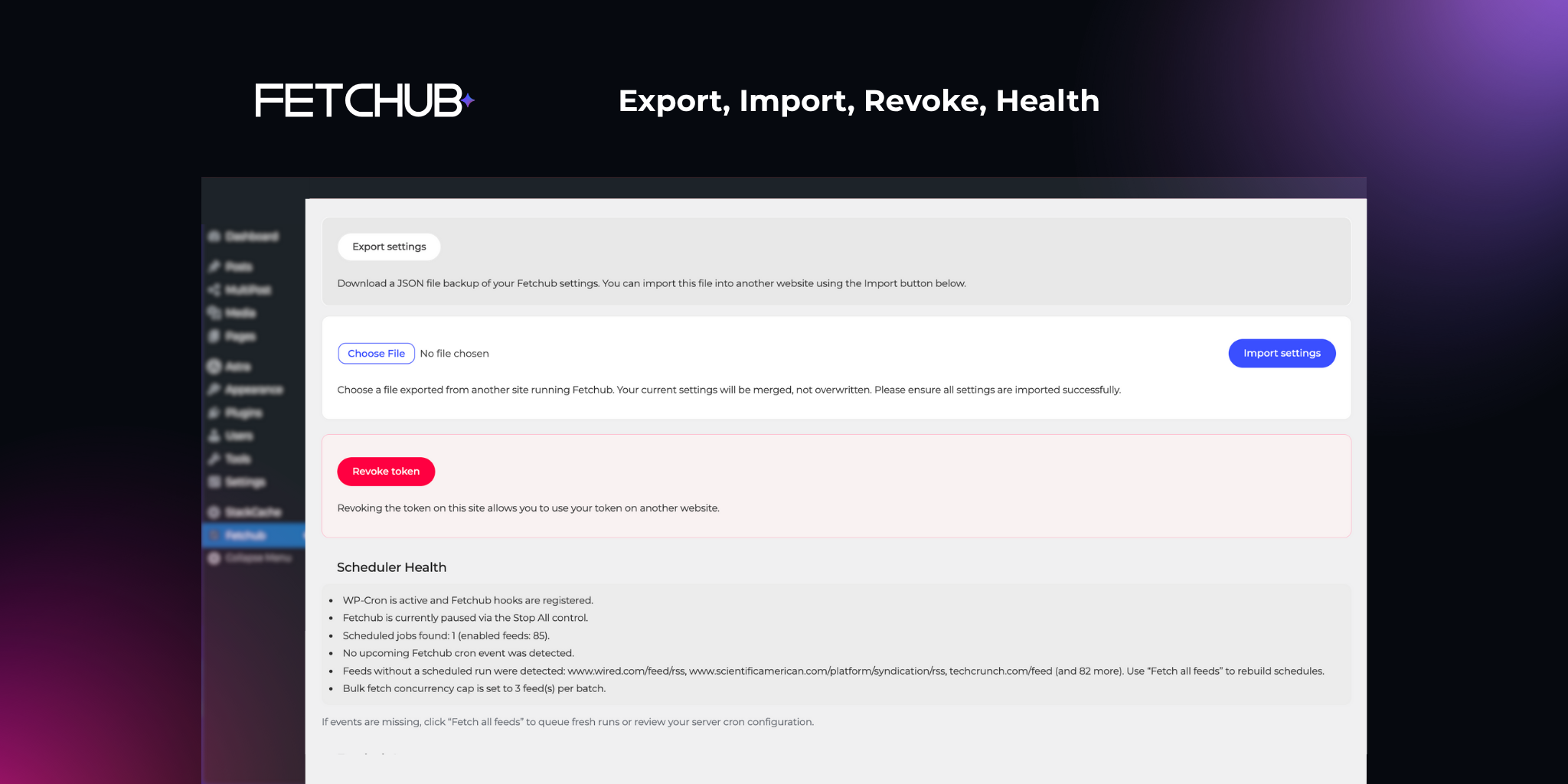
- Export / Import: Move your setup between sites with one JSON file.
- Logs & Status: Clear, searchable logs with timezone support.
- Multisite / Network Admin Support: Run Fetchub across your entire WordPress Multisite network.
Comment cela fonctionne
- Add your feed URLs and set target language.
- Connect your chosen AI provider(s).
- Define intervals per feed.
Fetchub handles the rest.
Obligations
- WordPress 6.0 or higher
- PHP 7.4 or higher (works with PHP 8.0 → 8.4)
- WP-Cron (or real cron) enabled
- Standard PHP extensions: cURL, OpenSSL, DOM
- 512 MB+ PHP memory recommended if running many feeds with AI
Best practice for performance
For the smoothest AI processing and zero-maintenance cron execution, we recommend hosting your WordPress site on ihost WordPress Cloud Hosting. See FAQ #12 for an ihost-optimised php.ini template you can copy-and-paste.
Account Setup
Before using the plugin, create your Fetchub account:
1. Go to the Fetchub account page.
2. Sign up to easily create your account.
3. In your Dashboard, select a package.
4. After a successful order, you will receive your Token on the Thank You page, via email, and in your Dashboard under the Fetchub Token menu.
5. Enjoy a 3-day free trial, then continue for only $1 per month.
No contract. No hidden costs. Cancel anytime directly from your account page.
Services externes
This plugin contacts five external APIs. For legal clarity users are told what
is sent, why, and where:
-
OpenAI Chat Completions API – Generates titles, summaries and translations.
– Sends: prompt text and numeric parameters whenever a post is translated or summarised.
– Endpoint https://api.openai.com/v1/chat/completions
– Terms https://openai.com/policies/terms-of-use
– Privacy https://openai.com/policies/privacy-policy -
Google Gemini Generative Language API – Same purpose for Gemini models.
– Sends: prompt text and numeric parameters.
– Endpoint (base): https://generativelanguage.googleapis.com/v1beta/models/{model}:generateContent
– Terms https://policies.google.com/terms
– Privacy https://policies.google.com/privacy -
Anthropic Claude API – Same purpose for Claude models.
– Sends: prompt text and numeric parameters.
– Endpoint https://api.anthropic.com/v1/messages
– Terms https://www.anthropic.com/terms
– Privacy https://www.anthropic.com/privacy -
xAI Grok API – Same purpose for Grok models.
– Sends: prompt text and numeric parameters.
– Endpoint https://api.x.ai/v1/chat/completions
– Terms https://x.ai/terms
– Privacy https://x.ai/privacy -
Fetchub Licence Server – Validates your e-mail/token and handles revocation.
– Sends: e-mail address, licence token and site URL at activation or once every six hours.
– Endpoint (base): https://fetchub.com/wp-json/fetchub/v1/verify (and /revoke)
– Terms https://fetchub.com/terms
– Privacy https://fetchub.com/privacy-policy/
Licence
This plugin is released under the GNU General Public License v2 or later. See license.txt for full details.
Installation
- Téléchargez le dossier
fetchubà/wp-content/plugins/. - Activez le plugin.
- Open Fetchub in your dashboard.
- Start your free trial and connect your AI provider.
- Add feeds, set your schedule, and click Save.
Journal de modifications
Action Required: After updating to version 1.3.7, your site will automatically disconnect from the old token system. But don’t worry — your data and settings are safe. You only need to re-authorize your site using your registered Fetchub.com email address.
1.3.8
- Note: We release frequent updates to keep things stable and secure—sorry if seeing updates often feels tiring. You can enable auto-updates on the Plugins page to apply them automatically.
- New: Fetchub.com Account, Fetchub Auth menu dashboard shows subscription “Site Name”, “Order No.”, “Token”, “Status”, “Latest Authorization” and “Actions” for each authorized site.
- Improvement: Duplicate guard now checks raw titles and summaries across all feeds, cutting cross-source duplicates while honoring the Look Back depth.
- Fix: Logs expand/collapse toggle now saves per user and is restored on load, preserving your preferred view.
1.3.7
- Note: We release frequent updates to keep things stable and secure—sorry if seeing updates often feels tiring. You can enable auto-updates on the Plugins page to apply them automatically.
- New: Logs expand/collapse toggle now saves per user and is restored on load, preserving your preferred view.
- Fix: Fetchub Uninstall section reliability—options now save and apply correctly during uninstall.
- Improvement: Scheduler Health section, the “Feeds without a scheduled run were detected” notice is more informative and its detection is more accurate.
1.3.6
- New: Paywalled sources (e.g., FT) now fall back to removepaywall.com when normal scraping hits a subscription wall.
- New: Scheduler Health panel surfaces cron queue details, next runs, and recent lock states for quick diagnostics.
- New: AI processing delay control (1–10 seconds; default 5s) persists across saves to smooth provider rate limits.
- New: Log retention limit selector (default 100 entries) keeps the history lean while noting requested retention.
- New: Fetch concurrency cap (default 3) governs how many feeds run in parallel during bulk fetches.
- New: “Fetchub Uninstall” cleanup panel auto-saves your choices for removing options, cached data, feed links, or everything at once when uninstalling.
- New: “Publication Time” column on the Posts list shows the original publication timestamp right beside the fetched URL.
- Improvement: Added hard-coded AI prompt guards to reduce truncation/repetition and keep generated articles accurate.
1.3.5
- Fix: Correct featured image detection for Google News/Alerts links by resolving to the original publisher URL; avoids Google placeholder images.
- Fix: Fallback image discovery when article images are missing — extracts
og:image/twitter:imageor uses the site’s homepage image when available. - Fix: Non-AJAX “Save settings” path now persists the per-feed Enable AI toggle and global
ai_delay, keeping exports/imports in sync even when JavaScript is disabled. - Improvement: Prefers feed-provided MRSS/enclosure/inline images before scraping live pages, cutting redundant requests and preserving publisher-selected art.
- Improvement: More realistic HTTP headers on fetch to reduce
403 Forbiddenresponses from strict origins. - Improvement: Settings hardening — bounds
ai_delayto 1–10s, casts per-feedai_enabledto boolean, and sanitizes request params viafilter_input()/sanitize_key(). - New: Per-feed Enable AI toggle in Advanced AI Options; fine-tune processing feed-by-feed.
- Dev: Removed duplicate
str_starts_withpolyfill fromclass-tk.php(now loaded centrally frompolyfills.php).
1.3.4
- Fix: WordPress dashboard menu icon now displays correctly.
- Fix: Custom fonts are now applied properly on the Token page.
1.3.3
- Fix: Success, warning, and error notice colors adjusted.
- Fix: Custom font no longer affects the entire WordPress dashboard; scoped only to plugin settings page.
Captures d'écran

Pour les développeurs
Est-ce votre plugin ? Montrez les chiffres.
Ajoutez un badge en direct à votre site, docs ou github readme. Il se met à jour par lui-même - aucun compte n'est nécessaire.
Best FETCHUB alternatives
All aggregator plugins →




FAQ
FETCHUB: quick answers
Réponses directes, extraites des données en direct WordPress.org.
Source : WordPress.org
Is FETCHUB free?
Yes. FETCHUB is free to download and use from the official WordPress.org plugin directory.
Is FETCHUB safe to use in 2026?
FETCHUB shows warning signs in 2026 — compare the alternatives below before installing. It runs on 10+ sites, is rated 5/5 and was last updated 1 year ago, and scores 39/100 on our health check.
How many websites use FETCHUB?
FETCHUB is active on 10+ WordPress websites and has been downloaded 2,615 times since it launched in July 2025. It was downloaded 186 times in the last 30 days.
Does FETCHUB work with WordPress 7.1?
FETCHUB is officially tested up to WordPress 6.8.13, while the latest release is 7.1.5. It may still work, but try it on a staging site first.
What PHP version does FETCHUB need?
FETCHUB requires PHP 7.4 or higher. Most hosts run PHP 8.x today, so it works on any modern WordPress hosting.
When was FETCHUB last updated?
The latest version, 1.3.8, was released on October 29, 2025 (1 year ago).
Who makes FETCHUB?
FETCHUB is developed and maintained by Unioney.
What are the best alternatives to FETCHUB?
The most popular alternatives to FETCHUB are Curator.io (2K+ installs), PressForward (100+ installs) and DaazSync (100+ installs).
Propulsé par PageForge
Un modèle et une feuille de calcul. Une vraie page pour chaque recherche.
PageForge transforme chaque ligne d'un CSV en une page WordPress avec son propre titre, URL, SEO et schéma, construit sur la mise en page que vous Déjà conçu. Gratuit sur WordPress.org.
- CSV et XLSX, plus Google Sheets sur les professionnels et les entreprises
- Son propre titre, URL, SEO champs et schéma pour chaque page
- Fonctionne avec l'éditeur de blocs, Elementor, Divi et Avada
- Gratuit sur WordPress.org, pas de carte de crédit