


ExpirePress – Automatic Post Scheduler for WordPress
ExpirePress automatically schedule post expiration and content actions in WordPress using powerful rules.

Envisager une alternative
ExpirePress shows warning signs in 2026 — compare the alternatives below before installing. It runs on 60+ sites and was last updated 10 months ago, and scores 40/100 on our health check.
- Petite base d'utilisateurs (60+ installations actives)
- Très peu de critiques jusqu'à présent
- Uniquement testé jusqu'à WordPress 6,9 (le dernier est de 7,1)
Comment s'accumule-t-il ?
Côte à côte sur les installations, les mises à jour, les évaluations et le supportTéléchargements quotidiens
Les pics de téléchargement suivent généralement une nouvelle version - chaque site qui met à jour automatiquement compte comme un téléchargement.
Classements
Where ExpirePress stands todayWordPress.org Classements de recherche
Position en direct dans la recherche de plugins, Top 100| Mot-clé | Position |
|---|---|
| auto expire | #95 |
| automation | >100 |
| content management | >100 |
| Planificateur de poste | #39 |
Adoption de version
Part de sites actifs par version.
About ExpirePress
À partir du Lisezmoi officiel · v1.0.4Description
ExpirePress is a lightweight yet powerful WordPress post scheduler designed to automate content management through smart expiration actions. With ExpirePress, you can automatically expire posts and control exactly what happens to your content at a scheduled date and time.
Perfect for blogs, news websites, business sites, and eCommerce stores, ExpirePress helps you keep your website clean, relevant, and up to date — without manual intervention.
You can auto expire posts and apply content actions such as changing post status, updating titles, modifying categories, or hiding content from search and sitemaps.
Key Fatures
Flexible ExpirePress Actions
– Set post status to Draft, Trash, Delete Permanently, or Private
– Password-protect or unprotect posts
– Change post categories
– Update post titles
– Hide posts from XML sitemaps
– Exclude posts from site search results
Post Scheduling & Automation
– Schedule expiration by date and time
– Automate content lifecycle management
– Ideal for temporary, seasonal, or time-limited content
User-Friendly Interface
– Configure expiration settings directly from the post editor
– No complex setup or configuration required
Supports Multiple Post Types
– Works with standard posts
– Fully compatible with custom post types
Reliable & Compatible
– Lightweight and performance-friendly
– Tested with modern WordPress versions (6.6+)
– Compatible with Gutenberg and common plugins
Customization & Developer Hooks
ExpirePress is built with developers in mind and provides custom hooks and filters for extending functionality.
You can:
– Add or remove expiration actions
– Register custom expiration behaviors
– Control how new actions are saved
– Modify expiration logic programmatically
Hooks are available for:
– Registering new expiration actions
– Handling data saving when a custom action is added
– Extending existing expiration workflows
This makes ExpirePress easy to integrate into custom projects, advanced workflows, or third-party plugins.
Full developer documentation is available at:
https://www.wp-sqr.com/
Cas d'utilisation courants
- Automatically expire outdated blog posts
- Manage seasonal or promotional content
- Clean up expired announcements or offers
- Control visibility of old content without deleting it
- Automate content workflows in WordPress
ExpirePress gives you full control over post scheduling, auto expiration, and content automation — all in one simple plugin.
Dépannage
- Ensure the ExpirePress plugin is activated and your WordPress version is at least 5.2.
- Deactivate other plugins to check for conflicts.
Installation
- Téléchargez le dossier
expirepressdans le répertoire/wp-content/plugins/. - Activez le plugin via le menu "plugins" dans WordPress.
- Configure your expiration settings in the Post Editor Page.
Journal de modifications
Recommended update for performance and compatibility improvements.
1.0.4
- Performance improvements
- Compatibility updates
1.0.3
- Minor improvements, bug fixes, and compatibility updates.
1.0.2
- Resolved conflict with ACF and Gutenberg.
1.0.0
- Communiqué initial
Captures d'écran
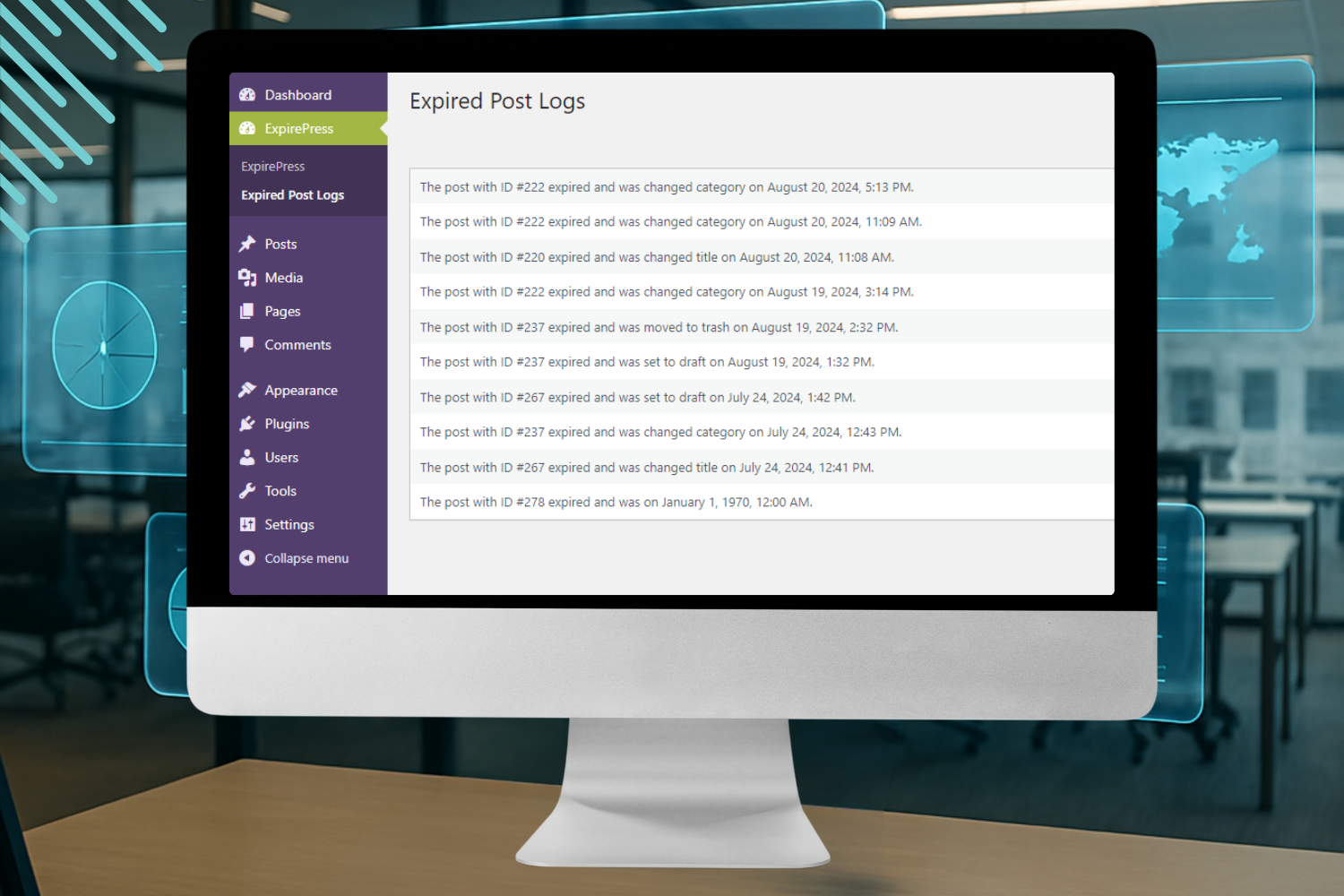
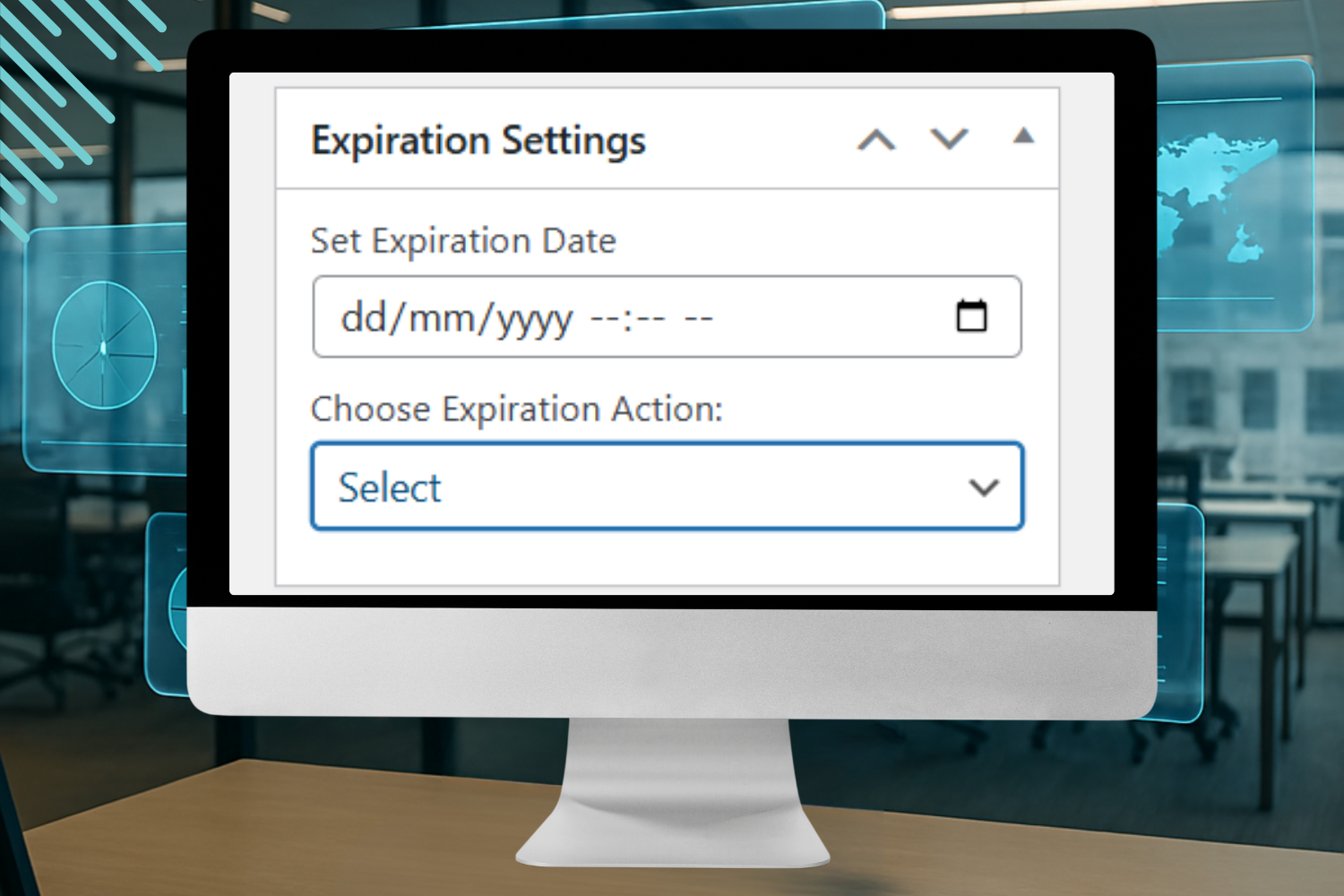

Pour les développeurs
Est-ce votre plugin ? Montrez les chiffres.
Ajoutez un badge en direct à votre site, docs ou github readme. Il se met à jour par lui-même - aucun compte n'est nécessaire.
Best ExpirePress alternatives
All auto expire plugins →| Rang | Plugin | Installations actives |
|---|---|---|
| 1 |
 Auto Post Expire
Sets an expiration date for posts, auto moving them to draft after the set period. |
1K+ |
| 3 |
 AIT Easy Post Customization
Easily set expiry dates for posts and custom post types, automatically unpublishing content… |
<10 |
FAQ
ExpirePress: quick answers
Réponses directes, extraites des données en direct WordPress.org.
Source : WordPress.org
Is ExpirePress free?
Yes. ExpirePress is free to download and use from the official WordPress.org plugin directory.
Is ExpirePress safe to use in 2026?
ExpirePress shows warning signs in 2026 — compare the alternatives below before installing. It runs on 60+ sites and was last updated 10 months ago, and scores 40/100 on our health check.
How many websites use ExpirePress?
ExpirePress is active on 60+ WordPress websites and has been downloaded 1,966 times since it launched in September 2024. It was downloaded 129 times in the last 30 days.
Does ExpirePress work with WordPress 7.1?
ExpirePress is officially tested up to WordPress 6.9.12, while the latest release is 7.1.5. It may still work, but try it on a staging site first.
What PHP version does ExpirePress need?
ExpirePress requires PHP 7.2 or higher. Most hosts run PHP 8.x today, so it works on any modern WordPress hosting.
When was ExpirePress last updated?
The latest version, 1.0.4, was released on January 21, 2026 (10 months ago).
Who makes ExpirePress?
ExpirePress is developed and maintained by wpsqr.
What are the best alternatives to ExpirePress?
The most popular alternatives to ExpirePress are Auto Post Expire (1K+ installs) and AIT Easy Post Customization (<10 installs).
Propulsé par PageForge
Un modèle et une feuille de calcul. Une vraie page pour chaque recherche.
PageForge transforme chaque ligne d'un CSV en une page WordPress avec son propre titre, URL, SEO et schéma, construit sur la mise en page que vous Déjà conçu. Gratuit sur WordPress.org.
- CSV et XLSX, plus Google Sheets sur les professionnels et les entreprises
- Son propre titre, URL, SEO champs et schéma pour chaque page
- Fonctionne avec l'éditeur de blocs, Elementor, Divi et Avada
- Gratuit sur WordPress.org, pas de carte de crédit