


Activer le remplacement des supports
Easily replace any attached image/file by simply uploading a new file in the Media Library edit view - a real time saver!

Choix
Yes — Enable Media Replace is a safe, well-maintained plugin to use in 2026. It runs on 600K+ sites, is rated 4.4/5 and was last updated 4 weeks ago, and scores 85/100 on our health check.
- Prouvé à grande échelle sur plus de 600 000 000 sites actifs
- Développé activement — Dernière mise à jour il y a 4 semaines
- Testé avec le dernier WordPress (7.1)
- Momentum — downloads up 415.9% vs the previous 30 days
Comment s'accumule-t-il ?
Côte à côte sur les installations, les mises à jour, les évaluations et le supportTéléchargements quotidiens
Les pics de téléchargement suivent généralement une nouvelle version - chaque site qui met à jour automatiquement compte comme un téléchargement.
Classements
Where Enable Media Replace stands todayWordPress.org Classements de recherche
Position en direct dans la recherche de plugins, Top 100| Mot-clé | Position |
|---|---|
| change media | #1 |
| remove background | #1 |
| remplacer | #1 |
| replace image | #1 |
| replace jpg | #1 |
Adoption de version
Part de sites actifs par version.
Répartition des notes
★★★★★★★★★★ 4.4 from 302 reviews
About Enable Media Replace
À partir du Lisez-moi officiel · v4.2.3Description
A free, lightweight and easy to use plugin that allows you to seamlessly replace an image or file in your Media Library by uploading a new file in its place. No more deleting, renaming and re-uploading files! Now fully compatible with WP Offload Media!
New beta feature! You can now remove the background of your images for better integration with eCommerce solutions!
Supported by the friendly team that created ShortPixel 🙂
A real timesaver
Don’t you find it tedious and complicated to first delete a file and then upload another one with the exact same name every time you want to update an image or other uploaded file in the WordPress media library?
Well, no longer!
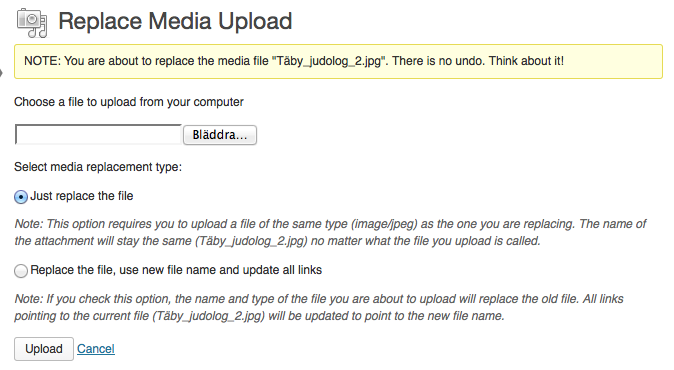
Now you can replace any uploaded file in the Edit Media view, where it should be. Replacing Media can be done in two ways:
It’s simple to replace a file
- Simply replace the file. This option requires you to upload a file of the same type as the file you want to replace. The attachment name remains the same regardless of what the file you upload is called.
- Replace the file, use the new file name, and update all links. If you check this option, the old file will be replaced with the name and type of the file you are uploading. All links pointing to the current file will be updated to point to the new file name. Additional options for the folder to put the new file in or the date of the new file are also available on the replace screen.
This plugin is very powerful and a must-have for all major websites built with WordPress. It also offers a preview of the replaced image!
New beta feature: You can now remove the background of any image!
Similar to replacing media, you can also remove the background of the images from the Media Library! The background removal feature sends the images to ShortPixel’s API, removes the background and sends them back in a preview window. If everything looks good, just replace the image with the one that has the background removed! If the source image is a PNG file, you will get a transparent background, while the other images default to a solid white background. You also have the option to choose a different color with an embedded color picker.
The background removal feature is still in beta and will be free of charge for a reasonable usage.
If you don’t want to use the background removal feature, add this line to your theme’s functions.php file, or use a plugin like Code Snippets:
`add_filter( 'emr/feature/background', '__return_false' );```
A similar filter, for the remote notification system is:
`add_filter( 'emr/feature/remote_notice', '__return_false' );```
To shorten the wait time before redirecting to the media editing screen, use the following filter and specify the wait time in seconds (0 means that redirection is immediate, but may cause problems in certain configurations):
`add_filter('emr/success/timeout', function () { return 3; });```
To set “Just replace the file” as the default replacing method, use the following filter:
`add_filter( 'emr/replace/default_type', function() {
return 'replace';
} );“`
To set “Replace the file, use the new file name, and update all links” as the default replacing method, use the following filter:
`add_filter( 'emr/replace/default_type', function() {
return 'replace_and_search';
} );“`
Show file modification time
There is a shortcode that takes the file modification date and displays it in a post or on a page. The code is:
[file_modified id=XX format=XXXX] where the “id” is required and the “format” is optional and defaults to your current WordPress settings for date and time format.
So [file_modified id=870] would show the last time the file with ID 870 was updated on your site. To get the ID for a file, check the URL when editing a file in the media library (see screenshot #4)
If you want more control over the format in which the time is shown, you can use the format option. So [file_modified id=870 format=Y-m-d] would show the date the file was modified but not the time. The format string uses the standard PHP date() formatting tags.
Other plugins by ShortPixel:
- FastPixel Caching – WP Optimization made easy
- ShortPixel Image Optimizer – Image optimization & compression for all the images on your website, including WebP & AVIF delivery
- ShortPixel Adaptive Images – On-the-fly image optimization & CDN delivery
- Resize Image After Upload – Automatically resize each uploaded image
- reGenerate Thumbnails Advanced – Easily regenerate thumbnails
- WP SVG Images – Secure upload of SVG files to Media Library
Get in touch!
- Email https://shortpixel.com/contact
- Twitter https://twitter.com/shortpixel
- Facebook https://www.facebook.com/ShortPixel
- LinkedIn https://www.linkedin.com/company/shortpixel
Wishlist / Coming attractions
Do you have suggestions? Feel free to contact ShortPixel here
Contribuer
Want to help us improve the plugin feel free to submit PRs via GitHub here.
Installation
Quick and easy installation:
- Upload the folder
enable-media-replaceto your plugin directory - Activez le plugin via le menu « Plugins » dans WordPress
- D'accord!
Journal de modifications
4.2.3
Release date: October 26, 2026
* Fix: Hardened the database replacements against a possible PHP Object Injection, which could be exploited under certain conditions, safely disclosed by the Wordfence, PatchStack and WPScan teams;
* Fix: Users with the Author role now only see the standard replace option; renaming, changing the location and background removal are limited to Editors and above, following a security report from the Wordfence team;
* Fix: Strengthened the folder checks when a file is replaced into a new location, including on multisite installations, following a report from Adam Kahlon via the WPScan team;
* Fix: Uploaded replacement files now go through the same WordPress checks as regular media uploads, following a report from Adam Kahlon via the WPScan team;
* Fix: The database replacement no longer runs when there is nothing to search for (thanks to @ibeninc for reporting and proposing the fix);
* Compat: Improved the Breakdance builder integration and the cache purge after a replacement;
* Tweak: A few interface improvements when the replaced file is an SVG;
* Tweak: The admin scripts no longer depend on jQuery;
* Tweak: Removed the outdated bundled translation files, translations are provided through WordPress.org.
4.2.2
Release date: June 28, 2026
* Fix: A potential stored XSS via the display name has been fixed, following the responsible disclosure from the PatchStack team;
* Fix: A fatal error was thrown in a very specific edge case;
* Compat: Fixed the composer file to publish the plugin on packagist.org.
4.2.1
Release date: June 24, 2026
* Compat: Updated the integration with Breakdance builder to also work with the upcoming 2.8.0 version.
4.2.0
Release date: June 17, 2026
* New: Updated the plugin design and user interface;
* New: Added hooks/filters to programmatically select the default replacement method;
* New: Added cache plugin integrations for FastPixel, Breeze(Cloudways), and Cache Enabler(KeyCDN). EMR will now automatically purge the cache when a media file is replaced;
* New: You can now add the API key from your ShortPixel Unlimited or Unlimited AI plan to enable unlimited AI background removals. This is especially useful when the standard 100 background removal limit has been reached;
* New: Added support for the Breakdance builder. Images uploaded through this page builder can now be replaced correctly;
* Fix: Fixed an issue where image titles could lose diacritical characters after replacement in certain cases;
* Tweak: Added various visual improvements and compatibility tweaks for WordPress 7.0.
4.1.9
Release date: April 22, 2026
* Fix: open_basedir warnings should be gone now for more restrictive hosts;
* Fix: Stored Cross-Site Scripting vulnerability via the ‘location_dir’ parameter, responsibly disclosed by the WordFence team;
* Compat: Updated the hook used for the LS Cache plugin integration for better compatibility.
4.1.8
Release date: March 3, 2026
* Fix: Unauthorized modification and deletion of media files vulnerability responsibly disclosed by the WordFence team;
* Fix: The plugin works for RTL languages now;
* Fix: Textdomain modules are loaded properly in all cases;
* Tweak: Added a permission check for the ShortPixel recommendation displayed after the replacement;
* Tweak: Added the raw file path to the filemodel filter;
* Tweak: Added a filter to disable the database replacements (thanks @seed-glauco);
* Tweak: Updated the banners from the plugin pages.
Captures d'écran



Pour les développeurs
Est-ce votre plugin ? Montrez les chiffres.
Ajoutez un badge en direct à votre site, docs ou github readme. Il se met à jour par lui-même - aucun compte n'est nécessaire.
Best Enable Media Replace alternatives
All change media plugins →| Rang | Plugin | Installations actives |
|---|---|---|
| 2 |
 Yatterukun
Fast and easy photo/video media changer plugin. |
<10 |
FAQ
Enable Media Replace: quick answers
Réponses directes, extraites des données en direct WordPress.org.
Source : WordPress.org
Is Enable Media Replace free?
Yes. Enable Media Replace is free to download and use from the official WordPress.org plugin directory.
Is Enable Media Replace safe to use in 2026?
Yes — Enable Media Replace is a safe, well-maintained plugin to use in 2026. It runs on 600K+ sites, is rated 4.4/5 and was last updated 4 weeks ago, and scores 85/100 on our health check.
How many websites use Enable Media Replace?
Enable Media Replace is active on 600K+ WordPress websites and has been downloaded 14,736,345 times since it launched in June 2009. It was downloaded 469,735 times in the last 30 days.
Does Enable Media Replace work with WordPress 7.1?
Yes. The developer has tested Enable Media Replace up to WordPress 7.1.5, the latest release. It requires WordPress 4.9.7 or newer.
What PHP version does Enable Media Replace need?
Enable Media Replace requires PHP 5.6 or higher. Most hosts run PHP 8.x today, so it works on any modern WordPress hosting.
When was Enable Media Replace last updated?
The latest version, 4.2.3, was released on October 26, 2026 (4 weeks ago).
Who makes Enable Media Replace?
Enable Media Replace is developed and maintained by ShortPixel.
What are the best alternatives to Enable Media Replace?
The most popular alternatives to Enable Media Replace are Yatterukun (<10 installs).
Propulsé par PageForge
Un modèle et une feuille de calcul. Une vraie page pour chaque recherche.
PageForge transforme chaque ligne d'un CSV en une page WordPress avec son propre titre, URL, SEO et schéma, construit sur la mise en page que vous Déjà conçu. Gratuit sur WordPress.org.
- CSV et XLSX, plus Google Sheets sur les professionnels et les entreprises
- Son propre titre, URL, SEO champs et schéma pour chaque page
- Fonctionne avec l'éditeur de blocs, Elementor, Divi et Avada
- Gratuit sur WordPress.org, pas de carte de crédit