

Dynamic QR Code Block – QR Code Generator with Logo Support
Dynamic QR Code Block is a powerful, feature-rich QR code generator that seamlessly integrates with the WordPress block editor. Create professional-grade QR codes for your business, products, events, or personal use…

Envisager une alternative
Dynamic QR Code Block shows warning signs in 2026 — compare the alternatives below before installing. It runs on 10+ sites and was last updated 2 years ago, and scores 32/100 on our health check.
- Petite base d'utilisateurs (plus de 10 installations actives)
- Très peu de critiques jusqu'à présent
- Pas de mise à jour depuis plus d'un an
- Uniquement testé jusqu'à WordPress 6,8 (le dernier est de 7,1)
Comment s'accumule-t-il ?
Côte à côte sur les installations, les mises à jour, les évaluations et le support



Téléchargements quotidiens
Les pics de téléchargement suivent généralement une nouvelle version - chaque site qui met à jour automatiquement compte comme un téléchargement.
Classements
Where Dynamic QR Code Block stands todayWordPress.org Classements de recherche
Position en direct dans la recherche de plugins, Top 100| Mot-clé | Position |
|---|---|
| dynamic qr code | >100 |
| qr code | >100 |
| qr code block | >100 |
| qr code generator | >100 |
Adoption de version
Part de sites actifs par version.
About Dynamic QR Code Block
À partir du Lisezmoi officiel · v1.1.2Description
Dynamic QR Code Block is a powerful, feature-rich QR code generator that seamlessly integrates with the WordPress block editor. Create professional-grade QR codes for your business, products, events, or personal use without leaving your WordPress dashboard.
Unlike other QR code solutions that rely on external services, Dynamic QR Code Block generates all QR codes locally on your server, ensuring your data remains private and secure. No API calls, no subscriptions, and no limitations.
🚀 Transform Your Content with Custom QR Codes
Whether you’re linking to your website, sharing contact information, or creating promotional materials, our QR code block makes it easy to generate scannable codes that stand out with your brand colors and logo.
💯 Complete QR Code Solution for WordPress
✨ Key Features
- Intuitive Block Editor Integration: Simply add the QR code block to any post or page
- Professional Branding Options:
- Add your company logo to the center of QR codes
- Customize foreground and background colors to match your brand
- Adjust size, margin, and corner style for perfect presentation
- Multiple Output Formats:
- SVG (scalable vector format, ideal for print)
- PNG (transparent background support)
- JPG (optimized for web)
- Flexible Content Types:
- Website URLs and deep links
- Plain text and messages
- Email addresses with optional subject and body
- Phone numbers with direct call functionality
- SMS messages with pre-filled text
- WhatsApp messages and contact sharing
- vCard contact information
- WiFi network credentials
- Advanced Customization:
- Four error correction levels for optimal scanning reliability
- Responsive design that looks great on all devices
- Custom size and margin controls
🛡️ Privacy & Performance
- 100% On-Server Generation: All QR codes are created locally on your server
- Zero External Dependencies: No reliance on third-party services or APIs
- No Data Collection or Tracking: Your QR code content remains completely private
- Lightweight Implementation: Minimal impact on your site’s performance
- No Usage Limits: Create as many QR codes as you need
🎯 Perfect For
- Business Websites: Add QR codes to product pages for easy information access
- Restaurants: Create QR codes for menus, specials, or reservation links
- Event Pages: Generate QR codes for tickets, directions, or event details
- Contact Pages: Share contact information with scannable QR codes
- Marketing Materials: Include QR codes in your digital and print marketing
- Social Media Promotion: Link to your social profiles with branded QR codes
Installation
Easy Installation
-
Automatic Installation:
- Navigate to your WordPress Dashboard
- Aller à Plugins > Ajouter un nouveau
- Search for “Dynamic QR Code Block”
- Click “Install Now” and then “Activate”
-
Manual Installation:
- Télécharger le fichier zip du plugin
- Upload the plugin files to the
/wp-content/plugins/dynamic-qr-code-blockdirectory - Activez le plugin via l'écran "Plugins" dans WordPress
Commencer
-
Add the QR Code Block:
- Open the block editor on any post or page
- Click the ‘+’ icon to add a new block
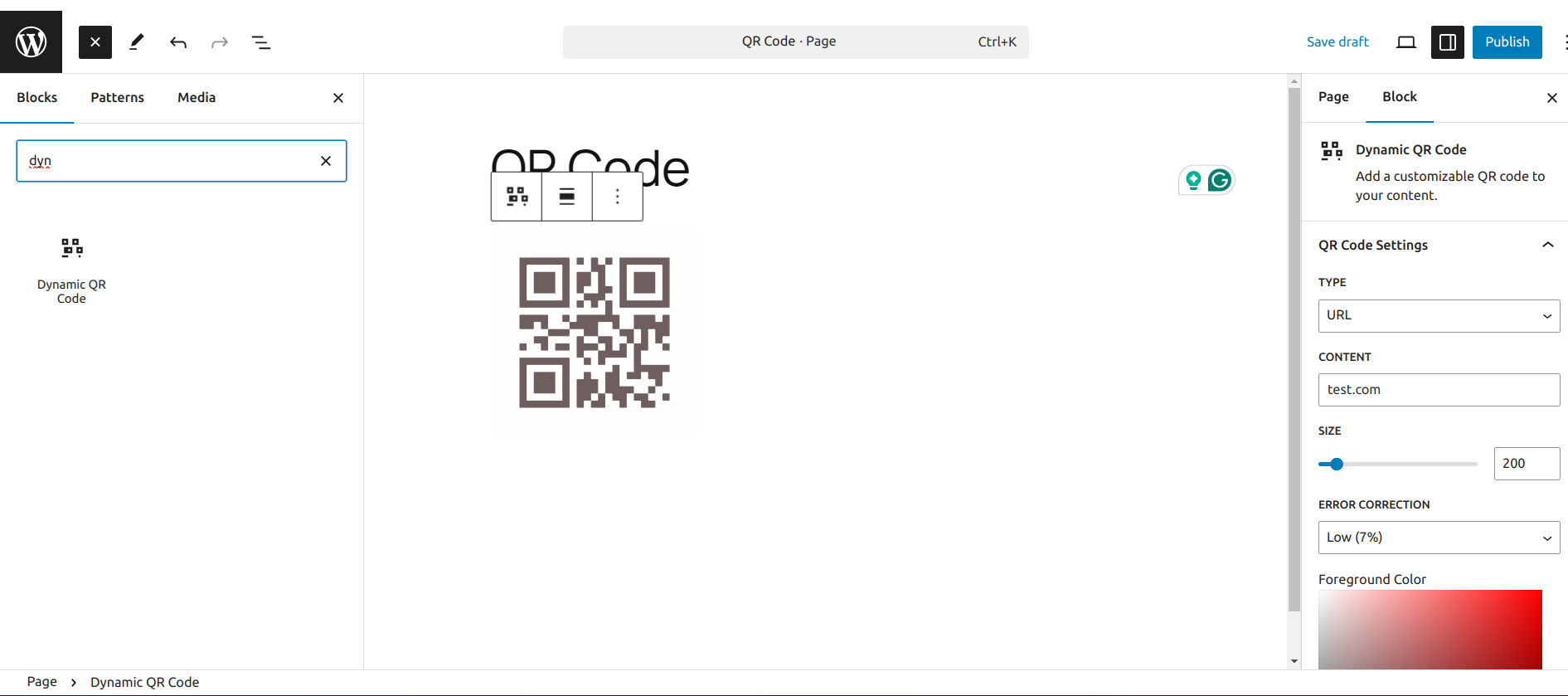
- Search for “QR Code” and select the “Dynamic QR Code” block
-
Configure Your QR Code:
- Enter the content you want to encode (URL, text, contact info, etc.)
- Customize appearance options (colors, size, logo, etc.)
- Preview your QR code directly in the editor
-
Publish and Share:
- Once satisfied with your QR code, publish your post or page
- The QR code will be displayed and ready for scanning
Journal de modifications
This update improves compatibility with WordPress 6.8 and enhances responsive behavior on mobile devices. It also fixes logo positioning issues in certain browsers.
1.1.2
- Enhancement – Improved compatibility with latest WordPress version (6.8)
- Enhancement – Better responsive behavior on mobile devices
- Fix – Resolved issue with logo positioning in certain browsers
- Performance – Optimized QR code generation for faster loading
1.1.1
- Fix – Resolved issues with color picker in some environments
- Fix – Corrected SVG rendering in Firefox browsers
- Fix – Minor bug fixes and code improvements
1.1.0
- New – Added logo support for QR codes with optimized placement
- New – Added support for PNG and JPG output formats alongside SVG
- New – Implemented logo size and position controls
- Fix – Background color setting now working correctly
- Enhancement – Improved error correction handling for better scanning reliability
- Enhancement – Added helpful guidance for logo size and placement
- Performance – Optimized code generation process
1.0.0
- Initial release of Dynamic QR Code Block
- Core QR code generation functionality
- Basic customization options (size, colors, error correction)
- SVG output format
- Support for URLs, text, email, phone, and SMS content types
Captures d'écran
Pour les développeurs
Est-ce votre plugin ? Montrez les chiffres.
Ajoutez un badge en direct à votre site, docs ou github readme. Il se met à jour par lui-même - aucun compte n'est nécessaire.
Best Dynamic QR Code Block alternatives
All dynamic qr code plugins →





FAQ
Dynamic QR Code Block: quick answers
Réponses directes, extraites des données en direct WordPress.org.
Source : WordPress.org
Is Dynamic QR Code Block free?
Yes. Dynamic QR Code Block is free to download and use from the official WordPress.org plugin directory.
Is Dynamic QR Code Block safe to use in 2026?
Dynamic QR Code Block shows warning signs in 2026 — compare the alternatives below before installing. It runs on 10+ sites and was last updated 2 years ago, and scores 32/100 on our health check.
How many websites use Dynamic QR Code Block?
Dynamic QR Code Block is active on 10+ WordPress websites and has been downloaded 1,215 times since it launched in February 2025. It was downloaded 60 times in the last 30 days.
Does Dynamic QR Code Block work with WordPress 7.1?
Dynamic QR Code Block is officially tested up to WordPress 6.8.13, while the latest release is 7.1.5. It may still work, but try it on a staging site first.
What PHP version does Dynamic QR Code Block need?
Dynamic QR Code Block requires PHP 7.4 or higher. Most hosts run PHP 8.x today, so it works on any modern WordPress hosting.
When was Dynamic QR Code Block last updated?
The latest version, 1.1.2, was released on April 26, 2025 (2 years ago).
Who makes Dynamic QR Code Block?
Dynamic QR Code Block is developed and maintained by SH Sajal Chowdhury.
What are the best alternatives to Dynamic QR Code Block?
The most popular alternatives to Dynamic QR Code Block are Dynamic QR Code (5K+ installs), QR Code Generator & Scanner (80+ installs) and QR Code Generator WP (20+ installs).
Propulsé par PageForge
Un modèle et une feuille de calcul. Une vraie page pour chaque recherche.
PageForge transforme chaque ligne d'un CSV en une page WordPress avec son propre titre, URL, SEO et schéma, construit sur la mise en page que vous Déjà conçu. Gratuit sur WordPress.org.
- CSV et XLSX, plus Google Sheets sur les professionnels et les entreprises
- Son propre titre, URL, SEO champs et schéma pour chaque page
- Fonctionne avec l'éditeur de blocs, Elementor, Divi et Avada
- Gratuit sur WordPress.org, pas de carte de crédit