


DownUp – Force Update, Fake downgrade
Force a clean reinstall or update of a plugin or theme — even one that's already up to date — via WordPress's own normal Update Now.

Choix solide
DownUp is a solid plugin choice in 2026, with a few things worth checking first. Is rated 5/5 and was last updated 1 week ago, and scores 71/100 on our health check.
- Développé activement — Dernière mise à jour il y a 1 semaine
- Testé avec le dernier WordPress (7.1)
- Petite base d'utilisateurs (<10 installations actives)
- Très peu de critiques jusqu'à présent
Téléchargements quotidiens
Les pics de téléchargement suivent généralement une nouvelle version - chaque site qui met à jour automatiquement compte comme un téléchargement.
Classements
Where DownUp stands todayWordPress.org Classements de recherche
Position en direct dans la recherche de plugins, Top 100| Mot-clé | Position |
|---|---|
| fake downgrade | #1 |
| force update | #100 |
| plugin update | >100 |
| reinstall | #28 |
| theme update | >100 |
Répartition des notes
★★★★★ ★★★★★ 5 sur 1 avis
About DownUp – Force Update, Fake downgrade
À partir du Lisez-moi officiel · v1.0.1Description
DownUp lets you reinstall any plugin or theme, even one that’s already up to date, with WordPress’s normal “Update Now” button.
How: click “Prepare Update” next to the plugin (or theme), then click “Update Now”. That’s it.
Under the hood: DownUp marks a plugin or theme’s current version as a pre-release of itself (appending a -dev suffix, e.g. 1.4.2 becomes 1.4.2-dev), purely so WordPress’s own update system offers a normal update for it. Nothing is downloaded or changed beyond that one version number — WordPress (or the plugin’s/theme’s own update source) does the rest, exactly as if a real new release had come out.
In short:
- Works on both plugins and themes, the same way.
- Never downloads, installs, or touches anything beyond that one version line.
- Enabled by default for everything — an opt-out settings screen, not opt-in.
- Two use cases, same mechanism either way — see below.
Main use case: force a clean reinstall
Sometimes a plugin or theme is already on its latest version, but you still want WordPress to redownload and reinstall it anyway — a file went missing, got corrupted, was tampered with, or you just want to be sure you’re running an unmodified copy of what’s actually published. WordPress has no built-in “reinstall this even though it’s already current” button for an individual plugin or theme. This plugin gives you one: it marks the current version as a pre-release of itself, so WordPress offers a completely normal update — which reinstalls that exact same version, fresh.
Secondary use case: forcing an update check after a same-version redeploy
If you deploy your own plugin or theme code to multiple environments (e.g. staging and production) without bumping the version number every time, WordPress correctly sees no version difference and never shows an update — even though the code changed. Instead of hand-editing the version header down and back up on every deploy, this plugin does it for you.
How it works, either way
On demand, it rewrites the Version: header to a lower pre-release value (e.g. 1.4.2 becomes 1.4.2-dev). WordPress (or the plugin’s/theme’s own update checker, if it has one) then reports an update is available, and you complete it the normal way via Update Now.
It never downloads, installs, or modifies any code beyond that one header line. It relies entirely on WordPress’s own update mechanism, or the target plugin’s/theme’s own legitimate update source.
Workflow
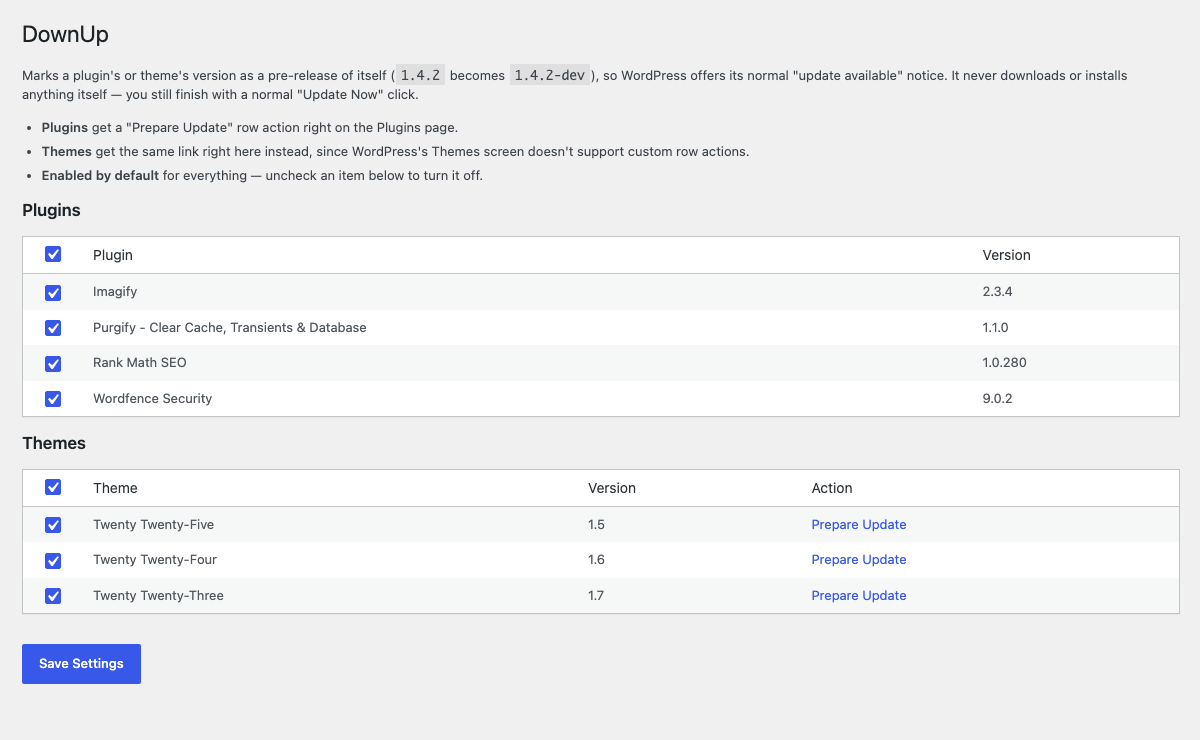
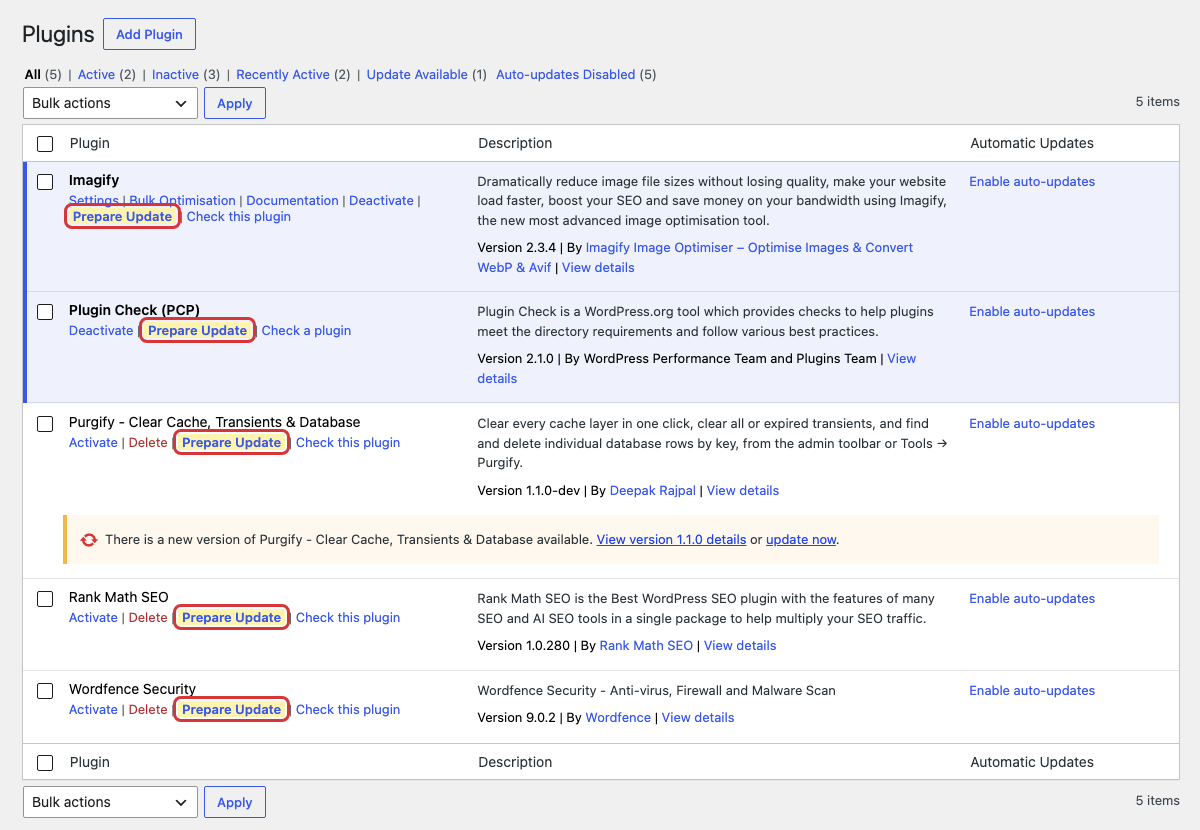
- As soon as the plugin is active, every installed plugin gets a “Prepare Update” row action on the Plugins page; every installed theme gets the same link on the Tools > DownUp screen (WordPress’s Themes screen doesn’t support in-context custom actions the way the Plugins screen does). Uncheck any plugin or theme you don’t want this on there.
- After deploying new code with an unchanged version number, click “Prepare Update” for the plugin (on the Plugins page) or theme (on Tools > DownUp) you just deployed.
- Click “Update Now” as usual to finish.
Installation
- Upload the
downupfolder to/wp-content/plugins/, or install it through the Plugins > Add New screen in wp-admin. - Activez le plugin via l'écran des plugins.
- That’s it — every plugin now has a “Prepare Update” row action on the Plugins page. Go to Tools > DownUp to manage themes, or to turn this off for specific plugins or themes.
Journal de modifications
1.0.1
- New: “Undo Prepare” restores an item you prepared (plugin row action, themes on Tools > DownUp,
wp downup restore/wp downup restore-theme). - Clearer “already prepared” message.
- Display name is now “DownUp – Force Update, Fake downgrade”; new tags and a simpler description intro.
- Internal: code prefixes and file names renamed to
downup.
1.0.0
- Initial release: enabled by default for all plugins and themes (opt-out settings list), fake-downgrade action for both, WP-CLI commands (
wp downup prepare <plugin>,wp downup prepare-theme <theme>).
Captures d'écran
Pour les développeurs
Est-ce votre plugin ? Montrez les chiffres.
Ajoutez un badge en direct à votre site, docs ou github readme. Il se met à jour par lui-même - aucun compte n'est nécessaire.
FAQ
DownUp: quick answers
Réponses directes, extraites des données en direct WordPress.org.
Source : WordPress.org
Is DownUp free?
Yes. DownUp is free to download and use from the official WordPress.org plugin directory.
Is DownUp safe to use in 2026?
DownUp is a solid plugin choice in 2026, with a few things worth checking first. Is rated 5/5 and was last updated 1 week ago, and scores 71/100 on our health check.
How many websites use DownUp?
DownUp is active on <10 WordPress websites and has been downloaded 228 times since it launched in October 2026. It was downloaded 238 times in the last 30 days.
Does DownUp work with WordPress 7.1?
Yes. The developer has tested DownUp up to WordPress 7.1.5, the latest release. It requires WordPress 5.6 or newer.
What PHP version does DownUp need?
DownUp requires PHP 7.4 or higher. Most hosts run PHP 8.x today, so it works on any modern WordPress hosting.
When was DownUp last updated?
The latest version, 1.0.1, was released on November 12, 2026 (1 week ago).
Who makes DownUp?
DownUp is developed and maintained by Deepak Rajpal.
Propulsé par PageForge
Un modèle et une feuille de calcul. Une vraie page pour chaque recherche.
PageForge transforme chaque ligne d'un CSV en une page WordPress avec son propre titre, URL, SEO et schéma, construit sur la mise en page que vous Déjà conçu. Gratuit sur WordPress.org.
- CSV et XLSX, plus Google Sheets sur les professionnels et les entreprises
- Son propre titre, URL, SEO champs et schéma pour chaque page
- Fonctionne avec l'éditeur de blocs, Elementor, Divi et Avada
- Gratuit sur WordPress.org, pas de carte de crédit