

Demo Reset – Robust Demo Website Automation
Build it → Freeze it → Let them play with it → Let it to Auto Reset via Server Cron.

Utiliser avec prudence
Demo Reset works, but test it on a staging site before relying on it in 2026. Is rated 5/5 and was last updated 3 months ago, and scores 56/100 on our health check.
- Petite base d'utilisateurs (<10 installations actives)
- Très peu de critiques jusqu'à présent
Comment s'accumule-t-il ?
Côte à côte sur les installations, les mises à jour, les évaluations et le support



Téléchargements quotidiens
Les pics de téléchargement suivent généralement une nouvelle version - chaque site qui met à jour automatiquement compte comme un téléchargement.
Classements
Where Demo Reset stands todayWordPress.org Classements de recherche
Position en direct dans la recherche de plugins, Top 100| Mot-clé | Position |
|---|---|
| demo | >100 |
| digital store | >100 |
| playground | #82 |
| sandbox | >100 |
| essai | >100 |
Répartition des notes
★★★★★ ★★★★★ 5 sur 1 avis
About Demo Reset
À partir du Lisez-moi officiel · v2.0.2Description
Build it → Freeze it → Let them play with it → Let it to Auto Reset via Server Cron.
A lightweight plugin built to deliver robust, set-and-forget Demo Automation.
Philosophy
Your WordPress product can be a Theme, Plugin, or Specially Developed Website. Why limit your customers to frontend-only demos? With Demo Reset Free plugin, they can experience it as an Editor, Author, Subscriber, or any user—without risking permanent changes or security. This is the ultimate set-and-forget automation solution for Demo Websites.
Stay ahead of your competitors by earning your customers’ trust and confidence with fully accessible Demo Websites on your own servers.
At Ministry of Plugins we believe, it is our duty to develop WordPress technologies to double your sales.
EXPLORE THE LIVE DEMO: Demo Website link…
Concept
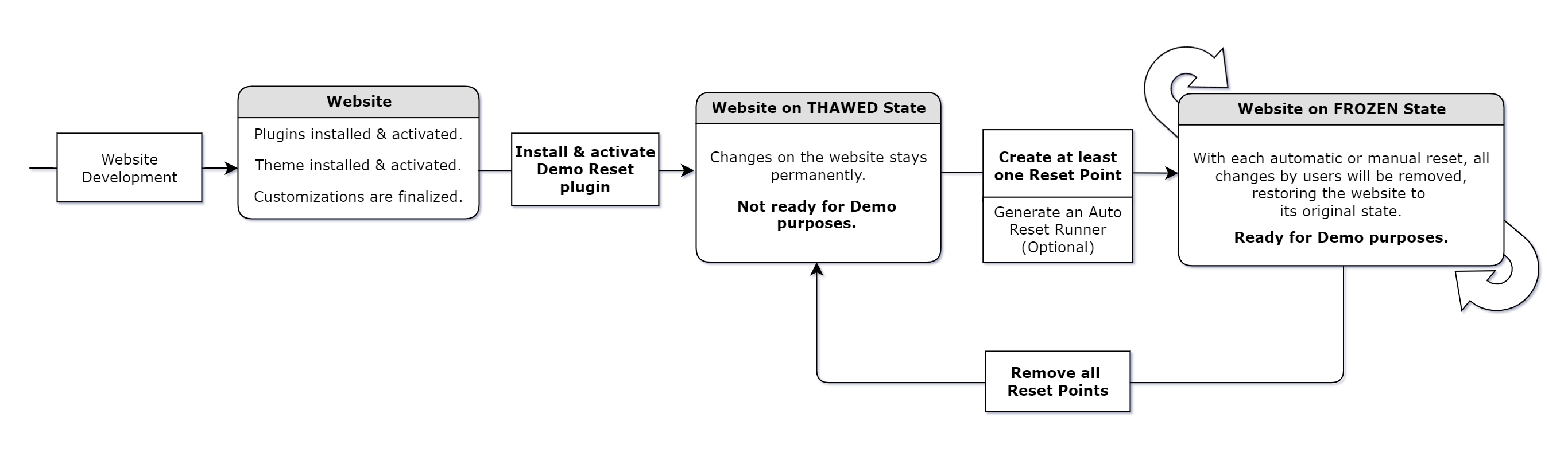
Simply install the Demo Reset free plugin or Demo Reset Pro plugin on your WordPress website and create a Reset Point to put the site in the Frozen State (Demo Mode). This allows you to let your customers to interact with the website without any risk of permanent changes. With each automatic or manual reset, all customer changes will be removed, restoring the website to its original state. In short; Now your website is ready for Demo purposes.
See the Concept Diagram: Image link…
Use Cases of Demo Reset plugin
Demo for sales purposes:
Having a Demo Website as part of your sales funnel can significantly boost customer conversions for website developers, theme developers, and plugin developers. It allows potential customers to experience the product firsthand and increasing their confidence of making a purchase. With each manual or automatic reset cycle, the Demo Reset plugin will keep the WordPress website in its original state by removing all temporary changes made by customers.
Demo for presentation purposes:
For website developers, converting a newly developed WordPress website into a Demo Site is an excellent strategy for presenting its features and functions to stakeholders. After the presentation, the developer can easily reset the website to its original state, erasing any temporary changes. This ensures that the website remains clean and professional. The Demo Reset plugin can be turned off once the presentation is complete.
Demo for training purposes:
Training the staff and stakeholders on a newly developed WordPress website is more effective when using the website in Demo state. This approach allows trainees to interact with the website and explore its features without the risk of making permanent changes. After the training session, the developer can reset the website to its original state, removing any temporary modifications. This method ensures the site remains pristine and always ready for future use. The Demo Reset plugin can be turned off as needed.
See the Use Cases Diagram: Image link…
Demo Reset Free Plugin
Demo Reset Free Plugin – Quick Introduction
Features of Free Plugin:
- Able to create multiple Reset Points.
- Manual Demo Reset execution capability.
- Demo Reset Cycle automation via a regular URL.
- Demo Reset Cycle automation via a RESTful URL.
- The entire Database will reset to the chosen Reset Point.
- All logged-in users will be logged out during the Reset process.
- Displays the Demo Reset Status (THAWED state or FROZEN state) on the WP Admin Bar.
- Media files uploading and deleting is restricted in the FROZEN state. (Images, PDFs etc.)
- Plugins, Themes are WP Core auto updates are restricted, but can update manually in the THAWED state.
- Capable of deploying Demo Websites only for Non-admin users. Because all admins can deactivate the Demo Reset plugin or delete Reset Points.
- Displays the Demo Users’ login details, Live Demo status, and Reset Timer on the Info Bar.
THAWED state of Free Plugin:
- Changes made by admins or other users will remain on the website.
- Permalink Settings page is accessible.
- All the auto-updates are suspended.
- Admins can install WP Core, Plugin & Theme updates.
- Admins can install or delete Plugins & Themes.
- Admins and users can upload new images or files.
- Admins and users can delete/trash existing uploaded images or files.
- Only admins can access the Demo Reset Admin Menu.
- Only admins can change Demo Reset settings.
- Admins must add at least one Reset Point to activate the FROZEN state (Demo Mode).
FROZEN state of Free Plugin:
- Changes made by admins or other users will be reset in every Reset Cycle.
- Permalink Settings page is restricted.
- All the auto-updates are suspended.
- Installation of WP Core, Plugin & Theme updates is suspended.
- Installation, activation, deactivation or deletion of Plugins & Themes are suspended.
- New images or files uploading is suspended.
- Deletion of already existing uploaded images or files is suspended.
- Logged-in users will automatically be logged out during the reset process.
- Only admins can access the Demo Reset Admin Menu.
- Only admins can change Demo Reset settings.
- Admins can add multiple Reset Points.
- Admins should delete all Reset Points to get back to the THAWED state.
Setting a WordPress website to FROZEN state (Valid for Free & Pro)
Setting an Active Reset Point for Auto Reset (Valid for Free & Pro)
Setting Reset Runner URL to run Auto Reset (Valid for Free & Pro)
Setting Reset Runner REST URL to run Auto Reset (Valid for Free & Pro)
Setting a WordPress website back to THAWED state (Valid for Free & Pro)
Demo Reset Documentation: https://ministryofplugins.com/demo-reset-docs
Demo Reset Pro Plugin
Demo Reset Pro – Quick Introduction
Features of Pro Plugin:
- Able to create multiple Reset Points.
- Manual Demo Reset execution capability.
- Demo Reset Cycle automation via a regular URL.
- Demo Reset Cycle automation via a RESTful URL.
- Demo Reset Cycle automation via server Cron Jobs directly.
- The entire Database and Media Library can be reset to the selected Reset Point.
- Offers options to avoid forceful log out on logged-in users during the Reset process.
- Displays the Demo Reset Status (THAWED state or FROZEN state) on the WP Admin Bar.
- THAWED State Website Isolation capability to prevent unnecessary changes to the website.
- Capable of allowing users to upload new media files and trash already uploaded files in the FROZEN state. (Images, PDFs etc.)
- There will be no accumulation of abandoned files in the uploads directory because the Media Library will reset with every reset run.
- Plugins, Themes are WP Core auto updates are restricted, but can update manually in the THAWED state.
- Able to deploy Demo Websites for both Admin and Non-admin users. Only Admin who activate the Demo Reset plugin can access its setup features.
- Displays the Demo Reset Countdown Timer showing the time remaining for the next Reset.
- Shows the customizable Promo Bar at the top of the Demo Website on both admin and public sides.
- Options to display the Promo Bar on the admin side, public side, both, or hide it entirely.
- Features your Logo and Brand Name on the Promo Bar, linking your Business Website to the Demo site.
- Highlights your Special Offers or Promotions on the Promo Bar, linking your Landing Page to the Demo site.
- Capable of providing your Phone Number and Email Address for Demo users as Promo Bar Tools.
- Includes your Help Articles for Demo users as a Promo Bar tool.
- Able to add Extra Links for Demo users as a Promo Bar tool.
- Capable of sending an email notification at the end of each Reset Cycle.
Demo Reset Documentation: https://ministryofplugins.com/demo-reset-docs
Installation
Obligations
- PHP version 7.4.0 or greater.
- WordPress 5.6.0 or greater.
- The website should not be a WordPress multisite.
- If both the Demo Reset Free and Pro plugins are installed on the same website, neither will activate until one is uninstalled.
Installation
- Method 1: Install and activate the Demo Reset plugin via the WordPress Plugin Installer.
- Method 2: Download the Demo Reset plugin zip, extract it, and upload its contents to the wp-content/plugins/ directory. Then, activate the plugin from the Plugins page in the WordPress Admin area.
Notes
- For the purpose of a Demo Website, it is crucial that all permanent changes to the Website are made intentionally and consciously. Therefore, auto-updates will be paused by the Demo Reset plugin. In THAWED state (Non-Demo mode), you can manually update Plugins, Themes, and WordPress Core.
Journal de modifications
2.0.2 – 17/08/2026
- Tested on WordPress 7.0.
2.0.1 – 26/12/2025
- Tested on WordPress 6.9.
- The plugin code has been improved to meet the latest Plugin Check standards.
- Added: The correct Plugin URI has been added.
- Changed: The for loop for the Demo User username input fields has been removed from demo-reset-save-info-bar-template.php and moved to class-demo-reset-info-bar-page.php.
- Removed: Unnecessary sections of code have been removed from the class-demo-reset-info-bar-page.php file.
2.0.0 – 12/10/2025 (A Major Release)
- Added: A new UI element called the Info Bar has been introduced, located at the very top of the demo website.
- Added: The Info Bar includes sub-elements called Demo User Details, Demo Status, and Next Reset Time.
- Added: A dedicated Info Bar Settings page has been added to the plugin’s admin menu.
- Added: New action hook demo_reset_info_bar_custom_css allows custom styling of the Info Bar.
- Added: New filter hook demo_reset_reset_gap_tolerance allows redefining the reset gap tolerance in seconds.
- Added: Constant DEMO_RESET_DEMO_USERNAMES_NUMBER introduced to control the number of usernames displayed on the Info Bar.
- Added: Constant DEMO_RESET_RUNNER_FOR_TIMER added as a requirement for the Next Reset Time functionality.
- Added: New filter hook demo_reset_allowed_upload_caps introduced to enable restricted Demo User upload capabilities.
- Added: Demo User Restrictions setting added to hide Account Management heading, New Password section, Log Out Everywhere Else button, and Application Passwords section.
- Added: Back to Default Settings functionality has been introduced on the Settings page.
- Added: A new Hooks & Constants tab has been introduced on the Concept and Help page, providing implementation details and usage instructions.
- Added: Demo Website link added to the readme.txt file.
- Added: New and updated screenshots have been added to showcase all plugin functionalities.
- Added: Placeholder CSS, JavaScript, and markup files have been enqueued and added for the common area.
- Changed: Unnecessary update checks after resets are now prevented.
- Changed: Stability of options transfer during resets has been improved.
- Changed: Admin Bar notices have been improved to better inform non-admin users (Editors, Authors, etc.) about the Demo Mode and Reset process.
- Changed: Help text on the Reset Runners page has been revised with additional notes about the effect of caching plugins on demo automation.
- Changed: Text under Concept, Pro Plugin vs Free Plugin, and THAWED vs FROZEN State tabs has been revised for improved clarity.
- Changed: Quick Introduction videos have been added to Help Resources, replacing the Demo Reset Free and Pro Plugin interface videos.
- Changed: Help Resources styling has been refined for better readability.
- Changed: Short Description and Description sections in the readme.txt file have been improved.
- Changed: Quick Introduction videos have been added to the readme.txt file, replacing the Demo Reset Free and Pro Plugin interface videos.
- Changed: Features of the Free Plugin section in the readme.txt file revised for clarity.
- Changed: FAQ section in the readme.txt file updated with information on how caching plugins affect demo automation.
1.0.1 – 29/04/2025
- Tested on WordPress 6.8.
- The trigger has been fixed for the warning: Translation loading for the text domain was triggered too early.
1.0.0 – 12/04/2025
- Version initiale.
Captures d'écran


Pour les développeurs
Est-ce votre plugin ? Montrez les chiffres.
Ajoutez un badge en direct à votre site, docs ou github readme. Il se met à jour par lui-même - aucun compte n'est nécessaire.
Best Demo Reset alternatives
All demo plugins →





FAQ
Demo Reset: quick answers
Réponses directes, extraites des données en direct WordPress.org.
Source : WordPress.org
Is Demo Reset free?
Yes. Demo Reset is free to download and use from the official WordPress.org plugin directory. The developer also sells premium add-ons or a Pro version with extra features.
Is Demo Reset safe to use in 2026?
Demo Reset works, but test it on a staging site before relying on it in 2026. Is rated 5/5 and was last updated 3 months ago, and scores 56/100 on our health check.
How many websites use Demo Reset?
Demo Reset is active on <10 WordPress websites and has been downloaded 1,188 times since it launched in April 2025. It was downloaded 65 times in the last 30 days.
Does Demo Reset work with WordPress 7.1?
Demo Reset is officially tested up to WordPress 7.0.9, while the latest release is 7.1.5. It may still work, but try it on a staging site first.
What PHP version does Demo Reset need?
Demo Reset requires PHP 7.4 or higher. Most hosts run PHP 8.x today, so it works on any modern WordPress hosting.
When was Demo Reset last updated?
The latest version, 2.0.2, was released on August 17, 2026 (3 months ago).
Who makes Demo Reset?
Demo Reset is developed and maintained by Anjana Hemachandra.
What are the best alternatives to Demo Reset?
The most popular alternatives to Demo Reset are Starter Templates & Sites P… (70K+ installs), Rara One Click Demo Import (20K+ installs) and Envo Extra (20K+ installs).
Propulsé par PageForge
Un modèle et une feuille de calcul. Une vraie page pour chaque recherche.
PageForge transforme chaque ligne d'un CSV en une page WordPress avec son propre titre, URL, SEO et schéma, construit sur la mise en page que vous Déjà conçu. Gratuit sur WordPress.org.
- CSV et XLSX, plus Google Sheets sur les professionnels et les entreprises
- Son propre titre, URL, SEO champs et schéma pour chaque page
- Fonctionne avec l'éditeur de blocs, Elementor, Divi et Avada
- Gratuit sur WordPress.org, pas de carte de crédit