


Dashify : WooCommerce Thème du tableau de bord d'administration
A modern design and UI for the WooCommerce admin. Manage, search, and navigate orders faster. Make the WordPress admin dashboard ecommerce-focused.

Utiliser avec prudence
Dashify: WooCommerce admin dash… works, but test it on a staging site before relying on it in 2026. It runs on 800+ sites, is rated 4.7/5 and was last updated 1 year ago, and scores 47/100 on our health check.
- Petite base d'utilisateurs (800+ installations actives)
- Pas de mise à jour depuis plus d'un an
- Uniquement testé jusqu'à WordPress 6,8 (le dernier est de 7,1)
Comment s'accumule-t-il ?
Côte à côte sur les installations, les mises à jour, les évaluations et le support



Téléchargements quotidiens
Les pics de téléchargement suivent généralement une nouvelle version - chaque site qui met à jour automatiquement compte comme un téléchargement.
Classements
Where Dashify: WooCommerce admin… stands todayWordPress.org Classements de recherche
Position en direct dans la recherche de plugins, Top 100| Mot-clé | Position |
|---|---|
| admin theme | >100 |
| État de la commande | >100 |
| shopify | >100 |
| woocommerce orders | >100 |
| woocommerce search | >100 |
Adoption de version
Part de sites actifs par version.
Répartition des notes
★★★★★★★★★★ 4.7 from 12 reviews
About Dashify: WooCommerce admin dashboard th…
From the official readme · v1.3.14Description
Dashify brings a modern design and UI to the WooCommerce admin. Manage, search, and navigate orders faster.
Just activate Dashify, and you’re all set! Your existing WordPress admin turns into a beautiful, ecommerce-focused admin panel. No configuration necessary.
Traits
Dashify doesn’t just give a fresh look to the WooCommerce admin—it also adds new functionality, marked with a star ⭐ below!
WooCommerce-focused admin menu
- Clear separation of WooCommerce from other WordPress menu items.
- “Orders” and other WooCommerce submenu items are moved to the main admin menu, making them easier to find.
- The navigation gets a modern style inspired by other popular apps (Shopify, Notion, Stripe).
- Compatible with Admin Menu Editor.
- If a plugin adds a menu item, you’ll find it in Dashify’s navigation too.
- Doesn’t suit your store? You can turn it off without affecting the rest of Dashify.
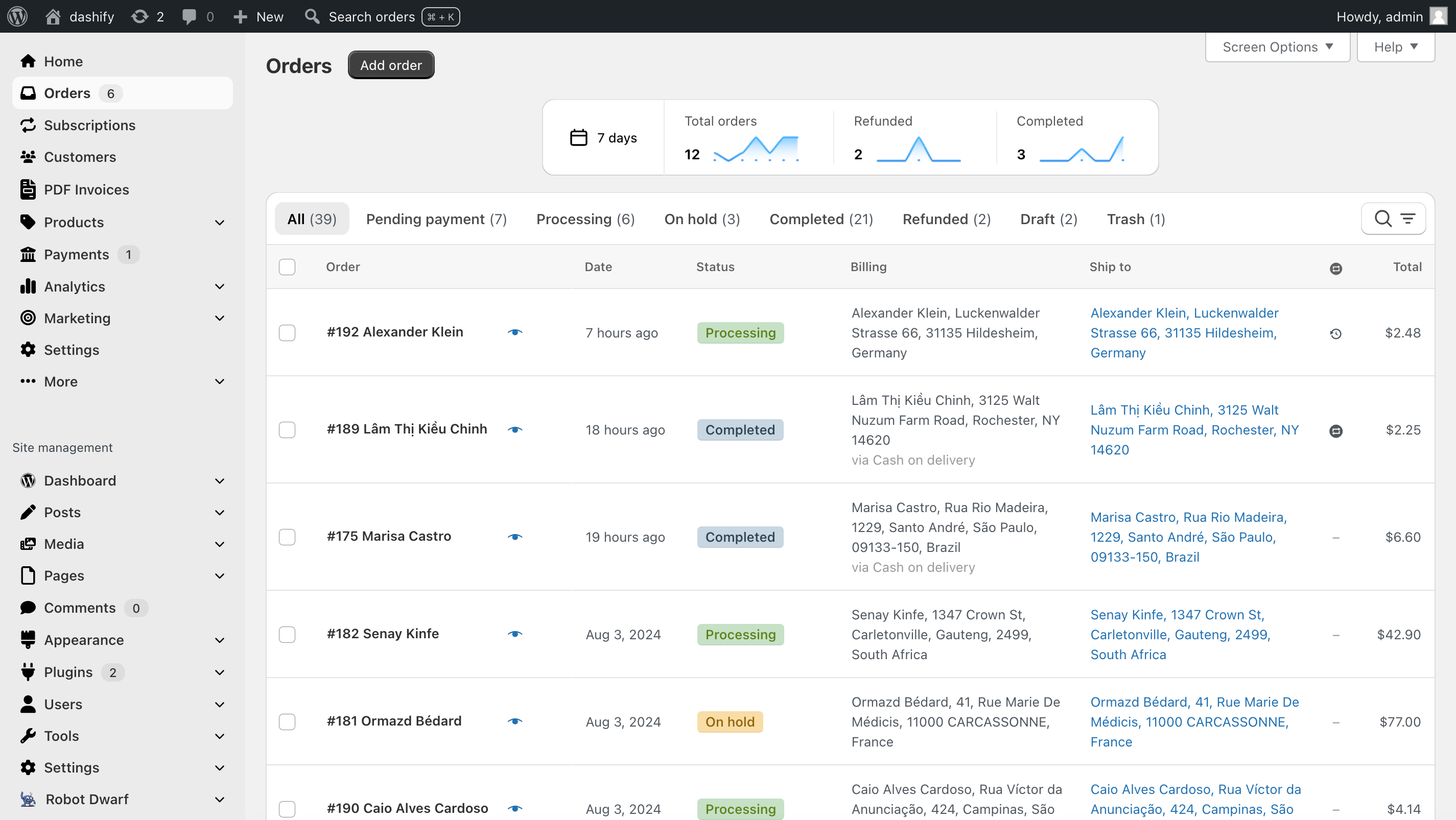
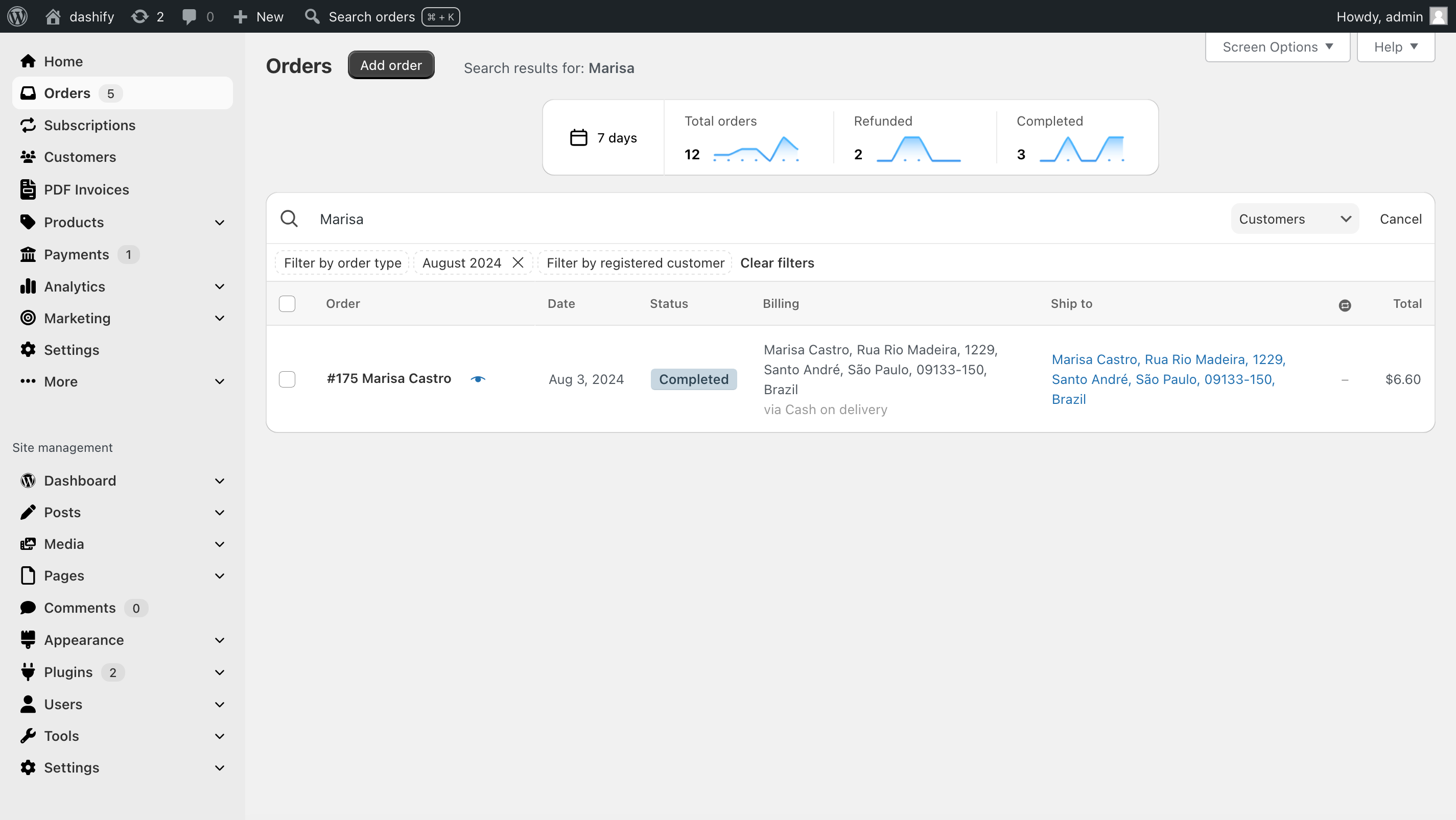
⭐ Order trend graphs
- See trends with a graph of total, refunded, and completed orders above the order list.
- For WooCommerce Subscriptions, see subscription revenue, the number of new subscriptions, and the number of cancelled subscriptions.
- Choose between Today, Last 24 hours, 7 and 30 day time periods.
Order list
- Order status filters are big and easy to click.
- Bulk actions appear only when at least one item is selected, and they are sticky as you scroll the order list.
- The search bar and filters are grouped together, only visible when in use, and can be opened with the “F” keyboard shortcut.
- Filters can be cleared all at once, or one at a time.
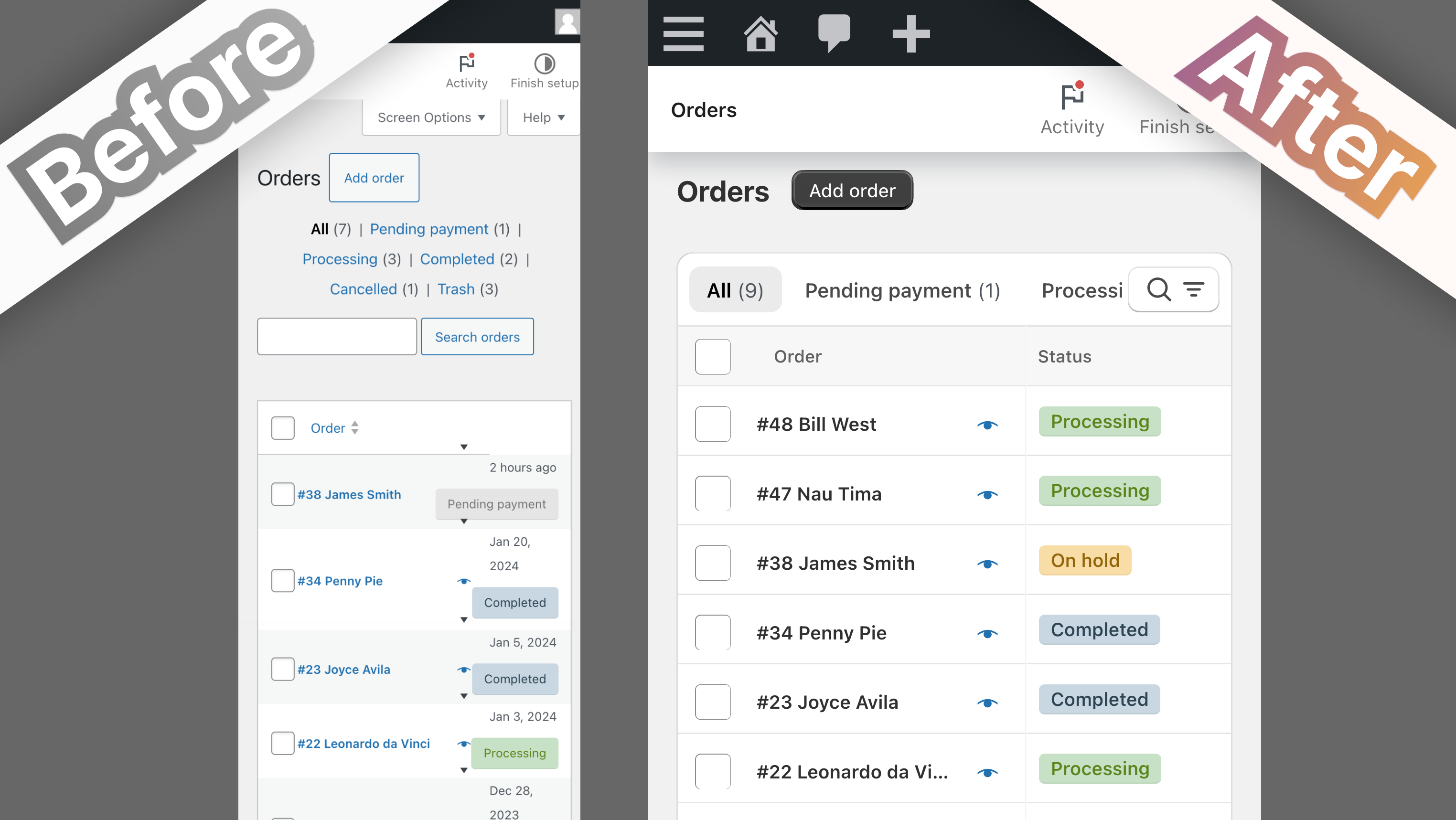
- Table is fully responsive to screen size and works well on mobile devices.
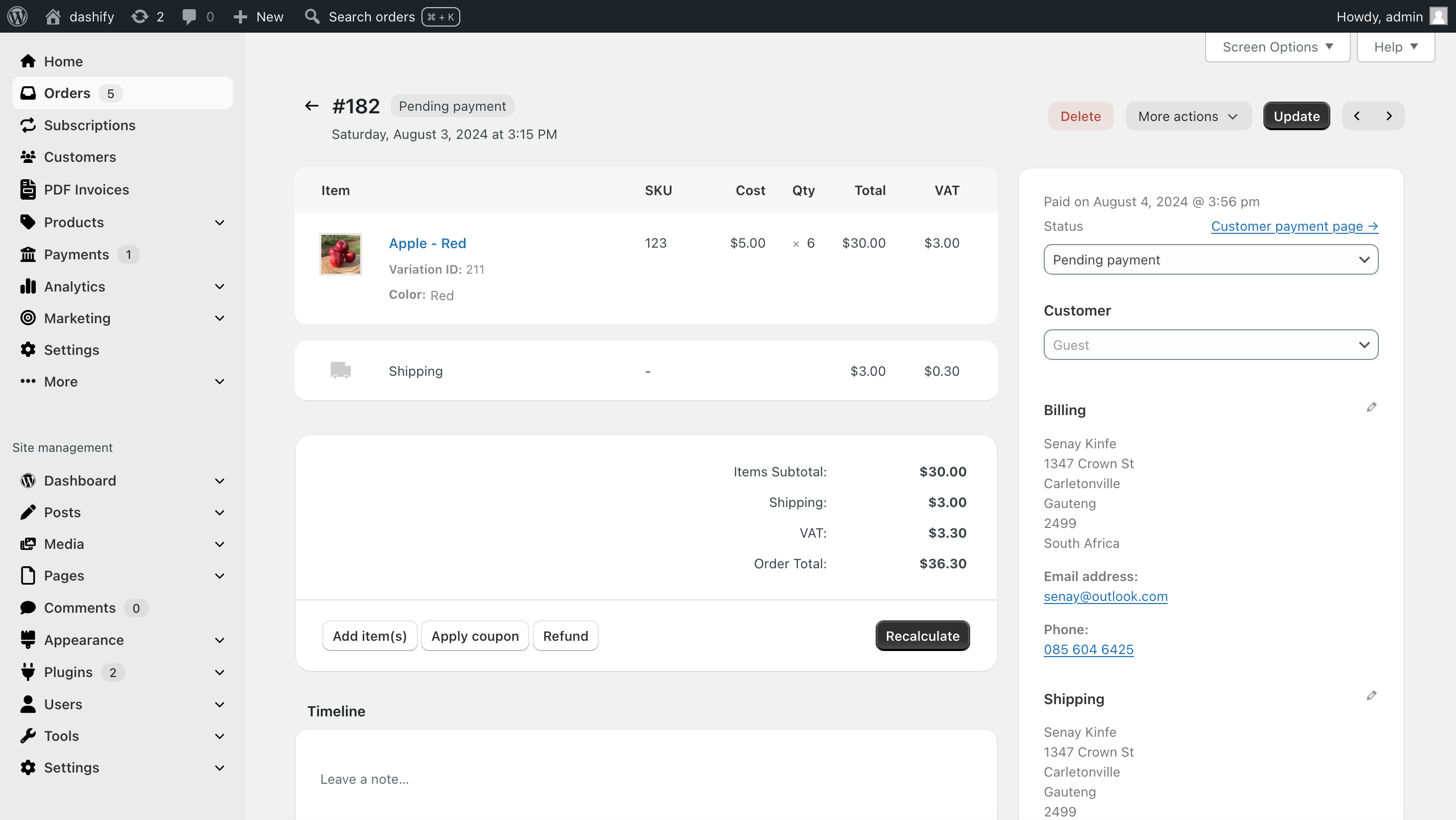
Order view/edit
- Switching from Shopify to WooCommerce? Manage orders in a Shopify-like UI.
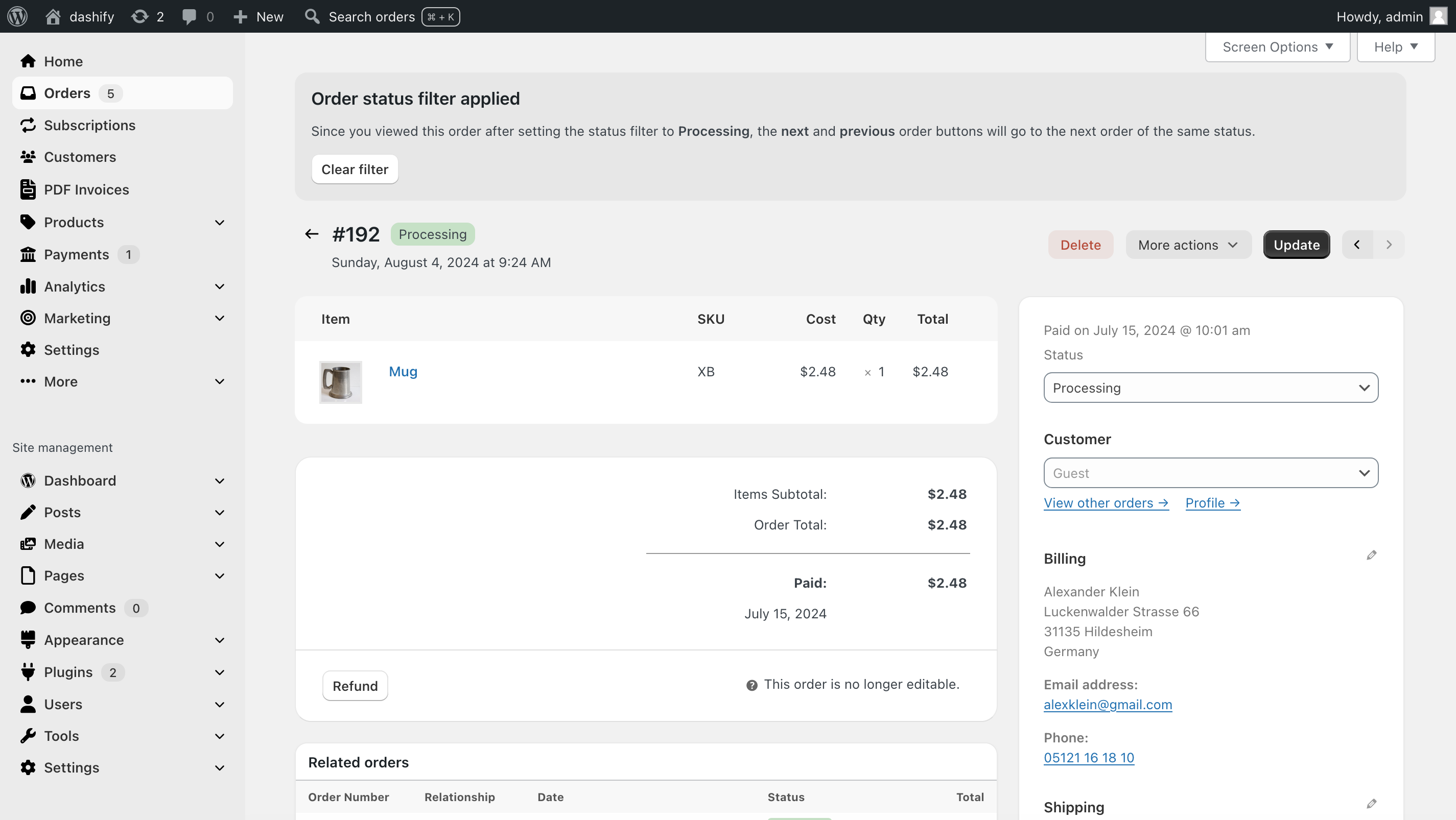
- ⭐ Next and previous order buttons with keyboard shortcuts.
- ⭐ Jump to orders of the same status. Based on the order status selected in the order list, after clicking into an order, the next and previous buttons will go to the next or previous order of the same status.
- ⭐ Date and time formatted according to region.
- ⭐ Back button to get back to the order list.
- Order number, status, and date are moved to the top for visibility.
- Action and update buttons are grouped together at the top.
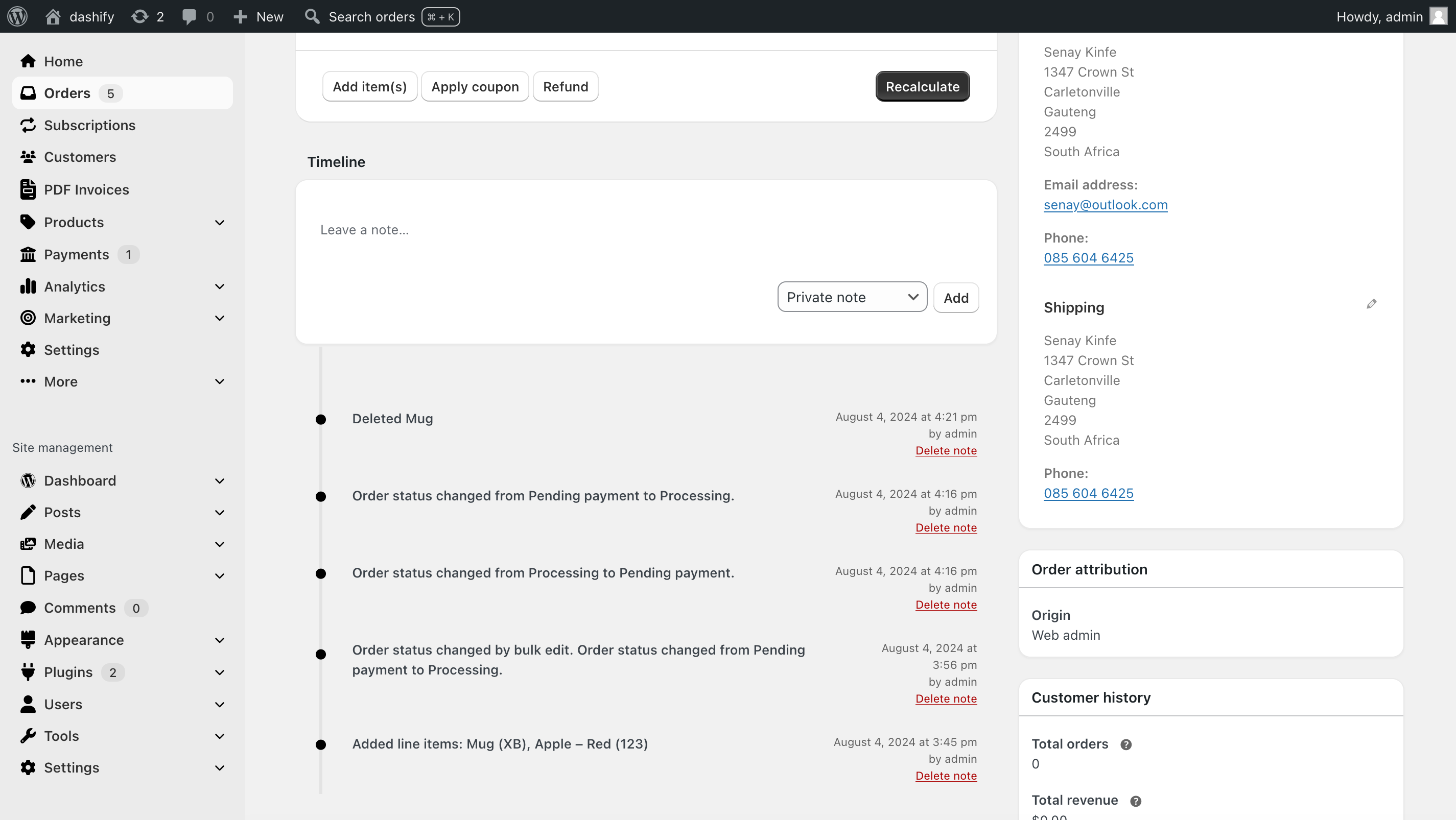
- Order notes become a Timeline.
- Timeline text box automatically expands as you type more.
Dashify Pro
Dashify Pro brings even more improvements to the WooCommerce admin.
- Get the Dashify theme on more WooCommerce pages. With Dashify Pro, the product list and WooCommerce settings are also styled. More pages coming soon! Check out the roadmap for details.
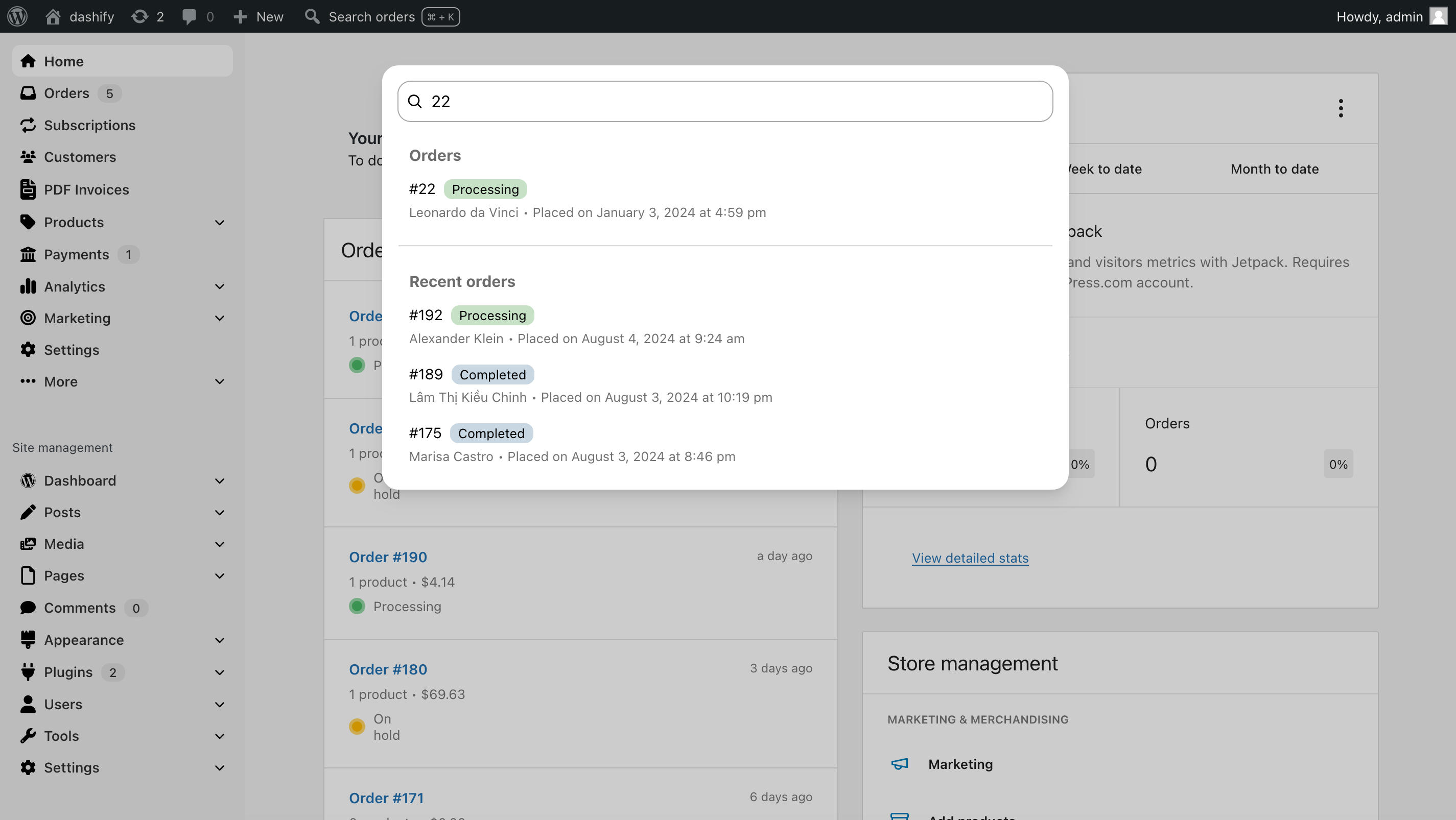
- ⭐ Find orders quickly with global search. Dashify Pro adds a “Search orders” button to the WordPress admin toolbar, allowing you to find an order by ID, customer name, email, phone, or product SKU within an order. This AJAX search is faster because it doesn’t require a full page reload, unlike the standard WooCommerce order search. It also shows recent orders so you can jump to those quickly.
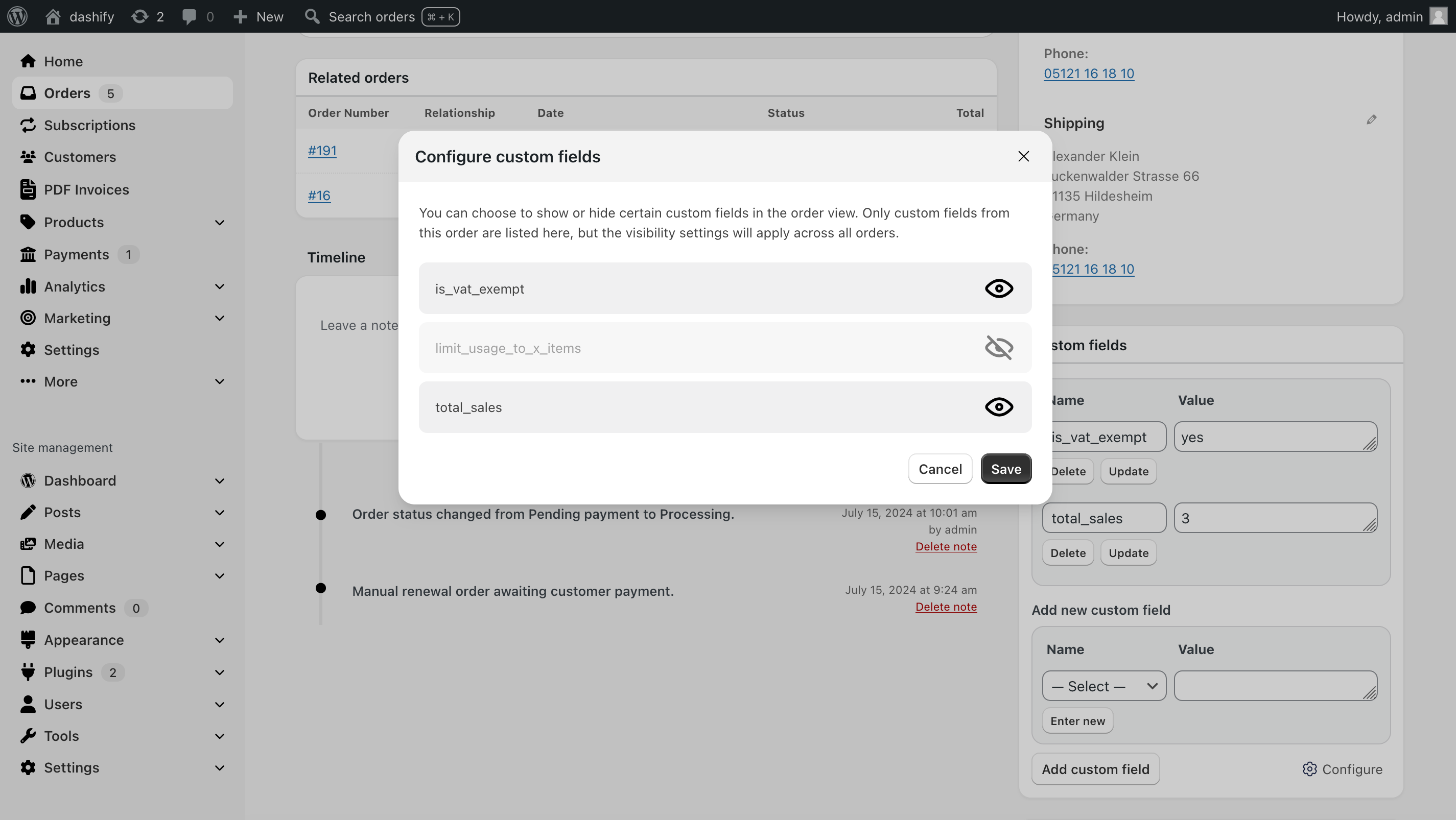
- ⭐ Hide specific custom fields in orders and subscriptions. You can mark custom fields as hidden, and then they won’t show in any order or subscription edit view.
- ⭐ Sort order line items by SKU. When packing orders with many items, this helps you find items faster if they’re also sorted by SKU in your warehouse or fulfillment center.
- ⭐ Sort order line items by product menu order. The items in a customer’s order can be sorted the same as they appear in the admin product list “Sorting” view and on the Shop page.
Compatibilité
Dashify should work with most plugins for the WooCommerce admin.
Here are the plugins we’ve extensively tested and designed Dashify to be compatible with:
- WooCommerce Abonnements
- Admin Menu Editor — Janis Elsts
- PDF Invoices & Packing Slips for WooCommerce — WP Overnight
- WooCommerce PDF Invoices, Packing Slips, Delivery Notes and Shipping Labels — WebToffee
- Payment Plugins for Stripe WooCommerce — Payment Plugins
- RD Order Modifier for WooCommerce — Robot Dwarf
- Order Tags — 99w
- PW WooCommerce Gift Cards — Pimwick, LLC
- Smash Balloon Social Photo Feed — Smash Balloon
- FiboSearch — FiboSearch Team
- Ultimate Dashboard — David Vongries
If you find a plugin that’s not compatible, leave a message in the WordPress.org support forum or contact us through the Dashify Help Desk, and we’ll gladly add compatibility for it.
You can turn Dashify on and off quickly through the WordPress screen options in case you have occasional plugins or workflows not currently supported by Dashify.
Dépannage
- If the order edit layout doesn’t look right, whether Dashify is on or off, turning it on/off again through the screen options will reset the layout.
Journal de modifications
1.3.14 (2025-06-24)
Correction de bugs
- Fixed the styling of the TrackShip button…just a little bit more!
1.3.13 (2025-06-17)
Correction de bugs
- Fixed Empty Trash button showing unintentionally when search and filter auto expand option is on, which caused the search bar to be pushed out of its container.
- Fixed Empty Trash button showing unintentionally when opening search and filter with f keyboard shortcut.
- Fixed Empty Trash button showing on search results page with search expanded when it shouldn’t.
- Fixed search and filter tooltip too wide with auto expand setting on.
- Fixed order edit page button styling for TrackShip.
1.3.12 (2025-03-14)
Améliorations
- Improved the appearance of custom admin menu icons through Admin Menu Editor.
- Added a link to the Dashify settings from the installed plugins list.
- Previously after downloading a Dashify update, you may have had to perform a hard refresh to see changes. Now, CSS, JS, and other assets are cache busted upon update, so you’ll see changes right away if there are any.
Correction de bugs
- Fixed the Admin Menu Editor custom logo possibly not showing when it should.
- Fixed Breakdance’s admin menu icon not showing.
- Fixed the Ultimate Dashboard admin menu logo possibly being cut off by the admin bar.
- Fixed the Ultimate Dashboard admin menu logo being too large on small screens.
- Fixed a JS console error when the Admin Menu Editor custom logo is not present.
1.3.11 (2025-02-18)
Améliorations
- Added compatibility for Admin Menu Editor by Janis Elsts: custom logo option and menu headings.
- Added compatibility for Ultimate Dashboard by David Vongries: custom logo option and admin menu editor module.
Correction de bugs
- Fixed Admin Menu Editor compatibility not working for Admin Menu Editor Pro.
- Fixed other plugins potentially changing Dashify’s admin menu background color which made the text unreadable.
- Fixed a random “a” appearing in the order list when Admin Columns Pro by Codepress is enabled.
- Fixed the Settings menu item not being highlighted after clicking on it.
1.3.10 (2025-01-08)
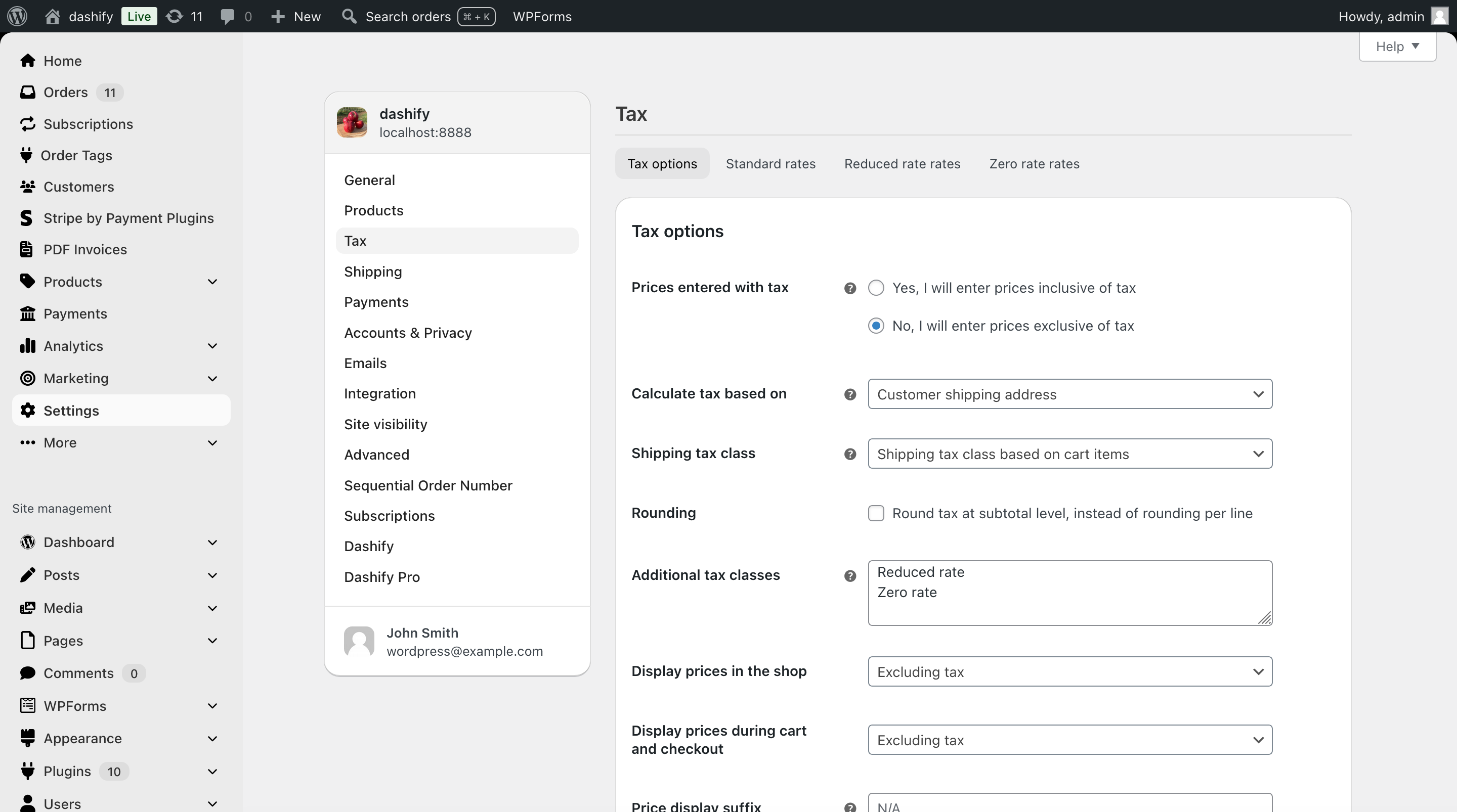
Captures d'écran
Pour les développeurs
Est-ce votre plugin ? Montrez les chiffres.
Ajoutez un badge en direct à votre site, docs ou github readme. Il se met à jour par lui-même - aucun compte n'est nécessaire.
Best Dashify: WooCommerce admin da… alternatives
All admin theme plugins →





FAQ
Dashify: WooCommerce admin dashboar…: quick answers
Réponses directes, extraites des données en direct WordPress.org.
Source : WordPress.org
Is Dashify: WooCommerce admin dash… free?
Yes. Dashify: WooCommerce admin dash… is free to download and use from the official WordPress.org plugin directory.
Is Dashify: WooCommerce admin dash… safe to use in 2026?
Dashify: WooCommerce admin dash… works, but test it on a staging site before relying on it in 2026. It runs on 800+ sites, is rated 4.7/5 and was last updated 1 year ago, and scores 47/100 on our health check.
How many websites use Dashify: WooCommerce admin dash…?
Dashify: WooCommerce admin dash… is active on 800+ WordPress websites and has been downloaded 18,265 times since it launched in February 2024. It was downloaded 487 times in the last 30 days.
Does Dashify: WooCommerce admin dash… work with WordPress 7.1?
Dashify: WooCommerce admin dash… is officially tested up to WordPress 6.8.13, while the latest release is 7.1.5. It may still work, but try it on a staging site first.
What PHP version does Dashify: WooCommerce admin dash… need?
Dashify: WooCommerce admin dash… requires PHP 7.0 or higher. Most hosts run PHP 8.x today, so it works on any modern WordPress hosting.
When was Dashify: WooCommerce admin dash… last updated?
The latest version, 1.3.14, was released on June 25, 2025 (1 year ago).
Who makes Dashify: WooCommerce admin dash…?
Dashify: WooCommerce admin dash… is developed and maintained by Dashify.
What are the best alternatives to Dashify: WooCommerce admin dash…?
The most popular alternatives to Dashify: WooCommerce admin dash… are Add Admin CSS (10K+ installs), Slate Admin Theme (6K+ installs) and UiPress lite (5K+ installs).
Propulsé par PageForge
Un modèle et une feuille de calcul. Une vraie page pour chaque recherche.
PageForge transforme chaque ligne d'un CSV en une page WordPress avec son propre titre, URL, SEO et schéma, construit sur la mise en page que vous Déjà conçu. Gratuit sur WordPress.org.
- CSV et XLSX, plus Google Sheets sur les professionnels et les entreprises
- Son propre titre, URL, SEO champs et schéma pour chaque page
- Fonctionne avec l'éditeur de blocs, Elementor, Divi et Avada
- Gratuit sur WordPress.org, pas de carte de crédit