


Gestionnaire de fichiers Darkstar
Secure client document management system allowing administrators to share files with clients and clients to upload their own documents.

Choix solide
Darkstar File Manager is a solid plugin choice in 2026, with a few things worth checking first. It runs on 20+ sites, is rated 5/5 and was last updated 2 months ago, and scores 70/100 on our health check.
- Testé avec le dernier WordPress (7.1)
- Petite base d'utilisateurs (20+ installations actives)
- Très peu de critiques jusqu'à présent
Comment s'accumule-t-il ?
Côte à côte sur les installations, les mises à jour, les évaluations et le supportTéléchargements quotidiens
Les pics de téléchargement suivent généralement une nouvelle version - chaque site qui met à jour automatiquement compte comme un téléchargement.
Classements
Where Darkstar File Manager stands todayWordPress.org Classements de recherche
Position en direct dans la recherche de plugins, Top 100| Mot-clé | Position |
|---|---|
| client files | #60 |
| client portal | #49 |
| document management | #85 |
| file upload | >100 |
| secure documents | #38 |
Adoption de version
Part de sites actifs par version.
Répartition des notes
★★★★★ ★★★★★ 5 sur 1 avis
About Darkstar File Manager
À partir du Lisezmoi officiel · v1.0.5Description
Darkstar File Manager is a secure, easy-to-use plugin that creates a private document portal for each WordPress user. Perfect for accountants, lawyers, consultants, or any business that needs to securely exchange documents with clients.
Principales caractéristiques
- Secure File Storage – Store files outside your web root for maximum security
- User Isolation – Each client can only access their own documents
- Two-Way File Sharing – Administrators can upload files for clients, and clients can upload files back
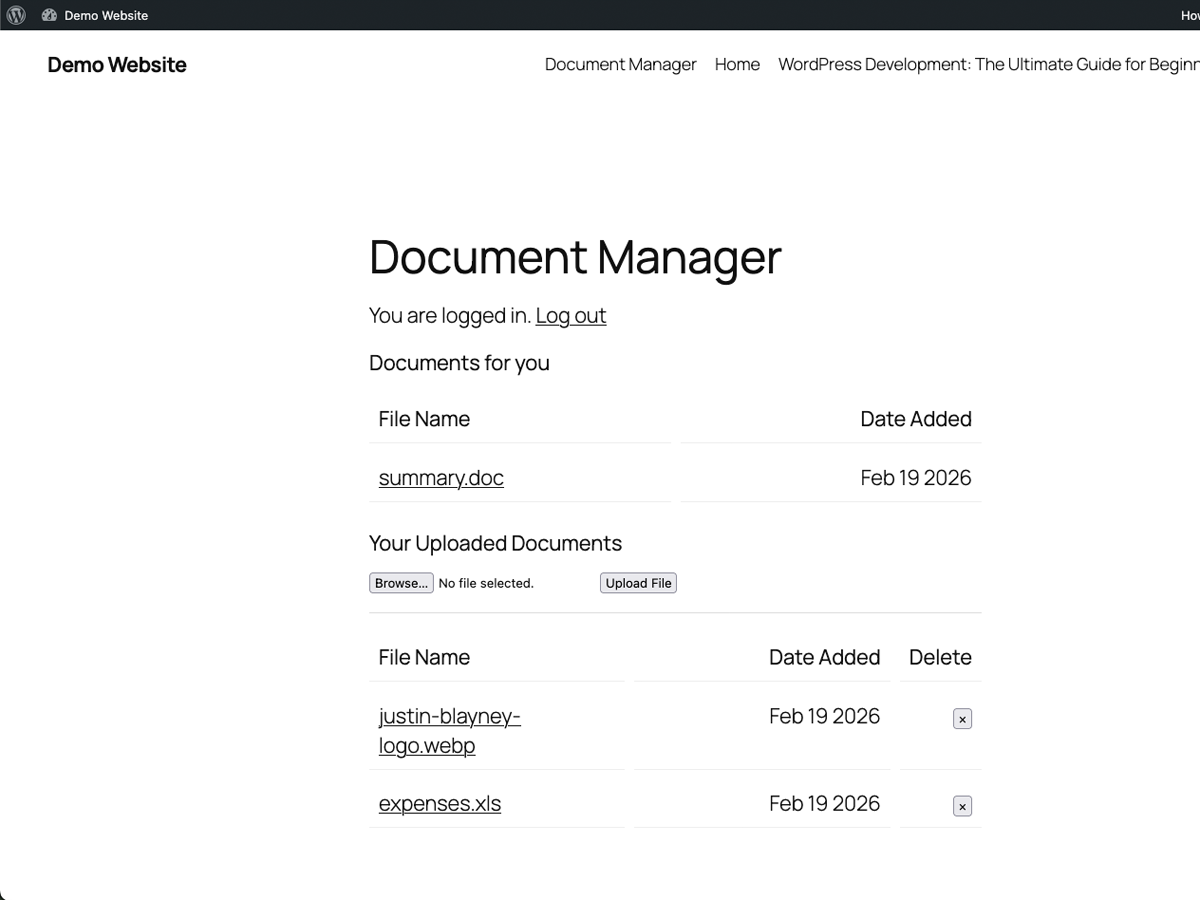
- Separate File Sections – Client view shows “Documents from Professional” and “Your Uploaded Documents” separately
- Simple Shortcode –
[dsfm_client_login]displays login form and document manager - File Type Validation – Configurable allowed file types (PDF, DOC, DOCX, XLS, XLSX, images, etc.)
- File Size Limits – Set maximum upload size (1-100 MB, default 50 MB)
- MIME Type Checking – Prevents malicious file uploads
- Bulk Operations – Delete multiple files at once from admin panel
- Translation Ready – Full internationalization support with Polylang integration
- Responsive Design – Works on desktop, tablet, and mobile devices
Comment cela fonctionne
- Create a Client Portal Page – Add the shortcode
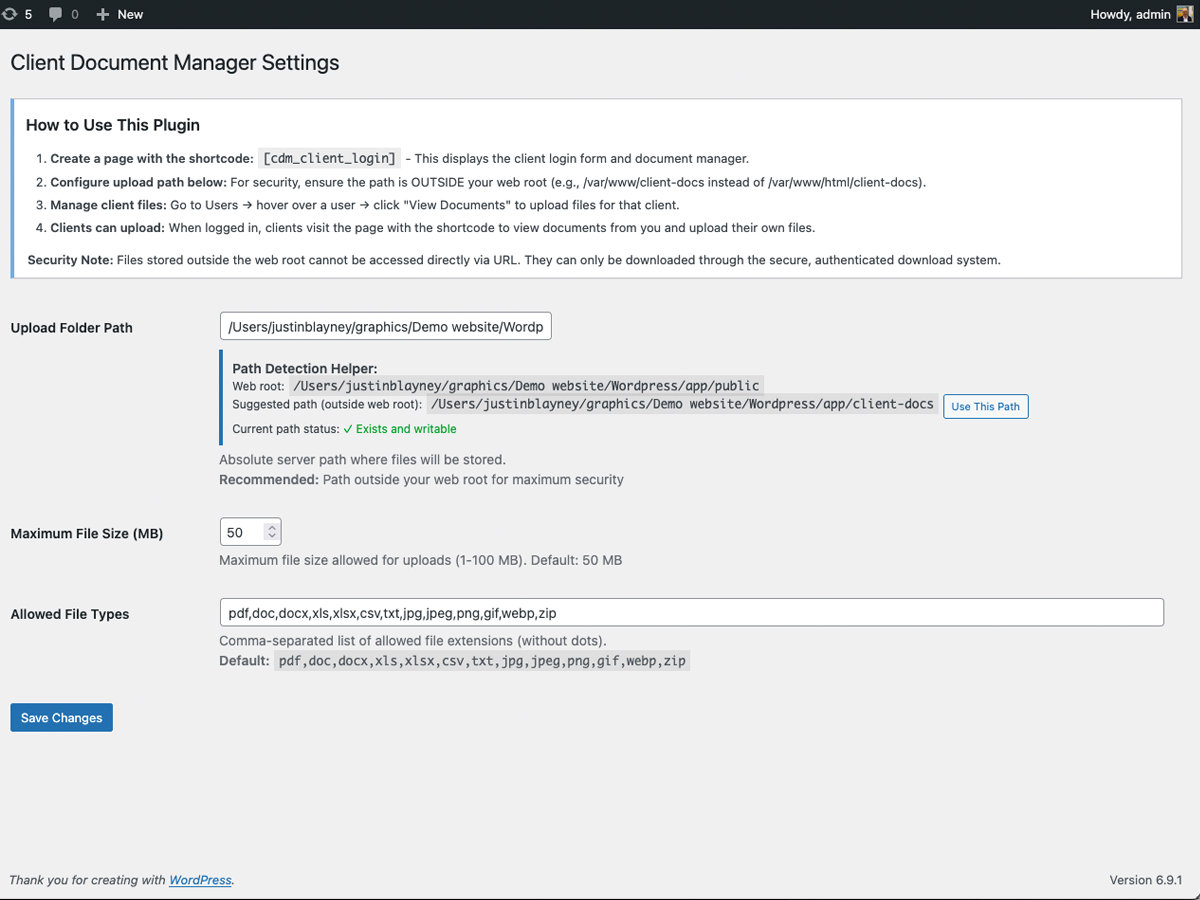
[dsfm_client_login]to any page - Configure Settings – Set upload path (outside web root recommended), file types, and size limits
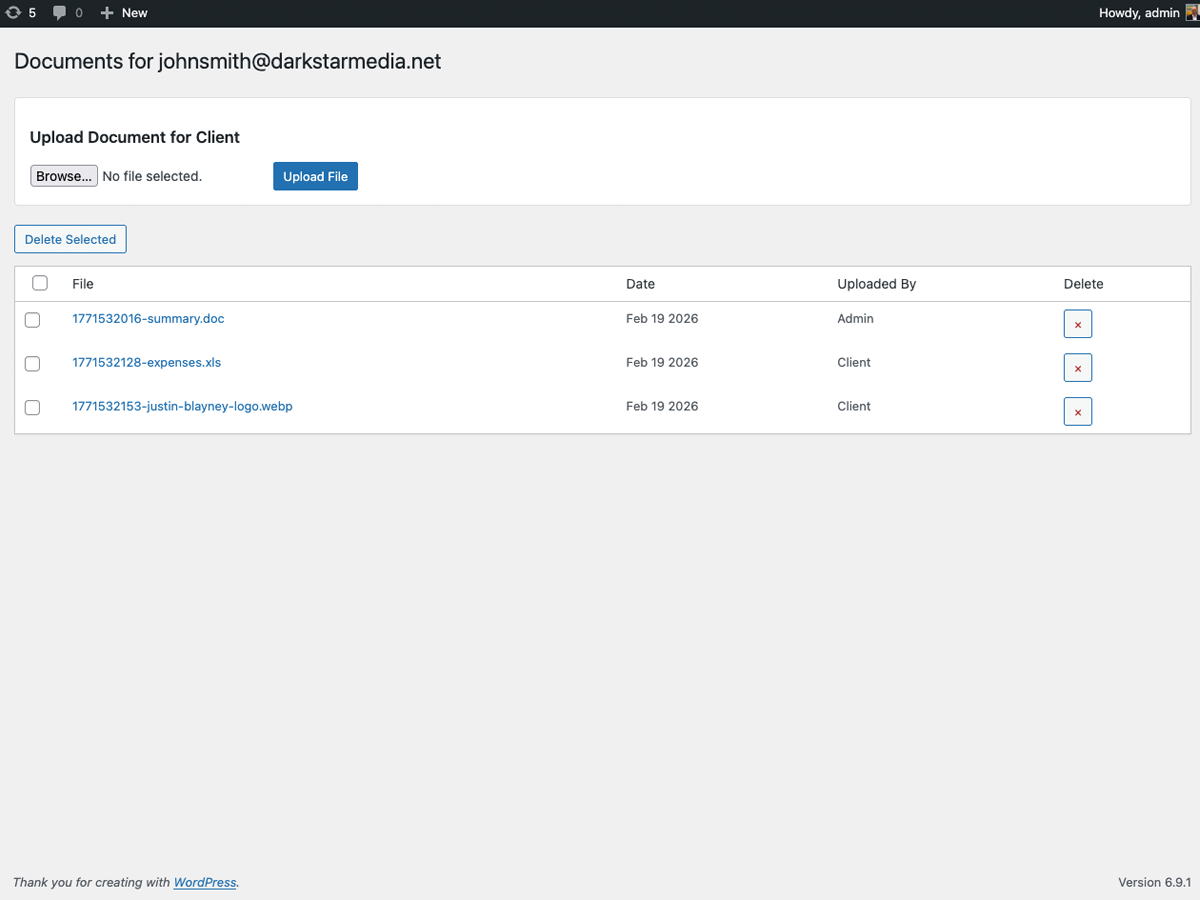
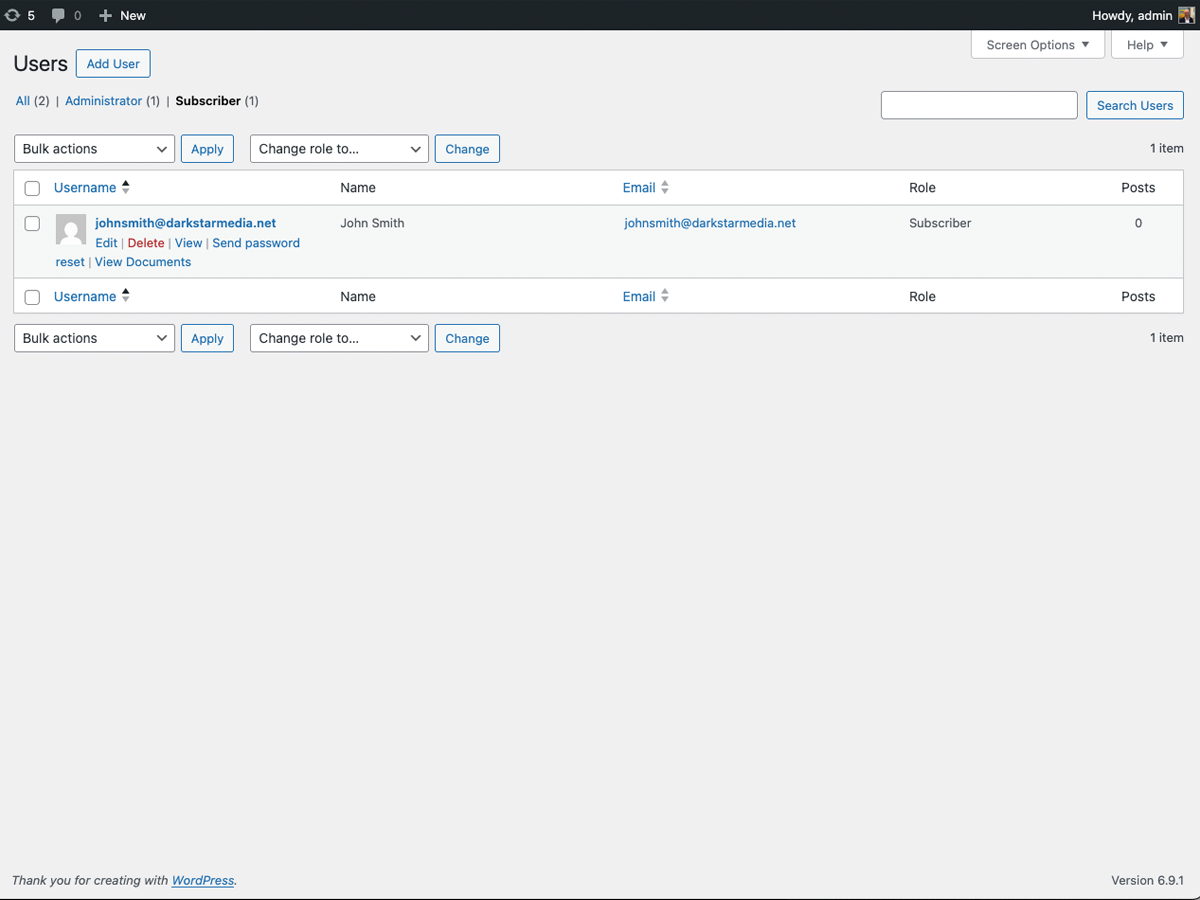
- Upload Files for Clients – Go to Users → hover over user → click “View Documents” to upload
- Clients Access Files – Clients log in and visit the portal page to view and upload documents
Fonctions de sécurité
- All files served through authenticated download handler (not direct file access)
- Path traversal protection with directory separator enforcement
- User authentication required
- Nonce verification on all forms and downloads
- CSRF protection on admin file downloads
- File type, MIME, and WordPress built-in type validation
- ZIP bomb protection (uncompressed content limit)
- Upload rate limiting (20 uploads per user per hour)
- Files stored outside web root by default
- Protective
.htaccessandindex.phpwritten to upload directory on activation - Each user can only access their own files
Note on File Storage
This plugin stores uploaded files outside the web root for security. Because of this requirement, files are moved using PHP’s move_uploaded_file() directly after passing validation through WordPress’s wp_check_filetype_and_ext(), our own MIME type check, extension allowlist, and size limits. Files cannot be stored through wp_handle_upload() without placing them inside the publicly accessible uploads directory, which would reduce security.
Parfait pour
- Tax professionals sharing documents with clients
- Lawyers exchanging contracts and legal documents
- Consultants sharing reports
- Any business requiring secure client file exchange
Information additionnelle
Soutien
For support, please visit Darkstar Media or contact us through our website.
Politique de confidentialité
This plugin stores uploaded files on your server and metadata (filenames, timestamps, uploader) in JSON files. No data is sent to external servers.
Crédits
Developed by Darkstar Media
Installation
Installation automatique
- Connectez-vous à votre panneau d'administration WordPress
- Aller à Plugins → Ajouter un nouveau
- Search for “Darkstar File Manager”
- Click “Install Now” and then “Activate”
Installation manuelle
- Download the plugin zip file
- Connectez-vous à votre panneau d'administration WordPress
- Go to Plugins → Add New → Upload Plugin
- Choose the zip file and click “Install Now”
- Activer le plugin
Après installation
- Go to Settings → Darkstar File Manager
- Configure the upload folder path (recommended: outside web root for security)
- Set allowed file types and maximum file size
- Create a new page (e.g., “Client Portal”)
- Add the shortcode:
[dsfm_client_login] - Publish the page
- Share the page URL with your clients
Journal de modifications
Tested and confirmed compatible with WordPress 7.1.
1.0.5
- Updated tested up to WordPress 7.1
1.0.4
- Updated tested up to WordPress 7.0
1.0.2
- Renamed plugin to Darkstar File Manager with new slug darkstar-file-manager
- Updated all function, option, and constant prefixes from cdm_ to dsfm_
- Added wp_check_filetype_and_ext() to upload validation for WordPress-native file type checking
- Added justinblayney as contributor
1.0.0
- Communiqué initial
- Secure file upload and download system
- Admin can upload files for clients via Users admin panel
- Clients can upload and download files via shortcode portal
- Separate sections for admin-uploaded vs client-uploaded files
- Configurable file types, size limits, and upload path
- File type, MIME type, and WordPress built-in type validation
- ZIP bomb protection (uncompressed size limit)
- Upload rate limiting (20 uploads per user per hour)
- CSRF protection on all forms and file downloads
- Path traversal protection with directory separator enforcement
- Protective
.htaccessandindex.phpauto-written to upload directory - Upload directory defaults to outside web root for security
- Bulk delete functionality for admins
- Privacy policy content registered with WordPress
- Clean uninstall removes all plugin options
- Translation ready with Polylang support
- Conception réactive
Captures d'écran
Pour les développeurs
Est-ce votre plugin ? Montrez les chiffres.
Ajoutez un badge en direct à votre site, docs ou github readme. Il se met à jour par lui-même - aucun compte n'est nécessaire.
Best Darkstar File Manager alternatives
All client files plugins →| Rang | Plugin | Installations actives |
|---|---|---|
| 2 |
 Transfert de contenu client Treder
Aidez les propriétaires d'entreprise à envoyer du contenu de site Web à leur concepteur Web — le tout dans WordPress… |
<10 |
FAQ
Darkstar File Manager: quick answers
Réponses directes, extraites des données en direct WordPress.org.
Source : WordPress.org
Is Darkstar File Manager free?
Yes. Darkstar File Manager is free to download and use from the official WordPress.org plugin directory.
Is Darkstar File Manager safe to use in 2026?
Darkstar File Manager is a solid plugin choice in 2026, with a few things worth checking first. It runs on 20+ sites, is rated 5/5 and was last updated 2 months ago, and scores 70/100 on our health check.
How many websites use Darkstar File Manager?
Darkstar File Manager is active on 20+ WordPress websites and has been downloaded 1,280 times since it launched in March 2026. It was downloaded 120 times in the last 30 days.
Does Darkstar File Manager work with WordPress 7.1?
Yes. The developer has tested Darkstar File Manager up to WordPress 7.1.5, the latest release. It requires WordPress 5.0 or newer.
What PHP version does Darkstar File Manager need?
Darkstar File Manager requires PHP 7.4 or higher. Most hosts run PHP 8.x today, so it works on any modern WordPress hosting.
When was Darkstar File Manager last updated?
The latest version, 1.0.5, was released on September 7, 2026 (2 months ago).
Who makes Darkstar File Manager?
Darkstar File Manager is developed and maintained by justinblayney.
What are the best alternatives to Darkstar File Manager?
The most popular alternatives to Darkstar File Manager are Treder Client Content Hando… (<10 installs).
Propulsé par PageForge
Un modèle et une feuille de calcul. Une vraie page pour chaque recherche.
PageForge transforme chaque ligne d'un CSV en une page WordPress avec son propre titre, URL, SEO et schéma, construit sur la mise en page que vous Déjà conçu. Gratuit sur WordPress.org.
- CSV et XLSX, plus Google Sheets sur les professionnels et les entreprises
- Son propre titre, URL, SEO champs et schéma pour chaque page
- Fonctionne avec l'éditeur de blocs, Elementor, Divi et Avada
- Gratuit sur WordPress.org, pas de carte de crédit