


Dan's Annotator
Lightweight front-end annotation tool with threads, tagging, and collaborator sessions.

Utiliser avec prudence
Dan's Annotator works, but test it on a staging site before relying on it in 2026. It runs on 20+ sites, is rated 5/5 and was last updated 12 months ago, and scores 46/100 on our health check.
- Petite base d'utilisateurs (20+ installations actives)
- Très peu de critiques jusqu'à présent
- Uniquement testé jusqu'à WordPress 6,9 (le dernier est de 7,1)
Comment s'accumule-t-il ?
Côte à côte sur les installations, les mises à jour, les évaluations et le support


Téléchargements quotidiens
Les pics de téléchargement suivent généralement une nouvelle version - chaque site qui met à jour automatiquement compte comme un téléchargement.
Classements
Where Dan's Annotator stands todayWordPress.org Classements de recherche
Position en direct dans la recherche de plugins, Top 100| Mot-clé | Position |
|---|---|
| annotations | #41 |
| collaboration | >100 |
| les commentaires | >100 |
| retour d'information | >100 |
| page notes | >100 |
Adoption de version
Part de sites actifs par version.
Répartition des notes
★★★★★ ★★★★★ 5 sur 3 avis
About Dan's Annotator
À partir du Lisezmoi officiel · v1.2.0Description
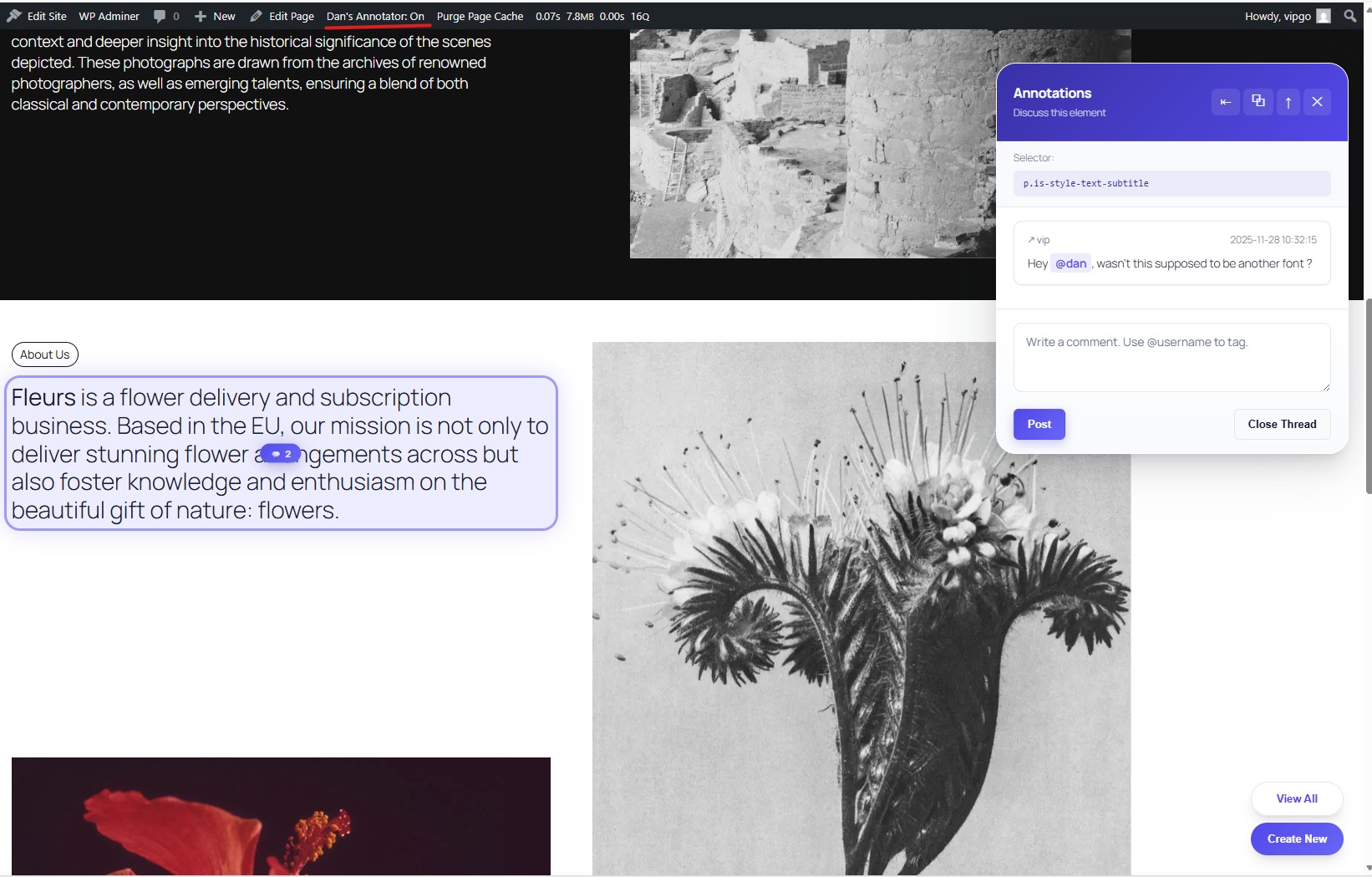
Dan’s Annotator lets logged-in users (and email based collaborators) highlight elements on any page and discuss them in threaded comments. It adds a floating UI to create, browse, and close annotation threads, plus @-mentions with email notifications.
Traits
– Custom database tables for threads, comments, tags, and collaborators (created on activation).
– Admin bar toggle to enable/disable annotation mode for logged-in users.
– Front-end badges showing counts and a side panel UI for reading/posting comments.
– @username tagging with autocomplete and email/admin-notice notifications.
– REST API endpoints used by the front-end JavaScript.
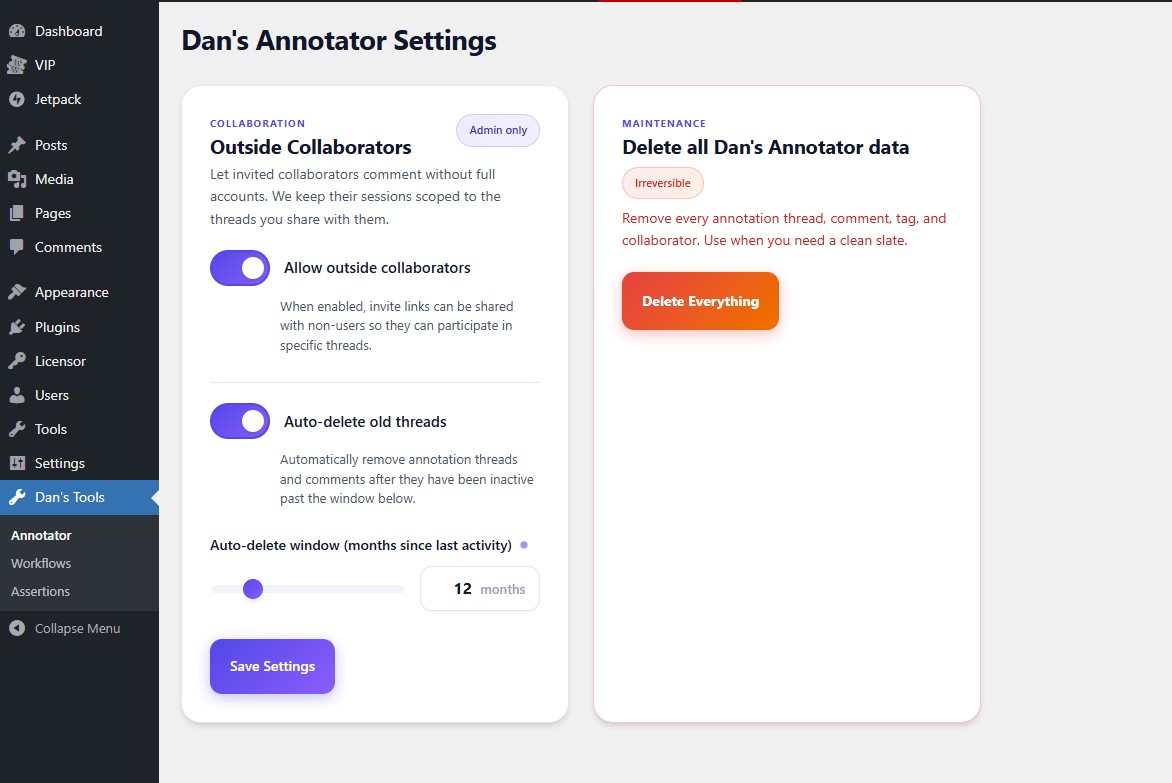
– Support for outside collaborators with email-based or link-based access.
Usage
@ Completion (User Tagging)
To mention a registered WordPress user in an annotation comment:
1. Type @ followed by the username or email
2. An autocomplete dropdown will appear showing matching users
3. Select the user from the list or continue typing their username
4. The tagged user will receive a notification (admin notice for logged-in users)
Example: @john or @admin
@email Collaborators (Email-Based Access)
To invite external collaborators who don’t have WordPress accounts:
1. In a comment, type @ followed by their email address
2. Example: @john@doe.com
3. The collaborator will automatically be created and receive an email with a secure magic link
4. They can click the link to access and comment on the specific thread without creating an account
5. Email-based collaborators are scoped to only the threads they’re tagged in
Note: The magic link is unique and secure, tied to their email address. Enable this feature in Settings → Annotator → Outside Collaborators.
!@link Collaborators (Link-Based Access)
For lightweight collaborator access without requiring an email:
1. In a comment, type !@ followed by a name/identifier
2. Example: !@mike or !@designer
3. A token-based collaborator is created with a shareable link
4. Copy the generated link from the comment and share it directly
5. Anyone with the link can participate using that collaborator identity
6. Link-based collaborators are also scoped to the threads they’re tagged in
Note: Enable token-based collaborators in Settings → Annotator → Token-based collaborators. This is useful for quick feedback without email verification.
Licence
This plugin is licensed under the GNU General Public License v2.0 or later.
Installation
- Upload the
dans-annotatordirectory to yourwp-content/pluginsfolder. - Activate the plugin in WP Admin (tables are created on activation).
- While logged in, use the admin bar toggle to enable annotation mode on the front-end.
Captures d'écran
Pour les développeurs
Est-ce votre plugin ? Montrez les chiffres.
Ajoutez un badge en direct à votre site, docs ou github readme. Il se met à jour par lui-même - aucun compte n'est nécessaire.
Best Dan's Annotator alternatives
All annotations plugins →



FAQ
Dan's Annotator: quick answers
Réponses directes, extraites des données en direct WordPress.org.
Source : WordPress.org
Is Dan's Annotator free?
Yes. Dan's Annotator is free to download and use from the official WordPress.org plugin directory.
Is Dan's Annotator safe to use in 2026?
Dan's Annotator works, but test it on a staging site before relying on it in 2026. It runs on 20+ sites, is rated 5/5 and was last updated 12 months ago, and scores 46/100 on our health check.
How many websites use Dan's Annotator?
Dan's Annotator is active on 20+ WordPress websites and has been downloaded 576 times since it launched in November 2025. It was downloaded 65 times in the last 30 days.
Does Dan's Annotator work with WordPress 7.1?
Dan's Annotator is officially tested up to WordPress 6.9.12, while the latest release is 7.1.5. It may still work, but try it on a staging site first.
What PHP version does Dan's Annotator need?
Dan's Annotator requires PHP 7.4 or higher. Most hosts run PHP 8.x today, so it works on any modern WordPress hosting.
When was Dan's Annotator last updated?
The latest version, 1.2.0, was released on December 7, 2025 (12 months ago).
Who makes Dan's Annotator?
Dan's Annotator is developed and maintained by lazardanlucian.
What are the best alternatives to Dan's Annotator?
The most popular alternatives to Dan's Annotator are Simple Commenter (200+ installs), Side Matter (100+ installs) and Previu (40+ installs).
Propulsé par PageForge
Un modèle et une feuille de calcul. Une vraie page pour chaque recherche.
PageForge transforme chaque ligne d'un CSV en une page WordPress avec son propre titre, URL, SEO et schéma, construit sur la mise en page que vous Déjà conçu. Gratuit sur WordPress.org.
- CSV et XLSX, plus Google Sheets sur les professionnels et les entreprises
- Son propre titre, URL, SEO champs et schéma pour chaque page
- Fonctionne avec l'éditeur de blocs, Elementor, Divi et Avada
- Gratuit sur WordPress.org, pas de carte de crédit