


Currency Converter Widget
Free, fast, and beautiful currency converter widget with 170+ currencies, live exchange rates, and 11 widget styles.

Choix
Yes — Currency Converter Widget is a safe, well-maintained plugin to use in 2026. It runs on 2K+ sites, is rated 4.9/5 and was last updated 1 day ago, and scores 83/100 on our health check.
- Aimé par les utilisateurs — 4,9/5 sur 88 avis
- Développé activement — Dernière mise à jour il y a 1 jour
- Momentum — Téléchargements en hausse de 16,2 % par rapport aux 30 jours précédents
Comment s'accumule-t-il ?
Côte à côte sur les installations, les mises à jour, les évaluations et le support


Téléchargements quotidiens
Les pics de téléchargement suivent généralement une nouvelle version - chaque site qui met à jour automatiquement compte comme un téléchargement.
Classements
Where Currency Converter Widget stands todayWordPress.org Classements de recherche
Position en direct dans la recherche de plugins, Top 100| Mot-clé | Position |
|---|---|
| currency calculator | #5 |
| currency converter | #1 |
| exchange rates | #13 |
| forex | #5 |
| money converter | #1 |
Adoption de version
Part de sites actifs par version.
Répartition des notes
★★★★★ ★★★★★ 4.9 sur 88 avis
About Currency Converter Widget
From the official readme · v4.2.0Description
Currency Converter Widget is the easiest way to add a professional currency converter to your WordPress site. Powered by Currency.wiki, it offers real-time exchange rates for 170+ world currencies.
Convert currencies on the go with our free apps: Android app | iOS app
Selling on Shopify? Show prices in each visitor’s currency with our Shopify app.
Principales caractéristiques
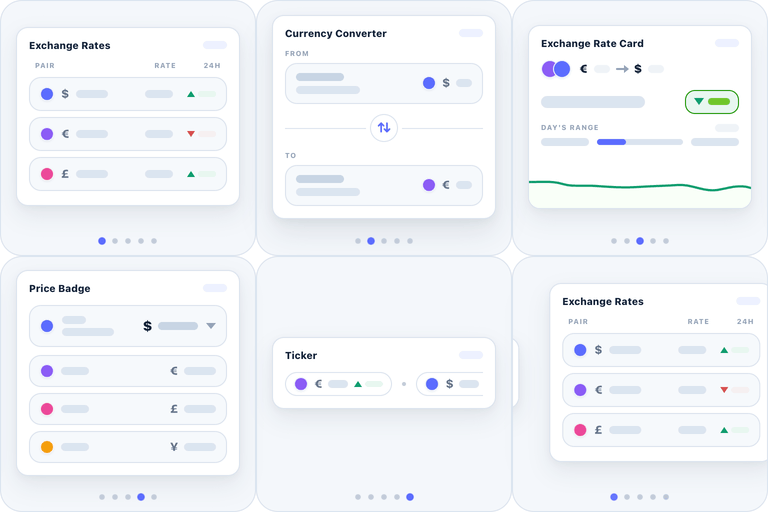
- 11 Widget Styles – Mini, Square, Tall, Inline, Compact, Mini Chart, Multi Currency, and more
- 170+ Currencies – All major world currencies with live exchange rates
- Gutenberg Block – Native WordPress block editor support
- Shortcode Support – Use [currencywiki_converter] anywhere
- Customizable – Themes, colors, languages, and display options
- Responsive – Works perfectly on all devices
- Fast & Lightweight – Loads asynchronously, no impact on page speed
- Multi-language – 78 languages supported
- Historical Charts – Show rate history (selected styles)
Widget Styles
- Mini (250×140) – Minimal footprint
- Square (250×250) – Perfect for sidebars
- Tall (200×280) – Vertical layout
- Inline (480×56) – Single line, great for headers
- Compact (280×200) – Default balanced style
- Mini Chart (250×260) – With historical rate chart
- Multi Expandable (300×400) – Multiple currency converter
- Multi Fixed (300×340) – Fixed multi-currency view
- Rates Compact (220×300) – Exchange rates table
- Rates Viewer (300×500) – Full rates display
- Rates Viewer Compact (300×400) – Compact rates table
Customization Options
- Theme – Light, Dark, or Auto (system preference)
- Accent Colors – Blue, Green, Purple, Red, Orange, Slate
- Default Currencies – Set from/to currencies
- Display Options – Flags, labels, swap button, branding
- Number Format – US, European, French, Swiss styles
- Decimal Places – 0 to 6 decimal precision
- Lock Currencies – Prevent user changes
- Language – 78 languages including English, Spanish, French, German, Italian, Portuguese, Russian, Japanese, Korean, Chinese, Arabic, Hindi, Thai, Vietnamese, Turkish, Polish, Dutch, Swedish, and many more
Usage
Gutenberg Block:
Search for “Currency Converter” in the block inserter and customize in the sidebar.
Shortcode:
[currencywiki_converter]
Short Alias:
[currencywiki]
With Options:
[currencywiki_converter style=”compact” theme=”light” from=”USD” to=”EUR” amount=”100″]
All Shortcode Attributes:
style– Widget style (mini, square, tall, inline, compact, mini-chart, multi-expandable, multi-fixed, rates-compact, rates-viewer, rates-viewer-compact)theme– Theme (auto, light, dark)accent– Accent color hex without # (2563eb, 059669, 7c3aed, dc2626, ea580c, 475569)from– Source currency code (USD, EUR, GBP, etc.)to– Target currency codeamount– Default amountlang– Language code – 78 supported (en, es, fr, de, it, pt, pt-br, ru, ja, ko, zh, zh-tw, ar, hi, th, vi, tr, pl, nl, sv, and more)flags– Show flags (1/0)labels– Show labels (1/0)swap– Show swap button (1/0)branding– Show branding (1/0)lock– Lock currency selection (1/0)format– Number format (auto, en-US, de-DE, fr-FR, de-CH)decimals– Decimal places (0-6)
Services externes
This plugin relies on an external service to render the widget and to supply live exchange rates: Currency.Wiki, operated by CurrencyWiki Technologies LLC.
What the service is and what it is used for
The widget is drawn by a small JavaScript embed hosted at widget.currency.wiki. Live exchange rates (and, for the chart styles, historical data) are read from api.currency.wiki, and currency flag images are loaded from cdn.currency.wiki. The plugin does not bundle the widget, the rates, or the flag images; it builds an embed URL and loads them from the service. This is what keeps the plugin small and lets exchange rates stay current without a plugin update.
What data is sent, and when
- On every page view where the widget is displayed, the visitor’s browser loads the widget from
https://widget.currency.wiki/v3/— either thescript.jsinjector or the/v3/embediframe, depending on the embed method you chose. To show live numbers it then requests current rates, and for chart styles historical data, fromhttps://api.currency.wiki, and flag images fromhttps://cdn.currency.wiki/flags/. These requests carry the display settings you configured — currency pair, amount, style, theme, accent color, language, and similar display options — as URL parameters. As with any web request, the visitor’s IP address and user agent are visible to the server. - No personal data is collected, and no cookies are set. Exchange rates and flags are public reference data; nothing about your visitor is sent beyond the ordinary contents of an HTTP request.
- In the WordPress admin, live previews are loaded from
https://widget.currency.wiki/v3/embed(flaggedpreview=1so they are not counted as a site using the widget) on two screens: the settings dashboard, which shows a live preview and an “All Widget Styles” gallery, and the block editor, which previews the block as you configure it. These send the same display settings listed above; no personal data is sent from the admin.
Terms and privacy
- Terms of Service: https://currency.wiki/terms-of-service
- Privacy Policy: https://currency.wiki/privacy-policy
Installation
- Téléchargez le dossier
currency-converter-widgetdans/wp-content/plugins/ - Activez le plugin via le menu « Plugins » dans WordPress
- Go to Settings > Currency Converter to customize defaults
- Use the Gutenberg block or shortcode to add the widget
Journal de modifications
Adds an "All Widget Styles" live gallery to the settings dashboard so you can preview every style at once.
4.2.0
- Added: “All Widget Styles” live gallery on the settings dashboard — every style rendered with live rates, each shown in a different accent color so you can see all eleven at a glance and copy the shortcode for the one you want
4.1.2
- Fixed: Smoother live preview in the admin when switching widget styles (no more resize flicker)
4.1.1
- Fixed: Block editor preview now displays the widget at its true size (removed the extra empty space below the widget)
4.1.0
- Added: Custom accent color — choose any hex color in addition to the preset swatches, in both the Advanced Builder and the WordPress dashboard
- Improved: Generated shortcode now carries your accent color when it differs from the default
4.0.1
- Fixed: Embed code now properly reflects all settings changes (theme, accent color, style, size, decimals)
- Fixed: Currency flag images now display correctly in admin dashboard currency pills
- Fixed: Multi-Expandable base currency dropdown now syncs with Add Currency Dropdown setting
- Fixed: Widget flags no longer show blank for currencies outside the dropdown preset
4.0.0
- Complete rebuild with new modern widget engine
- Added 11 beautiful widget styles
- Added native Gutenberg block support
- Added multi-language support (78 languages)
- Added historical rate charts
- Added number format options
- Added decimal precision control
- New admin dashboard with live preview
- Performance improvements
- Backwards compatible with legacy [currency_bcc] shortcode
- Backwards compatible with legacy sidebar widget
Captures d'écran


Pour les développeurs
Est-ce votre plugin ? Montrez les chiffres.
Ajoutez un badge en direct à votre site, docs ou github readme. Il se met à jour par lui-même - aucun compte n'est nécessaire.
Best Currency Converter Widget alternatives
All currency calculator plugins →
FAQ
Currency Converter Widget: quick answers
Réponses directes, extraites des données en direct WordPress.org.
Source : WordPress.org
Is Currency Converter Widget free?
Yes. Currency Converter Widget is free to download and use from the official WordPress.org plugin directory.
Is Currency Converter Widget safe to use in 2026?
Yes — Currency Converter Widget is a safe, well-maintained plugin to use in 2026. It runs on 2K+ sites, is rated 4.9/5 and was last updated 1 day ago, and scores 83/100 on our health check.
How many websites use Currency Converter Widget?
Currency Converter Widget is active on 2K+ WordPress websites and has been downloaded 54,621 times since it launched in June 2017. It was downloaded 895 times in the last 30 days.
Does Currency Converter Widget work with WordPress 7.1?
Currency Converter Widget is officially tested up to WordPress 7.0.9, while the latest release is 7.1.5. It may still work, but try it on a staging site first.
What PHP version does Currency Converter Widget need?
Currency Converter Widget requires PHP 7.4 or higher. Most hosts run PHP 8.x today, so it works on any modern WordPress hosting.
When was Currency Converter Widget last updated?
The latest version, 4.2.0, was released on November 18, 2026 (1 day ago).
Who makes Currency Converter Widget?
Currency Converter Widget is developed and maintained by currencywiki.
What are the best alternatives to Currency Converter Widget?
The most popular alternatives to Currency Converter Widget are Currency Converter Calculat… (1K+ installs), Currency Converter (400+ installs) and Currency Converter Widget ⚡… (300+ installs).
Propulsé par PageForge
Un modèle et une feuille de calcul. Une vraie page pour chaque recherche.
PageForge transforme chaque ligne d'un CSV en une page WordPress avec son propre titre, URL, SEO et schéma, construit sur la mise en page que vous Déjà conçu. Gratuit sur WordPress.org.
- CSV et XLSX, plus Google Sheets sur les professionnels et les entreprises
- Son propre titre, URL, SEO champs et schéma pour chaque page
- Fonctionne avec l'éditeur de blocs, Elementor, Divi et Avada
- Gratuit sur WordPress.org, pas de carte de crédit