

Country Code For Elementor Form Telephone Field
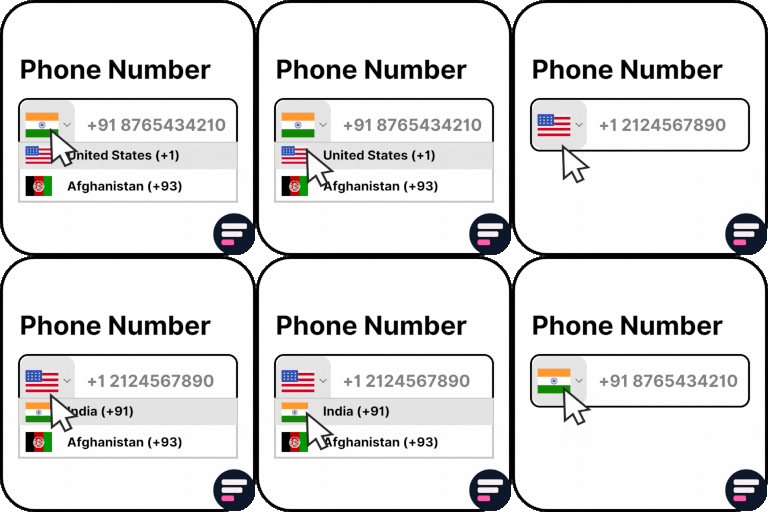
Add a country code dropdown with flags to Elementor form phone field for valid international numbers. Also works with Hello Plus form widget.

Choix
Yes — Country Code For Elementor Form… is a safe, well-maintained plugin to use in 2026. It runs on 10K+ sites, is rated 5/5 and was last updated 3 months ago, and scores 81/100 on our health check.
- Prouvé à grande échelle sur plus de 10 000 sites actifs
- Testé avec le dernier WordPress (7.1)
Comment s'accumule-t-il ?
Côte à côte sur les installations, les mises à jour, les évaluations et le support



Téléchargements quotidiens
Les pics de téléchargement suivent généralement une nouvelle version - chaque site qui met à jour automatiquement compte comme un téléchargement.
Classements
Where Country Code For Elementor… stands todayWordPress.org Classements de recherche
Position en direct dans la recherche de plugins, Top 100| Mot-clé | Position |
|---|---|
| country code | #1 |
| élémentorateur | #76 |
| elementor form | #17 |
| elementor form builder | #23 |
| phone field | #9 |
Adoption de version
Part de sites actifs par version.
Répartition des notes
★★★★★ ★★★★★ 5 sur 8 avis
About Country Code For Elementor Form Telepho…
From the official readme · v1.7.4Description
Use Country Code for Elementor Form Telephone Field plugin to easily add an international country code dropdown with flags inside the phone field of your Elementor form.
👉 VIEW FREE DEMO – COUNTRY CODE FOR ELEMENTOR FORM
Upgrade to Cool FormKit to unlock more advanced features for Elementor forms – including range slider, signature field, conditional logic, calculator & more. Start building smarter forms with coolformkit today!
Free Plugin Features:
-
Seamless Integration with Elementor Forms: This ultimate Elementor addon helps users enter valid mobile numbers by selecting the correct country dial code before typing their phone number. It ensures properly formatted data, improves form validation, and reduces errors in contact forms, booking forms, registration forms, and more.
-
Show Only Selected Countries: Limit the dropdown to display only specific countries. For example, if you only want to show Canada, India, United States, and United Kingdom, simply enter their alpha-2 codes in the Tel field settings like:
ca,in,us,gb. -
Exclude Specific Countries: Show all countries but hide a few by entering their alpha-2 codes (e.g.,
af,pkremoves Afghanistan and Pakistan). -
Set a Default Country: Preselect a default country code when the form loads.
-
Control Dial Code Visibility: Show or hide the dial code while users type their phone number.
-
Strict Mode Validation: Enable strict mode to block invalid numbers or extra digits based on the selected country.
-
Compatibility with Hello Plus: This addon also works with the Hello Plus form lite widget. If you are creating forms using Elementor Free with Hello Plus, you can still add an international dial code dropdown to the phone field using this ultimate addon.
Upgrade for More Features
-
Auto Detect Country Code by User IP
Automatically select the user’s country code in the phone field based on their IP address. You can enable this feature inside your Elementor form by using CoolFormKit pro version. -
Show Preferred Countries at Top
By default, the dropdown lists countries alphabetically (A–Z). With this feature, you can pin specific countries (like India, US, UK) at the top for faster user selection. -
Show or Hide Country Flags
Choose whether to display country flags alongside dial codes. For faster form loading, you can disable flags and only show the country dial codes. -
Country & State Field for Elementor Form
Go beyond phone fields! With Cool FormKit Pro, you can add a Country + State dropdown field. Users first select a country, and then the state field updates dynamically with available states.
More Essential Addons for Elementor Form
-
Conditional Fields for Elementor Form
Add conditional logic to Elementor form fields to show or hide inputs dynamically based on user choices. Make your forms smarter, cleaner, and easier to use. -
Form Input Masks for Elementor Forms
Apply input masks so users enter properly formatted data like phone numbers, dates, credit cards, and more. Improves accuracy and reduces validation errors. -
Cool FormKit
A complete form builder addon for Elementor Free & Pro. It extends Elementor Pro forms with advanced fields or provides a dedicated form builder widget if you’re on Elementor Free. Popular features include:
Other Popular Addons for Elementor
Enhance your website-building workflow with these other ultimate Elementor addons by Cool Plugins:
-
Loop Grid Extender for Elementor Pro
Add ACF Repeater fields & advanced taxonomy filters inside Elementor Pro loop grids. -
AutoPoly – AI Translation for Polylang
Instantly auto-translate Elementor pages using AI. Build multilingual websites faster with Polylang + AutoPoly. -
Timeline Widget for Elementor
Display history, events, or milestones in beautiful vertical or horizontal timelines inside Elementor pages. -
Events Widgets for Elementor
Add The Events Calendar widgets to Elementor — show events in grid, list, or carousel layouts with ease. -
LocoAI – Auto Translate for Loco Translate
Translate WordPress plugins & themes automatically with AI. One-click string translation inside Loco Translate.
Use of 3rd Party Services: This plugin connects to the Cool Plugins feedback server only for optional usage data sharing and voluntary feedback submission (for example, during plugin deactivation). Data is transmitted solely after explicit user consent. No hidden tracking is performed, and no frontend visitor or site user data is collected. For more details, please review our Data Usage Policy, TOS, and Privacy Policy.It also includes the intl-tel-input library, distributed under the MIT License .
Installation
-
Install the Plugin:
- In your WordPress admin dashboard, go to Plugins → Add New.
- Search for “Country Code For Elementor Form Telephone Field” and install the plugin developed by Cool Plugins.
- Alternatively, you can manually upload the plugin:
- Download and unzip the plugin.
- Upload the folder to /wp-content/plugins/ directory using FTP or File Manager.
- Note: This plugin extends the form widget provided by Elementor Pro or Hello Plus. Please ensure you have one of these installed and activated.
-
Activate the Plugin:
- In your WordPress admin dashboard, go to Plugins → Installed Plugins.
- Find Country Code For Elementor Form Telephone Field and click Activate.
-
Configure the Plugin:
- Edit any page with Elementor.
- Add a Form widget and include a Tel (Phone) Field.
- Enable the Country Code dropdown inside the Tel Field settings.
- Configure options so users can easily select their country code before entering their phone number.
More Docs & Guides
Journal de modifications
Integrated new plugin dashboard.
1.7.4 | Jul 31, 2026
- Tested up to: Elementor 4.2.1 and Elementor Pro 4.2.1.
1.7.3 | Jul 08, 2026
- Improved: Code improvements.
- Fixed: Atomic Forms compatibility issue with older versions of Elementor Pro (v4.0.2).
1.7.2 | Jun 16, 2026
- Fixed: Bug fixes.
1.7.1 | Jun 16, 2026
- Amélioration : nettoyé la logique d'enregistrement de l'avis pour une meilleure lisibilité.
1.7.0 | Jun 02, 2026
- Added: Atomic form compatibility.
- Improved: Code improvements.
- Tested up to: Elementor 4.1.1 and Elementor Pro 4.1.0.
1.6.4 | Apr 01, 2026
- Tested up to: Elementor 4.0.0 and Elementor Pro 4.0.0.
Captures d'écran


Pour les développeurs
Est-ce votre plugin ? Montrez les chiffres.
Ajoutez un badge en direct à votre site, docs ou github readme. Il se met à jour par lui-même - aucun compte n'est nécessaire.
Best Country Code For Elementor Fo… alternatives
All country code plugins →



FAQ
Country Code For Elementor Form Tel…: quick answers
Réponses directes, extraites des données en direct WordPress.org.
Source : WordPress.org
Is Country Code For Elementor Form… free?
Yes. Country Code For Elementor Form… is free to download and use from the official WordPress.org plugin directory.
Is Country Code For Elementor Form… safe to use in 2026?
Yes — Country Code For Elementor Form… is a safe, well-maintained plugin to use in 2026. It runs on 10K+ sites, is rated 5/5 and was last updated 3 months ago, and scores 81/100 on our health check.
How many websites use Country Code For Elementor Form…?
Country Code For Elementor Form… is active on 10K+ WordPress websites and has been downloaded 168,015 times since it launched in May 2024. It was downloaded 2,378 times in the last 30 days.
Does Country Code For Elementor Form… work with WordPress 7.1?
Yes. The developer has tested Country Code For Elementor Form… up to WordPress 7.1.5, the latest release. It requires WordPress 5.0 or newer.
What PHP version does Country Code For Elementor Form… need?
Country Code For Elementor Form… requires PHP 7.2 or higher. Most hosts run PHP 8.x today, so it works on any modern WordPress hosting.
When was Country Code For Elementor Form… last updated?
The latest version, 1.7.4, was released on September 4, 2026 (3 months ago).
Who makes Country Code For Elementor Form…?
Country Code For Elementor Form… is developed and maintained by Cool Plugins.
What are the best alternatives to Country Code For Elementor Form…?
The most popular alternatives to Country Code For Elementor Form… are International Telephone Inp… (8K+ installs), Contact Form Extender for D… (600+ installs) and Wawp Country Code & Chat Wi… (400+ installs).
Propulsé par PageForge
Un modèle et une feuille de calcul. Une vraie page pour chaque recherche.
PageForge transforme chaque ligne d'un CSV en une page WordPress avec son propre titre, URL, SEO et schéma, construit sur la mise en page que vous Déjà conçu. Gratuit sur WordPress.org.
- CSV et XLSX, plus Google Sheets sur les professionnels et les entreprises
- Son propre titre, URL, SEO champs et schéma pour chaque page
- Fonctionne avec l'éditeur de blocs, Elementor, Divi et Avada
- Gratuit sur WordPress.org, pas de carte de crédit