


Commandify – Command Palette, Content Search, Themes Control, Product Edits, Context Actions, Dynamic content, Page builders navigation and actions
Commandify, a smart command palette for WordPress & WooCommerce. Instantly navigate, search, and manage admin tasks with fast keyboard commands.

Utiliser avec prudence
Commandify works, but test it on a staging site before relying on it in 2026. It runs on 50+ sites, is rated 5/5 and was last updated 1 month ago, and scores 59/100 on our health check.
- Petite base d'utilisateurs (plus de 50 installations actives)
- Très peu de critiques jusqu'à présent
- Uniquement testé jusqu'à WordPress 6,9 (le dernier est de 7,1)
Comment s'accumule-t-il ?
Côte à côte sur les installations, les mises à jour, les évaluations et le support



Téléchargements quotidiens
Les pics de téléchargement suivent généralement une nouvelle version - chaque site qui met à jour automatiquement compte comme un téléchargement.
Classements
Where Commandify stands todayWordPress.org Classements de recherche
Position en direct dans la recherche de plugins, Top 100| Mot-clé | Position |
|---|---|
| admin search | >100 |
| command palette | #6 |
| instant action | #21 |
| navigation tools | #53 |
| productivity tools | #17 |
Adoption de version
Part de sites actifs par version.
Répartition des notes
★★★★★ ★★★★★ 5 sur 2 avis
About Commandify
À partir du Lisez-moi officiel · v1.1.0Description
Commandify is a modern command palette for WordPress, designed to help you work faster, stay focused, and control your entire site with a single keyboard shortcut. Cmd/Ctrl + K!
Whether you manage a blog, a learning community or membership platform, an agency portfolio, or a WooCommerce store, Commandify gives you instant access to navigation, content search, settings, maintenance tools, and powerful admin actions from any screen inside WordPress.
Built for creators, developers, store owners, and productivity lovers, Commandify replaces slow menu-clicking with a clean command palette or keyboard-first workflow powered by Cmd/Ctrl + K.
Features | Documentation | Pricing
Commandify Free Features at a Glance
A clean, fast, and lightweight command palette available to all WordPress users.
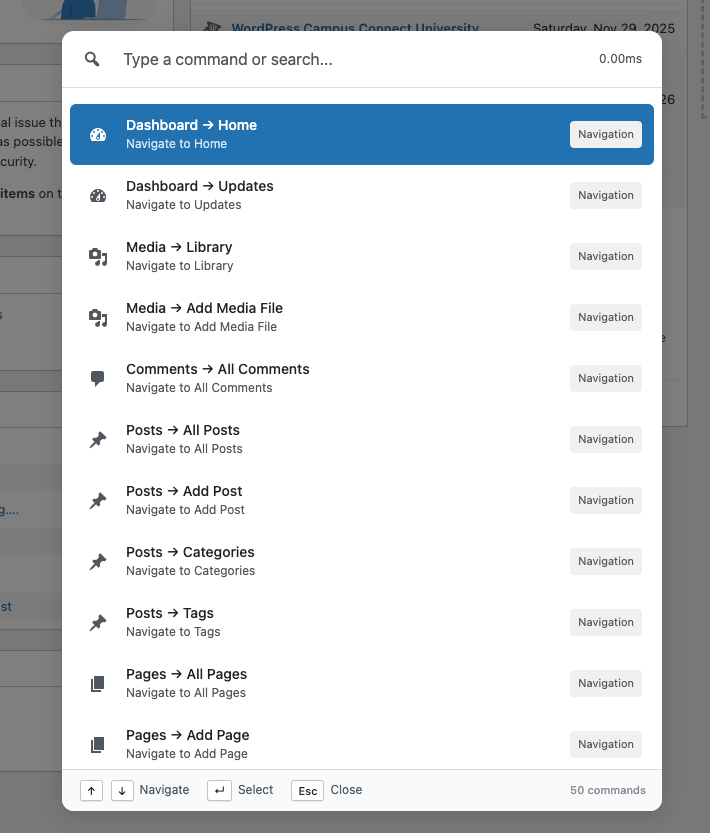
- Global Command Palette (Cmd/Ctrl + K) – Works in admin and frontend
- Frontend Command Palette – Access commands from any page with theme-independent styling
- Instant Admin Navigation across settings, tools, and CPTs
- Universal Content Search for posts, pages, media, and users
- Automatic Content Search – When no command matches, find up to 10 posts, pages, custom post types and media items with quick actions
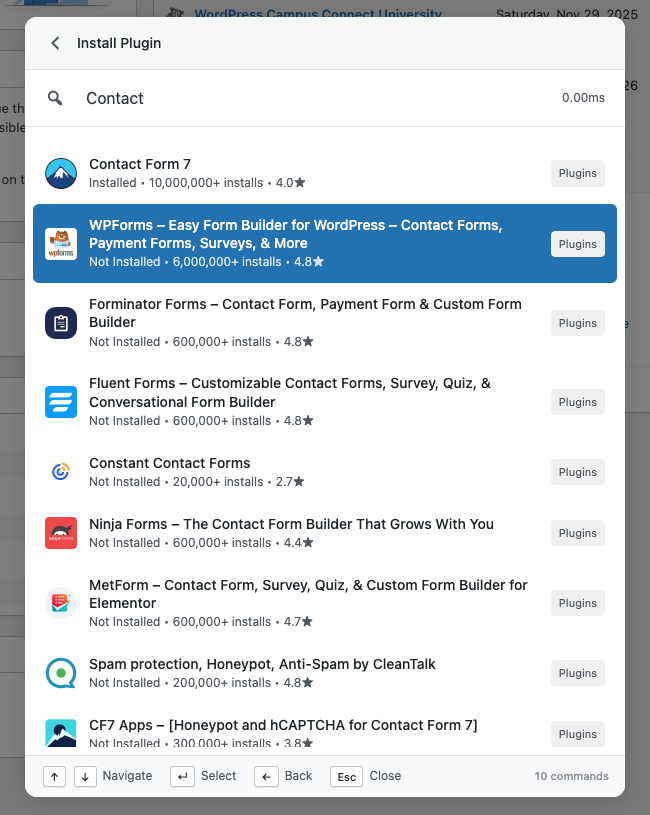
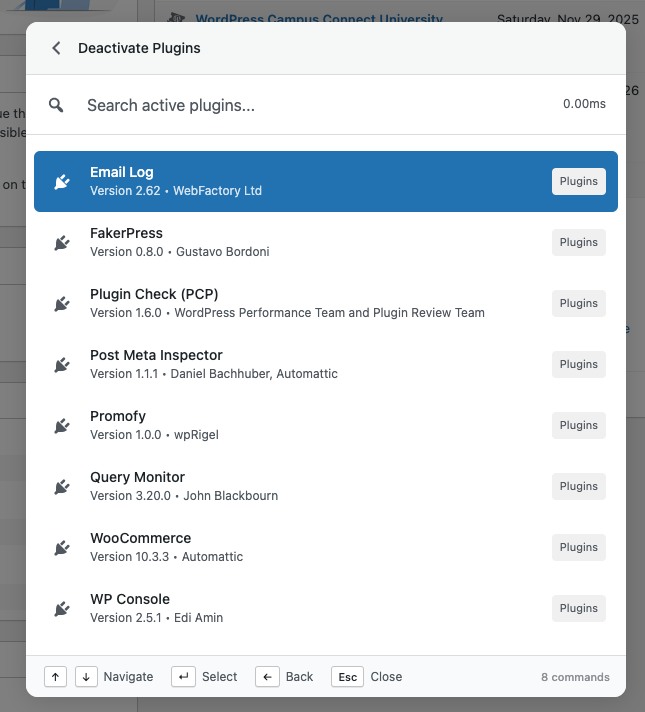
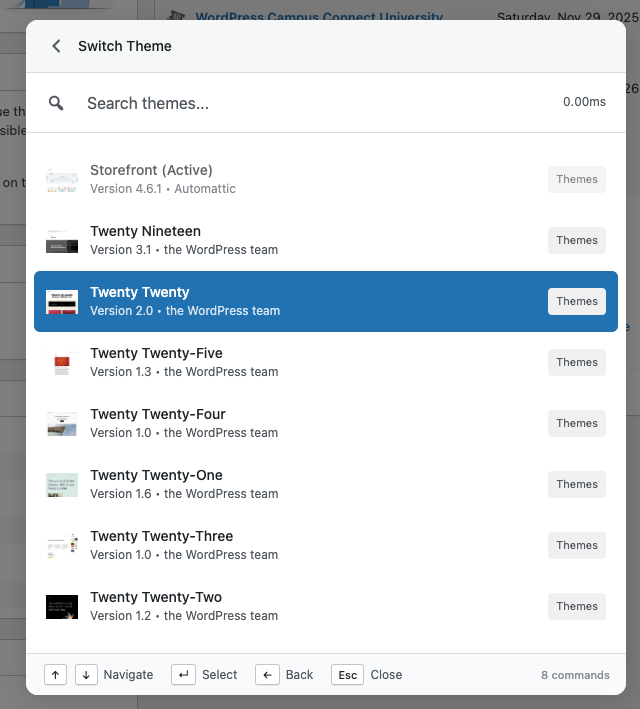
- Plugin & Theme Control (install/activate/deactivate)
- Keyboard-First Workflow optimized for speed and focus
- Fuzzy Search for fast results, even on large sites
- Lightweight & Performance-friendly, works with all major themes and plugins
- Smart and user-friendly interface
Commandify Pro is a separate add-on requiring Commandify Free 1.1.0+ and an activated EDD license.
Commandify Pro Features at a Glance
Advanced features designed for power users, agencies, and WooCommerce stores.
- Smart Default View (Favorites, Recent, Most Used)
- Context-Aware Commands based on your current screen
- WooCommerce Order Actions (status, notes, coupons, totals, emails)
- Product & Variation Editing (stock, SKU, pricing, delete, view)
- WooCommerce Customer Management (view/update billing & shipping addresses, order insights)
- Contact Form 7 Integration (search forms, manage submissions, view form usage)
- Flamingo Submissions (search, view details, manage spam, delete submissions)
- Bricks Builder Integration (edit templates, manage Bricks-enabled post types)
- Elementor Integration (search templates, edit with Elementor, template management)
- Dynamic Pattern Recognition (#postID, @userID, emails)
- Quick Maintenance Tools (clear transients, delete spam, regenerate thumbnails)
- Advanced Settings Forms (site title, timezone, discussion, more)
- Toggle Commands including maintenance mode
- Beacon-powered Smooth UX for consistent palette state
- Dark Mode Support with three appearance options (Always Dark, Always Light, Follow System)
- WP Dark Mode Plugin Integration – Automatic detection and compatibility with popular WP Dark Mode plugin
Why Use Commandify?
The WordPress admin is powerful, but as your website grows (more plugins, more settings, more custom post types, more business operations) the dashboard becomes slower and harder to navigate. Every task requires clicking, scrolling, loading new screens, and dealing with constant context switching.
Commandify brings a modern, keyboard-first workflow to WordPress with a Spotlight-style command palette that helps you navigate, search, and perform admin actions instantly using Cmd/Ctrl + K.
Where most admin search tools stop at navigation, Commandify focuses on actions, workflow automation, contextual intelligence, and WooCommerce-first capabilities. These make Commandify valuable for creators, developers, agencies, and online stores managing complex, high-volume sites.
Detailed LITE Feature Breakdown
Spotlight-Style Global Command Palette (Cmd/Ctrl + K)
The command palette is the center of Commandify. Open it from any screen, type what you need, and execute instantly. Fast fuzzy search makes it easy to find settings, tools, content, or pages even if you don’t remember the exact name.
This offers a focused, keyboard-first experience for users who want to work without breaking their flow.
Frontend Access: Commandify works on both admin and frontend. Access the command palette from any page on your site (for administrators only). The frontend palette features theme-independent styling, ensuring a consistent, professional appearance regardless of your active theme.
Admin Menu Navigation- Without Hunting Through Submenus
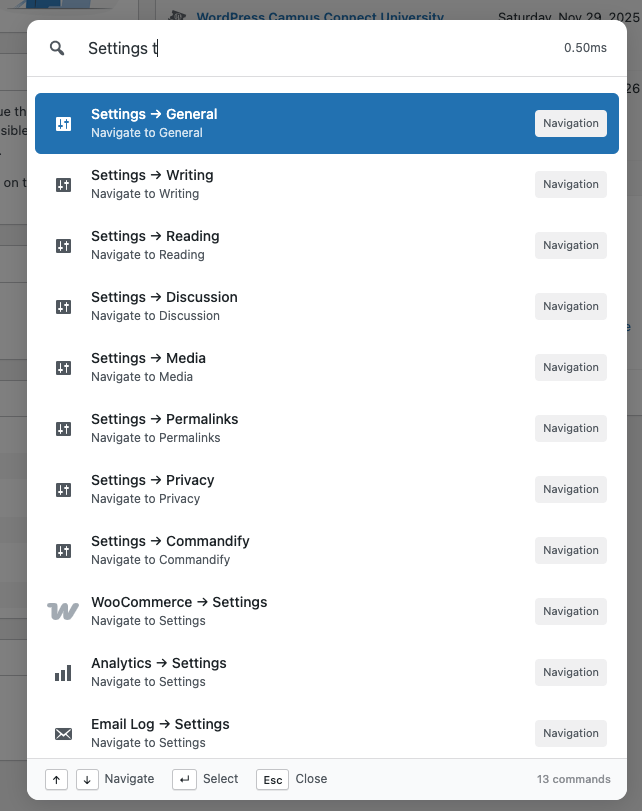
Commandify automatically mirrors your full admin menu structure whatever plugin and theme you have. Just type the page name and jump straight there, perfect for large sites with long, complex admin menus.
Universal Content Search & Quick Actions
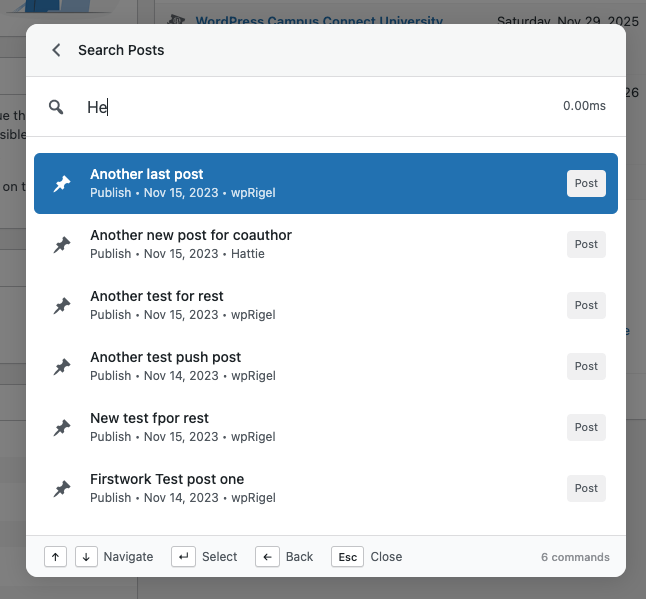
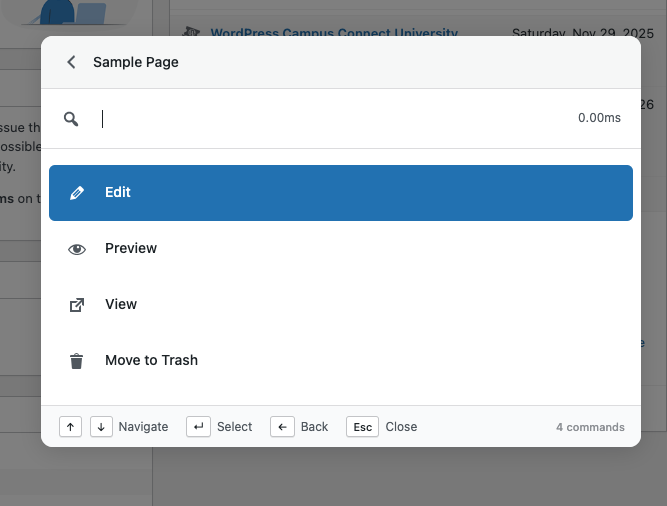
Search for: Posts, Pages, Media items, Users or any registered customer post types. Each result includes context (date, status, author) and quick actions such as: Edit, View, Preview and Trash/Permanent Delete. This drastically speeds up work for content-heavy websites, editorial teams, creators, and publishers.
Plugin & Theme Management
You can manage plugins and themes without leaving the palette:
- Search WordPress.org plugins
- Install plugins
- Activate or deactivate plugins
- Switch themes
- Install new themes
A single, centralized launcher for setup, testing, or client site maintenance.
User Lookup & Quick Profile Access
Search users by name or email and open profiles instantly. Ideal for sites with memberships, communities, customer logins, or LMS dashboards.
Personal Preferences for a Flexible Workflow
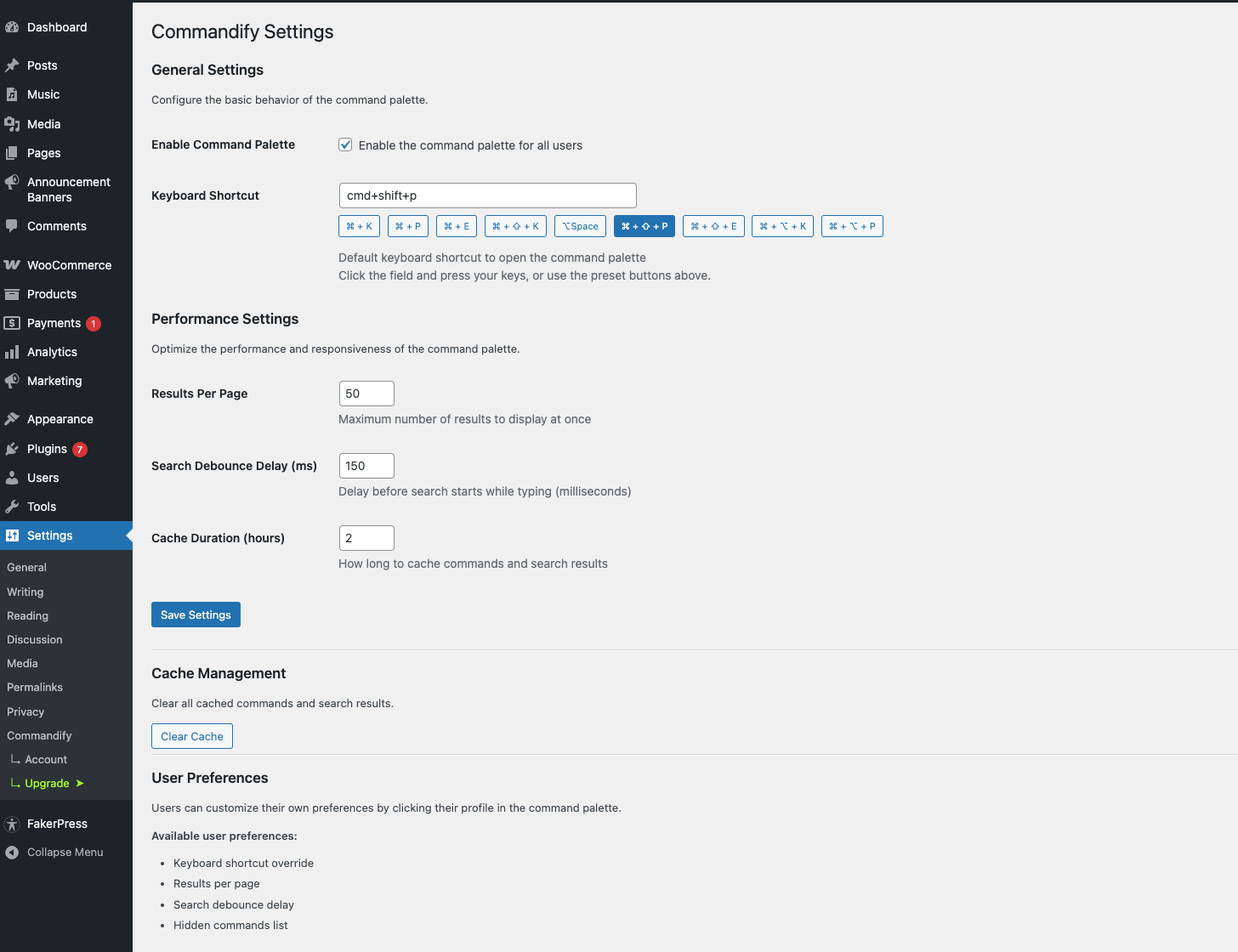
Each user can customize Commandify to fit their preference:, Change shortcut, Adjust search command size, Modify debounce timing, Clearing cache. It adapts to your personal workflow for maximum productivity.
Detailed PRO Feature Breakdown
Smart Default View: Do More Before Typing Anything
Instead of starting with an empty input field, Commandify Pro shows:
- Favorites (commands+actions)
- Recent commands
- Most used actions
- Gloabl commands
Ideal for workflows where you repeat key actions throughout the day.
Context-Aware Command Packs
Commandify Pro adapts based on the screen you’re viewing, providing relevant commands instantly. For example: In post editor the context command will be Publish, Update, Save draft and Preview. Same like on list table the contextual commands will be See all post, Add post. This dynamic behavior reduces navigation steps even further.
Dynamic Pattern Recognition
Commandify Pro intelligently detects patterns and offers relevant actions:
- #123 → Open post with ID 123
- @58 → Open user ID 58
- email@example.com → Find user or customer profile
- Order numbers → Jump directly into WooCommerce order management (Upcoming)
This feature is extremely useful for support teams, developers, online store managers, and administrators working with IDs or copied references.
Advanced Settings Forms & Toggle Commands
Perform key configuration updates without navigating through settings pages. Update most of the required wordpress settings using command palette. Secure REST-powered forms make updates faster and more reliable.
Full WooCommerce Feature Set
Commandify Pro includes the most comprehensive WooCommerce command system available in any WordPress command palette.
WooCommerce Order Management
- Search order by order number, Customer name or customer email.
- Each order there are lots of actions like Edit order, Change order status, Add order notes, Apply coupons, Recalculate totals, Resend order emails, Copy customer email or order number, View order, Send order details email. No other command palette offers this level of WooCommerce depth.
WooCommerce Product & Variation Management
Search products with variations easily. Which also include lots of actions like: Edit product, View product, Trash or permanently delete, Copy product link, Copy SKU, Update stock, Update regular price, Update sale price, Update SKU, Change stock status. Perfect for large stores managing hundreds or thousands of SKUs.
WooCommerce Customer Workflow
Search customers instantly by name or email. Each customer includes powerful actions: Open customer profile, View associated orders, Show billing and shipping address (read-only modal with formatted display), Update billing address (form modal with searchable country/state dropdowns), Update shipping address (form modal with searchable country/state dropdowns), Copy customer details(Upcoming), Email the customer. Address management features match WooCommerce field order and provide dynamic state updates based on selected country. This drastically speeds up support and order management workflows.
Quick Maintenance Tools
Easy one-click maintenance actions designed to handle large volumes of data without timing out:
Clear Transients
Safely removes expired and active transients, even on databases with 100k+ records.
Régénérer des vignettes
Rebuild all image sizes for theme changes, bulk uploads, or redesigns.
Delete All Spam Comments
Deletes thousands of spam comments instantly — ideal for high-traffic blogs.
These tools replace multiple plugins and keep your site running efficiently.
Contact Form 7 & Flamingo Integration
Commandify Pro provides comprehensive Contact Form 7 management directly from the command palette:
Form Management
– Search all Contact Form 7 forms with instant access
– Edit forms, copy shortcodes, duplicate forms, delete forms
– View submissions for any form or post/page containing CF7 shortcodes
– Search posts, pages, and custom post types containing CF7 shortcodes with form-specific actions
Flamingo Submissions
– Search all form submissions by email, name, or content
– View submission details with full form data
– Copy email addresses directly from submissions
– Mark submissions as spam or not spam
– Move submissions to trash or delete permanently
– Efficient database-level searching matching Flamingo admin behavior
Perfect for support teams, form managers, and administrators handling high volumes of form submissions.
Bricks Builder Integration
Seamlessly integrate Bricks Builder into your workflow:
- Edit with Bricks action appears on all Bricks-enabled post types (respects Bricks settings)
- Search and manage Bricks templates
- Regenerate Code Signatures – Security command to regenerate code signatures for all executable code in Bricks templates with confirmation dialog and proper safety checks
- Regenerate CSS files and clear cache
- Create new templates (all types: headers, footers, sections, popups, etc.)
- Dynamic support for all post types enabled in Bricks settings
- Consistent action system integrated with Commandify’s unified post actions
Works automatically with Bricks Builder – no configuration needed.
Elementor Integration
Full Elementor template and page management:
- Search Elementor templates by name or type
- Edit with Elementor action on posts, pages, and all Elementor-supported post types
- Export, copy, duplicate, and rename templates
- Create new templates (all types: pages, sections, headers, footers, etc.)
- Regenerate CSS, sync library, clear cache
- Frontend contextual commands for quick editing
- Works seamlessly in Elementor editor with enhanced keyboard shortcut handling
Fluent Forms Integration
Comprehensive Fluent Forms management directly from the command palette:
Form Management
– Search all Fluent Forms with instant access
– Edit forms, copy shortcodes, duplicate forms, delete forms
– View entries for any form
– Search posts, pages, and custom post types containing FluentForm shortcodes with form-specific actions
Entry Management
– Search all form entries by email, name, or content
– View entry details with full form data
– Mark entries as read/unread
– Move entries to trash or delete permanently
– Recent entries and unread entries quick access
Transaction Management (Pro)
– Search transactions by order number, customer email, or amount
– View transaction details with order items, discounts, and totals
– Full payment information display
Pattern Recognition
– ffentry:ID → Open FluentForm entry by ID
– ffentry:email@example.com → Find entry by email address
– Auto-detects numeric IDs vs email addresses for smart lookup
WP Dark Mode Integration
Full-featured dark mode toggle and appearance management:
- Universal Dark Mode Toggle and Match System command (works everywhere in admin and frontend)
- Quick toggle for dark, light, or system-matched appearance
- Remembers your preference across devices and browsers
- Command palette can switch appearance instantly, including via keyboard shortcut
- Supports both admin dashboard and frontend, with automatic context detection
- Appearance badge in results for visual clarity (dark, light, system)
Perfect for support teams, form managers, and administrators handling high volumes of form submissions and payments.
Check more plugins
Pollify – Feedback Polls, Anonymous Polls, Up/down Voting, NPS Surveys, Export data
Pollify lets you create a poll website in WordPress with awesome polling/online voting capabilities and unlock a series of advanced features to engage your audience like never before.
Auteur
Created by wpRigel
Soutien
For help or bug reports, please visit the support forum or contact us at https://wprigel.com/contact/.
Installation
- Navigate to Plugins → Add New in your WordPress admin.
- Search for “Commandify”.
- Click Install Now, then Activate.
- Press Cmd/Ctrl + K to open the command palette anywhere in the admin or frontend (for administrators).
- Explore settings under Preferences to customize your workflow.
- Upgrade to Commandify Pro for advanced actions, WooCommerce tools, Contact Form 7, Bricks, Elementor integrations, and contextual commands.
Journal de modifications
Automatic content search, tabbed settings and security fixes. Pro is now a separate add-on: install Commandify Pro 1.1.0+ and activate its license to use Pro features.
1.1.0
Release date: October 28, 2026
- [New] Automatically search content when no command matches. Find up to 10 readable posts, pages, public custom post types and media items by title, excerpt or content, with actions for each result.
- [Improved] WooCommerce products appear in fallback search with Free alone or Free plus Pro; Pro command replacements no longer hide products.
- [Improved] Debounced content requests, cancelled stale searches, and explicit loading and error feedback keep the palette responsive.
- [Improved] Organized Settings > Commandify into tabs and preserved unrelated settings when saving an individual tab.
- [Changed] Removed bundled Pro code and the Freemius SDK. Pro features now require the separate Commandify Pro 1.1.0+ add-on and an activated EDD license.
- [Fixed] Strengthened command permissions, nonce validation, bulk actions, search handling and cache behavior.
- [Development] Regenerated Free translations and added PHP 8.0–8.4, WPCS, JavaScript/CSS and release-package checks, plus automated WordPress.org deployment.
1.0.7 – February 04, 2026
- [Fix] Changed the readme name and updated some readme description.
- [Fix] Fixed nonce verficaton issue on settings update.
1.0.6 – January 26, 2026
- [New] New palette design: Introduced an updated palette interface with improved indicators and enhanced user experience.
- [New] Dark Mode Support (Pro): Added native dark mode for command palette with three appearance options – Always Dark, Always Light, and Follow System preference.
- [New] Command Palette Appearance (Pro): New “Command Palette Appearance” command with form modal to customize palette theme – accessible via search or settings.
- [New] WP Dark Mode Integration (Pro): Automatic detection of WP Dark Mode plugin – disables native dark mode when WP Dark Mode is active to prevent conflicts.
- [New] Bricks Code Signatures (Pro): Added “Bricks: Regenerate Code Signatures” command with confirmation dialog – regenerates security signatures for all executable code in Bricks templates with proper safety checks.
- [New] classNames Utility: Implemented utility function for conditional CSS class management – improves code readability and maintainability across components.
- [Improvement] Global Command Execution Event: Added
commandify-command-executedevent system for extensible post-execution handling – enables Pro features and third-party integrations to hook into command lifecycle. - [Improvement] Dark Mode Architecture: Simplified dark mode implementation with direct DOM manipulation for instant updates – removed complex event chains in favor of global reload function.
- [Improvement] Form Modal State Persistence: Form default values now update when preferences change – modal shows correct current state when reopened.
- [Improvement] Cookie Security: Dark mode preference cookie set with proper security flags (HttpOnly, SameSite) and 1-year expiration for persistent preference storage.
- [Improvement] Keep Palette Open: Preference change commands now keep palette open by default – allows users to see immediate visual feedback and try different options.
- [Improvement] Command Reload System: Exposed global
window.commandifyReloadCommandsfunction for external scripts to trigger command list refresh without events. - [Improvement] Component Styling: Enhanced CommandItem component with conditional class application using classNames utility for better CSS management.
- [Fix] WooCommerce Customer Lookup: Fixed customer search issues – improved query performance and result accuracy for large customer databases.
- [Fix] Update Checking: Resolved issues with WordPress update checks, ensuring accurate detection and display of available core, plugin, and theme updates.
- [Fix] Dark Mode Event Handling: Fixed
commandify-reload-commandsevent not triggering – moved event dispatch outside conditional block to ensure it always fires. - [Fix] Theme Initialization: Fixed initial theme detection to properly read from cookie on palette open – ensures theme persists across page loads without delay.
- [Fix] Overlay Data Attribute: Fixed direct data attribute updates on
.commandify-overlayelement – ensures theme changes reflect immediately in CSS without React state updates.
1.0.5 – January 02, 2026
- [New] Fluent Forms Integration (Pro): Search forms, entries, and transactions. Find posts/pages containing FluentForm shortcodes. Pattern recognition for entry lookups (ffentry:ID or email). Full action support for forms, entries, and transactions.
- [New] Fuzzy Search Implementation: Implemented advanced fuzzy search algorithm with context-aware scoring, synonym matching, and intelligent ranking for better search results.
- [New] Help Panel System: Built-in help documentation accessible via help button from command palette footer – includes keyboard shortcuts reference, command guide, and feature documentation.
- [New] New Tab Navigation: Navigation commands now show a visual indicator (↗) when Cmd (Mac) or Ctrl (Windows) is pressed – opens links in new tab instead of current window.
- [New] Alternative Keyboard Shortcuts: Added support for double Shift key press as alternative shortcut to open command palette, providing more flexibility for different workflows.
- [New] Skeleton Loading State: Added elegant skeleton loader that displays while Pro features are loading on page refresh, preventing “No commands found” flash.
- [Improvement] Dynamic Command Loading: Optimized command execution with instant results preloading, static results caching, and improved dynamic action handler system for faster response times.
- [Improvement] Search Index Performance: Optimized search index memoization to prevent stale data and reduce unnecessary rebuilds.
- [Improvement] Command Loading: Added retry mechanism and readiness checks to ensure all commands and settings are loaded before palette opens.
- [Improvement] Error Handling: Added HTTP response validation to all API fetch calls to prevent crashes on network errors.
- [Improvement] CSS Architecture: Refactored stylesheet to reduce !important usage by 77% using double-class specificity technique, improving maintainability and theme compatibility.
- [Improvement] Form Modal Styling: Improved select field height and spacing for better text visibility and user experience.
- [Improvement] Code Quality: Moved HTML sanitizer to utility file, removed unused Elementor integration functions, fixed variable name conflicts.
- [Fix] Favorites Feature: Fixed favorites loading when settings are disabled – now properly respects enable_favorites preference.
- [Fix] Modal Styles: Fixed form modal element styles to ensure consistent appearance across all WordPress themes.
- [Fix] Smart Default View: Fixed contextual commands display on post list pages – now shows all relevant commands instead of limited set.
- [Fix] Command Selection States: Fixed title and badge colors on selected commands – title now stays white and badge maintains dark text for better readability.
- [Fix] Form Select Fields: Fixed text cutoff issue in select dropdowns by increasing height and improving line spacing.
1.0.4 – December 18, 2025
- [New] Unified Post Actions: “Change Status” action now appears consistently in both search results and dynamic pattern lookups for all post types.
- [New] WooCommerce Customer Actions (Pro): Added “Show billing and shipping address” action – displays read-only address information in a modal with proper formatting.
- [New] WooCommerce Customer Actions (Pro): Added “Update billing address” action – form modal with searchable country/state dropdowns matching WooCommerce field order.
- [New] WooCommerce Customer Actions (Pro): Added “Update shipping address” action – form modal with searchable country/state dropdowns matching WooCommerce field order.
- [New] WordPress 6.9 Compatibility: Added setting to disable default WordPress command palette, preventing conflicts with Commandify’s Cmd/Ctrl+K shortcut.
- [New] Frontend palette: Command palette styles are now theme-independent, ensuring consistent design across all themes on both backend and frontend.
- [New] Dynamic Country/State Selection: WooCommerce address forms now use searchable select dropdowns with dynamic state updates based on selected country.
- [Improvement] Icon Alignment: Fixed vertical alignment of icons in command palette (command items, back button, search icon) for better visual consistency.
- [Improvement] WooCommerce Customer Actions: Updated to use centralized UserActions class for consistent action generation across different contexts.
- [Improvement] Bricks Integration: Updated to use centralized commandify_post_actions filter for better consistency with other integrations.
- [Improvement] Elementor Integration: Frontend contextual “Edit with Elementor” command now shows for all Elementor-supported post types, not just pages built with Elementor.
- [Improvement] Keyboard Shortcut Handling: Enhanced keyboard event handling to work seamlessly in Elementor editor iframe, with automatic iframe detection and event capture.
- [Improvement] Modal Sizing: Added support for large and extra-large modal sizes for address display and update forms.
- [Improvement] Form Modal: Added keyboard scroll support (Arrow Up/Down) for scrollable modal content.
- [Fix] Duplicate Post Action: Fixed issue where duplicating a post created two copies instead of one and incorrect toast message.
- [Fix] Contact Form 7 Delete Action: Fixed delete action not working and added proper confirmation modal before deletion.
- [Fix] Contact Form 7 Copy Shortcode: Fixed escaped quotation marks (“) appearing in copied shortcode.
- [Fix] Contact Form 7 Search: Fixed search contact form command not showing all forms – now includes all post statuses and increased limit.
- [Fix] Post Actions: Fixed undefined variable error in frontend contextual commands when generating edit URL.
- [Fix] Elementor Frontend: Fixed “Edit with Elementor” action not appearing on frontend post views.
1.0.3 – December 09, 2025
- [New] Bricks integration: “Edit with Bricks” action now respects Bricks settings – only shows for post types enabled in Bricks settings (Settings → Post Types).
- [New] Bricks integration: Dynamic bricks support for all Bricks-enabled post types based on settings.
- [New] Contact Form 7 integration (Pro): Search all CF7 forms with actions (Edit Form, Copy Shortcode, Duplicate Form, Delete Form, View Submissions).
- [New] Contact Form 7 integration (Pro): Search posts, pages, and custom post types containing CF7 shortcodes with form-specific actions.
- [New] Contact Form 7 integration (Pro): Flamingo submissions search – Search all form submissions with actions (View Details, Copy Email, Mark as Spam/Not Spam, Move to Trash, Delete Permanently).
- [New] Contact Form 7 integration (Pro): “View Submissions” action on forms and posts/pages – Shows 10 recent submissions per form with full action support.
- [New] Contact Form 7 integration (Pro): Search functionality uses WordPress’s
sparameter for efficient database-level searching (matching Flamingo admin behavior). - [Fix] Contact Form 7 integration: Fixed email display and copy – properly extracts email from “Name email@domain.com” format.
- [Fix] Contact Form 7 integration: Fixed HTML entity encoding issues in email addresses and descriptions.
- [Fix] Contact Form 7 integration: Fixed search contact form command not appearing – filter registration timing issue resolved.
- [Improvement] Contact Form 7 integration: Performance optimization – cached form channel mapping, removed unnecessary loops, optimized ID retrieval.
- [Improvement] Contact Form 7 integration: Security enhancements – added capability checks for all submission actions, proper input validation, escaped all URLs and user data.
- [Improvement] Contact Form 7 integration: Search submissions now includes spam submissions with “Mark as Not Spam” option.
- [Improvement] Contact Form 7 integration: Post search shows post type label in description (e.g., “Post • Contains form: Contact Form 1”).
- [Improvement] Contact Form 7 integration: Optimized SQL queries for faster post/page search with CF7 shortcodes.
Captures d'écran
Pour les développeurs
Est-ce votre plugin ? Montrez les chiffres.
Ajoutez un badge en direct à votre site, docs ou github readme. Il se met à jour par lui-même - aucun compte n'est nécessaire.
Best Commandify alternatives
All admin search plugins →



FAQ
Commandify: quick answers
Réponses directes, extraites des données en direct WordPress.org.
Source : WordPress.org
Is Commandify free?
Yes. Commandify is free to download and use from the official WordPress.org plugin directory.
Is Commandify safe to use in 2026?
Commandify works, but test it on a staging site before relying on it in 2026. It runs on 50+ sites, is rated 5/5 and was last updated 1 month ago, and scores 59/100 on our health check.
How many websites use Commandify?
Commandify is active on 50+ WordPress websites and has been downloaded 5,174 times since it launched in November 2025. It was downloaded 305 times in the last 30 days.
Does Commandify work with WordPress 7.1?
Commandify is officially tested up to WordPress 6.9.12, while the latest release is 7.1.5. It may still work, but try it on a staging site first.
What PHP version does Commandify need?
Commandify requires PHP 7.4 or higher. Most hosts run PHP 8.x today, so it works on any modern WordPress hosting.
When was Commandify last updated?
The latest version, 1.1.0, was released on October 27, 2026 (1 month ago).
Who makes Commandify?
Commandify is developed and maintained by wpRigel.
What are the best alternatives to Commandify?
The most popular alternatives to Commandify are Admin Menu Search (3K+ installs), Advanced All in One Admin S… (900+ installs) and Advanced Admin Search (500+ installs).
Propulsé par PageForge
Un modèle et une feuille de calcul. Une vraie page pour chaque recherche.
PageForge transforme chaque ligne d'un CSV en une page WordPress avec son propre titre, URL, SEO et schéma, construit sur la mise en page que vous Déjà conçu. Gratuit sur WordPress.org.
- CSV et XLSX, plus Google Sheets sur les professionnels et les entreprises
- Son propre titre, URL, SEO champs et schéma pour chaque page
- Fonctionne avec l'éditeur de blocs, Elementor, Divi et Avada
- Gratuit sur WordPress.org, pas de carte de crédit