


Clarivo – AI Content Disclosure
Detects AI-generated media by its metadata, allows manual marking and labels it visibly on request (Art. 50 EU AI Act).

Utiliser avec prudence
Clarivo – AI Content Disclosure works, but test it on a staging site before relying on it in 2026. It runs on 20+ sites and was last updated 4 months ago, and scores 52/100 on our health check.
- Petite base d'utilisateurs (20+ installations actives)
- Très peu de critiques jusqu'à présent
Comment s'accumule-t-il ?
Côte à côte sur les installations, les mises à jour, les évaluations et le support


Téléchargements quotidiens
Les pics de téléchargement suivent généralement une nouvelle version - chaque site qui met à jour automatiquement compte comme un téléchargement.
Classements
Where Clarivo stands todayWordPress.org Classements de recherche
Position en direct dans la recherche de plugins, Top 100| Mot-clé | Position |
|---|---|
| IA | >100 |
| disclosure | #82 |
| eu ai act | #39 |
| labelling | #16 |
| transparency | >100 |
Adoption de version
Part de sites actifs par version.
About Clarivo – AI Content Disclosure
À partir du Lisez-moi officiel · v1.1.0Description
The transparency obligations under Art. 50 of the EU AI Act (Regulation
(EU) 2024/1689) apply from 2 August 2026. Clarivo helps website operators
to put these obligations into practice – as a guided process:
Detect → Decide → Label.
Important first – what Clarivo is NOT: Clarivo is a technical tool and
is no substitute for legal advice. No plugin can make a website
“automatically legally compliant” – the decision about which content gets
labelled always rests with the website operator. Clarivo makes that
decision easier (scan, suggestions, help texts) and makes carrying it out
simple (one click, automatic output).
Features (Free)
- Media Library scan: Batch scan of all images (JPEG, PNG, WebP, GIF,
AVIF) as well as video (MP4, MOV) and audio files (MP3, M4A) for
provenance metadata: C2PA/Content Credentials, XMP/IPTC
DigitalSourceType, EXIF generator fields, PNG text chunks, AIGC notes
in the ID3 tag. Pausable, even for large media libraries. - Auto-scan on upload: new media files are checked immediately.
- Manual marking: files without metadata (e.g. screenshots) can be
marked as AI-generated in the Media Library’s attachment dialog – the
labelling then works exactly the same. - Visible labelling: configurable label for marked media in the frontend –
an overlay badge or caption for images, an overlay badge or notice line for
videos, and a notice line at the player for audio; text, position and style
adjustable. On request, Clarivo supports the official EU labelling icons
(optional, automatically matched to the category: fully AI-generated /
AI-edited / basic). (Labelling of featured images, attachment and
WooCommerce product images is part of the separate, separately distributed
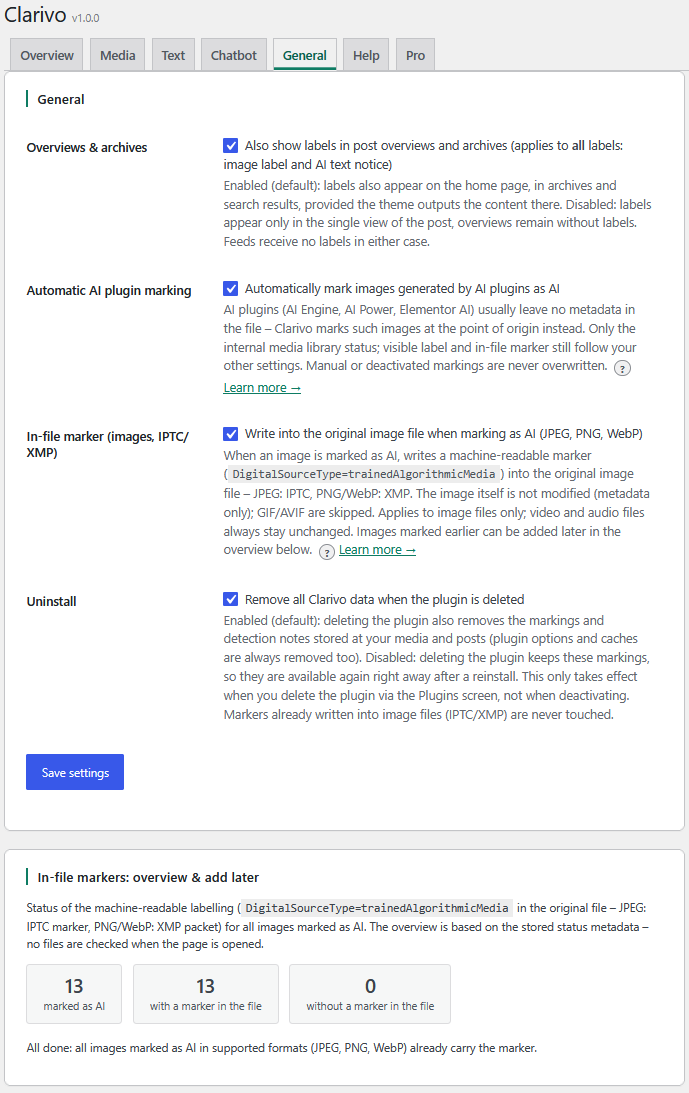
Pro add-on – it is not included in this plugin.) - Machine-readable in-file note (images only, opt-in):
DigitalSourceType=trainedAlgorithmicMedia as an IPTC note (JPEG) or XMP
packet (PNG, WebP) in the original file. - AI text disclosure: “Contains AI-generated content” checkbox per
post/page with a configurable note (deliberately NO AI text detection –
that would be technically unreliable). - Chatbot notice: configurable notice banner for pages with a chat
widget, including detection of common chat plugins. - AI plugin integration: images that AI plugins (AI Engine, AI Power,
Elementor AI, the official WordPress AI plugin) create directly in
WordPress are marked at the point of creation; open interface
clarivo_mark_ai_generated for further plugins. - Media Library overview: AI status column, filters and dashboard by
media type.
Honest limits
- No automatic detection without metadata. Screenshots, clipboard
copies, messenger exports and files whose metadata was stripped by
editing or optimisation tools cannot be reliably identified as AI by any
scan in the world. Manual marking exists for such cases. - No finding does not mean “no AI” – it only means that no indications
were found in the file. - The full format and generator matrix is in the FAQ and in the plugin’s
Help tab.
Privacy and principles
- No requests to third-party servers: all scans run locally on your
server; no files or data are ever sent to third parties, and the plugin
never phones home. The single outbound HTTP request Clarivo can make is the
optional chatbot check – you trigger it by hand, it runs once, and it fetches
your OWN home page only (home_url()), with no cookies and no data sent
anywhere, to look for an embedded chat widget. - No tracking, no forced account: the plugin works entirely without
registration and collects no usage data. - No changes without your say-so: Clarivo never alters your live
website or your files on its own. Every external effect – visible labels,
in-file notes, banners – requires your explicit approval (opt-in).
The plugin is available in English and German: the interface and the default
label texts follow your WordPress language (English by default, German on German
sites), and every label remains freely editable.
Bundled assets
The 12 AI-labelling icons in assets/eu-icons/ are the official icons
published by the European Commission for labelling AI-generated content
(source: https://digital-strategy.ec.europa.eu/en/policies/eu-icons-labelling-ai-generated-content).
The Commission provides them for everyone to use freely, without the need
for attribution. No other third-party assets are bundled; the plugin loads
no external scripts, fonts or images.
Installation
- In your WordPress admin, go to Plugins → Add New, search for
“Clarivo”, then click Install Now and Activate. (Alternatively,
upload the plugin ZIP under Plugins → Add New → Upload Plugin.) - Open Clarivo in the admin menu. A short tour introduces the three
steps: Detect → Decide → Label. - Detect: on the Media tab, run the one-time Media Library scan.
It reads provenance metadata (C2PA, IPTC/XMP, EXIF, PNG, ID3) read-only and
never writes into your files. Every new upload afterwards is scanned
automatically. - Decide: review the AI status in the Media Library. Files without
metadata (e.g. screenshots) can be marked manually in the attachment
dialog. - Label: turn on visible labelling (overlay badge or caption for images,
a notice line for video and audio) and, if you wish, the AI text note per
post/page and the chatbot notice. Nothing appears on your site until you
enable it – you decide whether and how to label.
Clarivo is a technical tool, not legal advice, and does not make a website
“automatically legally compliant” (see the Description and the plugin’s Help
tab). Requires WordPress 6.7 or higher and PHP 7.4 or higher.
Journal de modifications
First public release of Clarivo on wordpress.org.
1.1.0
- AI text disclosure now has four levels instead of a single checkbox:
none / AI-assisted / AI-generated / AI-generated, editorially reviewed.
“AI-generated” shows the notice automatically; “AI-assisted” stays off by
default (no over-labelling). A one-time, lossless migration turns the
previous checkbox into the “AI-generated” level. Quick edit and bulk edit
in the post list are supported. - New “Implementation status” card on the overview: an honest 0-100 % view of
how completely you have set up the measures available in Clarivo, with a
“does not apply” option per duty. It is explicitly not a compliance score
and not proof of legal compliance. - Media that cannot be read (for example offloaded to a CDN, or with a missing
file) is now shown honestly as “not checkable” instead of being counted as
“no finding” – such files never turn the status green on their own. - New “Evidence” tab (documenting & proving), placed right after the labelling
tabs: in the free version it holds the “AI literacy (Art. 4)”
self-documentation checklist for your own measures – a dated entry per point
(not proof that the requirements are met). - The “General” tab is now called “Settings”.
- New shortcodes [clarivo_notice] / [clarivo_hinweis] and a clarivo_notice()
template function to place the AI notice anywhere themes/page builders
reach (output fully escaped; placing it is your deliberate release). - Optional plain-text notice for RSS/Atom feeds and raw excerpts, following
each post’s disclosure level (all off by default). - Chatbot detection reworked: a leading question, local signature detection
in active plugins and theme files, plus an optional one-click check of your
own home page (home_url() only, on click, never automatically; no requests to
third-party servers, signatures bundled locally). - Editor and settings polish: a live preview of the label settings, clearer
expectation setting, and an honest empty state after a scan with no findings. - The overview page was streamlined to two blocks: the implementation status
(open items first, completed items collapsed) and “Your AI content”, which
brings the inventory figures and the per-media-type findings together.
1.0.1
- The plugin now ships with zero licence logic and no inactive code paths:
the previously dormant labelling code for featured/attachment/WooCommerce
images was removed entirely (it lives exclusively in the separate,
separately distributed Pro add-on; nothing changes functionally for this
plugin – it never labelled those images). - All output escaping is now applied visibly at the point of output
(wp_kses with explicit allow-lists) instead of relying on suppressed
linter findings. - The add-on hint on the settings pages was reduced to a single unobtrusive
text line; the full feature comparison lives only on the “Pro” tab. - Removed the explicit load_plugin_textdomain() call – WordPress loads the
bundled translation itself. “Requires at least” was raised to 6.7
accordingly: core auto-loads bundled plugin translations from 6.7 on, so
this is the oldest version on which the German UI works out of the box.
1.0.0
- First public release on wordpress.org.
- Media area reworked for all license tiers: a single Media tab with image,
video and audio sub-panels, a shared Media Library scan that collapses to a
compact summary after the first full run, and clearer label settings. - Audio labelling is now a notice line at the player (the audio overlay option
was removed); the image and video overlay/caption options are unchanged. - The “contains AI-generated content” text note now sits directly below the
post title consistently across themes (spacing fix). - Internal housekeeping: removed unused code so the plugin ships lean.
0.9.2
- Fix: on narrow images (smaller than the content column) the visible overlay
badge now anchors to the image edge instead of the content column, so it no
longer floats in the empty space beside the image (most visible on themes
that centre images). Full-width images, as well as video, audio and
caption-mode labels, are unchanged.
0.9.1
- Internal: the development/testing licence override no longer ships in the
free plugin’s source – it now lives in the self-hosted Pro add-on. No
functional change for normal use (the free plugin has no licence code and
makes no external requests). - Pro overview updated to the final plan line-up (Pro / Studio / Agency) and
pricing; the upgrade box on the settings pages now sits right next to the
content on wide screens instead of far to the right. - Onboarding tour reworked into a guided, multi-step tour that walks through
the tabs (Overview, Media, Text, Chatbot, General, Help) and resumes across
pages; fragile spots (the media dialog, the editor checkbox) are shown as a
short path instead of being opened automatically.
0.9.0
- Help tab rewritten: shorter, consistently from the website operator’s
perspective and with less jargon – the single place for the duties, the
detection limits, the format matrix and the EU-icon notes. - Pro upgrade information in the free version: a dedicated “Pro” tab plus a
discreet upgrade box beside the settings (no external requests – it only
opens the pricing page when you click it). - Attachment dialog: the automatic scan result is now shown as a clear
result block (“Scan result”), separated from the marking controls. - Detection hardening: removed metadata substring traps that could cause
false positives (e.g. an “ImageNumber” XMP field is no longer mistaken for
“Google Imagen”); added the current IPTC non-AI source-type values. - Behaviour change – please note: the option “Remove all Clarivo data
when the plugin is deleted” is now ON by default (previously off). Only if
you switch it off are the markings kept across a reinstall. This takes
effect only when you actually delete the plugin (never on deactivation);
markers already written into image files (IPTC/XMP) are never touched.
Captures d'écran
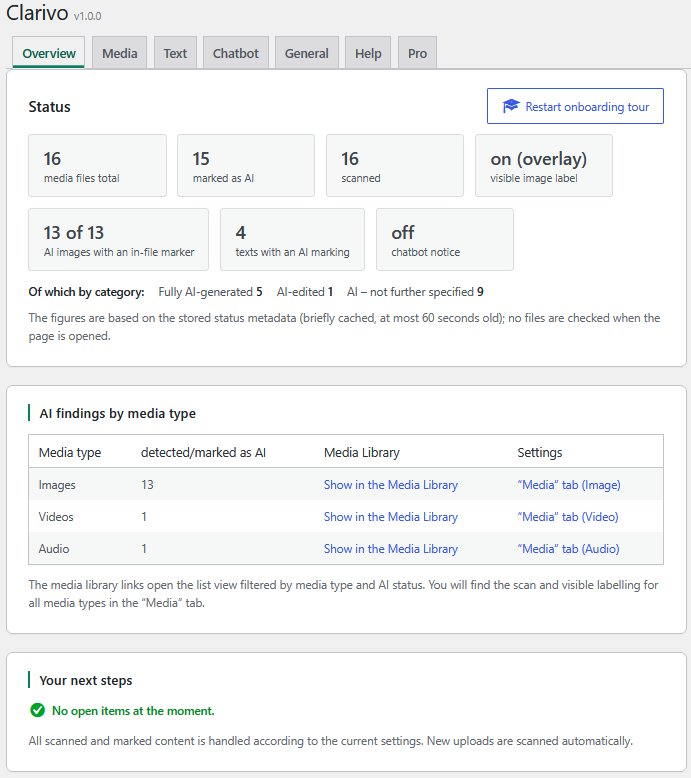
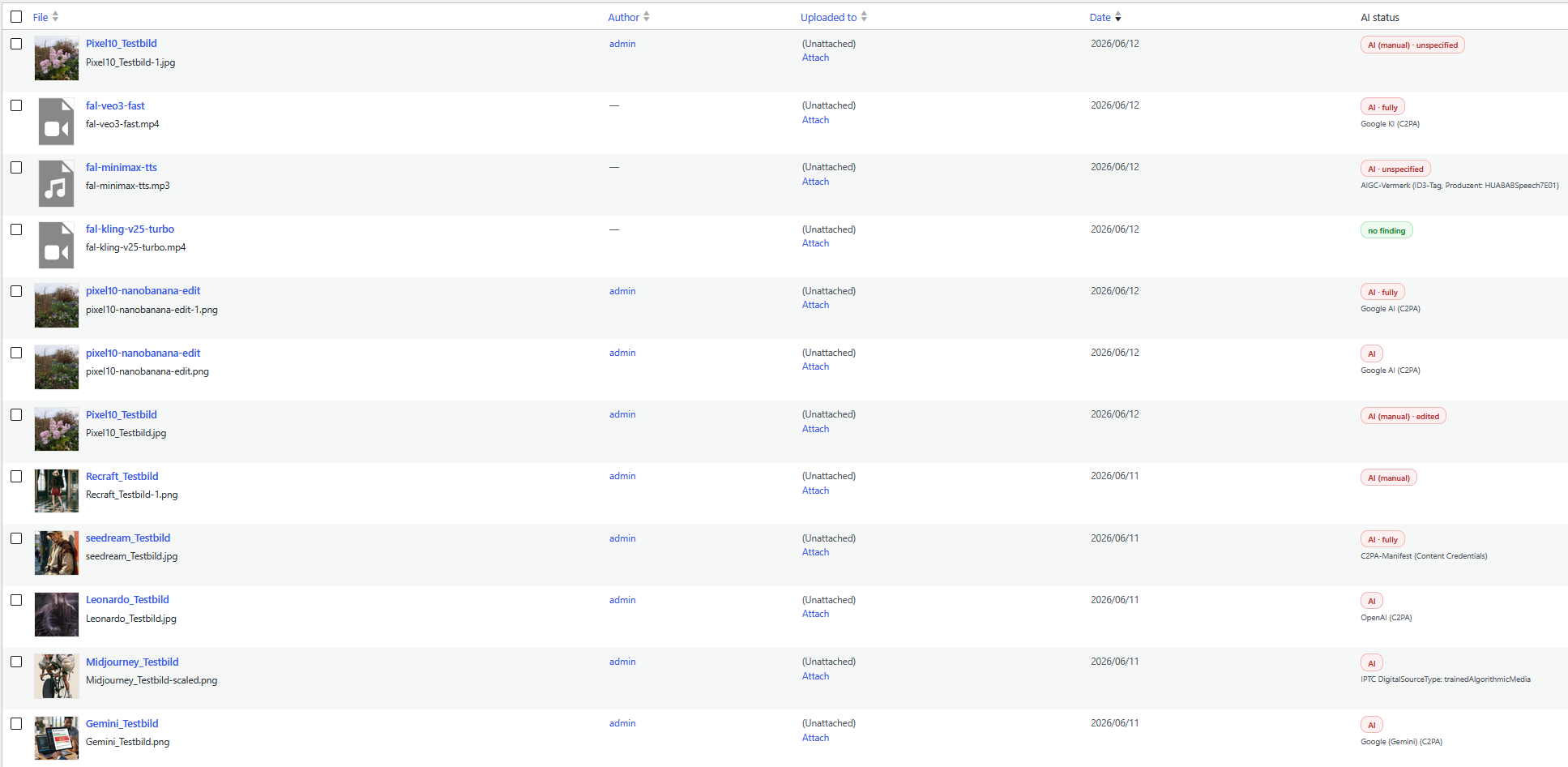
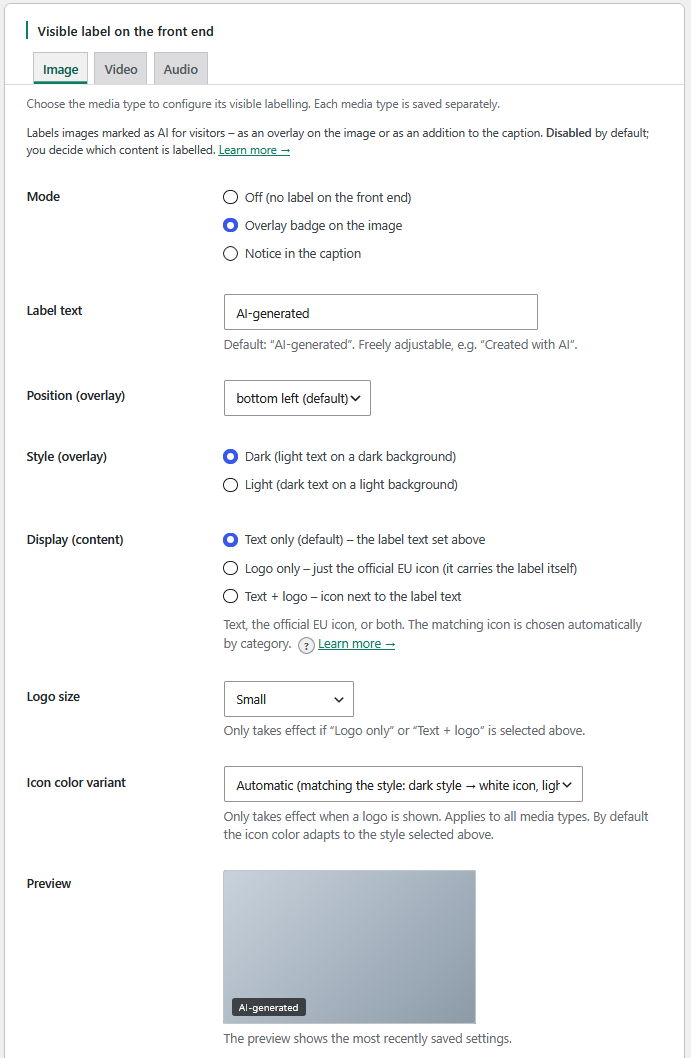
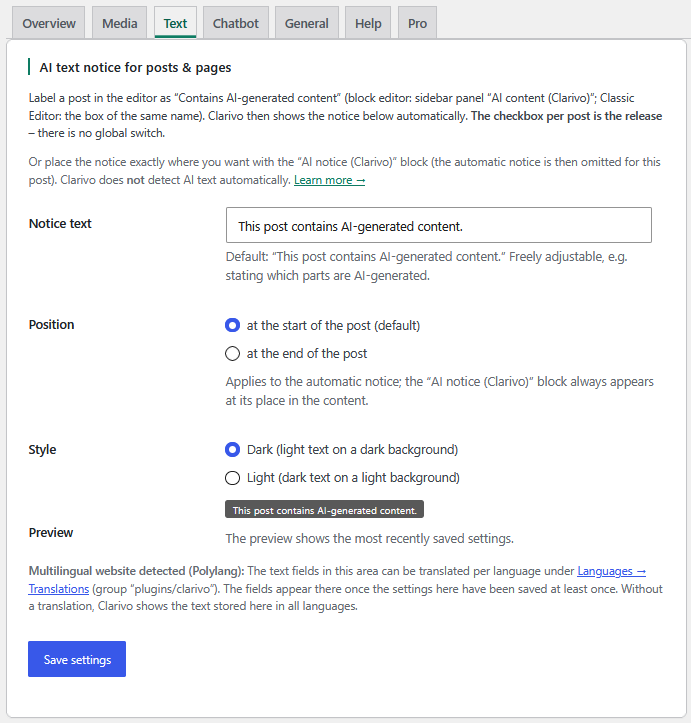
Pour les développeurs
Est-ce votre plugin ? Montrez les chiffres.
Ajoutez un badge en direct à votre site, docs ou github readme. Il se met à jour par lui-même - aucun compte n'est nécessaire.
Best Clarivo alternatives
Tous les plugins d'IA →





FAQ
Clarivo – AI Content Disclosure: quick answers
Réponses directes, extraites des données en direct WordPress.org.
Source : WordPress.org
Is Clarivo – AI Content Disclosure free?
Yes. Clarivo – AI Content Disclosure is free to download and use from the official WordPress.org plugin directory.
Is Clarivo – AI Content Disclosure safe to use in 2026?
Clarivo – AI Content Disclosure works, but test it on a staging site before relying on it in 2026. It runs on 20+ sites and was last updated 4 months ago, and scores 52/100 on our health check.
How many websites use Clarivo – AI Content Disclosure?
Clarivo – AI Content Disclosure is active on 20+ WordPress websites and has been downloaded 1,531 times since it launched in July 2026. It was downloaded 256 times in the last 30 days.
Does Clarivo – AI Content Disclosure work with WordPress 7.1?
Clarivo – AI Content Disclosure is officially tested up to WordPress 7.0.9, while the latest release is 7.1.5. It may still work, but try it on a staging site first.
What PHP version does Clarivo – AI Content Disclosure need?
Clarivo – AI Content Disclosure requires PHP 7.4 or higher. Most hosts run PHP 8.x today, so it works on any modern WordPress hosting.
When was Clarivo – AI Content Disclosure last updated?
The latest version, 1.1.0, was released on July 15, 2026 (4 months ago).
Who makes Clarivo – AI Content Disclosure?
Clarivo – AI Content Disclosure is developed and maintained by Clarivo.
What are the best alternatives to Clarivo – AI Content Disclosure?
The most popular alternatives to Clarivo – AI Content Disclosure are Elementor Agent Ready Websi… (10M+ installs), Jetpack (3M+ installs) and All in One SEO (2M+ installs).
Propulsé par PageForge
Un modèle et une feuille de calcul. Une vraie page pour chaque recherche.
PageForge transforme chaque ligne d'un CSV en une page WordPress avec son propre titre, URL, SEO et schéma, construit sur la mise en page que vous Déjà conçu. Gratuit sur WordPress.org.
- CSV et XLSX, plus Google Sheets sur les professionnels et les entreprises
- Son propre titre, URL, SEO champs et schéma pour chaque page
- Fonctionne avec l'éditeur de blocs, Elementor, Divi et Avada
- Gratuit sur WordPress.org, pas de carte de crédit