


Cimo – Free Instant Image Optimizer & WebP Converter
Unlimited free image compression and WebP conversion, done instantly as you upload them. No quotas, no external servers, no limits.

Choix
Yes — Cimo is a safe, well-maintained plugin to use in 2026. It runs on 10K+ sites, is rated 4.9/5 and was last updated 1 month ago, and scores 90/100 on our health check.
- Prouvé à grande échelle sur plus de 10 000 sites actifs
- Loved by users — 4.9/5 from 20 reviews
- Testé avec le dernier WordPress (7.1)
Comment s'accumule-t-il ?
Côte à côte sur les installations, les mises à jour, les évaluations et le support


Téléchargements quotidiens
Les pics de téléchargement suivent généralement une nouvelle version - chaque site qui met à jour automatiquement compte comme un téléchargement.
Classements
Where Cimo stands todayWordPress.org Classements de recherche
Position en direct dans la recherche de plugins, Top 100| Mot-clé | Position |
|---|---|
| compress | #28 |
| convert | #17 |
| image | #29 |
| optimisation | #68 |
| webp | #22 |
Adoption de version
Part de sites actifs par version.
Répartition des notes
★★★★★★★★★★ 4.9 from 20 reviews
About Cimo
À partir du Lisezmoi officiel · v1.5.0Description
Optimize all your images instantly and for free.
Cimo optimizes, resizes, and converts your images to WebP instantly as you upload them — right in your browser, before the files are ever added to your Media Library. From WordPress’ point of view, it’s as if the image was already optimized before you uploaded it, keeping your site’s load speed fast without compromising quality.
Visit Cimo’s website to learn more about how Cimo does things.
- Unlimited usage – upload as many images as you want
- Instant optimization – virtually no waiting time
- No extra server load, bandwidth, or external image-processing services
Note: Cimo works in all modern browsers (Chrome, Firefox, Edge, Opera). In Safari, images will be optimized but will keep their original file format. WebP conversion is not supported in Safari.
Image Optimization options:
- WebP quality – set the quality level for WebP conversion (1-100), defaults at 80%
- Max image dimension – automatically resize images to a maximum dimension while preserving aspect ratio
- WordPress automatic scaling – disable WordPress’s built-in 2560px image scaling
- Thumbnail generation – disable all WordPress thumbnail generation to save disk space
- Individual thumbnail sizes – selectively enable/disable specific thumbnail sizes
- Preset configurations – one-click “Recommended” settings for optimal performance
- Statistics dashboard – view total storage saved, compression ratio, and optimization metrics
Comment utiliser
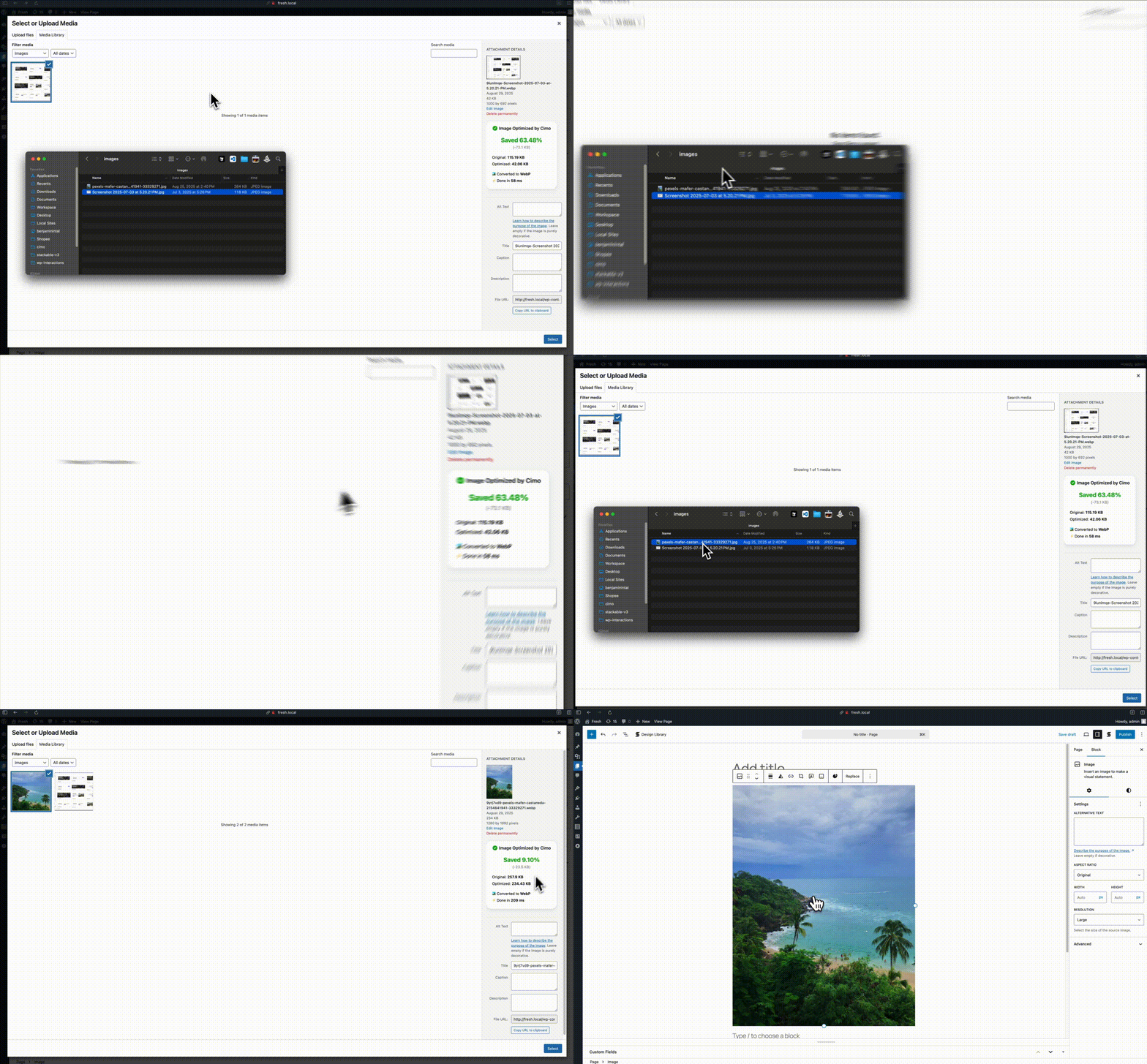
Just upload images to your Media Manager as you normally would, then Cimo instantly optimizes the images to the next-gen format WebP on your browser during the upload process, the resulting optimized file is the one saved to your WordPress site. It’s amazing!
Why use Cimo?
- Completely Free & Unlimited – no quotas, no limits, no paywalls. Optimize as many images as you want, forever.
- Instant, Browser-Based Processing – images are optimized as you upload, with zero server load and no external services.
- Privacy-First – your images never leave your device until they’re uploaded to WordPress.
- Future-Proof Format – automatic WebP conversion reduces file sizes by up to 80%, with full control over quality, dimensions, and thumbnail generation.
- Universal Compatibility – works seamlessly with the WordPress Block Editor, Elementor, Beaver Builder, and all major page builders.
- Developer Friendly – integrate your own upload UI with a small PHP helper and optional JavaScript API. See the developer integration guide.
Works with
- The native WordPress Block Editor / Gutenberg
- Should work with any plugin, but we made sure it works with these:
- Popular Page Builders
- Elementor
- Divi (partial: dropping files is not yet supported)
- Break
- Constructeur de briques
- Oxygène
- Constructeur de castors
- WP Bakery
- Popular Block Editor Builders
- Stackable
- Spectra
- Kadence
- Greenshift
- Générer des blocs
- Popular plugins
- WooCommerce
- Popular Page Builders
Since Cimo’s optimization works during the upload process, Cimo should be compatible with any plugin that uses images
Pour les développeurs
Cimo can optimize files in the browser before your plugin or theme uploads them.
Your existing upload code can stay as it is.
On frontend pages, load Cimo with cimo_enqueue_assets(), then either:
- Register your file input wrapper with
cimo/select_files/allowed_locations - Register a drop zone with
cimo/drop_zone/allowed_locations - Or call
window.cimo.optimizeFiles()from your own JavaScript
See the developer integration guide for the full walkthrough.
What’s in Cimo Premium?
Free already optimizes images as you upload. Cimo Premium finishes the job on what’s already on your site:
- Bulk Optimization – optimize your existing images, videos and audio in your Media Library in one click, no server processing as well
- Optimize All Media Uploaded via Form Plugins – automatically optimize images, videos, and audio uploaded through popular form plugins (Gravity Forms, WPForms, Ninja Forms, Formidable, Fluent Forms, etc.)
- Smart Optimization – uses advanced algorithms to automatically select the optimal compression settings for each image, for the best results without manual tweaking.
- Video & Audio Optimization – automatically optimize and optionally downscale the resolution of videos and audio quality as you upload them
- Low Quality Image Placeholders (LQIP) – for native image blocks, display a subtle image placeholder while waiting for images to load, then fade the loaded image in.
- Stealth Mode – completely hides all Cimo branding and interface elements, while all optimization features continue to work seamlessly in the background.
Visit our website to learn more
Video & Audio optimization are also performed as you upload your files, even before the files are added to your Media Library.
Parfait pour
- Website owners and content creators who upload large images without optimizing them first
- Developers and agencies building or managing sites that need fast, optimized images
- Anyone wanting automatic WebP conversion without a manual workflow
- Sites where server-side image processing isn’t available or desired
- Privacy-conscious users who don’t want images sent to third-party servers
Installation
- Téléchargez le dossier
cimodans le répertoire/wp-content/plugins/ - Activez le plugin via le menu « Plugins » dans WordPress
- That’s it! Cimo automatically optimizes images when you upload
Journal de modifications
1.5.0
- New: Developer API so other plugins can optimize files before upload #67
- New: Option to skip optimizing WebP images on upload #77
- New: Convert GIFs to animated WebP and optimize animated WebP #78
1.4.2
- New: Free settings page shows real bulk optimization progress #66
- New: Media Library notice when video optimization is skipped (premium) #48 #49
- Fixed: Improved error message for bulk optimization on non-HTTPS sites #54
- Fixed: Smart Optimization for HEIC images (premium) #60
- Fixed: SVG sanitizer loading issue (premium) #55
1.4.1
- Fixed: PHP error notice because of invalid big_image_size_threshold usage
1.4.0
- New: Smart Optimization (premium) – get even smaller image file sizes when uploading images #35
- New: Video & audio can now be optimized in Bulk Optimization #37
- New: Toggle optimization option – toggle Cimo’s optimizer on/off when needed #36
- Fixed: When uploading a video using a webkit-based browser, the progress bar would get stuck to ready #47
- Fixed: When WordPress Automatic Image Scaling is ON, the file size in metadata does not match with the final #43
1.3.1
- Fixed: Optimization metadata may not be attached if uploading images with the same filename #40
- Fixed: Added view all stats link
- Fixed: Added upgrade links
1.3.0
- New: Bulk optimization without server processing (premium)
- New: Frontend file uploads can now be optimized (premium)
- New: Integrations to popular WordPress Form plugins (premium)
- New: Added stealth mode (premium)
- New: Added settings link in plugins page entry
- New: Added support for dropping images in WooCommerce descriptions
- Fixed: Cimo settings page improvements
- Fixed: Improvements on stats metabox styling
Captures d'écran
Pour les développeurs
Est-ce votre plugin ? Montrez les chiffres.
Ajoutez un badge en direct à votre site, docs ou github readme. Il se met à jour par lui-même - aucun compte n'est nécessaire.
Best Cimo alternatives
All compress plugins →




FAQ
Cimo: quick answers
Réponses directes, extraites des données en direct WordPress.org.
Source : WordPress.org
Is Cimo free?
Yes. Cimo is free to download and use from the official WordPress.org plugin directory.
Is Cimo safe to use in 2026?
Yes — Cimo is a safe, well-maintained plugin to use in 2026. It runs on 10K+ sites, is rated 4.9/5 and was last updated 1 month ago, and scores 90/100 on our health check.
How many websites use Cimo?
Cimo is active on 10K+ WordPress websites and has been downloaded 64,263 times since it launched in August 2025. It was downloaded 4,660 times in the last 30 days.
Does Cimo work with WordPress 7.1?
Yes. The developer has tested Cimo up to WordPress 7.1.5, the latest release. It requires WordPress 7.0.7 or newer.
What PHP version does Cimo need?
Cimo requires PHP 8.0 or higher. Most hosts run PHP 8.x today, so it works on any modern WordPress hosting.
When was Cimo last updated?
The latest version, 1.5.0, was released on October 14, 2026 (1 month ago).
Who makes Cimo?
Cimo is developed and maintained by Benjamin Intal.
What are the best alternatives to Cimo?
The most popular alternatives to Cimo are EWWW Image Optimizer (1M+ installs), Minify HTML (10K+ installs) and WP Super Minify • Minify, C… (8K+ installs).
Propulsé par PageForge
Un modèle et une feuille de calcul. Une vraie page pour chaque recherche.
PageForge transforme chaque ligne d'un CSV en une page WordPress avec son propre titre, URL, SEO et schéma, construit sur la mise en page que vous Déjà conçu. Gratuit sur WordPress.org.
- CSV et XLSX, plus Google Sheets sur les professionnels et les entreprises
- Son propre titre, URL, SEO champs et schéma pour chaque page
- Fonctionne avec l'éditeur de blocs, Elementor, Divi et Avada
- Gratuit sur WordPress.org, pas de carte de crédit