


Buy one Get one Free – BOGO discount rule maker for WooCommerce
Create buy one get one free or buy X get Y Free, BOGO discount rule of product in WooCommerce

Choix
Yes — Buy one Get one Free is a safe, well-maintained plugin to use in 2026. It runs on 400+ sites, is rated 3.5/5 and was last updated 2 weeks ago, and scores 80/100 on our health check.
- Développé activement — Dernière mise à jour il y a 2 semaines
- Testé avec le dernier WordPress (7.1)
- Petite base d'utilisateurs (400+ installations actives)
Comment s'accumule-t-il ?
Côte à côte sur les installations, les mises à jour, les évaluations et le support



Téléchargements quotidiens
Les pics de téléchargement suivent généralement une nouvelle version - chaque site qui met à jour automatiquement compte comme un téléchargement.
Classements
Where Buy one Get one Free stands todayWordPress.org Classements de recherche
Position en direct dans la recherche de plugins, Top 100| Mot-clé | Position |
|---|---|
| bogo | #11 |
| Bogo WooCommerce plugin | #19 |
| buy one get one | #1 |
| Buy One Get One Free | #1 |
| discounts | #96 |
Adoption de version
Part de sites actifs par version.
Répartition des notes
★★★★★★★★★★ 3.5 from 26 reviews
About Buy one Get one Free
From the official readme · v1.11.26Description
Buy one get one free is a common form of sales promotion.
Demo Link | Documentation Link
Try out the pro features before purchase
https://websitemaintenanceservice.in/bogo_demo
Check the demo of different types of offer
Buy 1 and get 1 at 50% discount
Category level discount rule Video
Product level discount rule Video
Buy 1 and get 1 free of the same product
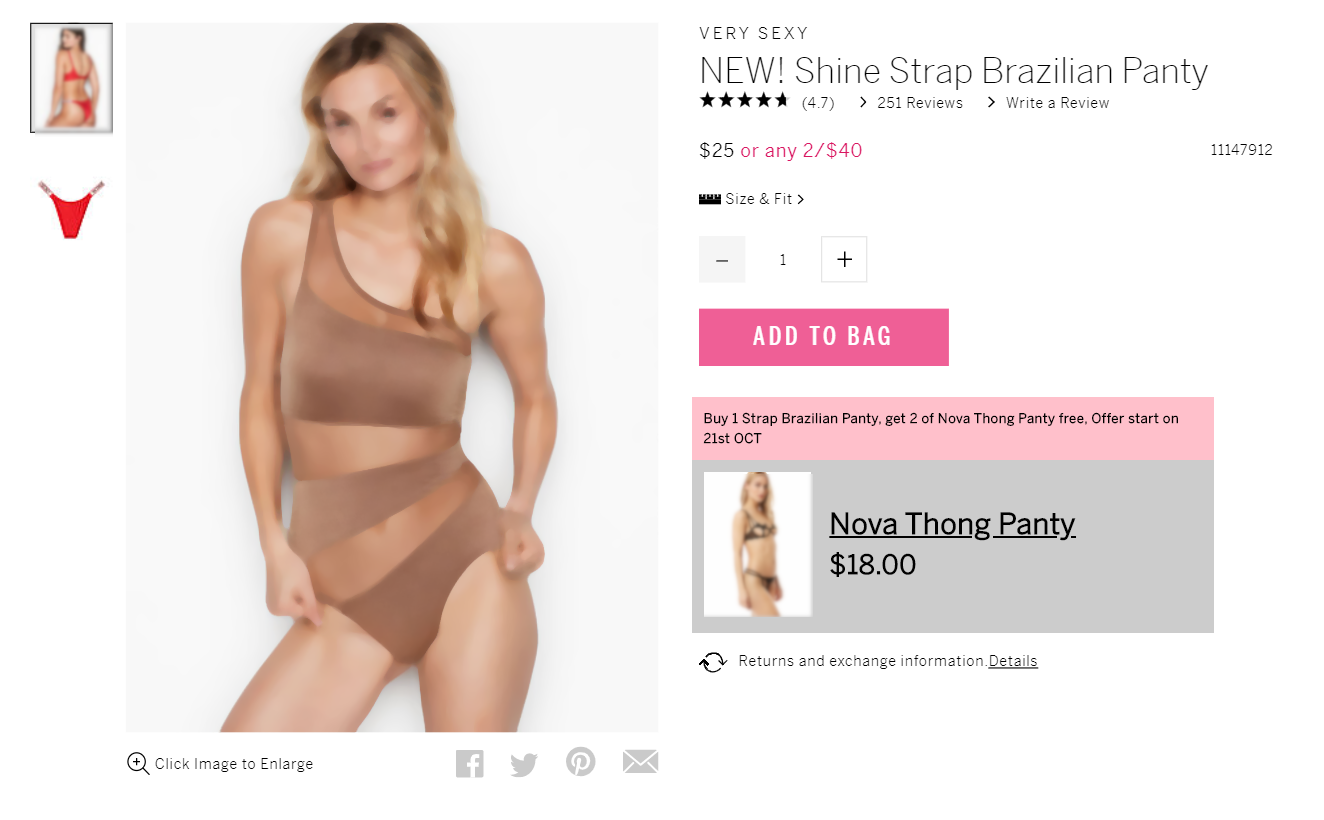
Buy 3 and get 1 unit free Offer that will start at some time in future
Buy one get one Free of other product
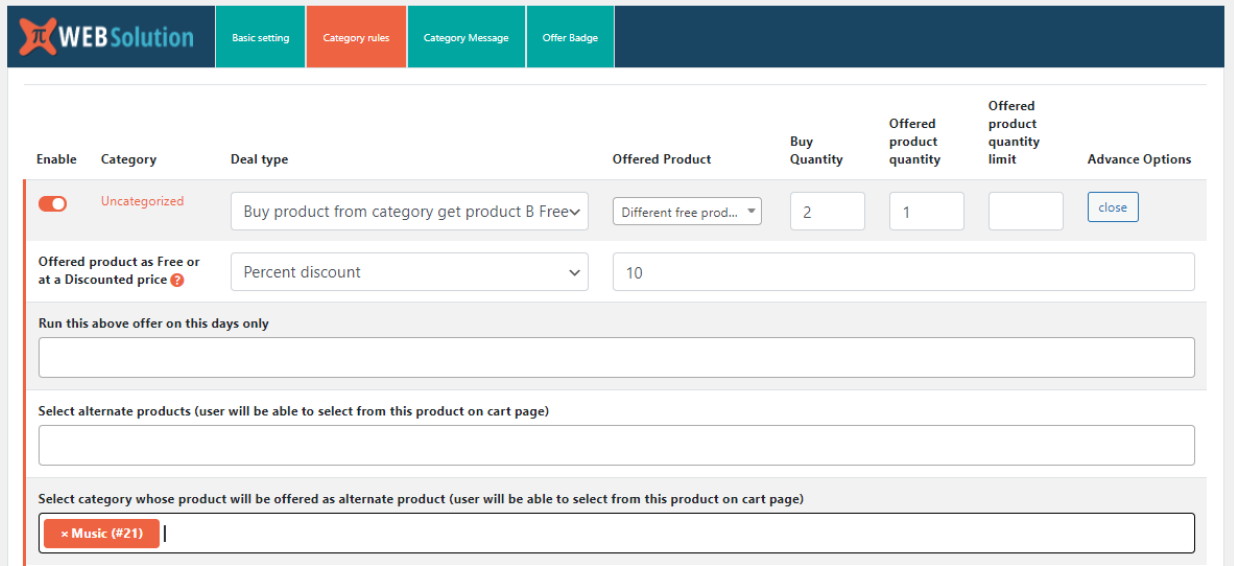
Buy product from category get product B free
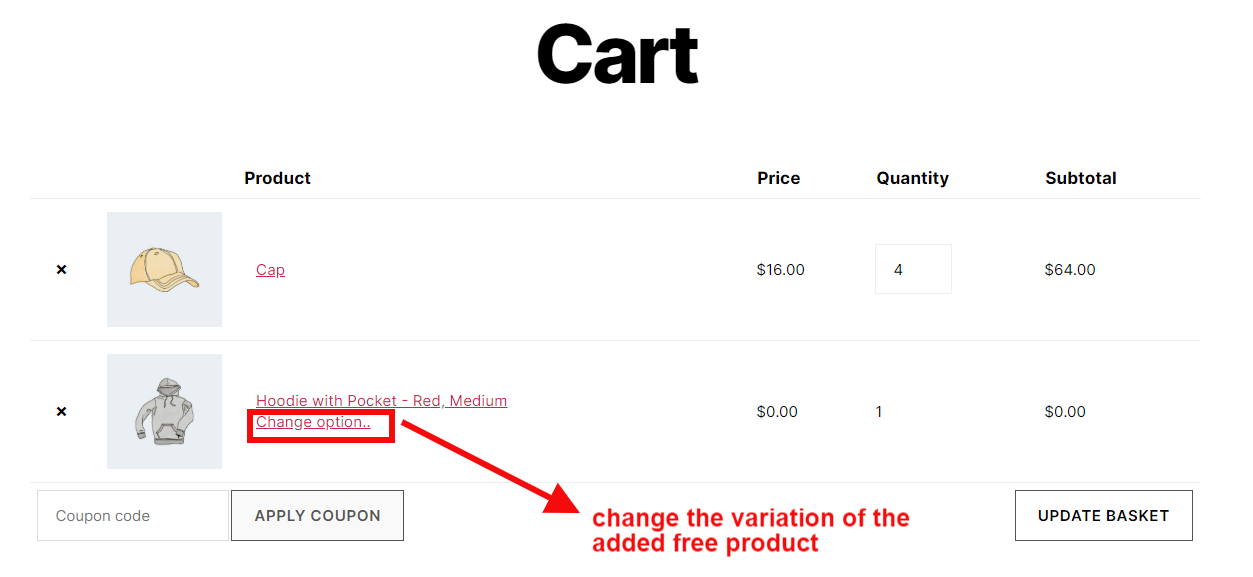
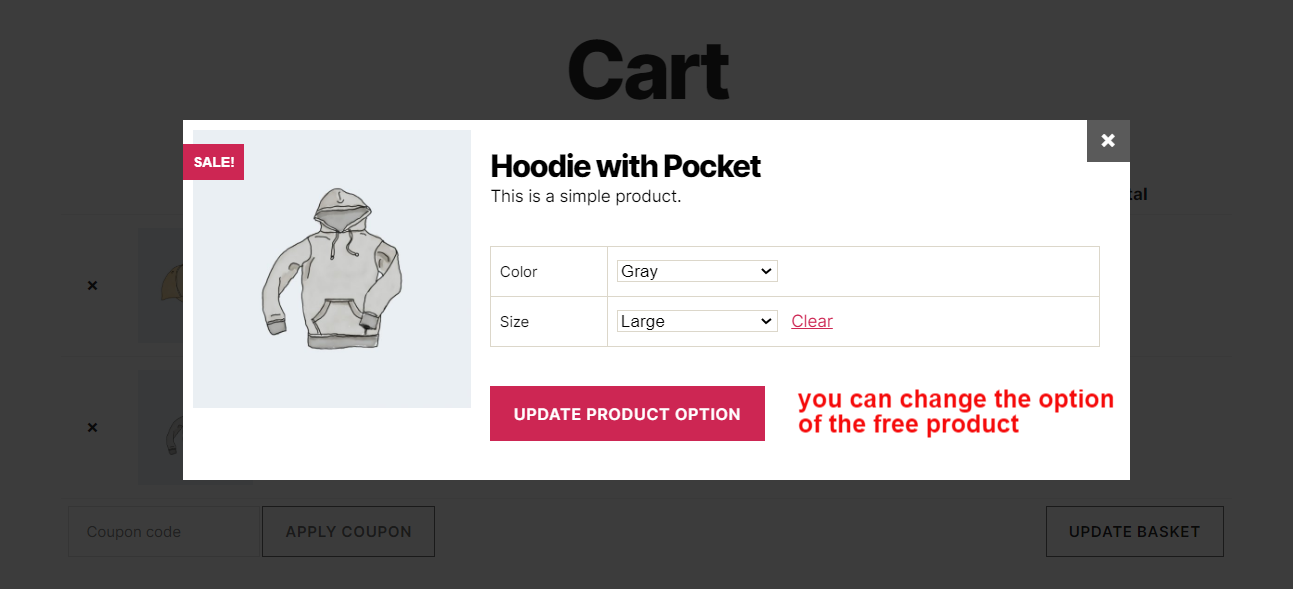
Change variation of the free product
Buy one get one free with option to select the 1 free product from list of products
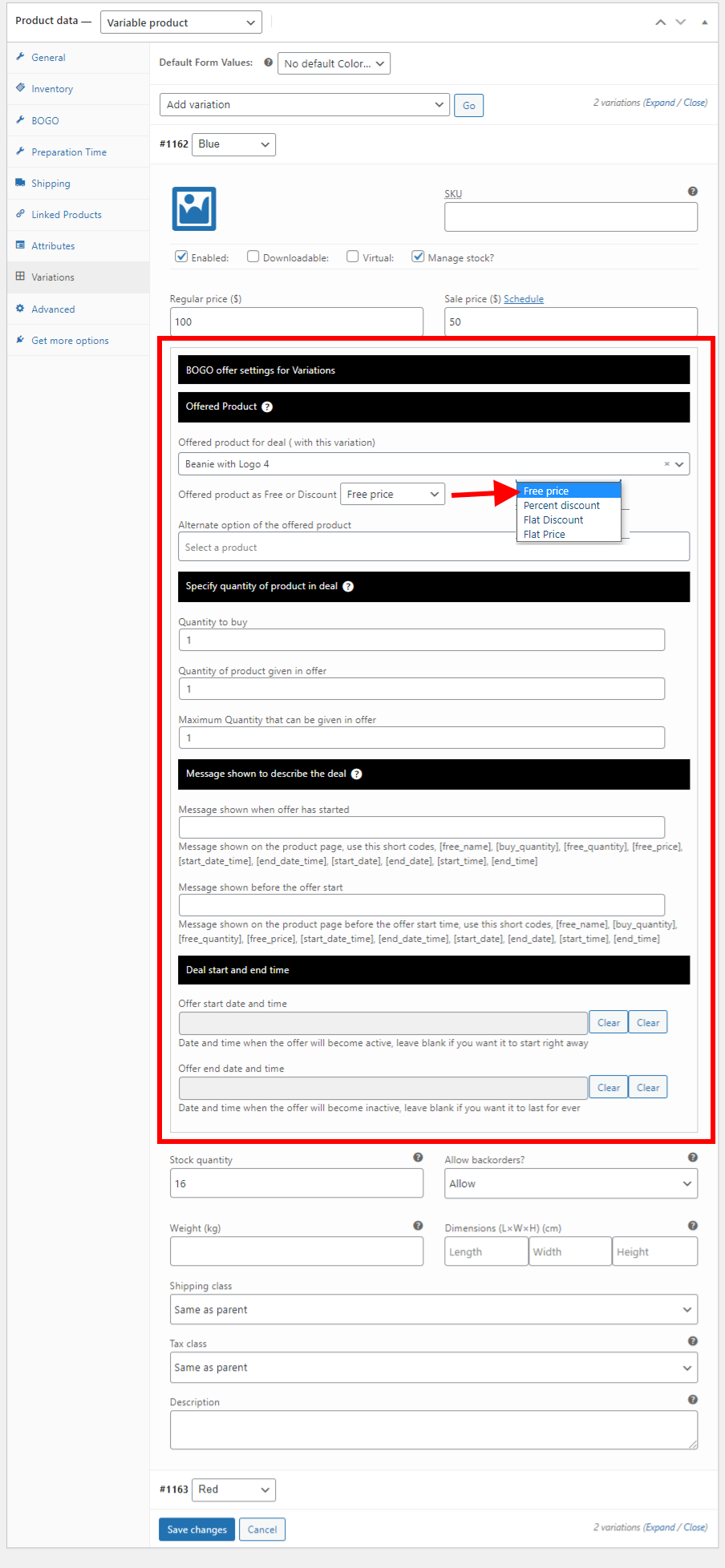
Offer different free product with each of the variations
Demo | Video
Buy any 2 products from category and 1 product will be added free
Create buy one get one free or buy X get Y of product free discount rule in your WooCommerce based website
-
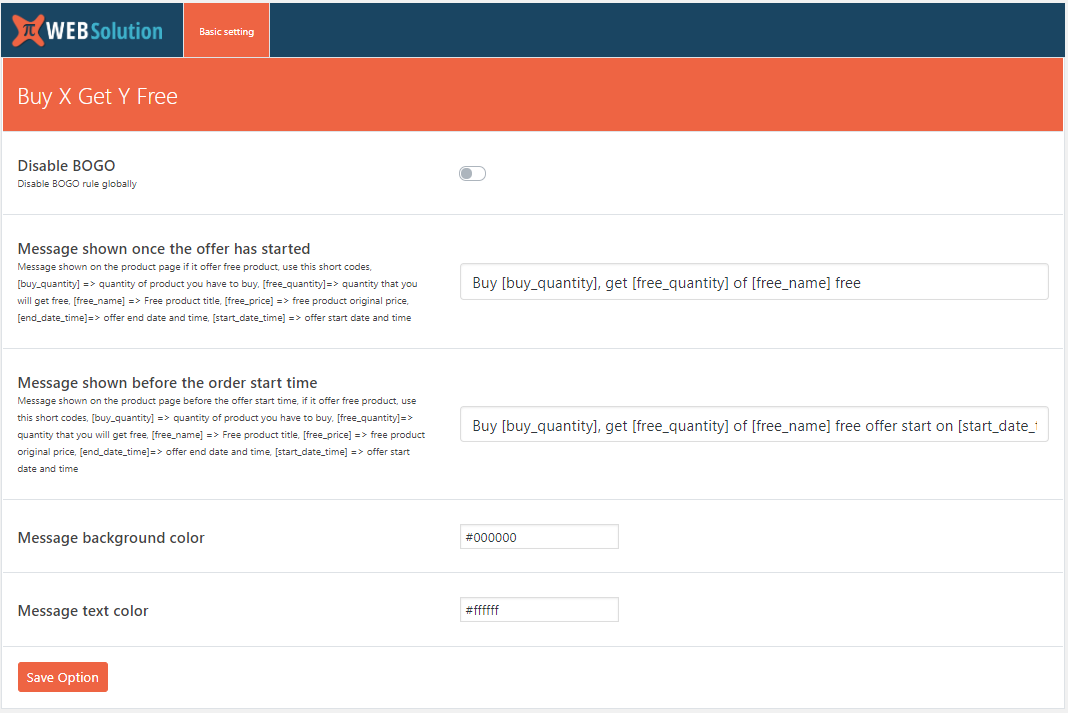
Set a global how much product to buy to set how much of free quantity
-
You can specify the amount of free product given on global level
-
It adds the same product as free product (you can add other product as free product in the PRO version)
-
You can enable BOGO deal on specific product
Pro version
-
It allows you to set the buy quantity for each product differently
-
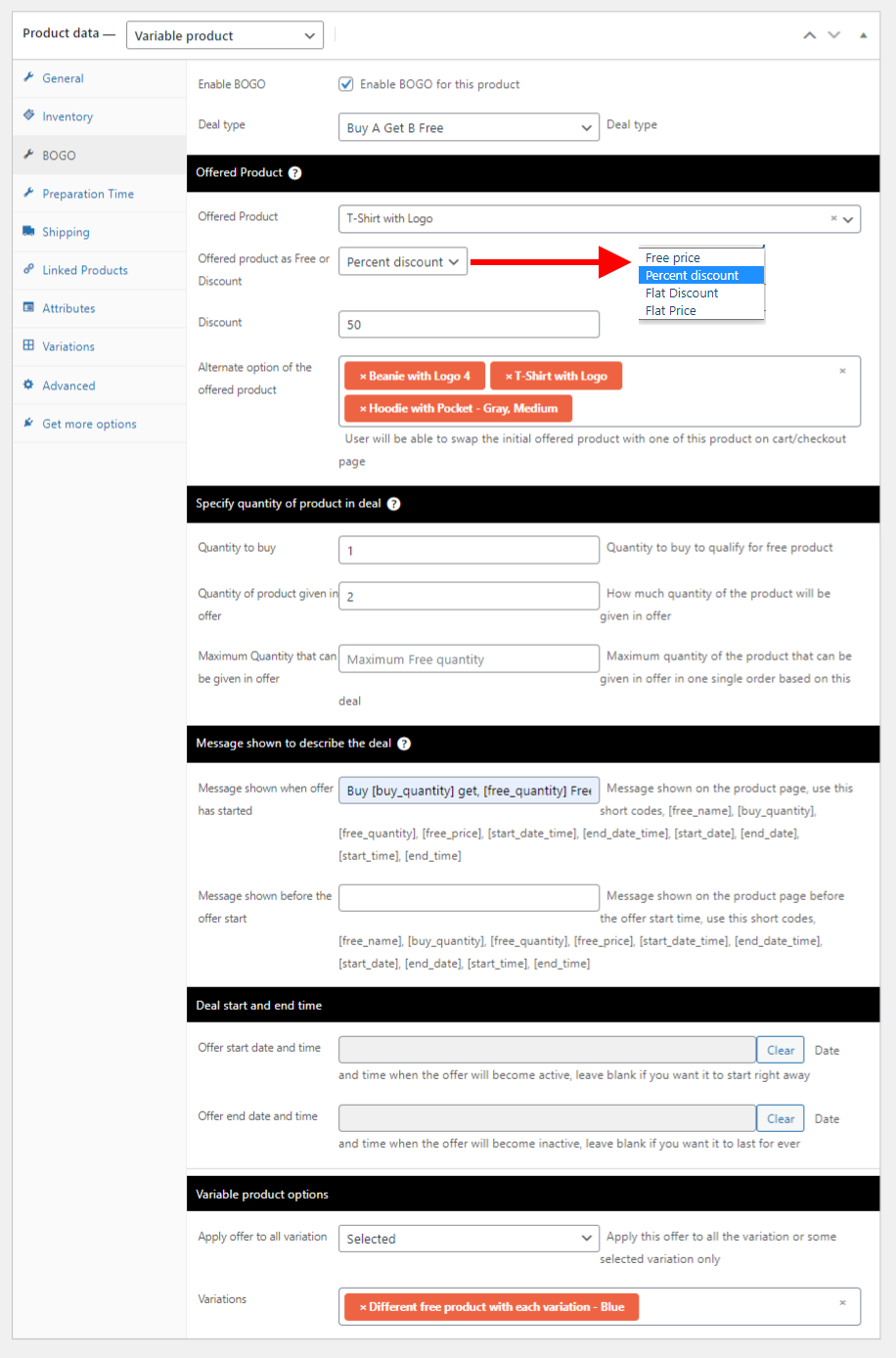
Offer the BOGO Deal product as Free or At Discounted price
-
Set free quantity differently for each product
-
It allows you to offer other product as free product instead of giving the same product as free
-
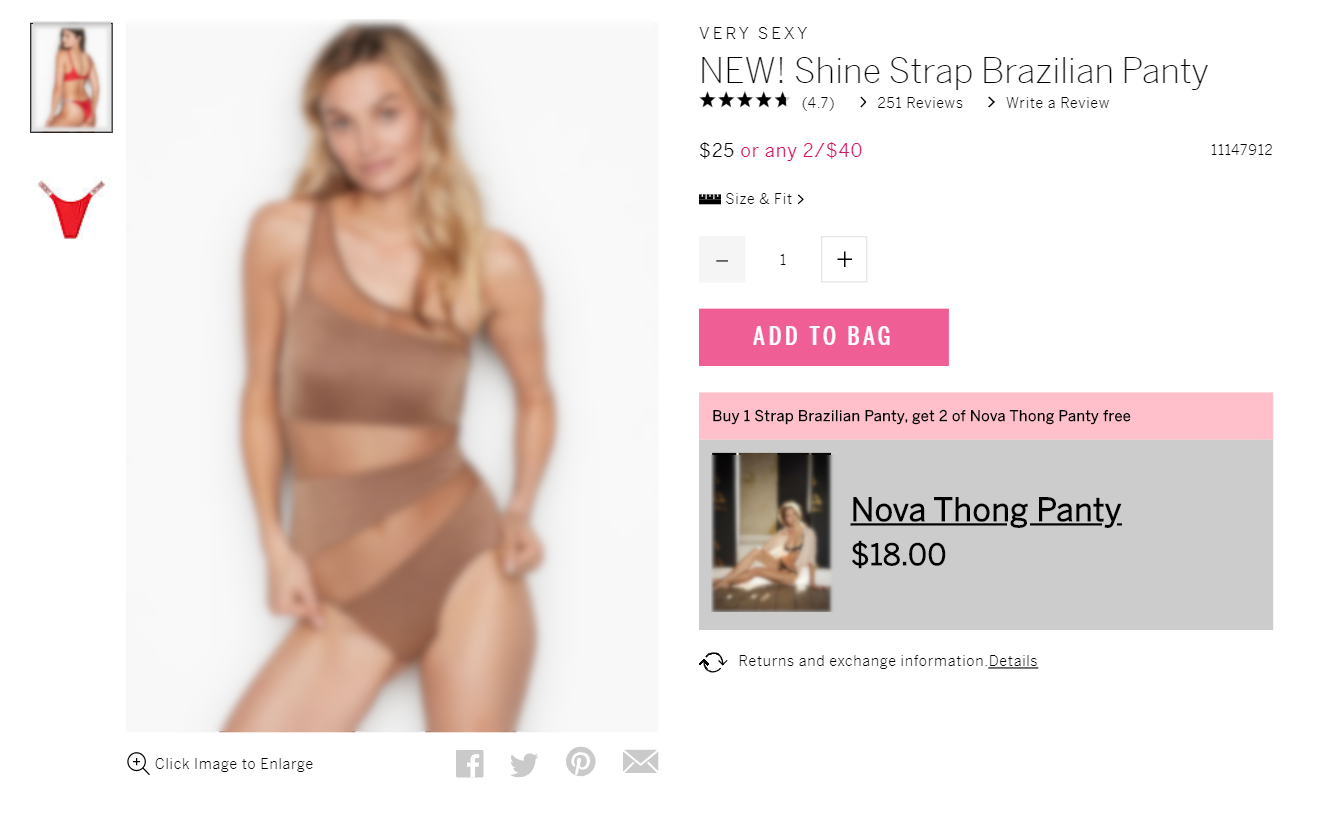
You can set a message on the single product page, to describe the offer
-
You can customize the message shown for each product in your own wording
-
List of shortcodes that you can use as placeholders while making offer message [free_name], [buy_quantity], [free_quantity], [free_price], [start_date_time], [end_date_time], [start_date], [end_date], [start_time], [end_time]
-
You can show different parameters of the offer in the message using the shortcode
-
Set an offer start and end time, you can set this different for each product
-
Set a message that will be shown before the offer starts, you can set this different for each product
-
Set different message to show when the offer has started, you can set this different for each product
-
Set maximum quantity of free product that can be offered with parent product.
Say 1 unit of Product A gives 1 unit of B and max quantity is 2 then, when you add 3 units of A the quantity of Free B will be kept at 2 only as Max quantity is 2 (without max quantity restriction it would have been 3) -
Create BOGO or Buy X get Y free offer on the Category level, so you don’t have to create this offer on an individual product basis
-
Run category level rule on specific days of the week
-
Exclude a product or a variation from a category level BOGO offer
-
Overwrite the BOGO on category level with a separate rule for the product on product level rule
-
You can run offer for all the variations of variable product
-
Restrict the offer to run for some specific variations for a variable product
-
Offer info will only show when the buyer selects a variation that has the offer, if he selects some other variation that doesn’t have offer, the message box will disappear
-
Offer different product as Free product with each of the variations in a variable product
-
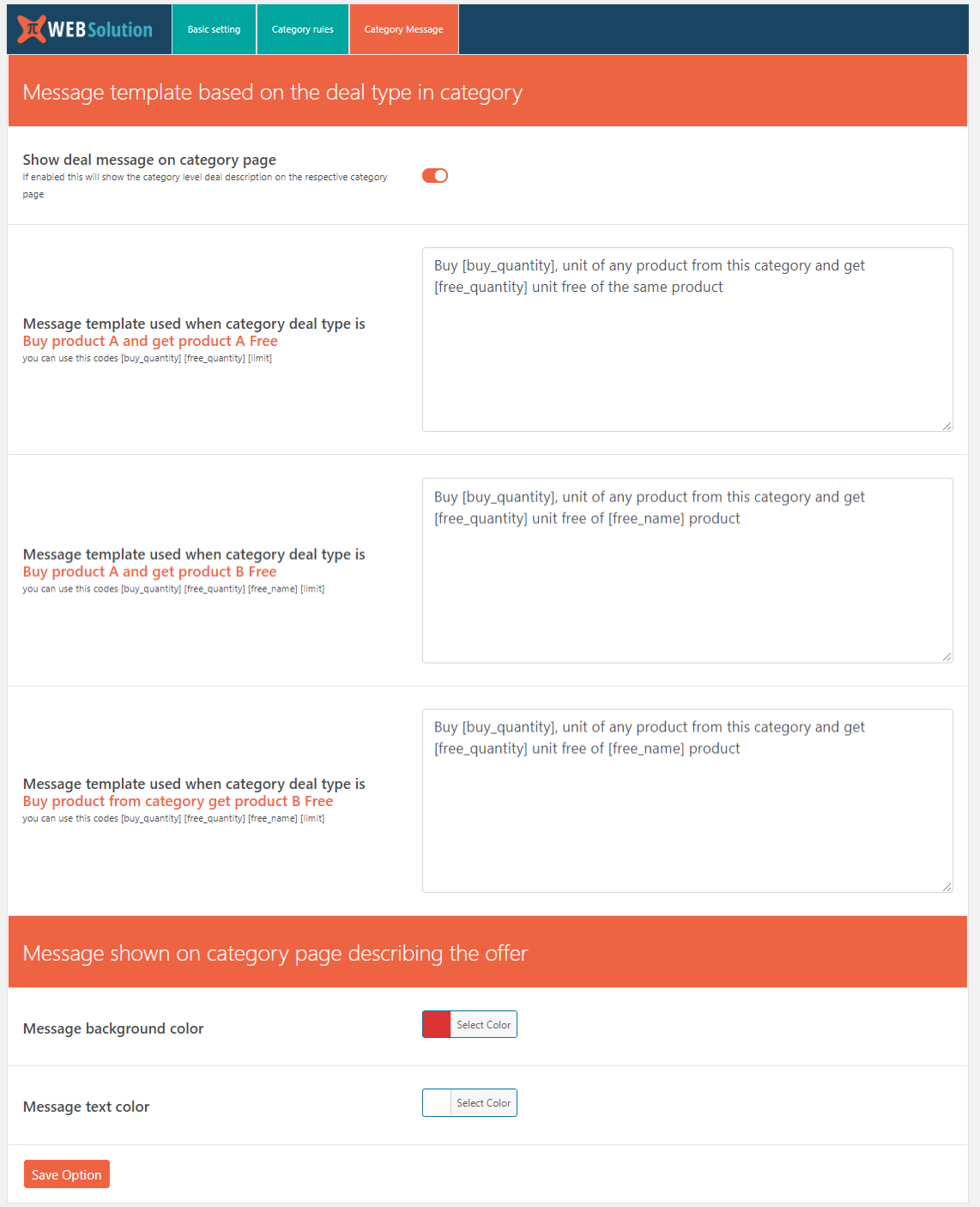
Show category level offer message on the respective category pages
-
Give option to the customer to remove the free product from the cart (in case they don’t want to receive the free product)
-
If the free product is a variable product then you can allow customer to change the variation of the free product in the cart or on checkout page
-
You can give option to the customer to select a free product from list of products, (you have to make the list of products that you will like to offer them for selection). Initially one product will be added to cart for free and will be given an option to change the free product (if you have given a list of alternate free products)
-
You can make the alternate free product to be always less than the price of the product added by the customer in the cart, That is making the BOGO offer (this applies in the category based BOGO rules)
-
You can control how many times a customer can avail the offer, you can set a limit on the number of times a customer can avail the offer. Say you have set the limit to 2 on the category X bogo rule, then the customer A can avail the offer only 2 times, after that the offer will not be applied for that customer A, but customer B can get the offer 2 times as well, so the limit is per customer not for all the customers. Customer A can get the benefit of the offer set on some other category B.
Full control over variable product BOGO offer
- Select the variation that you want to have the BOGO offer and keep other variations out of the bogo offer using product level rule
- Offer different product as free product with each of the variations
- Set different buy quantity, Free product quantity, Max free product limit for each variation
- Set different start time and end time for the variation
- Set different message for each variation
Difference between the 3 category level rules
Buy product A and get product B Free
E.g: Category A has product –> B, C
Free product –> D
Free unit –> 1
Max limit –> 22 x B he will get 2 units of D
3 x C he will get 2 units of D
Buy product A and get product A Free
E.g: Category A has product –> B, C
Free unit –> 1
Max limit –> 22 x B he will get 2 units of B
3 x C he will get 2 units of C
Buy product from category get product B Free
E.g: Category A has product –> B, C
Free product –> D
Free unit –> 1
Max limit –> 32 x B he will get 2 units of D
3 x C he will get 1 unit of D
Explore our other plugins to supercharge your WordPress website:
- CSS JS Manager, Async JavaScript, Defer Render Blocking CSS supports WooCommerce
- Direct checkout, Add to cart redirect, Quick purchase button, Buy now button, Quick View button for WooCommerce
- Export WooCommerce customers list csv, WordPress users csv, Email customer list daily
- Fake sales notification, Live sales notification, Recent sales popup for WooCommerce
- Free shipping bar WooCommerce, message, popup and alert
- HTTP/2 Push, Async JavaScript, Defer Render Blocking CSS, HTTP2 server push
- Order delivery, Order pickup, Order date time, Pickup Location for WooCommerce
- Product Quantity, Minimum Maximum quantity & Minimum Order amount for WooCommerce
- Restaurant Menu plugin for WooCommerce
- WooCommerce estimated delivery date per product | shipping date per product
- WooCommerce Product Enquiry Quotation, WooCommerce product catalog
- Buy one Get one Free – a Bogo WooCommerce plugin
Intimité
If you choose to opt in from the plugin settings, or submit optional feedback during deactivation, this plugin may collect basic technical information, including:
- Plugin version
- WordPress version
- WooCommerce version
- Site url
- Deactivation reason (if submitted)
This data is used solely to improve plugin quality, compatibility, and features. No personal or user-specific data is collected without consent.
Journal de modifications
1.11.26
- Tested with WC 11.2
1.11.24
- Select from 4 predefined template for message shown on product page
1.11.23
- UI improvement
1.11.22
- Option to disable coupon when bogo is applied to cart
1.11.21
- Admin ui
1.11.20
- banner modified
- Tested for WC 11.0
Captures d'écran
Pour les développeurs
Est-ce votre plugin ? Montrez les chiffres.
Ajoutez un badge en direct à votre site, docs ou github readme. Il se met à jour par lui-même - aucun compte n'est nécessaire.
Best Buy one Get one Free alternatives
All bogo plugins →




FAQ
Buy one Get one Free: quick answers
Réponses directes, extraites des données en direct WordPress.org.
Source : WordPress.org
Is Buy one Get one Free free?
Yes. Buy one Get one Free is free to download and use from the official WordPress.org plugin directory.
Is Buy one Get one Free safe to use in 2026?
Yes — Buy one Get one Free is a safe, well-maintained plugin to use in 2026. It runs on 400+ sites, is rated 3.5/5 and was last updated 2 weeks ago, and scores 80/100 on our health check.
How many websites use Buy one Get one Free?
Buy one Get one Free is active on 400+ WordPress websites and has been downloaded 104,188 times since it launched in September 2019. It was downloaded 916 times in the last 30 days.
Does Buy one Get one Free work with WordPress 7.1?
Yes. The developer has tested Buy one Get one Free up to WordPress 7.1.5, the latest release. It requires WordPress 3.0.1 or newer.
When was Buy one Get one Free last updated?
The latest version, 1.11.26, was released on November 4, 2026 (2 weeks ago).
Who makes Buy one Get one Free?
Buy one Get one Free is developed and maintained by PI Web Solution.
What are the best alternatives to Buy one Get one Free?
The most popular alternatives to Buy one Get one Free are Smart Coupons For WooCommer… (30K+ installs), Advanced Coupons for WooCom… (20K+ installs) and Discount Rules and Dynamic… (9K+ installs).
Propulsé par PageForge
Un modèle et une feuille de calcul. Une vraie page pour chaque recherche.
PageForge transforme chaque ligne d'un CSV en une page WordPress avec son propre titre, URL, SEO et schéma, construit sur la mise en page que vous Déjà conçu. Gratuit sur WordPress.org.
- CSV et XLSX, plus Google Sheets sur les professionnels et les entreprises
- Son propre titre, URL, SEO champs et schéma pour chaque page
- Fonctionne avec l'éditeur de blocs, Elementor, Divi et Avada
- Gratuit sur WordPress.org, pas de carte de crédit