


Bible Reader
A beautiful Bible reader with a 'Verse of the Day' and a 'Hebrew date converter'.

Envisager une alternative
Bible Reader shows warning signs in 2026 — compare the alternatives below before installing. It runs on 10+ sites and was last updated 2 years ago, and scores 32/100 on our health check.
- Petite base d'utilisateurs (plus de 10 installations actives)
- Très peu de critiques jusqu'à présent
- Pas de mise à jour depuis plus d'un an
- Uniquement testé jusqu'à WordPress 6,8 (le dernier est de 7,1)
Comment s'accumule-t-il ?
Côte à côte sur les installations, les mises à jour, les évaluations et le support



Téléchargements quotidiens
Les pics de téléchargement suivent généralement une nouvelle version - chaque site qui met à jour automatiquement compte comme un téléchargement.
Classements
Where Bible Reader stands todayWordPress.org Classements de recherche
Position en direct dans la recherche de plugins, Top 100| Mot-clé | Position |
|---|---|
| bible | #37 |
| converter | >100 |
| reader | >100 |
| scripture | #35 |
| Verse | #56 |
Adoption de version
Part de sites actifs par version.
About Bible Reader
À partir du Lisez-moi officiel · v1.0.1Description
Features:
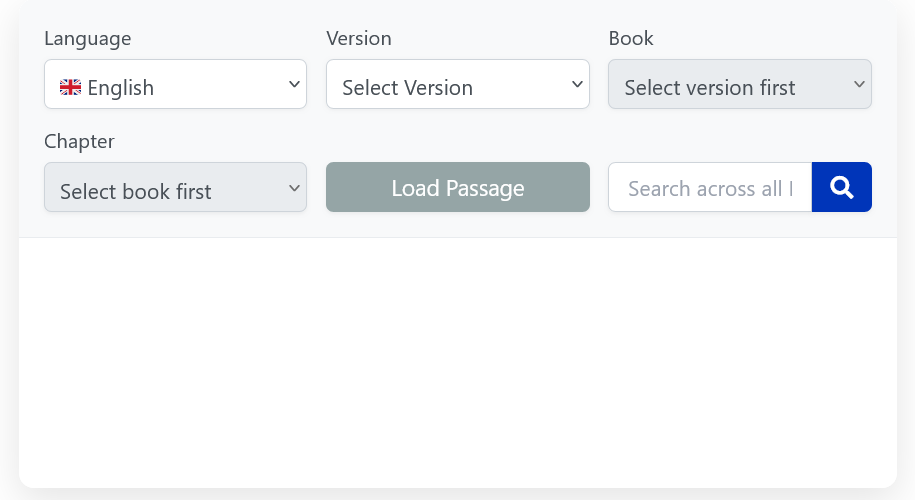
– Bible Reader with multiple languages and translations
– Verse of the Day
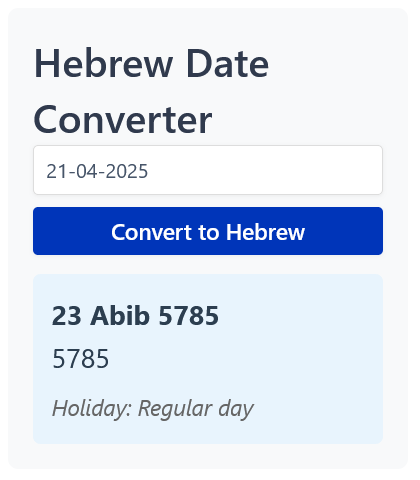
– Hebrew Date Converter
– Word Cloud Visualization
– Word Highlighting
– Chapter Navigation
– Font Size Options
– Easy Sharing Options
Requires a free API key from scripture.api.bible.
Note: API.Bible has usage limits (500 requests/hour for free tier).
Services externes
This plugin connects to the API.Bible service (https://scripture.api.bible) to fetch Bible translations, books, chapters, and verses. This is required for the core functionality of displaying Bible content.
Data sent to API.Bible:
– Bible version ID (e.g., ‘06125adad2d5898a-01’)
– Book ID (e.g., ‘GEN’)
– Chapter number (e.g., 1)
– Language code (e.g., ‘eng’)
When data is sent:
– When loading available Bible versions for a selected language
– When loading books for a selected Bible version
– When loading chapters for a selected book
– When loading verses for a selected chapter
– When performing searches
The plugin does NOT send:
– User personal data
– IP addresses
– Site URLs
– Any identifiable information
API.Bible is provided by American Bible Society:
– Terms of Service: https://scripture.api.bible/docs/terms
– Privacy Policy: https://scripture.api.bible/docs/privacy
Hebrew Date Conversion
The plugin also connects to HebCal’s Hebrew Date Converter API (https://www.hebcal.com) for converting Gregorian dates to Hebrew dates.
Data sent to HebCal:
– Day, month, and year of Gregorian date being converted
When data is sent:
– Only when a user actively uses the Hebrew date converter feature
HebCal is provided by HebCal LLC:
– Terms of Service: https://www.hebcal.com/about/terms-and-conditions
– Privacy Policy: https://www.hebcal.com/about/privacy-policy
Social Sharing
This plugin includes optional sharing features that generate links to social media platforms.
No data is sent to these services unless the user actively chooses to share content.
When a user shares a verse:
– The verse text and reference are encoded in the share URL
– The user’s browser connects directly to the chosen platform
– No data passes through our servers
Supported services:
– X (Twitter): https://twitter.com/tos
– Truth Social: https://truthsocial.com/terms
– Gab: https://gab.com/about/terms
– WhatsApp: https://www.whatsapp.com/legal
– Telegram: https://telegram.org/tos
– Email (uses default mail client)
The plugin does NOT:
– Track sharing activity
– Store any sharing data
– Connect to these services without user initiation
Privacy Notice
This plugin does not collect, store or share any personal user data.
All Bible content is fetched directly from API.Bible and not stored locally.
Installation
- Upload the plugin files to
/wp-content/plugins/bible-reader - Activate the plugin through the ‘Plugins’ menu
- Get your API key from https://scripture.api.bible
- Configure your API key in Settings → Bible Reader
Journal de modifications
Added text domain Important security enhancements and bug fixes Includes improved toolbar appearance
1.0.1
- Added: Text domain
- Enhanced: Security improvements in AJAX handlers
- Fixed: Verse selection toolbar behavior
- Updated: Documentation and privacy notices
1.0
- Communiqué initial
Captures d'écran

Pour les développeurs
Est-ce votre plugin ? Montrez les chiffres.
Ajoutez un badge en direct à votre site, docs ou github readme. Il se met à jour par lui-même - aucun compte n'est nécessaire.
Best Bible Reader alternatives
All bible plugins →




FAQ
Bible Reader: quick answers
Réponses directes, extraites des données en direct WordPress.org.
Source : WordPress.org
Is Bible Reader free?
Yes. Bible Reader is free to download and use from the official WordPress.org plugin directory.
Is Bible Reader safe to use in 2026?
Bible Reader shows warning signs in 2026 — compare the alternatives below before installing. It runs on 10+ sites and was last updated 2 years ago, and scores 32/100 on our health check.
How many websites use Bible Reader?
Bible Reader is active on 10+ WordPress websites and has been downloaded 727 times since it launched in May 2025. It was downloaded 52 times in the last 30 days.
Does Bible Reader work with WordPress 7.1?
Bible Reader is officially tested up to WordPress 6.8.13, while the latest release is 7.1.5. It may still work, but try it on a staging site first.
What PHP version does Bible Reader need?
Bible Reader requires PHP 7.4 or higher. Most hosts run PHP 8.x today, so it works on any modern WordPress hosting.
When was Bible Reader last updated?
The latest version, 1.0.1, was released on May 6, 2025 (2 years ago).
Who makes Bible Reader?
Bible Reader is developed and maintained by Quincy.
What are the best alternatives to Bible Reader?
The most popular alternatives to Bible Reader are Logos Reftagger (10K+ installs), Bible Verse of the Day (3K+ installs) and Visual Bible Verse of the D… (900+ installs).
Propulsé par PageForge
Un modèle et une feuille de calcul. Une vraie page pour chaque recherche.
PageForge transforme chaque ligne d'un CSV en une page WordPress avec son propre titre, URL, SEO et schéma, construit sur la mise en page que vous Déjà conçu. Gratuit sur WordPress.org.
- CSV et XLSX, plus Google Sheets sur les professionnels et les entreprises
- Son propre titre, URL, SEO champs et schéma pour chaque page
- Fonctionne avec l'éditeur de blocs, Elementor, Divi et Avada
- Gratuit sur WordPress.org, pas de carte de crédit